

Rehnable
Built by - Rehnable
Installs - 10+ installs
Requirements
HubSpot Plan HubSpot Account permissions - View the required account permissions
Access Type Shared Rehnable Subscription - Starter, Team, Business, or Enterprise plans
Overview
1/9 - Demo of Rehnable: an org chart built from HubSpot contacts, edited by drag and drop and written back as associations.
Rehnable builds an org chart from the contacts already on a company record in HubSpot. Your buying committee exists in your CRM. It is just spread across fifteen contact records with no shape to it.
Rehnable draws that shape. Open the company record. The Rehnable card shows how many contacts are hot, warm, cold or never contacted, and who is worth a look. Click Open org chart, and the contacts associated with that company appear as an editable org chart, with job title, buying role and last activity on every card. Drag one person under another and the reporting line is written straight back to your portal as a labelled contact-to-contact association.
There is no second database and no sync to keep honest: the chart is your HubSpot data.
Three heat modes sit on the same tree. Engagement turns the stakeholders nobody has spoken to in months red. Deals shows which contacts are actually attached to open business and which are just names on a list. Combined puts both together. The gap between the first two is usually the interesting part - the well-liked contact nobody is selling to, or the quiet name on every deal.
For groups of companies, the group view shows a parent and its subsidiaries as an org chart, or as a table from the top company down. Contacts and open deals are shown per company, with totals for the figures your team chooses, such as annual revenue, and your own company-to-company association labels are drawn between them on the chart. The Contacts total counts each person once. And for the roles you know exist but cannot yet name - the CFO you have never met - create a placeholder. It becomes a real, clearly marked, email-less contact in your portal, and when you learn who it is you promote it in place without losing its position in the chart.
Open any card to see that person's deals, open and closed, with their stage and a link to each one. When you learn something worth keeping, write a note to one contact or a whole selection - it lands on their HubSpot timelines as an ordinary note.
Rehnable works on every HubSpot tier.
Early bird 2026: the first 10 subscriptions started by 31 December 2026 get 25% off for as long as the subscription stays active. The discount is applied automatically at checkout.
On your data: Rehnable never stores your CRM data. Contacts, deals and activity are read on demand and rendered in your browser. We keep your OAuth tokens (encrypted), per-portal configuration, seat assignments, subscription status and the HubSpot user ID of whoever installed the app. To look after the customer relationship, the name and email of the person who installed or bought Rehnable, and your account's name, are kept in our own HubSpot account. Hosted in the EU. Full details: rehnable.com/privacy
Features
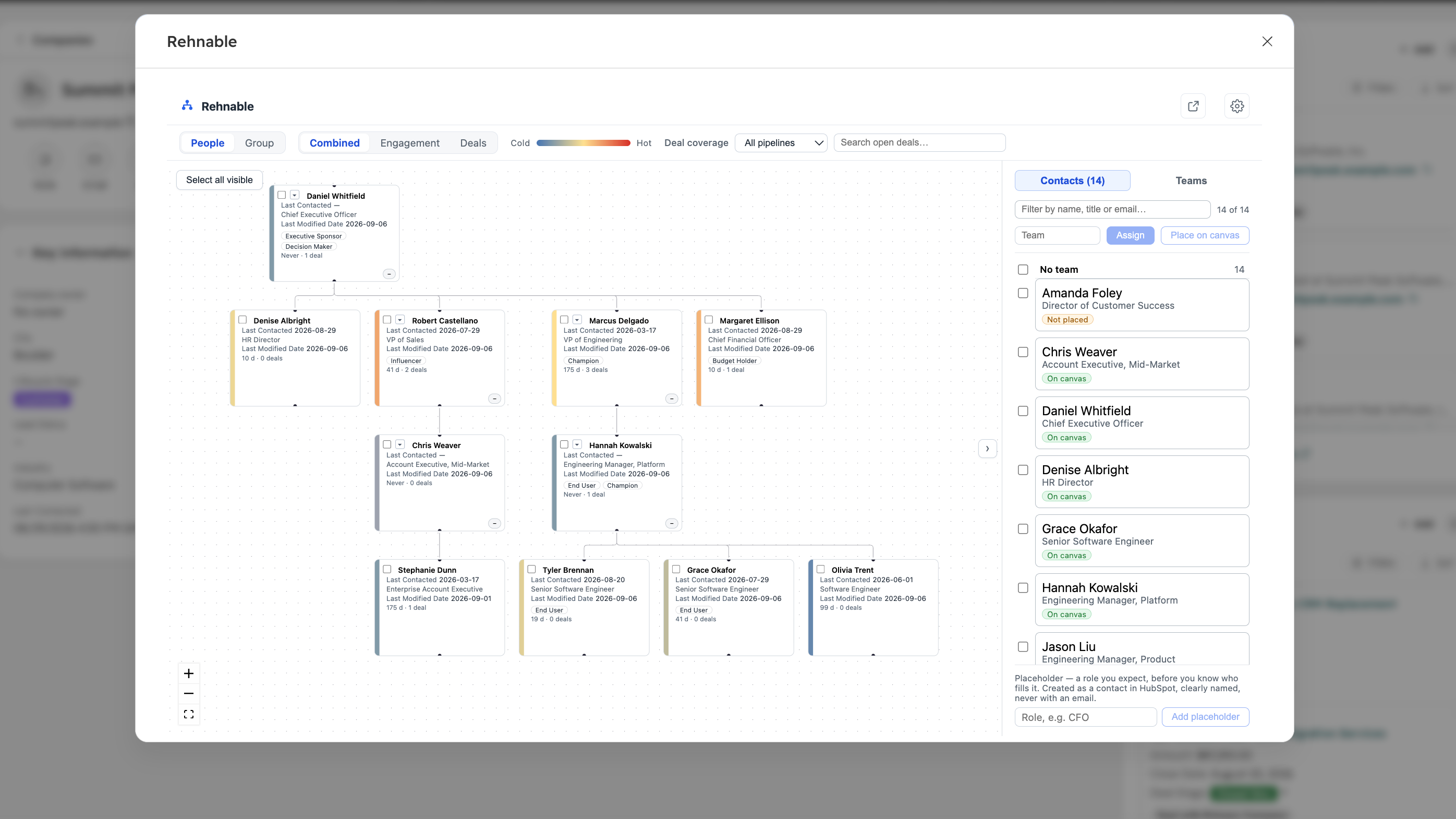
Org chart from your own contacts
Built from the contacts associated with the company. The hierarchy is stored as a labelled contact-to-contact association Rehnable creates in your portal on install, so the reporting lines are real HubSpot data. Each card shows name, job title, buying role and last activity.
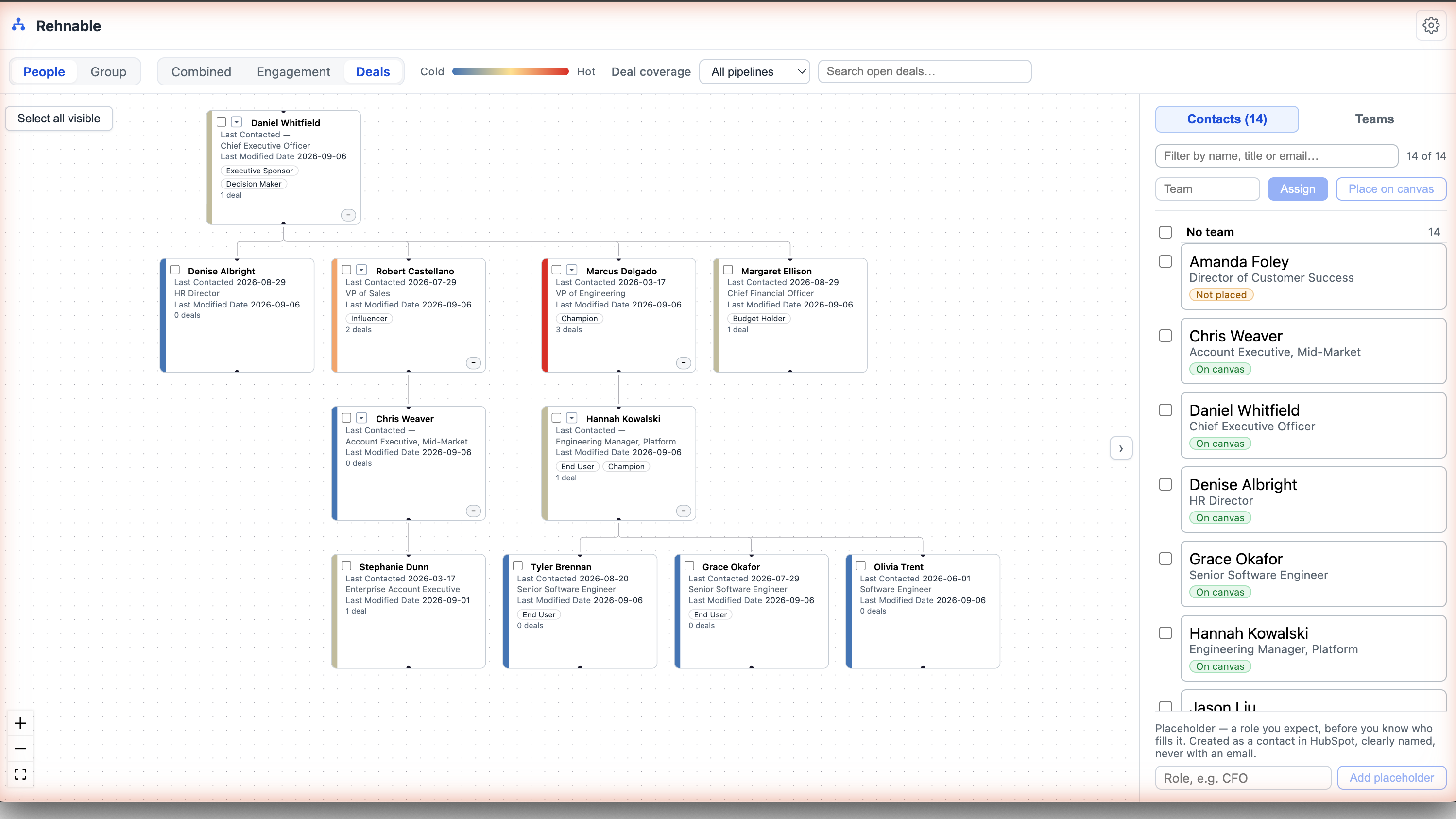
Deal-participation heat map
Switch the same tree to show which contacts are attached to the most open deals. Buying role travels with the contact in HubSpot, so this is the view that shows where the role is actually being exercised, and where a decision maker is a name on a list rather than a participant.
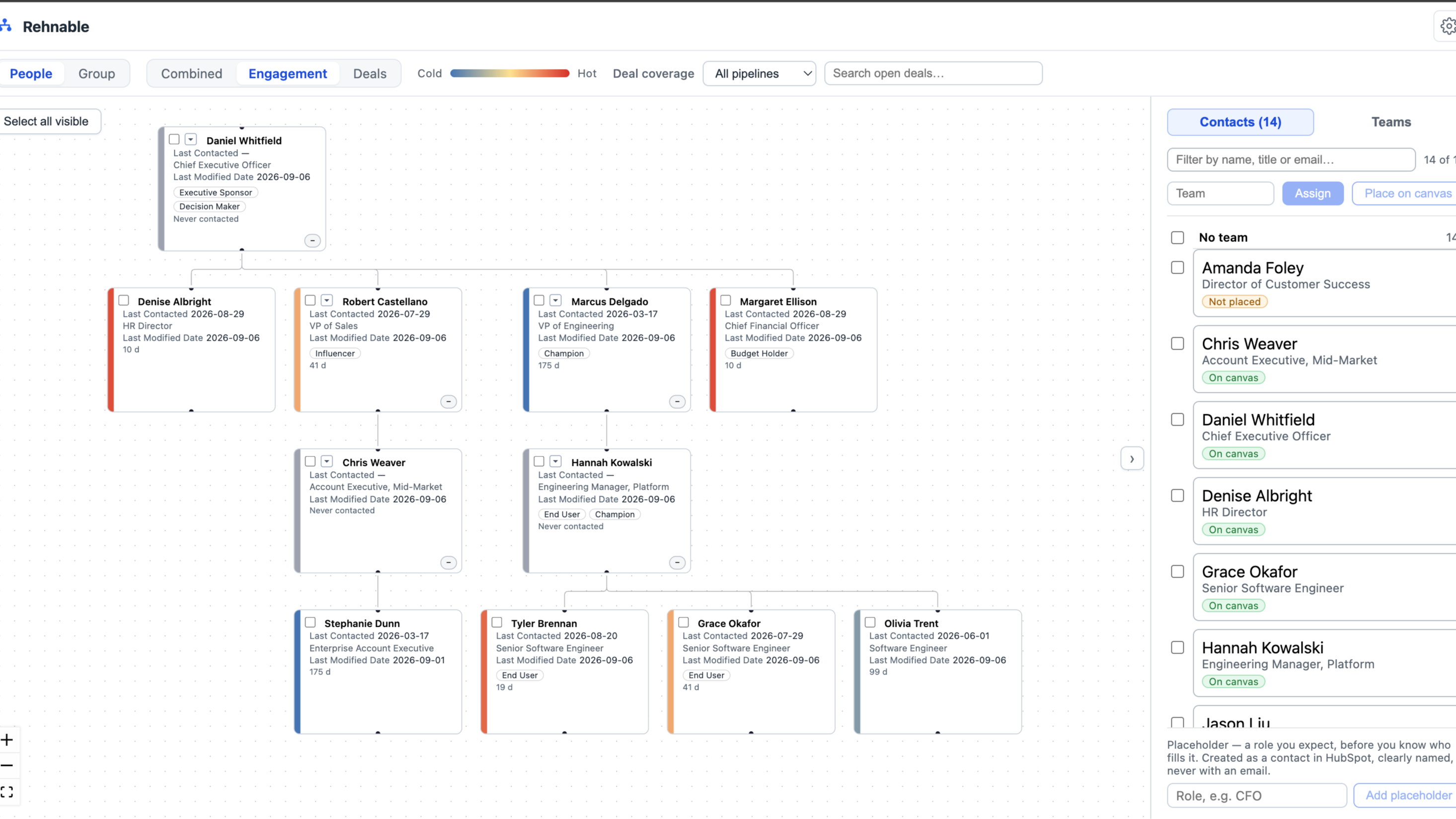
Engagement heat map
See at a glance who on the buying committee has gone cold. Each card is coloured by when the contact was last contacted, so the stakeholder nobody has spoken to in three months stands out before the renewal meeting, not after it. Hot, warm, cold and never contacted, on the same tree.
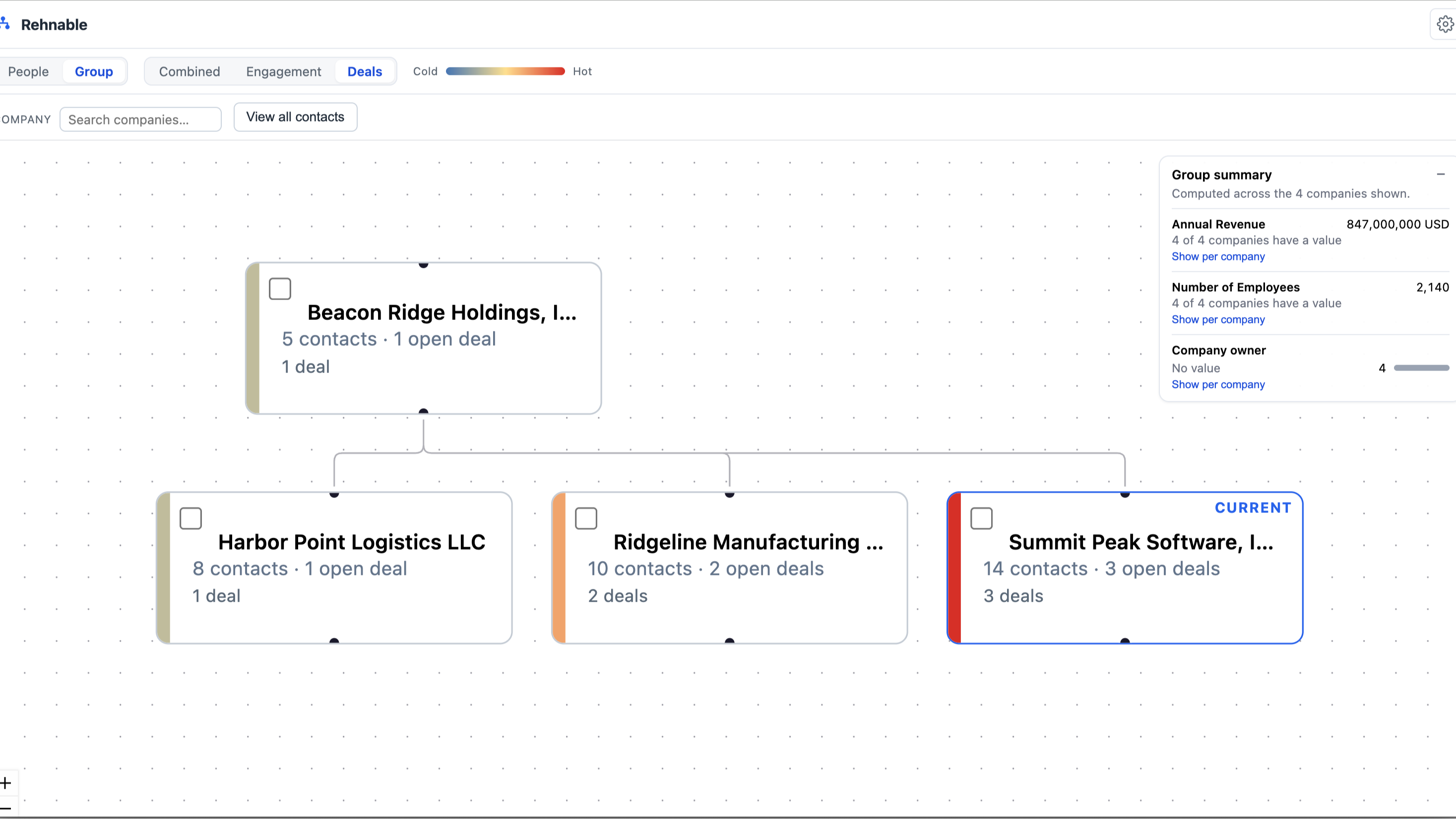
Group view for corporate groups
Put a parent company and its subsidiaries on one canvas, or in a table from the top company down. See contacts and open deals per company, plus group totals for figures such as annual revenue. Sort the table, open a company's contacts in place, and drag a company on the chart to change its parent in HubSpot. Built for account plans across a group.
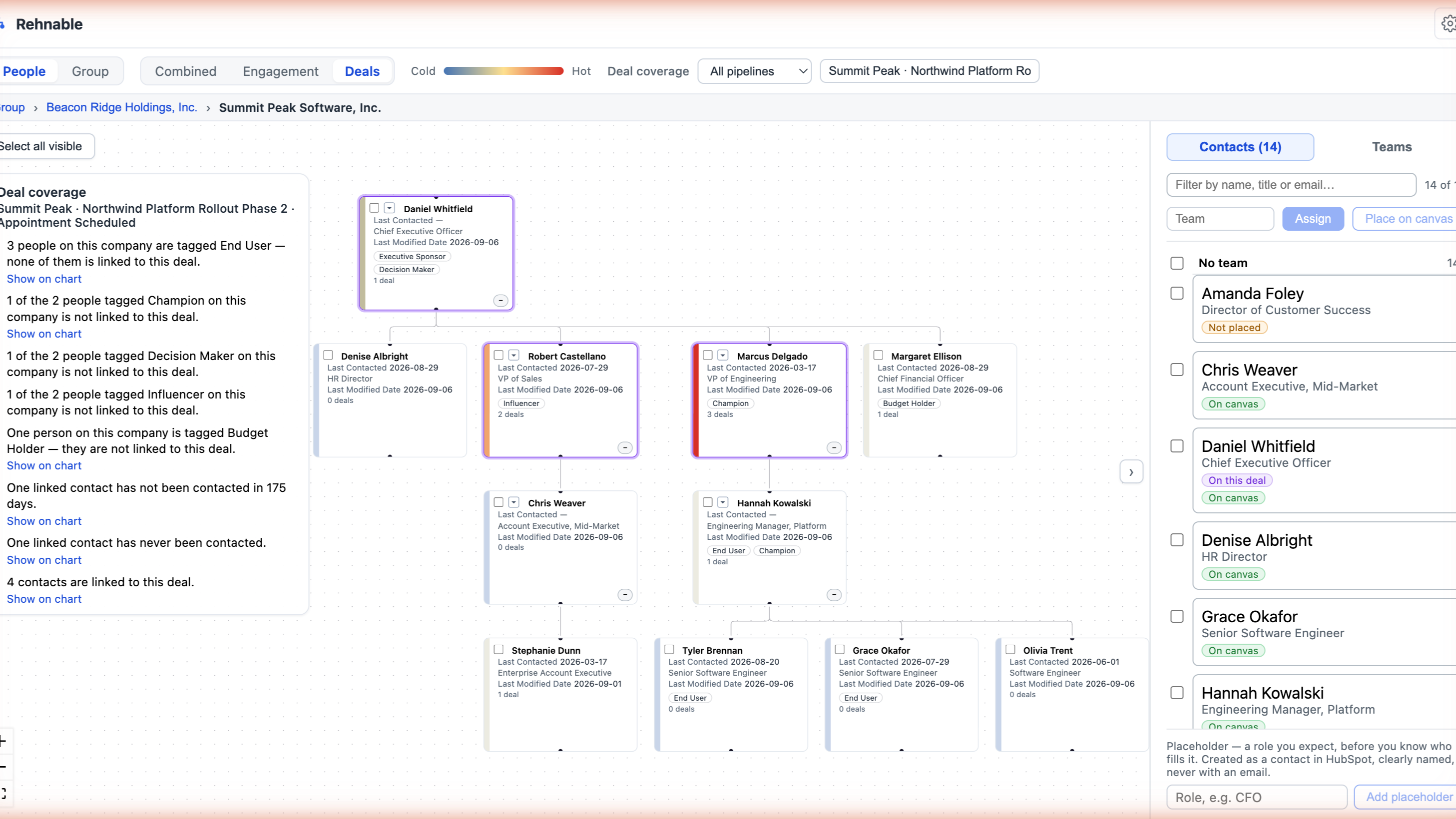
Deal coverage
Pick an open deal and see which buying roles exist on the company but are missing from the deal, and how many days since each linked contact was contacted. A quick check before a forecast call: is the economic buyer actually on this deal, or only on the company?
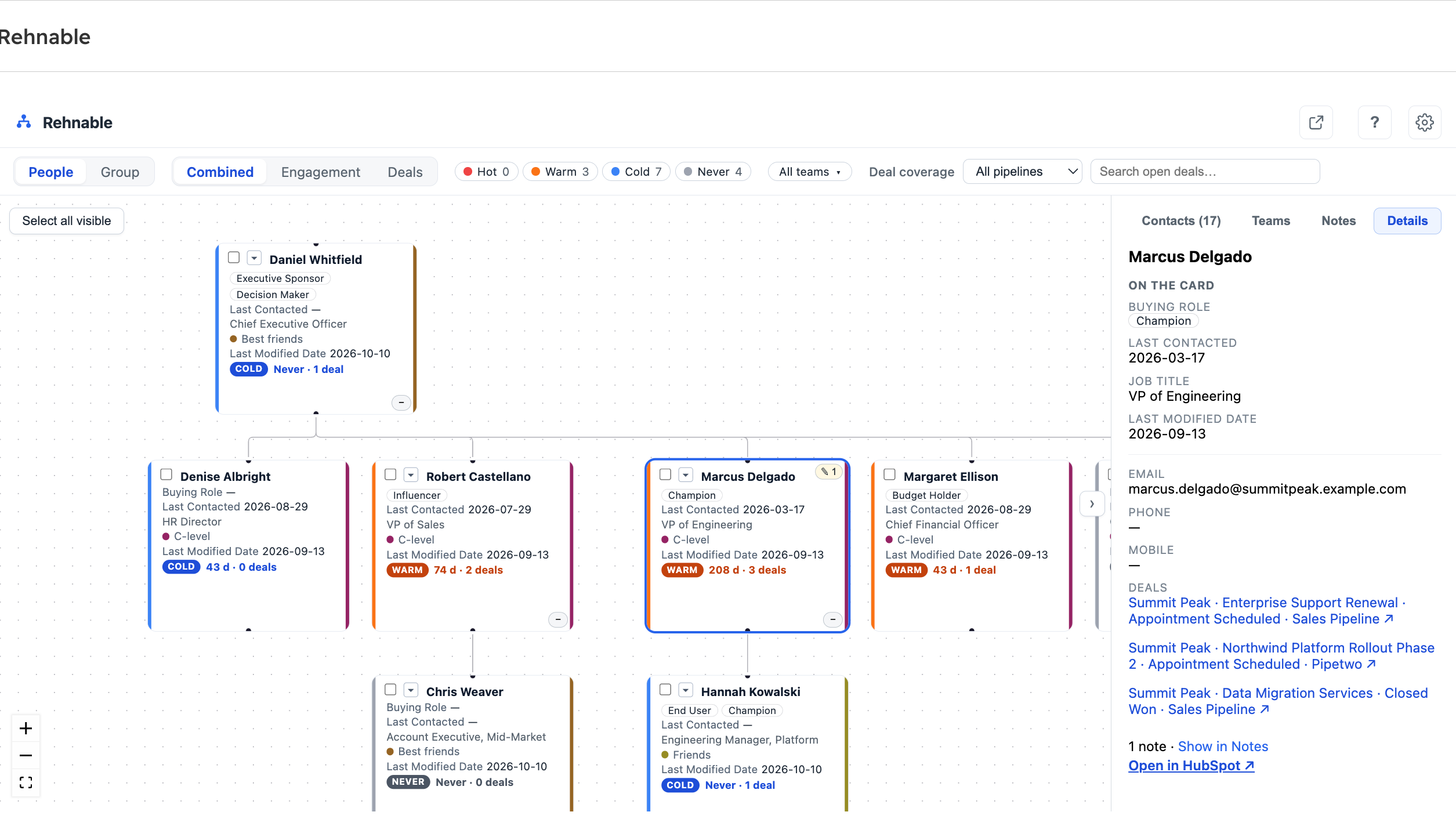
Deals and notes on every card
Click a card and the Details tab shows that person's deals, open and closed, with stage and a link to each one. Write a note to one contact or a whole selection; it lands on their HubSpot timelines as an ordinary note, and a pen on the card shows who wrote it and when.
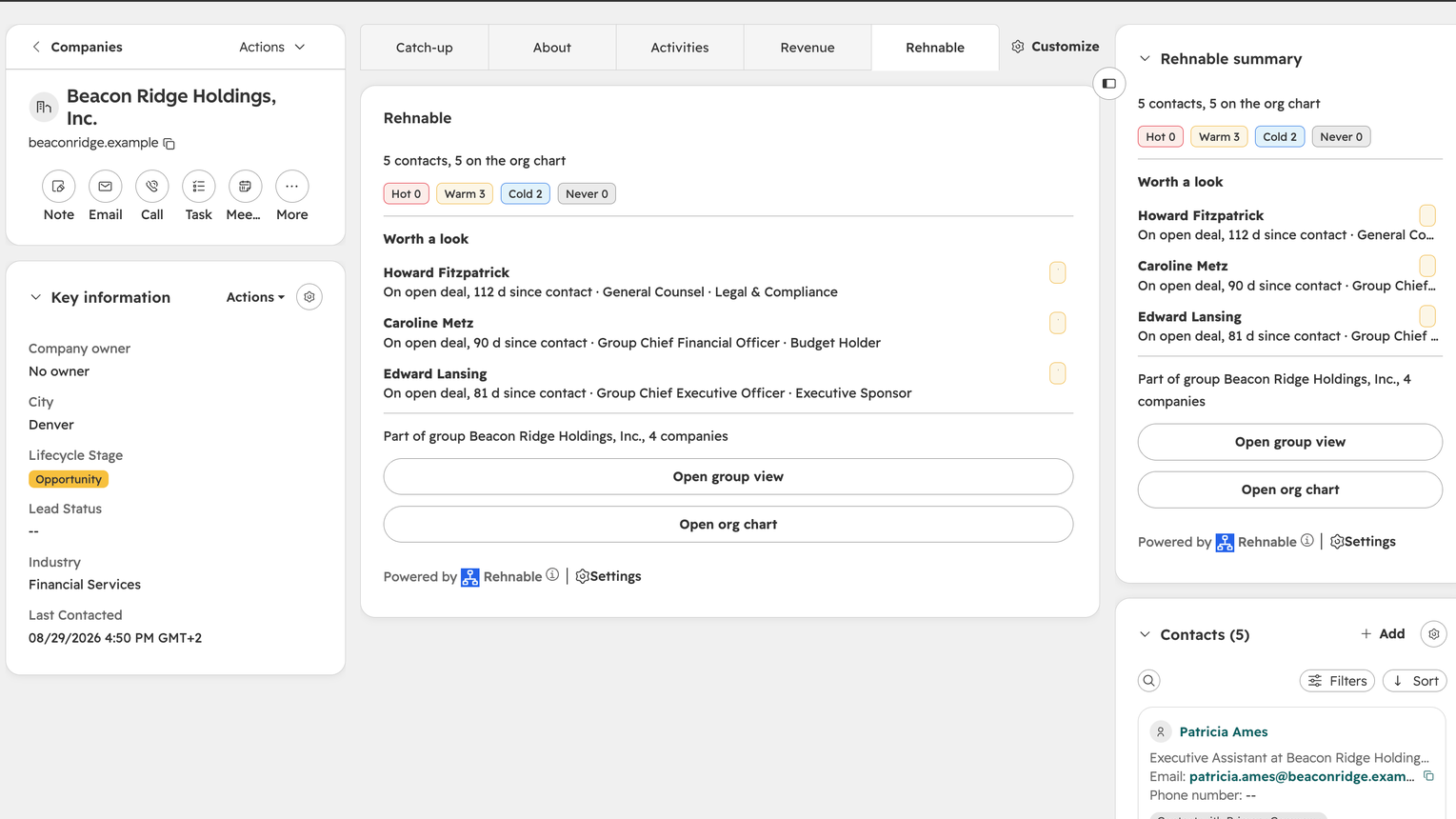
Stakeholder summary on the company record
The Rehnable card on a company record shows how many contacts are hot, warm, cold or never contacted, who is worth a look, and a button to open the org chart. For a company in a group there is also a button to open the group view. Add it as a tab in the middle of the record or as a card in the sidebar. Both show the same.
App Functionality
Shared Data
Org chart nodes and reporting lines | ||
Deals | ||
Contact properties and association labels | ||
Companies and corporate group | ||
Portal users | ||
Owners (task assignees and note authors) | ||
Static contact lists | ||
Notes written from Rehnable |
The app also uses its own app-level credential to read HubSpot's developer webhooks journal. That stream contains only this app's own installation events - install and uninstall per portal - and no CRM data. Its single purpose is to notice an uninstall within about a minute so the portal's stored tokens can be invalidated immediately.
Reviews
Pricing
Starter
$33.25
/monthThe whole product, for up to 5 seats.
$39 per month, or $399 per year. 5 seats included. Every plan contains the entire product; plans differ only by the number of seats.Starter
$33.25
/monthThe whole product, for up to 5 seats.
$39 per month, or $399 per year. 5 seats included. Every plan contains the entire product; plans differ only by the number of seats.* The pricing here is for display purposes only. All prices do not include taxes, incentives, discounts, or other pricing variables. You should contact the partner for the most up to date and correct pricing information. HubSpot does not take any responsibility for this pricing information, which is provided by our partners. Pricing last updated: 10/28/2026
New arrivals

InboundSync- Simplify Your CRM Migration
Migrate CRM data to HubSpot with accurate mapping, zero data loss, and minimal downtime.

Loxia AI - Voice & Chat AI
24/7 AI Voice and Web Chat agents to qualify leads, book appointments, and sync CRM contacts.
