

Xentral
Data Sync - Sync contacts between Xentral and HubSpot
Gemaakt door - Xentral ERP Software GmbH
Installaties - 100+ installaties
Beoordeling 3
(2)
Vereisten
HubSpot-abonnement HubSpot-accountmachtigingen - Bekijk de vereiste accountmachtigingen
Toegangstype Shared Xentral-abonnement - Starter, Business of Pro plannen
Overzicht
1/4
Xentral gives you back your time
Do not waste your valuable time in day to day business operations. Instead let Xentral run your order, stock, payment and delivery processes. As a consequence, you can invest your valuable time into developing your products and growing your business.
Boost your Xentral Onboarding
When you start with Xentral use the app to import all your relevant contact. You'll be set up for contact import in less than 1 minute.
Work at the same time in Xentral and HubSpot
As soon as you've established a data sync between both systems it does not matter where you create a new contact or add a new piece of data to an existing contact. The data stays always in sync.
Use sales data to fine-tune your campaigns [coming soon]
Each order that reaches Xentral will be synced as a deal to HubSpot and linked to the associated contact and company. In addition, we add the purchased products as line items to the deal. That helps you to outreach to the right customers at the right time.
Functies
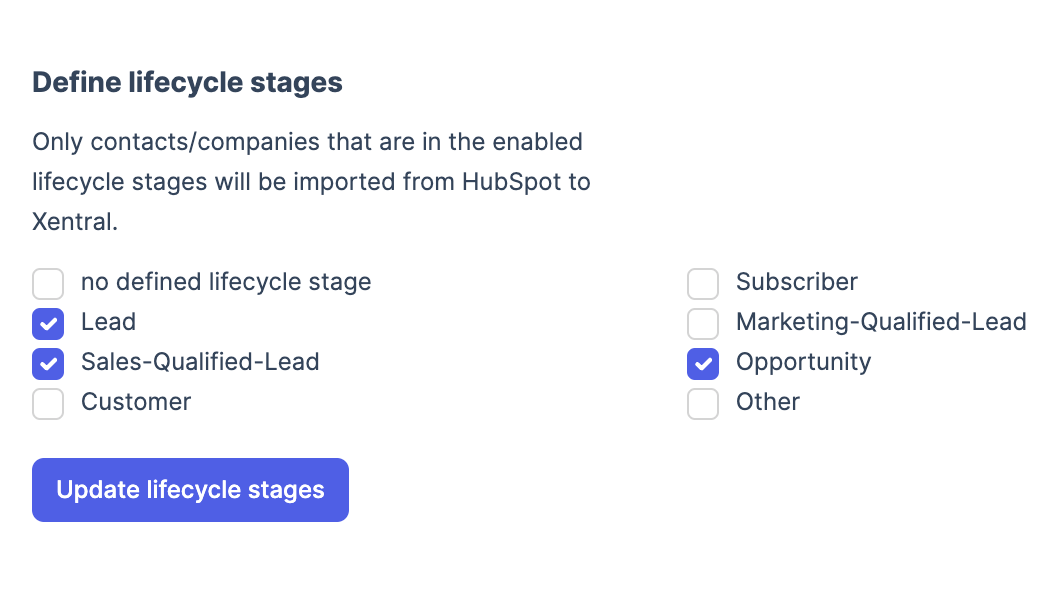
Filter by lifecycle stage
In Xentral you may only want a subset of your contacts, e.g. sales-qualified-leads where you want to follow up with an offer. With our lifecycle stage filter you can filter the data import from HubSpot to Xentral on all available lifecycle stages that you have defined.
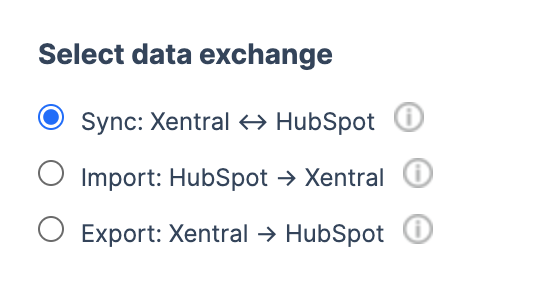
Select data exchange
How should the data flow? Chose among a real sync to both systems, an import to Xentral, or an export to HubSpot. In case you work with your contacts on both systems a sync makes most sense for you. Whereas a simple import is good enough to get started with Xentral.
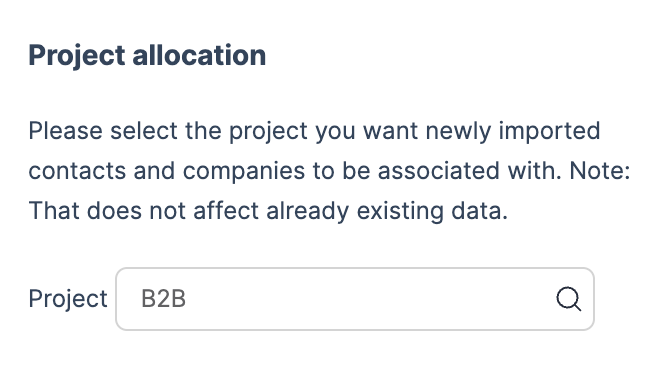
Allocate a project
In Xentral you can allocate your contacts to projects. A project can be a certain sales channel. When contacts are imported from HubSpot to Xentral you can chose to which project they should be linked to.
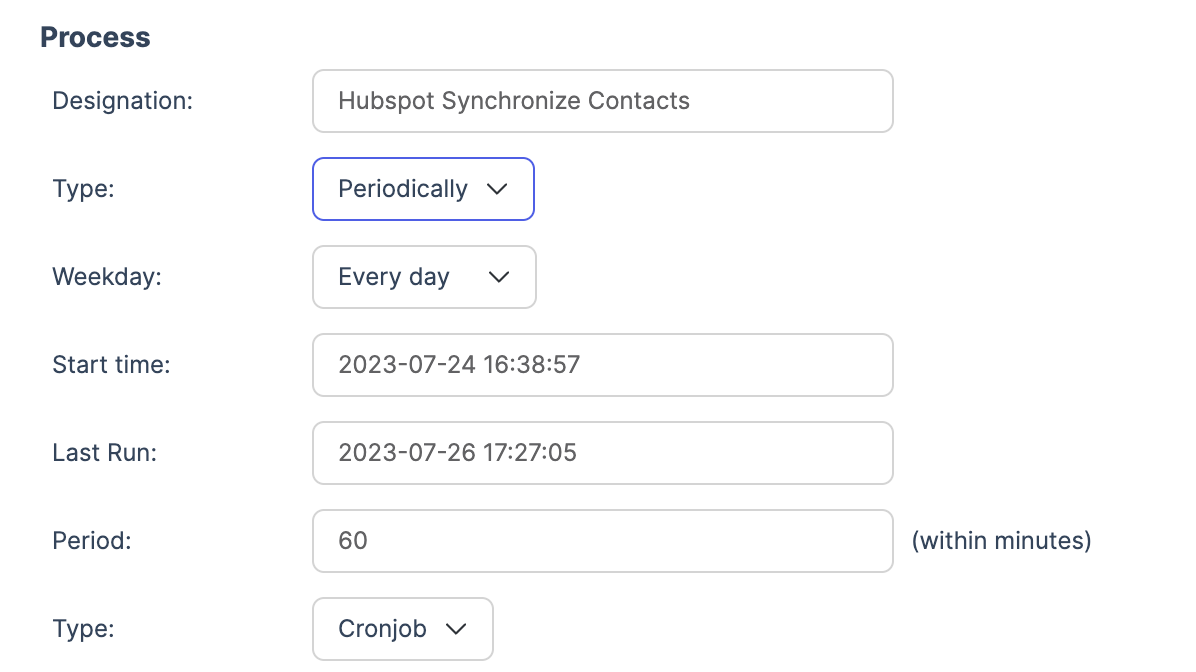
Configure process interval
How often should the data sync happen? Default is each hour. However, you can adjust that as you like. From every minute to once a day. Periodically or just through manual trigger. It is about you to decide.
App-functionaliteit
Gedeelde gegevens
Address | ||
Address | ||
Address | ||
Address |
Reviews
- 16 okt. 2025
Interface werkt totaal onvoldoende - volledig teleurstellend
De interface is volstrekt ontoereikend.
De interface is volstrekt ontoereikend.
Stock, J.
- 30 mrt. 2025
Heissel, T.
Starter
€ 199
/maandStart with simple workflows and gain transparency into your business
Connection to online shops & marketplace
Product catalogue
Stock
Connection to shipping service providers
Delivery notes
Customer database
Invoices & credit notes
DATEV
Reportings
Starter
€ 199
/maandStart with simple workflows and gain transparency into your business
Connection to online shops & marketplace
Product catalogue
Stock
Connection to shipping service providers
Delivery notes
Customer database
Invoices & credit notes
DATEV
Reportings
* De hier vermelde prijzen dienen alleen ter illustratie. Alle prijzen zijn exclusief belasting, bonussen, kortingen of andere prijsvariabelen. Neem contact op met de partner voor de meest recente en correcte prijsinformatie. HubSpot erkent geen verantwoordelijkheid voor deze prijsinformatie, die wordt verstrekt door onze partners. Prijzen laatst bijgewerkt: 11-08-2025
Meer info
Gemaakt door - Xentral ERP Software GmbH
Installaties - 100+ installaties
Categorieën Talen waarin deze app beschikbaar is Duits enEngels
Populairst


