

Storydoc
สร้างโดย - Storydoc
ติดตั้ง - 10+ การติดตั้ง
ข้อกำหนด
แผน HubSpot สิทธิ์บัญชี HubSpot - ดูสิทธิ์บัญชี ที่จำเป็น
ประเภทสิทธิ์การเข้าถึง แชร์แล้ว การสมัครใช้บริการ Storydoc - Premium หรือ Enterprise แพ็กเกจ
ภาพรวม
1/9 - Storydoc demo video
Create personalized Storydoc decks from HubSpot data
Storydoc AI helps revenue teams create interactive decks and proposals with personalization and engagement analytics built in. When you connect Storydoc with HubSpot, you can generate slide decks and proposals that automatically personalize to your HubSpot Contacts, Deals, and Companies, so every version stays accurate and on-brand.
Personalize collateral with HubSpot data
Use HubSpot properties inside Storydoc to tailor each deck to the right audience. Map variables from Contacts, Deals, and Companies, then generate a personalized version for a specific record, without manual copy-pasting.
Create Storydocs in HubSpot, without leaving the CRM
Generate a Storydoc version directly from a HubSpot record. Choose a template, create a version for the current contact, company, or deal, then copy the live link or open the editor, all from HubSpot.
Save links back to HubSpot for automation
Every time you create a version, HubSpot stores the links on the record as properties, including:
Storydoc link
Storydoc editor link
Because these links are standard HubSpot properties, you can use them in workflows, sequences, cadences, tasks, and email templates to automate sharing and follow-ups at scale.
Get quick access to editing and analytics from HubSpot
From the Storydoc card on the record, your team can open the live link, jump to edit the version in Storydoc, and access analytics for that specific version. This makes it easy to follow up with context and keep momentum moving.
Ideal use cases
Personalized outbound and account-based selling at scale
Deal-specific proposals generated from HubSpot records
Automated follow-ups using Storydoc link properties in workflows and sequences
Visibility into stakeholder engagement to time outreach and reduce deal risk
ฟีเจอร์
-2-1.png)
Create Storydoc decks directly from HubSpot records
Generate a personalized Storydoc deck straight from a HubSpot record, auto-personalized with the data record’s data. Pick a template, create a version for the current Contact, Company, or Deal, then copy the live link or open the editor. This allows you to work seamlessly within HubSpot while always sending fully personalized decks and proposals
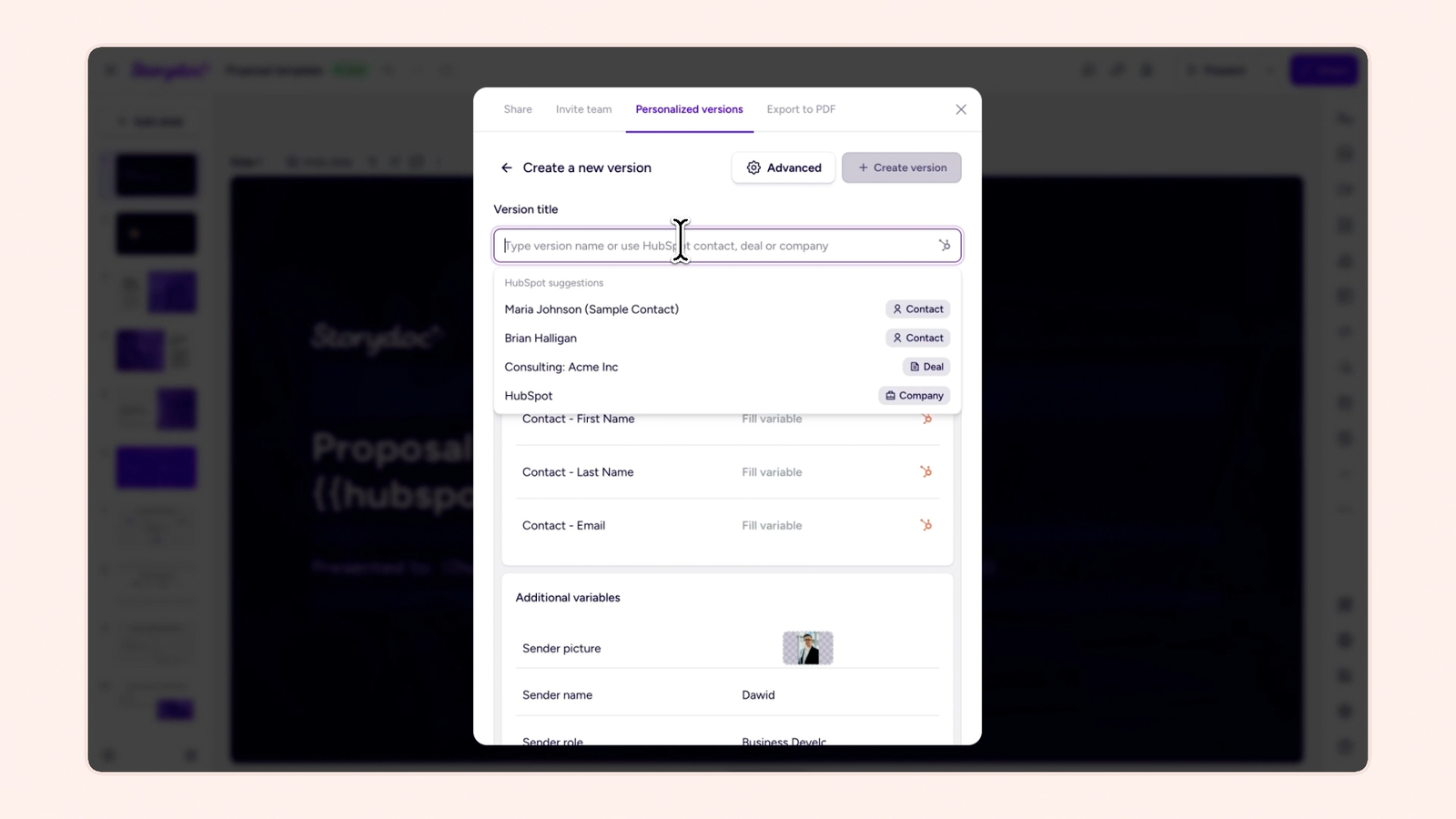
Generate personalized decks enriched with HubSpot data from Storydoc
Create a personalized Storydoc deck from Storydoc by selecting a HubSpot Contact, Company, or Deal record. Storydoc fills your mapped HubSpot variables automatically and generates a unique version for that record, so you can save time and always use accurate, on-brand decks without manual copy-pasting.
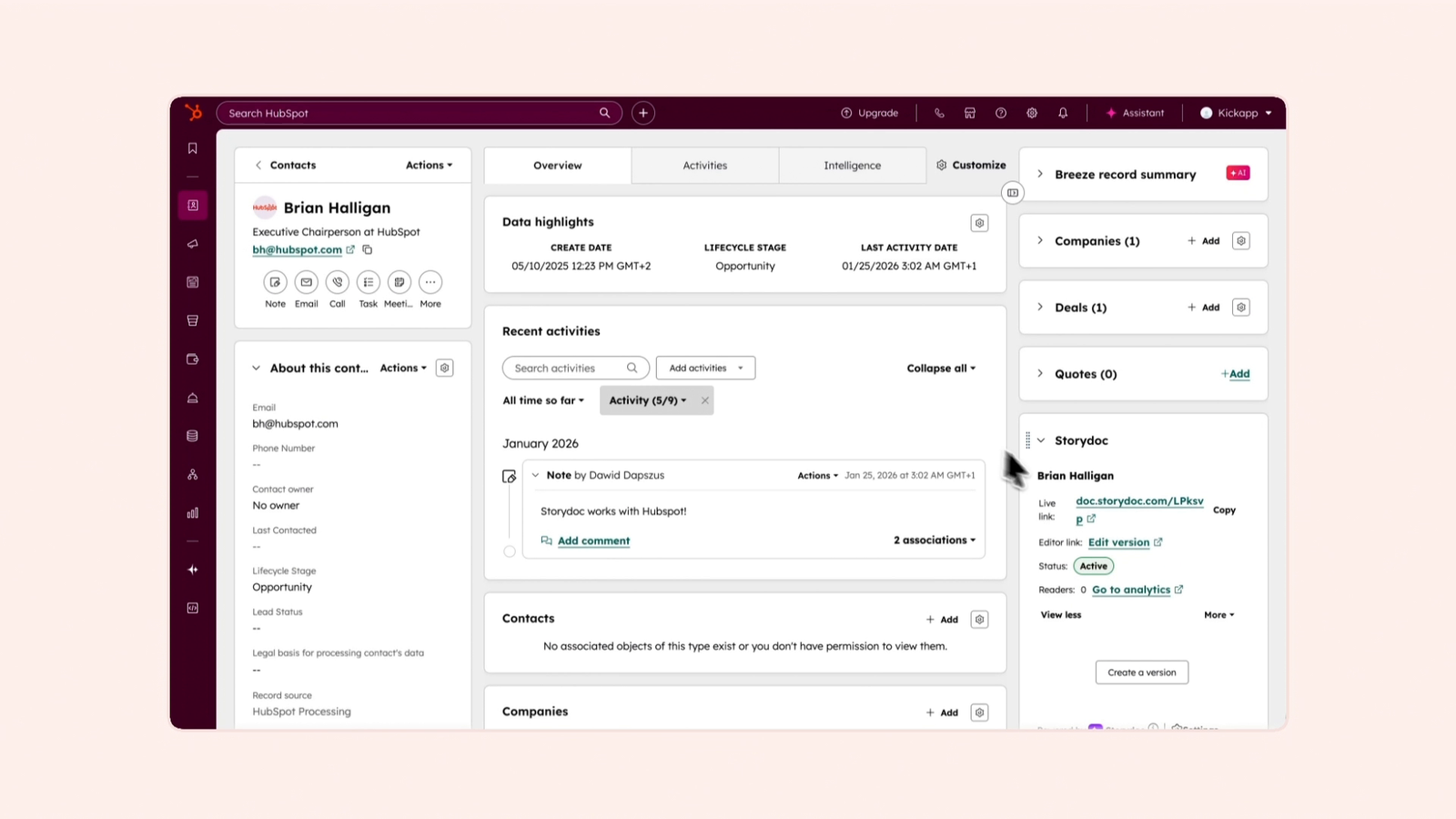
Save Storydoc decks as HubSpot properties for automation
After a version is created, Storydoc saves the version link back to HubSpot as record properties, including Storydoc link and Storydoc editor link. Use these properties in workflows, sequences, cadences, tasks, and templates to automate sharing and follow-ups.
-3-1.png)
Real-time analytics access in HubSpot
Get quick access to real-time Storydoc analytics from HubSpot, so you can follow up with context and keep deals moving. The Storydoc card also shows the current number of readers for each version and links you to the full Storydoc analytics.
-Mar-09-2026-10-35-49-3555-AM-1.png)
Automatically save signed proposal PDFs to HubSpot deals
When a buyer approves your Storydoc proposal, the version status in HubSpot updates to Accepted. Additionally, the signed proposal is automatically added to the HubSpot deal as a PDF attachment, so the final contract is stored on the record and easy to download and share internally.
ฟังก์ชันการทำงานแอป
ข้อมูลที่แบ่งปัน
Prospect | ||
Company | ||
Deal | ||
Contact Properties | ||
Company Properties | ||
Deal Properties |
รีวิว
การกำหนดราคา
Premium
Premium branding, CRM integrations, and advanced support for growing teams.
Premium
Premium branding, CRM integrations, and advanced support for growing teams.
* ราคาที่แสดงนี้มีไว้เพื่อแสดงข้อมูลเท่านั้น ราคาทั้งหมดยังไม่รวมภาษี สิทธิพิเศษ ส่วนลด หรือตัวแปรราคาอื่นๆ คุณควรติดต่อพาร์ทเนอร์เพื่อรับข้อมูลราคาล่าสุดและถูกต้องที่สุด HubSpot จะไม่รับผิดชอบใดๆ ต่อข้อมูลราคานี้ซึ่งจัดทำโดยพาร์ทเนอร์ของเรา การกำหนดราคาอัปเดตล่าสุด: 20/04/2026
ข้อมูลเพิ่มเติม
สร้างโดย - Storydoc
ติดตั้ง - 10+ การติดตั้ง
หมวดหมู่ ภาษาที่แอปนี้สามารถใช้ได้ อังกฤษ
ยอดนิยม

Gmail
Bring HubSpot to your inbox with the HubSpot integration for Gmail.

Google Calendar
Book meetings quickly and easily with HubSpot and Google Calendar.
