

Mailchimp
Anforderungen
HubSpot-Produktversion HubSpot-Account-Berechtigungen Keine Berechtigungen erforderlich Zugriffstyp Geteilt Mailchimp-Abonnement - Produktversion: Review Mailchimp's Pricing Page
Übersicht
1/2
Unify email and customer insights across Mailchimp and HubSpot for information alignment and reduce the need for messy, time-consuming imports.
Install this app to:
Sync contacts and records between Mailchimp and HubSpot two-ways in real-time for data alignment
Get set up quickly with automatic historical data sync and configure ongoing sync settings to reduce manual data management and prevent data silos.
Configure custom field mappings between Mailchimp and HubSpot contact properties to match specific business requirements.
Note: To sync Mailchimp email activity - including sends, opens, clicks, and bounces - to HubSpot timelines, create segments and build lists, or use email engagement to trigger automated HubSpot workflows, you’ll need to install an additional Mailchimp app. You can do so here.
Funktionen
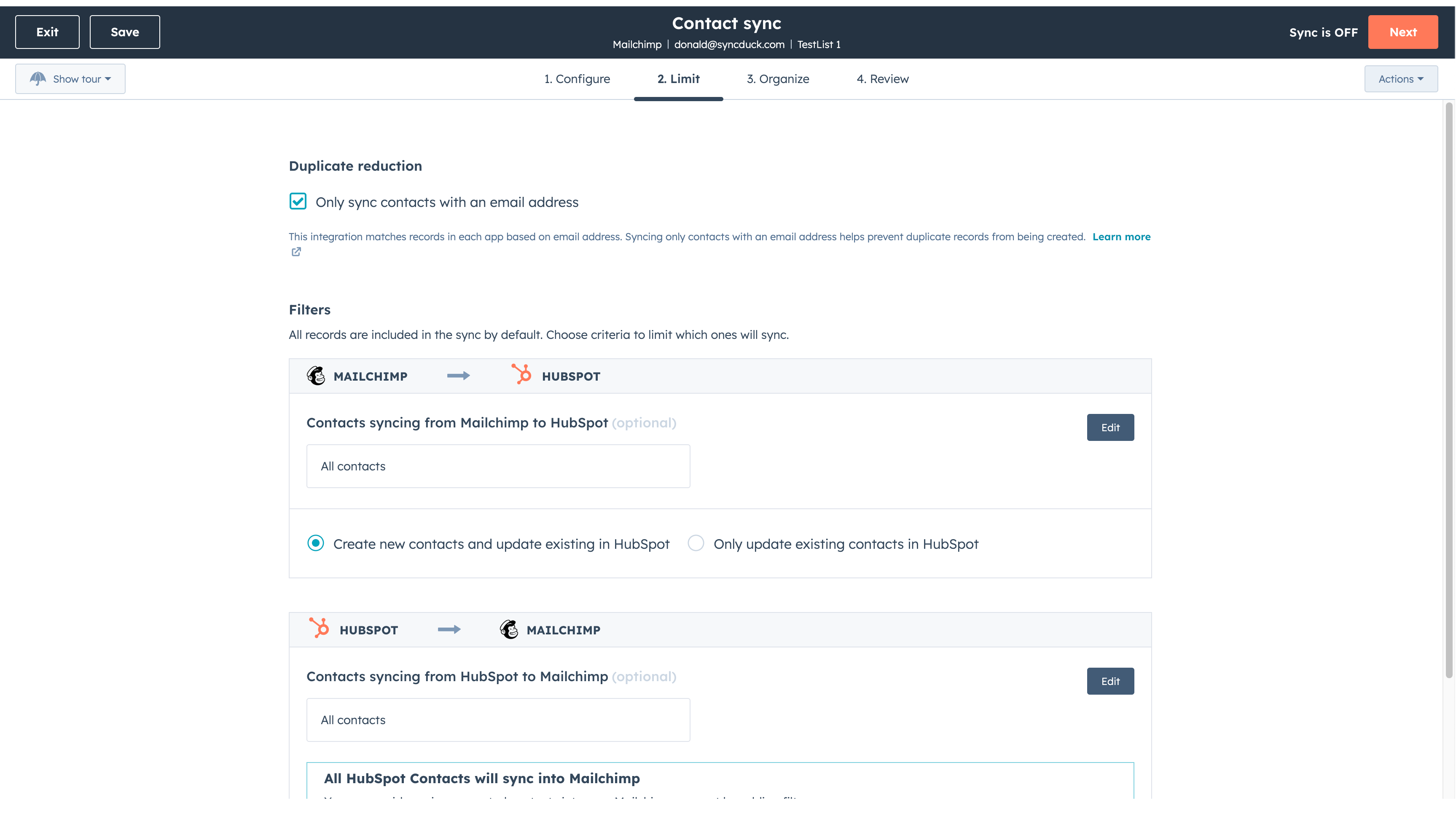
Sync Mailchimp and HubSpot in the background
Make manual data entry a thing of the past by syncing data (see below) between HubSpot and Mailchimp. When records are created or updated in either app, that information will be automatically shared with the other one. You can also add a filter for any Mailchimp field or HubSpot list to sync exactly what you want—and nothing you don’t.
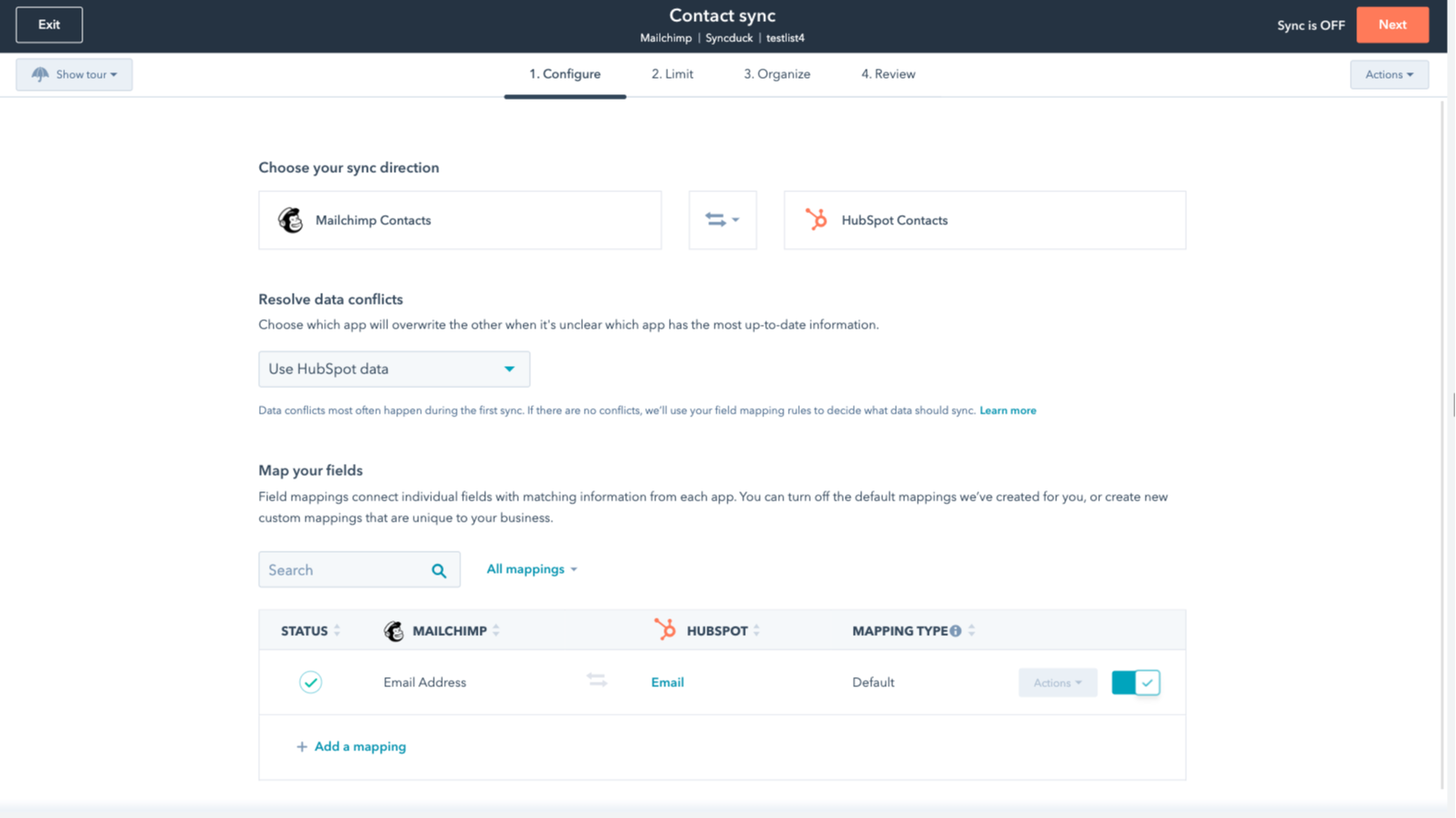
You’re in control of your data
You can set up a one- or two-way sync, which means you can either sync data from Mailchimp to HubSpot, from HubSpot to Mailchimp, or back-and-forth! IMPORTANT: This app requires Data Hub Starter or above.
App-Funktionalität
Datenaustausch
Each object has field mappings that connect matching information from each app.
The following will not sync: Groups, Tags, Email Opens/Clicks. As mentioned above, you can review and install the other Mailchimp integration here to sync additional data.
Note: You will need Data Hub Starter and up to use this app.
Contacts |
Rezensionen
2,6
63
2,6
63
Während Nutzer berichten, dass das Tool nur E-Mail-Adressen ohne Namen überträgt und Listen gelegentlich falsch zusammenführt, schätzen einige die schnelle Einrichtung für die grundlegende Kontaktsynchronisierung. Einige Rezensenten loben die intuitive Benutzeroberfläche für die Verwaltung von Massenkommunikation, während andere anmerken, dass Abmeldungen und benutzerdefinierte Tags nicht immer in die Hauptdatenbank übernommen werden.
- 15. Juni 2026
Diese Integration kann ich nur wärmstens empfehlen!
Die Einrichtung ist ganz einfach, und ich kann es auf jeden Fall weiterempfehlen.
Über die zusätzlichen Apps können Sie die Kampagnen und E-Mail-Marketing-Aktivitäten aus Mailchimp direkt mit HubSpot verknüpfen.
Dem ist nichts hinzuzufügen.
Mihajlovic, B.
- 20. Mai 2026
Noch neu, aber bis jetzt gefällt es mir
Dies ist eine neue Integration für uns, aber die Kontakte scheinen ziemlich nahtlos von Mailchimp zu kommen. Eine Sache, die ich herausfinden muss, ist, wie ich den Lead-Status auf den richtigen Standard automatisieren kann. Beim Einrichten war die Konfiguration nicht offensichtlich.
Moskal, E.
Review Mailchimp's Pricing Page
0 $
Use the 'See all pricing options' link on the righthand side
Make sure to confirm the HubSpot subscription and the Mailchimp subscription needed to install this integration
Note: "Free" is referring to the cost of the integration, not the app subscriptions
Review Mailchimp's Pricing Page
0 $
Use the 'See all pricing options' link on the righthand side
Make sure to confirm the HubSpot subscription and the Mailchimp subscription needed to install this integration
Note: "Free" is referring to the cost of the integration, not the app subscriptions
* Die hier angegebenen Preise dienen nur zu Illustrationszwecken. Alle Preise enthalten keine Steuern, Sonderangebote, Rabatte oder sonstigen Preisvarianten. Bitte wenden Sie sich direkt an den Partner, um aktuelle und korrekte Preisinformationen zu erhalten. HubSpot übernimmt keine Verantwortung für Preisinformationen, die von unseren Partnern bereitgestellt werden. Letzte Aktualisierung der Preisinformationen: 22.01.2026