

Mailchimp
Vereisten
HubSpot-abonnement HubSpot-accountmachtigingen Geen machtigingen vereist Toegangstype Gedeeld Mailchimp-abonnement - Review Mailchimp's Pricing Page plan
Overzicht
1/2
Unify email and customer insights across Mailchimp and HubSpot for information alignment and reduce the need for messy, time-consuming imports.
Install this app to:
Sync contacts and records between Mailchimp and HubSpot two-ways in real-time for data alignment
Get set up quickly with automatic historical data sync and configure ongoing sync settings to reduce manual data management and prevent data silos.
Configure custom field mappings between Mailchimp and HubSpot contact properties to match specific business requirements.
Note: To sync Mailchimp email activity - including sends, opens, clicks, and bounces - to HubSpot timelines, create segments and build lists, or use email engagement to trigger automated HubSpot workflows, you’ll need to install an additional Mailchimp app. You can do so here.
Functies
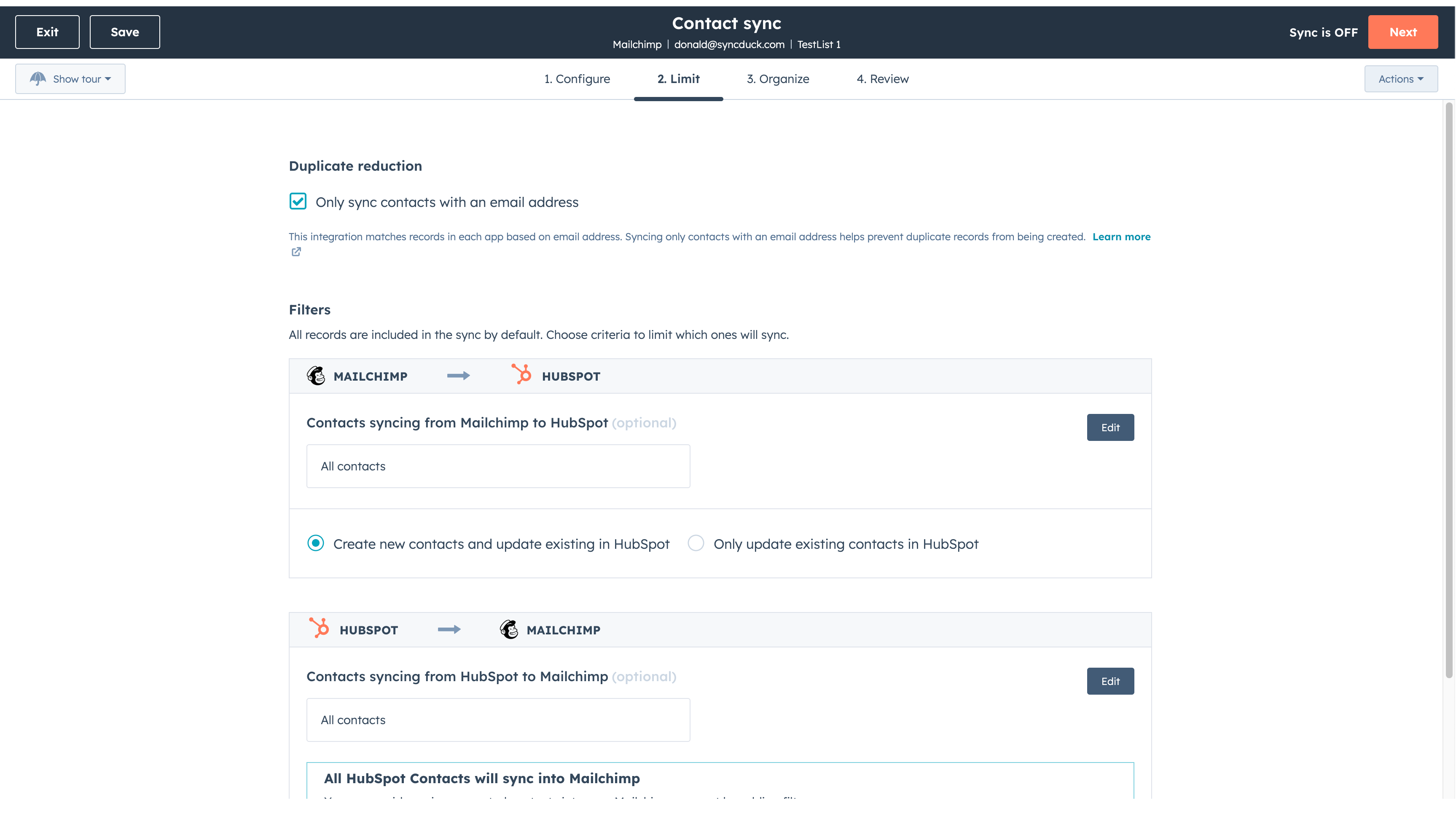
Sync Mailchimp and HubSpot in the background
Make manual data entry a thing of the past by syncing data (see below) between HubSpot and Mailchimp. When records are created or updated in either app, that information will be automatically shared with the other one. You can also add a filter for any Mailchimp field or HubSpot list to sync exactly what you want—and nothing you don’t.
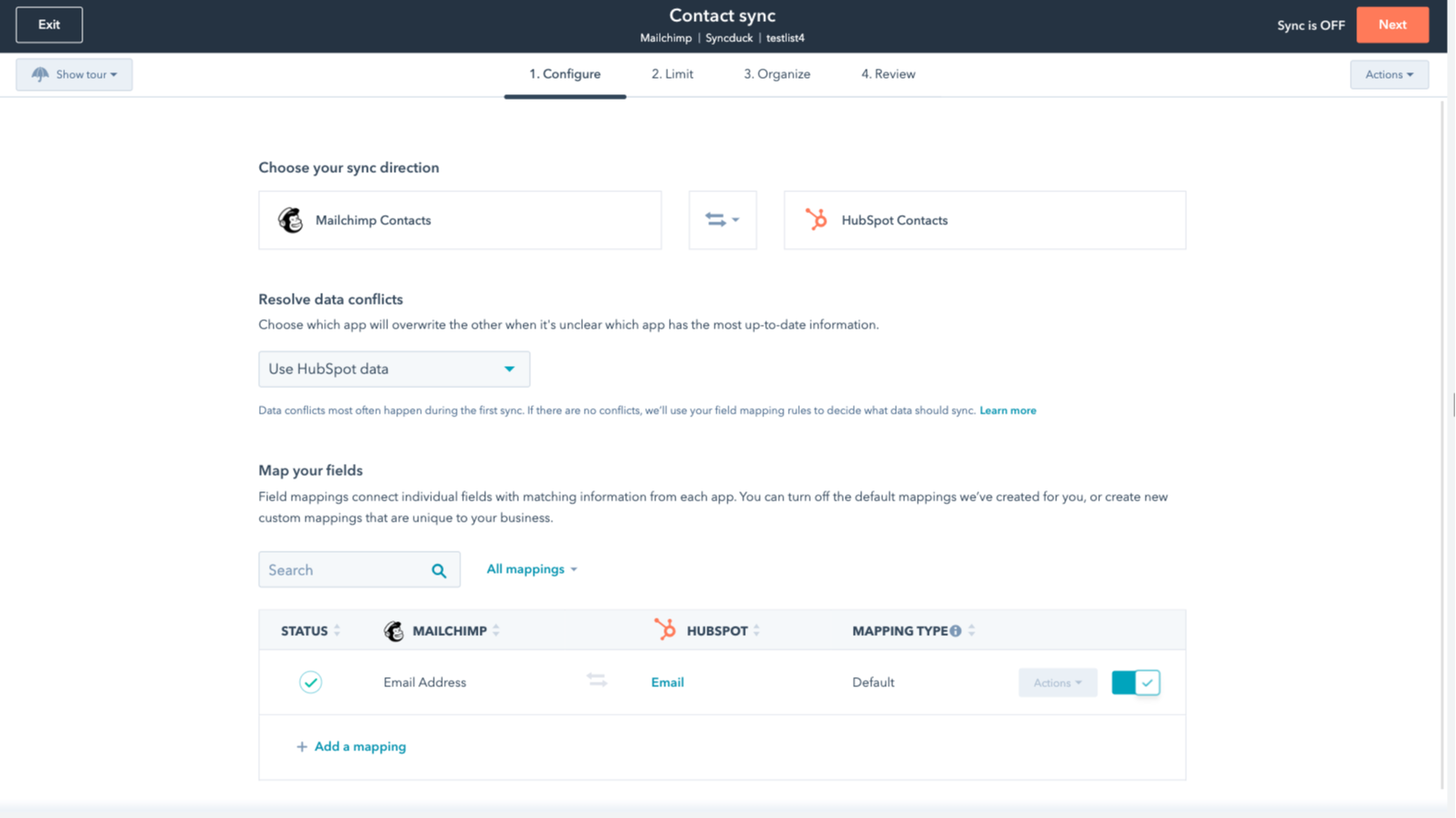
You’re in control of your data
You can set up a one- or two-way sync, which means you can either sync data from Mailchimp to HubSpot, from HubSpot to Mailchimp, or back-and-forth! IMPORTANT: This app requires Data Hub Starter or above.
App-functionaliteit
Gedeelde gegevens
Each object has field mappings that connect matching information from each app.
The following will not sync: Groups, Tags, Email Opens/Clicks. As mentioned above, you can review and install the other Mailchimp integration here to sync additional data.
Note: You will need Data Hub Starter and up to use this app.
Contacts |
Reviews
2,7
64
2,7
64
De integratie beperkt de toewijzing van velden doordat alleen e-mailadressen worden gesynchroniseerd, zonder namen of tags, hoewel sommigen de eerste installatie eenvoudig vinden. De instellingen voor tweerichtingssynchronisatie kunnen onbedoeld afzonderlijke doelgroepen samenvoegen, maar een aantal gebruikers waardeert de app omdat deze tijd bespaart bij het overzetten van eenvoudige contactgegevens.
- 21 okt. 2026
Sanchez, I.
- 15 jun. 2026
Ik raad deze integratie zeker aan!
Het is heel eenvoudig in te stellen en ik zou het zeker aanraden.
Je kunt de campagne en e-mailmarketingactiviteiten van Mailchimp rechtstreeks aan HubSpot koppelen via de beschikbare apps.
Niets aan toe te voegen.
Mihajlovic, B.
Prijzen
Review Mailchimp's Pricing Page
US$ 0
Use the 'See all pricing options' link on the righthand side
Make sure to confirm the HubSpot subscription and the Mailchimp subscription needed to install this integration
Note: "Free" is referring to the cost of the integration, not the app subscriptions
Review Mailchimp's Pricing Page
US$ 0
Use the 'See all pricing options' link on the righthand side
Make sure to confirm the HubSpot subscription and the Mailchimp subscription needed to install this integration
Note: "Free" is referring to the cost of the integration, not the app subscriptions
* De hier vermelde prijzen dienen alleen ter illustratie. Alle prijzen zijn exclusief belasting, bonussen, kortingen of andere prijsvariabelen. Neem contact op met de partner voor de meest recente en correcte prijsinformatie. HubSpot erkent geen verantwoordelijkheid voor deze prijsinformatie, die wordt verstrekt door onze partners. Prijzen laatst bijgewerkt: 22-01-2026