

Mailchimp
Requisiti
Piano HubSpot Autorizzazioni dell'account HubSpot Nessuna autorizzazione richiesta Tipo di accesso Condiviso Abbonamento Mailchimp - Piano Review Mailchimp's Pricing Page
Panoramica
1/2
Unify email and customer insights across Mailchimp and HubSpot for information alignment and reduce the need for messy, time-consuming imports.
Install this app to:
Sync contacts and records between Mailchimp and HubSpot two-ways in real-time for data alignment
Get set up quickly with automatic historical data sync and configure ongoing sync settings to reduce manual data management and prevent data silos.
Configure custom field mappings between Mailchimp and HubSpot contact properties to match specific business requirements.
Note: To sync Mailchimp email activity - including sends, opens, clicks, and bounces - to HubSpot timelines, create segments and build lists, or use email engagement to trigger automated HubSpot workflows, you’ll need to install an additional Mailchimp app. You can do so here.
Funzionalità
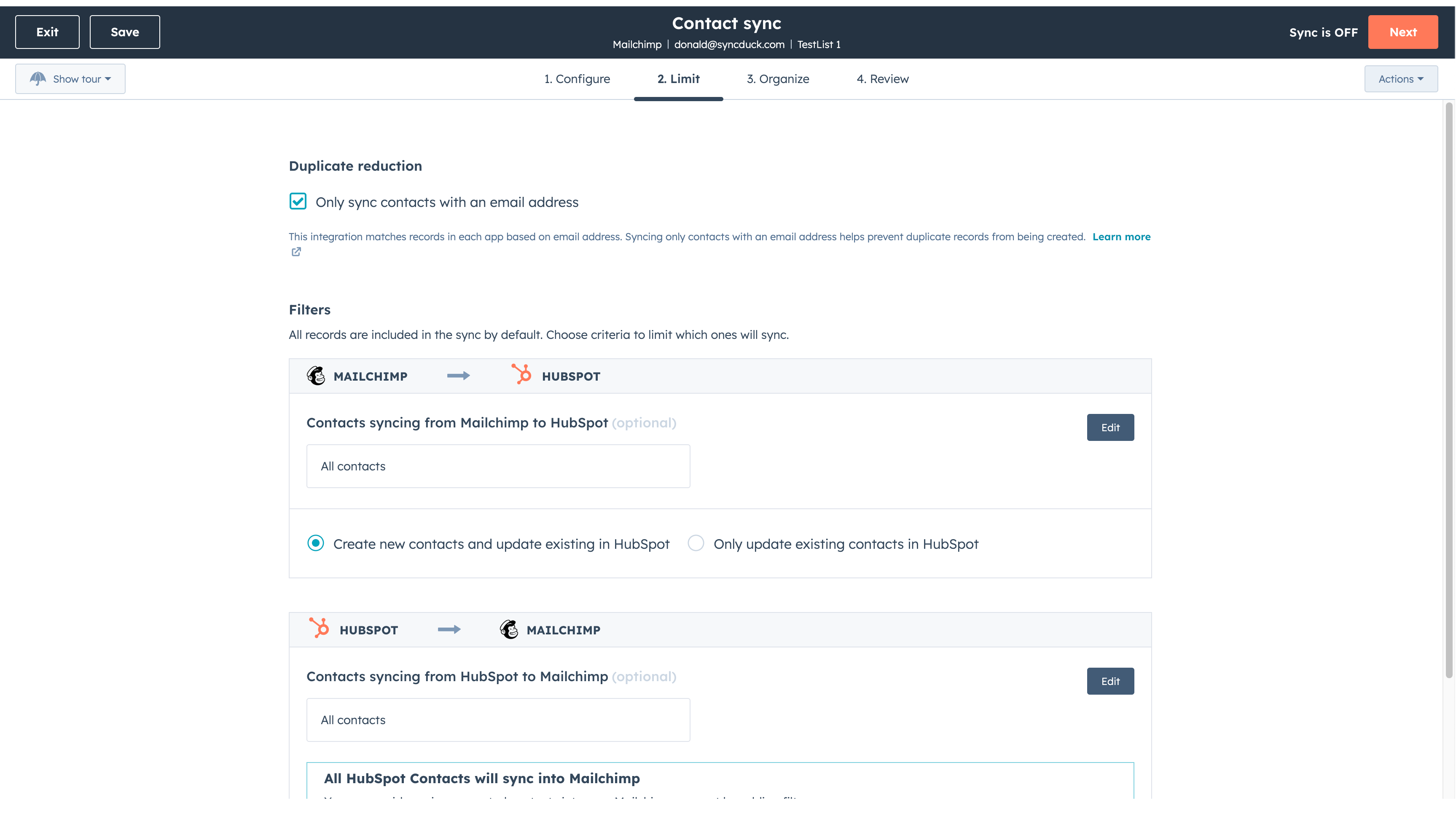
Sync Mailchimp and HubSpot in the background
Make manual data entry a thing of the past by syncing data (see below) between HubSpot and Mailchimp. When records are created or updated in either app, that information will be automatically shared with the other one. You can also add a filter for any Mailchimp field or HubSpot list to sync exactly what you want—and nothing you don’t.
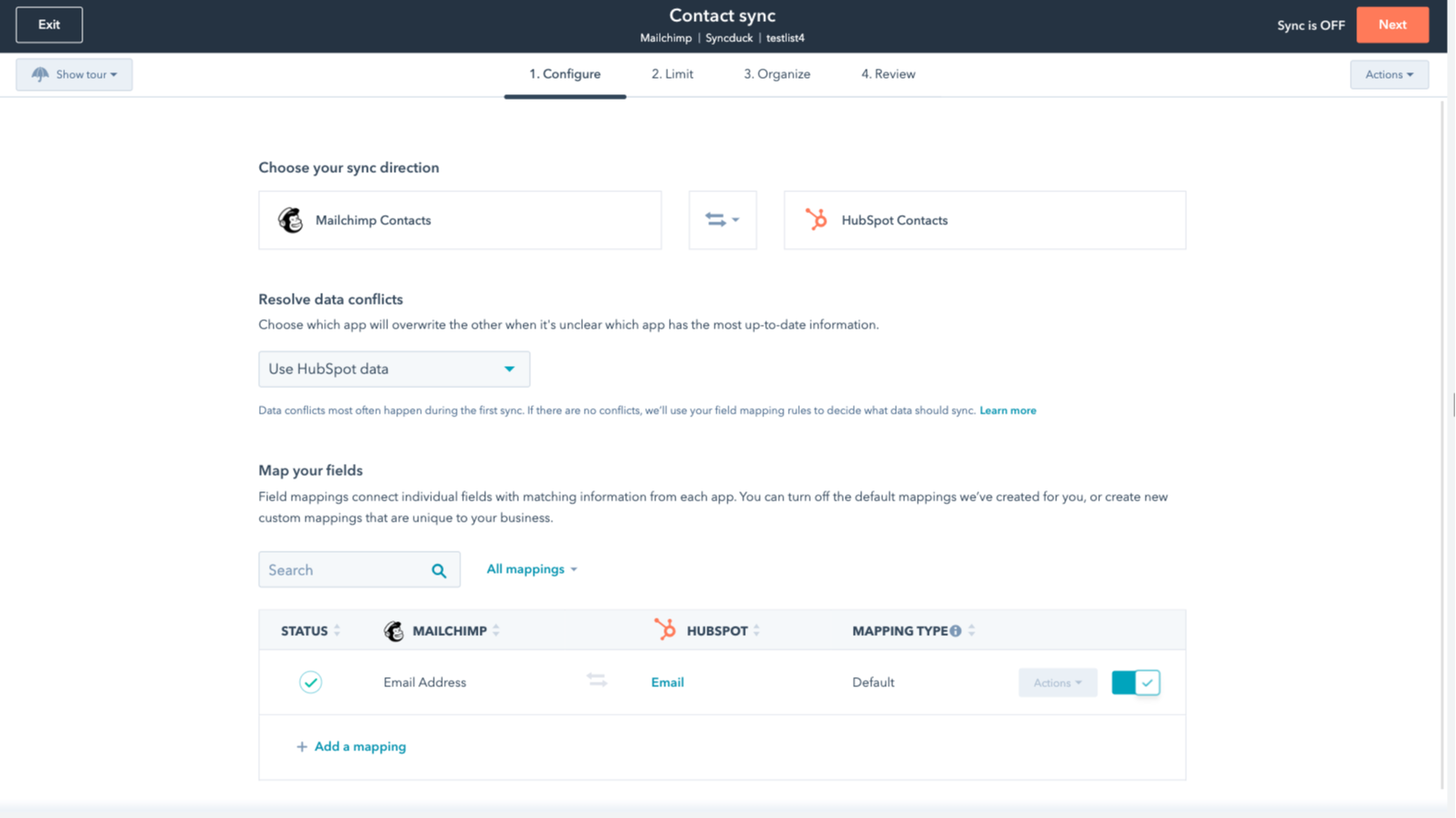
You’re in control of your data
You can set up a one- or two-way sync, which means you can either sync data from Mailchimp to HubSpot, from HubSpot to Mailchimp, or back-and-forth! IMPORTANT: This app requires Data Hub Starter or above.
Funzionalità dell'app
Dati condivisi
Each object has field mappings that connect matching information from each app.
The following will not sync: Groups, Tags, Email Opens/Clicks. As mentioned above, you can review and install the other Mailchimp integration here to sync additional data.
Note: You will need Data Hub Starter and up to use this app.
Contacts |
Recensioni
2,7
64
2,7
64
L'integrazione limita la mappatura dei campi sincronizzando solo gli indirizzi e-mail senza nomi né tag, anche se alcuni ritengono che la configurazione iniziale sia semplice. Le impostazioni di sincronizzazione bidirezionale possono unire involontariamente segmenti di pubblico distinti, ma alcuni utenti apprezzano l'app perché consente di risparmiare tempo durante i trasferimenti di base dei contatti.
- 21 ott 2026
Sanchez, I.
- 15 giu 2026
Consiglio vivamente questa integrazione!
È facilissimo da configurare e lo consiglio vivamente.
È possibile integrare le campagne e le attività di email marketing di Mailchimp direttamente in HubSpot tramite le app aggiuntive.
Non c'è altro da aggiungere.
Mihajlovic, B.
Review Mailchimp's Pricing Page
0 USD
Use the 'See all pricing options' link on the righthand side
Make sure to confirm the HubSpot subscription and the Mailchimp subscription needed to install this integration
Note: "Free" is referring to the cost of the integration, not the app subscriptions
Review Mailchimp's Pricing Page
0 USD
Use the 'See all pricing options' link on the righthand side
Make sure to confirm the HubSpot subscription and the Mailchimp subscription needed to install this integration
Note: "Free" is referring to the cost of the integration, not the app subscriptions
* I prezzi riportati sono a scopo informativo. I prezzi non includono tasse, incentivi, sconti o altre variabili. Contatta il partner per ricevere il tariffario aggiornato. HubSpot declina qualsiasi responsabilità circa le informazioni di prezzo fornite dai propri partner. Ultimo aggiornamento tariffario: 22/01/2026
Maggiori informazioni
Più popolari

Gmail
Portare HubSpot nella casella di posta in arrivo con l'integrazione per Gmail

Google Calendar
Prenota riunioni in modo semplice e rapido con HubSpot e Google Calendar.
