

Mailchimp
Requisitos
Plan de HubSpot Permisos de cuenta de HubSpot No se requieren permisos Tipo de acceso Compartida Suscripción: Mailchimp - Suscripción: Review Mailchimp's Pricing Page
Vista general
1/2
Unify email and customer insights across Mailchimp and HubSpot for information alignment and reduce the need for messy, time-consuming imports.
Install this app to:
Sync contacts and records between Mailchimp and HubSpot two-ways in real-time for data alignment
Get set up quickly with automatic historical data sync and configure ongoing sync settings to reduce manual data management and prevent data silos.
Configure custom field mappings between Mailchimp and HubSpot contact properties to match specific business requirements.
Note: To sync Mailchimp email activity - including sends, opens, clicks, and bounces - to HubSpot timelines, create segments and build lists, or use email engagement to trigger automated HubSpot workflows, you’ll need to install an additional Mailchimp app. You can do so here.
Características
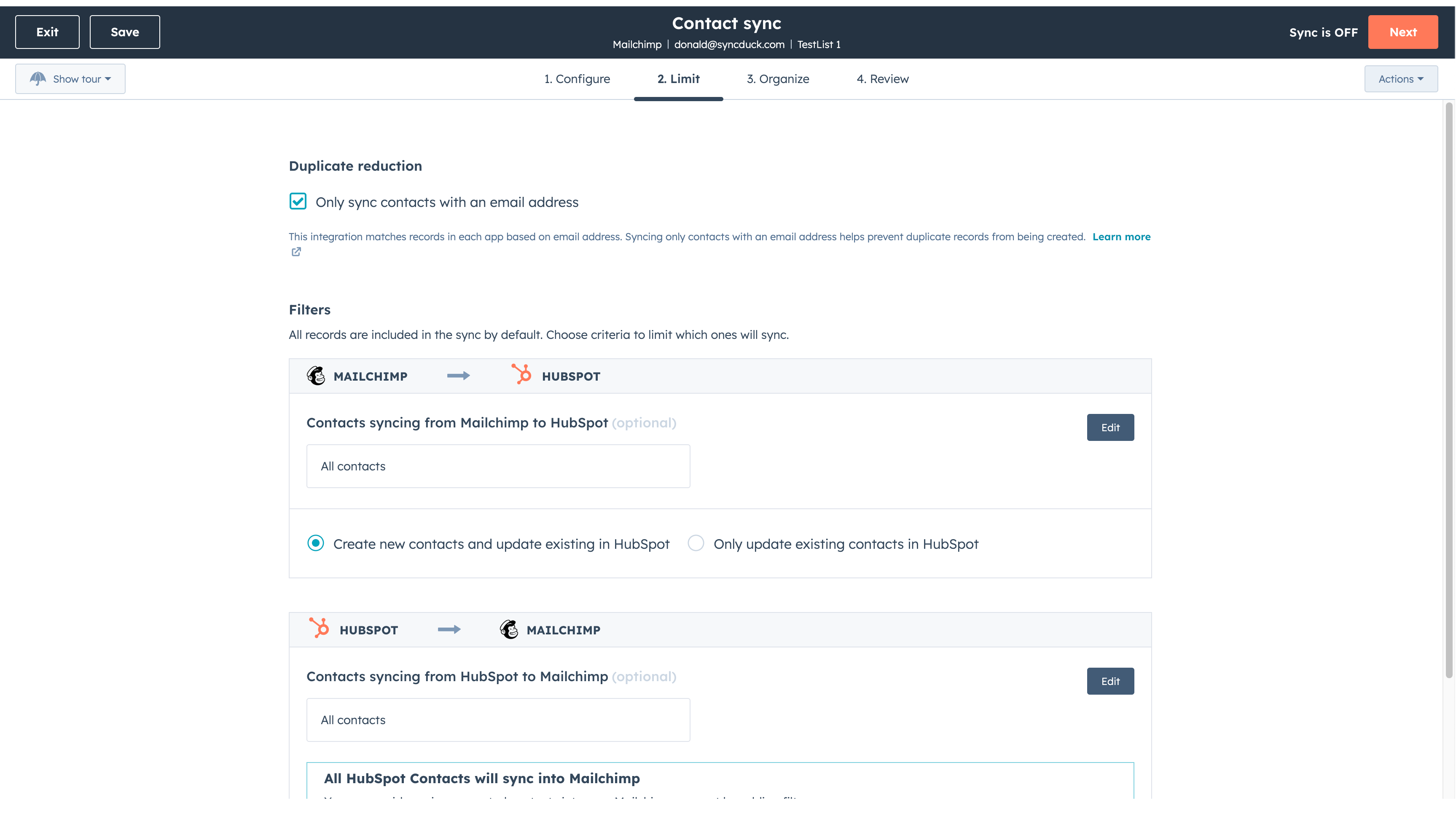
Sync Mailchimp and HubSpot in the background
Make manual data entry a thing of the past by syncing data (see below) between HubSpot and Mailchimp. When records are created or updated in either app, that information will be automatically shared with the other one. You can also add a filter for any Mailchimp field or HubSpot list to sync exactly what you want—and nothing you don’t.
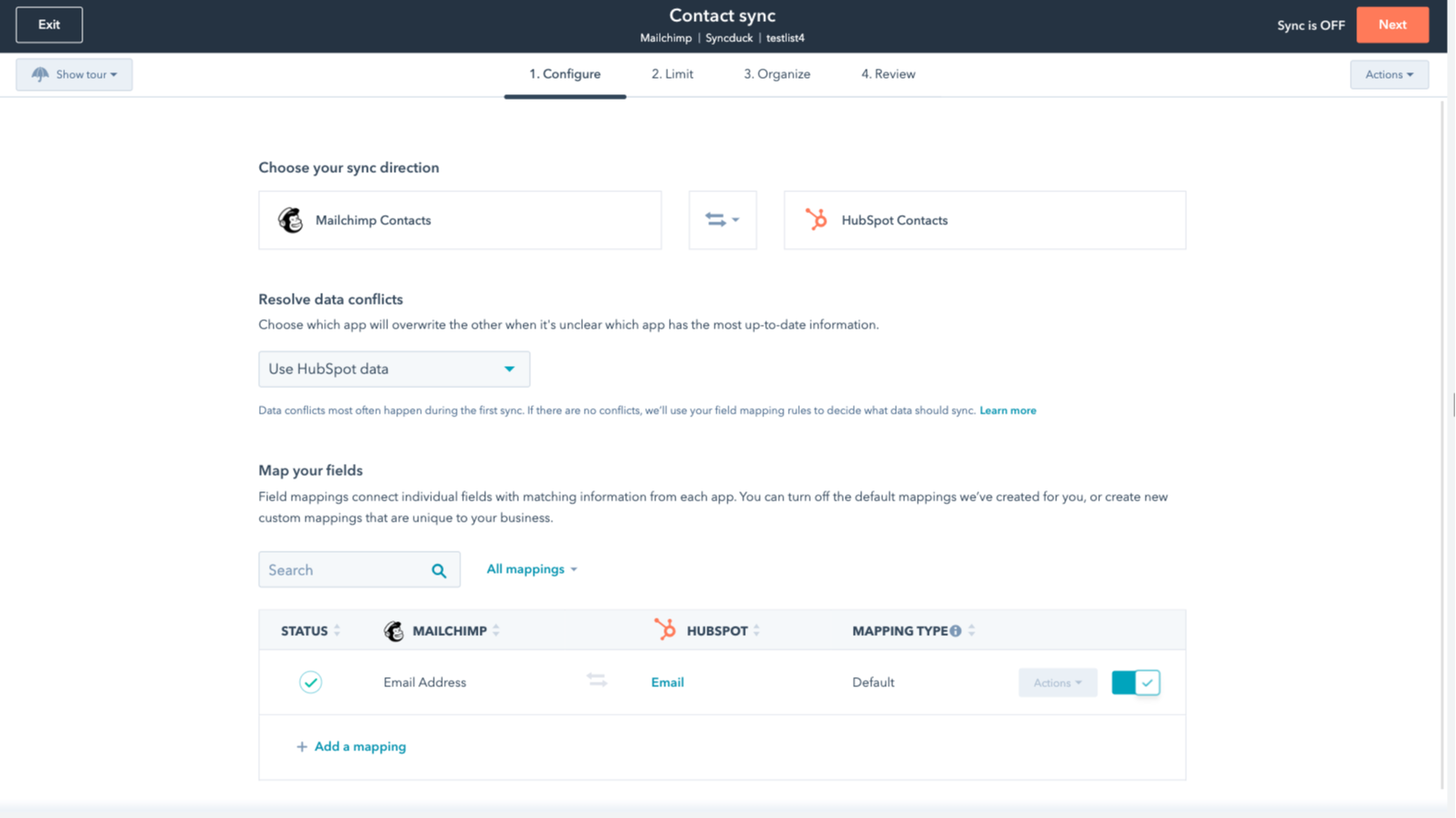
You’re in control of your data
You can set up a one- or two-way sync, which means you can either sync data from Mailchimp to HubSpot, from HubSpot to Mailchimp, or back-and-forth! IMPORTANT: This app requires Data Hub Starter or above.
Funcionalidad de la aplicación
Datos compartidos
Each object has field mappings that connect matching information from each app.
The following will not sync: Groups, Tags, Email Opens/Clicks. As mentioned above, you can review and install the other Mailchimp integration here to sync additional data.
Note: You will need Data Hub Starter and up to use this app.
Contacts |
Valoraciones
2,7
64
2,7
64
La integración limita la asignación de campos, ya que solo sincroniza las direcciones de correo electrónico sin nombres ni etiquetas, aunque hay quien considera que la configuración inicial es sencilla. Los ajustes de sincronización bidireccional pueden fusionar involuntariamente audiencias distintas, pero algunos usuarios valoran la aplicación por el ahorro de tiempo que supone a la hora de transferir contactos básicos.
- 21 de oct. de 2026
Sanchez, I.
- 15 de jun. de 2026
¡Sin duda recomiendo esta integración!
Es muy fácil de configurar y, sin duda, lo recomiendo.
Puedes conectar la campaña y las actividades de marketing por correo electrónico de Mailchimp directamente con HubSpot a través de las aplicaciones adicionales.
No hay nada más que añadir.
Mihajlovic, B.
Review Mailchimp's Pricing Page
0 US$
Use the 'See all pricing options' link on the righthand side
Make sure to confirm the HubSpot subscription and the Mailchimp subscription needed to install this integration
Note: "Free" is referring to the cost of the integration, not the app subscriptions
Review Mailchimp's Pricing Page
0 US$
Use the 'See all pricing options' link on the righthand side
Make sure to confirm the HubSpot subscription and the Mailchimp subscription needed to install this integration
Note: "Free" is referring to the cost of the integration, not the app subscriptions
* El precio que aparece aquí es solo para fines de visualización. Los precios no incluyen impuestos, incentivos, descuentos u otras variables. Debes comunicarte con nuestro partner para obtener la información de precios más actualizada y correcta. HubSpot no se hace responsable de los precios que proporcionan nuestros partners. Precios actualizados por última vez: 22/01/2026
Más información
Lo más leído

Gmail
Incorpora HubSpot a tu bandeja de entrada con la integración de HubSpot para Gmail.

Google Calendar
Programa reuniones de forma rápida y sencilla con HubSpot y el calendario de Google.
