

Mailchimp
Krav
HubSpot-abonnement Tilladelser til HubSpot-konto Ingen tilladelser påkrævet Adgangstype Delt Mailchimp abonnement - Review Mailchimp's Pricing Page plan
Oversigt
1/2
Unify email and customer insights across Mailchimp and HubSpot for information alignment and reduce the need for messy, time-consuming imports.
Install this app to:
Sync contacts and records between Mailchimp and HubSpot two-ways in real-time for data alignment
Get set up quickly with automatic historical data sync and configure ongoing sync settings to reduce manual data management and prevent data silos.
Configure custom field mappings between Mailchimp and HubSpot contact properties to match specific business requirements.
Note: To sync Mailchimp email activity - including sends, opens, clicks, and bounces - to HubSpot timelines, create segments and build lists, or use email engagement to trigger automated HubSpot workflows, you’ll need to install an additional Mailchimp app. You can do so here.
Funktioner
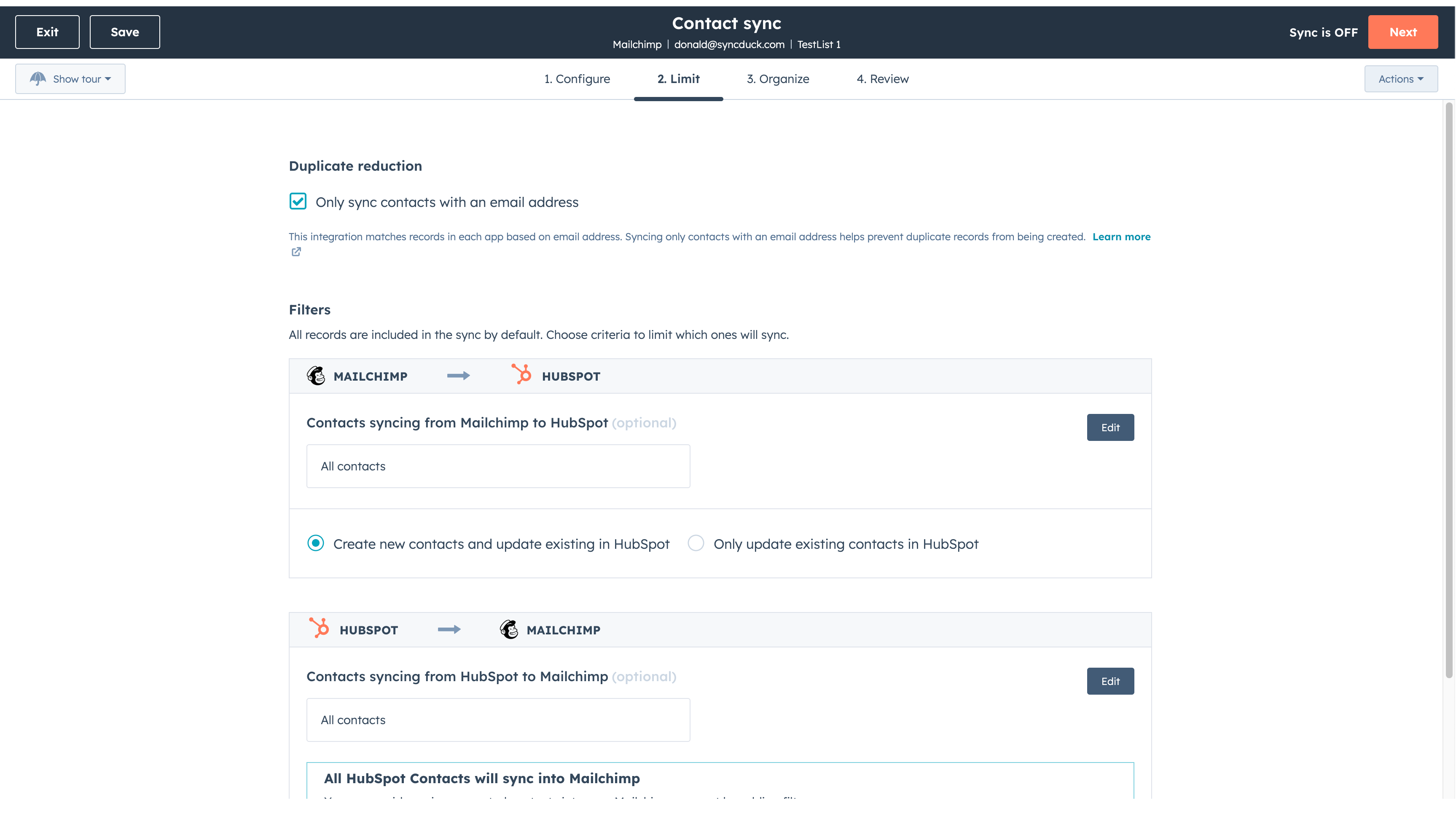
Sync Mailchimp and HubSpot in the background
Make manual data entry a thing of the past by syncing data (see below) between HubSpot and Mailchimp. When records are created or updated in either app, that information will be automatically shared with the other one. You can also add a filter for any Mailchimp field or HubSpot list to sync exactly what you want—and nothing you don’t.
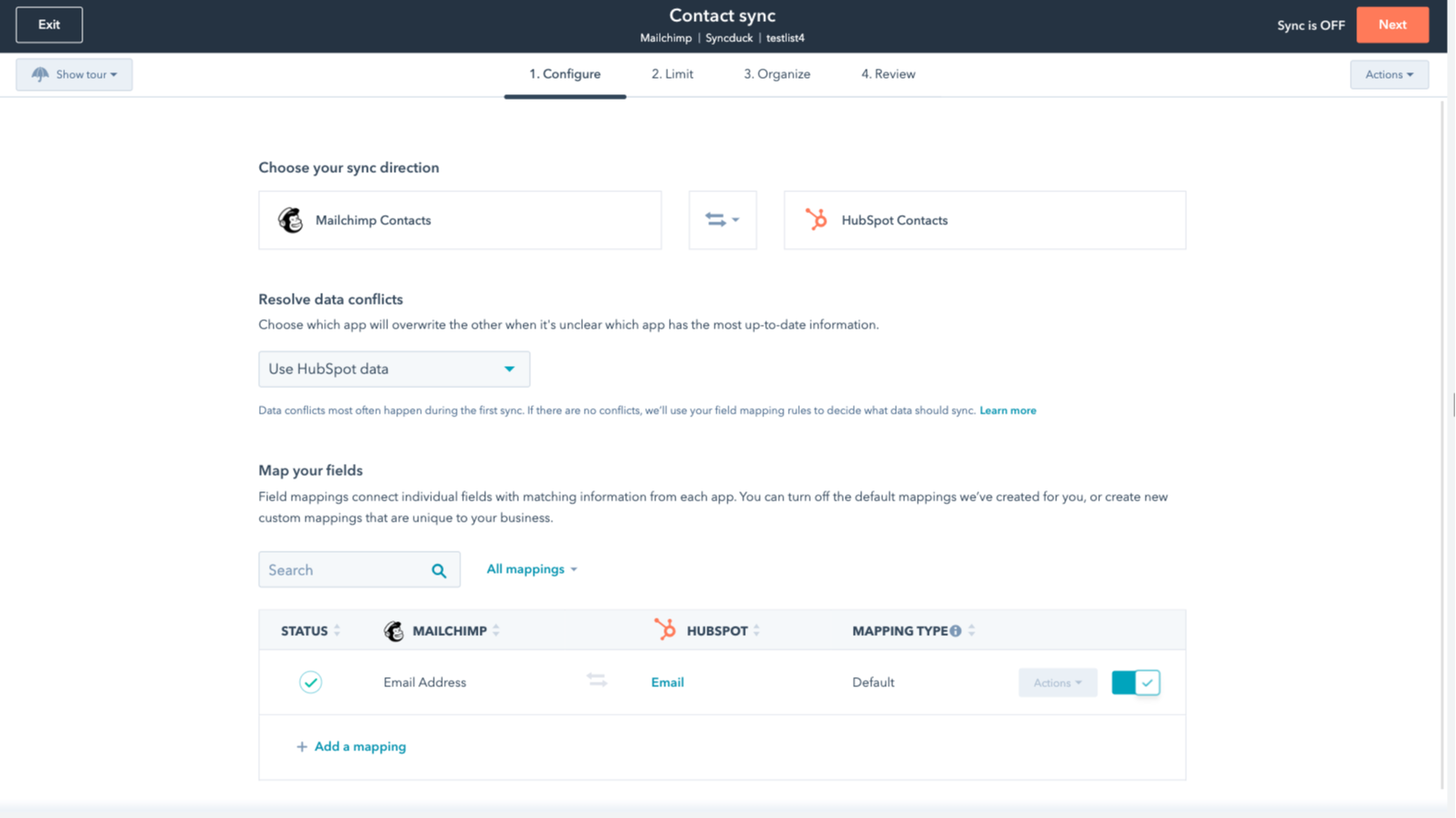
You’re in control of your data
You can set up a one- or two-way sync, which means you can either sync data from Mailchimp to HubSpot, from HubSpot to Mailchimp, or back-and-forth! IMPORTANT: This app requires Data Hub Starter or above.
Appfunktionalitet
Delte data
Each object has field mappings that connect matching information from each app.
The following will not sync: Groups, Tags, Email Opens/Clicks. As mentioned above, you can review and install the other Mailchimp integration here to sync additional data.
Note: You will need Data Hub Starter and up to use this app.
Contacts |
Anmeldelser
2,7
64
2,7
64
Integrationen begrænser feltmappingen ved kun at synkronisere e-mail-adresser uden navne eller tags, selvom nogle finder den indledende opsætning ligetil. Indstillingerne for tovejssynkronisering kan utilsigtet sammenlægge separate målgrupper, men nogle få brugere sætter pris på appen, fordi den sparer tid ved overførsel af almindelige kontaktoplysninger.
- 21. okt 2026
Sanchez, I.
- 15. jun 2026
Jeg kan varmt anbefale denne integration!
Det er meget nemt at sætte op, og jeg kan varmt anbefale det.
Du kan integrere kampagner og e-mail-marketingaktiviteter fra Mailchimp direkte i HubSpot via de tilgængelige apps.
Der er ikke mere at tilføje.
Mihajlovic, B.
Priser
Review Mailchimp's Pricing Page
0 US$
Use the 'See all pricing options' link on the righthand side
Make sure to confirm the HubSpot subscription and the Mailchimp subscription needed to install this integration
Note: "Free" is referring to the cost of the integration, not the app subscriptions
Review Mailchimp's Pricing Page
0 US$
Use the 'See all pricing options' link on the righthand side
Make sure to confirm the HubSpot subscription and the Mailchimp subscription needed to install this integration
Note: "Free" is referring to the cost of the integration, not the app subscriptions
* Priserne her er kun til visningsformål. Alle priser er ekskl. afgifter, incitamenter, rabatter eller andre prisvariabler. Du bør kontakte partneren for at få de mest ajourførte og korrekte prisoplysninger. HubSpot påtager sig intet ansvar for disse prisoplysninger, som leveres af vores partnere. Priser sidst opdateret: 22.01.2026