
StopWatch
Intuitive time tracking, managed entirely within HubSpot.
Créé par - Thread Integrations
Installation - 700+ installations
Évaluation - 3,6(10)
Exigences
Abonnement HubSpot Compatible avec tous les abonnements HubSpot En savoir plus Autorisations de compte HubSpot - Afficher les autorisations de compte requises
Abonnement à StopWatch - Abonnements : Free 🤗, Team 👥 ou Unlimited 💫
Vue d'ensemble
1/6 - StopWatch for HubSpot Demo Video - Demonstrating usage of the StopWatch App Card and Settings
⭐️⭐️⭐️⭐️⭐️ "Easy to use, cost effective" K. Kiryshin
⭐️⭐️⭐️⭐️⭐️ "A viable solution for time tracking in HubSpot" A. Lupori
⭐️⭐️⭐️⭐️⭐️ "Simple and effective" M. Jiran
⭐️⭐️⭐️⭐️⭐️ "Gain extra insights into the way staff spend their time" A. Baillie
⭐️⭐️⭐️⭐️⭐️ "Fool proof" S. Bakker
💥 14 Day Free Trial: Simply install the app and enjoy complimentary access to all app features for 14 days (limited to 1 redemption per HubSpot Portal)
StopWatch for HubSpot is a simple, intuitive time tracking app designed specifically for HubSpot. We're the only dedicated time tracking solution on the market that's certified by HubSpot. All logged time is stored directly within HubSpot as "StopWatch Time Log" records.
Using the app's "StopWatch" feature (available as an App Card within the right sidebar on select HubSpot CRM records), your team can easily track time spent against HubSpot Contacts, Companies, Deals, Tickets, Services, Appointments, Listings & Courses (tracking time against Custom Objects is also available via special request).
💫 Unlimited subscribers also get access to custom workflow actions, enabling you to start and stop flexible workflow-based timers (1,000 requests per day). This makes it possible, for example, to track the time an individual CRM record spends in a specific stage (e.g. Deal Stage, Contact Lifecycle, Ticket Status). You can even choose to exclude out of office hours from these time tracking calculations.
Designed for teams and businesses wanting an intuitive time tracking solution, deeply embedded within HubSpot CRM. Leverage HubSpot's powerful reporting and automation tools, with your team's Time Logs on centre stage.
Fonctionnalités
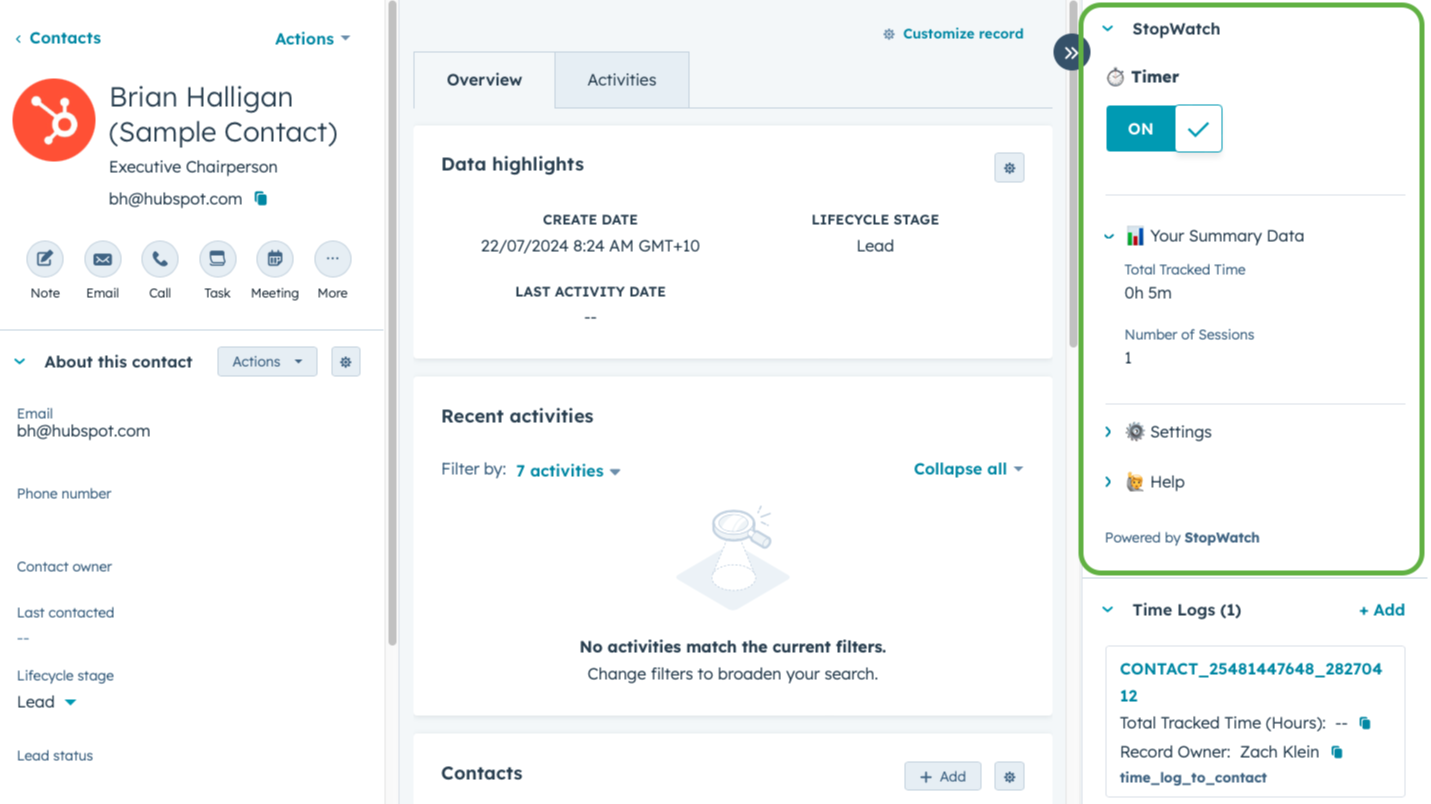
⏱️ Track Time Spent Against HubSpot CRM Records
Need to keep track of how much time your team is spending on target accounts, customer service enquiries or sales opportunities? StopWatch for HubSpot enables single-click time tracking functionality for your entire team, directly within HubSpot CRM. It's even possible to differentiate between "Billable" and "Total" Time Tracked.
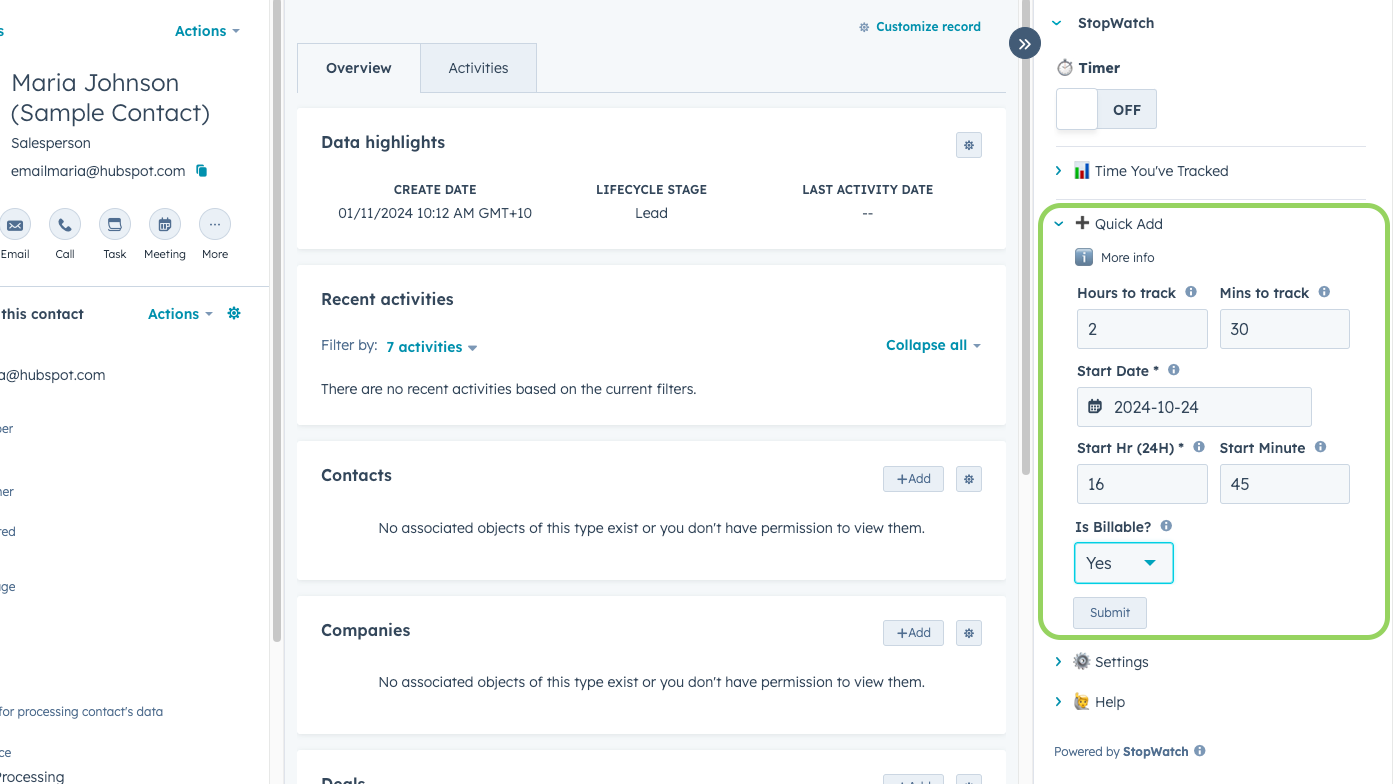
➕ 'Quick Add' Time Tracking Sessions
Prefer logging your tracked time in batches (for example, at the end of your work day)? Or maybe you occasionally forget to track your time as you're working on something? StopWatch solves for these common use cases by offering the ability to manually 'Quick Add' time tracking sessions ('Simple' and 'Detailed' editing modes available).
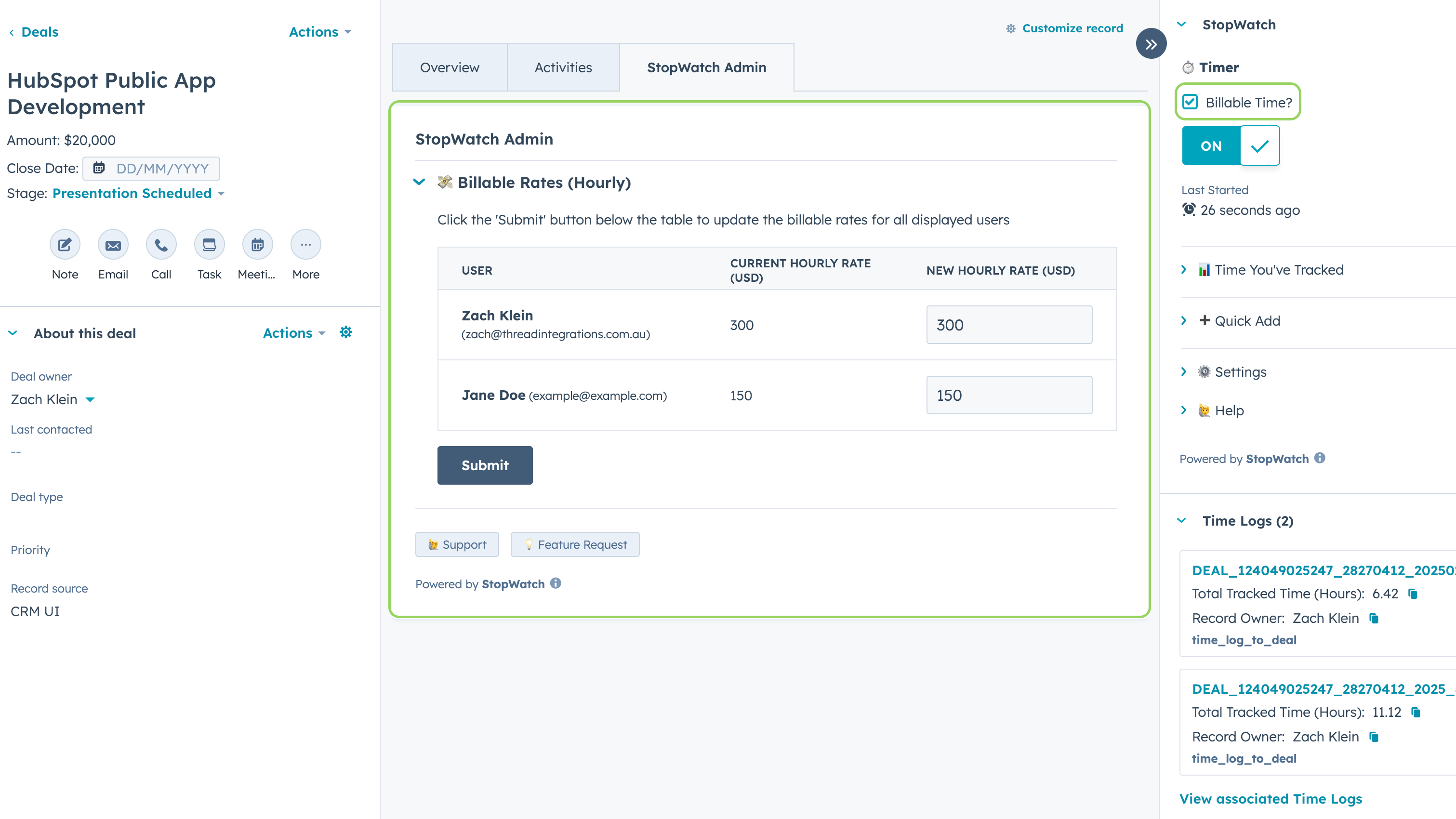
💸 Automatically Calculate Billings Based on Tracked Time
The "Billable Amount" Time Log property is automatically populated based on Billable Rates (specified per HubSpot User) set by an Admin user. This is designed to help you when it comes time to invoicing for "Billable" time tracked via the StopWatch App Card. Please note, this is available to StopWatch for HubSpot "💫 Unlimited" subscribers only.
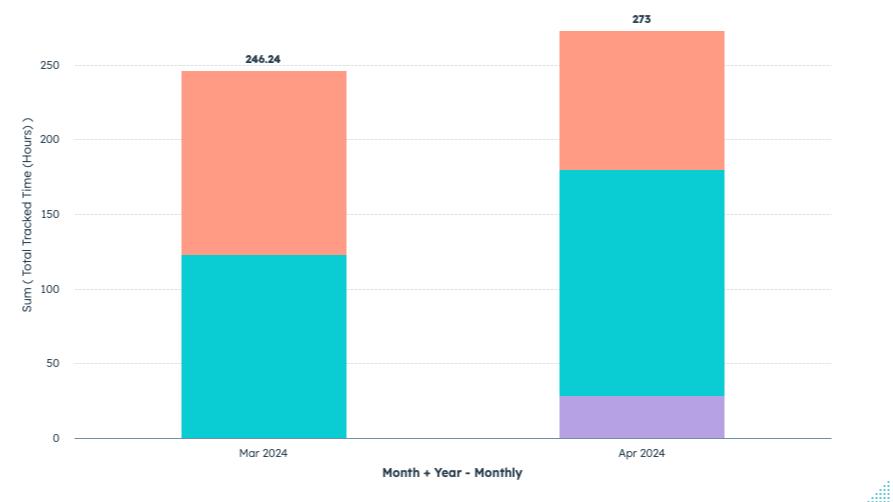
📊 Analyse How Your Team Spends Their Time Within HubSpot
Leverage HubSpot reporting tools to analyse your team's time tracking data. Be as granular as understanding how much time an individual team member actually spent on resolving a customer service ticket, or as big picture as analysing how an entire sales team has been managing their time across target industries. *Requires HubSpot Custom Reports.
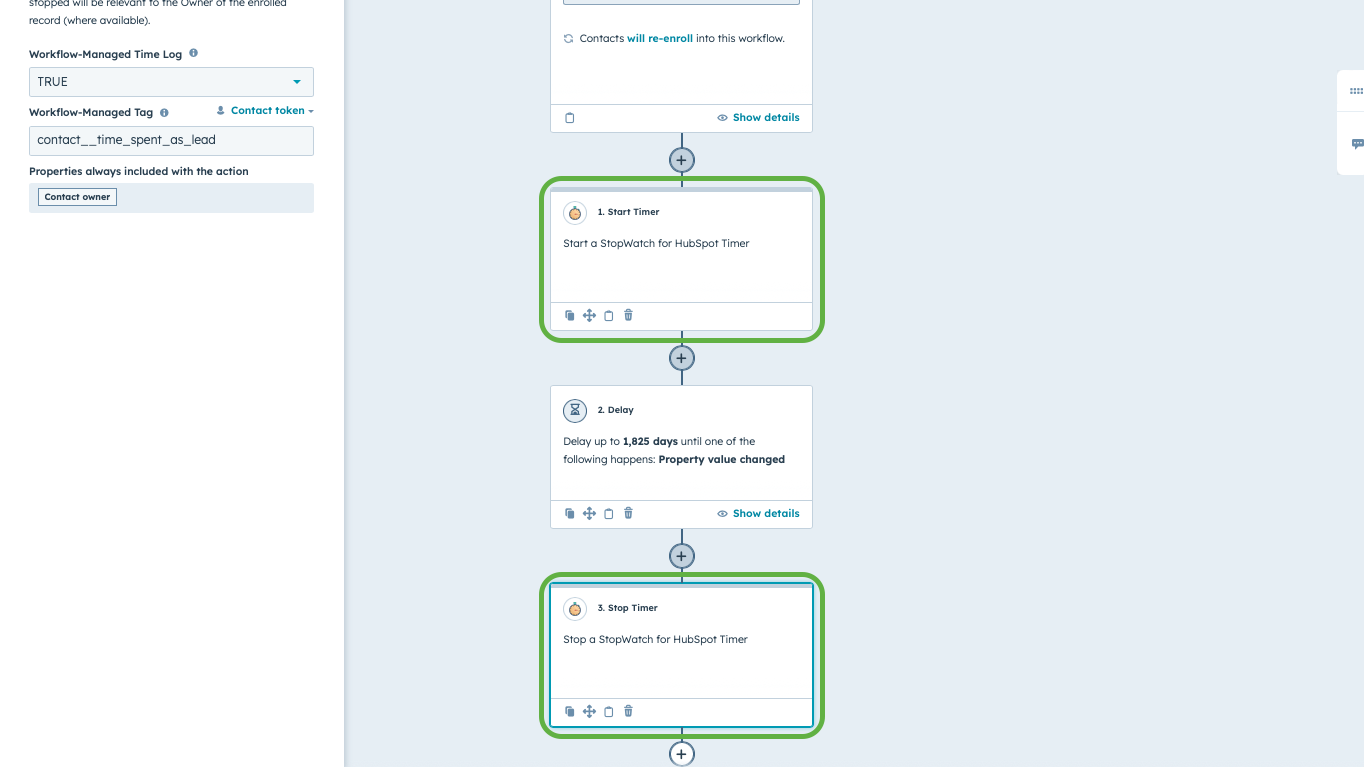
⚡ Start & Stop Timers Using HubSpot Workflows
Start & stop flexible timers via HubSpot Workflows. Track the time an individual CRM record spends in a specific pipeline stage, incl. or excl. out of office hours. Please note, this feature is for "💫 Unlimited" subscribers only and requires access to HubSpot Workflows. By default, capped at 1K requests per day (can be increased on request).

🖥️ StopWatch for HubSpot Web
Need to submit time tracking sessions on your mobile device? "Unlimited" subscribers can use StopWatch for HubSpot Web to track time via our web interface. Simply log in via our app homepage, search for the HubSpot CRM record you'd like to track time against and submit a time tracking session.
Fonctionnalité de l'application
Time Logs | ||
Time Logs | Stopwatch time logs Stopwatch time logs |
All data managed by this app is stored exclusively in HubSpot (as "Time Log" records).
This helps your team stay focused on their goal within HubSpot, reducing the need to switch between multiple apps.
Avis
3,6
10
3,6
10
- 31 oct. 2025
Grandement améliorée, ce qui en fait une solution viable de suivi du temps pour HubSpot avec une excellente intégration Services / Projets
L'application s'est beaucoup améliorée depuis la dernière fois que je l'ai utilisée. Grâce aux cartes d'application dans HubSpot et au travail acharné de Zach, c'est maintenant une solution viable pour le suivi du temps dans HubSpot.
L'application fonctionne très bien avec l'objet Services, ce qui permet de suivre le temps consacré aux engagements avec les clients. Dès que HubSpot rendra les extensions de l'interface utilisateur disponibles pour l'objet Projets, elle deviendra également un outil de gestion de projet interne viable. Les feuilles de temps sont faciles à créer via des rapports personnalisés.
Il s'agit plus d'une préférence personnelle que d'une nécessité, mais il aurait été agréable de voir les journaux de temps comme des événements d'application afin qu'ils s'affichent dans la chronologie de l'activité. Il serait utile de faire défiler la chronologie et de voir qui a travaillé sur quoi au fil du temps.
Lupori, A.
- 16 déc. 2024
Stopwatch for Project Time Reporting
Stopwatch has allowed us to gain extra insights into the way staff spend their time
Transparency on where time is spent in a deal
Having to manually stop and start the timer
Baillie, A.
Tarification
Free 🤗
0 $US
For Small Teams or UAT / Test Accounts
Free of charge (optional contributions welcome)
Up to 3 nominated users
No user rotation (i.e. once users are nominated, they cannot be changed)
Free 🤗
0 $US
For Small Teams or UAT / Test Accounts
Free of charge (optional contributions welcome)
Up to 3 nominated users
No user rotation (i.e. once users are nominated, they cannot be changed)
* Les prix mentionnés ici sont uniquement présentés à titre indicatif. Tous les prix n'incluent pas les taxes, les offres spéciales, les réductions ni les autres facteurs pouvant affecter les tarifs. Vous devez contacter le partenaire pour obtenir les tarifs les plus récents. HubSpot n'assume aucune responsabilité pour les informations de tarification fournies par ses partenaires. Dernière mise à jour des prix : 11/11/2025
Informations supplémentaires
Créé par - Thread Integrations
Installation - 700+ installations
Catégories Langues dans lesquelles cette application est disponible Anglais
Les plus populaires

Gmail
Intégrez HubSpot à votre boîte de réception grâce à l'intégration…

Google Calendar
Réservez des réunions rapidement et facilement avec HubSpot et Google…
