
StopWatch
Built by - Thread Integrations
Installs - 900+ installs
Rating 3.8
(12)

Leading
Requirements
HubSpot Plan HubSpot Account permissions - View the required account permissions
Access Type Shared StopWatch Subscription - Free 🤗, Team 👥, or Unlimited 💫 plans
Overview
1/8 - StopWatch for HubSpot Demo Video - Demonstrating usage of the StopWatch App Card and Settings
⭐️⭐️⭐️⭐️⭐️ "A viable solution for time tracking in HubSpot" A. Lupori
⭐️⭐️⭐️⭐️⭐️ "Easy to use, cost effective" K. Kiryshin
⭐️⭐️⭐️⭐️⭐️ "Simple and effective" M. Jiran
⭐️⭐️⭐️⭐️⭐️ "Incredibly helpful business tool with responsive developer support" D Zingleman
⭐️⭐️⭐️⭐️⭐️ "Fool proof" S. Bakker
💥 14 Day Free Trial: Simply install the app and enjoy free access to all app features for 14 days (limited to 1 redemption per HubSpot Portal)
StopWatch for HubSpot is a simple, intuitive time tracking app designed specifically for HubSpot. We're the only dedicated time-tracking solution on the market certified by HubSpot. All logged time is stored directly within HubSpot as "Time Log" records.
Using the app's "StopWatch" App Card, your team can easily track time spent against HubSpot Contacts, Companies, Deals, Tickets, Projects, Services, Appointments, Listings & Courses (and Custom Objects by special request), as well as CRM Engagements (including Tasks, Meetings and Calls).
👥 Team subscribers also get access to:
1 Time Log Per Session, enabling powerful time tracking session segmentation, including custom categorisation, titles and descriptions.
Associate Engagements, making it possible to associate your time tracking sessions with HubSpot Engagements, including Tasks, Calls and Meetings.
App Events for Time Tracking Sessions, enabling you to trigger HubSpot Workflows based on time tracking session submissions, as well as additional HubSpot Reporting capabilities.
💫 Unlimited subscribers also get access to:
All features available to 👥 Team subscribers.
Custom workflow actions, enabling you to start and stop flexible workflow-based timers (1,000 requests per day). This makes it possible, for example, to track how long an individual CRM record spends in a specific stage (e.g., Deal Stage, Contact Lifecycle, Ticket Status). You can even choose to exclude out-of-office hours from these time tracking calculations.
Automatically Calculated Billings, streamlining your time-sheet-to-invoice processes.
Web UI, making it possible to track time against HubSpot CRM records wherever you can access a web browser. Great for teams who aren't tied to their desks.
StopWatch API, giving you programmatic access to your time tracking data.
Webhooks, making it possible to build push-based integrations relating to your time tracking sessions
Designed for teams and businesses wanting an intuitive time tracking solution, deeply embedded within HubSpot CRM. Leverage HubSpot's powerful reporting and automation tools, with your team's Time Logs on centre stage.
Features
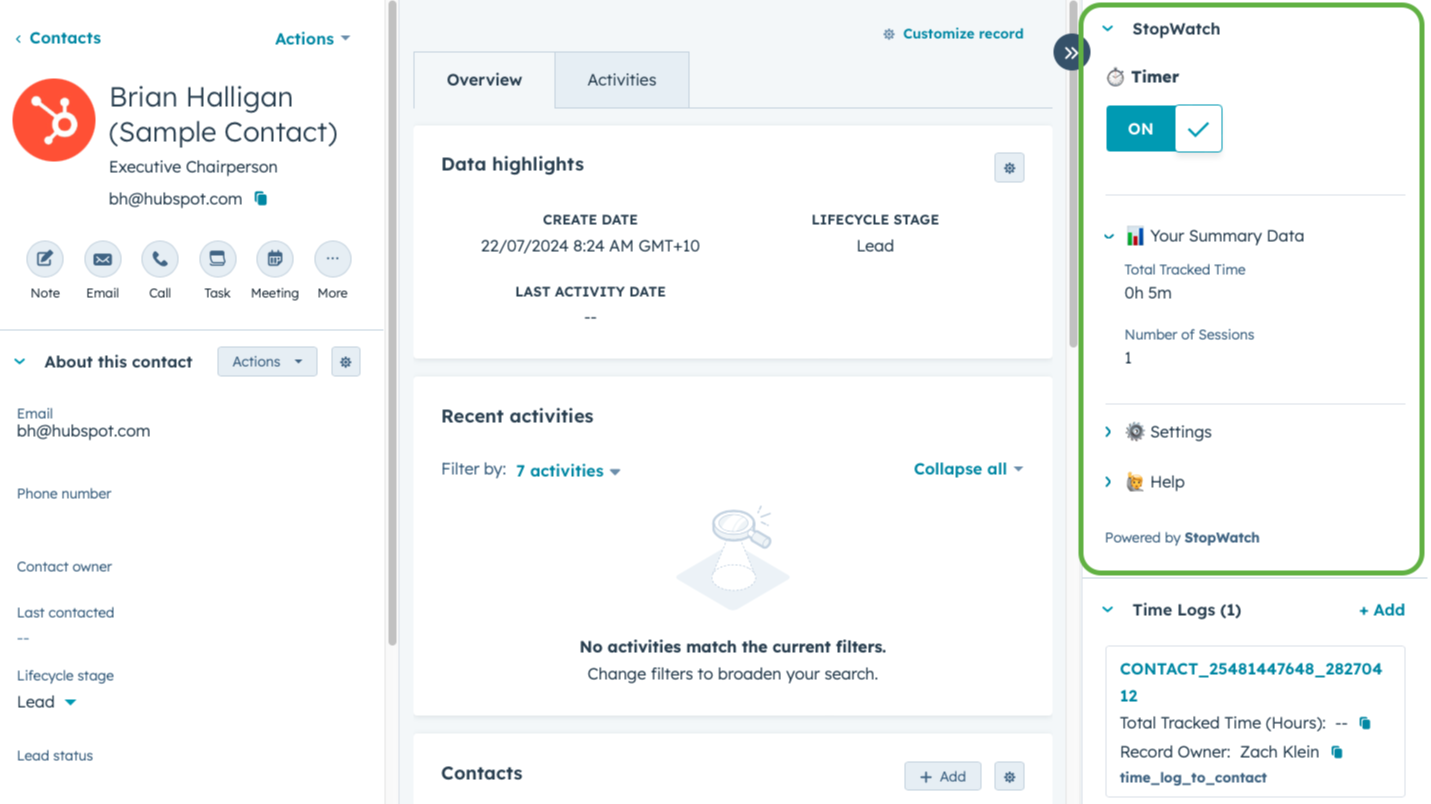
⏱️ Track Time Spent Against HubSpot CRM Records
Need to keep track of how much time your team is spending on target accounts, customer service enquiries or sales opportunities? StopWatch for HubSpot enables single-click time tracking functionality for your entire team, directly within HubSpot CRM. It's even possible to differentiate between "Billable" and "Total" Time Tracked.
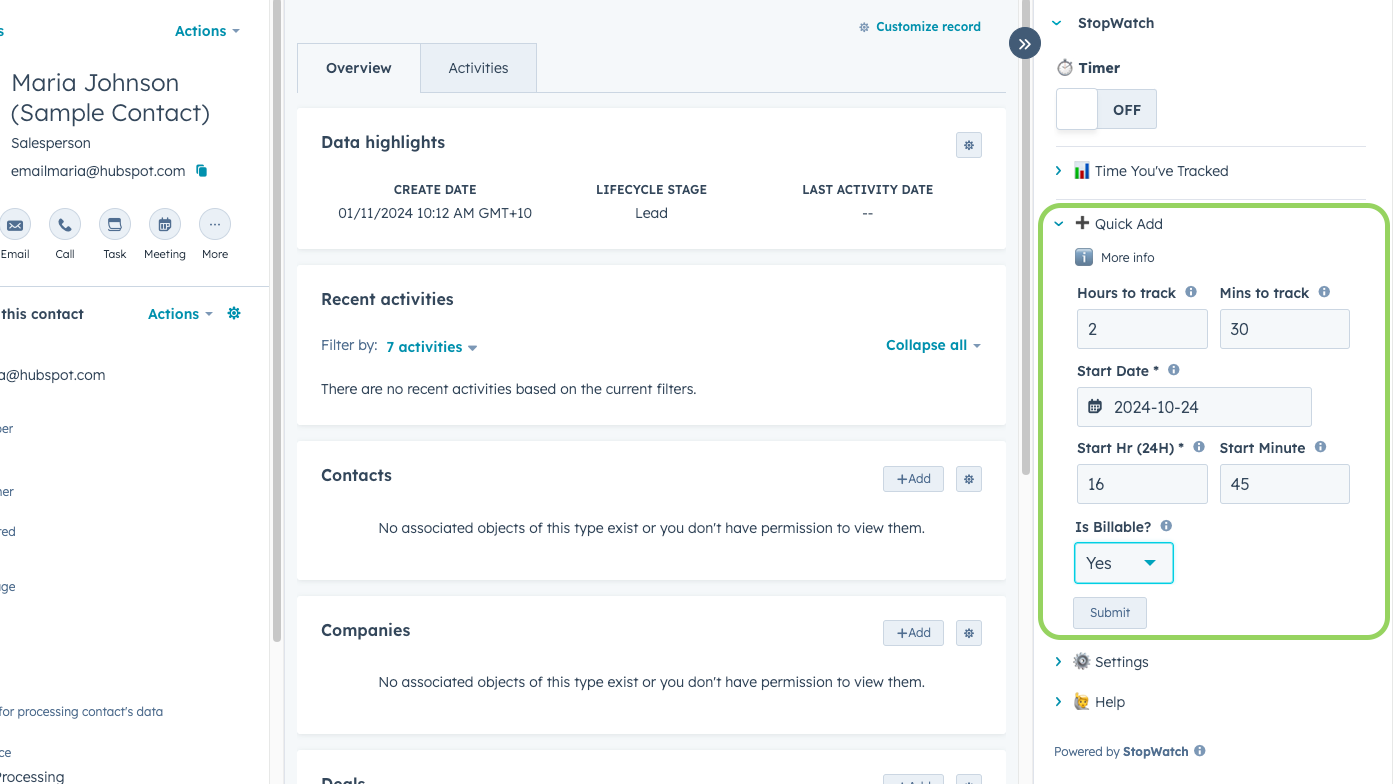
➕ 'Quick Add' Time Tracking Sessions
Prefer logging your tracked time in batches (for example, at the end of your work day)? Or maybe you occasionally forget to track your time as you're working on something? StopWatch solves for these common use cases by offering the ability to manually 'Quick Add' time tracking sessions ('Simple' and 'Detailed' editing modes available).
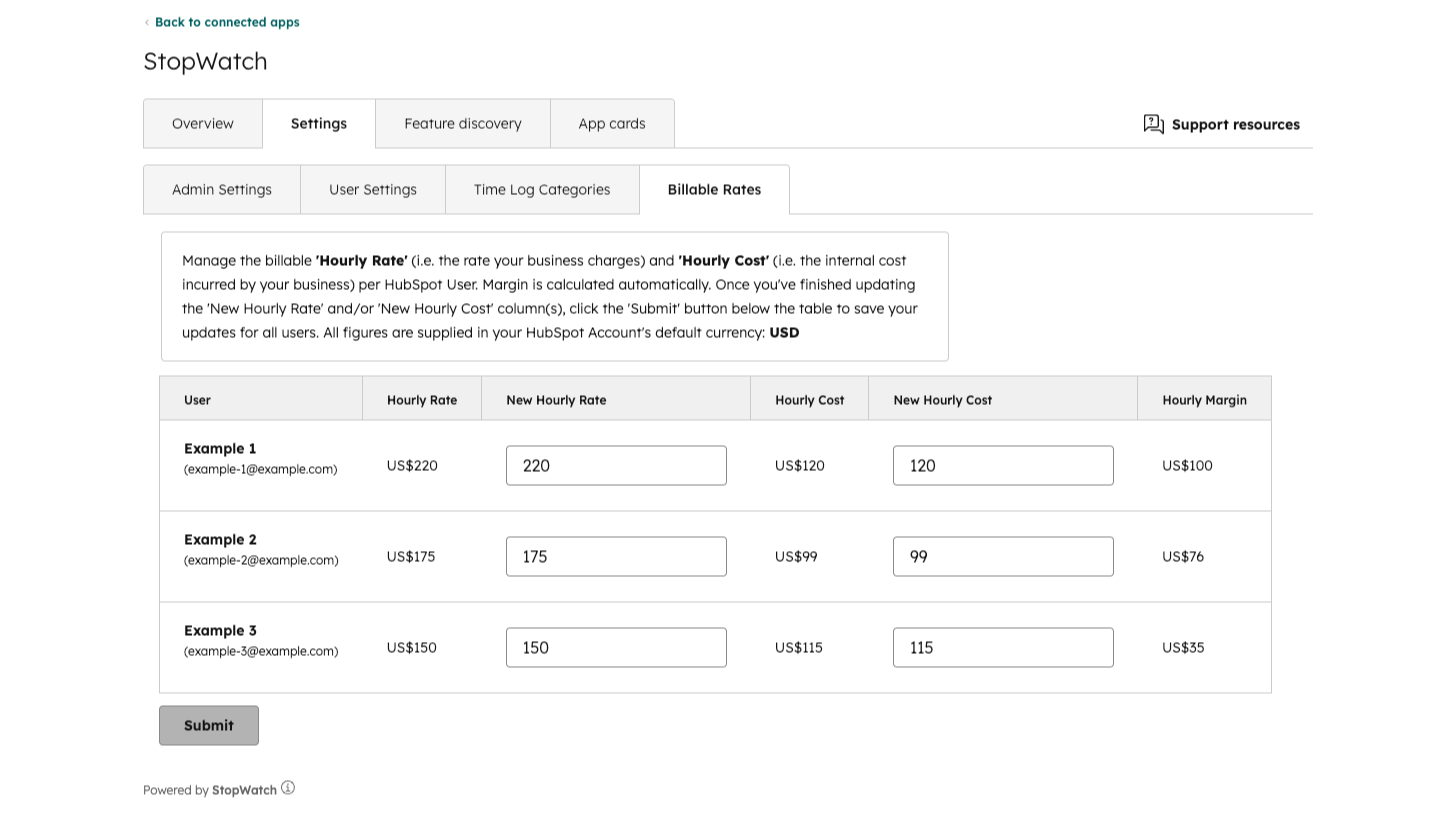
💸 Automatically Calculate Billings Based on Tracked Time
The "Billable Amount", "Cost Amount" and "Margin Amount" Time Log properties are automatically populated based on your configured Billable Rates settings. Designed to support common invoicing and workforce profitability use cases. Please note, this feature is available to StopWatch for HubSpot "💫 Unlimited" subscribers only.
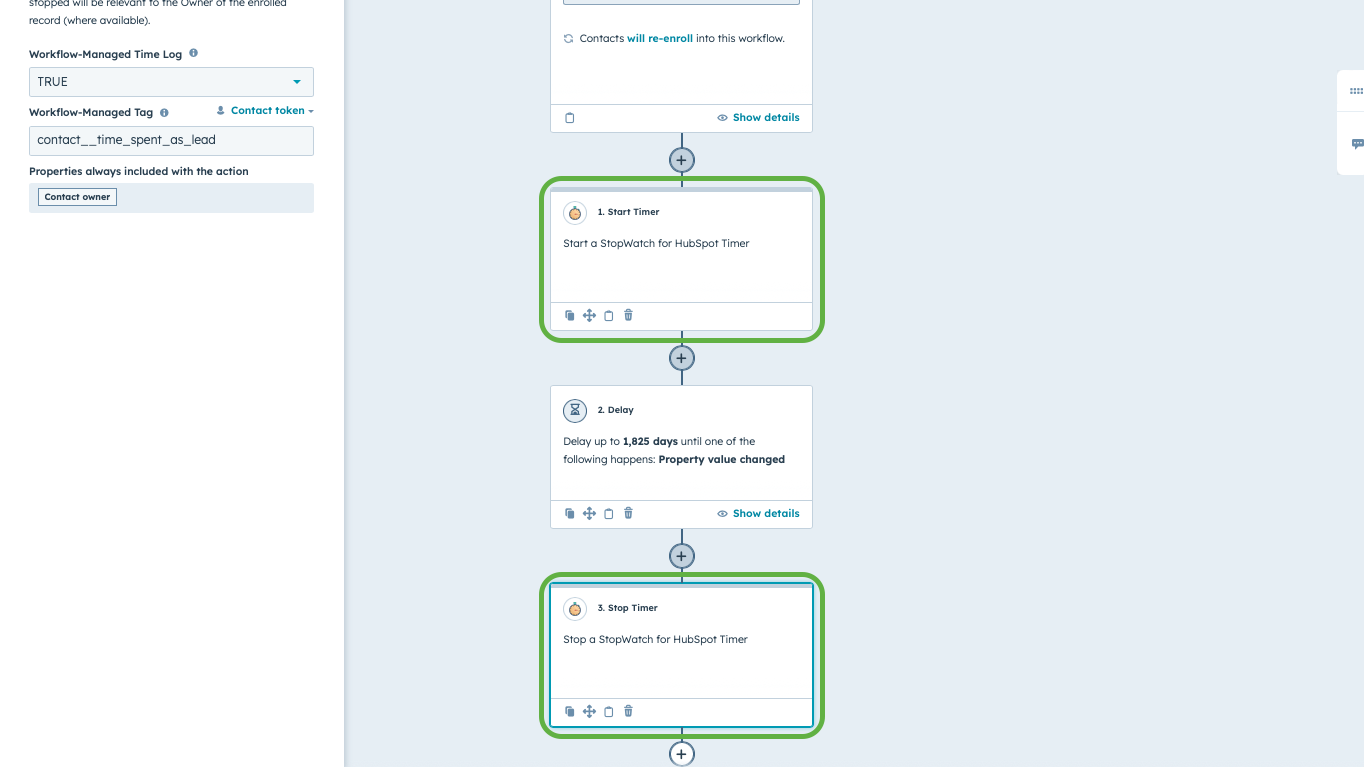
⚡ Start & Stop Timers Using HubSpot Workflows
Start & stop flexible timers via HubSpot Workflows. Track the time an individual CRM record spends in a specific pipeline stage, incl. or excl. out of office hours. Please note, this feature is for "💫 Unlimited" subscribers only and requires access to HubSpot Workflows. By default, capped at 1K requests per day (can be increased on request).
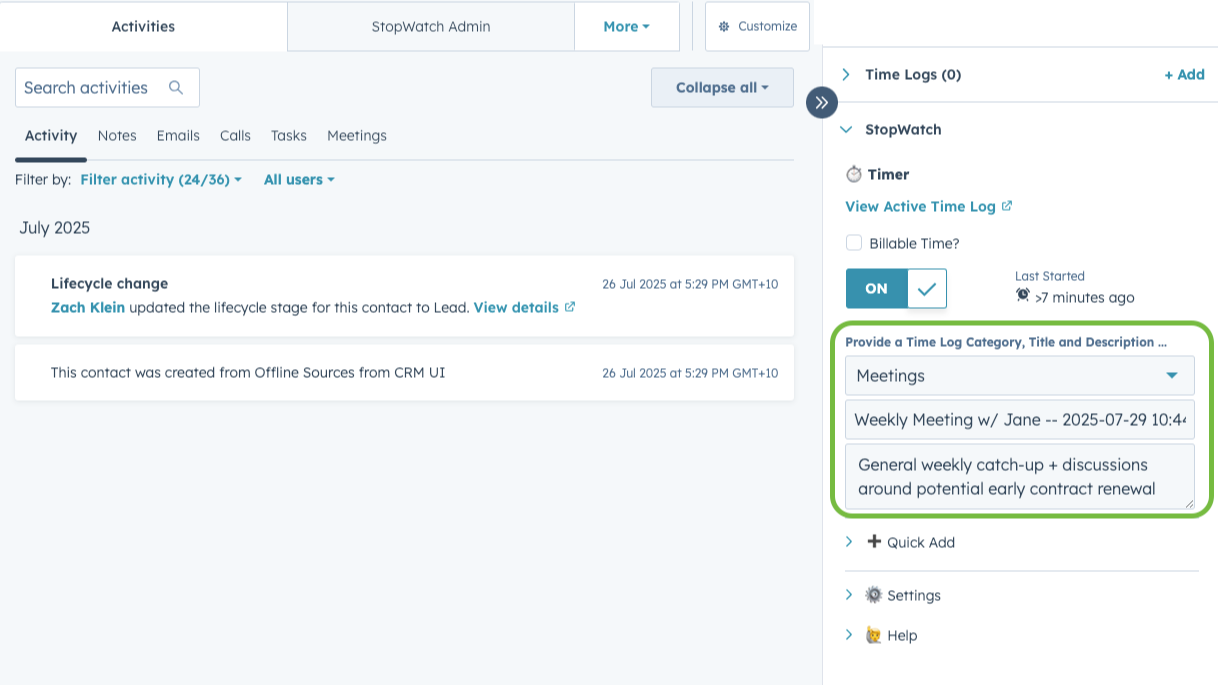
1️⃣ Power-up your Time Log segmentation with '1 Time Log Per Session'
Add a "Category", "Title" & "Description" to your Time Logs for improved segmentation capabilities. With this user-specific setting enabled, each submitted time tracking session is represented as a single Time Log. Time Log Categories are customisable. Please note, this feature is for "👥 Team" and "💫 Unlimited" subscribers only.

🖥️ StopWatch for HubSpot Web
Need to track time against HubSpot CRM records when you're on the run? "💫 Unlimited" subscribers can use StopWatch for HubSpot Web to track time via our web interface (accessible via web browser). Simply log in via our app homepage, search for the HubSpot CRM record you'd like to track time against and submit a time tracking session.
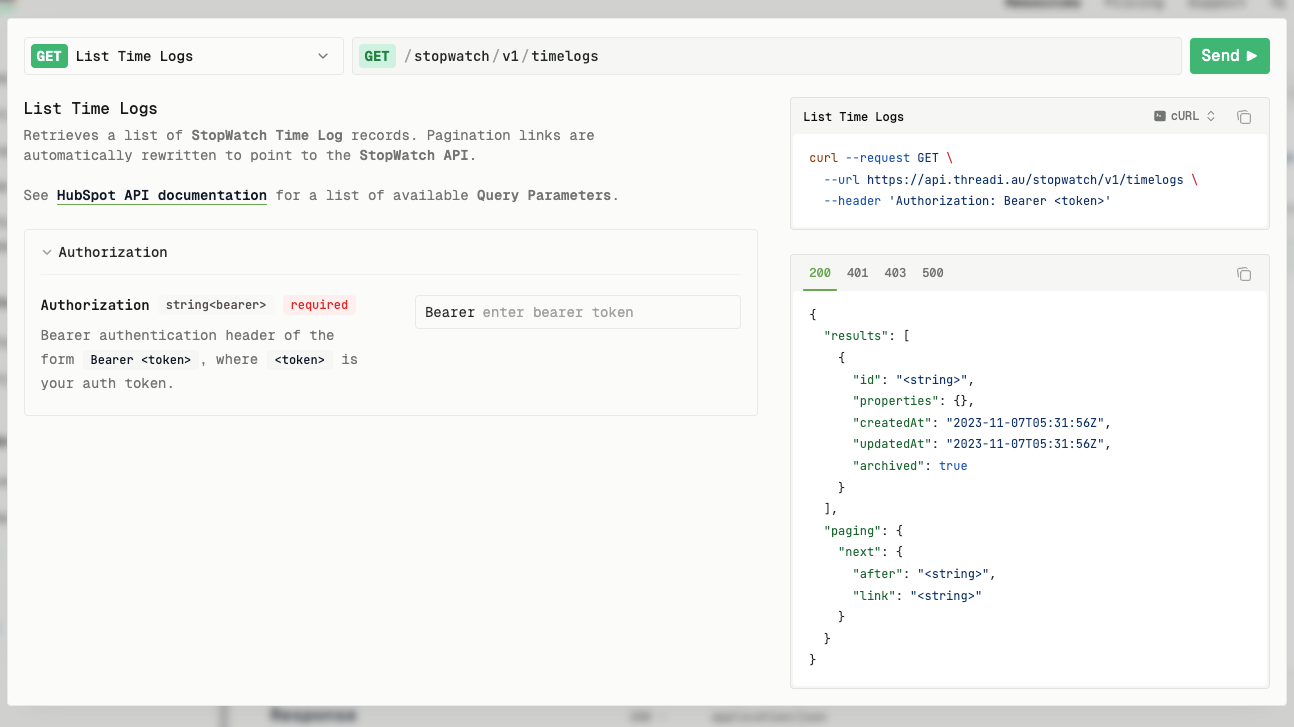
🧩 StopWatch API
The StopWatch API acts as a secure authentication wrapper for specific HubSpot CRM Objects and Properties APIs, relevant to the StopWatch for HubSpot app. It is specifically designed to allow programmatic read-only access to StopWatch Time Log records and properties. Please note, this feature is for "💫 Unlimited" subscribers only.
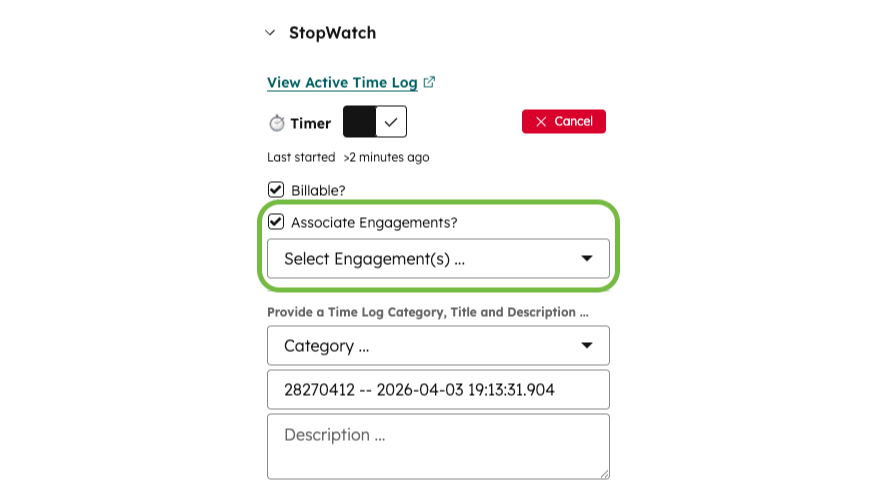
📝 Associate Engagements
Unlock powerful reporting and automation capabilities by enabling selective associations between Time Logs and specific HubSpot Engagements. For example, build custom reports to analyse your time spent on specific Tasks, Meetings and Calls. Available to our 👥 Team and 💫 Unlimited subscribers.
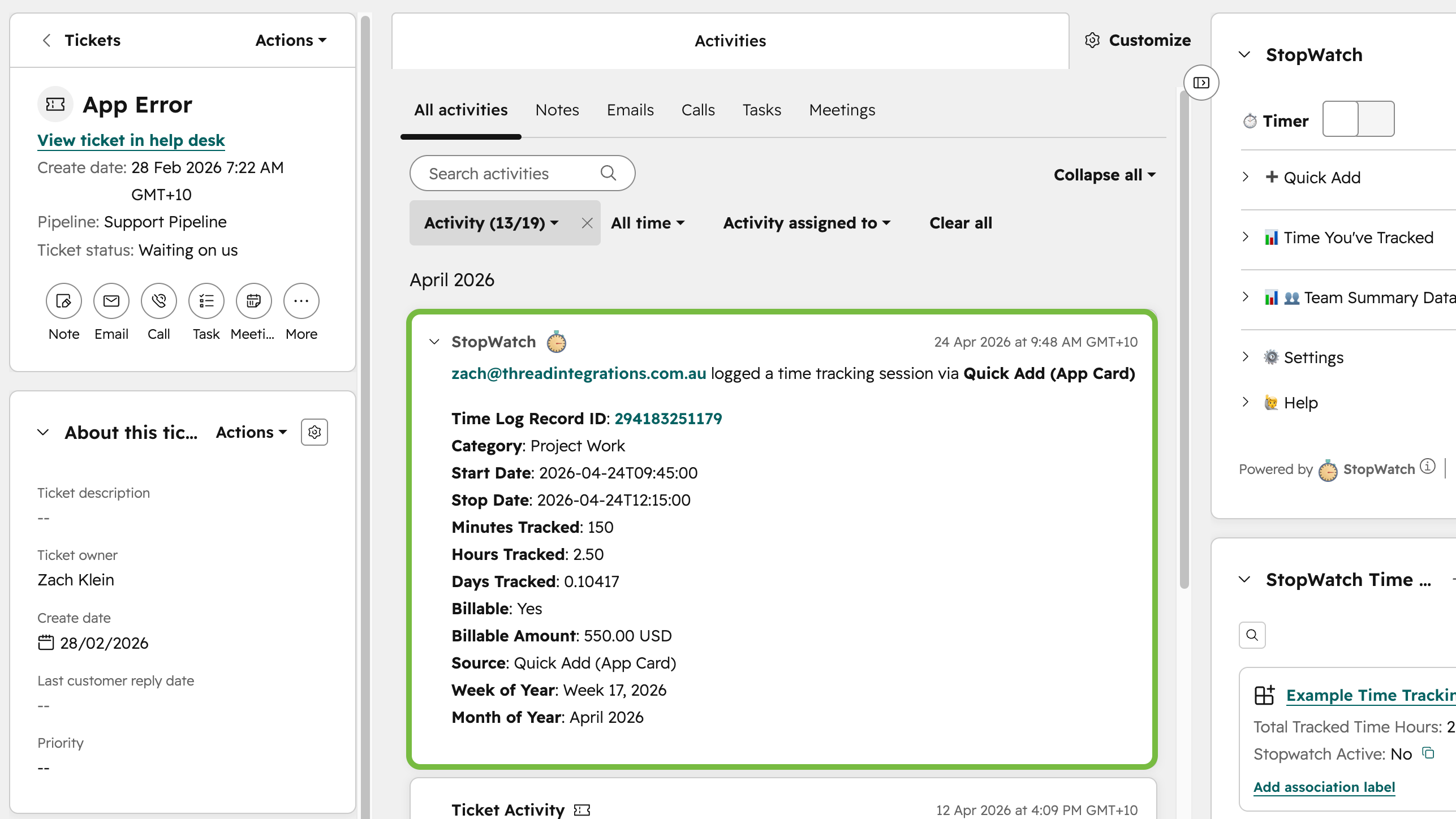
▶️ App Events for Time Tracking Sessions
When enabled, App Events are logged within the relevant HubSpot CRM record’s activity timeline for each submitted time tracking session. This makes it possible to build HubSpot Workflows and Custom Reports based on the submission of individual time tracking sessions.
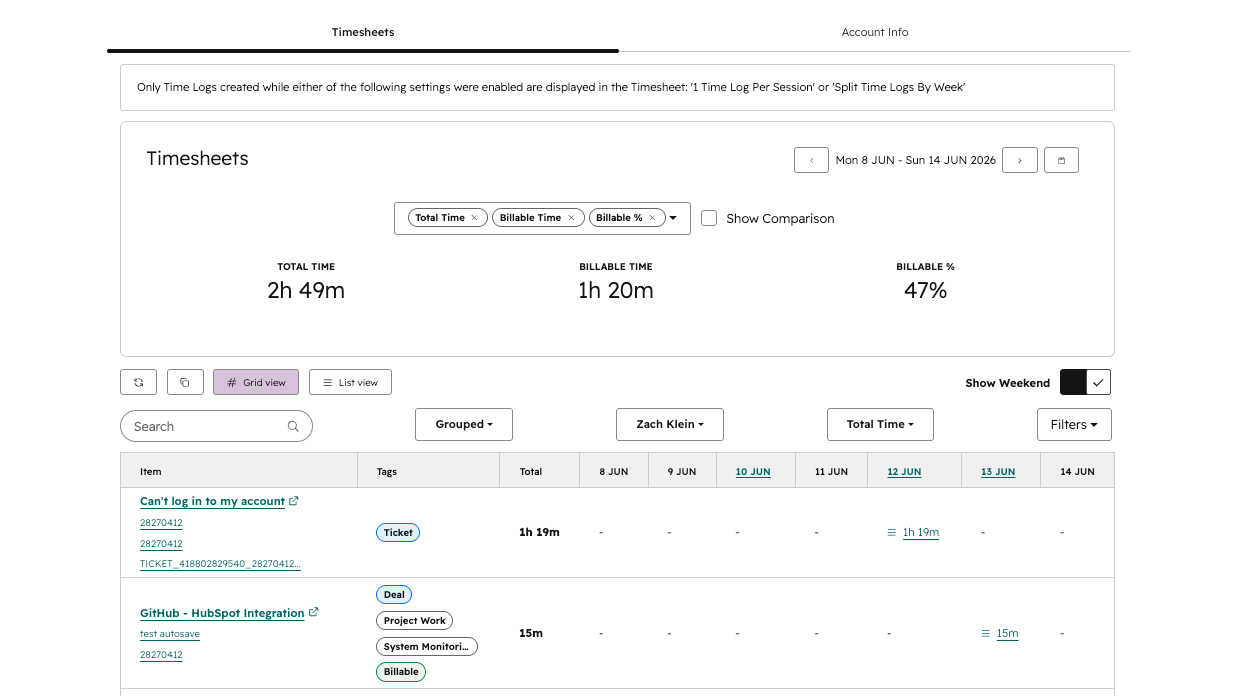
📋 Timesheets
Our Timesheets feature helps you quickly review and manage tracked time without having to create reports or jump between CRM record views. Spot missing or incorrect time tracking sessions, focus on a specific day or week, and segment your time tracking data for common reporting, invoicing, and team workload analysis use cases.
App Functionality
Time Logs | ||
Time Logs | Stopwatch time logs Stopwatch time logs | |
Time Logs | ||
Time Logs | ||
Time Logs | ||
Time Logs | ||
Time Logs | ||
Time Logs | ||
Time Logs | ||
Time Logs |
All data managed by this app is stored exclusively in HubSpot (as "Time Log" records).
This helps your team stay focused on their work within HubSpot, reducing the need to switch between multiple apps.
Reviews
3.8
12
3.8
12
- Jul 2, 2026
Wroks Great
Developer reached out and helped me get this set up properly after having a few issues. Quick response and very helpful. Wroks great.
Rosmarin, N.
- Dec 11, 2025
Incredibly helpful business tool with responsive developer support
Stopwatch has been incredibly helpful for our business, covering an essential need for our system - time tracking - that HubSpot does not cover, and you can associate time records with a variety of objects. Developer has been incredibly responsive to emails and input.
Simple implementation and easy reporting. The developers have continued adding features over time.
Can feel mildly clunky to use due to HubSpot restrictions on application GUIs, but even that has gotten better over time. Some properties populate by default whereas other require specific app settings to populate.
ZINGLEMAN, D.
Pricing
Free 🤗
$0
For Small Teams or UAT / Test Accounts
Free of charge
Up to 3 nominated users
No nominated user rotation
Free 🤗
$0
For Small Teams or UAT / Test Accounts
Free of charge
Up to 3 nominated users
No nominated user rotation
* The pricing here is for display purposes only. All prices do not include taxes, incentives, discounts, or other pricing variables. You should contact the partner for the most up to date and correct pricing information. HubSpot does not take any responsibility for this pricing information, which is provided by our partners. Pricing last updated: 07/16/2026
More info
Built by - Thread Integrations
Installs - 900+ installs
Categories Languages this app is available in English