

Microsoft Teams
Use Microsoft Teams and HubSpot for meetings, conversations, and more!
Requisitos
Plano da HubSpot Permissões da conta da HubSpot Nenhuma permissão necessária Tipo de acesso Shared Assinatura Microsoft Teams - Free (no commitment), Microsoft 365 Business Basic, Microsoft 365 Business Standard ou Office 365 E3 planos
Visão geral
1/8
Sales, marketing, and services are all about building relationships -- but it can be difficult to form those relationships when a rep spends precious time completing menial tasks. In fact, a report from HubSpot Research found that sales reps spend up to a quarter of their day on tasks like writing emails and data entry.
Software should exist to help minimize that time spent, not create extra steps. HubSpot's integration for Microsoft Teams aims to do just that.
Integrate with HubSpot Meeting Scheduler
Automatically send dial-in and conference call details to your HubSpot prospects. Turn every meeting booked in your HubSpot CRM into a Microsoft Teams meeting.
Sync Microsoft Teams Meeting Recordings and Transcripts to HubSpot
Unify your meeting data in HubSpot through Microsoft Teams meeting recording and transcript sync to HubSpot for coaching and analysis.
Share Notifications
Stay connected to activities in your HubSpot CRM by receiving notifications for chats, reminders, mentions, form submissions, and more within Microsoft Teams. You can even create specialized workflows within HubSpot to customize your notifications.
Manage Conversations
Recieve and reply to your conversation inbox messages from HubSpot directly in your Microsoft Teams channels
Automate with Workflows
Use HubSpot workflows to customize notifications and create new channels in Microsoft Teams.
Create Tasks and Tickets
Stay on top of your work by quickly creating a HubSpot task or ticket right from a Microsoft Teams message.
Associate HubSpot Deals and Companies with Microsoft Teams Channels
Connect Microsoft Teams channels to HubSpot company and deal records to sync activity updates and keep your team in the loop
Have feedback about this integration? Please use this form to submit any suggestions, requests or ideas.
Recursos
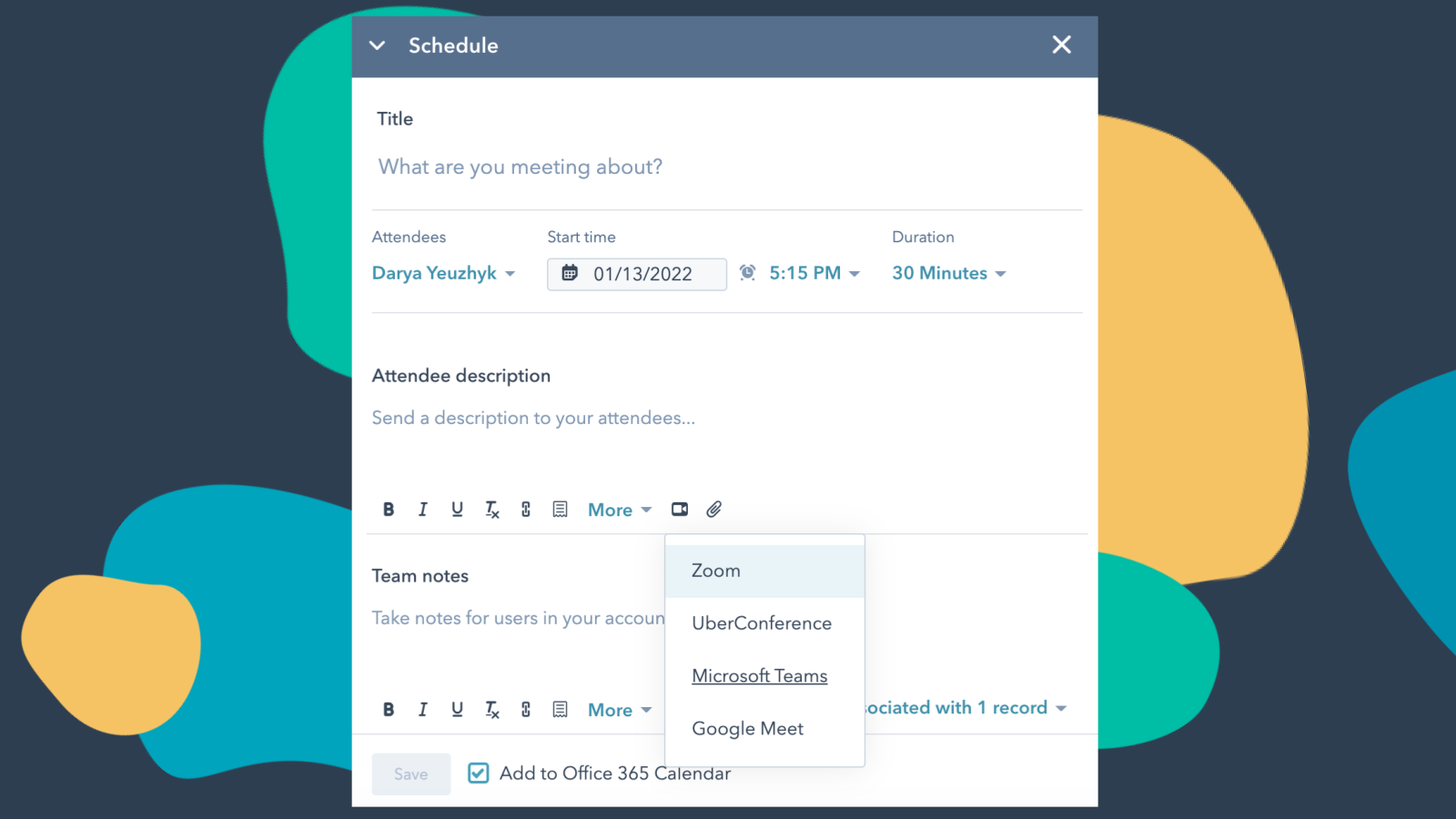
Integrate Microsoft Teams with HubSpot Meetings
Want to check in on a lead or a customer? As a sales or service rep -- there's nothing better than a quick chat over video to get a pulse on what your lead or customer needs from you to succeed. Easily schedule a Microsoft Teams meeting from any contact record to get your video chat on the books.
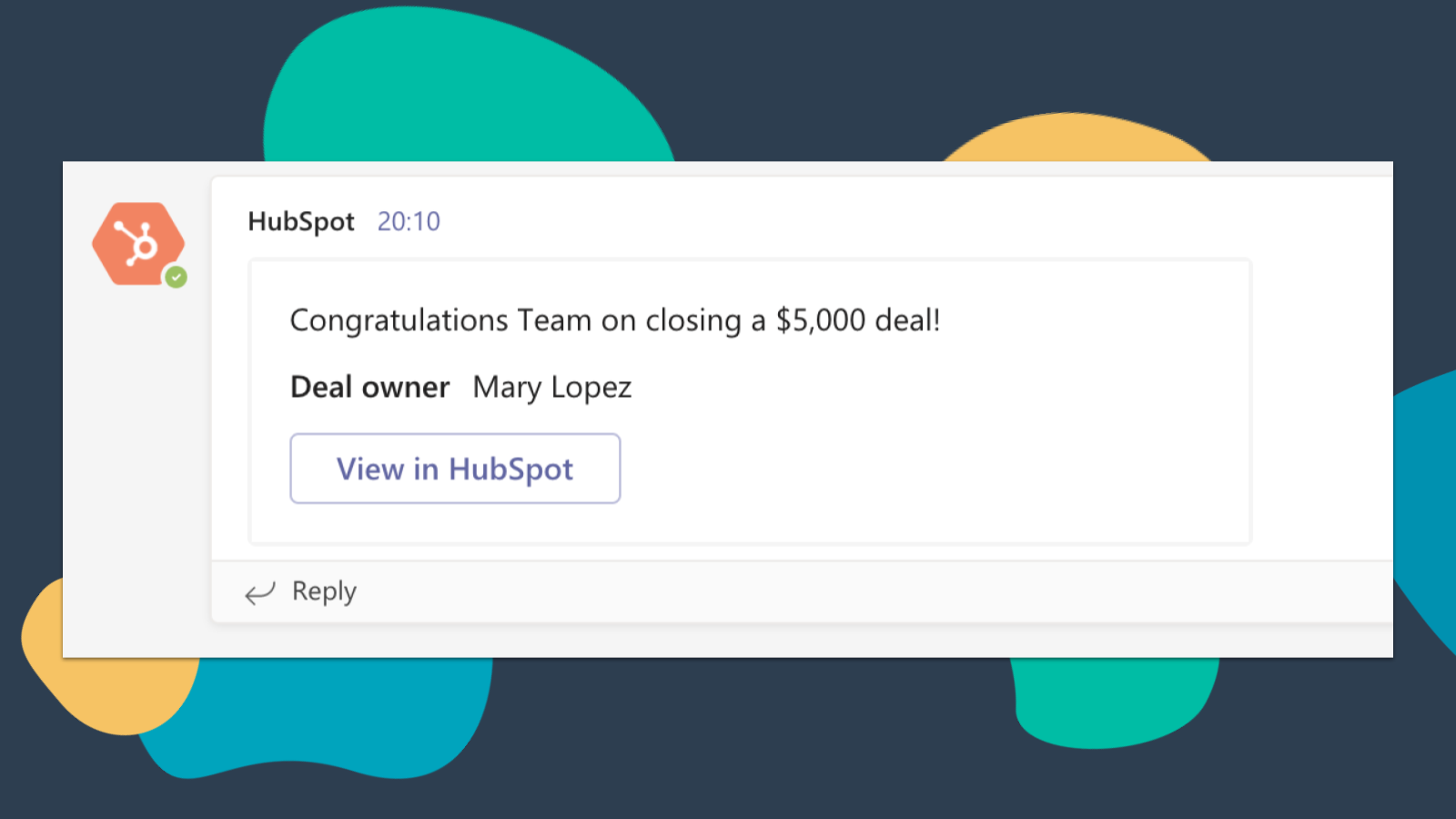
Get HubSpot Notifications in Microsoft Teams
Get notified in Microsoft Teams when you get assigned a new ticket or when a deal you own closes! By default, you will receive notifications for these types of activities: Assignments, Comments, Follows, Mentions, Overdue Items, Reminders, Replies, Submissions, Views
-4-1.png)
Sync Microsoft Teams Meeting Recordings and Transcripts to HubSpot
Preview meetings on associated records and automatically record and transcribe meetings for playback. In the HubSpot index page, you can access a full list of team's meetings, filter meetings by object properties, and search across meetings for key terms.
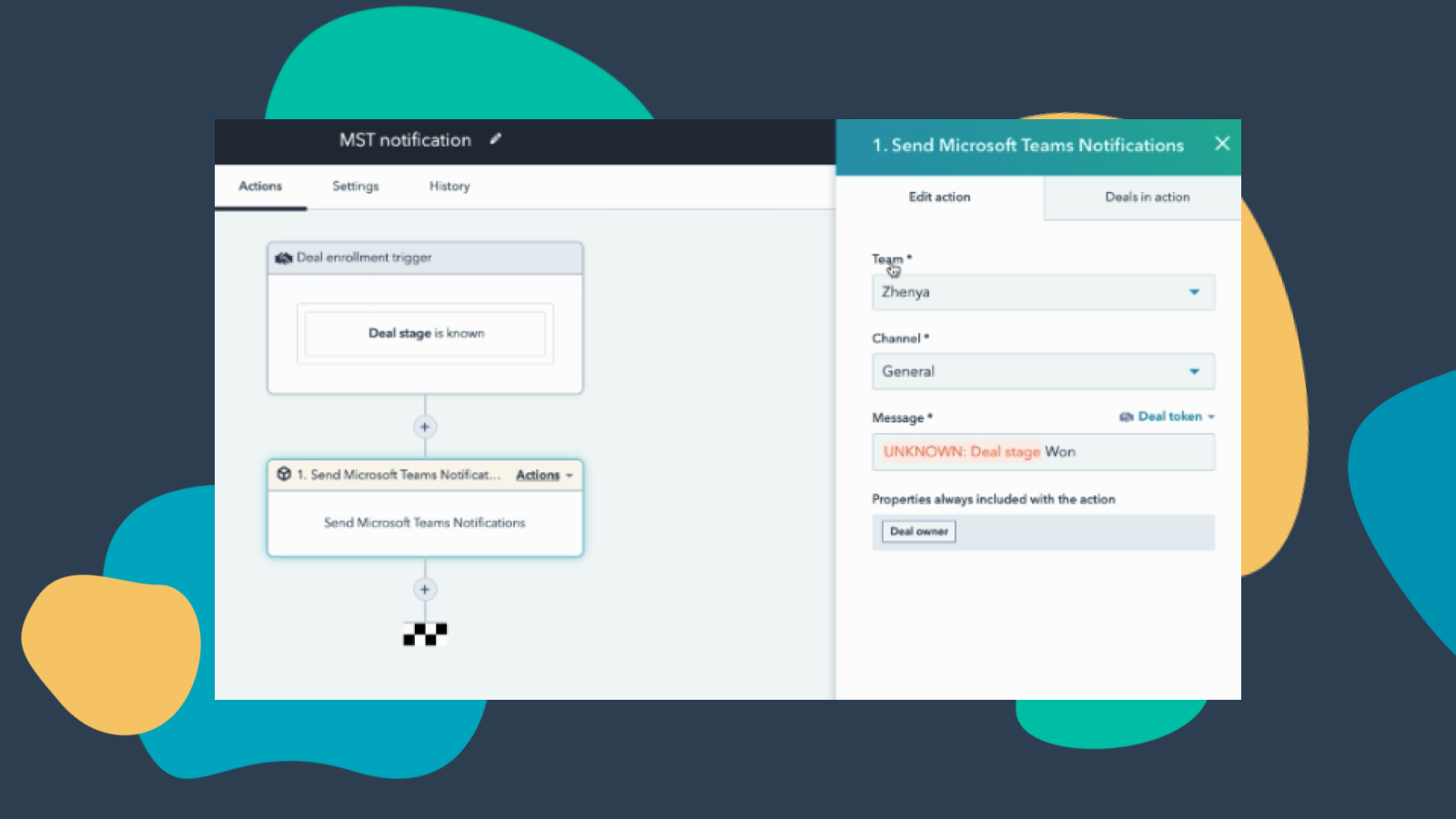
Customize Teams Notifications through Workflows
Create notification workflows for Microsoft Team to allow you to get notified when your deals change status or when new companies that fit within your territory are added to HubSpot and much more! Note: this feature requires a paid subscription.
-Apr-13-2023-06-54-18-0205-PM.jpeg)
Manage your Conversations in Microsoft Teams
Receive and reply to HubSpot Conversations Inbox Messages directly in Microsoft Teams channels. Note: this feature requires a paid subscription.
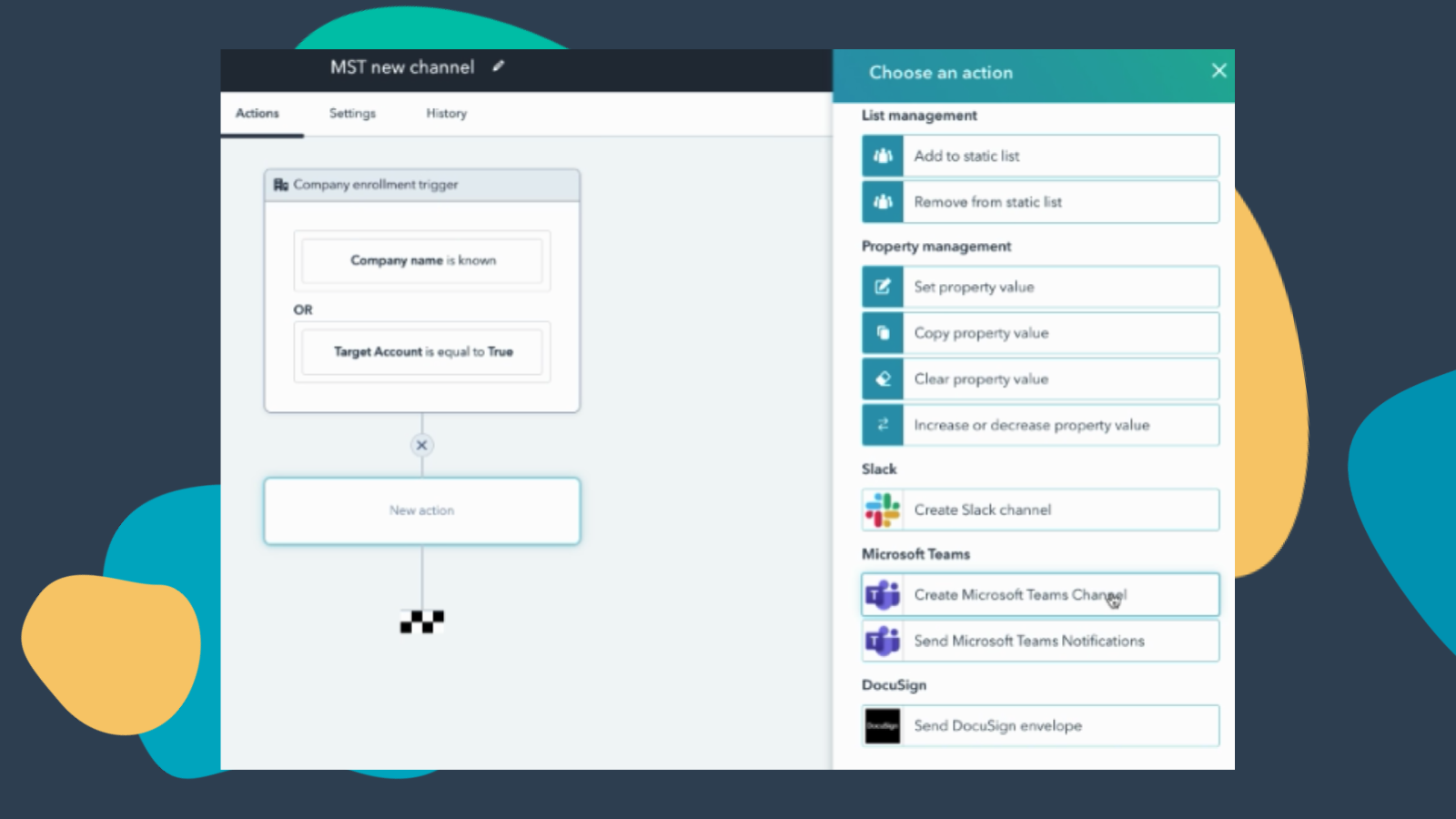
Create Workflows to Add Channels to Microsoft Teams
Create a new Microsoft Teams channel when new companies or deals are created that meet a certain set of criteria. Note: this feature requires a paid subscription.
Funcionalidade do aplicativo
Dados compartilhados
Direct Message | ||
Messages |
Avaliações
3,2
227
3,2
227
- 9 de Abr de 2026
Os problemas frustrantes de relogin ofuscam qualquer potencial que essa plataforma possa ter
Parece que faltam alguns recursos
Tem potencial
A constante mudança de login é uma dor de cabeça
Weaver, M.
- 7 de Abr de 2026
Integração incompleta com funcionalidade limitada que não se compara ao Slack - configuração excessivamente complexa para resultados mínimos
Isso é promissor, mas atualmente é a integração mais básica que se pode obter. As informações e os dados sincronizados são limitados e a configuração/personalização disponível é mínima. Por exemplo, com a integração do webinar, você só pode sincronizar o nome, o e-mail, o cargo e o nome da organização. Além disso, se você criar um formulário para se inscrever em um webinar por meio da HubSpot, se você tornar qualquer outro campo obrigatório, ele não será sincronizado! Além disso, se você quiser usar a funcionalidade de aprovação para a inscrição em webinars no Teams, isso impedirá a sincronização automática dos contatos depois que eles forem aprovados para inscrição, e você será forçado a sincronizar manualmente de forma periódica. O restante da integração é muito imprevisível. Até agora, conseguimos fazer com que o agente da HubSpot funcione no Teams, a sincronização de webinar mencionada anteriormente e a capacidade de enviar mensagens a indivíduos, mas, depois de muito esforço, ainda não conseguimos fazer com que a integração funcione com canais/equipes. Configuração excessivamente complexa com funcionalidade limitada. Em comparação com o Slack, é noite e dia.
Às vezes funciona
Funcionalidade limitada, personalização limitada, integração muito básica
MacInnes-Manby, K.
Free (no commitment)
US$ 0
Meetings and calling
Chat and collaboration
Productivity apps and services
Security and compliance
Free (no commitment)
US$ 0
Meetings and calling
Chat and collaboration
Productivity apps and services
Security and compliance
* O preço aqui é apenas para fins de exibição. Todos os preços não incluem impostos, incentivos, descontos ou outras variáveis de preços. Você deve entrar em contato com o parceiro para obter informações mais atualizadas e precisas. A HubSpot não se responsabiliza por essas informações de preços, que são fornecidas pelos nossos parceiros. Preços atualizados pela última vez: 15/10/2025
New arrivals

-1-2.jpeg)
