

Microsoft Teams
Wymagania
Plan HubSpot Uprawnienia konta HubSpot Nie wymaga uprawnień Typ dostępu Udostępniono Subskrypcja Microsoft Teams - Bezpłatnie (bez zobowiązań), Microsoft 365 Business Basic, Microsoft 365 Business Standard lub Office 365 E3 planu
Przegląd
1/8
Sprzedaż, marketing i obsługa klienta opierają się na budowaniu relacji — jednak nawiązywanie tych relacji może być trudne, gdy przedstawiciel handlowy poświęca cenny czas na wykonywanie rutynowych zadań. Jak wynika z raportu HubSpot Research, przedstawiciele handlowi spędzają nawet jedną czwartą dnia na zadaniach takich jak pisanie e-maili i wprowadzanie danych.
Oprogramowanie powinno służyć minimalizacji tego czasu, a nie tworzeniu dodatkowych etapów. Integracja HubSpot z Microsoft Teams ma właśnie to na celu.
Zintegruj się z narzędziem HubSpot Meeting Scheduler
Automatycznie wysyłaj dane dotyczące połączeń telefonicznych i konferencji do potencjalnych klientów w HubSpot. Zamień każde spotkanie zarezerwowane w systemie CRM HubSpot na spotkanie w Microsoft Teams.
Synchronizuj nagrania i transkrypcje spotkań z Microsoft Teams z HubSpot
Ujednolicaj dane dotyczące spotkań w HubSpot dzięki synchronizacji nagrań i transkrypcji spotkań z Microsoft Teams z HubSpot w celu prowadzenia szkoleń i analiz.
Udostępnianie powiadomień
Bądź na bieżąco z aktywnością w systemie CRM HubSpot, otrzymując powiadomienia o czatach, przypomnieniach, wzmiankach, przesłanych formularzach i nie tylko w aplikacji Microsoft Teams. Możesz nawet tworzyć specjalistyczne przepływy pracy w HubSpot, aby dostosować powiadomienia do swoich potrzeb.
Zarządzaj rozmowami
Odbieraj i odpowiadaj na wiadomości ze skrzynki odbiorczej w HubSpot bezpośrednio w kanałach Microsoft Teams
Automatyzacja za pomocą przepływów pracy
Wykorzystaj przepływy pracy HubSpot, aby dostosować powiadomienia i tworzyć nowe kanały w aplikacji Microsoft Teams.
Twórz zadania i zgłoszenia
Bądź na bieżąco ze swoją pracą, szybko tworząc zadanie lub zgłoszenie w HubSpot bezpośrednio z wiadomości w Microsoft Teams.
Powiąż transakcje i firmy z HubSpot z kanałami Microsoft Teams
Połącz kanały Microsoft Teams z rekordami firm i transakcji w HubSpot, aby synchronizować aktualizacje aktywności i zapewnić zespołowi stały dostęp do informacji
Masz uwagi dotyczące tej integracji? Skorzystaj z tego formularza, aby przesłać sugestie, prośby lub pomysły.
Cechy
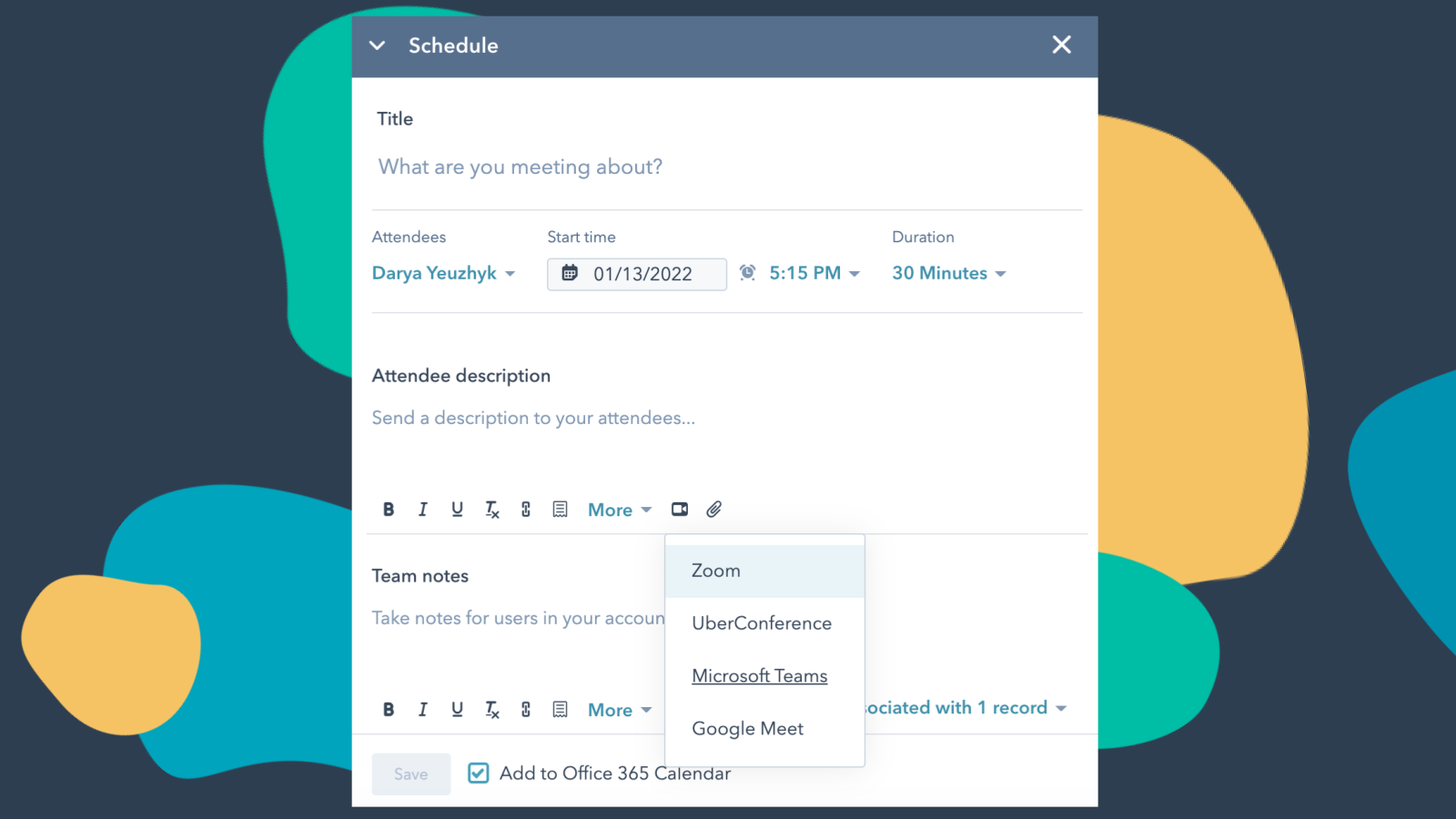
Zintegruj Microsoft Teams z HubSpot Meetings
Chcesz skontaktować się z potencjalnym klientem lub obecnym klientem? Jeśli jesteś przedstawicielem handlowym lub serwisowym — nie ma nic lepszego niż krótka rozmowa wideo, aby dowiedzieć się, czego potrzebuje od Ciebie potencjalny lub obecny klient, by odnieść sukces. Z łatwością zaplanuj spotkanie w Microsoft Teams bezpośrednio z poziomu dowolnego wpisu kontaktowego, aby umówić się na rozmowę wideo.
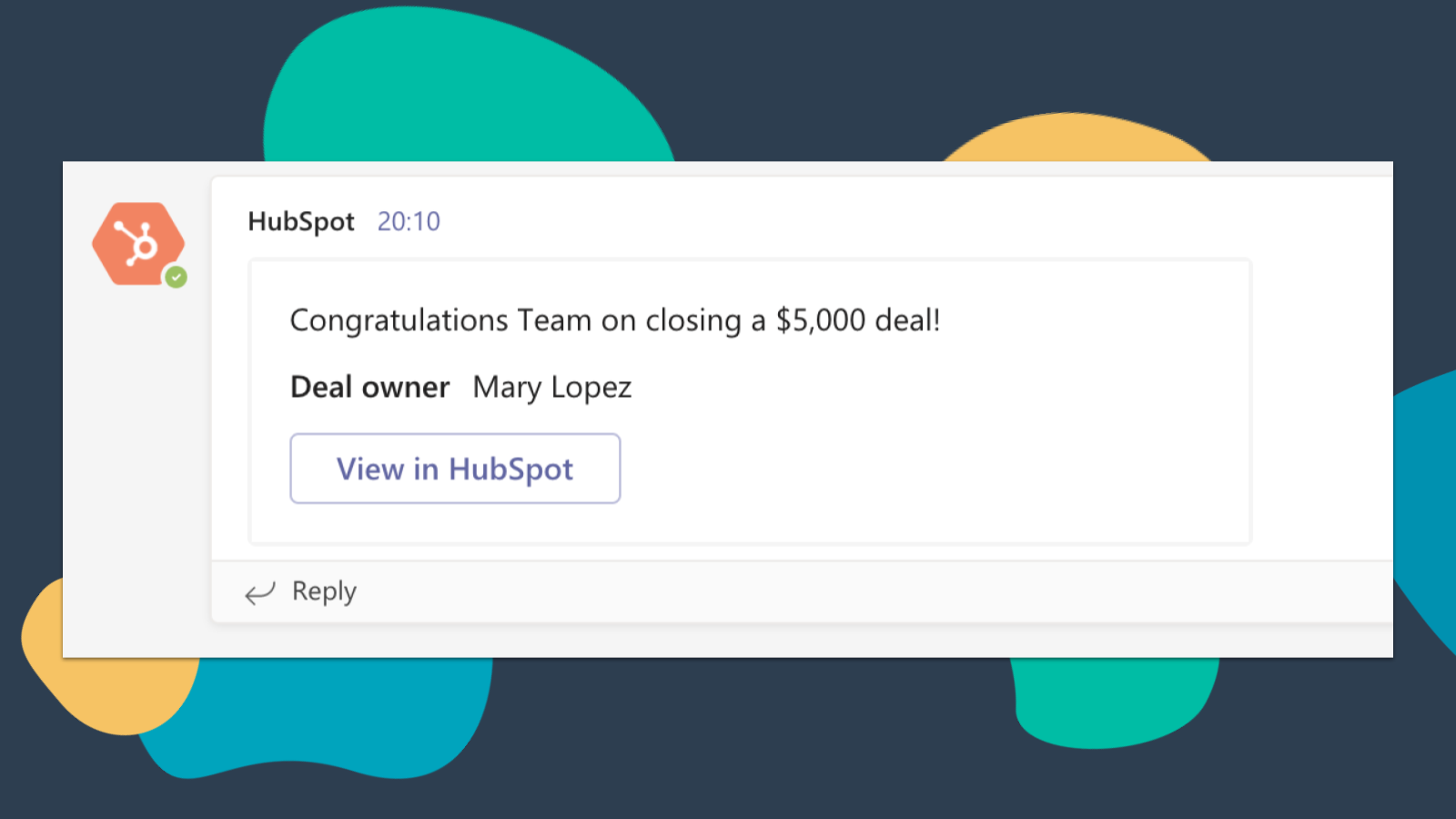
Otrzymuj powiadomienia z HubSpot w aplikacji Microsoft Teams
Otrzymuj powiadomienia w aplikacji Microsoft Teams, gdy zostanie Ci przypisane nowe zgłoszenie lub gdy zostanie sfinalizowana transakcja, za którą jesteś odpowiedzialny! Domyślnie będziesz otrzymywać powiadomienia dotyczące następujących rodzajów działań: przypisania, komentarze, obserwacje, wzmianki, zaległe zadania, przypomnienia, odpowiedzi, zgłoszenia, wyświetlenia
-4-1.png)
Synchronizuj nagrania i transkrypcje spotkań z aplikacji Microsoft Teams z platformą HubSpot
Przeglądaj spotkania powiązane z odpowiednimi rekordami oraz automatycznie nagrywaj i transkrybuj spotkania w celu ich odtworzenia. Na stronie głównej HubSpot możesz uzyskać dostęp do pełnej listy spotkań zespołu, filtrować je według właściwości obiektów oraz wyszukiwać kluczowe terminy we wszystkich spotkaniach.
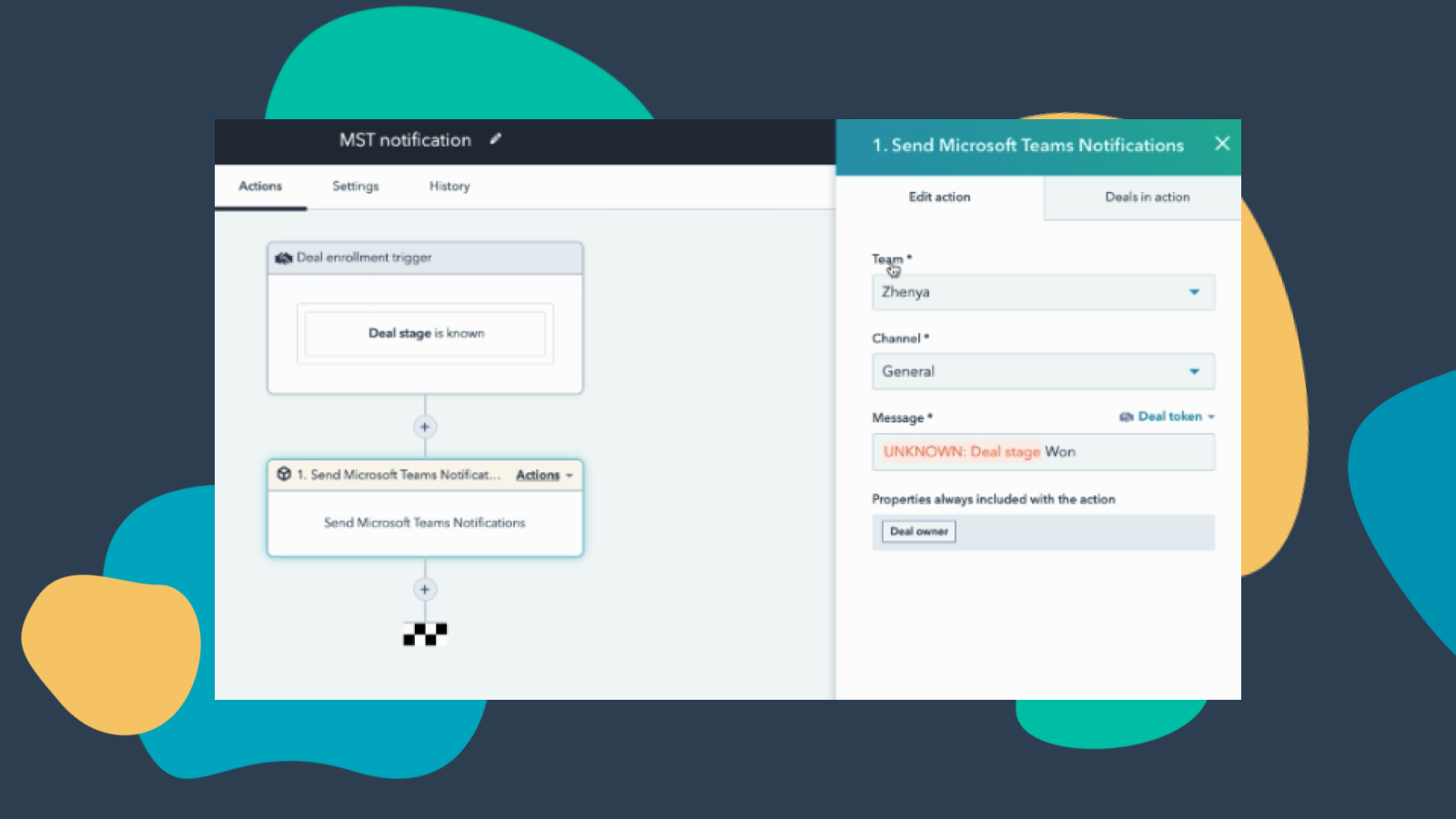
Dostosowywanie powiadomień w aplikacji Teams za pomocą przepływów pracy
Utwórz schematy powiadomień dla aplikacji Microsoft Teams, dzięki czemu będziesz otrzymywać powiadomienia o zmianie statusu transakcji, dodaniu do HubSpot nowych firm z Twojego obszaru działania i nie tylko! Uwaga: ta funkcja wymaga płatnej subskrypcji.
-Apr-13-2023-06-54-18-0205-PM.jpeg)
Zarządzaj rozmowami w aplikacji Microsoft Teams
Odbieraj wiadomości z skrzynki odbiorczej HubSpot Conversations i odpowiadaj na nie bezpośrednio w kanałach aplikacji Microsoft Teams. Uwaga: ta funkcja wymaga płatnej subskrypcji.
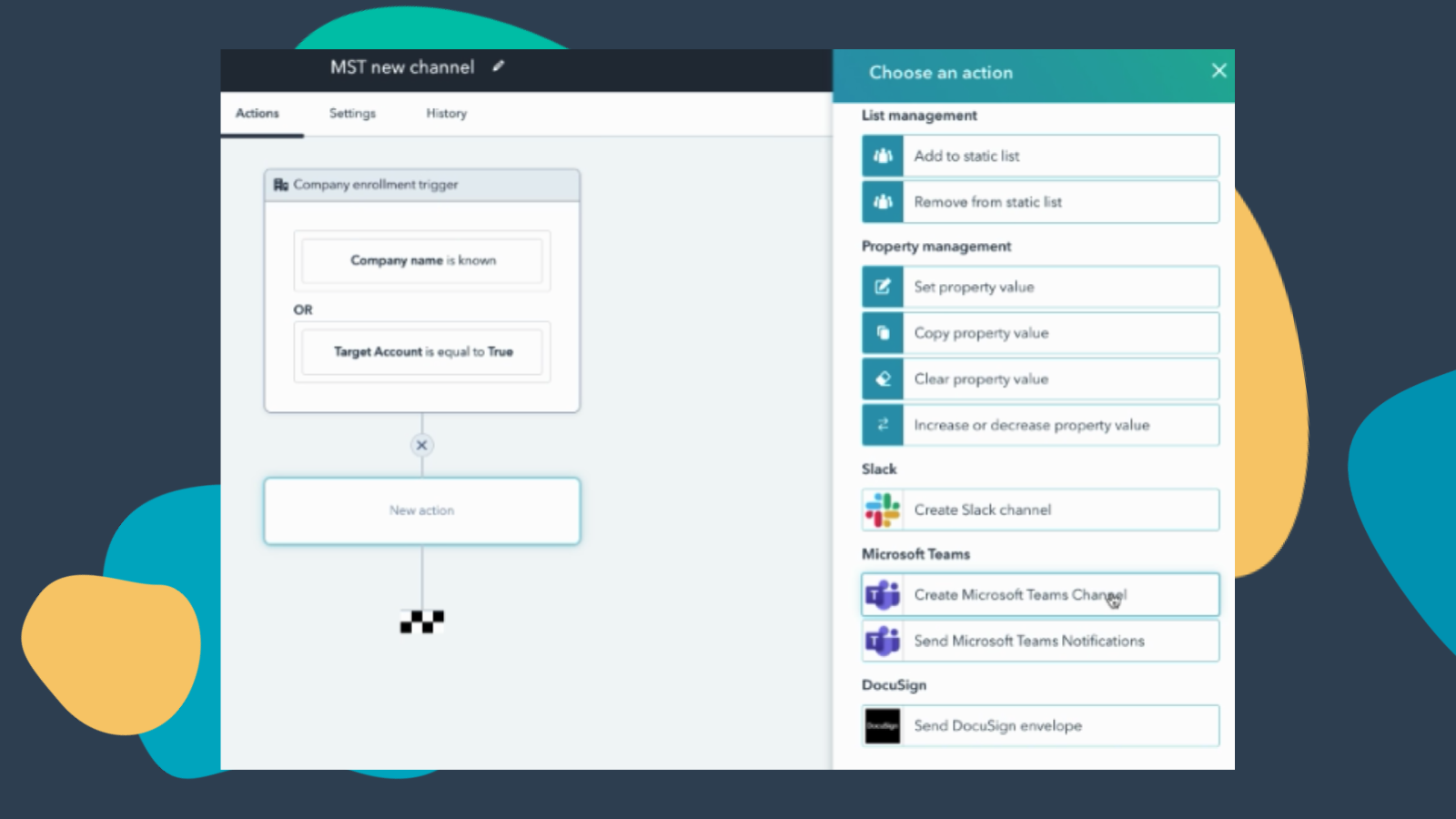
Tworzenie przepływów pracy w celu dodawania kanałów do aplikacji Microsoft Teams
Utwórz nowy kanał w aplikacji Microsoft Teams, gdy pojawią się nowe firmy lub transakcje spełniające określone kryteria. Uwaga: ta funkcja wymaga płatnej subskrypcji.
Funkcjonalność aplikacji
Direct Message | ||
Messages |
Recenzje
3,2
251
3,2
251
Użytkownicy uważają, że integracja usprawnia planowanie dzięki automatycznemu generowaniu linków do aplikacji Teams w zaproszeniach kalendarzowych oraz centralizacji powiadomień z HubSpot. Niektórzy zgłaszają jednak, że proces konfiguracji jest uciążliwy i występują problemy z synchronizacją, w wyniku których linki do spotkań nie są dołączane do wydarzeń w kalendarzu. Chociaż niektórzy zwracają uwagę na brak funkcji synchronizacji webinarów i automatycznego rejestrowania połączeń, aplikacja skutecznie automatyzuje rutynowe rezerwacje i pomaga zespołom skonsolidować narzędzia komunikacyjne.
- 8 wrz 2026
nie można nawiązać połączenia
Próbowałem wielu sposobów przez wiele godzin. Nie przyniosło to rezultatu.
Martinez, L.
- 1 wrz 2026
Ograniczona
Instalacja trochę trwała, ale program ma bogaty zestaw funkcji i świetnie nadaje się do analizy spotkań
Wysyłaj powiadomienia bezpośrednio do użytkowników i kanałów oraz analizuj spotkania w Teams za pomocą funkcji CI i AI platformy HubSpot.
Nie ma dynamicznych powiadomień dla „właściciela rekordu” – zawsze trzeba wybrać konkretnego użytkownika. To prawdziwa udręka dla każdej organizacji, w której jest więcej niż, powiedzmy, 10 potencjalnych właścicieli rekordów.
Balm, B.
Bezpłatnie (bez zobowiązań)
0 USD
Spotkania i rozmowy telefoniczne
Czat i współpraca
Aplikacje i usługi zwiększające produktywność
Bezpieczeństwo i zgodność z przepisami
Bezpłatnie (bez zobowiązań)
0 USD
Spotkania i rozmowy telefoniczne
Czat i współpraca
Aplikacje i usługi zwiększające produktywność
Bezpieczeństwo i zgodność z przepisami
* Powyższe ceny zostały podane wyłącznie w celach informacyjnych. Nie zawierają one podatków, premii, zniżek lub innych zmiennych cenowych. Skontaktuj się z partnerem w celu uzyskania najbardziej aktualnych i poprawnych informacji o cenach. HubSpot nie ponosi żadnej odpowiedzialności za informacje cenowe, które są dostarczane przez naszych partnerów. Ostatnia aktualizacja cen: 16.06.2026
Więcej informacji
Utworzone przez - HubSpot
Instaluje - Instalacje (64 tys.)
Kategorie Języki, w których dostępna jest ta aplikacja Angielski