

QuickBooks Online Advanced Automation
Erstellt von - HelloCODER LLP
Installationen - 500+ Installationen
Bewertung 4,2
(20)

Aufsteigend
Anforderungen
HubSpot-Produktversion HubSpot-Account-Berechtigungen - Erforderliche Account-Berechtigungen anzeigen
Zugriffstyp Geteilt QuickBooks Online Advanced Automation-Abonnement - Produktversionen: Professionell, Business Max, Unternehmen oder Professionell Jährlich
Übersicht

1/6 - SyncQ - HubSpot QuickBooks Automation
Nahtlose Synchronisierung aller QuickBooks-Transaktionen mit HubSpot
Buchhaltungssynchronisation in beide Richtungen - von Kunden und Projekten bis hin zu Zahlungen, mit AI Insights. Deckt sowohl die Debitoren- als auch die Kreditorenbuchhaltung ab.
Einfaches Erfassen und Verwalten von Einnahmen
Mit SyncQ können Sie Kostenvoranschläge, Rechnungen, Zahlungen und Verkaufsbelege direkt aus HubSpot-Datensätzen erstellen, versenden und anzeigen. Mit den Plänen Business Max und Corporate können Sie erweiterte Synchronisierungsfunktionen für benutzerdefinierte HubSpot-Objekte freischalten, darunter
QuickBooks-Projekt als HubSpot-Geschäft,
QuickBooks Job/Unterkunde als HubSpot Deal und Anhängen der zugehörigen Rechnungen als Deal-Rechnungen,
Bidirektionale QuickBooks-Rechnung mit HubSpot Invoice/Deal,
Einzahlungen, Kreditorengutschriften, Kontenplan und mehr.
Genießen Sie KOSTENLOSE Unterstützung beim Mapping und Null Kosten für die Einarbeitung.
KI-gestützte Einblicke, autonome Synchronisierung, 100% anpassbare Synchronisierung
SyncQ bietet fortschrittliche, KI-gestützte Geschäftseinblicke. Stellen Sie eine beliebige Frage zu Ihrem Unternehmen und erhalten Sie sofort eine Antwort. (kostenlose, begrenzte Testversion für jeden Plan + kostenpflichtige Editionen).
100 % anpassbare Zuordnungen , mit denen Sie HubSpot-Objekte, einschließlich benutzerdefinierter Objekte und Felder, den meisten QuickBooks-Transaktionen zuordnen können , einschließlich der benutzerdefinierten Felder für Rechnungen und Kostenvoranschläge, sowie Steuern und Klassen, um Ihre 360-Grad-Geschäftsanforderungen zu erfüllen.
Dank intelligenter Automatisierung können Sie wählen, ob Sie die Synchronisierung automatisch oder manuell mit einem einzigen Klick vornehmen möchten - ohne sich bei QuickBooks anmelden zu müssen. Außerdem werden QuickBooks Online-Datensätze automatisch mit HubSpot synchronisiert, einschließlich eingegangener Zahlungen und ausstehender Salden.
Stärkung des Vertriebs mit sofortigem Zugriff auf Finanzdaten
SyncQ zeigt automatisch QuickBooks-Kostenvoranschläge, Rechnungen und Zahlungsdetails in den Notizabschnitten für HubSpot-Unternehmen/Kontakte an, so dass Ihr Vertriebsteam sofortigen Zugriff auf wichtige Finanzdaten hat, ohnedie Buchhaltung kontaktieren oder sich bei QuickBooks Online anmelden zu müssen.
Sicherheit der Enterprise-Klasse & Intuit-Zertifizierung
SyncQ ist Intuit Approved und erfüllt die branchenüblichen Sicherheitsanforderungen. Es wird regelmäßig von Intuit gemäß den NIST-Sicherheitsstandards (National Institute of Standards and Technology, U.S. Department of Commerce) geprüft. Sie finden SyncQ in Ihrem QuickBooks-Konto oder im Intuit App Store.
Hauptmerkmale
✔ Intuit Approved - Erfüllt die Industriestandards für finanzielle Sicherheit
✔ Automatisierte und manuelle bidirektionale und monodirektionale Synchronisierung
✔ Automatische Synchronisierung von QuickBooks-Transaktionen mit HubSpot-Datensätzen
✔ KI-gestützte Einblicke - Erfahren Sie mehr über Ihr Unternehmen und Ihre Kunden
✔ Synchronisierung von HubSpot-Unternehmen/Kontakten mit QuickBooks-Kunden/Anbietern
✔ Synchronisieren Sie HubSpot-Deals/Tickets mit QuickBooks-Kostenvoranschlägen, -Rechnungen, -Bestellungen, -Rechnungen & mehr
✔ Anzeige der QuickBooks-Transaktionshistorie in HubSpot-Notizen, einschließlich QuickBooks-Rechnungs-PDF-Links(Lizenz zur Anzeige erforderlich)
✔ QuickBooks-Produkte mit HubSpot-Produkten synchronisieren
✔ Kostenvoranschläge und Rechnungen direkt aus HubSpot per E-Mail versenden
✔ Verfolgen Sie Verkaufstrends und Forderungen innerhalb von HubSpot
✔ Vollständig anpassbare Feldzuordnungen für individuelle Geschäftsanforderungen
✔ Synchronisierung von benutzerdefinierten HubSpot-Feldern und QuickBooks-Feldern
✔ Verbinden Sie mehrere QuickBooks-Unternehmen
SyncQ - Das führende QuickBooks-Automatisierungstool mit KI-Einblicken
SyncQ ist die führende QuickBooks-Automatisierungslösung für mehrere CRMs, einschließlich Salesforce und Pipedrive. Hunderte von Unternehmen vertrauen darauf, dass SyncQ eine nahtlose KI-gestützte Automatisierung, Transaktionssynchronisierung und finanzielle Einblicke gewährleistet.
Alle unsere Integrationen sind von Intuit genehmigt.
Funktionen
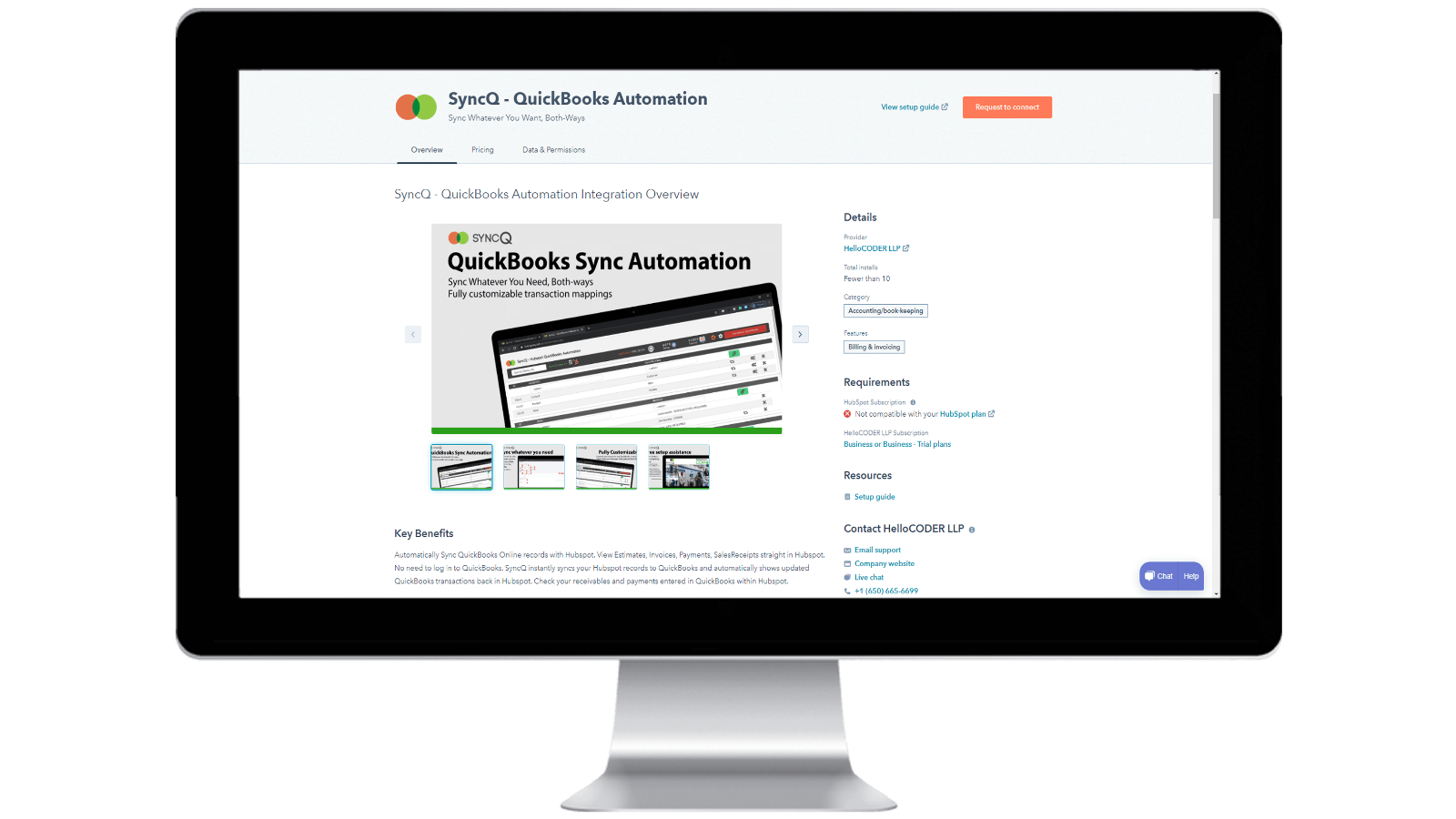
Installation von SyncQ in Ihrem HubSpot-Konto und Abmeldung von SyncQ
Installieren Sie SyncQ aus dem Intuit oder HubSpot AppStore. Für InstaView wenden Sie sich bitte an den SyncQ-Support. Um sich von SyncQ abzumelden, klicken Sie auf die Schaltfläche "Abmelden" in der SyncQ-App oder kündigen Sie Ihre wiederkehrende Paypal-Zahlung oder wenden Sie sich an den SyncQ-Support. Durch das bloße Trennen der SyncQ-App von HubSpot wird SyncQ nicht abbestellt.
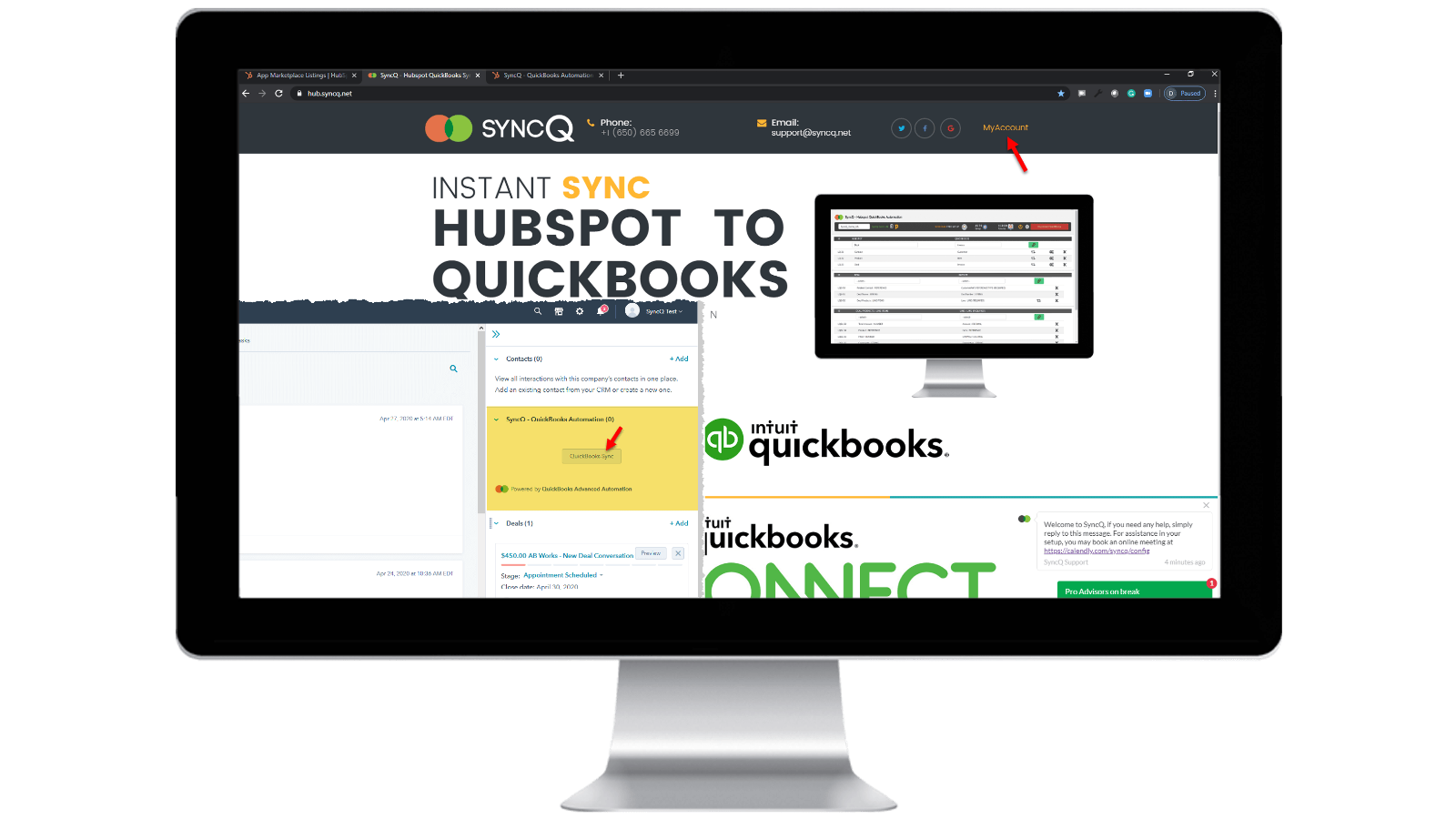
Melden Sie sich bei Ihrem SyncQ-Konto an
Gehen Sie zu https://hb.syncq.net und klicken Sie auf Mein Konto. Der einfache Weg: Gehen Sie zu einem beliebigen Datensatz in HubSpot, suchen Sie die Registerkarte SyncQ-Karte auf der rechten Registerkarte und klicken Sie dann auf QuickBooks Sync. Geben Sie dann Ihre HubSpot-Benutzer-E-Mail-ID ein. Sie erhalten einen Bestätigungscode, um Ihr Konto zu verifizieren.
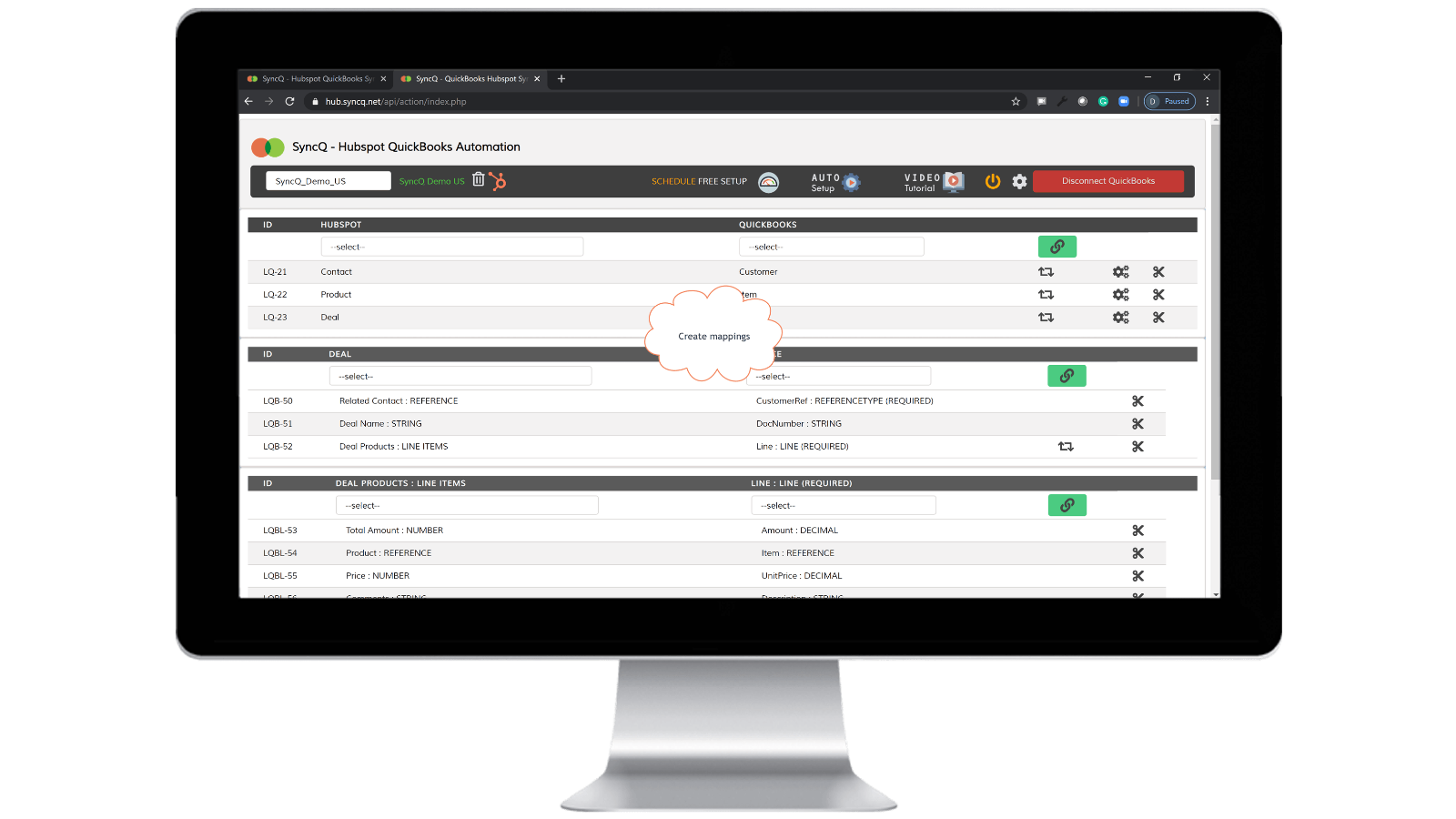
Verbinden Sie QuickBooks Company, erstellen Sie Zuordnungen und aktivieren Sie die automatische Synchronisierung.
Klicken Sie auf Mit QuickBooks verbinden. Ihr QuickBooks-Unternehmen wird automatisch angezeigt. Klicken Sie auf die Schaltfläche des Einrichtungsrads, um Ihre Zuordnungen zu erstellen, oder klicken Sie auf Automatische Einrichtung. Aktivieren Sie die automatische Synchronisierung für einzelne Zuordnungen. Sie können auch eine manuelle Synchronisierung durchführen, indem Sie im HubSpot-Datensatz auf die Schaltfläche SyncQ-Karte klicken.

Manuelle und sofortige Aufnahmesynchronisation, in beide Richtungen
Gehen Sie zu dem HubSpot-Datensatz, den Sie synchronisieren möchten. Suchen Sie die SyncQ-Karte auf der rechten Seite und klicken Sie dann auf QuickBooks Sync. Sie erhalten Optionen zum Synchronisieren des entsprechenden HubSpot-Datensatzes. Klicken Sie auf die Schaltfläche Synchronisieren. Der HubSpot-Datensatz wird sofort mit QuickBooks synchronisiert. Es wird eine Zusammenfassung des QuickBooks-Datensatzes angezeigt.
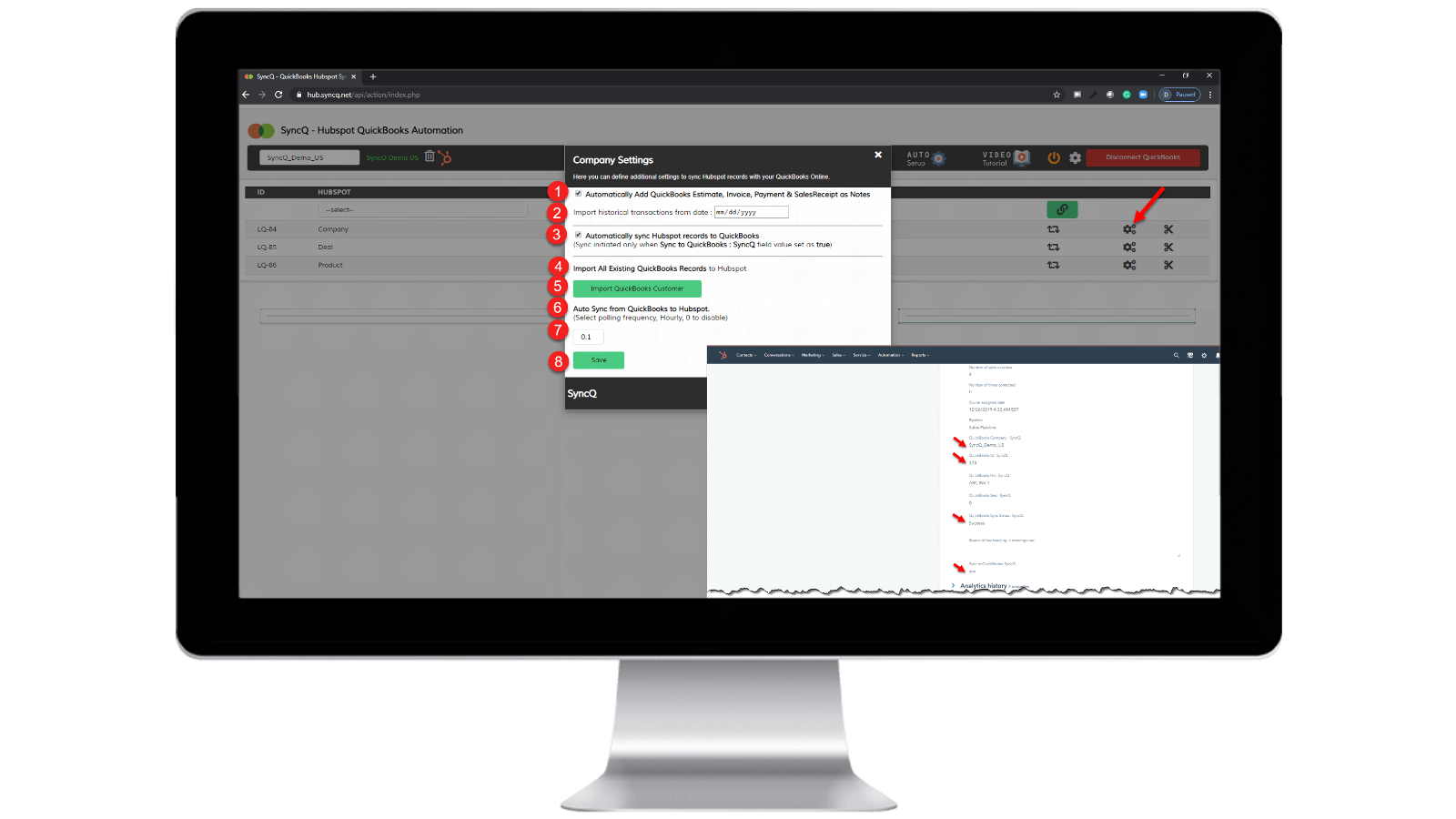
Auto-Synchronisation einschalten.
Von QuickBooks zu HubSpot: 1) Aktivieren Sie "HubSpot-Datensätze automatisch mit QuickBooks synchronisieren". Von HubSpot zu QuickBooks: 1) Legen Sie die stündliche Häufigkeit der "automatischen Synchronisierung von QuickBooks mit HubSpot" fest. 2) Stellen Sie für den spezifischen HubSpot-Datensatz, den Sie synchronisieren möchten, "SyncQ to QuickBooks: SyncQ" auf "Ja".
App-Funktionalität
Datenaustausch
1. Customers / Vendors | ||
2. Customers / Vendors | ||
3. Items | ||
4. Estimates/Invoice/Bill/PurchaseOrder | ||
5. Inovoice | ||
6. Estimate/Invoice/Deposit/Bill/VendorCredit & More | ||
7. Job / Sub Customer / Project |
Rezensionen
4,2
20
4,2
20
- 22. Sep. 2025
Gute Synchronisierungsfunktionen, aber schlechte Benutzeroberfläche und wenig hilfreiches Support-Team
Insgesamt gute Integration mit einigen kleineren Problemen, die Unterstützung muss verbessert werden
Die Synchronisierung ist gut, schnell und bietet eine Vielzahl von Optionen für die Zuordnung von Feldern IN HS - QB
Einige kleinere Fehler tauchen immer noch bei der Synchronisierung auf, wie z.B. Kontakte werden nicht richtig synchronisiert, Informationen werden überschrieben. Auch die Benutzeroberfläche ist nicht so intuitiv und muss weiter verbessert werden. Die nächsten Support-Teams müssen hilfsbereiter und schneller sein, wenn es um Synchronisierungsprobleme und Fragen geht.
Tasnimul, M.
- 3. Juli 2025
DIESE APP VERMEIDEN
Ich habe die Kommentare vor dem Herunterladen gelesen und wünschte, ich hätte den Rat anderer befolgt - vermeiden Sie diese App. Nutzlos
Die App erfasst Ihre QB-Zahlungsinformationen sofort (toll für sie, scheiße für mich, da ich sie (in Großbritannien) verfolgen muss, um zu stornieren)
die App hat nicht funktioniert - sie hat nichts getan
McDermott, J.
Preise
Professionell
49 $
/MonatENTHÄLT 2 LIZENZEN
Synchronisieren Sie HubSpot-Kontakte oder Unternehmen, Produkte und Abschlüsse mit QuickBooks.
Manuelle und automatisierte Synchronisierung.
Unbegrenzte Synchronisierung.
KI-Kundeneinblicke. Voller Funktionsumfang mit zusätzlichen Plänen.
Bidirektionale Synchronisierung von QuickBooks-Kunden und -Lieferanten mit HubSpot.
Automatischer Import von Kostenvoranschlägen, Rechnungen und Verkaufsbelegen in Abschlüsse.
Importieren Sie automatisch Kostenvoranschläge, Rechnungen, Zahlungen und Verkaufsbelege in Organisationen oder Personen.
Professionell
49 $
/MonatENTHÄLT 2 LIZENZEN
Synchronisieren Sie HubSpot-Kontakte oder Unternehmen, Produkte und Abschlüsse mit QuickBooks.
Manuelle und automatisierte Synchronisierung.
Unbegrenzte Synchronisierung.
KI-Kundeneinblicke. Voller Funktionsumfang mit zusätzlichen Plänen.
Bidirektionale Synchronisierung von QuickBooks-Kunden und -Lieferanten mit HubSpot.
Automatischer Import von Kostenvoranschlägen, Rechnungen und Verkaufsbelegen in Abschlüsse.
Importieren Sie automatisch Kostenvoranschläge, Rechnungen, Zahlungen und Verkaufsbelege in Organisationen oder Personen.
* Die hier angegebenen Preise dienen nur zu Illustrationszwecken. Alle Preise enthalten keine Steuern, Sonderangebote, Rabatte oder sonstigen Preisvarianten. Bitte wenden Sie sich direkt an den Partner, um aktuelle und korrekte Preisinformationen zu erhalten. HubSpot übernimmt keine Verantwortung für Preisinformationen, die von unseren Partnern bereitgestellt werden. Letzte Aktualisierung der Preisinformationen: 10.04.2026
Weitere Infos
Erstellt von - HelloCODER LLP
Installationen - 500+ Installationen
Kategorien Sprachen, in denen diese App verfügbar ist Englisch