

QuickBooks Online Advanced Automation
Utworzone przez - HelloCODER LLP
Instaluje - Ponad 500 instalacji
Ocena 4,2
(20)

Powstanie
Wymagania
Plan HubSpot Uprawnienia konta HubSpot - Wyświetl wymagane uprawnienia konta
Typ dostępu Udostępniono Subskrypcja QuickBooks Online Advanced Automation - Profesjonalny, Business Max, Korporacyjny lub Profesjonalny roczny planu
Przegląd

1/6 - SyncQ - HubSpot QuickBooks Automation
Płynna synchronizacja wszystkich transakcji QuickBooks z HubSpot
Dwukierunkowa synchronizacja księgowości - od klientów i projektów po płatności, z AI Insights. Obejmuje zarówno należności, jak i zobowiązania.
Łatwe rejestrowanie i zarządzanie przychodami
SyncQ umożliwia tworzenie, wysyłanie i przeglądanie kosztorysów, faktur, płatności i pokwitowań sprzedaży bezpośrednio z rekordów HubSpot. Plany Business Max i Corporate odblokowują zaawansowane możliwości synchronizacji obiektów niestandardowych HubSpot, w tym
QuickBooks Project jako HubSpot Deal,
QuickBooks Job/sub-customer jako HubSpot Deal i dołączanie powiązanych faktur jako Deal Invoices,
Dwukierunkowa faktura QuickBooks z fakturą / transakcją HubSpot,
Wpłaty, kredyty dostawców, plan kont i inne.
Korzystaj z BEZPŁATNEJ pomocy w mapowaniu i zerowych kosztów wdrożenia.
Analizy oparte na sztucznej inteligencji, autonomiczna synchronizacja, w 100% konfigurowalna synchronizacja
SyncQ oferuje zaawansowane analizy biznesowe oparte na sztucznej inteligencji. Zadaj dowolne pytanie dotyczące swojej firmy i uzyskaj natychmiastowe odpowiedzi. (bezpłatna ograniczona wersja próbna dla każdego planu + płatne wersje).
W 100% konfigurowalne mapowania , które umożliwiają mapowanie obiektów HubSpot, w tym niestandardowych obiektów i pól, do większości transakcji QuickBooks, w tym niestandardowych pól faktur i szacunków, a także podatków i klas, aby dopasować je do 360-stopniowych potrzeb biznesowych.
Dzięki inteligentnej automatyzacji można wybrać synchronizację automatyczną lub ręczną za pomocą jednego kliknięcia - bez konieczności logowania się do QuickBooks. Aplikacja automatycznie synchronizuje również rekordy QuickBooks Online z HubSpot, w tym otrzymane płatności i oczekujące salda.
Zwiększ możliwości sprzedaży dzięki natychmiastowemu dostępowi do danych finansowych
SyncQ automatycznie wyświetla szacunki, faktury i szczegóły płatności QuickBooks w sekcjach notatek HubSpot Companies/Contacts, zapewniając zespołowi sprzedaży natychmiastowy dostęp do krytycznych informacji finansowych - bezkonieczności kontaktowania się z księgowością lub logowania się do QuickBooks Online.
Bezpieczeństwo klasy korporacyjnej i certyfikacja Intuit
SyncQ jest zatwierdzony przez Intuit i spełnia branżowe wymogi bezpieczeństwa. Jest regularnie oceniany przez Intuit zgodnie ze standardami bezpieczeństwa NIST (The National Institute of Standards and Technology, U.S. Department of Commerce). Znajdź SyncQ na swoim koncie QuickBooks lub w Intuit App Store.
Kluczowe funkcje
Zatwierdzona przez Intuit - spełnia branżowe standardy bezpieczeństwa finansowego.
Automatyczna i ręczna synchronizacja dwukierunkowa i jednokierunkowa
Automatyczna synchronizacja transakcji QuickBooks z rekordami HubSpot
Statystyki oparte na sztucznej inteligencji - dowiedz się więcej o swojej firmie i klientach
Synchronizacja firm/kontaktów HubSpot z klientami/sprzedawcami QuickBooks
Synchronizacja transakcji/biletów HubSpot z szacunkami, fakturami, zamówieniami zakupu, rachunkami i innymi danymi QuickBooks
Wyświetlanie historii transakcji QuickBooks w notatkach HubSpot, w tym linków PDF do faktur QuickBooks(do przeglądania wymagana jest licencja)
Synchronizacja produktów QuickBooks z produktami HubSpot
Wysyłanie kosztorysów i faktur pocztą elektroniczną bezpośrednio z HubSpot
Śledzenie trendów sprzedaży i należności w HubSpot
W pełni konfigurowalne mapowania pól dla unikalnych potrzeb biznesowych
Synchronizacja pól niestandardowych HubSpot i pól niestandardowych QuickBooks
Połączenie wielu firm QuickBooks
SyncQ - narzędzie nr 1 do automatyzacji QuickBooks z analizą AI
SyncQ to wiodące rozwiązanie do automatyzacji QuickBooks dla wielu CRM, w tym Salesforce i Pipedrive. Zaufane przez setki firm, SyncQ zapewnia płynną automatyzację opartą na sztucznej inteligencji, synchronizację transakcji i wgląd w finanse.
Wszystkie nasze integracje są zatwierdzone przez Intuit.
Cechy
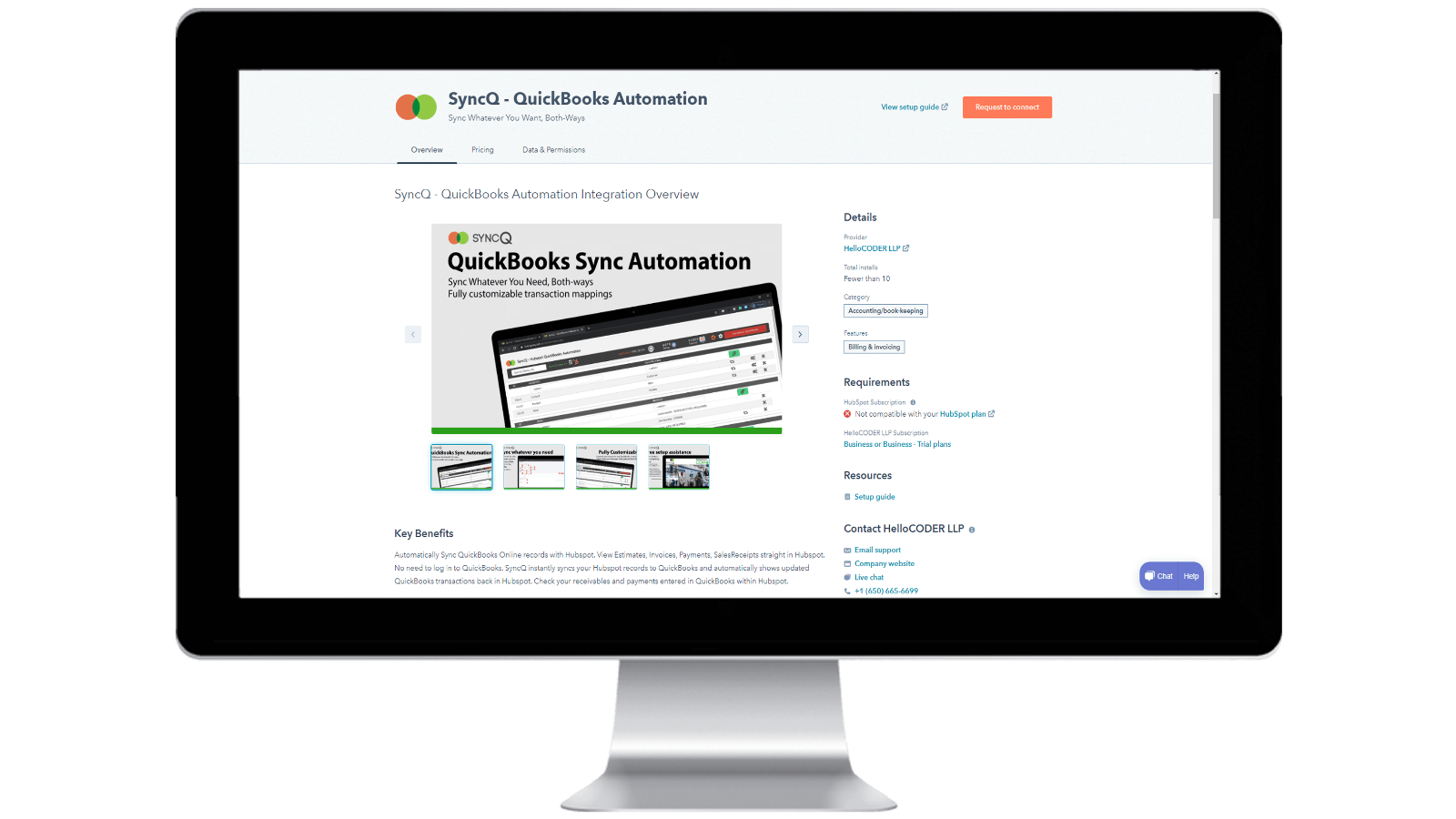
Instalacja SyncQ na koncie HubSpot i rezygnacja z subskrypcji SyncQ
Zainstaluj SyncQ z Intuit lub HubSpot AppStore. W przypadku InstaView skontaktuj się z pomocą techniczną SyncQ. Aby zrezygnować z subskrypcji SyncQ, kliknij przycisk Anuluj subskrypcję w aplikacji SyncQ lub anuluj płatność cykliczną Paypal lub skontaktuj się z pomocą techniczną SyncQ. Samo odłączenie aplikacji SyncQ od HubSpot nie powoduje anulowania subskrypcji SyncQ
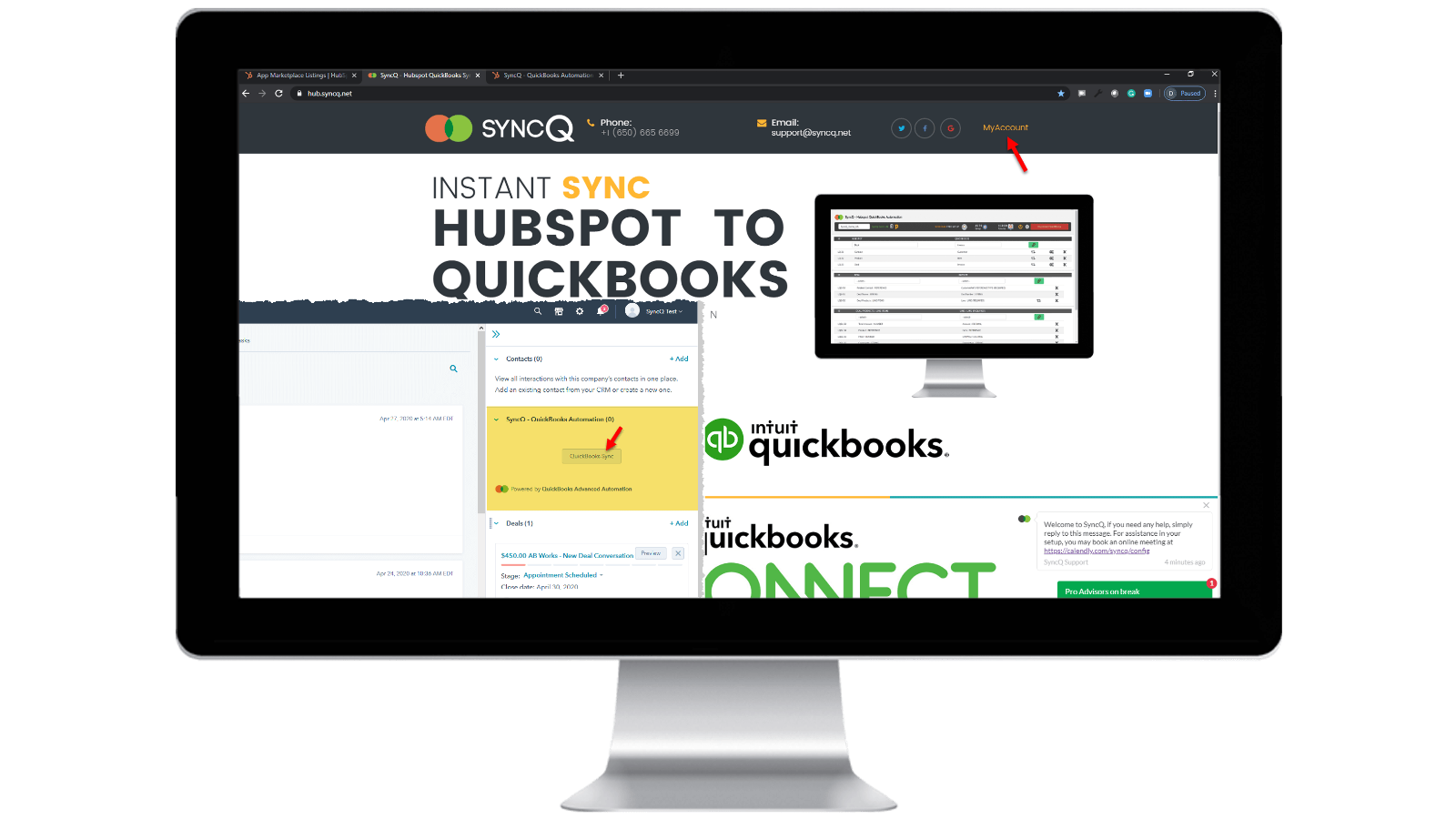
Zaloguj się do swojego konta SyncQ
Przejdź do https://hb.syncq.net i kliknij Moje konto. Prosty sposób: przejdź do dowolnego rekordu w HubSpot, znajdź kartę SyncQ na prawej karcie, a następnie kliknij QuickBooks Sync. Następnie wprowadź swój identyfikator e-mail użytkownika HubSpot. Otrzymasz kod weryfikacyjny, aby zweryfikować swoje konto.
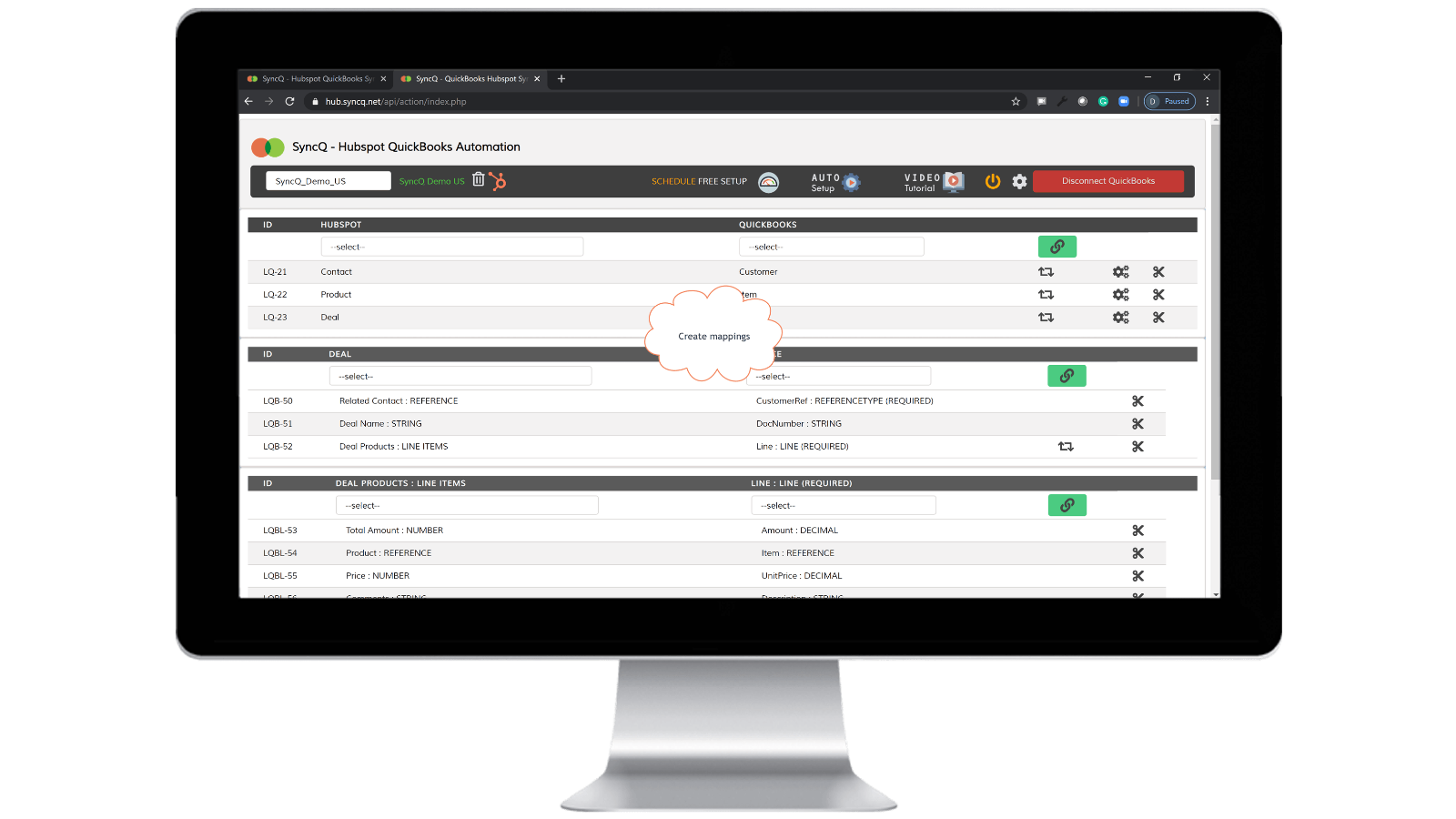
Podłącz QuickBooks Company, utwórz mapowania i włącz automatyczną synchronizację.
Kliknij Połącz z QuickBooks, Twoja firma QuickBooks pojawi się automatycznie. Kliknij przycisk koła konfiguracji, aby utworzyć mapowania lub kliknij opcję Automatyczna konfiguracja. Włącz automatyczną synchronizację dla poszczególnych mapowań. Możesz także wykonać ręczną synchronizację, klikając przycisk karty SyncQ w rekordzie HubSpot.

Ręczna i natychmiastowa synchronizacja nagrywania, w obie strony
Przejdź do rekordu HubSpot, który chcesz zsynchronizować. Znajdź kartę SyncQ po prawej stronie, a następnie kliknij QuickBooks Sync. Pojawią się opcje synchronizacji powiązanego rekordu HubSpot. Kliknij przycisk Synchronizuj. Rekord HubSpot zostanie natychmiast zsynchronizowany z QuickBooks. Pojawi się podsumowanie rekordu QuickBook.
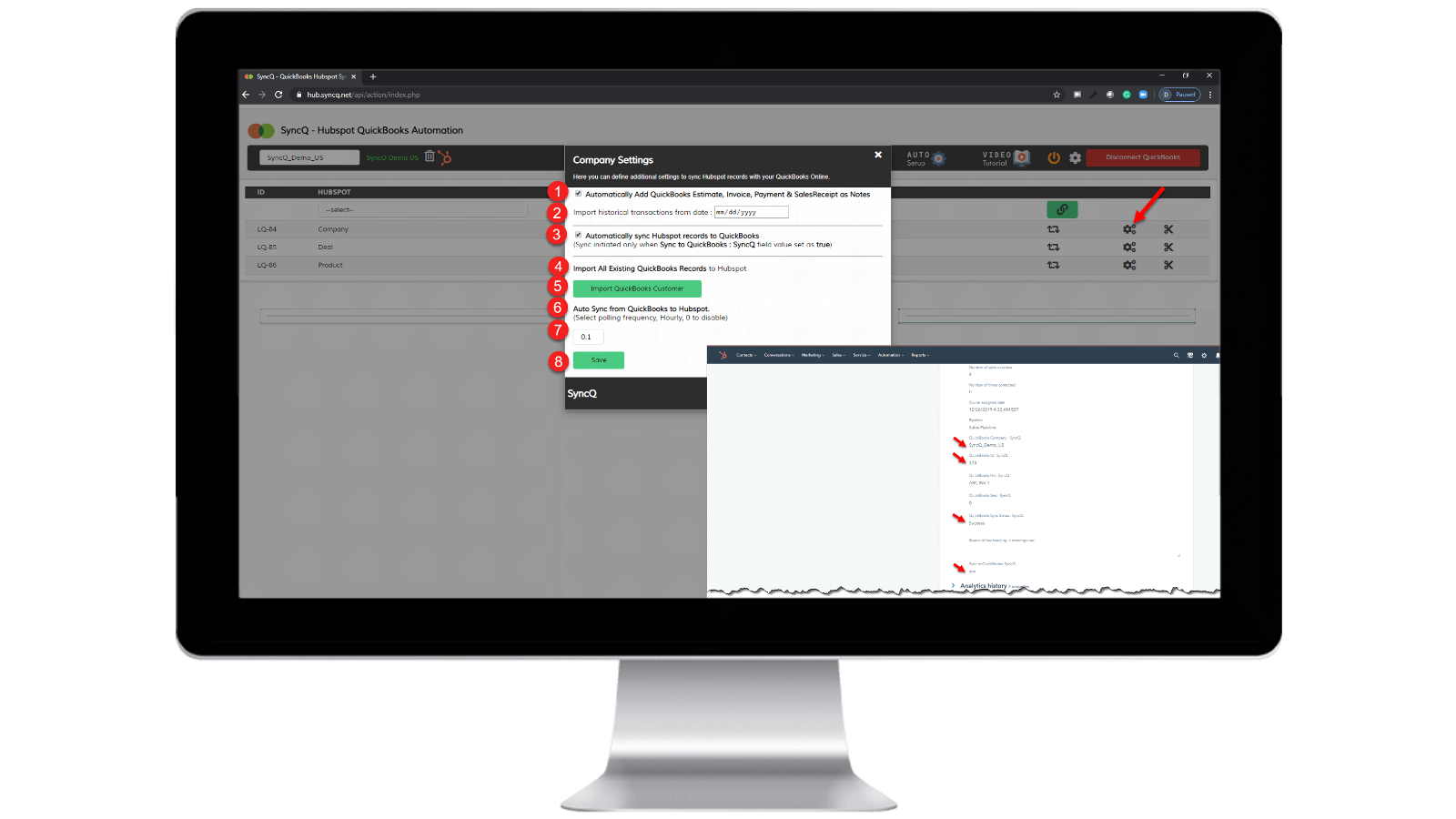
Włącz automatyczną synchronizację.
Z QuickBooks do HubSpot: 1) Zaznacz "Automatycznie synchronizuj rekordy HubSpot z QuickBooks". Z HubSpot do QuickBooks: 1) Określ godzinową częstotliwość "Automatycznej synchronizacji z QuickBooks do HubSpot". 2) W konkretnym rekordzie HubSpot, który chcesz zsynchronizować, ustaw "SyncQ to QuickBooks: SyncQ" jako "tak".
Funkcjonalność aplikacji
Udostępnione dane
1. Customers / Vendors | ||
2. Customers / Vendors | ||
3. Items | ||
4. Estimates/Invoice/Bill/PurchaseOrder | ||
5. Inovoice | ||
6. Estimate/Invoice/Deposit/Bill/VendorCredit & More | ||
7. Job / Sub Customer / Project |
Recenzje
4,2
20
4,2
20
- 22 wrz 2025
Dobra funkcjonalność synchronizacji, ale słaby interfejs użytkownika i niepomocny zespół wsparcia
Ogólnie dobra integracja z kilkoma drobnymi problemami, potrzeba poprawy wsparcia
Synchronizacja jest dobra, szybka i różnorodne opcje mapowania pól w HS - QB
Niektóre drobne błędy nadal wyskakują podczas synchronizacji, takie jak nieprawidłowa synchronizacja kontaktów, nadpisywanie informacji. Również interfejs użytkownika nie jest zbyt intuicyjny i wymaga dalszej poprawy. Kolejne zespoły wsparcia muszą być bardziej pomocne i szybko reagować na problemy z synchronizacją i zapytania, z którymi się spotykamy.
Tasnimul, M.
- 3 lip 2025
UNIKAJ TEJ APLIKACJI
Przejrzałem komentarze przed pobraniem i żałuję, że nie poszedłem za radą innych - unikaj tej aplikacji. Bezużyteczna
Aplikacja od razu pobiera informacje o płatności QB (świetne dla nich, do bani dla mnie, ponieważ muszę ich ścigać (z siedzibą w Wielkiej Brytanii), aby anulować).
aplikacja nie działała - nic nie robiła
McDermott, J.
Ceny
Profesjonalny
49 USD
/mies.ZAWIERA 2 LICENCJE
Synchronizuj kontakty HubSpot lub firmy, produkty i transakcje z QuickBooks.
Synchronizacja ręczna i automatyczna.
Nieograniczona synchronizacja.
Wgląd w sztuczną inteligencję klienta. Pełne funkcje z dodatkowymi planami.
Dwukierunkowa synchronizacja klientów i sprzedawców QuickBooks z HubSpot.
Automatyczne importowanie kosztorysów, faktur i potwierdzeń sprzedaży do transakcji.
Automatycznie importuj kosztorysy, faktury, płatności i potwierdzenia sprzedaży do organizacji lub osób.
Profesjonalny
49 USD
/mies.ZAWIERA 2 LICENCJE
Synchronizuj kontakty HubSpot lub firmy, produkty i transakcje z QuickBooks.
Synchronizacja ręczna i automatyczna.
Nieograniczona synchronizacja.
Wgląd w sztuczną inteligencję klienta. Pełne funkcje z dodatkowymi planami.
Dwukierunkowa synchronizacja klientów i sprzedawców QuickBooks z HubSpot.
Automatyczne importowanie kosztorysów, faktur i potwierdzeń sprzedaży do transakcji.
Automatycznie importuj kosztorysy, faktury, płatności i potwierdzenia sprzedaży do organizacji lub osób.
* Powyższe ceny zostały podane wyłącznie w celach informacyjnych. Nie zawierają one podatków, premii, zniżek lub innych zmiennych cenowych. Skontaktuj się z partnerem w celu uzyskania najbardziej aktualnych i poprawnych informacji o cenach. HubSpot nie ponosi żadnej odpowiedzialności za informacje cenowe, które są dostarczane przez naszych partnerów. Ostatnia aktualizacja cen: 10.04.2026
Więcej informacji
Utworzone przez - HelloCODER LLP
Instaluje - Ponad 500 instalacji
Kategorie Języki, w których dostępna jest ta aplikacja Angielski