
QuickBooks Online Advanced Automation
Den eneste HubSpot ↔ QuickBooks-integrasjonen du noen gang vil trenge.
Bygget av - HelloCODER LLP
Installeringer - 500+ installasjoner
Rangering 4,2
(20)

Stigende
Krav
HubSpot-abonnement HubSpot-kontotillatelser - Vis nødvendige kontotillatelser
Tilgangstype Shared QuickBooks Online Advanced Automation-abonnement - Profesjonell, Business Max, Bedrift eller Profesjonell årlig-abonnementer
Oversikt

1/6 - SyncQ - HubSpot QuickBooks Automation
Sømløs synkronisering av alle QuickBooks-transaksjoner med HubSpot
Toveis regnskapssynkronisering - fra kunder og prosjekter til betalinger, med AI-innsikt. Dekker både kundefordringer og leverandørreskontro.
Registrer og administrer inntekter med enkelhet
Med SyncQ kan du opprette, sende og vise estimater, fakturaer, betalinger og salgskvitteringer direkte fra HubSpot-poster. Med Business Max- og Corporate-abonnementene kan du låse opp avanserte synkroniseringsfunksjoner for HubSpot Custom Objects, inkludert
QuickBooks Project som HubSpot Deal,
QuickBooks Job/sub-customer som HubSpot Deal og legge ved relaterte fakturaer som Deal Invoices,
Toveis QuickBooks Faktura med HubSpot Faktura/Deal,
Innskudd, leverandørkreditter, kontoplan og mer.
Nyt GRATIS kartleggingsassistanse og null ombordkostnader.
AI-drevet innsikt, autonom synkronisering, 100% tilpassbar synkronisering
SyncQ tilbyr avansert, AI-drevet forretningsinnsikt. Still spørsmål om virksomheten din og få svar umiddelbart. (gratis begrenset prøveversjon på alle abonnementer, + betalte utgaver).
100 % tilpassbare mappinger som lar deg tilordne HubSpot-objekter, inkludert egendefinerte objekter og felt, til de fleste QuickBooks-transaksjoner, inkludert egendefinerte felt for fakturaer og estimater, samt skatter og avgifter, slik at de passer til dine 360-graders forretningsbehov.
Med intelligent automatisering kan du velge å synkronisere automatisk eller manuelt med ett enkelt klikk - uten å logge inn i QuickBooks. Den synkroniserer også automatisk QuickBooks Online-poster med HubSpot, inkludert mottatte betalinger og utestående saldoer.
Gi salgsavdelingen umiddelbar tilgang til finansielle data
SyncQ viser automatisk QuickBooks-kalkyler, fakturaer og betalingsdetaljer i HubSpots selskaper/kontaktpersoner, noe som gir salgsteamet øyeblikkelig tilgang til viktig økonomisk innsikt - utenat de trenger å kontakte regnskapsavdelingen eller logge inn i QuickBooks Online.
Sikkerhet i bedriftsklasse og Intuit-sertifisering
SyncQ er Intuit-godkjent og oppfyller bransjestandardens sikkerhetskrav. Det evalueres jevnlig av Intuit i henhold til NIST-sikkerhetsstandarder (The National Institute of Standards and Technology, U.S. Department of Commerce). Du finner SyncQ i QuickBooks-kontoen din eller i Intuit App Store.
Viktige funksjoner
✔ Intuit-godkjent - oppfyller bransjestandarder for økonomisk sikkerhet
✔ Automatisert og manuell toveis og enveis synkronisering
✔ Automatisk synkronisering av QuickBooks-transaksjoner til HubSpot-poster
AI-drevet innsikt - Få mer kunnskap om virksomheten og kundene dine
Synkroniser HubSpot-selskaper/kontakter med QuickBooks-kunder/leverandører
✔ Synkroniser HubSpot-avtaler/billetter med QuickBooks Estimater, fakturaer, innkjøpsordrer, regninger og mer
✔ Se QuickBooks-transaksjonshistorikk i HubSpot-notater, inkludert PDF-lenker til QuickBooks-fakturaer(lisens kreves for å se)
✔ Synkroniser Quick Books-produkter med HubSpot-produkter
✔ Send estimater og fakturaer via e-post direkte fra HubSpot
✔ Spor salgstrender og fordringer i HubSpot
✔ Fullt tilpassbare felttilordninger for unike forretningsbehov
Synkroniser HubSpots egendefinerte felt og QuickBooks' egendefinerte felt
✔ Koble til flere QuickBooks-selskaper
SyncQ - Det beste QuickBooks automatiseringsverktøyet med AI-innsikt
SyncQ er den ledende QuickBooks-automatiseringsløsningen for flere CRM-systemer, inkludert Salesforce og Pipedrive. SyncQ er betrodd av hundrevis av bedrifter og sikrer sømløs AI-drevet automatisering, transaksjonssynkronisering og økonomisk innsikt.
Alle våre integrasjoner er godkjent av Intuit.
Funksjoner
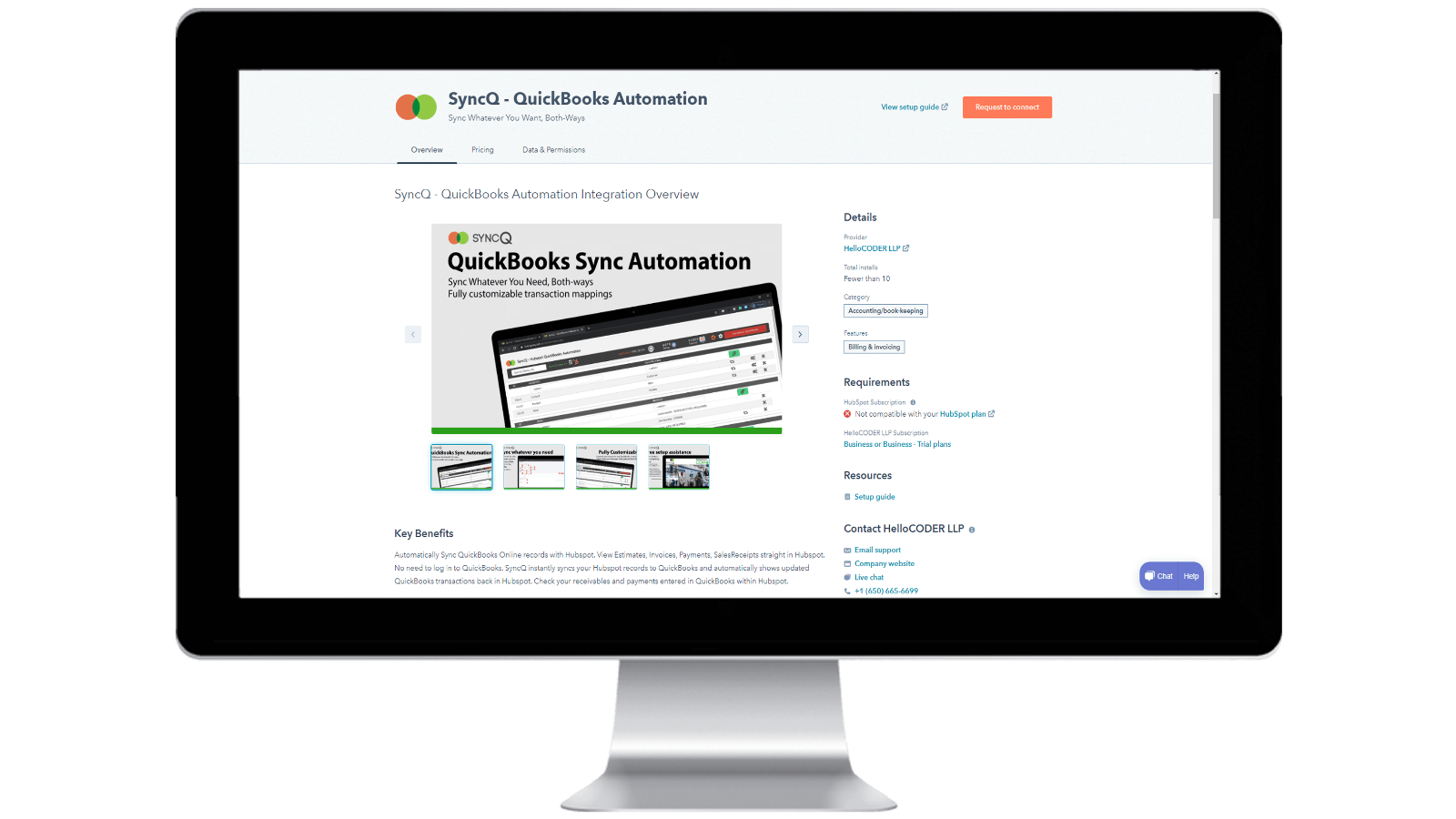
Installere SyncQ i HubSpot-kontoen din og avslutte abonnementet på SyncQ
Installer SyncQ fra Intuit eller HubSpot AppStore. For InstaView, kontakt SyncQ support. For å avslutte abonnementet på SyncQ, klikk på Unsubscribe-knappen i SyncQ-appen eller avbryt din tilbakevendende betaling med Paypal eller kontakt SyncQ support. Bare det å koble SyncQ-appen fra HubSpot avslutter ikke SyncQ-abonnementet.
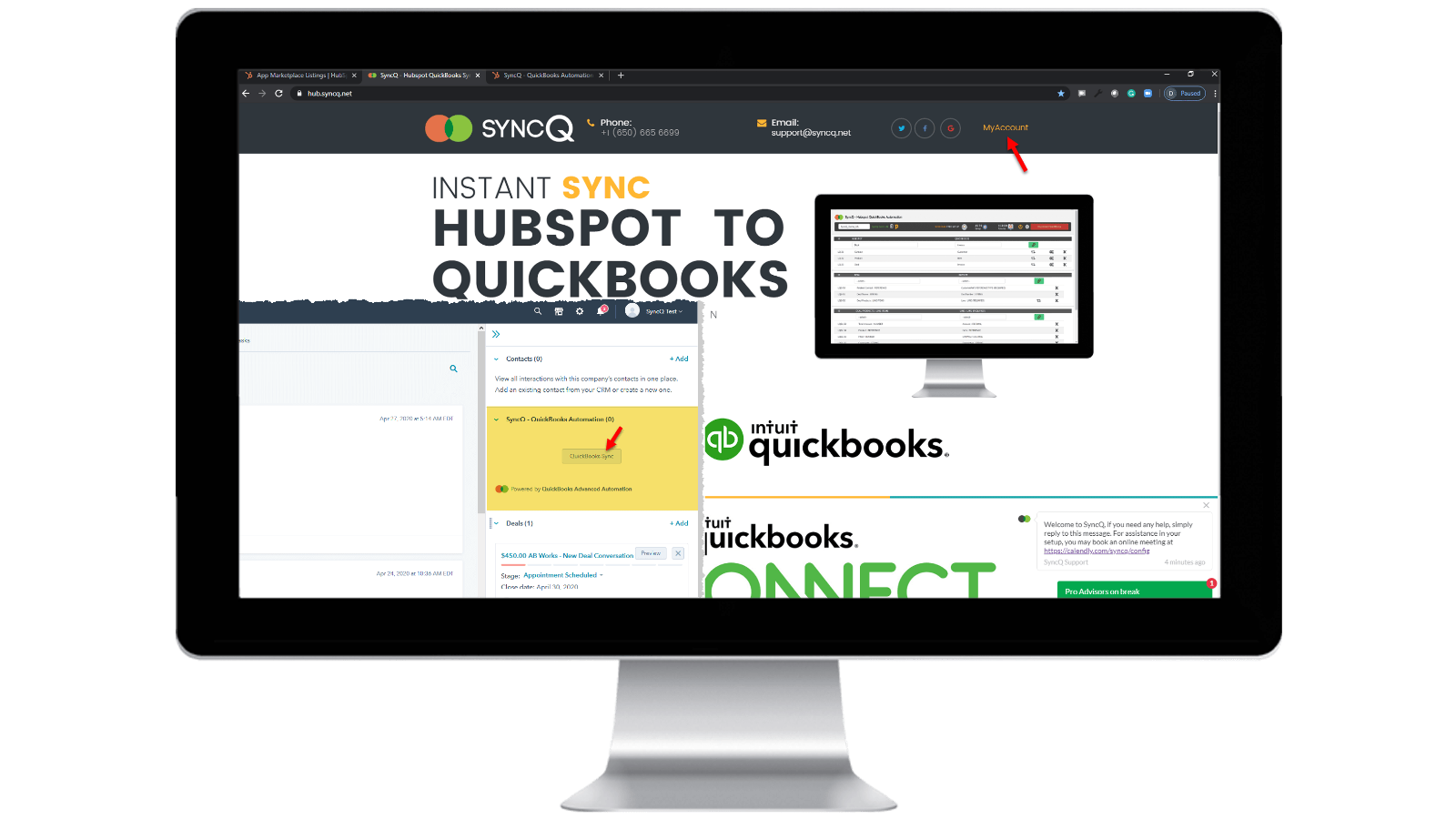
Logg inn på SyncQ-kontoen din
Bla til https://hb.syncq.net og klikk på Min konto. Den enkle måten: Gå til en hvilken som helst post i HubSpot, finn SyncQ-kortfanen i høyre fane, og klikk deretter på QuickBooks Sync. Skriv deretter inn HubSpot-brukerens e-post-ID. Du vil motta en bekreftelseskode for å bekrefte kontoen din.
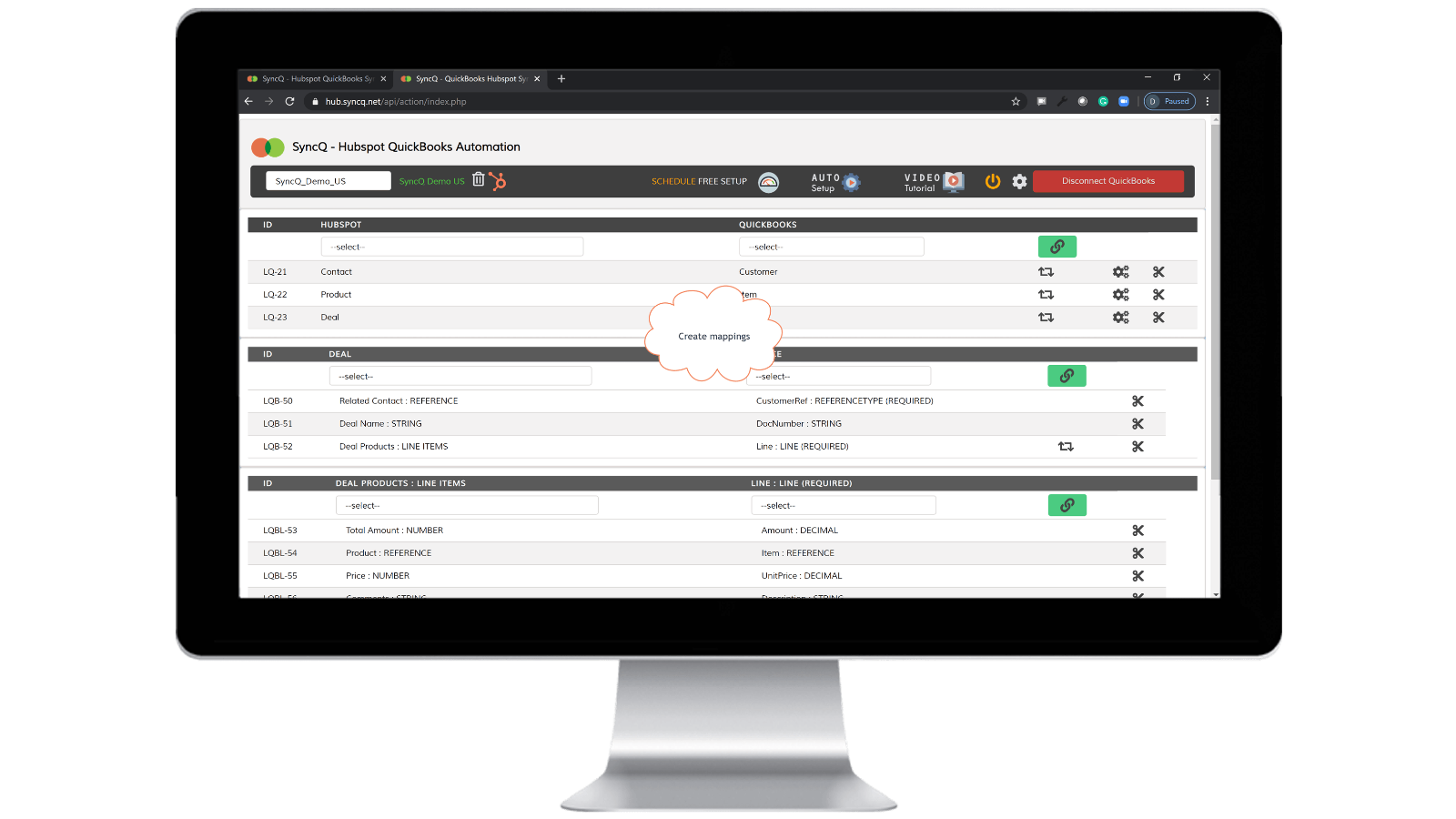
Koble til QuickBooks Company, opprett mappinger og aktiver automatisk synkronisering.
Klikk på Koble til QuickBooks, og QuickBooks-selskapet ditt vises automatisk. Klikk på oppsetthjulet for å opprette tilordningene dine, eller klikk på Autooppsett. Aktiver automatisk synkronisering mot individuelle mappinger. Du kan også gjøre manuell synkronisering ved å klikke på SyncQ-kortknappen fra HubSpot-posten.

Manuell og umiddelbar synkronisering av opptak, begge veier
Gå til HubSpot-posten som du vil synkronisere. Finn SyncQ-kortet til høyre og klikk deretter på QuickBooks Sync. Du får alternativer for å synkronisere den relaterte HubSpot-posten. Klikk på Synkroniser-knappen. HubSpot-posten synkroniseres øyeblikkelig til QuickBooks. Et sammendrag av QuickBooks post vil vises.
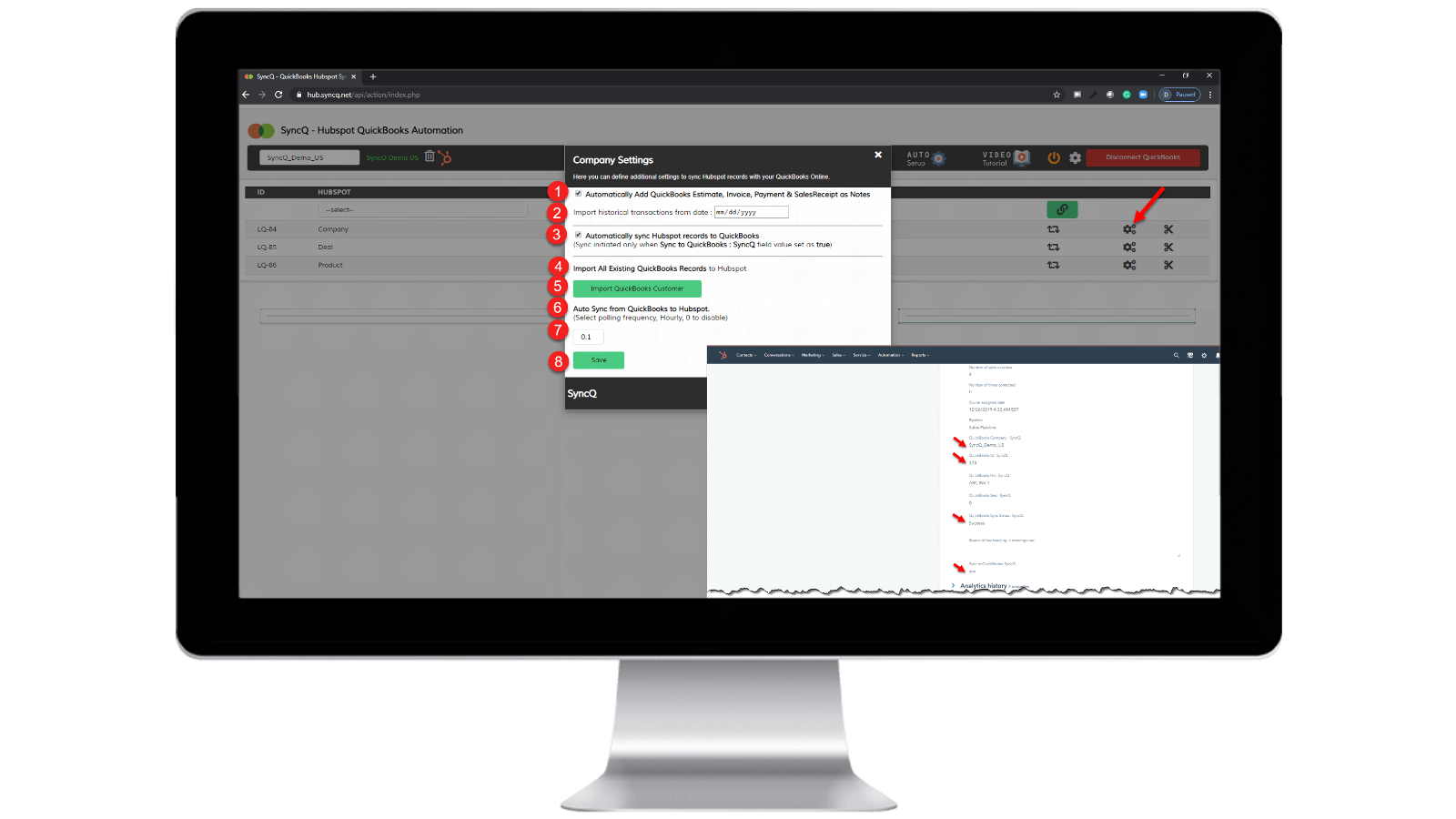
Aktiver automatisk synkronisering.
Fra QuickBooks til HubSpot: 1) Merk av for "Synkroniser HubSpot-poster automatisk til QuickBooks" Fra HubSpot til QuickBooks: 1) Angi hvor ofte du vil synkronisere automatisk fra QuickBooks til HubSpot hver time. 2) På den spesifikke HubSpot-posten som du vil synkronisere, angir du "SynkroniserQ til QuickBooks: SyncQ" som "ja".
Appfunksjonalitet
Delt data
1. Customers / Vendors | ||
2. Customers / Vendors | ||
3. Items | ||
4. Estimates/Invoice/Bill/PurchaseOrder | ||
5. Inovoice | ||
6. Estimate/Invoice/Deposit/Bill/VendorCredit & More | ||
7. Job / Sub Customer / Project |
Gjennomganger
4,2
20
4,2
20
- 22. sep. 2025
Good sync functionality but poor UI, and unhelpful support team
Overall good Integration with some minor issue, Need to improve support
The sync is good, fast and variety of options in mapping fields IN HS - QB
Some minor errors still pops up the sync , like contact not syncing properly, overwriting information. Also the UI is not so intuitive needs further improvement. Next support team teams needs to be more helpful and quick of the sync issue and queries we face.
Tasnimul, M.
- 3. juli 2025
AVOID THIS APP
I reviewed the comments before downloading and wish I had followed the advise of others - avoid this app. Useless
The app grabs your QB payment information right away (great for them, sucks for me as I have to chase them (UK based) to cancel)
the app did not work - it did nothing
McDermott, J.
Priser
Profesjonell
USD 49
/månedINKLUDERER 2 LISENSER
Synkroniser HubSpot-kontakter eller selskaper, produkter og avtaler med QuickBooks.
Manuell og automatisert synkronisering.
Ubegrenset synkronisering.
AI-innsikt i kundene. Fullstendige funksjoner med tilleggsplaner.
Toveis synkronisering av QuickBooks-kunder og -leverandører med HubSpot.
Automatisk import av estimater, fakturaer og salgskvitteringer til avtaler.
Importer automatisk estimater, fakturaer, betalinger og salgskvitteringer til organisasjoner eller personer.
Profesjonell
USD 49
/månedINKLUDERER 2 LISENSER
Synkroniser HubSpot-kontakter eller selskaper, produkter og avtaler med QuickBooks.
Manuell og automatisert synkronisering.
Ubegrenset synkronisering.
AI-innsikt i kundene. Fullstendige funksjoner med tilleggsplaner.
Toveis synkronisering av QuickBooks-kunder og -leverandører med HubSpot.
Automatisk import av estimater, fakturaer og salgskvitteringer til avtaler.
Importer automatisk estimater, fakturaer, betalinger og salgskvitteringer til organisasjoner eller personer.
* Prissettingen her er kun for illustrasjonsformål. Prisene inkluderer ikke avgifter, insentiver, rabatter eller andre prissettingsvariabler. Kontakt partneren for å få oppdatert og riktig prissettingsinformasjon. HubSpot tar ikke ansvar for denne prissettingsinformasjonen, som gis av våre partnere. Prissetting sist oppdatert: 10.04.2026
Mer info
Bygget av - HelloCODER LLP
Installeringer - 500+ installasjoner
Kategorier Språkene appen er tilgjengelig på Engelsk
Å få oppmerksomhet i dag