

QuickBooks Online Advanced Automation
Udviklet af - HelloCODER LLP
Installeringer - 500+ installationer
Rangering 4,2
(20)

Stigende
Krav
HubSpot-abonnement Tilladelser til HubSpot-konto - Se de nødvendige kontotilladelser
Adgangstype Delt QuickBooks Online Advanced Automation abonnement - Professionel, Business Max, Virksomhed eller Professionel årlig planer
Oversigt

1/6 - SyncQ - HubSpot QuickBooks Automation
Synkroniser problemfrit alle QuickBooks-transaktioner med HubSpot
Tovejs regnskabssynkronisering - fra kunder og projekter til betalinger med AI-indsigt. Dækker både debitorer og kreditorer.
Registrer og administrer indtægter med lethed
SyncQ giver dig mulighed for at oprette, sende og se tilbud, fakturaer, betalinger og salgskvitteringer direkte fra HubSpot-poster. Med Business Max- og Corporate-abonnementer kan du låse op for avancerede synkroniseringsfunktioner for HubSpot Custom Objects, herunder
QuickBooks Project som HubSpot Deal,
QuickBooks Job/sub-customer som HubSpot Deal og vedhæft relaterede fakturaer som Deal Invoices,
Bi-direktionel QuickBooks-faktura med HubSpot-faktura/aftale,
Indbetalinger, leverandørkreditter, kontoplan og meget mere.
Nyd GRATIS kortlægningsassistance og nul onboarding-omkostninger.
AI-drevet indsigt, autonom synkronisering, 100 % tilpasselig synkronisering
SyncQ tilbyder avanceret, AI-drevet forretningsindsigt. Stil et hvilket som helst spørgsmål om din virksomhed og få øjeblikkelige svar. (gratis begrænset prøveperiode på alle planer, + betalte udgaver).
100 % tilpassede mappinger , der lader dig mappe HubSpot-objekter, herunder brugerdefinerede objekter og felter, til de fleste QuickBooks-transaktioner, herunder brugerdefinerede felter til fakturaer og estimater samt skatter og afgifter, så de passer til dine 360-graders forretningsbehov.
Med intelligent automatisering kan du vælge at synkronisere automatisk eller manuelt med et enkelt klik - uden at logge ind i QuickBooks. Det synkroniserer også automatisk QuickBooks Online-poster til HubSpot, herunder modtagne betalinger og afventende saldi.
Styrk salget med øjeblikkelig adgang til finansielle data
SyncQ viser automatisk QuickBooks-overslag, fakturaer og betalingsoplysninger i HubSpot Companies/Contacts note-sektioner, hvilket giver dit salgsteam øjeblikkelig adgang til kritisk økonomisk indsigt - uden atskulle kontakte bogholderiet eller logge ind i QuickBooks Online.
Sikkerhed på virksomhedsniveau og Intuit-certificering
SyncQ er Intuit Approved og opfylder branchens standardiserede sikkerhedskrav. Det evalueres regelmæssigt af Intuit i henhold til NIST-sikkerhedsstandarder (The National Institute of Standards and Technology, U.S. Department of Commerce). Find SyncQ på din QuickBooks-konto eller i Intuit App Store.
Vigtige funktioner
✔ Intuit Approved - Opfylder branchestandarder for finansiel sikkerhed
✔ Automatiseret og manuel tovejs- og monodirektionel synkronisering
✔ Automatisk synkronisering af QuickBooks-transaktioner til HubSpot-poster
✔ AI-drevne indsigter - få mere at vide om din virksomhed og dine kunder
✔ Synkroniser HubSpot-virksomheder/kontakter med QuickBooks-kunder/leverandører
✔ Synkroniser HubSpot Deals/Tickets med QuickBooks Estimates, Invoices, Purchase Orders, Bills & more
✔ Se QuickBooks-transaktionshistorik i HubSpot-noter, inklusive QuickBooks-faktura-PDF-links(licens kræves for at se)
✔ Synkroniser Quick Books-produkter med HubSpot-produkter
E-mail estimater og fakturaer direkte fra HubSpot
✔ Spor salgstendenser og tilgodehavender i HubSpot
✔ Fuldt tilpassede feltmappinger til unikke forretningsbehov
✔ Synkroniser HubSpots brugerdefinerede felter og QuickBooks brugerdefinerede felter
✔ Forbind flere QuickBooks-virksomheder
SyncQ - Det førende QuickBooks-automatiseringsværktøj med AI-indsigt
SyncQ er den førende QuickBooks-automatiseringsløsning til flere CRM'er, herunder Salesforce og Pipedrive. SyncQ, som hundredvis af virksomheder har tillid til, sikrer problemfri AI-drevet automatisering, transaktionssynkronisering og økonomisk indsigt.
Alle vores integrationer er godkendt af Intuit.
Funktioner
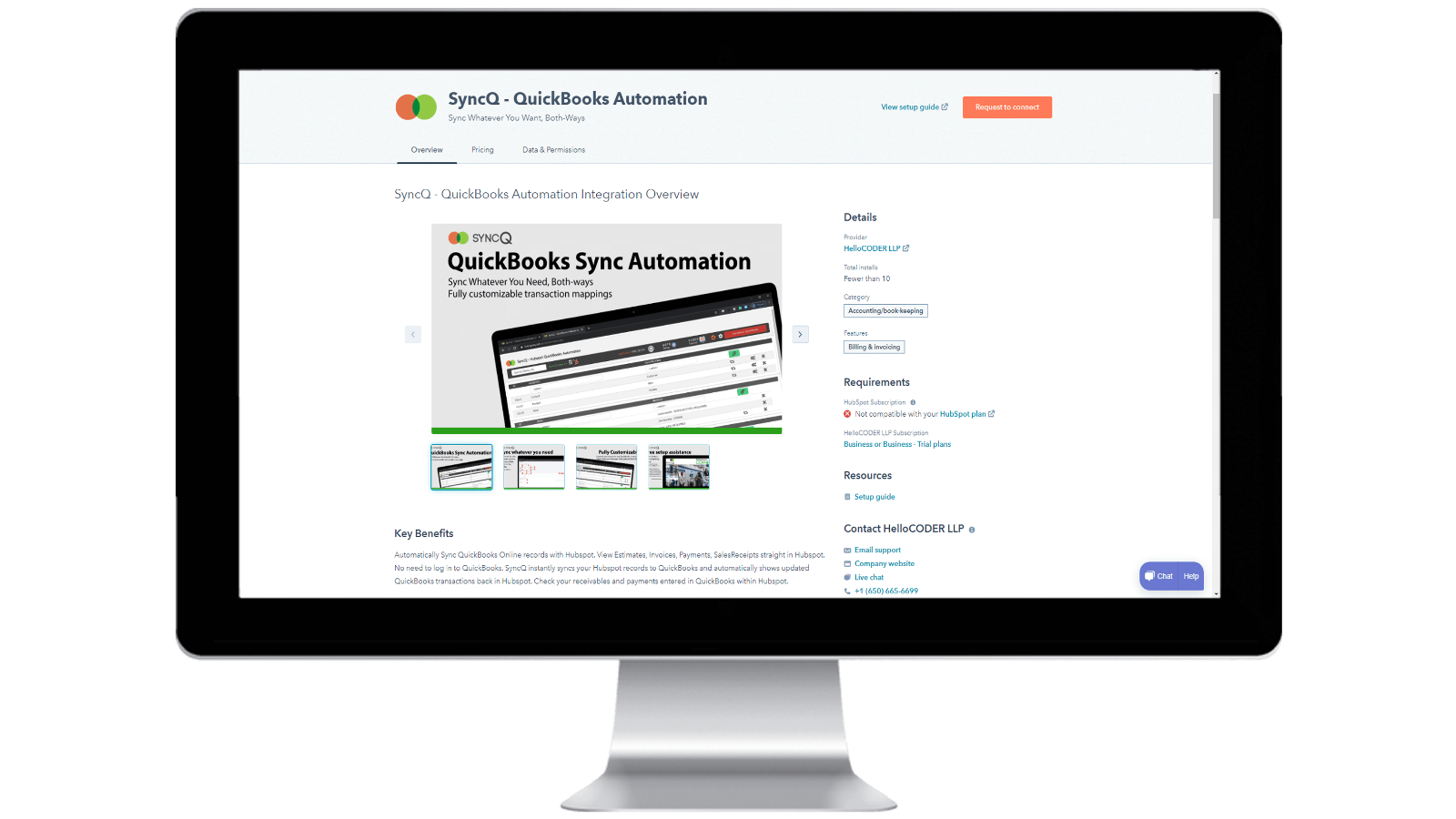
Installation af SyncQ på din HubSpot-konto og afmelding af SyncQ
Installer SyncQ fra Intuit eller HubSpot AppStore. Kontakt SyncQ-support for InstaView. For at afmelde SyncQ skal du klikke på knappen Afmeld i SyncQ-appen eller annullere din tilbagevendende Paypal-betaling eller kontakte SyncQ-support. Hvis du blot afbryder SyncQ-appen fra HubSpot, afmelder du ikke SyncQ.
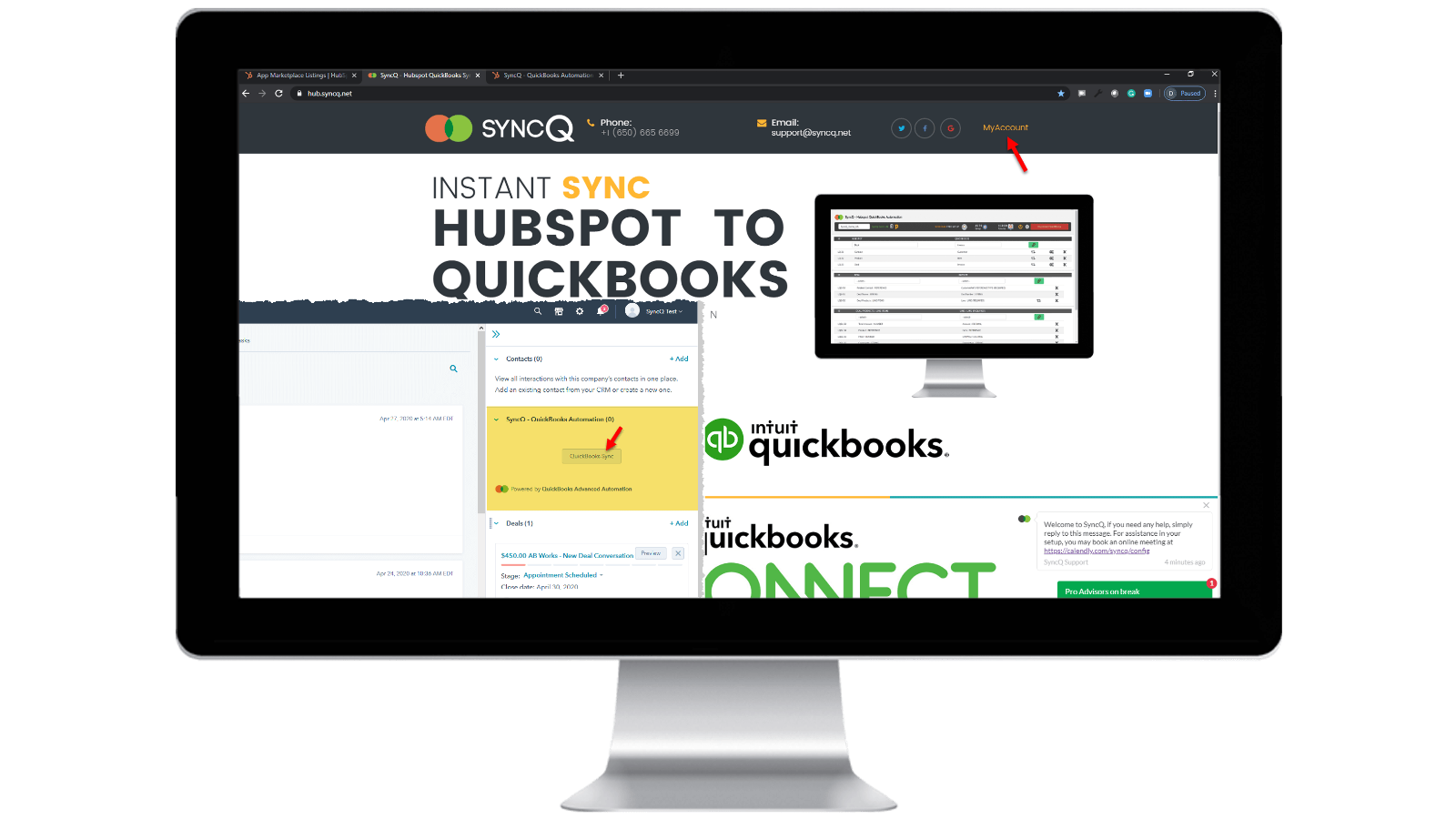
Log ind på din SyncQ-konto
Gå til https://hb.syncq.net, og klik på Min konto. Den nemme måde: Gå til en hvilken som helst post i HubSpot, find fanen SyncQ-kort i højre side, og klik derefter på QuickBooks Sync. Indtast derefter din HubSpot-brugers e-mail-id. Du vil modtage en bekræftelseskode for at bekræfte din konto.
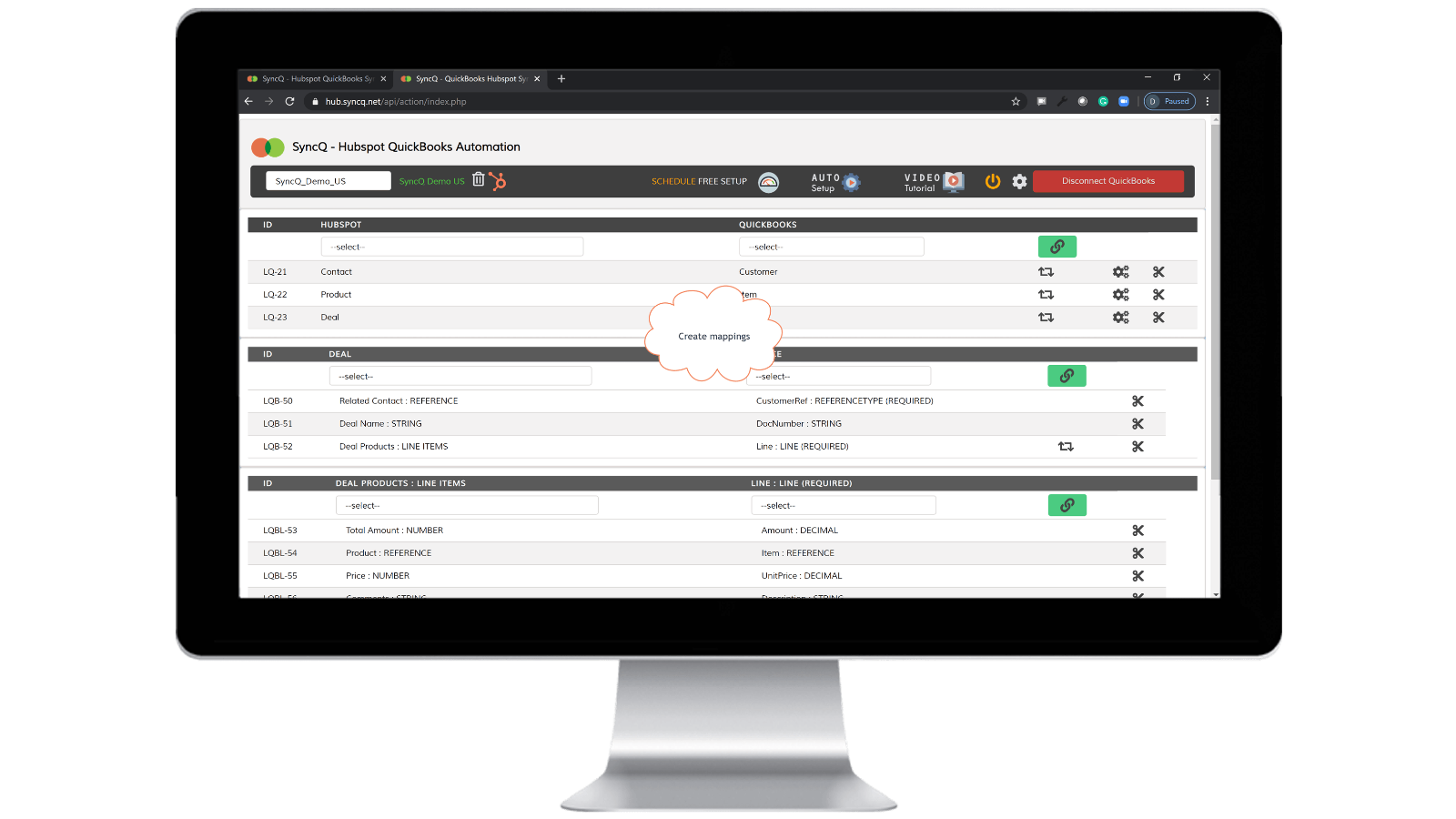
Opret forbindelse til QuickBooks Company, opret mappinger og aktiver automatisk synkronisering.
Klik på Connect to QuickBooks, så vises dit QuickBooks-selskab automatisk. Klik på opsætningshjulet for at oprette dine mappinger, eller klik på Auto Setup. Aktivér automatisk synkronisering mod individuelle tilknytninger. Du kan også foretage manuel synkronisering ved at klikke på SyncQ-kortknappen fra HubSpot-posten.

Manuel og øjeblikkelig synkronisering af optagelser, begge veje
Gå til den HubSpot-post, du vil synkronisere. Find SyncQ-kortet til højre, og klik derefter på QuickBooks Sync. Du får mulighed for at synkronisere den relaterede HubSpot-post. Klik på knappen Synkroniser. HubSpot-posten synkroniseres øjeblikkeligt med QuickBooks. En oversigt over QuickBooks post vises.
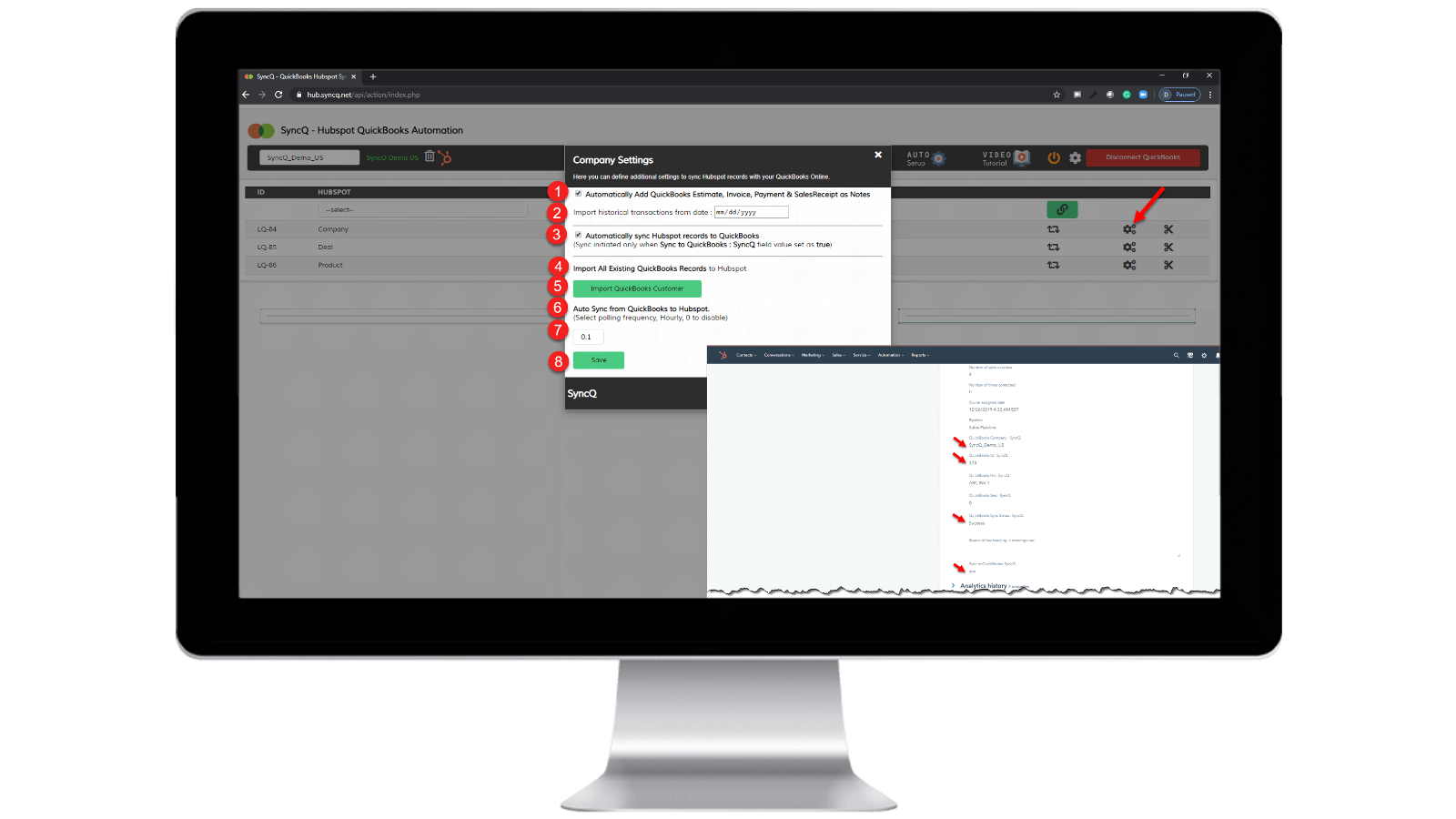
Aktivér automatisk synkronisering.
Fra QuickBooks til HubSpot: 1) Marker "Synkroniser automatisk HubSpot-poster til QuickBooks" Fra HubSpot til QuickBooks: 1) Angiv timefrekvensen for "Automatisk synkronisering fra QuickBooks til HubSpot". 2) På den specifikke HubSpot-post, som du vil synkronisere, skal du indstille "SyncQ to QuickBooks: SyncQ" som "ja".
Appfunktionalitet
Delte data
1. Customers / Vendors | ||
2. Customers / Vendors | ||
3. Items | ||
4. Estimates/Invoice/Bill/PurchaseOrder | ||
5. Inovoice | ||
6. Estimate/Invoice/Deposit/Bill/VendorCredit & More | ||
7. Job / Sub Customer / Project |
Anmeldelser
4,2
20
4,2
20
- 22. sep 2025
God synkroniseringsfunktionalitet, men dårlig brugergrænseflade og et ubehjælpeligt supportteam
Generelt god integration med nogle mindre problemer, behov for at forbedre supporten
Synkroniseringen er god og hurtig, og der er mange muligheder for at kortlægge felter IN HS - QB
Nogle mindre fejl dukker stadig op under synkroniseringen, f.eks. at kontakter ikke synkroniseres korrekt, og at oplysninger overskrives. Brugergrænsefladen er heller ikke så intuitiv, at den skal forbedres yderligere. Næste supportteam skal være mere hjælpsomme og hurtige til at løse de synkroniseringsproblemer og forespørgsler, vi står over for.
Tasnimul, M.
- 3. jul 2025
UNDGÅ DENNE APP
Jeg gennemgik kommentarerne, før jeg downloadede, og ville ønske, at jeg havde fulgt andres råd - undgå denne app. Ubrugelig
Appen tager dine QB-betalingsoplysninger med det samme (fantastisk for dem, surt for mig, da jeg er nødt til at jagte dem (baseret i Storbritannien) for at annullere).
Appen virkede ikke - den gjorde ingenting
McDermott, J.
Priser
Professionel
49 US$
/månedINKLUDERER 2 LICENSER
Synkroniser HubSpot-kontakter eller virksomheder, produkter og tilbud med QuickBooks.
Manuel og automatisk synkronisering.
Ubegrænset synkronisering.
AI-indsigt i kunderne. Alle funktioner med ekstra planer.
Bi-direktionel synkronisering af QuickBooks-kunder og -leverandører med HubSpot.
Automatisk import af estimater, fakturaer og salgskvitteringer til tilbud.
Importer automatisk estimater, fakturaer, betalinger og salgskvitteringer til organisationer eller personer.
Professionel
49 US$
/månedINKLUDERER 2 LICENSER
Synkroniser HubSpot-kontakter eller virksomheder, produkter og tilbud med QuickBooks.
Manuel og automatisk synkronisering.
Ubegrænset synkronisering.
AI-indsigt i kunderne. Alle funktioner med ekstra planer.
Bi-direktionel synkronisering af QuickBooks-kunder og -leverandører med HubSpot.
Automatisk import af estimater, fakturaer og salgskvitteringer til tilbud.
Importer automatisk estimater, fakturaer, betalinger og salgskvitteringer til organisationer eller personer.
* Priserne her er kun til visningsformål. Alle priser er ekskl. afgifter, incitamenter, rabatter eller andre prisvariabler. Du bør kontakte partneren for at få de mest ajourførte og korrekte prisoplysninger. HubSpot påtager sig intet ansvar for disse prisoplysninger, som leveres af vores partnere. Priser sidst opdateret: 10.04.2026
Flere oplysninger
Udviklet af - HelloCODER LLP
Installeringer - 500+ installationer
Kategorier Sprog som denne app er tilgængelig på Engelsk