

QuickBooks Online Advanced Automation
Built by - HelloCODER LLP
Installs - 500+ installs
Rating 4.2
(20)

Rising
Requirements
HubSpot Plan HubSpot Account permissions - View the required account permissions
Access Type Shared QuickBooks Online Advanced Automation Subscription - Professional, Business Max, Corporate, or Professional Annual plans
Overview

1/6 - SyncQ - HubSpot QuickBooks Automation
Seamlessly Sync All QuickBooks Transactions with HubSpot
Two-Way Accounting Sync — from Customers & Projects to Payments, with AI Insights. Covers both Accounts Receivable & Accounts Payable.
Record and Manage Income with Ease
SyncQ allows you to create, send, and view Estimates, Invoices, Payments, and Sales Receipts directly from HubSpot records. With Business Max and Corporate plans, unlock advanced sync capabilities for HubSpot Custom Objects, including
QuickBooks Project as HubSpot Deal,
QuickBooks Job/sub-customer as HubSpot Deal and attach related invoices as Deal Invoices,
Bi-directional QuickBooks Invoice with HubSpot Invoice/Deal,
Deposits, Vendor Credits, Chart of Accounts, and more.
Enjoy FREE Mapping Assistance and Zero Onboarding Cost.
AI-Powered Insights, Autonomous Sync, 100% Customizable Sync
SyncQ offers advanced, AI-powered business insights. Ask any question about your business and get instant answers. (complimentary limited trial on every plan, + paid editions).
100% customizable mappings that let you map HubSpot Objects including custom objects and fields to most QuickBooks transactions including Invoice and Estimate custom fields, plus taxes and classes, to fit your 360-degree business needs.
With intelligent automation, you can choose to sync automatically or manually with a single click—without logging into QuickBooks. It also automatically syncs QuickBooks Online records to HubSpot, including received payments and pending balances.
Empower Sales with Instant Access to Financial Data
SyncQ automatically displays QuickBooks Estimates, Invoices, and Payment details inside HubSpot Companies/Contacts note sections, giving your sales team instant access to critical financial insights—without needing to contact accounting or log into QuickBooks Online.
Enterprise-Grade Security & Intuit Certification
SyncQ is Intuit Approved and meets industry-standard security requirements. It is regularly evaluated by Intuit as per NIST security standards (The National Institute of Standards and Technology, U.S. Department of Commerce). Find SyncQ inside your QuickBooks account or on the Intuit App Store.
Key Features
✔ Intuit Approved – Meets industry standards for financial security
✔ Automated & manual bi-directional and mono-directional sync
✔ Automatically sync QuickBooks transactions to HubSpot records
✔ AI-Powered Insights – Know more about your business and customers
✔ Sync HubSpot Companies/Contacts with QuickBooks Customers/Vendors
✔ Sync HubSpot Deals/Tickets with QuickBooks Estimates, Invoices, Purchase Orders, Bills & more
✔ View QuickBooks transaction history in HubSpot notes, including QuickBooks Invoice PDF links (license required to view)
✔ Sync QuickBooks Products with HubSpot Products
✔ Email Estimates & Invoices directly from HubSpot
✔ Track sales trends & receivables inside HubSpot
✔ Fully customizable field mappings for unique business needs
✔ Sync HubSpot custom fields & QuickBooks custom fields
✔ Connect multiple QuickBooks Companies
SyncQ – The #1 QuickBooks Automation Tool with AI Insights
SyncQ is the leading QuickBooks automation solution for multiple CRMs, including Salesforce and Pipedrive. Trusted by hundreds of businesses, SyncQ ensures seamless AI-powered automation, transaction sync, and financial insights.
All our integrations are Intuit approved.
Features
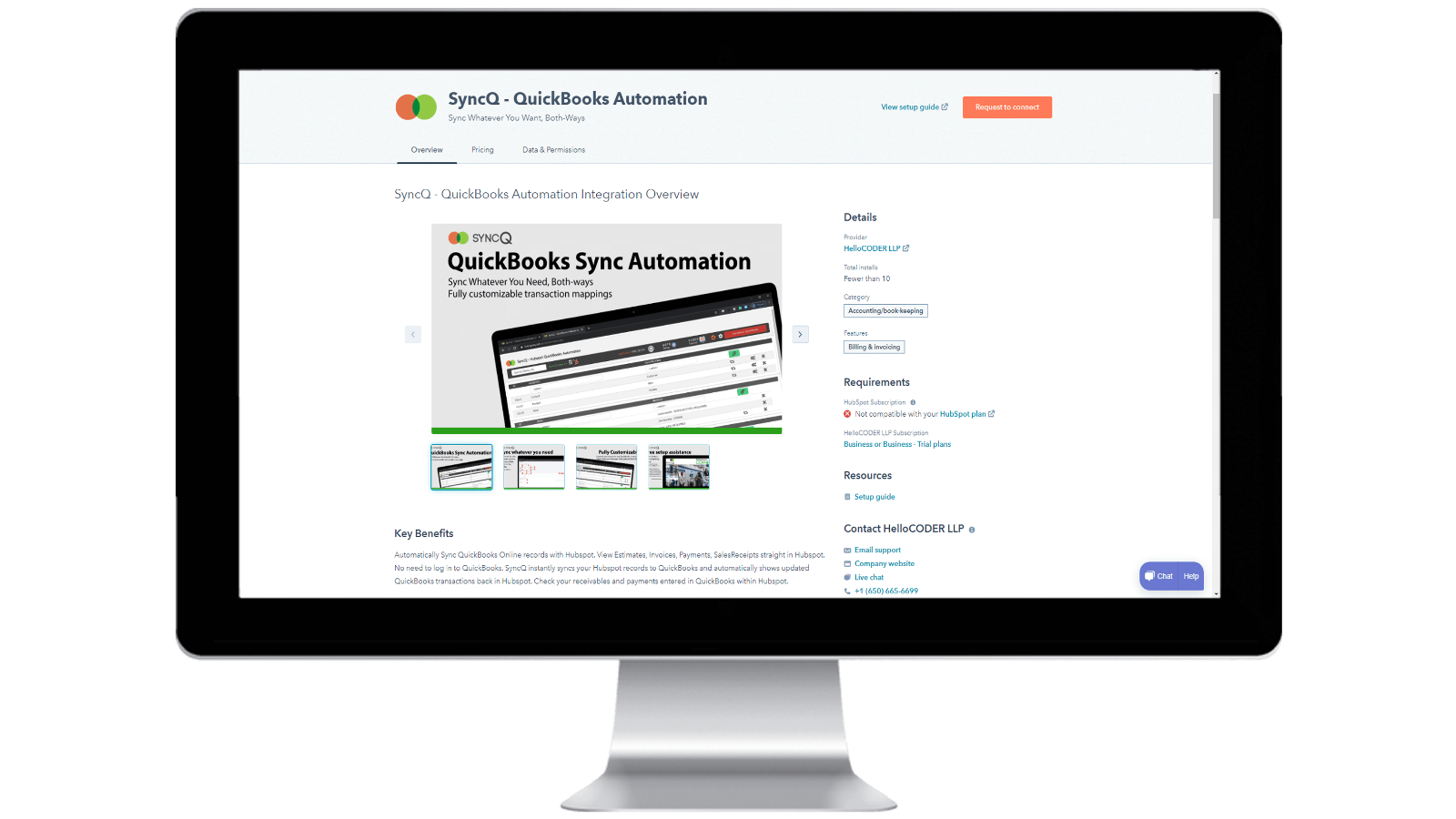
Installing SyncQ into your HubSpot account & Unsubscribing SyncQ
Install SyncQ from Intuit or HubSpot AppStore. For InstaView, contact SyncQ support. To unsubscribe to SyncQ, click on the Unsubscribe button within the SyncQ app or cancel your Paypal recurring payment or contact SyncQ support. Merely disconnecting SyncQ app from HubSpot does not unsubscribe SyncQ
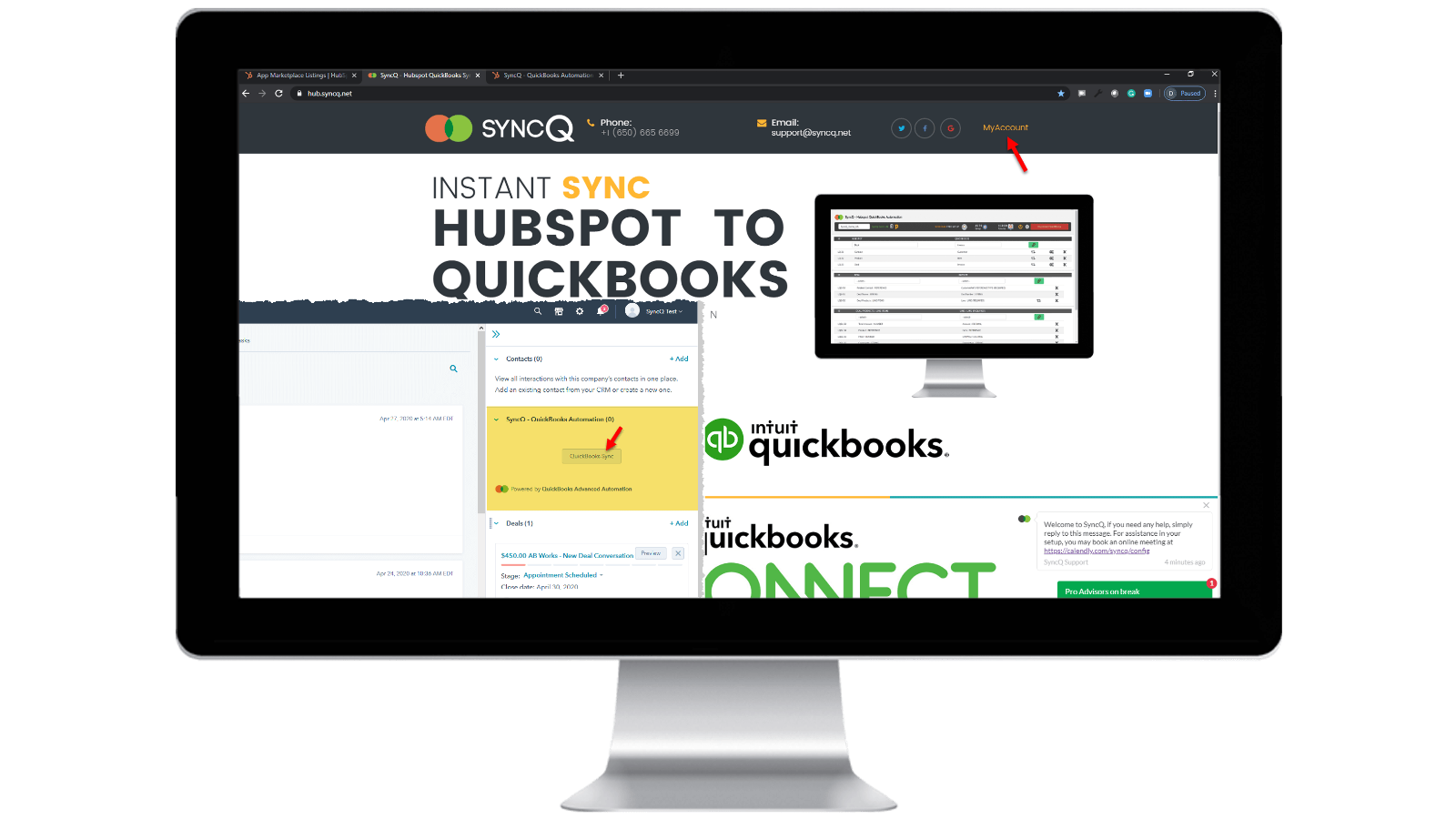
Log into your SyncQ account
Browse to https://hb.syncq.net and click on My Account. The easy way: goto any record in HubSpot, find SyncQ card tab on the right tabs, and then click on QuickBooks Sync. Then enter your HubSpot user email id. You will receive a verification code to verify your account.
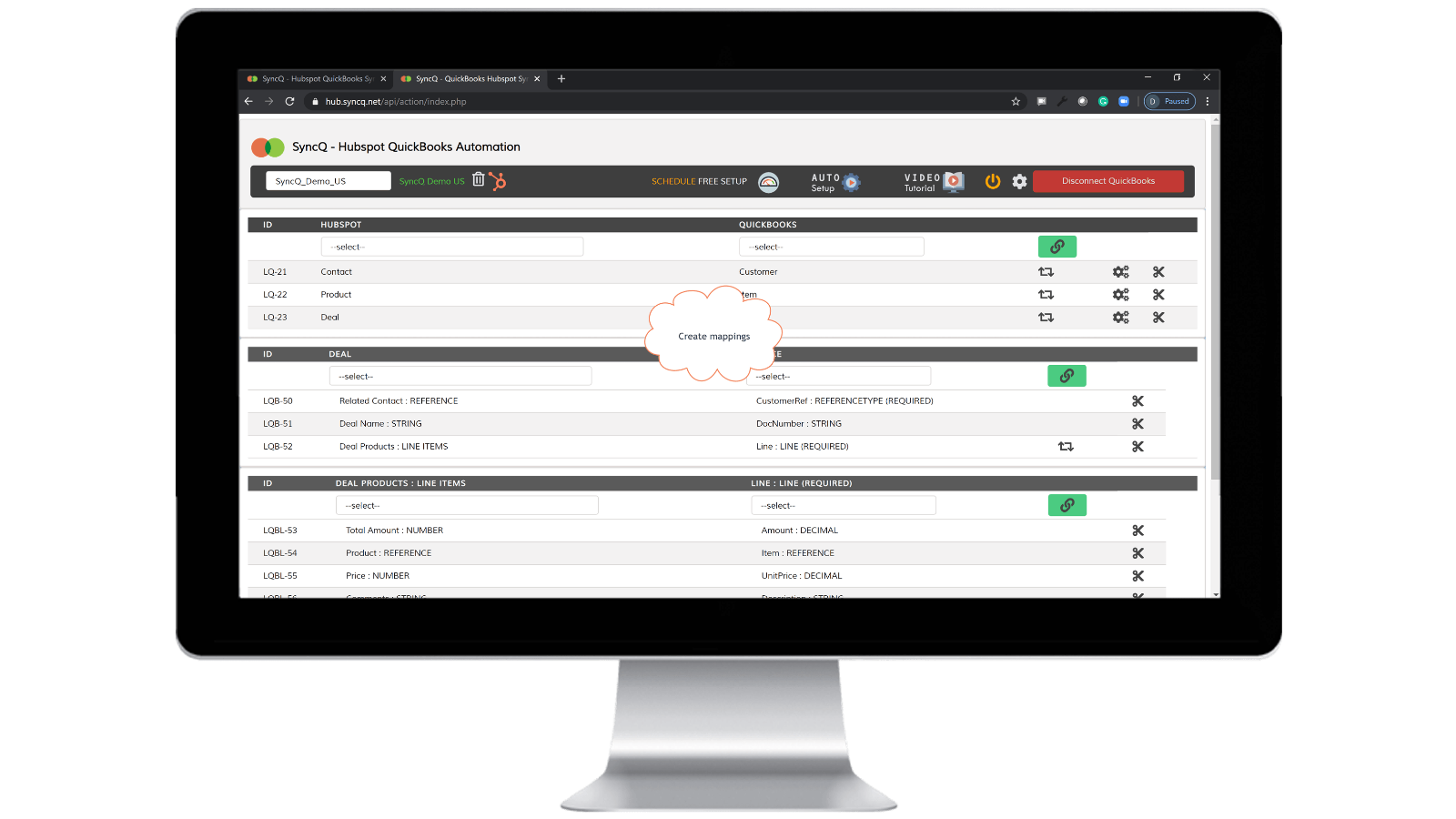
Connect QuickBooks Company, create mappings and enable auto sync.
Click on Connect to QuickBooks, your QuickBooks company will automatically show up. Click on the setup wheel button to create your mappings or click on Auto Setup. Enable auto-sync against individual mappings. You can also do manual sync by clicking on the SyncQ card button from HubSpot record.

Manual and instant record sync, both-ways
Goto to the HubSpot record that you want to sync. Find the SyncQ card on right and then click on QuickBooks Sync. You will get options to sync the related HubSpot record. Click on the Sync button. HubSpot record will instantly sync to QuickBooks. A summary of QuickBook's record will show up.
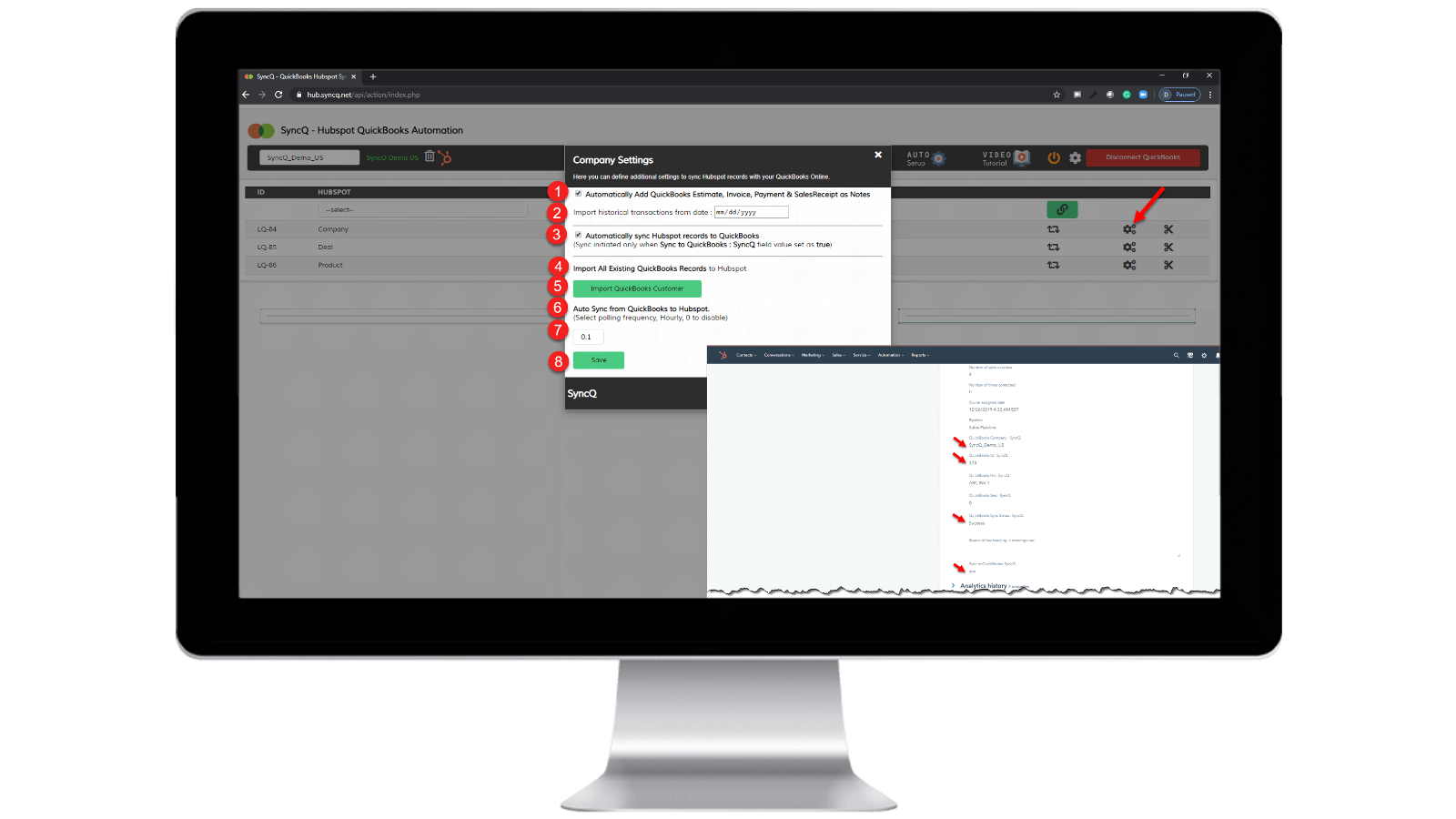
Enable auto-sync.
From QuickBooks to HubSpot: 1) Check "Automatically sync HubSpot records to QuickBooks" From HubSpot to QuickBooks: 1) Specify the hourly frequency of "Auto Sync from QuickBooks to HubSpot." 2) On the specific HubSpot record that you want to sync, set "SyncQ to QuickBooks: SyncQ" as "yes".
App Functionality
Shared Data
1. Customers / Vendors | ||
2. Customers / Vendors | ||
3. Items | ||
4. Estimates/Invoice/Bill/PurchaseOrder | ||
5. Inovoice | ||
6. Estimate/Invoice/Deposit/Bill/VendorCredit & More | ||
7. Job / Sub Customer / Project |
Reviews
4.2
20
4.2
20
- Sep 22, 2025
Good sync functionality but poor UI, and unhelpful support team
Overall good Integration with some minor issue, Need to improve support
The sync is good, fast and variety of options in mapping fields IN HS - QB
Some minor errors still pops up the sync , like contact not syncing properly, overwriting information. Also the UI is not so intuitive needs further improvement. Next support team teams needs to be more helpful and quick of the sync issue and queries we face.
Tasnimul, M.
- Jul 3, 2025
AVOID THIS APP
I reviewed the comments before downloading and wish I had followed the advise of others - avoid this app. Useless
The app grabs your QB payment information right away (great for them, sucks for me as I have to chase them (UK based) to cancel)
the app did not work - it did nothing
McDermott, J.
Pricing
Professional
$49
/monthINCLUDES 2 LICENSES
Sync HubSpot Contacts or Companies, Products, and Deals with QuickBooks.
Manual and Automated Sync.
Unlimited Sync.
Customer AI insights. Full features with additional plans.
Bi-directional Sync of QuickBooks Customers and Vendors with HubSpot.
Auto-import Estimates, Invoices, and Sales Receipts to Deals.
Automatically import Estimates, Invoices, Payments, and Sales Receipts to Organizations or People.
Professional
$49
/monthINCLUDES 2 LICENSES
Sync HubSpot Contacts or Companies, Products, and Deals with QuickBooks.
Manual and Automated Sync.
Unlimited Sync.
Customer AI insights. Full features with additional plans.
Bi-directional Sync of QuickBooks Customers and Vendors with HubSpot.
Auto-import Estimates, Invoices, and Sales Receipts to Deals.
Automatically import Estimates, Invoices, Payments, and Sales Receipts to Organizations or People.
* The pricing here is for display purposes only. All prices do not include taxes, incentives, discounts, or other pricing variables. You should contact the partner for the most up to date and correct pricing information. HubSpot does not take any responsibility for this pricing information, which is provided by our partners. Pricing last updated: 04/10/2026
More info
Built by - HelloCODER LLP
Installs - 500+ installs
Categories Languages this app is available in English
New arrivals

Dialaxy v3
Boost Your Communication with Dialaxy x HubSpot

Letter App
Reimagining enablement, with AI at the core.
