


요구 사항
HubSpot 요금제 HubSpot 계정 권한 - 필수 계정 권한 보기
액세스 유형 공유됨 QuickBooks Online Advanced Automation 구독 - 전문가, 비즈니스 최대, 기업 또는 프로페셔널 연간 플랜
개요

1/6 - SyncQ - HubSpot QuickBooks Automation
모든 QuickBooks 거래를 HubSpot과 원활하게 동기화하세요.
양방향 회계 동기화 - 고객 및 프로젝트에서 결제까지, AI 인사이트를 통한 양방향 동기화. 미수금과 미지급금을 모두 처리합니다.
손쉬운 수입 기록 및 관리
SyncQ를 사용하면 HubSpot 기록에서 직접 견적서, 송장, 결제 및 판매 영수증을 생성, 전송 및 확인할 수 있습니다. Business Max 및 기업 요금제를 사용하면 다음과 같은 HubSpot 사용자 지정 개체에 대한 고급 동기화 기능을 이용할 수 있습니다 .
HubSpot 거래로 QuickBooks 프로젝트,
QuickBooks 작업/하위 고객을 HubSpot 거래로 설정하고 관련 송장을 거래 송장으로 첨부하세요,
양방향 퀵북스 인보이스를 HubSpot 인보이스/딜로 첨부할 수 있습니다,
예금, 공급업체 크레딧, 계정표 등을 첨부할 수 있습니다.
무료 매핑 지원과 제로 온보딩 비용을 즐기세요.
AI 기반 인사이트, 자율 동기화, 100% 맞춤형 동기화
SyncQ는 AI 기반의 고급 비즈니스 인사이트를 제공합니다. 비즈니스에 관한 모든 질문을 하고 즉각적인 답변을 받아보세요. (모든 요금제에서 무료 제한적 평가판, + 유료 버전).
사용자 지정 개체 및 필드를 포함한 HubSpot 개체를 송장 및 견적 사용자 지정 필드, 세금 및 수업을 포함한 대부분의 QuickBooks 거래에 매핑할 수 있는 100% 사용자 지정 가능한 매핑으로 360도 비즈니스 요구 사항에 맞게매핑할 수 있습니다.
지능형 자동화를 통해 QuickBooks에 로그인하지 않고도 클릭 한 번으로 자동 또는 수동 동기화를 선택할 수 있습니다. 또한 받은 결제와 보류 중인 잔액을 포함하여 QuickBooks Online 기록을 HubSpot에 자동으로 동기화합니다.
재무 데이터에 즉시 액세스하여 영업 역량 강화
SyncQ는 HubSpot 회사/연락처 메모 섹션에 QuickBooks 견적, 송장 및 결제 세부 정보를 자동으로 표시하여 영업팀이 회계팀에 연락하거나 QuickBooks Online에 로그인할 필요 없이 중요한 재무 인사이트에 즉시 액세스할수 있도록 합니다.
엔터프라이즈급 보안 및 Intuit 인증
SyncQ는 Intuit 승인을 받았으며 업계 표준 보안 요구 사항을 충족합니다. NIST 보안 표준 (미국 상무부 국립표준기술연구소)에 따라 Intuit의 정기적인 평가를 받습니다. QuickBooks 계정 또는 Intuit 앱 스토어에서 SyncQ를 찾아보세요.
주요 기능
Intuit 승인 - 금융 보안에 대한 업계 표준 충족
자동 및 수동 양방향 및 단방향 동기화
QuickBooks 거래를 HubSpot 기록에 자동으로 동기화
AI 기반 인사이트 - 비즈니스와 고객에 대해 더 많이 알 수 있습니다.
허브스팟 회사/연락처를 퀵북스 고객/공급업체와 동기화하세요.
허브스팟 거래/티켓을 퀵북스 견적, 송장, 구매 주문, 청구서 등과 동기화하세요.
QuickBooks 송장 PDF 링크를 포함한 HubSpot 노트에서 QuickBooks 거래 내역 보기(라이선스 필요)
QuickBooks 제품과 HubSpot 제품 동기화
HubSpot에서 직접 견적 및 송장 이메일 보내기
HubSpot 내에서 판매 동향 및 미수금 추적
고유 한 비즈니스 요구에 맞게 완전히 사용자 정의 가능한 필드 매핑
HubSpot 사용자 정의 필드 및 QuickBooks 사용자 정의 필드 동기화
여러 퀵북스 회사 연결
SyncQ - AI 인사이트를 제공하는 최고의 QuickBooks 자동화 도구
SyncQ는 Salesforce 및 Pipedrive를 포함한 여러 CRM을 위한 선도적인 QuickBooks 자동화 솔루션입니다. 수백 개의 기업이 신뢰하는 SyncQ는 원활한 AI 기반 자동화, 거래 동기화, 재무 인사이트를 보장합니다.
모든 통합은 Intuit의 승인을 받았습니다.
기능
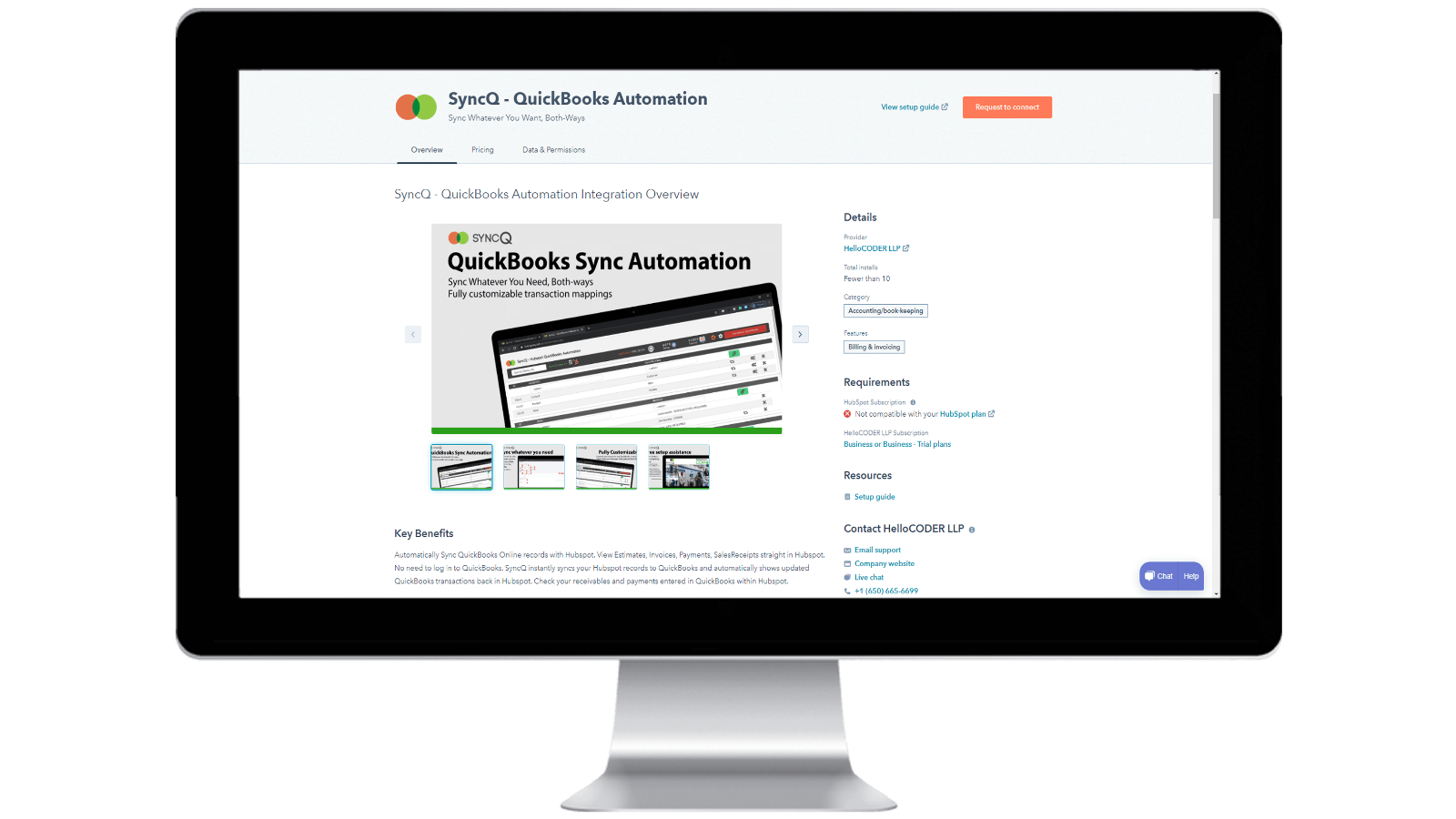
HubSpot 계정에 SyncQ 설치 및 SyncQ 구독 취소하기
Intuit 또는 HubSpot 앱스토어에서 SyncQ를 설치합니다. InstaView의 경우 SyncQ 지원팀에 문의하세요. SyncQ 구독을 취소하려면 SyncQ 앱에서 구독 취소 버튼을 클릭하거나 Paypal 정기 결제를 취소하거나 SyncQ 지원팀에 문의하세요. HubSpot에서 SyncQ 앱 연결을 끊는 것만으로는 SyncQ 구독이 취소되지 않습니다.
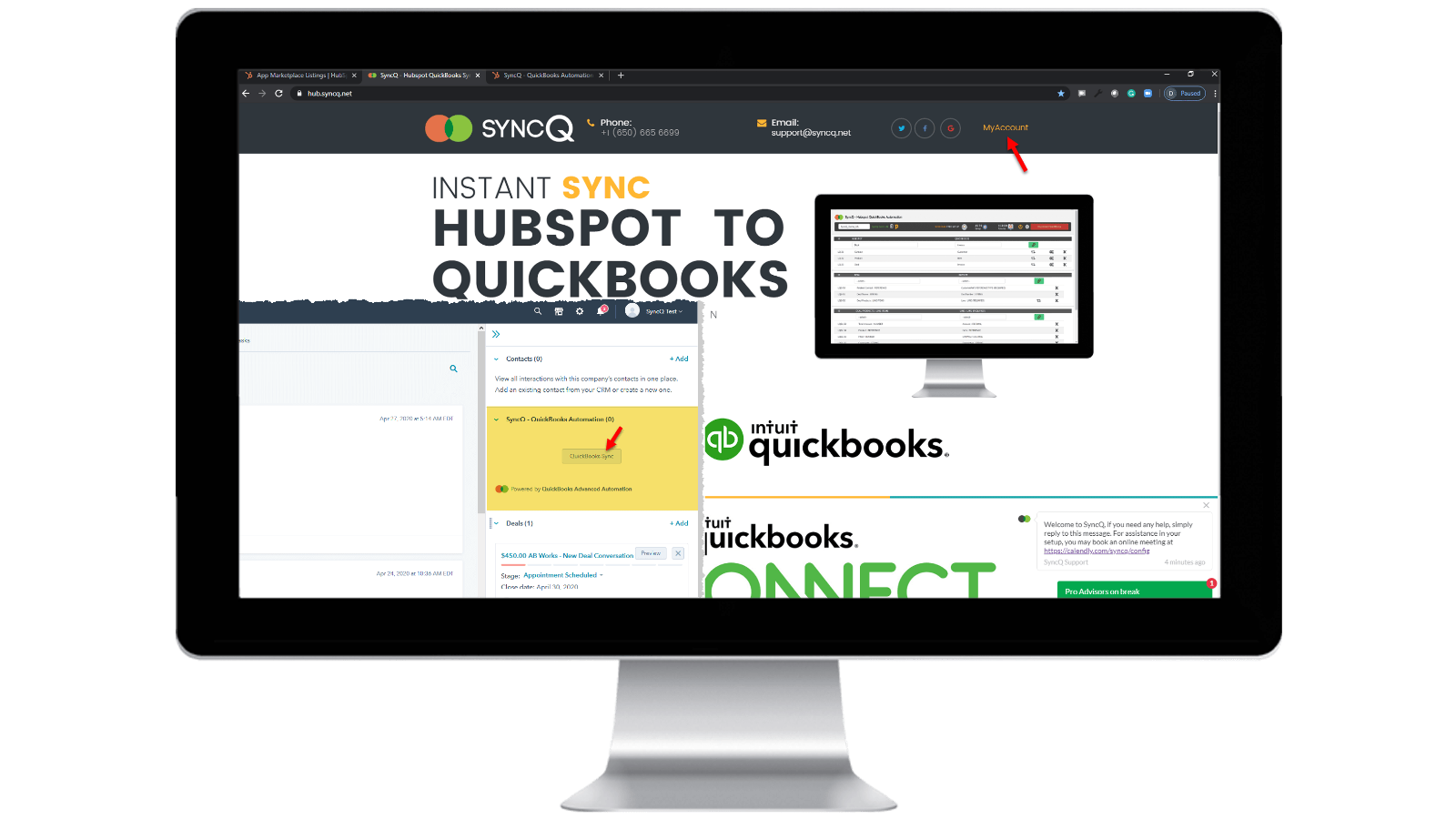
SyncQ 계정에 로그인
https://hb.syncq.net 로 이동하여 내 계정을 클릭합니다. 쉬운 방법: HubSpot의 레코드로 이동하여 오른쪽 탭에서 SyncQ 카드 탭을 찾은 다음 QuickBooks 동기화를 클릭합니다. 그런 다음 HubSpot 사용자 이메일 ID를 입력합니다. 계정을 인증할 수 있는 인증 코드가 전송됩니다.
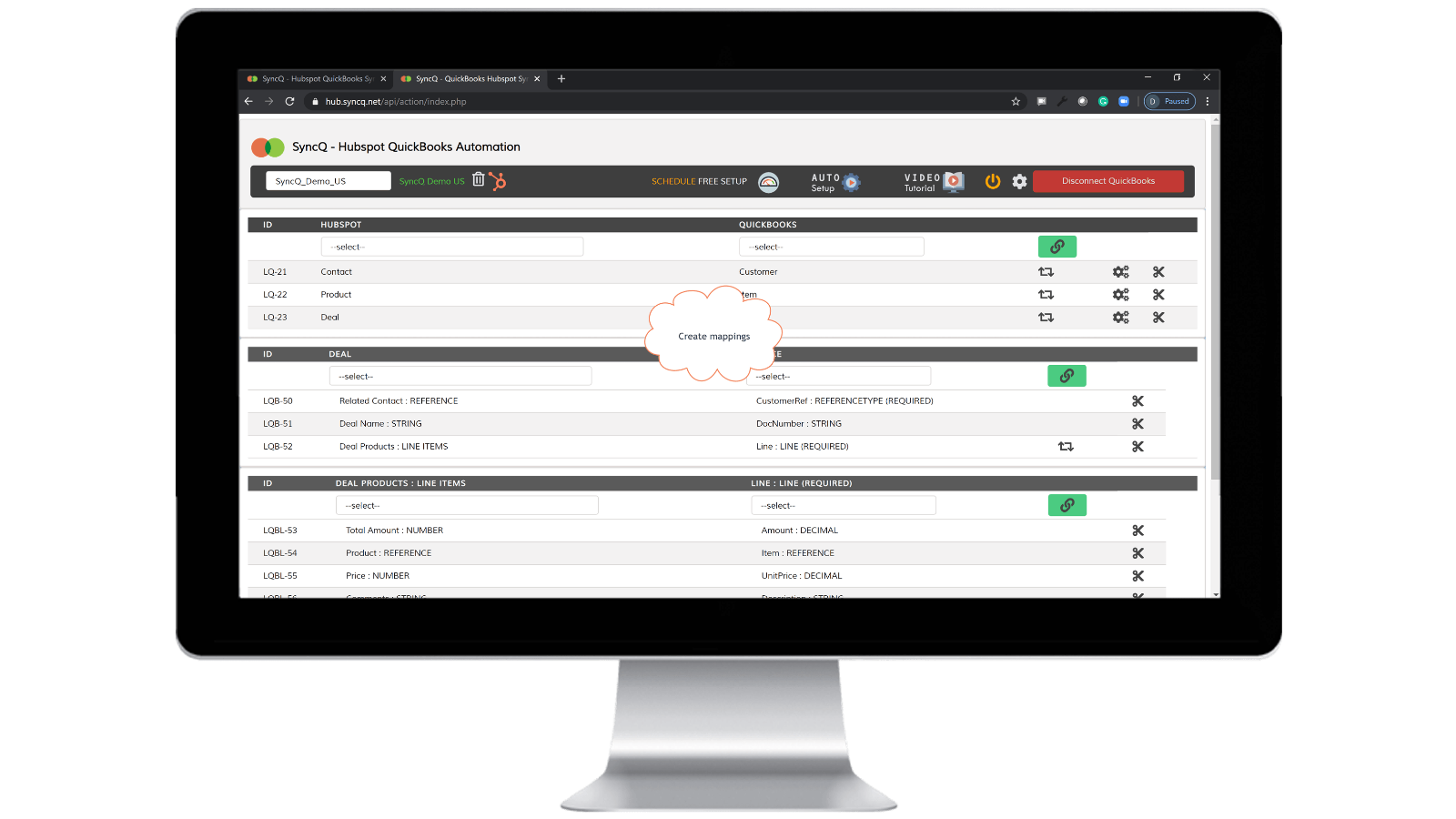
QuickBooks 회사를 연결하고, 매핑을 만들고, 자동 동기화를 사용 설정합니다.
QuickBooks에 연결을 클릭하면 QuickBooks 회사가 자동으로 표시됩니다. 설정 휠 버튼을 클릭하여 매핑을 만들거나 자동 설정을 클릭합니다. 개별 매핑에 대해 자동 동기화를 사용 설정합니다. HubSpot 레코드에서 동기화 카드 버튼을 클릭하여 수동 동기화를 수행할 수도 있습니다.

양방향 수동 및 즉시 레코드 동기화
동기화하려는 HubSpot 레코드로 이동합니다. 오른쪽에서 SyncQ 카드를 찾은 다음 QuickBooks 동기화를 클릭합니다. 관련 HubSpot 레코드를 동기화할 수 있는 옵션이 표시됩니다. 동기화 버튼을 클릭합니다. HubSpot 레코드가 즉시 QuickBooks에 동기화됩니다. QuickBook의 기록 요약이 표시됩니다.
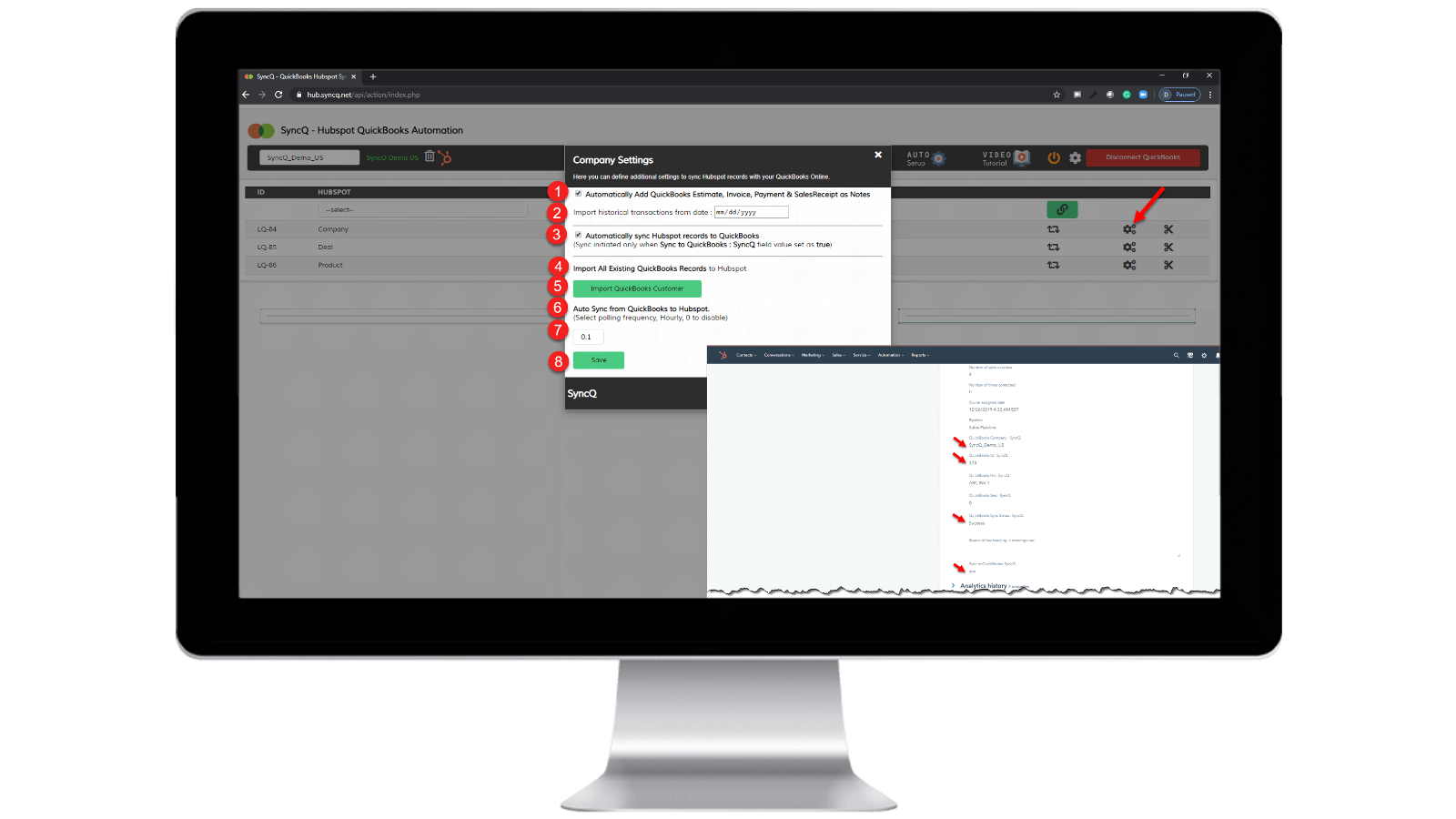
자동 동기화를 활성화합니다.
QuickBooks에서 HubSpot으로: 1) "HubSpot 레코드를 QuickBooks에 자동으로 동기화"를 선택합니다. HubSpot에서 QuickBooks로: 1) "QuickBooks에서 HubSpot으로 자동 동기화"의 시간별 빈도를 지정합니다. 2) 동기화하려는 특정 HubSpot 레코드에서 "SyncQ를 QuickBooks로: SyncQ"를 "예"로 설정합니다.
앱 기능
공유 데이터
1. Customers / Vendors | ||
2. Customers / Vendors | ||
3. Items | ||
4. Estimates/Invoice/Bill/PurchaseOrder | ||
5. Inovoice | ||
6. Estimate/Invoice/Deposit/Bill/VendorCredit & More | ||
7. Job / Sub Customer / Project |
리뷰
4.2
20
4.2
20
- 2025년 9월 22일
동기화 기능은 좋지만 UI가 열악하고 지원팀이 도움이 되지 않습니다.
일부 사소한 문제와 전반적으로 양호한 통합, 지원 개선 필요
동기화가 좋고 빠르며 매핑 필드에서 다양한 옵션이 HS - QB에 있습니다.
연락처가 제대로 동기화되지 않거나 정보를 덮어쓰는 등 일부 사소한 오류가 여전히 동기화 팝업창에 나타납니다. 또한 직관적이지 않은 UI도 개선이 필요합니다. 다음 지원팀은 동기화 문제와 문의에 대해 더 많은 도움을 주고 신속하게 대응해야 합니다.
Tasnimul, M.
- 2025년 7월 3일
이 앱 피하기
다운로드하기 전에 댓글을 검토했는데, 다른 사람들의 조언을 따랐더라면 이 앱을 피할 수 있었을 텐데 하는 아쉬움이 남습니다. 쓸모없다
앱이 QB 결제 정보를 바로 가져옵니다(그들에게는 좋지만, 취소하기 위해 (영국에 있는) 결제 정보를 쫓아다녀야 하는 저에게는 아쉽습니다).
앱이 작동하지 않음 - 아무것도 하지 않음
McDermott, J.
가격 책정
전문가
US$49
/월라이선스 2개 포함
HubSpot 연락처 또는 회사, 제품, 거래를 QuickBooks와 동기화하세요.
수동 및 자동 동기화.
무제한 동기화.
고객 AI 인사이트. 추가 요금제로 모든 기능을 이용할 수 있습니다.
QuickBooks 고객과 공급업체의 양방향 동기화를 HubSpot과 수행합니다.
견적, 송장 및 판매 영수증을 거래로 자동 가져오기.
견적서, 송장, 결제, 판매 영수증을 조직이나 사람에게 자동으로 가져올 수 있습니다.
전문가
US$49
/월라이선스 2개 포함
HubSpot 연락처 또는 회사, 제품, 거래를 QuickBooks와 동기화하세요.
수동 및 자동 동기화.
무제한 동기화.
고객 AI 인사이트. 추가 요금제로 모든 기능을 이용할 수 있습니다.
QuickBooks 고객과 공급업체의 양방향 동기화를 HubSpot과 수행합니다.
견적, 송장 및 판매 영수증을 거래로 자동 가져오기.
견적서, 송장, 결제, 판매 영수증을 조직이나 사람에게 자동으로 가져올 수 있습니다.
* 여기에 표시된 가격은 표시 목적으로만 사용됩니다. 모든 가격에는 세금, 인센티브, 할인 또는 기타 가격 변수가 포함되어 있지 않습니다. 가장 최신의 정확한 가격 정보를 알고 싶다면 파트너에게 연락해야 합니다. HubSpot은 파트너가 제공하는 이 가격 정보에 대해 어떠한 책임도 지지 않습니다. 마지막 가격 업데이트 날짜: 2026.04.10.