

QuickBooks Online Advanced Automation
Creazione di - HelloCODER LLP
Installazioni - PIù di 500 installazioni
Valutazione 4,2
(20)

In aumento
Requisiti
Piano HubSpot Autorizzazioni dell'account HubSpot - Visualizza le autorizzazioni dell'account richieste
Tipo di accesso Condiviso Abbonamento QuickBooks Online Advanced Automation - Piani Professionale, Business Max, Azienda o Annuale professionale
Panoramica

1/6 - SyncQ - HubSpot QuickBooks Automation
Sincronizzazione perfetta di tutte le transazioni di QuickBooks con HubSpot
Sincronizzazione bidirezionale della contabilità, dai clienti e progetti ai pagamenti, con approfondimenti AI. Copre sia i crediti che i debiti.
Registrare e gestire le entrate con facilità
SyncQ consente di creare, inviare e visualizzare preventivi, fatture, pagamenti e ricevute di vendita direttamente dai record di HubSpot. Con i piani Business Max e Corporate, è possibile sbloccare funzionalità di sincronizzazione avanzate per gli oggetti personalizzati di HubSpot, tra cui
Progetto QuickBooks come HubSpot Deal,
QuickBooks Job/sub-customer come HubSpot Deal e allegare le relative fatture come Deal Invoices,
Fattura bidirezionale di QuickBooks con HubSpot Invoice/Deal,
Depositi, crediti verso fornitori, piano dei conti e altro ancora.
Assistenza GRATUITA per la mappatura e zero costi di onboarding.
Approfondimenti basati sull'intelligenza artificiale, sincronizzazione autonoma e personalizzazione al 100%.
SyncQ offre approfondimenti aziendali avanzati e basati sull'intelligenza artificiale. Fate qualsiasi domanda sulla vostra azienda e riceverete risposte immediate. (prova limitata gratuita su ogni piano, + edizioni a pagamento).
Mappature personalizzabili al 100% che consentono di mappare gli oggetti di HubSpot, compresi gli oggetti e i campi personalizzati, alla maggior parte delle transazioni di QuickBooks, compresi i campi personalizzati di Fattura e Preventivo, oltre a tasse e classi, per adattarsi alle vostre esigenze aziendali a 360 gradi.
Grazie all'automazione intelligente, è possibile scegliere di sincronizzare automaticamente o manualmente con un solo clic, senza accedere a QuickBooks. Inoltre, sincronizza automaticamente i record di QuickBooks Online con HubSpot, compresi i pagamenti ricevuti e i saldi in sospeso.
Potenziamento delle vendite con accesso immediato ai dati finanziari
SyncQ visualizza automaticamente i preventivi, le fatture e i dettagli dei pagamenti di QuickBooks all'interno delle sezioni delle note di HubSpot Aziende/Contatti, offrendo al team di vendita un accesso immediato a informazioni finanziarie critiche, senzadover contattare la contabilità o accedere a QuickBooks Online.
Sicurezza di livello aziendale e certificazione Intuit
SyncQ è approvato da Intuit e soddisfa i requisiti di sicurezza standard del settore. Viene regolarmente valutato da Intuit in base agli standard di sicurezza NIST (National Institute of Standards and Technology, U.S. Department of Commerce). Trovate SyncQ all'interno del vostro account QuickBooks o sull'App Store di Intuit.
Caratteristiche principali
Approvato da Intuit - Soddisfa gli standard di sicurezza finanziaria del settore.
Sincronizzazione bidirezionale e monodirezionale automatica e manuale
Sincronizzazione automatica delle transazioni QuickBooks con i record di HubSpot
Insight potenziati dall'intelligenza artificiale: per saperne di più sulla vostra azienda e sui vostri clienti.
Sincronizzazione di aziende/contatti HubSpot con clienti/venditori QuickBooks
Sincronizzazione di offerte/biglietti di HubSpot con preventivi, fatture, ordini di acquisto, fatture e altro di QuickBooks
Visualizzazione della cronologia delle transazioni di QuickBooks nelle note di HubSpot, compresi i link alle fatture PDF di QuickBooks(per la visualizzazione è necessaria una licenza).
Sincronizzazione dei prodotti QuickBooks con i prodotti HubSpot
Inviare preventivi e fatture via e-mail direttamente da HubSpot
Tracciare l'andamento delle vendite e dei crediti all'interno di HubSpot
Mappature dei campi completamente personalizzabili per esigenze aziendali uniche
Sincronizzazione dei campi personalizzati di HubSpot e QuickBooks
Collegare più aziende QuickBooks
SyncQ - Lo strumento di automazione QuickBooks numero 1 con intuizioni AI
SyncQ è la soluzione di automazione QuickBooks leader per diversi CRM, tra cui Salesforce e Pipedrive. Affidata a centinaia di aziende, SyncQ garantisce un'automazione AI senza soluzione di continuità , una sincronizzazione delle transazioni e approfondimenti finanziari.
Tutte le nostre integrazioni sono approvate da Intuit.
Funzionalità
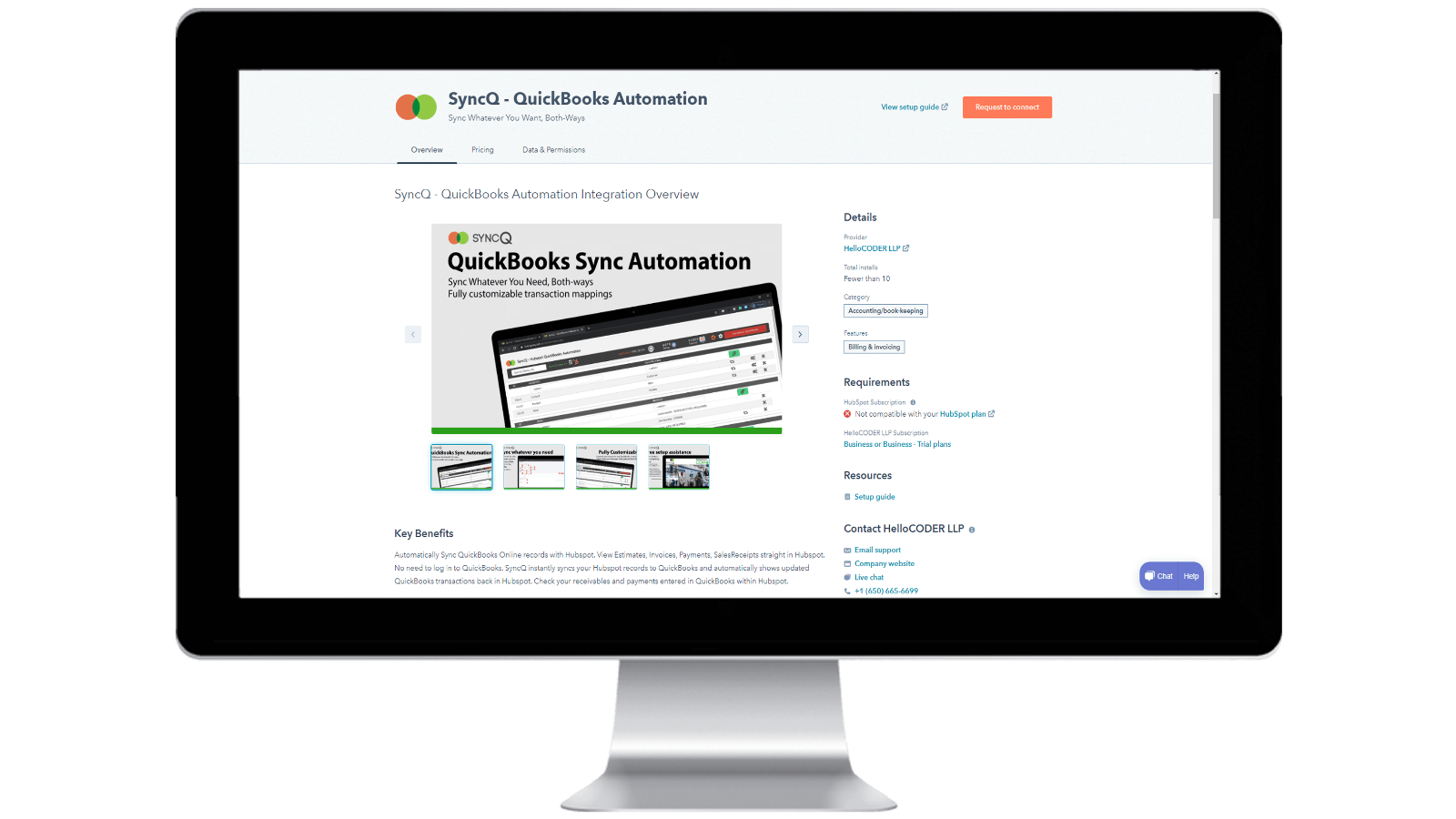
Installazione di SyncQ nell'account HubSpot e cancellazione di SyncQ
Installare SyncQ dall'AppStore di Intuit o HubSpot. Per InstaView, contattare il supporto di SyncQ. Per annullare l'iscrizione a SyncQ, fare clic sul pulsante Unsubscribe all'interno dell'app SyncQ o annullare il pagamento ricorrente Paypal o contattare l'assistenza SyncQ. La semplice disconnessione dell'app SyncQ da HubSpot non annulla l'iscrizione a SyncQ.
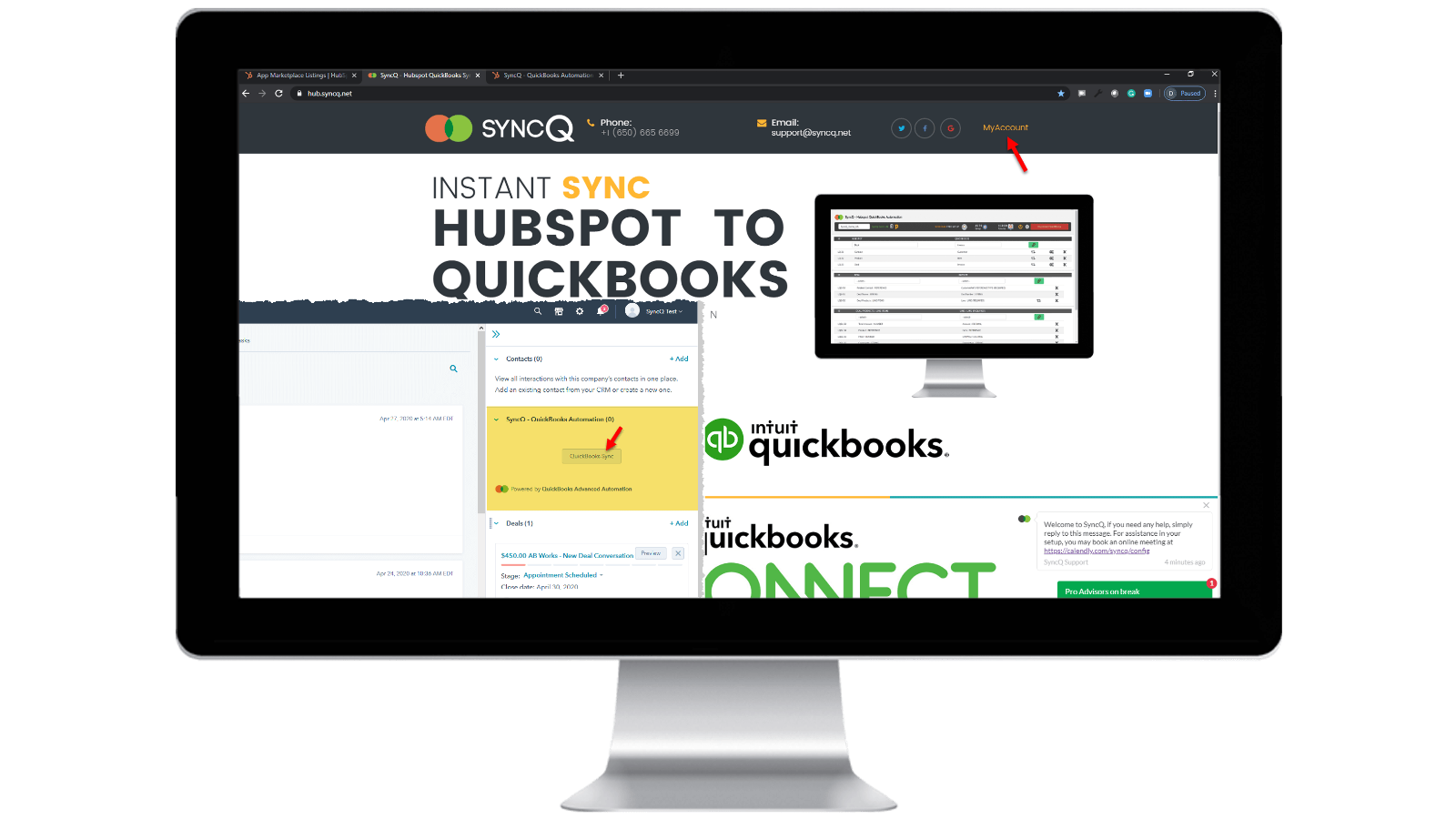
Accedere al proprio account SyncQ
Accedere a https://hb.syncq.net e fare clic su Il mio account. Il modo più semplice: accedere a qualsiasi record in HubSpot, trovare la scheda SyncQ nelle schede di destra e fare clic su QuickBooks Sync. Quindi inserire il proprio ID utente di HubSpot. Riceverete un codice di verifica per verificare il vostro account.
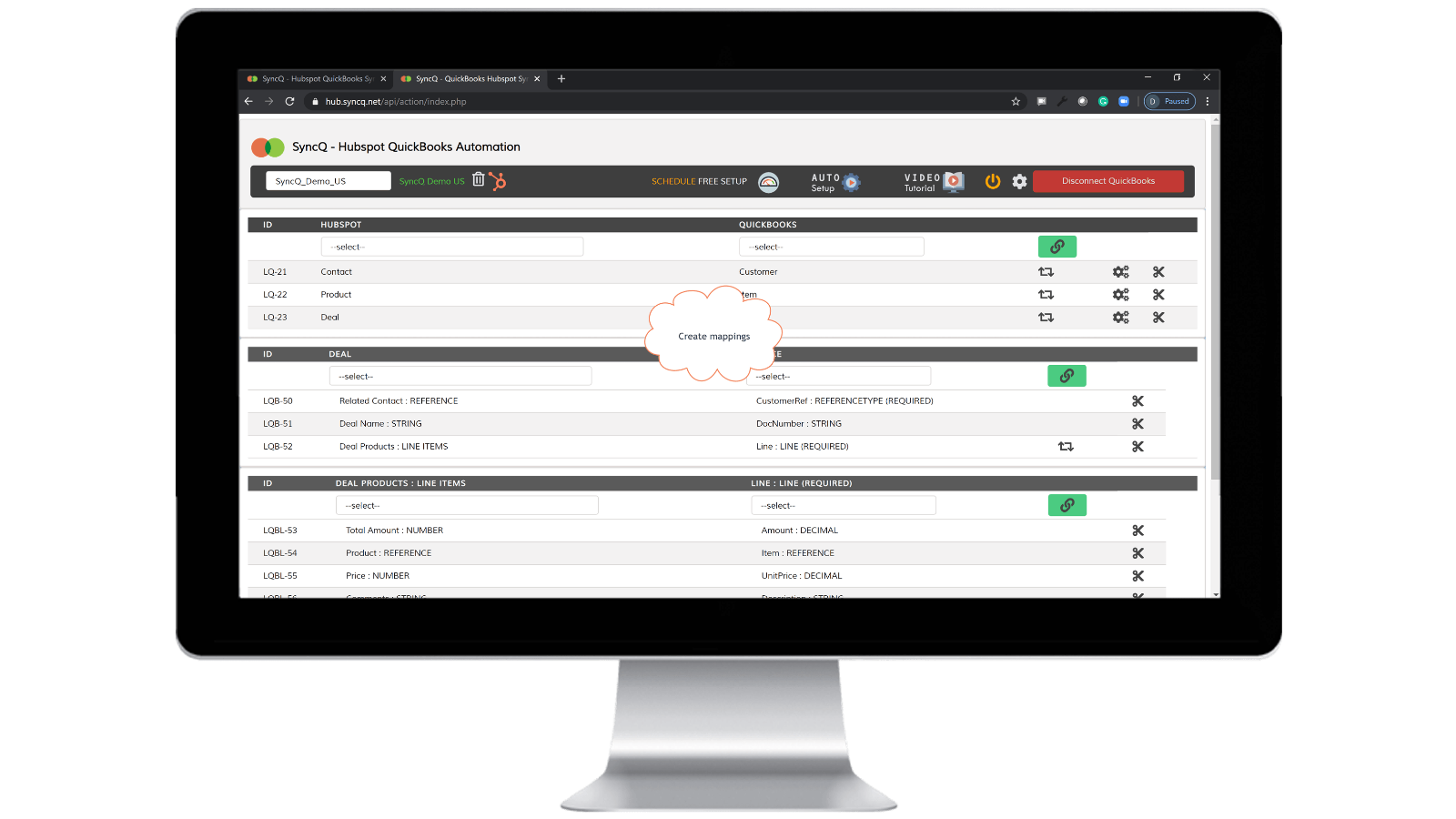
Collegare QuickBooks Company, creare le mappature e attivare la sincronizzazione automatica.
Cliccate su Connetti a QuickBooks, la vostra azienda QuickBooks apparirà automaticamente. Fare clic sul pulsante della rotella di impostazione per creare le mappature o fare clic su Impostazione automatica. Attivare la sincronizzazione automatica con le singole mappature. È anche possibile eseguire la sincronizzazione manuale facendo clic sul pulsante della scheda SyncQ dal record di HubSpot.

Sincronizzazione manuale e istantanea delle registrazioni, in entrambe le direzioni
Andare al record HubSpot che si desidera sincronizzare. Individuare la scheda SyncQ sulla destra e fare clic su QuickBooks Sync. Verranno visualizzate le opzioni per sincronizzare il record HubSpot correlato. Fare clic sul pulsante Sincronizza. Il record di HubSpot verrà immediatamente sincronizzato con QuickBooks. Verrà visualizzato un riepilogo del record di QuickBook.
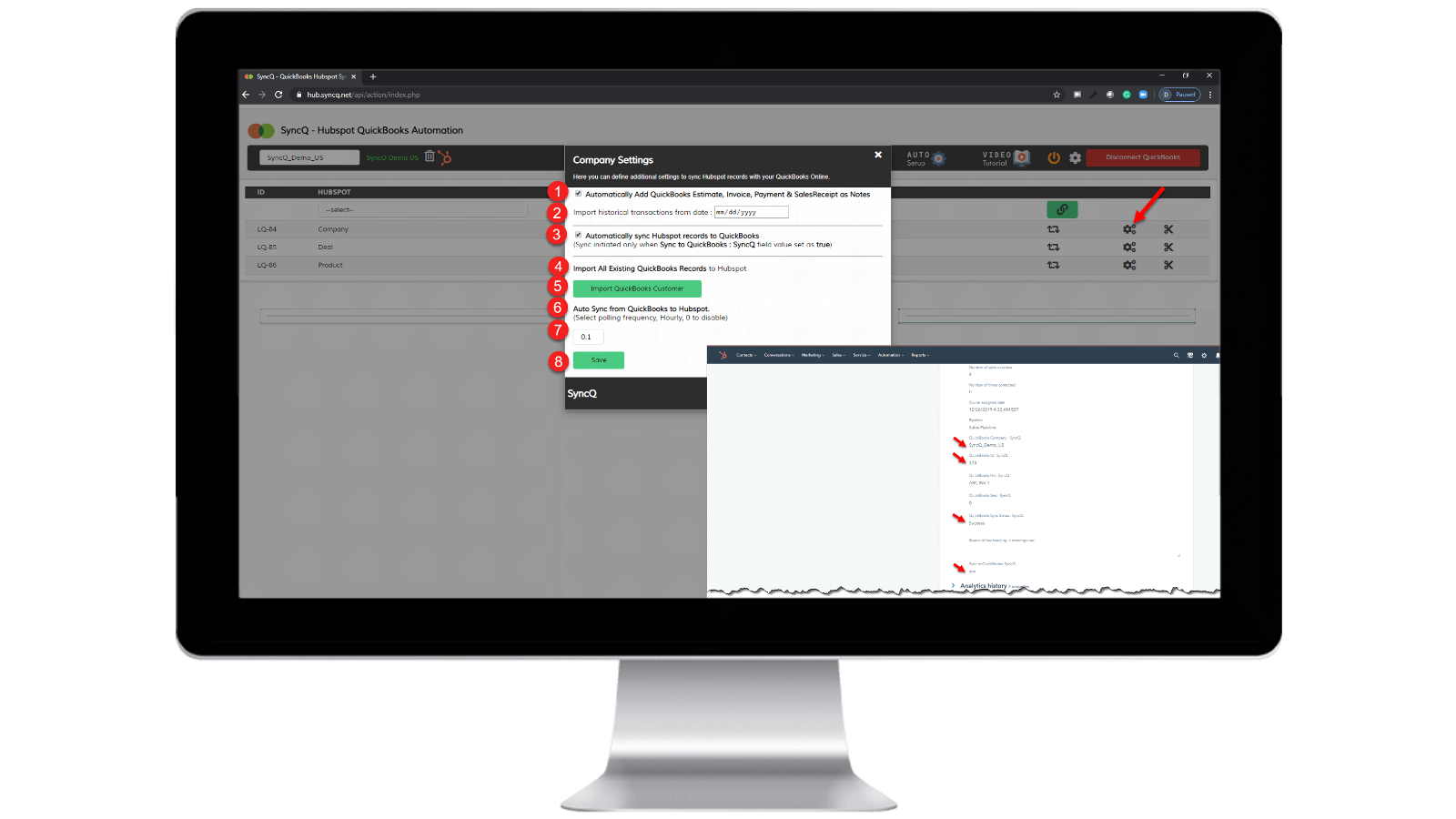
Abilita la sincronizzazione automatica.
Da QuickBooks a HubSpot: 1) Selezionare "Sincronizza automaticamente i record di HubSpot con QuickBooks". Da HubSpot a QuickBooks: 1) Specificare la frequenza oraria di "Sincronizzazione automatica da QuickBooks a HubSpot". 2) Sul record HubSpot specifico che si desidera sincronizzare, impostare "SyncQ to QuickBooks: SyncQ" come "sì".
Funzionalità dell'app
Dati condivisi
1. Customers / Vendors | ||
2. Customers / Vendors | ||
3. Items | ||
4. Estimates/Invoice/Bill/PurchaseOrder | ||
5. Inovoice | ||
6. Estimate/Invoice/Deposit/Bill/VendorCredit & More | ||
7. Job / Sub Customer / Project |
Recensioni
4,2
20
4,2
20
- 22 set 2025
Buona funzionalità di sincronizzazione, ma interfaccia utente scadente e team di assistenza poco disponibile
Integrazione complessivamente buona con qualche problema minore, necessità di migliorare il supporto
La sincronizzazione è buona, veloce e con una varietà di opzioni nei campi di mappatura IN HS - QB
Alcuni errori minori si verificano ancora durante la sincronizzazione, come la mancata sincronizzazione dei contatti e la sovrascrittura delle informazioni. Anche l'interfaccia utente non è molto intuitiva e deve essere ulteriormente migliorata. Il team di supporto deve essere più disponibile e veloce nel risolvere i problemi di sincronizzazione e le domande che dobbiamo affrontare.
Tasnimul, M.
- 3 lug 2025
EVITARE QUESTA APP
Ho letto i commenti prima di scaricarla e vorrei aver seguito il consiglio degli altri: evitate questa applicazione. Inutile
L'app acquisisce subito i dati di pagamento del QB (ottimo per loro, uno schifo per me che devo inseguirli (con sede nel Regno Unito) per annullare).
l'app non ha funzionato - non ha fatto nulla
McDermott, J.
Prezzi
Professionale
49 USD
/meseINCLUDE 2 LICENZE
Sincronizzare i contatti o le aziende, i prodotti e le transazioni di HubSpot con QuickBooks.
Sincronizzazione manuale e automatica.
Sincronizzazione illimitata.
Approfondimenti sull'intelligenza artificiale dei clienti. Funzionalità complete con piani aggiuntivi.
Sincronizzazione bidirezionale di clienti e fornitori di QuickBooks con HubSpot.
Importazione automatica di preventivi, fatture e ricevute di vendita nelle transazioni.
Importazione automatica di preventivi, fatture, pagamenti e ricevute di vendita in organizzazioni o persone.
Professionale
49 USD
/meseINCLUDE 2 LICENZE
Sincronizzare i contatti o le aziende, i prodotti e le transazioni di HubSpot con QuickBooks.
Sincronizzazione manuale e automatica.
Sincronizzazione illimitata.
Approfondimenti sull'intelligenza artificiale dei clienti. Funzionalità complete con piani aggiuntivi.
Sincronizzazione bidirezionale di clienti e fornitori di QuickBooks con HubSpot.
Importazione automatica di preventivi, fatture e ricevute di vendita nelle transazioni.
Importazione automatica di preventivi, fatture, pagamenti e ricevute di vendita in organizzazioni o persone.
* I prezzi riportati sono a scopo informativo. I prezzi non includono tasse, incentivi, sconti o altre variabili. Contatta il partner per ricevere il tariffario aggiornato. HubSpot declina qualsiasi responsabilità circa le informazioni di prezzo fornite dai propri partner. Ultimo aggiornamento tariffario: 10/04/2026
Maggiori informazioni
Creazione di - HelloCODER LLP
Installazioni - PIù di 500 installazioni
Categorie Lingue in cui è disponibile questa app Inglese