

Mailchimp
Data Sync - Sync contacts two-way with a Mailchimp Audience
Requisiti
Piano HubSpot Funziona con tutti i piani HubSpot Scopri di più Autorizzazioni dell'account HubSpot Nessuna autorizzazione richiesta Abbonamento Mailchimp - Piano Review Mailchimp's Pricing Page
Panoramica
1/2
Sync Mailchimp contacts without manual data entry or messy, time-consuming imports. Here’s what you get with Data Sync by HubSpot:
Two-way sync: Data is shared between Mailchimp and HubSpot in real time
Historical syncing: Your existing data will sync right away, and updates will sync as they happen
Custom field mapping: sync fields other than email, first name and last name
This sync can be used on top of this other Mailchimp app that syncs Mailchimp events to your timeline.
Note: This app requires at least a subscription to Data Hub Starter. See below.
Funzionalità
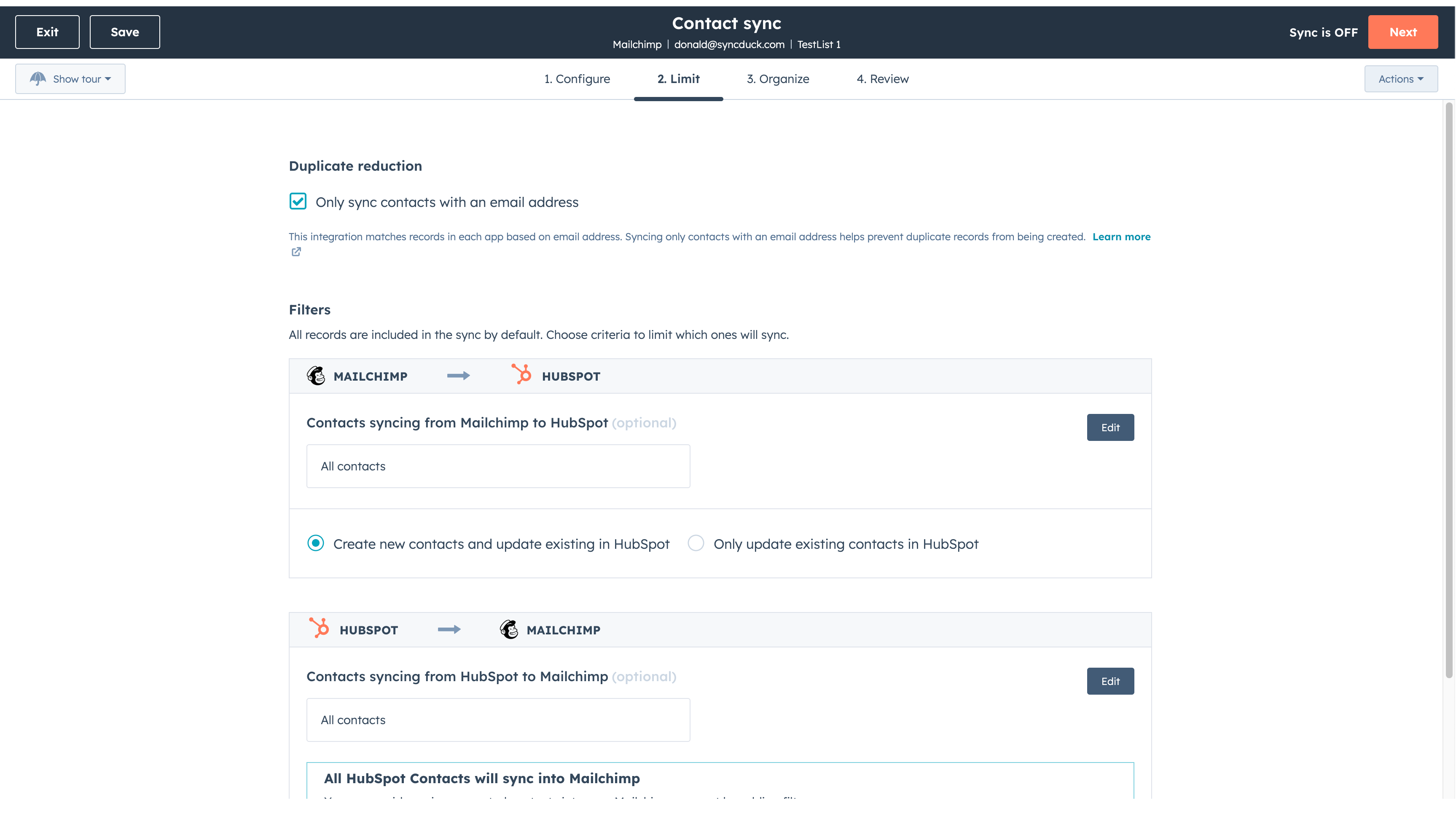
Sync Mailchimp and HubSpot in the background
Make manual data entry a thing of the past by syncing data (see below) between HubSpot and Mailchimp. When records are created or updated in either app, that information will be automatically shared with the other one. You can also add a filter for any Mailchimp field or HubSpot list to sync exactly what you want—and nothing you don’t.
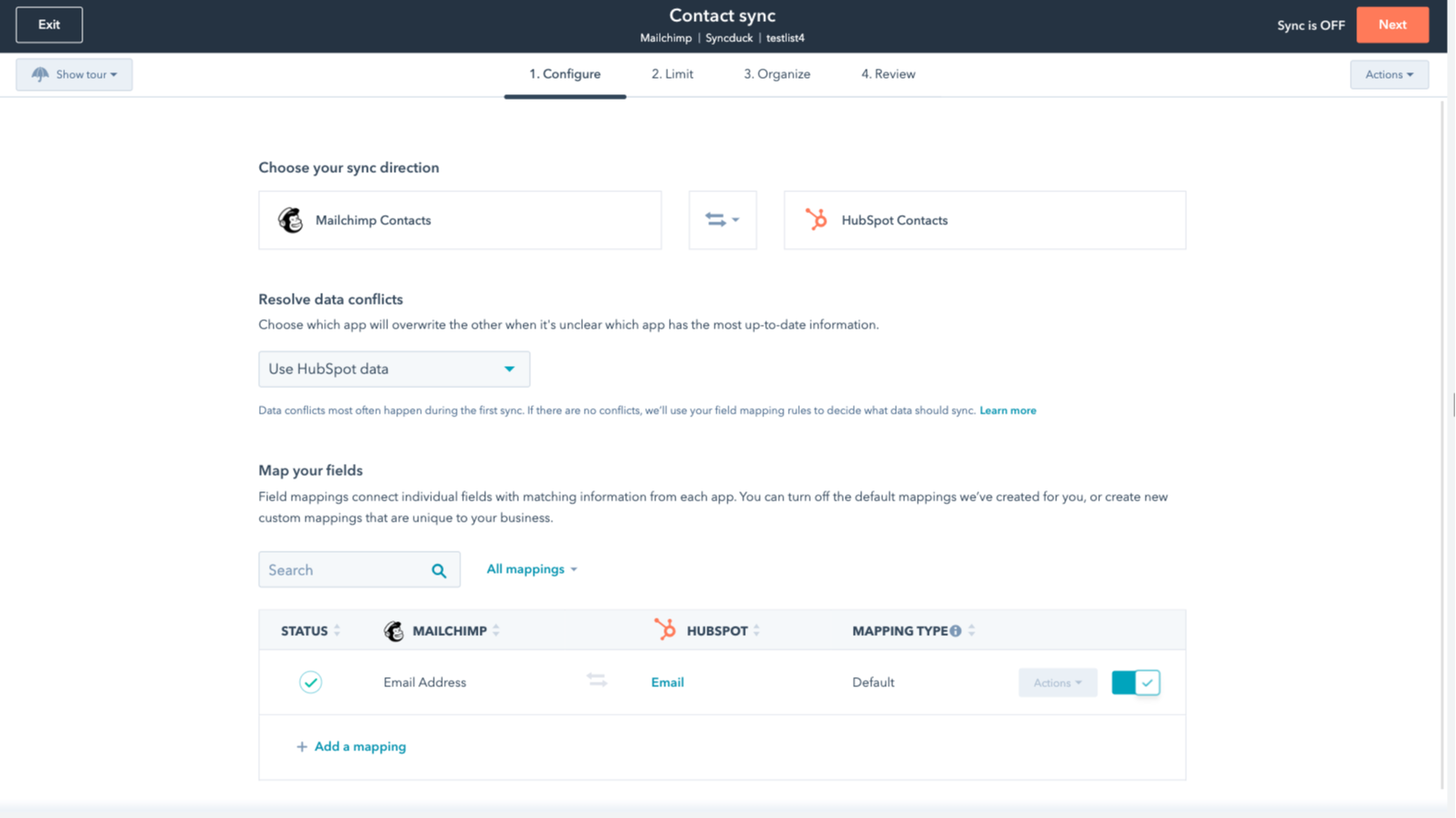
You’re in control of your data
You can set up a one- or two-way sync, which means you can either sync data from Mailchimp to HubSpot, from HubSpot to Mailchimp, or back-and-forth! IMPORTANT: This app requires Data Hub Starter or above.
Funzionalità dell'app
Dati condivisi
Each object has field mappings that connect matching information from each app.
The following will not sync: Groups, Tags, Email Opens/Clicks. As mentioned above, you can review and install the other Mailchimp integration here to sync additional data.
Note: You will need Data Hub Starter and up to use this app.
Contacts |
Recensioni
2,6
53
2,6
53
- 16 ago 2025
Integrazione perfetta che mantiene tutto organizzato, anche se la conversione dei lead potrebbe essere più fluida
L'utilizzo di HubSpot con Mailchimp mi ha fatto risparmiare molto tempo. Il collegamento ha reso semplice spostare tutti gli iscritti alla mia newsletter da un posto all'altro senza alcun problema. Mi è piaciuto il fatto che non ho dovuto trafficare con file o passaggi complicati. Tutto si è sincronizzato velocemente, così ho potuto tornare a lavorare con le mie liste. Se volete mantenere i vostri contatti in ordine ed evitare problemi, questa combinazione è una scelta solida.
Ora tutto è in un unico posto con HubSpot
convertire i lead in abbonati alle email è un po' complicato
Sicard, L.
- 13 ago 2025
Guasto completo del sistema: nulla funziona come pubblicizzato
NON FUNZIONANTE
MacIntosh, E.
Review Mailchimp's Pricing Page
0 USD
Use the 'See all pricing options' link on the righthand side
Make sure to confirm the HubSpot subscription and the Mailchimp subscription needed to install this integration
Note: "Free" is referring to the cost of the integration, not the app subscriptions
Review Mailchimp's Pricing Page
0 USD
Use the 'See all pricing options' link on the righthand side
Make sure to confirm the HubSpot subscription and the Mailchimp subscription needed to install this integration
Note: "Free" is referring to the cost of the integration, not the app subscriptions
* I prezzi riportati sono a scopo informativo. I prezzi non includono tasse, incentivi, sconti o altre variabili. Contatta il partner per ricevere il tariffario aggiornato. HubSpot declina qualsiasi responsabilità circa le informazioni di prezzo fornite dai propri partner. Ultimo aggiornamento tariffario: 09/11/2025
Maggiori informazioni
Ora di tendenza

Gmail
Portare HubSpot nella casella di posta in arrivo con l'integrazione…

Salesforce
Una sincronizzazione bidirezionale automatica tra HubSpot e…
