

Microsoft Teams
Requisiti
Piano HubSpot Autorizzazioni dell'account HubSpot Nessuna autorizzazione richiesta Tipo di accesso Condiviso Abbonamento Microsoft Teams - Piani Gratis (senza impegno), Microsoft 365 Business Basic, Microsoft 365 Business Standard o Office 365 E3
Panoramica
1/8
Le vendite, il marketing e i servizi ruotano tutti attorno alla costruzione di relazioni, ma può risultare difficile instaurare tali relazioni quando un addetto alle vendite dedica tempo prezioso a svolgere attività di routine. Infatti, un rapporto di HubSpot Research ha rilevato che gli addetti alle vendite dedicano fino a un quarto della loro giornata ad attività quali la redazione di e-mail e l’inserimento di dati.
Il software dovrebbe servire a ridurre al minimo il tempo impiegato in queste attività, non a creare ulteriori passaggi. L’integrazione di HubSpot per Microsoft Teams mira proprio a questo.
Integrazione con HubSpot Meeting Scheduler
Invia automaticamente i dettagli per l’accesso e della teleconferenza ai tuoi potenziali clienti su HubSpot. Trasforma ogni riunione prenotata nel tuo CRM HubSpot in una riunione su Microsoft Teams.
Sincronizza le registrazioni e le trascrizioni delle riunioni di Microsoft Teams con HubSpot
Unifica i dati delle riunioni in HubSpot grazie alla sincronizzazione delle registrazioni e delle trascrizioni delle riunioni di Microsoft Teams con HubSpot, per attività di coaching e analisi.
Condividi le notifiche
Rimani aggiornato sulle attività nel tuo CRM HubSpot ricevendo notifiche relative a chat, promemoria, menzioni, invio di moduli e altro ancora all’interno di Microsoft Teams. Puoi persino creare flussi di lavoro personalizzati all’interno di HubSpot per personalizzare le tue notifiche.
Gestisci le conversazioni
Ricevi e rispondi ai messaggi della tua casella di posta delle conversazioni da HubSpot direttamente nei tuoi canali di Microsoft Teams
Automatizza con i flussi di lavoro
Utilizza i flussi di lavoro di HubSpot per personalizzare le notifiche e creare nuovi canali in Microsoft Teams.
Crea attività e ticket
Tieni sotto controllo il tuo lavoro creando rapidamente un'attività o un ticket HubSpot direttamente da un messaggio di Microsoft Teams.
Associa le trattative e le aziende di HubSpot ai canali di Microsoft Teams
Collega i canali di Microsoft Teams ai record delle aziende e delle trattative di HubSpot per sincronizzare gli aggiornamenti sulle attività e tenere il tuo team sempre aggiornato
Hai dei commenti su questa integrazione? Utilizza questo modulo per inviare suggerimenti, richieste o idee.
Funzionalità
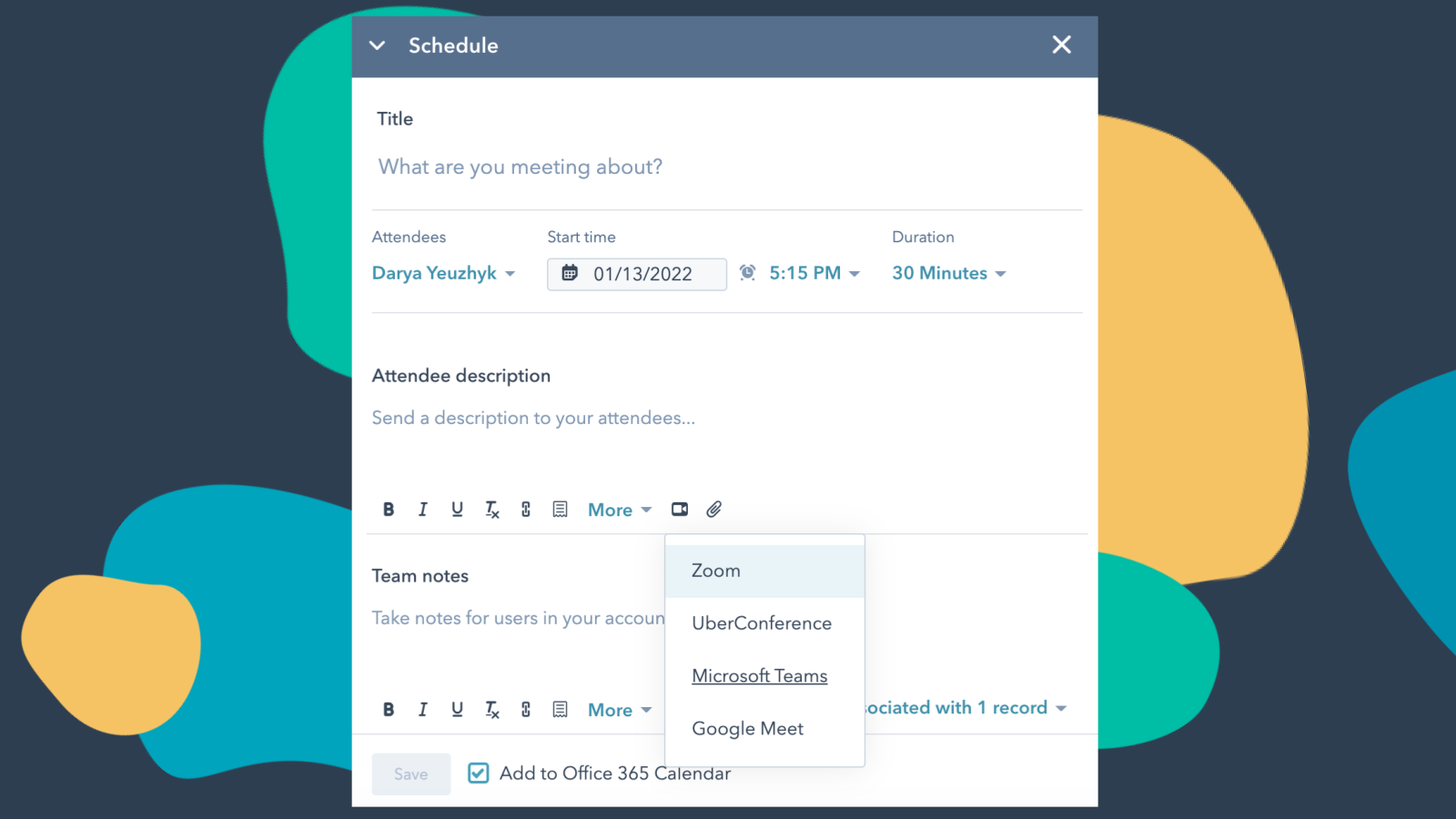
Integra Microsoft Teams con HubSpot Meetings
Vuoi fare il punto della situazione con un potenziale cliente o un cliente esistente? Se sei un addetto alle vendite o all’assistenza, non c’è niente di meglio di una breve videochiamata per capire di cosa ha bisogno il tuo potenziale cliente o cliente per avere successo. Pianifica facilmente una riunione su Microsoft Teams direttamente da qualsiasi scheda di contatto per fissare la tua videochiamata.
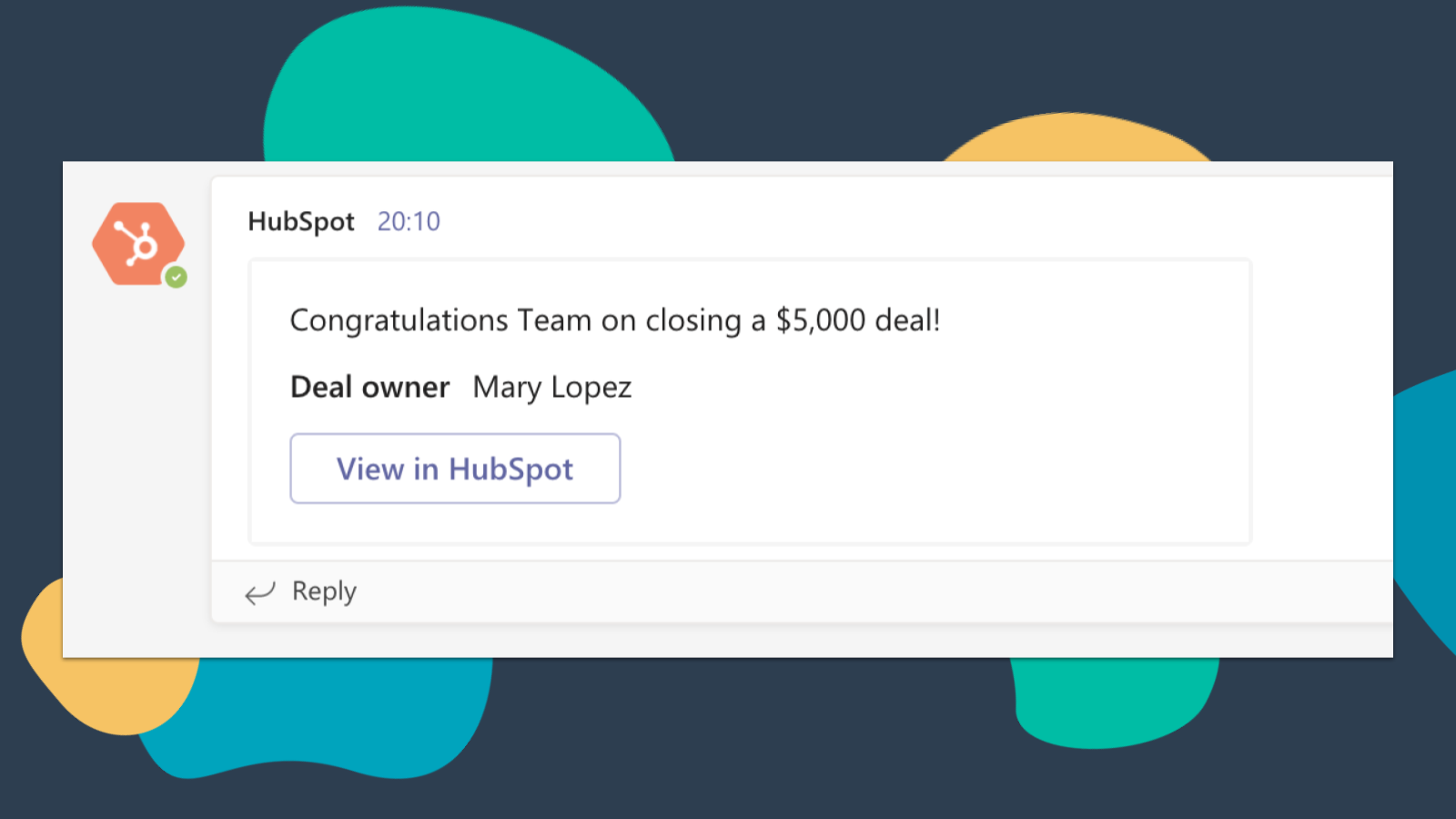
Ricevi le notifiche di HubSpot su Microsoft Teams
Ricevi una notifica su Microsoft Teams quando ti viene assegnato un nuovo ticket o quando si conclude un affare di cui sei responsabile! Per impostazione predefinita, riceverai notifiche per questi tipi di attività: assegnazioni, commenti, follow, menzioni, elementi scaduti, promemoria, risposte, invii, visualizzazioni
-4-1.png)
Sincronizza le registrazioni e le trascrizioni delle riunioni di Microsoft Teams con HubSpot
Visualizza in anteprima le riunioni relative ai record associati e registra e trascrivi automaticamente le riunioni per poterle riprodurre in seguito. Nella pagina indice di HubSpot puoi accedere all'elenco completo delle riunioni del team, filtrarle in base alle proprietà degli oggetti ed effettuare ricerche per parole chiave all'interno delle riunioni.
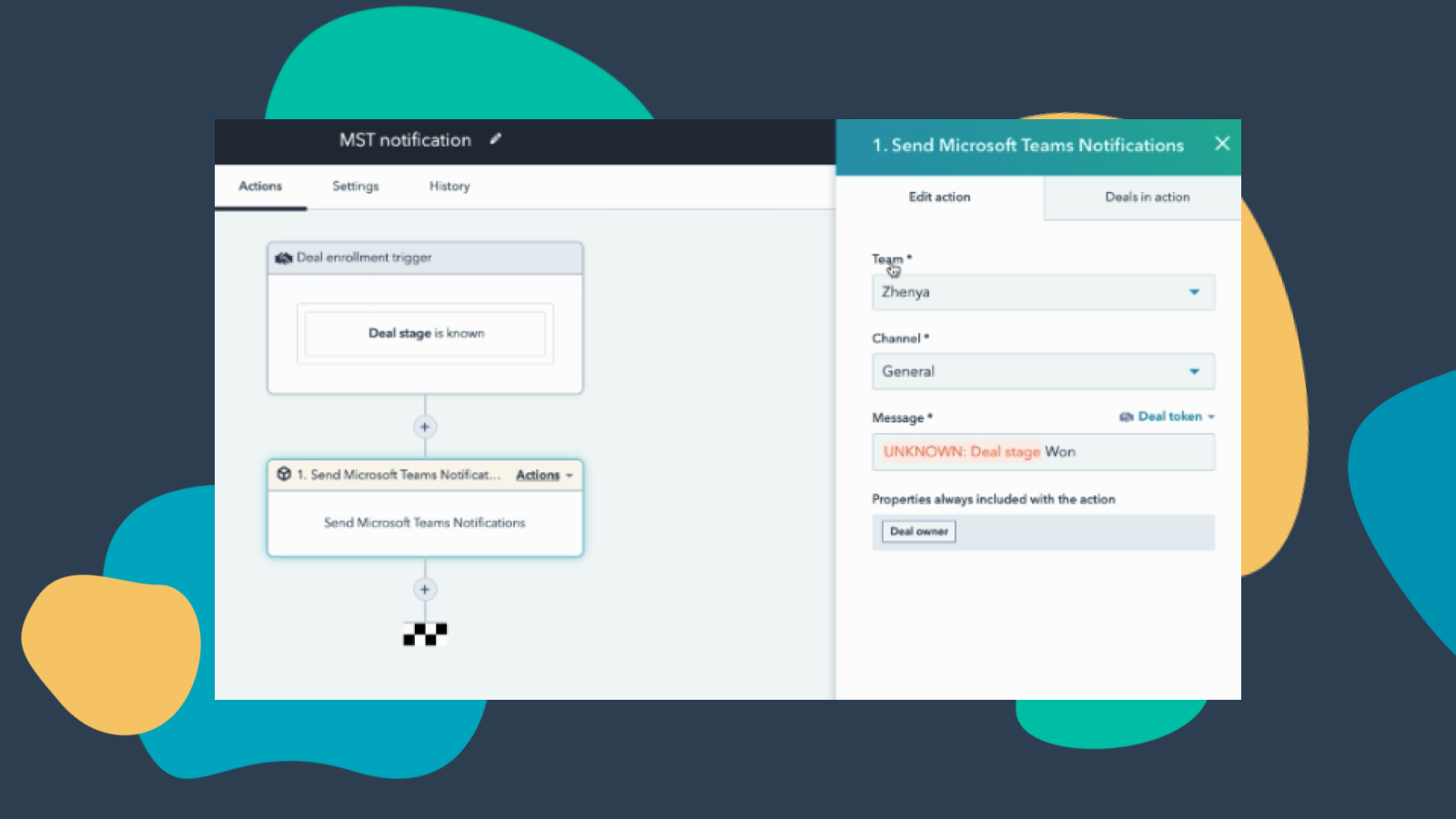
Personalizza le notifiche di Teams tramite i flussi di lavoro
Crea flussi di lavoro per le notifiche su Microsoft Teams in modo da ricevere una notifica quando lo stato delle tue trattative cambia o quando vengono aggiunte a HubSpot nuove aziende che rientrano nel tuo territorio e molto altro ancora! Nota: questa funzionalità richiede un abbonamento a pagamento.
-3-1.png)
Gestisci le tue conversazioni in Microsoft Teams
Ricevi e rispondi ai messaggi della Posta in arrivo di HubSpot Conversations direttamente nei canali di Microsoft Teams. Nota: questa funzionalità richiede un abbonamento a pagamento.
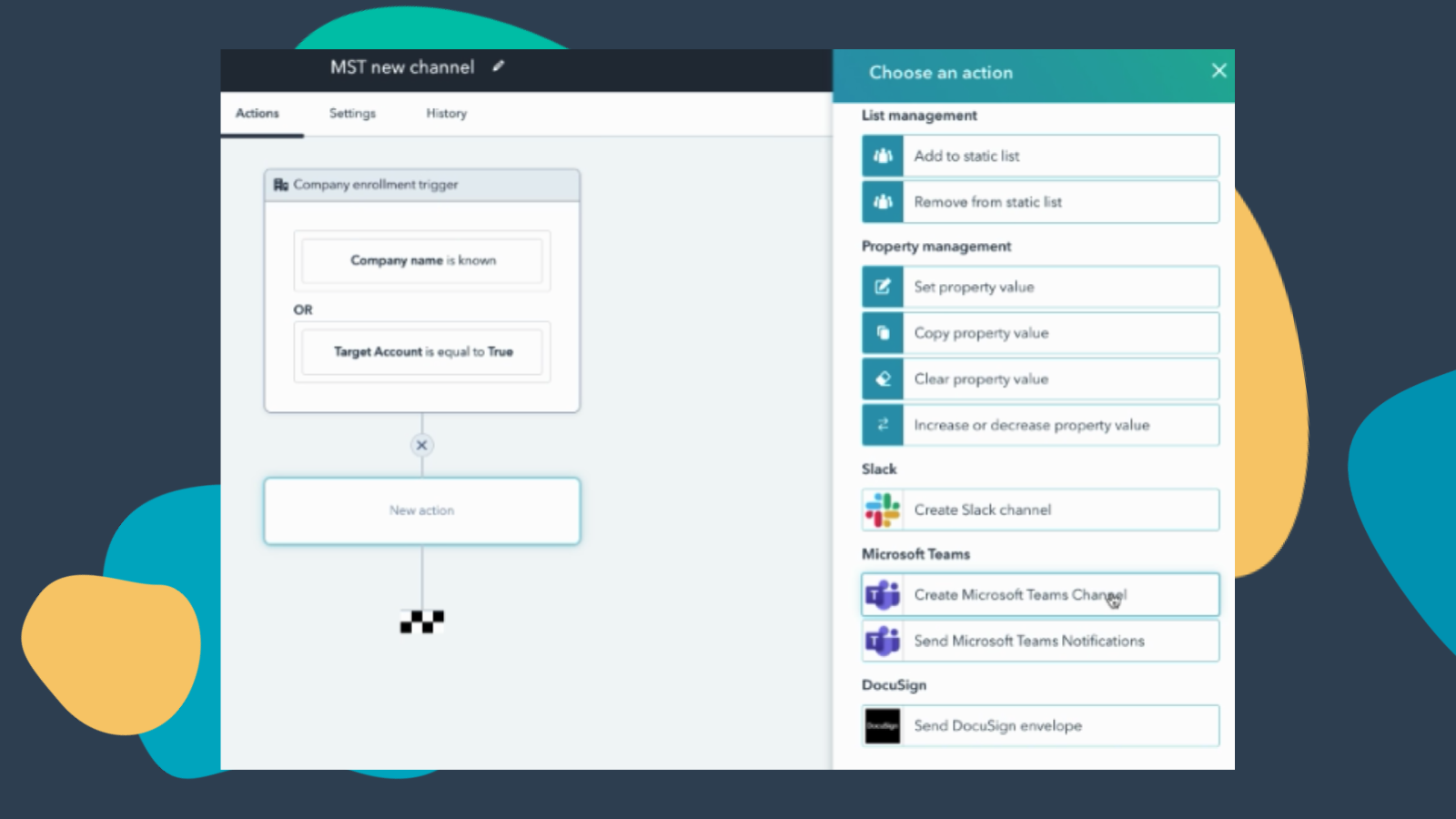
Creare flussi di lavoro per aggiungere canali a Microsoft Teams
Crea un nuovo canale di Microsoft Teams ogni volta che vengono create nuove aziende o nuove trattative che soddisfano determinati criteri. Nota: questa funzionalità richiede un abbonamento a pagamento.
Funzionalità dell'app
Direct Message | ||
Messages |
Recensioni
3,2
251
3,2
251
Gli utenti ritengono che l'integrazione semplifichi la pianificazione, generando automaticamente link di Teams per gli inviti del calendario e centralizzando le notifiche di HubSpot. Tuttavia, alcuni segnalano una procedura di configurazione complessa e problemi di sincronizzazione, per cui i link delle riunioni non vengono associati agli eventi del calendario. Sebbene alcuni segnalino la mancanza di funzionalità per la sincronizzazione dei webinar e la registrazione automatica delle chiamate, l'app automatizza efficacemente le prenotazioni di routine e aiuta i team a consolidare i propri strumenti di comunicazione.
- 8 set 2026
impossibile connettersi
Ho provato in tanti modi per ore, ma senza successo.
Martinez, L.
- 1 set 2026
Limitato
Ci è voluto un po' per installarlo, ma è ricco di funzionalità e ottimo per l'analisi delle riunioni
Invia le notifiche direttamente agli utenti e ai canali, analizza le riunioni di Teams con le funzionalità di CI e AI di HubSpot.
Non sono previste notifiche dinamiche al “titolare del record”; bisogna sempre selezionare un utente statico. È un vero incubo per qualsiasi organizzazione con più di, diciamo, 10 potenziali titolari di record.
Balm, B.
Gratis (senza impegno)
0 USD
Riunioni e chiamate
Chat e collaborazione
App e servizi per la produttività
Sicurezza e conformità
Gratis (senza impegno)
0 USD
Riunioni e chiamate
Chat e collaborazione
App e servizi per la produttività
Sicurezza e conformità
* I prezzi riportati sono a scopo informativo. I prezzi non includono tasse, incentivi, sconti o altre variabili. Contatta il partner per ricevere il tariffario aggiornato. HubSpot declina qualsiasi responsabilità circa le informazioni di prezzo fornite dai propri partner. Ultimo aggiornamento tariffario: 16/06/2026
Maggiori informazioni
Creazione di - HubSpot
Installazioni - 63.700 installazioni
Categorie Lingue in cui è disponibile questa app Inglese