
Logo - Full (Color)

Build

Dropbox Sign, fka HelloSign

Dropbox Sign, fka HelloSign-icon
App

Dropbox Sign, fka HelloSign

One integrated workflow to keep sales teams moving

Built by
Dropbox Sign
Installs
4K installs
Rating

2.5(90)

Sign in to installRequires Dropbox Sign, fka HelloSign subscription

Requirements

HubSpot Plan
    Works with all HubSpot plans
Learn more
HubSpot Account permissions
View the required account permissions
Dropbox Sign, fka HelloSign Subscription
Essentials, Standard, or Premium plans

Overview

Dropbox Sign for HubSpot is an integration built for teams to work efficiently and stay organized throughout the entire sales cycle. Through one integrated workflow, sales teams are no longer wasting time doing redundant tasks or manual work that slows them down. Now you can spend more time focused on the work that matters: growing your business and building relationships with your customers.

Dropbox Sign for HubSpot allows users to:

  • Send a contract from Contact, Deal, and Company properties
  • Create and save reusable templates directly within HubSpot
  • Auto-fill data from HubSpot properties directly into templates
  • Send one-time documents out for signature in just a few clicks
  • See when a contact has viewed, opened, or signed a contract in the HubSpot CRM card

Features
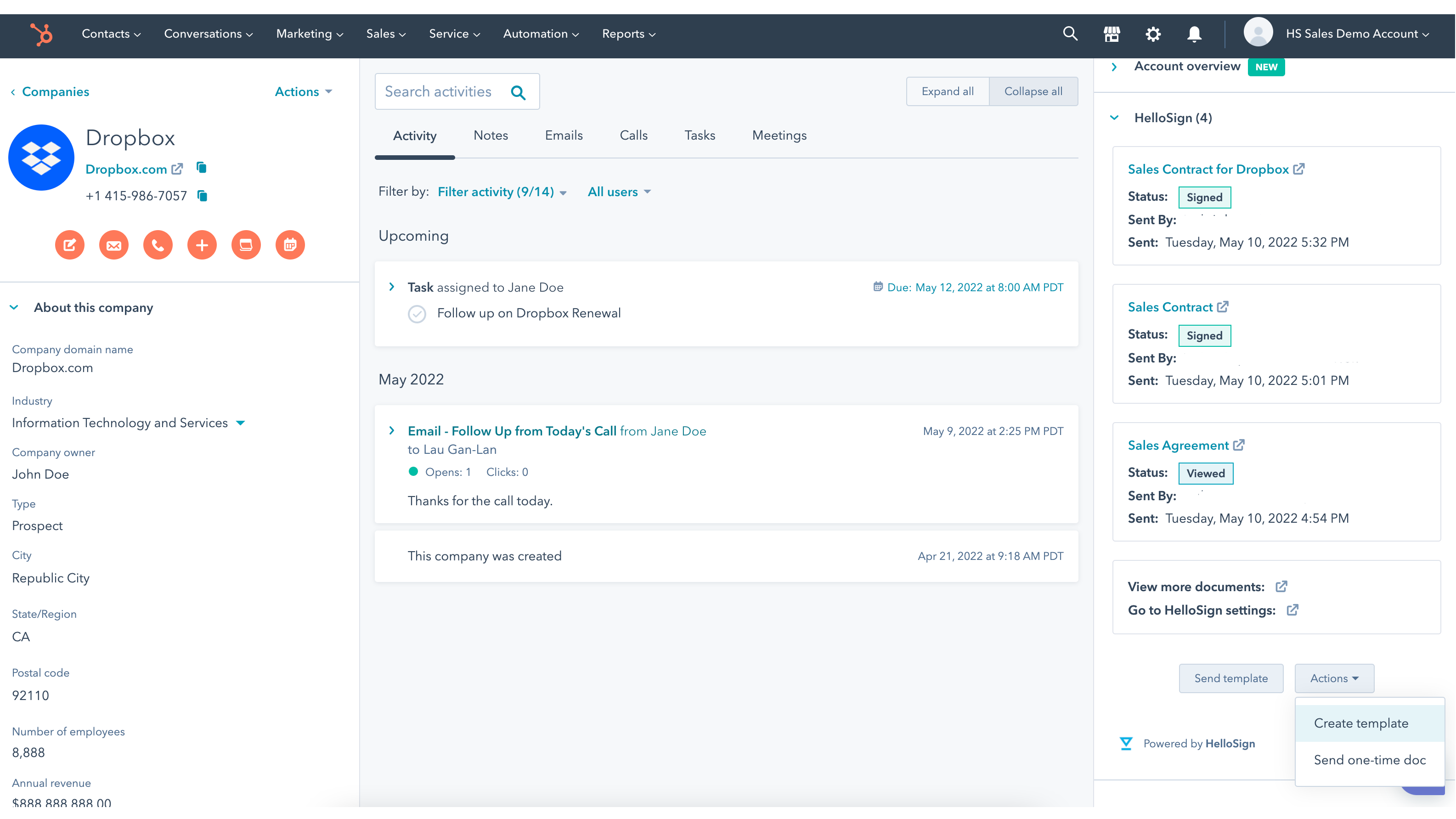
Manage and send key documents from where you’re working in HubSpot

Manage and send key documents from where you’re working in HubSpot

Whether you’re working out of Contact, Deal, or Company object in HubSpot, easily send off your lead’s contract for eSignature. Anyone on your team can access the latest information for a lead or a deal when they need it.
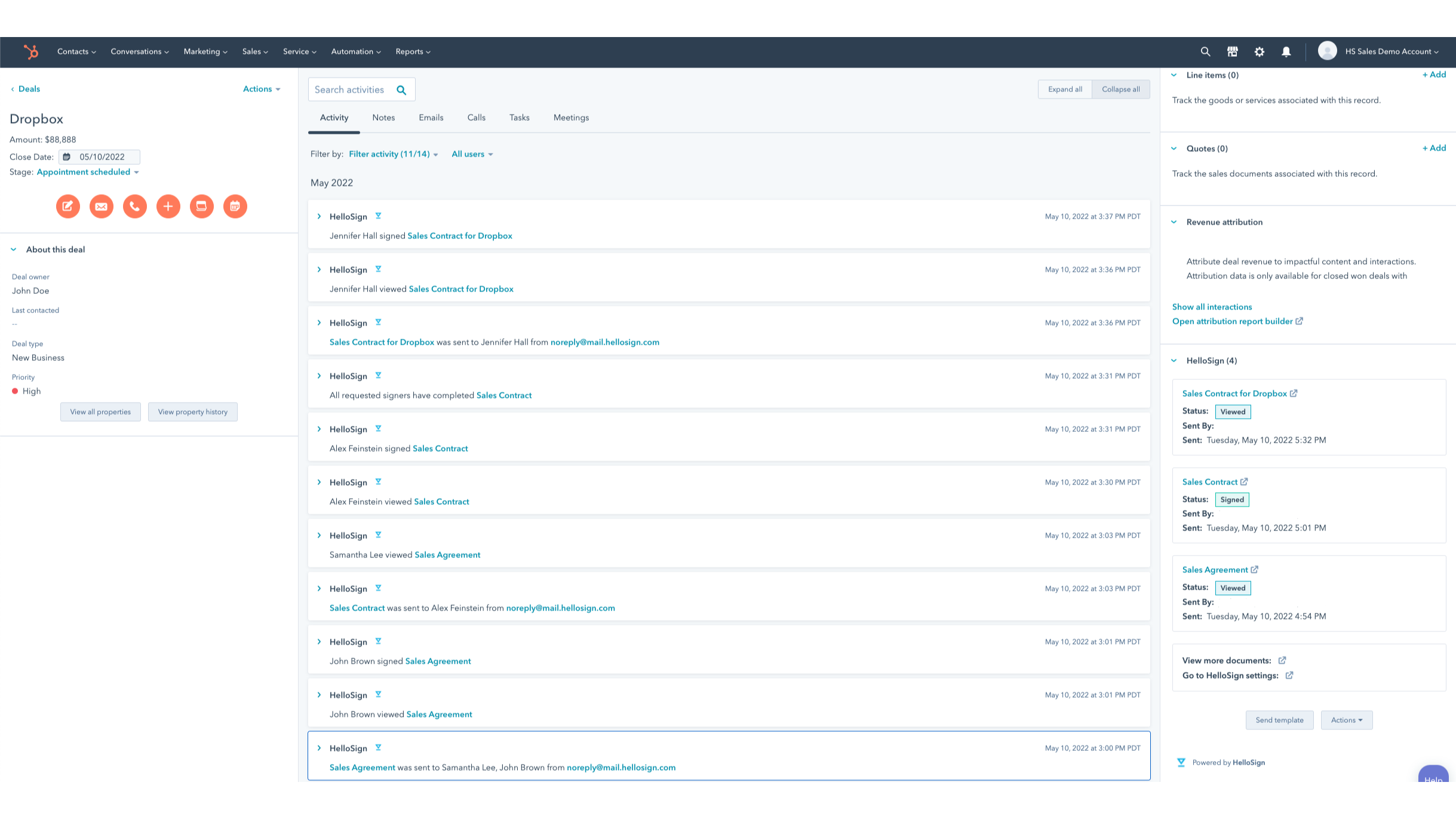
Keep track of all your sales in motion without missing a beat

Keep track of all your sales in motion without missing a beat

Dropbox Sign for HubSpot integration gives you important visibility into any action your leads take with documents sent for signature. Immediately track when a contact views, opens, or signs a contract in the HubSpot CRM card. Once your customer signs a contract, it's automatically saved back to the HubSpot record where you sent the contract from.
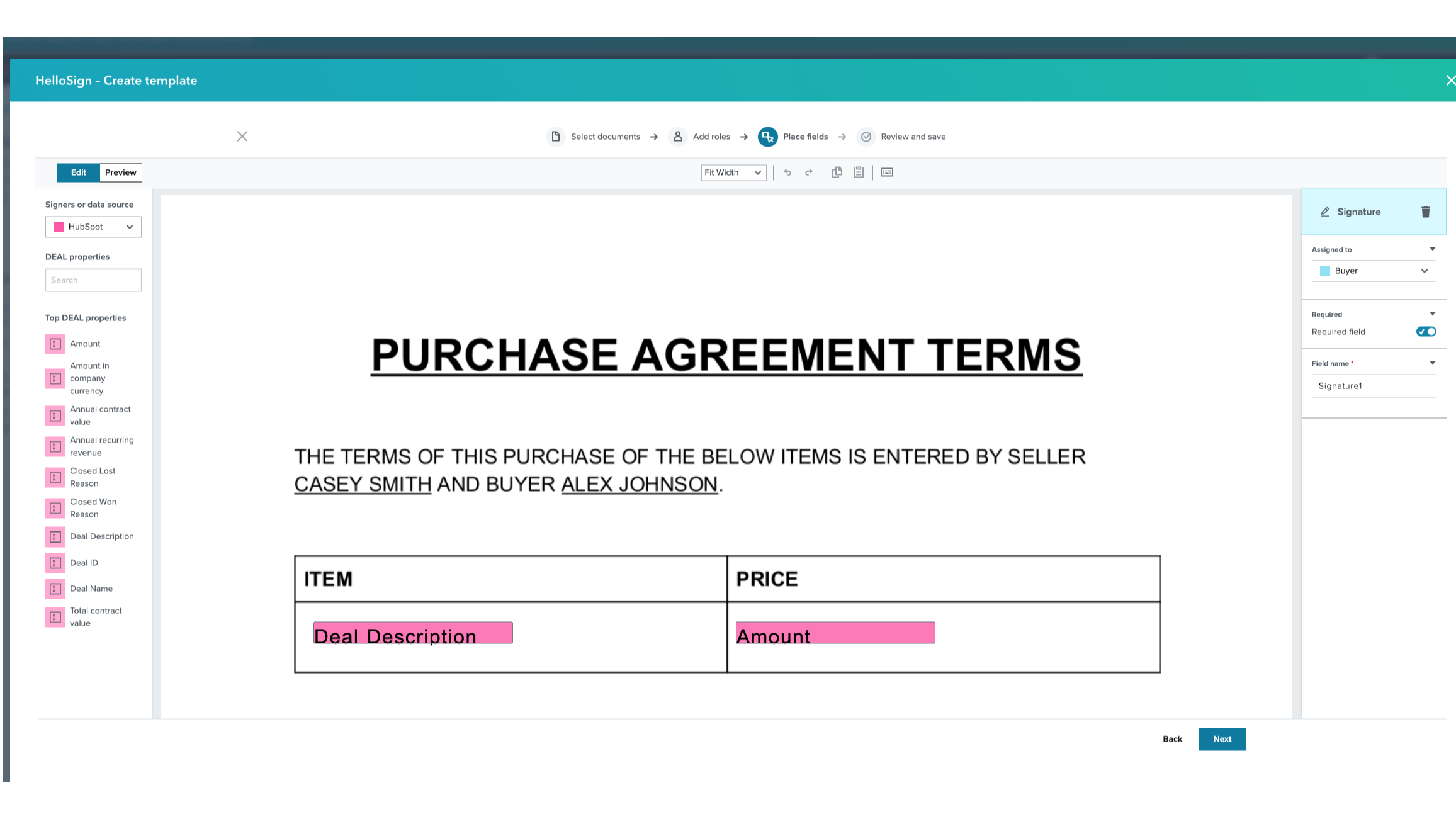
Sync and auto-fill HubSpot data directly into Templates

Sync and auto-fill HubSpot data directly into Templates

Create reusable templates for your commonly used contracts directly in HubSpot. Data is auto-filled directly into your template from your contact’s HubSpot properties, removing manual, error-prone work. Once your template is built, quickly send it to your customers in a single click.
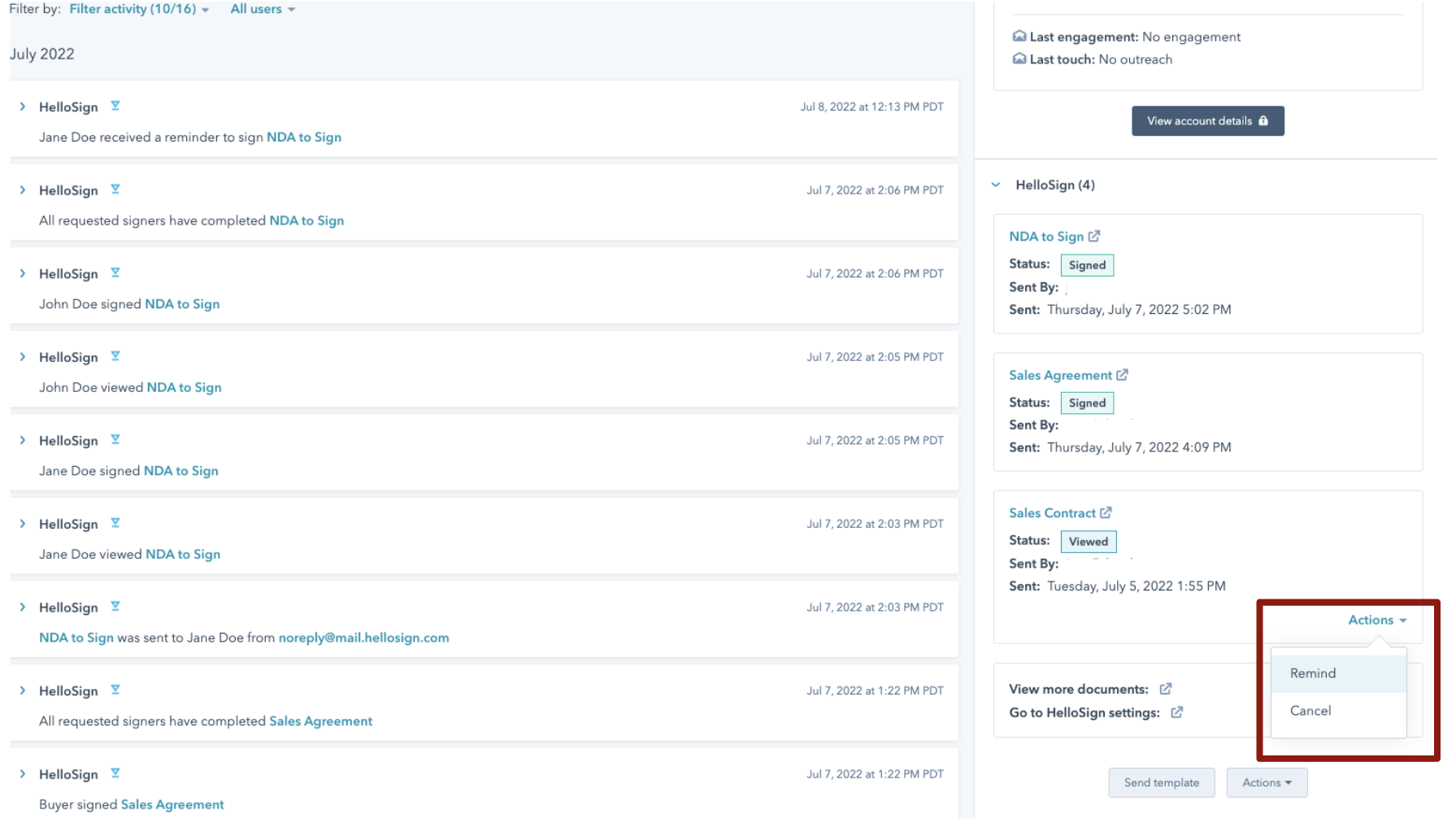
Send reminders and cancellations without leaving HubSpot

Send reminders and cancellations without leaving HubSpot

With easy tracking in the HubSpot CRM card for your pending signatures, you can quickly send reminders to your signers who have outstanding requests. If you need to update your contract and cancel the existing one that's been sent, you can simply do it in just a couple clicks directly in the CRM card dropdown.
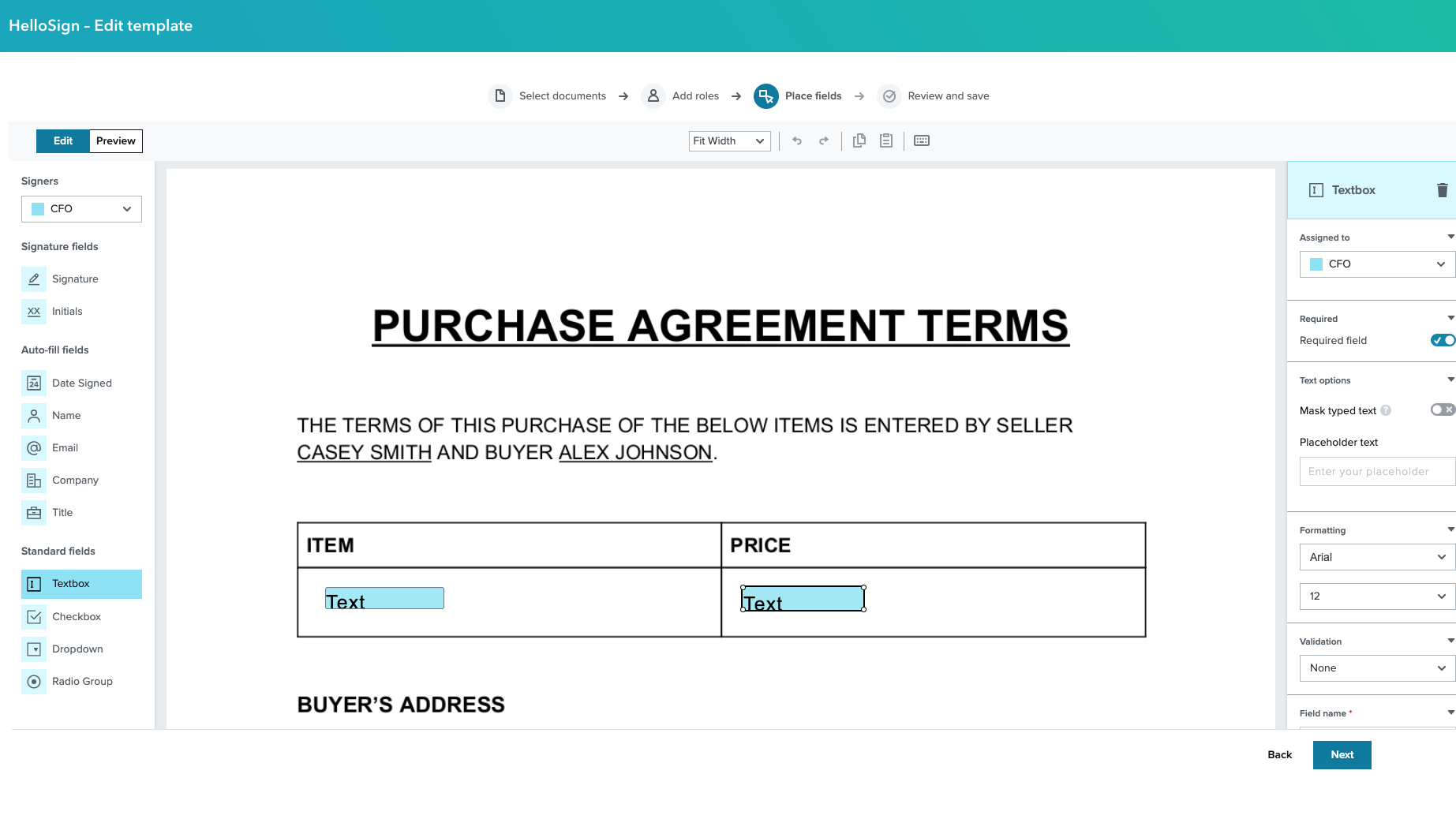
Edit Templates in HubSpot without toggling back and forth

Edit Templates in HubSpot without toggling back and forth

Seamlessly edit all your Templates without switching back to Dropbox Sign. Make any changes you need directly in the HubSpot CRM, speeding up your contract building, saving, and sending process.

App Functionality

Shared Data
Data Source
Sync Direction
In HubSpot
In HubSpot

Document Status

Timeline

Timeline

Merge Fields

Contact Properties

Contact Properties

Merge Fields

Company Properties

Company Properties

Merge Fields

Deal Properties

Deal Properties

Reviews

Average rating

2.5

Based on 90 ratings


Total reviews

90

Number of reviews all-time


5
14% complete
14%
4
12% complete
12%
3
22% complete
22%
2
18% complete
18%
1
34% complete
34%

Average rating

2.5

Based on 90 ratings

Total reviews

90

Number of reviews all-time

5
14% complete
14%
4
12% complete
12%
3
22% complete
22%
2
18% complete
18%
1
34% complete
34%

Filter reviews:

Sort:


2/5
    Nov 17, 2025

Frustrating integration failures with slow help desk support

The integration is not working and their team has been "working on it" since October 22nd with no resolution except to have me make new templates.

What do you like?

It would be cool since we have Dropbox for all our docs already

What do you dislike?

There is no way to speak to a human on their team. You just have to wait for the back and forth via email in their helpdesk.

  • Hawk, B.


1/5
    Oct 6, 2025

Frustratingly outdated platform with broken support links, janky interface, and tedious template management that forces unnecessary workarounds

I don't think Dropbox Sign has been updated since they took over from Hello Sign in 2022. We have been using it since before the takeover, and in the last 3 years none of the problems listed below have been addressed. The last update log is about the name change: https://faq.hellosign.com/hc/en-us/articles/10189970475405-H22-SP20 Before they took over there were several update logs coming out every year. The interface is janky, it's hard to place fields where you want them to be. They shift around as soon as you let go of the mouse button. There is a search box to find the HubSpot properties that you want to map into your document, but you can't use the backspace key while you are typing in it. If you make a typo, you either have to click the little x to clear the box or you have to highlight the text so you can overwrite it when you start typing again. If you hit the backspace key it will just delete the currently selected field, usually the last one you just finished placing. When we update our contract, I have to remap the entire thing. There is a potential workaround if we saved every single page of the contract as a separate document, then we could theoretically update only the pages that changed. It's usually just easier to sit there and do the tedious work of manually remapping all the fields. You must set a fixed number of signers when you create a template. Our contract can be signed by a single signer but sometimes we do contracts with two signers included. The document is exactly the same, we just add the second person's name at the top and a few signature/initials fields for them. With the current system, we have to create a whole separate template for the two-signer version. This means whenever we update the contract I have to remap every single field twice; once for the single-signer version and once for the multi-signer version. A potential time save here would be to update the single-signer version and then duplicate the template and add the second signer. Unfortunately, while you can duplicate a regular Dropbox Sign template, you can't duplicate one made with the HubSpot integration. You must use the HubSpot integration version of the editor to create and edit your templates if you want your document to pull data from a HS record. You can't edit or duplicate templates created from HubSpot on the regular Dropbox website. When I submitted my most recent support request, the first link in the confirmation email took me to a page-not-found. The other links took me to information that hasn't been updated since Dropbox took over, and the link to info about external tools took me to some kind of zendesk/okta employee sign in page. Overall the software is frustrating to use and appears not be actively maintained. (The review title was suggested by HubSpot AI. The rest of this review is human-written.)

  • Huckins, J.


This app requires one of the following Dropbox Sign, fka HelloSign subscription plans.

Essentials

$15

/month

Single users with basic eSignature needs get five templates and unlimited signatures!

  • $15/mo (when paid annually)

  • 1 User

  • Unlimited signature requests

  • 5 Templates

  • Audit trail

  • Mobile app

Essentials

$15

/month

Single users with basic eSignature needs get five templates and unlimited signatures!

  • $15/mo (when paid annually)

  • 1 User

  • Unlimited signature requests

  • 5 Templates

  • Audit trail

  • Mobile app

* The pricing here is for display purposes only. All prices do not include taxes, incentives, discounts, or other pricing variables. You should contact the partner for the most up to date and correct pricing information. HubSpot does not take any responsibility for this pricing information, which is provided by our partners. Pricing last updated: 12/03/2025

More info

Built by
Dropbox Sign
Installs
4K installs
Categories
Languages this app is available in
Dutch, English, Finnish, French, German, Italian, Japanese, Polish, Portuguese, Spanish, and Swedish

Now trending

HubSpot solutions partner illustration
Need more help?

Build a custom solution with help from a HubSpot solutions partner.

Connect with HubSpot solutions partners for any business need. Browse recommendations, hire the right fit, and get your project started.