
Box Connector
สร้างโดย - SparkGrid Software
ติดตั้ง - 100+ การติดตั้ง
คะแนน 5
(10)
ข้อกำหนด
แผน HubSpot สิทธิ์บัญชี HubSpot - ดูสิทธิ์บัญชี ที่จำเป็น
ประเภทสิทธิ์การเข้าถึง แชร์แล้ว การสมัครใช้บริการ Box Connector - Core, Growth, Enterprise หรือ Onboarding & enablement package แพ็กเกจ
ภาพรวม
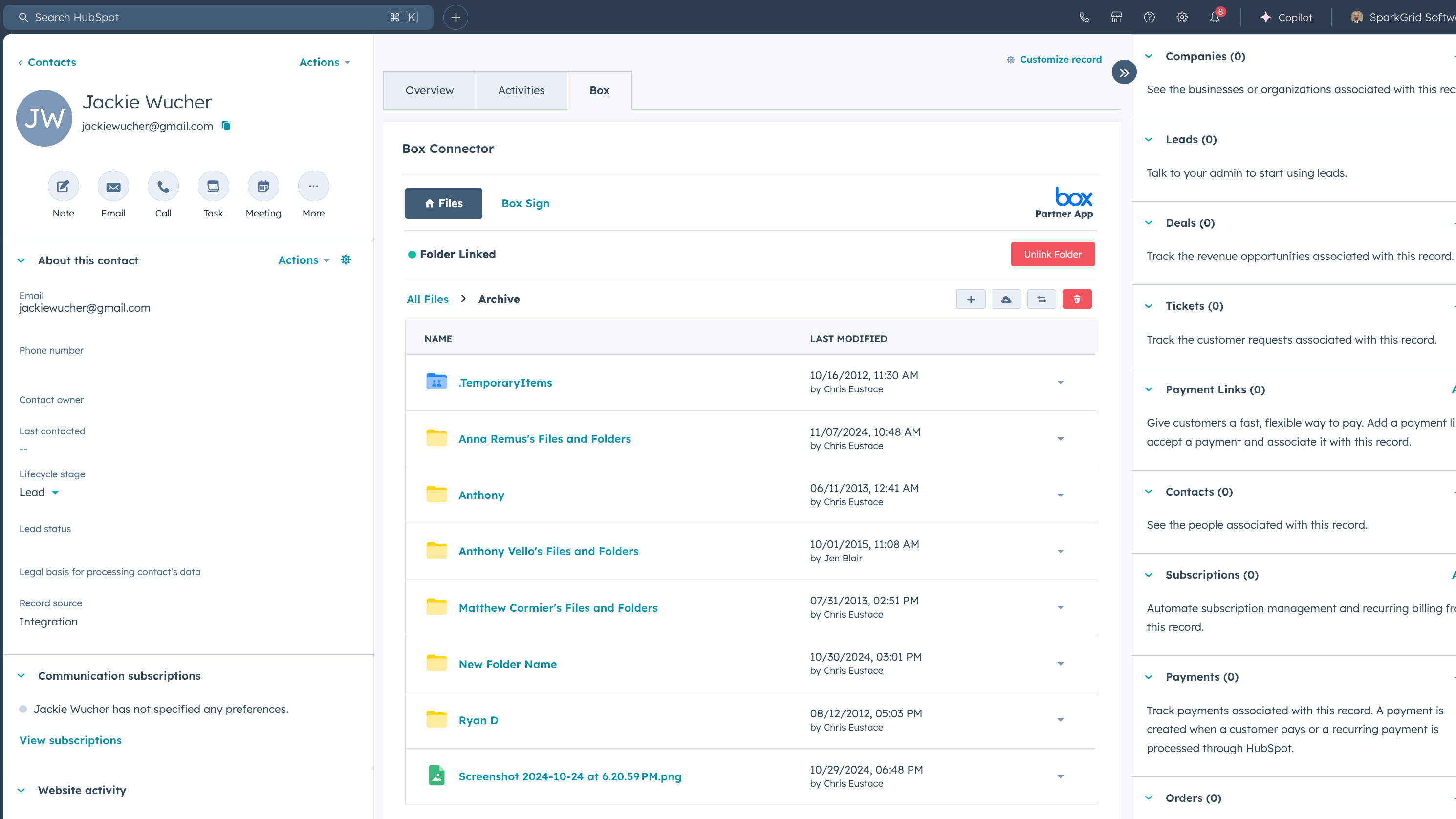
1/5 - View and manage your box folders and files in HubSpot
Bring Box-powered document workflows into HubSpot.
Box Connector by SparkGrid helps teams manage Box files, automate document processes, and support secure customer collaboration directly within HubSpot. By linking Box folders, files, permissions, document actions, and signatures directly to HubSpot records and workflows, teams can minimize manual administrative work and keep document-related tasks aligned with operational workflows.
Manage Box Files in HubSpot
Access and organize Box content in the context of HubSpot contacts, companies, deals, tickets, and customer processes
Auto-create and organize Box folders on HubSpot contacts, companies, deals, and tickets
Pin the right folders to the right records so you have access to all the right docs at your fingertips automatically
Keep documents synced between Box and HubSpot when HubSpot properties or deal stages change
End to end document workflows, automated for your real-world processes
Auto-generate folder structures at specific deal stages
Auto-send onboarding documents to new clients via a secure Box portal
Create personalized folders the moment a deal is marked closed won
Auto-archive files on schedule
Keep documentation up to date as records change
Send Documents With Box Sign
Send and track Box Sign requests directly from HubSpot
Connect e-signature requests and signature activity to the HubSpot records and processes they support
Personalize agreements with dynamic data pulled from HubSpot fields
Save thousands per year vs standalone eSign tools
Bring AI-powered document clarity into HubSpot
Automatically sort, link, and extract data from files to the correct HubSpot records.
Natural-language search and instant document summaries
Intelligent file renaming for clean, compliant documentation
Support Secure Document Collaboration
Use Box-powered file management, permissions, security, and governance while bringing documents into HubSpot
Built on Box’s industry-leading security and compliance, trusted by financial services, legal teams, healthcare organizations, real estate, and energy companies.
Certifications include: FedRAMP, HIPAA, SOC-1/2/3, NIST, ISO 27001/27018, FINRA, GDPR, ITAR, and more.
FAQs
Can Box integrate with HubSpot?
Yes. SparkGrid's Box Connector connects Box files and document activity to HubSpot records and workflows. Teams can use the integration to manage files, automate folders, support document collection, and connect document processes to CRM activity.
How can companies manage Box files inside HubSpot?
Box Connector allows teams to access and manage Box content in the context of HubSpot contacts, companies, deals, tickets, and workflows.
Can HubSpot automatically create folders in Box?
Yes. Box Connector can work with HubSpot workflows to create Box folders based on selected records, stages, triggers, or processes.
What document workflows can be automated between Box and HubSpot?
Teams can automate folder creation, file organization, document requests, routing, approvals, signatures, and other repeatable document actions.
Can Box Sign be used with HubSpot?
Box Connector supports workflows that connect Box Sign requests and signature activity to HubSpot processes.
How does Box Connector support secure document workflows?
Box Connector connects Box-powered content, permissions, security, and governance with HubSpot workflows, helping organizations manage document processes more consistently. SparkGrid is also SOC 2 Type I compliant.
Who is Box Connector best for?
Box Connector is best suited for organizations already using Box and HubSpot that need a more structured way to manage files, folders, signatures, permissions, or document-heavy processes. It can be especially valuable for teams in financial services, healthcare, legal, and other regulated or document-intensive industries.
How long does implementation take?
Implementation depends on the organization's systems, permissions, workflow complexity, and intended use cases. The Box Connector team helps teams plan and configure the appropriate implementation process.
ฟีเจอร์
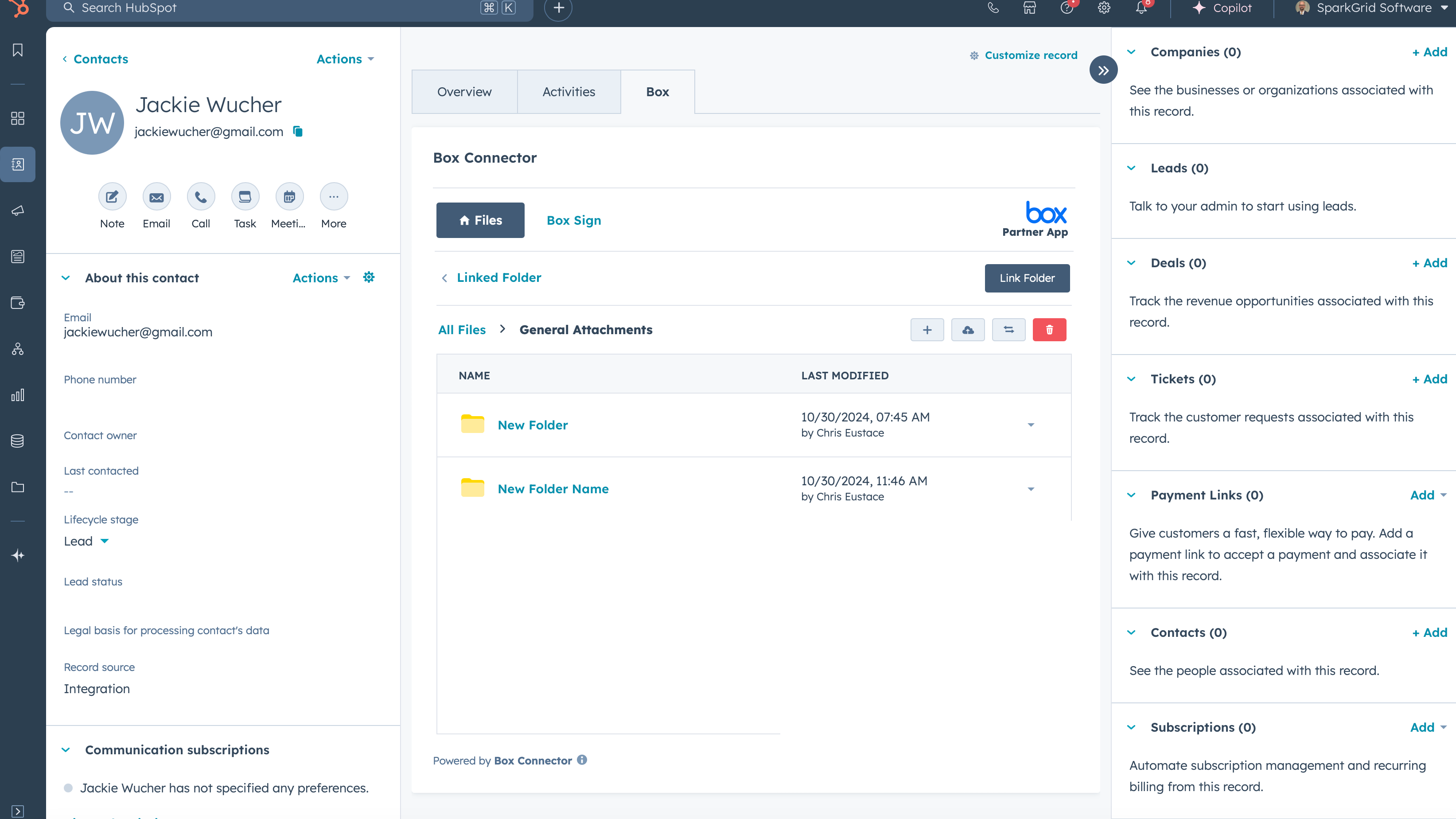
View and Manage Box Files in HubSpot
Access every client folder and file in HubSpot so your team can find, preview, and share files instantly. - See Box files instantly on Contact, Company, Deal, Ticket, & Custom Object records - Work without switching tools by managing Box documents directly inside HubSpot - Keep access secure with Box permissions automatically applied for every user

Automate repeatable file tasks
Stop manually creating folders, moving files, & requesting contracts. - Trigger secure Box file upload requests automatically from HubSpot - Files & folders that create, move, and sort themselves based on triggers, like when a new client onboards - Use 30+ Box automations in HubSpot Workflows to eliminate manual file management
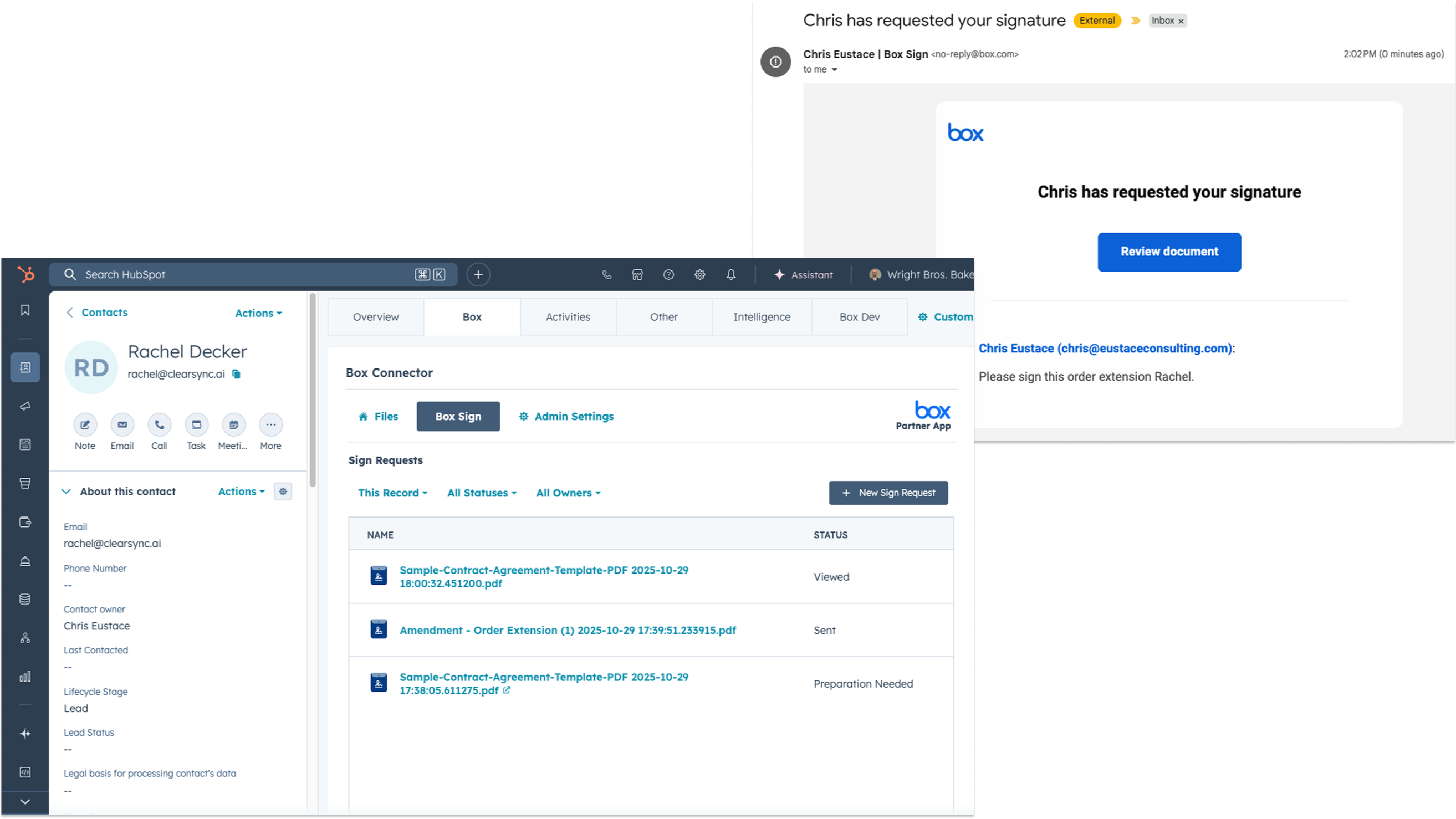
Sign and share documents effortlessly
Send, track, and sync signatures without leaving HubSpot. - Monitor every signature in real time by initiating, viewing, and tracking Box Sign requests directly from HubSpot - Personalize every document automatically by mapping HubSpot properties to Box Sign templates - Send unlimited e-signatures for free with your Box Business plan or above
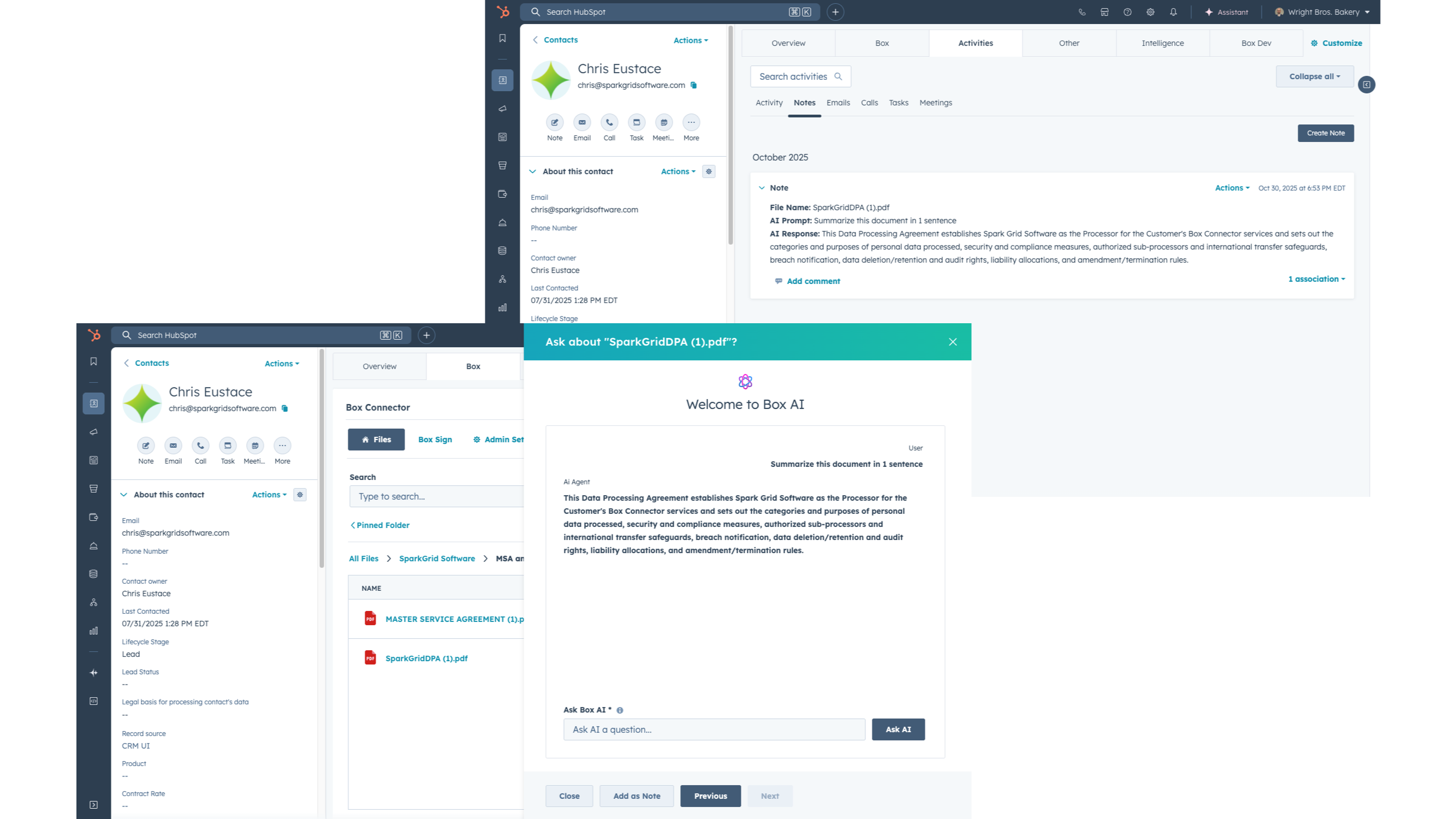
Turn chaos into clarity with Box AI
Box AI automatically names, sorts, files, and summarizes your documents. - Find & summarize any document instantly by asking questions in natural language - Files organize themselves into the correct Box folders & link to HubSpot records - From “IMG_2487.pdf” to “Jane S's Driver’s License”, Box AI renames files automatically for instant clarity
-1.jpeg)
Built on Box's security & compliance
- Built on Box’s enterprise-grade security stack, including SOC 1/2/3, ISO 27001, HIPAA, FedRAMP, PCI DSS, ITAR, and GDPR compliance - Every file inherits Box’s compliance and access controls automatically, extending enterprise security into HubSpot - Built for financial, legal, and regulated industries that need airtight compliance inside HubSpot
ฟังก์ชันการทำงานแอป
Tickets | ||
Companies | ||
Contacts | ||
Deals |
รีวิว
5.0
10
5.0
10
- 18 ส.ค. 2026
Seamless HubSpot & Box Integration with Outstanding Support
We recently completed the implementation of Box Connector to integrate HubSpot with Box, and the experience exceeded our expectations. The integration has streamlined our document management process by allowing our sales team to initiate Box Sign requests directly from HubSpot while automatically storing executed agreements in the correct Box folder structure. This has eliminated manual file management, improved consistency, and ensured client documentation is organized and accessible across the organization. A special thank you to Jackie for his outstanding support throughout the implementation. He was knowledgeable, responsive, and always willing to help work through questions and configuration challenges. His guidance made the deployment smooth and ensured we were able to implement the solution successfully. The product delivers real operational value, and the level of customer support provided by the SparkGrid team was excellent.
Mahmood, W.
- 15 ก.ค. 2026
The 400 Hour Per Month Time Saver
The Box Connector integration for HubSpot has absolutely transformed the way we do business, process documentation, and service our clients. As a financial services company, it's imperative that we are able to accurately accept, digest, and reference documentation. The Box Connector allows us to do just that, while opening up our HubSpot portal to the full functionality and capability of the Box AI model and Box metadata. If you want your team to experience 400 Hours of time savings like we have, get this product.
Customer Support, Customer Success, Integration, Metadata Extraction, Box AI functionality
N/A
Smith, D.
การกำหนดราคา
Core
US$200
/เดือนIntegrate Your Box Files to HubSpot
Securely Share Folders and Files
Basic Workflow Automation
File Search
File Collaboration
Dynamic Folder Creation
Pin Folders to HubSpot Records
File Previews
Seamless integration of Box within HubSpot CRM
Core
US$200
/เดือนIntegrate Your Box Files to HubSpot
Securely Share Folders and Files
Basic Workflow Automation
File Search
File Collaboration
Dynamic Folder Creation
Pin Folders to HubSpot Records
File Previews
Seamless integration of Box within HubSpot CRM
* ราคาที่แสดงนี้มีไว้เพื่อแสดงข้อมูลเท่านั้น ราคาทั้งหมดยังไม่รวมภาษี สิทธิพิเศษ ส่วนลด หรือตัวแปรราคาอื่นๆ คุณควรติดต่อพาร์ทเนอร์เพื่อรับข้อมูลราคาล่าสุดและถูกต้องที่สุด HubSpot จะไม่รับผิดชอบใดๆ ต่อข้อมูลราคานี้ซึ่งจัดทำโดยพาร์ทเนอร์ของเรา การกำหนดราคาอัปเดตล่าสุด: 19/08/2026
ข้อมูลเพิ่มเติม
สร้างโดย - SparkGrid Software
ติดตั้ง - 100+ การติดตั้ง
หมวดหมู่ ภาษาที่แอปนี้สามารถใช้ได้ อังกฤษ