

Mailchimp
Requirements
HubSpot Plan HubSpot Account permissions No permissions required Access Type Shared Mailchimp Subscription - Review Mailchimp's Pricing Page plan
Overview
1/2
Unify email and customer insights across Mailchimp and HubSpot for information alignment and reduce the need for messy, time-consuming imports.
Install this app to:
Sync contacts and records between Mailchimp and HubSpot two-ways in real-time for data alignment
Get set up quickly with automatic historical data sync and configure ongoing sync settings to reduce manual data management and prevent data silos.
Configure custom field mappings between Mailchimp and HubSpot contact properties to match specific business requirements.
Note: To sync Mailchimp email activity - including sends, opens, clicks, and bounces - to HubSpot timelines, create segments and build lists, or use email engagement to trigger automated HubSpot workflows, you’ll need to install an additional Mailchimp app. You can do so here.
Features
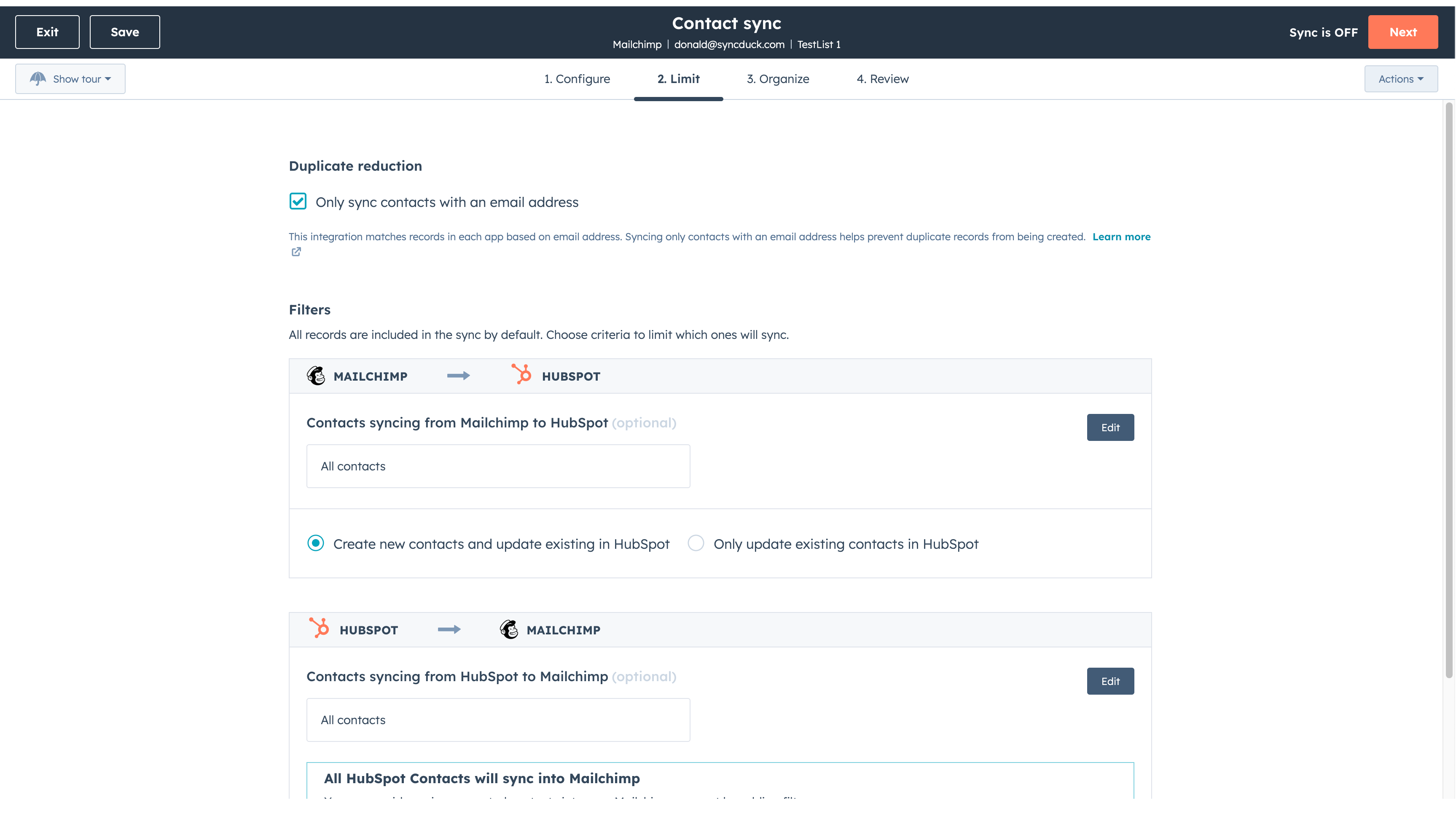
Sync Mailchimp and HubSpot in the background
Make manual data entry a thing of the past by syncing data (see below) between HubSpot and Mailchimp. When records are created or updated in either app, that information will be automatically shared with the other one. You can also add a filter for any Mailchimp field or HubSpot list to sync exactly what you want—and nothing you don’t.
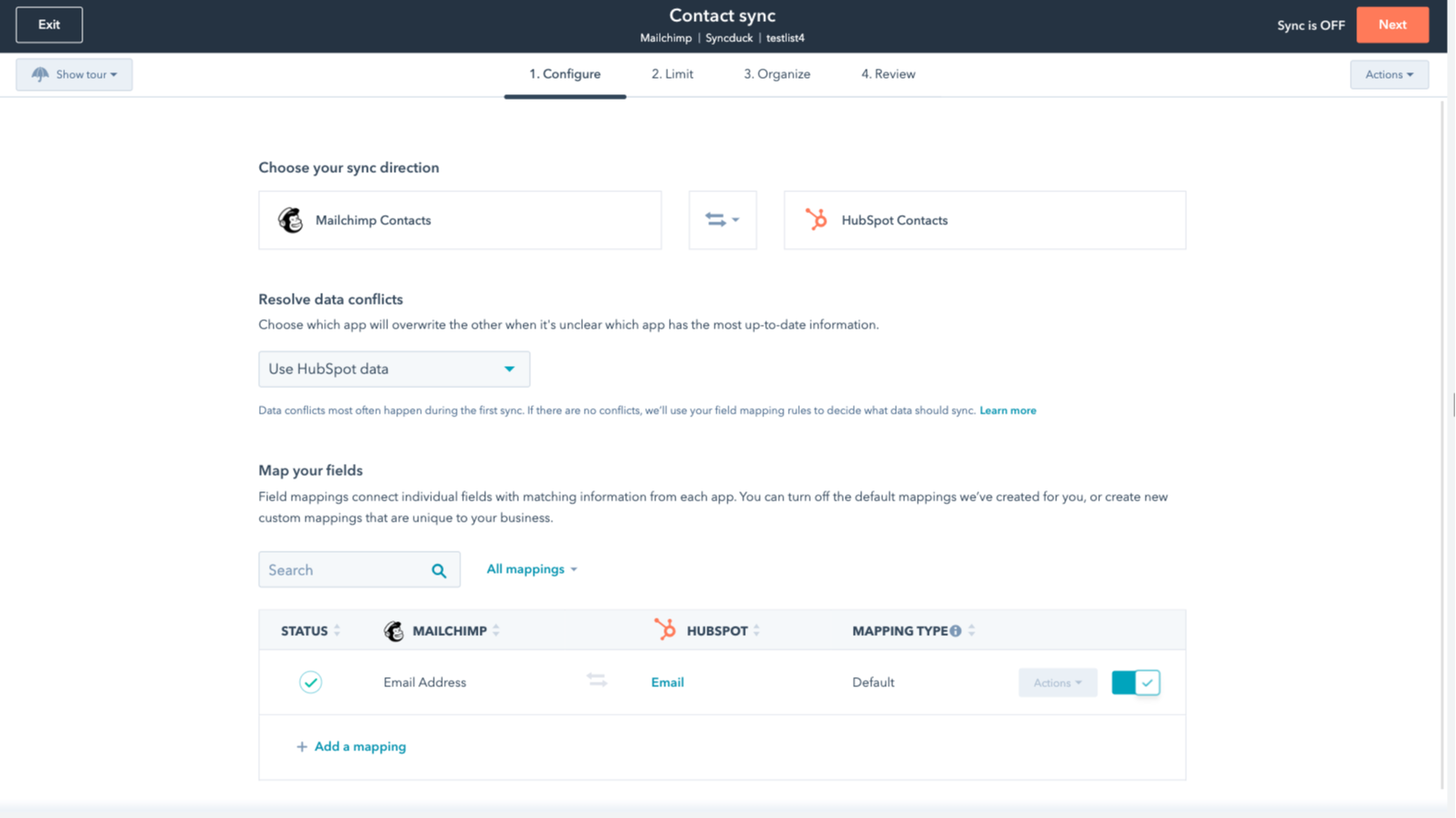
You’re in control of your data
You can set up a one- or two-way sync, which means you can either sync data from Mailchimp to HubSpot, from HubSpot to Mailchimp, or back-and-forth! IMPORTANT: This app requires Data Hub Starter or above.
App Functionality
Shared Data
Each object has field mappings that connect matching information from each app.
The following will not sync: Groups, Tags, Email Opens/Clicks. As mentioned above, you can review and install the other Mailchimp integration here to sync additional data.
Note: You will need Data Hub Starter and up to use this app.
Contacts |
Reviews
2.6
63
2.6
63
While users report that the tool transfers only email addresses without names and occasionally merges lists incorrectly, some appreciate the quick setup for basic contact syncing. A few reviewers praise the intuitive interface for managing mass communications, though others mention that unsubscribes and custom tags do not always map back to the main database.
- Jun 15, 2026
Definitely recommending this integration!
It's very easy to set up and I would definitely recommend it.
You can connect the campaign and email marketing activity from Mailchimp directly into HubSpot through the additional apps.
Nothing to add.
Mihajlovic, B.
- May 20, 2026
Still new but so far I like it
This is a new integration for us but contacts seem to be flowing in from Mailchimp pretty seamlessly. One thing I need to determine is how to automate the lead status to the correct default. Not an obvious configuration when I set it up.
Moskal, E.
Pricing
Review Mailchimp's Pricing Page
$0
Use the 'See all pricing options' link on the righthand side
Make sure to confirm the HubSpot subscription and the Mailchimp subscription needed to install this integration
Note: "Free" is referring to the cost of the integration, not the app subscriptions
Review Mailchimp's Pricing Page
$0
Use the 'See all pricing options' link on the righthand side
Make sure to confirm the HubSpot subscription and the Mailchimp subscription needed to install this integration
Note: "Free" is referring to the cost of the integration, not the app subscriptions
* The pricing here is for display purposes only. All prices do not include taxes, incentives, discounts, or other pricing variables. You should contact the partner for the most up to date and correct pricing information. HubSpot does not take any responsibility for this pricing information, which is provided by our partners. Pricing last updated: 01/22/2026
New arrivals

Trophy Jar
Automatic Customer Reviews and Testimonials Software

SiteSpeakAI
No-code AI chatbot for your website that answers customer questions, captures leads, and syncs contacts, chat transcripts, and support tickets to HubSpot.
