

Dusk FSM - Service Excellence
Powering Field Services: Delivering Exceptional Customer Experiences
Built by - Dusk Mobile
Installs - 70+ installs
Rating 4.3
(4)
Requirements
HubSpot Plan HubSpot Account permissions - View the required account permissions
Dusk FSM - Service Excellence Subscription - Launch, Essentials, Growth, or Enterprise plans
Overview
1/9 - HubSpot and Dusk FSM: Automate Field Job Dispatch
If you’re sending individuals and teams into the field, Dusk FSM supercharges your HubSpot CRM with AI-powered Field Service Management (FSM), giving you real-time control over job scheduling, workforce dispatch, and invoicing.
Dusk FSM leverages AI automation to boost efficiency, reduce operational delays, and improve customer experience, all while seamlessly syncing with HubSpot to streamline service workflows.
With support for HubSpot custom objects and properties, your field teams can access and update customer-specific data directly from the job site, ensuring accurate, real-time information is always available.
🎯 Take the Interactive Tour: Sign Up, Schedule, Complete
📌 Unlock AI-Driven Field Service Excellence
✅ Automate Job Scheduling & Dispatch
AI-powered workflows ensure real-time job assignments, smart routing, and workforce optimization directly from HubSpot.
✅ Enhance Visibility with AI-Powered Insights
Gain real-time insights into field operations, track work progress, predict job completions, and monitor technician performance with intelligent analytics.
✅ Leverage Custom Objects & Properties in the Field
Field teams can view, edit, and sync HubSpot custom objects and properties directly from mobile or desktop, ensuring service accuracy and better customer interactions.
✅ Seamless CRM + FSM Integration
Move deals through HubSpot, and Dusk FSM will auto-create jobs, assign teams, and schedule follow-up work—ensuring data accuracy and operational efficiency.
✅ Boost Revenue & Speed Up Invoicing
Shorten invoice cycles by automating job closeout-to-invoice workflows, ensuring faster payments and improved cash flow.
✅ Empower Technicians to Create New Business
Give field teams the ability to suggest follow-up work, create deals, and generate revenue—directly from the job site.
📌 Why Dusk FSM?
Managing field service with multiple tools and spreadsheets is inefficient. Without an integrated AI-powered FSM platform, ensuring data quality, operational efficiency, and real-time customer updates is almost impossible.
With Dusk FSM and HubSpot, you get an intelligent field service platform that enables you to:
✔ Leverage AI-driven automation for smarter scheduling & dispatch
✔ Use HubSpot custom objects & properties to enhance field service accuracy
✔ Ensure real-time job tracking and proactive customer updates
✔ Streamline field operations with an end-to-end integrated workflow
📌 AI-Powered Integration Features
Turn HubSpot Workflows into Work in the Field
Auto-create jobs in Dusk FSM when a HubSpot deal moves stages
Dispatch teams in real time with automated assignments
Ensure data accuracy and visibility across CRM & FSM
Shorten Invoice Cycles & Improve Cash Flow
Auto-trigger invoices when work is completed in Dusk FSM
Reduce delays with real-time field updates and approvals
AI-Powered Scheduling & Smart Workflows
Predict job durations, technician availability, and workload balancing
Optimize dispatch routes and workforce utilization
Leverage HubSpot Custom Objects & Properties
Allow technicians to access & update key CRM data in the field
Ensure real-time sync between HubSpot & field service teams
Unlock New Revenue Opportunities from the Field
Technicians can suggest additional services, schedule follow-ups, and auto-generate deals in HubSpot
One Seamless, AI-Powered Workflow – No Duplicate Data!
Create Jobs in Dusk FSM from HubSpot Deals
Automate actions through Workflows from HubSpot Tickets
Create Tickets in HubSpot and auto-trigger workflows in Dusk FSM
Preview upcoming deals to forecast workloads
📌 Start Winning with AI-Powered Field Service Automation
🚀 Get started with our Launch Plan today and experience Dusk FSM with no obligation. Install the app today, and schedule a 30-minute discovery call to learn more about how to tailor the HubSpot + Dusk FSM integration to your specific needs.
Features
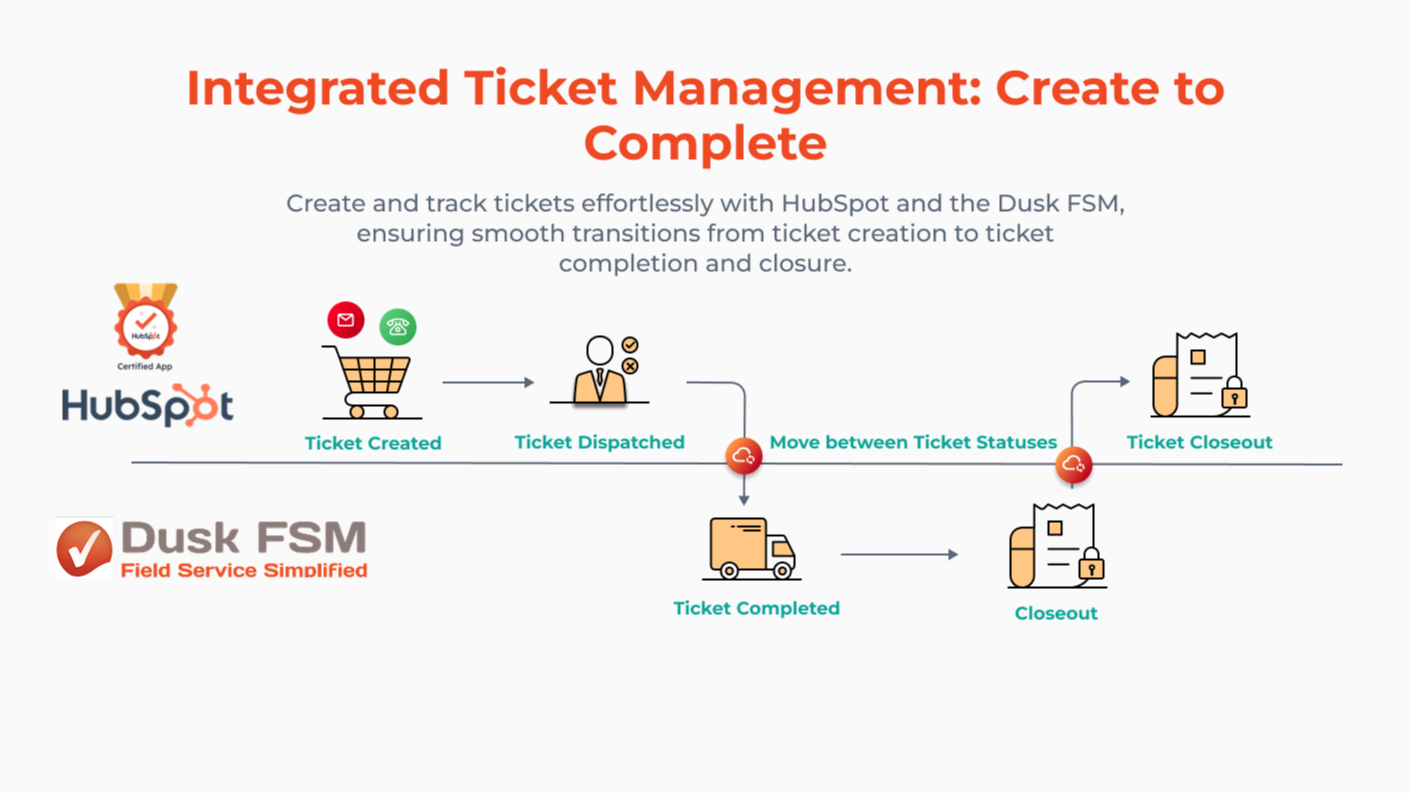
Trigger Field Jobs from HubSpot Tickets
Auto-create field jobs when ticket status changes in HubSpot. Dispatch instantly from the Dusk FSM card or scheduler. Once complete, jobs sync back to HubSpot, keeping your support desk fully updated, no manual steps.
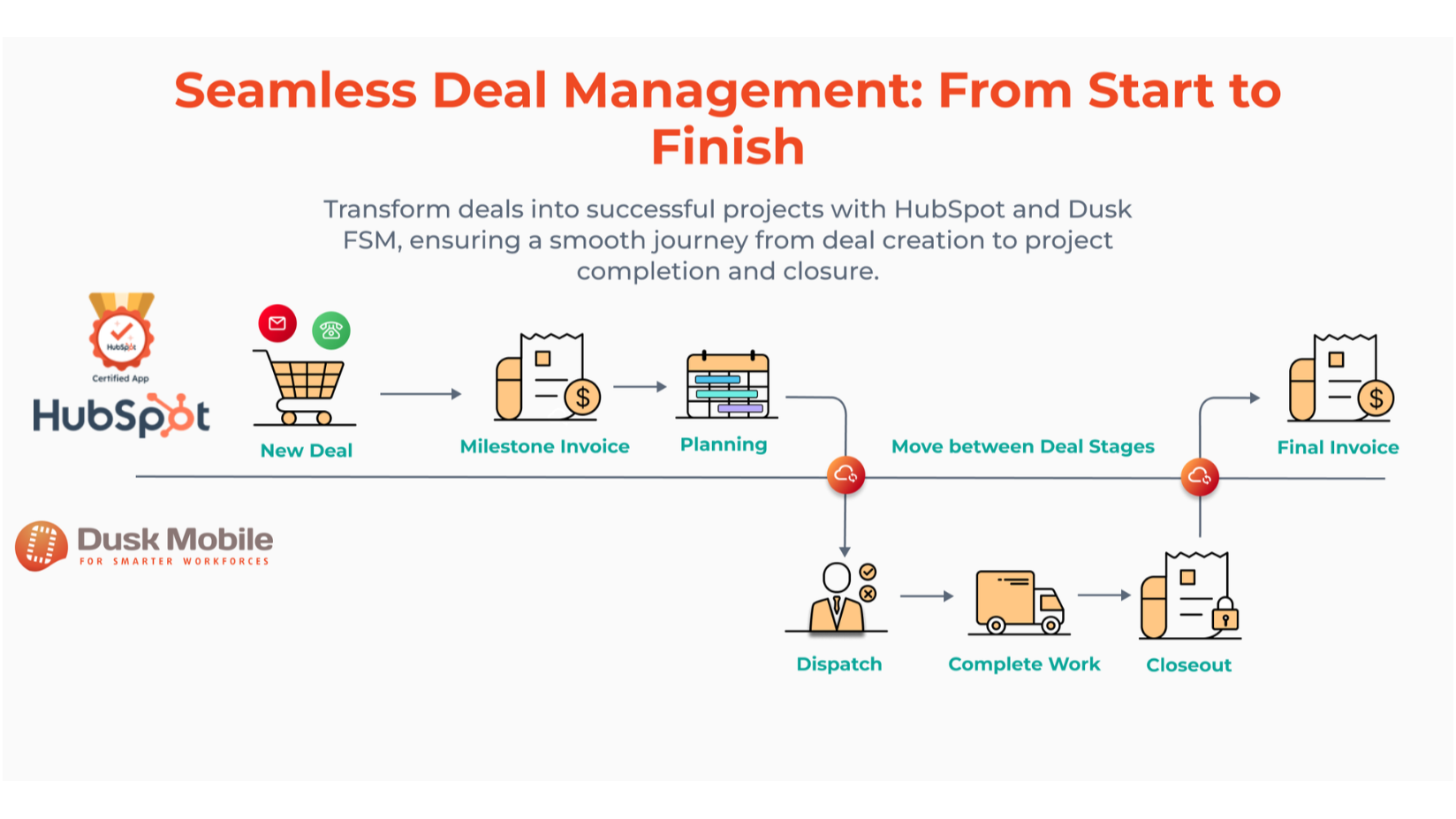
Trigger Jobs from HubSpot Deals Automatically
Dispatch jobs directly from HubSpot using the Dusk FSM Dispatch App Card for a seamless, automated workflow from sales to service. Alternatively, create jobs for manual assignment and dispatch in Dusk FSM by selecting which Deal stages trigger job creation and which stages update in HubSpot upon job completion and invoicing
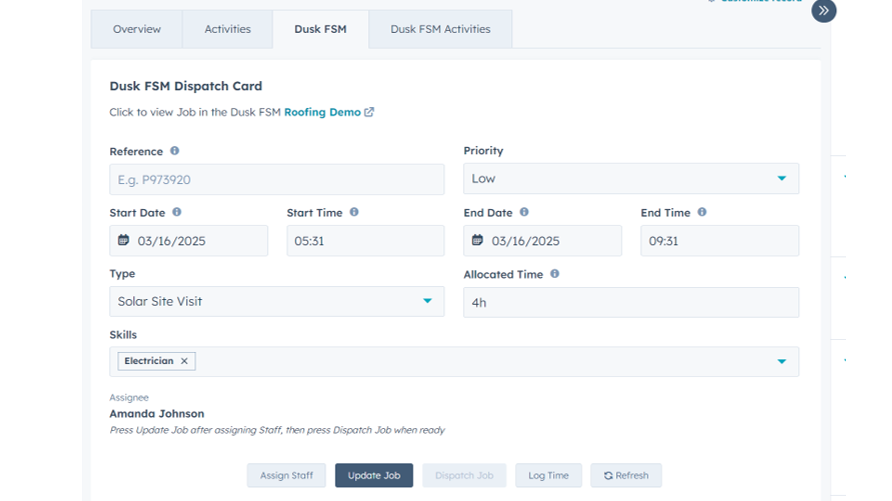
Dispatch Field Jobs from the HubSpot CRM App Card
Create and dispatch jobs directly from HubSpot using the embedded Dusk FSM App Card. Field staff get notified instantly, and job details sync automatically, no switching tabs, no manual entry.
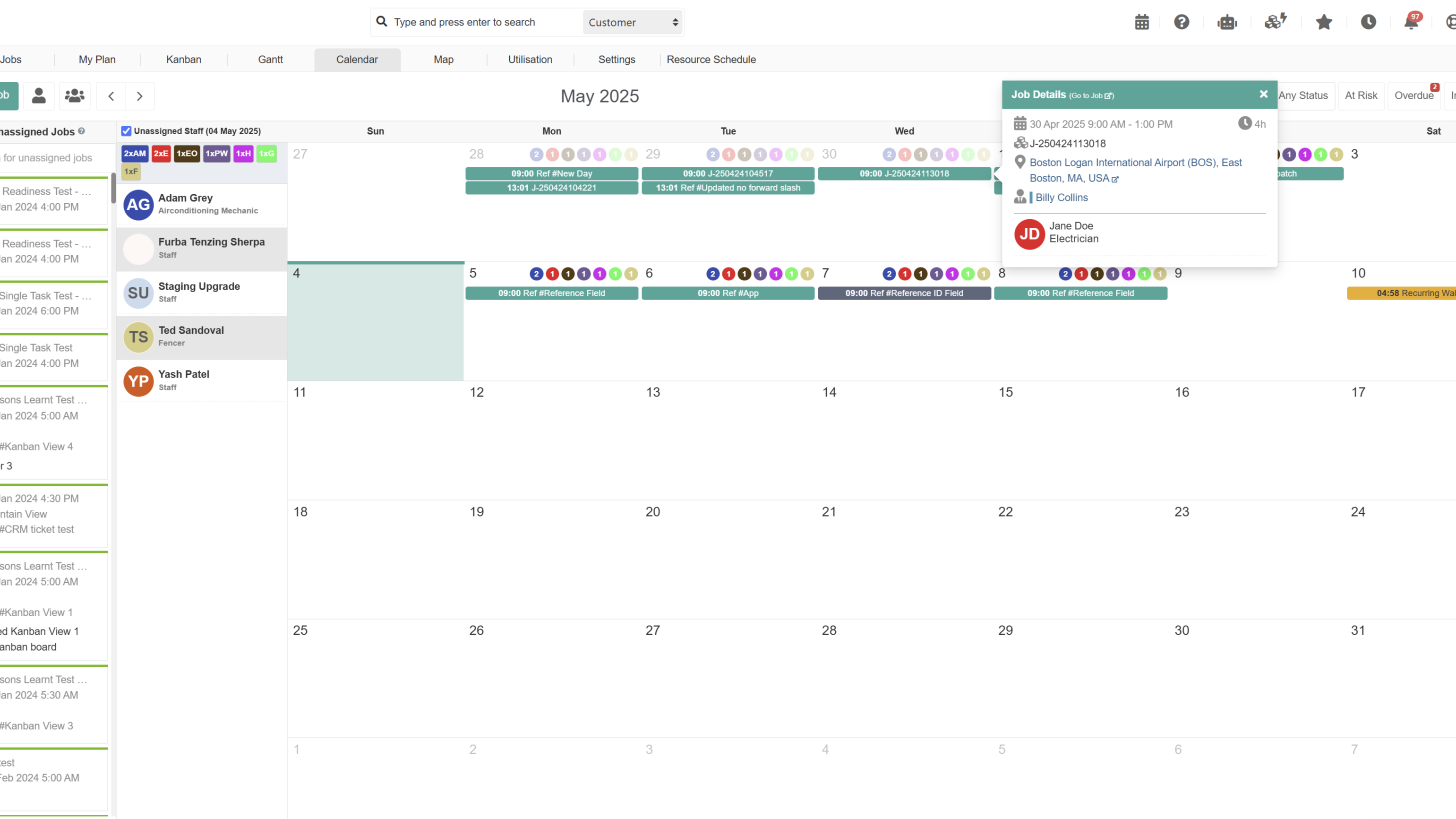
Schedule Field Jobs in Dusk FSM
Use Dusk FSM’s advanced scheduling board to dispatch jobs triggered by HubSpot Tickets or Deals. View technician availability, apply filters, and assign work via drag-and-drop. Once dispatched, updates sync in real-time to HubSpot.
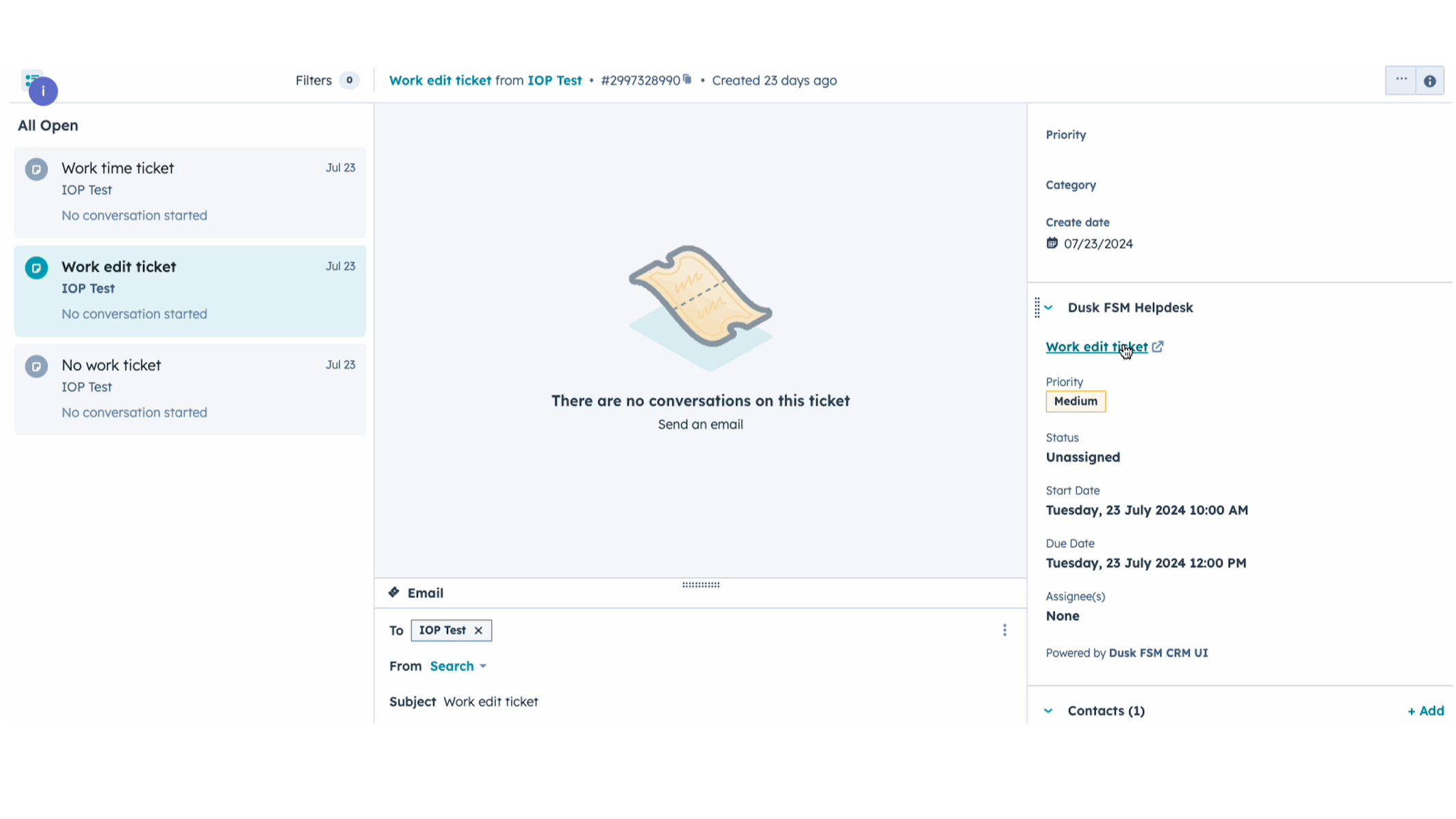
Live Field Status in HubSpot Helpdesk
Empower your Help Desk agents to seamlessly manage and track field tickets from the HubSpot Helpdesk with Dusk FSM. View real-time updates, manage assignments, log time, and ensure a smooth workflow from ticket creation to job completion, all within HubSpot.
App Functionality
Shared Data
Customer Company | ||
Customers | ||
Customers | ||
Field Job Forms | ||
Field Jobs | ||
Field Jobs | ||
Materials |
Reviews
4.3
4
4.3
4
- Jun 10, 2025
Helpful Scheduler With Quick Support Despite Minor Loading Issues
Very useful tool for scheduling
several views, convinient app
still have some minor things to fix, but support replies very quick with the solution slow loading of web pages
Accounting, F.
- Jan 9, 2025
The simple layout is positive - requires work.
Proposed use case: move a deal/ticket to a stage called 'delivery' with a customer address and have employees use the app to receive notification with all necessaries logged in relevant objects in HubSpot. I associated three contacts to a ticket which did sent to desktop Dusk FSM but not for all three contacts. App closed during session I cannot now use it - would need reinstall. Set-up steps not really difficult, however I wonder if the user guide for HubSpot integration is correct today?!
Has a simple user-interface and app home screen is clear.
Deals and tickets not syncing to meet use case.
Gromniak, W.
Launch
$0
For small teams getting started
Up to 25 completed jobs per month
Unlimited Staff and Contractors
Unlimited Integration Connectors
Core FSM tools
Schedule & Dispatch Jobs
Field Mobile Apps
Custom Mobile Job Forms
Automate Workflows
Send Quotes and Invoices
Role based Dashboards
Equipment & Asset Management
Timesheets
Manage Customers & Inventory
Launch
$0
For small teams getting started
Up to 25 completed jobs per month
Unlimited Staff and Contractors
Unlimited Integration Connectors
Core FSM tools
Schedule & Dispatch Jobs
Field Mobile Apps
Custom Mobile Job Forms
Automate Workflows
Send Quotes and Invoices
Role based Dashboards
Equipment & Asset Management
Timesheets
Manage Customers & Inventory
* The pricing here is for display purposes only. All prices do not include taxes, incentives, discounts, or other pricing variables. You should contact the partner for the most up to date and correct pricing information. HubSpot does not take any responsibility for this pricing information, which is provided by our partners. Pricing last updated: 03/12/2026
More info
Built by - Dusk Mobile
Installs - 70+ installs
Categories Languages this app is available in English
New arrivals


