

Copper
Anforderungen
HubSpot-Produktversion HubSpot-Account-Berechtigungen Keine Berechtigungen erforderlich Zugriffstyp Geteilt Copper-Abonnement - Produktversion: Review Copper's Pricing Page
Übersicht
1/2
Sync data between Copper (Prosperworks) and HubSpot without manual data entry or messy, time-consuming imports.
Here’s what you get with Data Sync by HubSpot:
- Two-way sync: Data is shared between Copper and HubSpot in real time
- Default field mappings: Set-up is quick with out-of-the-box field mappings already created for you
- Historical syncing: Your existing data will sync right away, and updates will sync as they happen
Note: Please review the "Shared Data" section below to see which objects sync
Funktionen
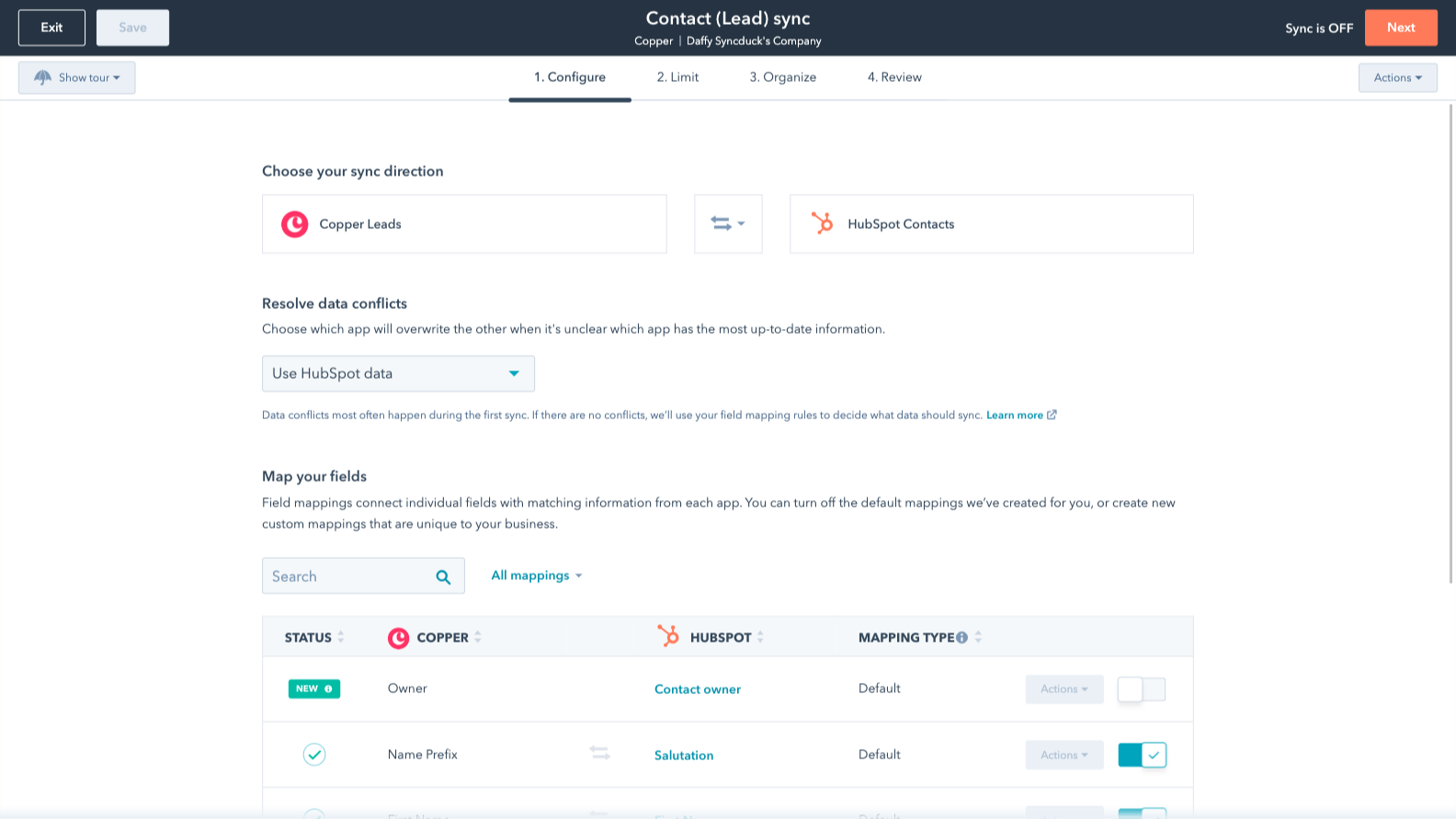
Sync Copper and HubSpot data
Make manual data entry a thing of the past by syncing opportunities, companies, people & leads between HubSpot and Copper (Prosperworks). When records are created or updated in either app, that information will be automatically shared with the other one.

Custom field mappings
Custom field mappings are available with Data Hub Starter or up. Custom mappings add the flexibility to create your own mappings or make changes to your default ones.
App-Funktionalität
Datenaustausch
Each object has field mappings that connect matching information from each app. Default mappings are listed below. If you want to change these default mappings or create your own, custom field mappings are available with Data Hub Starter and up.
Phone Call Activities | ||
Companies | ||
People | ||
Leads | ||
Meeting Activities | ||
Notes | ||
Opportunities | ||
Tasks |
Rezensionen
2,8
5
2,8
5
- 27. Mai 2026
Nur eine grundlegende Ausgangsbasis
Es bringt die Grundausstattung mit, alles andere muss man selbst machen oder extra bezahlen.
Das macht den Einstieg viel einfacher
Zum Beispiel kann es eine Notiz einbringen, aber nicht die Person, die sie erstellt hat, und HubSpot verhindert die Bearbeitung einer Notiz durch Importe, oder es bringt den Datensatz aus Copper ein, aber Sie müssen für Data Hub bezahlen, um die Copper-Datensatz-ID der HubSpot-ID zuzuordnen - das geschieht nicht automatisch.
Guirgis, M.
- 6. März 2026
Großes Potenzial, aber es fehlen wichtige Marketinginstrumente und der Preis ist im Vergleich zu besseren Alternativen, die mehr für weniger bieten, überhöht.
Kupfer funktioniert gut, das Problem ist, dass ein CRM eine Art echter Markierungsplattform benötigt. Was nützt die ganze Organisation ohne eine Möglichkeit, sie zu nutzen? Es funktioniert hervorragend mit Workspace, was gut ist, aber der Mangel an Marketing ist einfach nicht zu übersehen. Wenn ich nur ein organisiertes Adressbuch brauche, habe ich das bereits mit meinem Workspace-Konto. Aber der größte Knackpunkt für uns war die Möglichkeit, innerhalb von Copper NICHT von einer persönlichen E-Mail zu einer allgemeinen E-Mail zu wechseln. Copper macht so viele Dinge richtig, lässt aber an einigen wichtigen Stellen den Ball fallen.
Es integriert sich so schön, saubere UI. Es funktioniert, aber ist mehr ein persönliches Adressbuch vs wahre Business-Plattform crm.
Da Copper nur begrenzte Möglichkeiten für das Marketing bietet, habe ich alles zu HubSpot verlagert. Die UIs sind ähnlich und HubSpot's $9 pro Monat Plan tut mehr für mich als das, was Copper tut. Copper kostet viel mehr pro Monat als der niedrigere Tarif von HubSpot, aber HubSpot bietet mehr Integrationen und fortschrittlichere Tools, die mit dem CrM zusammenarbeiten. HubSpot ist zwar nicht ganz so stark in Google integriert, aber es ist besser, als die meisten denken.
Broekemier, J.
Review Copper's Pricing Page
0 $
Use the 'See all pricing options' link on the righthand side
Make sure to confirm the HubSpot subscription and the Copper subscription needed to install this integration
Note: "Free" is referring to the cost of the integration, not the app subscriptions
Review Copper's Pricing Page
0 $
Use the 'See all pricing options' link on the righthand side
Make sure to confirm the HubSpot subscription and the Copper subscription needed to install this integration
Note: "Free" is referring to the cost of the integration, not the app subscriptions
* Die hier angegebenen Preise dienen nur zu Illustrationszwecken. Alle Preise enthalten keine Steuern, Sonderangebote, Rabatte oder sonstigen Preisvarianten. Bitte wenden Sie sich direkt an den Partner, um aktuelle und korrekte Preisinformationen zu erhalten. HubSpot übernimmt keine Verantwortung für Preisinformationen, die von unseren Partnern bereitgestellt werden. Letzte Aktualisierung der Preisinformationen: 15.12.2025