
-1.png)
Linear by Atlantic Ops
Erstellt von - Atlantic Ops
Installationen - 100+ Installationen
Anforderungen
HubSpot-Produktversion HubSpot-Account-Berechtigungen - Erforderliche Account-Berechtigungen anzeigen
Zugriffstyp Geteilt Linear by Atlantic Ops-Abonnement - Produktversion: Monatlich
Übersicht
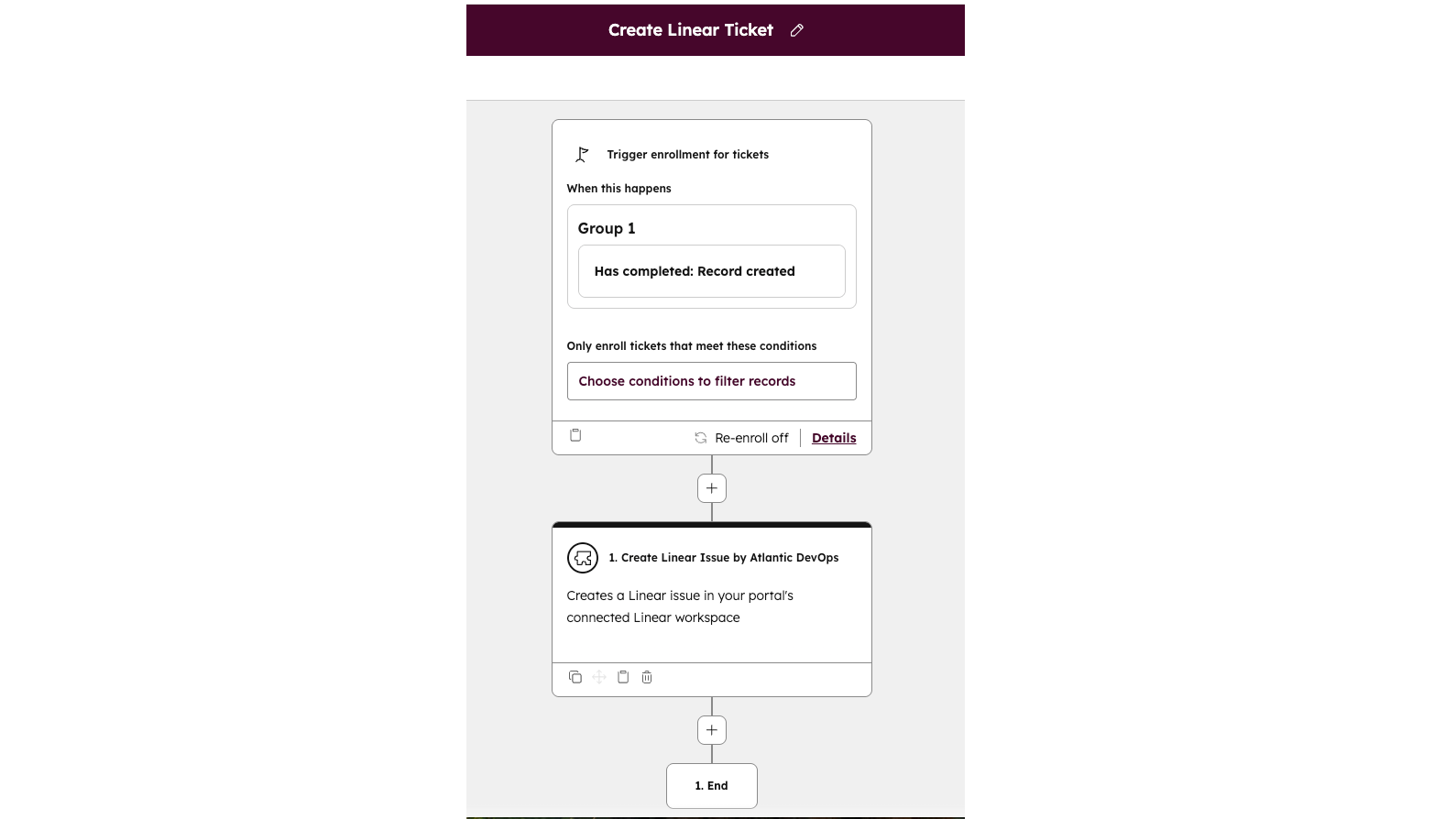
1/3 - Workflow set up
Die Linear ↔ HubSpot-Integration überbrückt die Kluft zwischen den kundenorientierten Teams und der Produktentwicklung. Support- und Success-Teams erfassen kritische Probleme häufig in HubSpot-Tickets, während Produkt- und Entwicklungsteams ihre Arbeit in Linear verfolgen. Ohne eine Verbindung gehen Informationen verloren, werden doppelt erfasst oder verzögern sich, was die Reaktionszeiten verlangsamt und sowohl Teams als auch Kunden frustriert.
Diese App schließt diese Lücke, indem sie HubSpot-Nutzern ermöglicht, Linear-Probleme direkt aus Tickets heraus zu erstellen oder zu verknüpfen, Status und Zuweisungen in beiden Systemen synchron zu halten und Einblick in den Fortschritt der Probleme zu gewähren, ohne dass die Teams zwischen den Tools wechseln müssen. Durch die Vereinheitlichung von CRM- und Projektmanagement-Workflows sorgt sie für schnellere Lösungen, klarere Kommunikation und einen reibungsloseren Übergang vom Kundensupport zur Produktentwicklung.
Funktionen
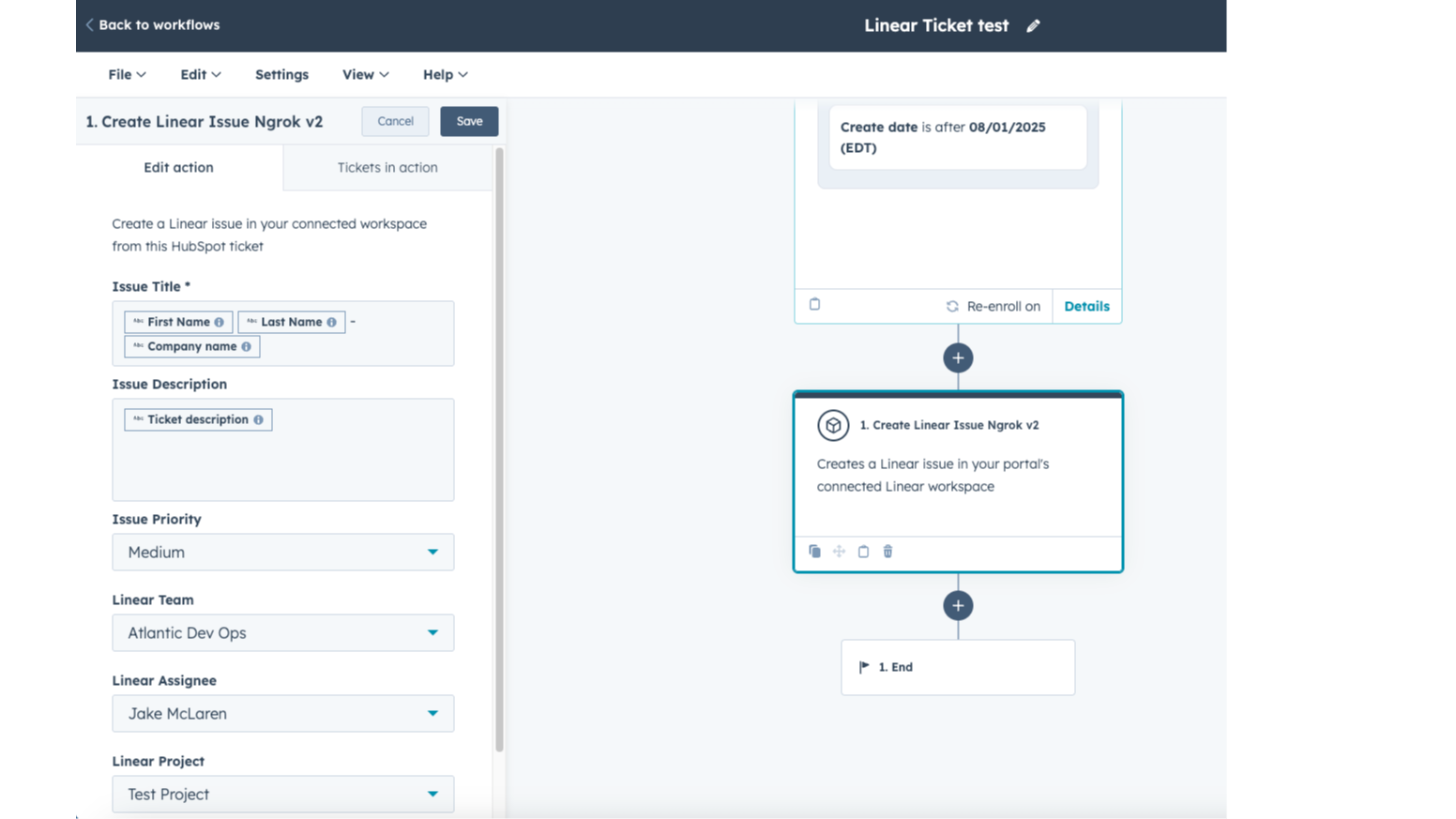
In den Workflow integrierte Apps
Verbinden Sie HubSpot-Workflows mit Linear, um die Übergabe zwischen Support- und Produktteams zu automatisieren. Erstellen oder verknüpfen Sie automatisch Tickets, lösen Sie Benachrichtigungen bei Statusänderungen aus und halten Sie die Ticketverantwortlichen auf dem Laufenden – so reduzieren Sie manuelle Schritte und sorgen für schnellere, besser koordinierte Lösungen für Ihre Kunden.
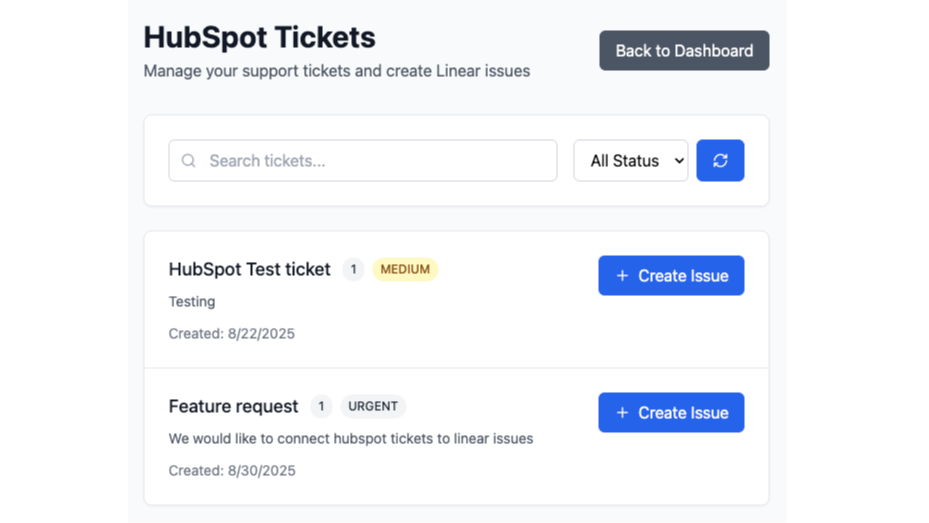
Lineare Probleme schnell aus Tickets erstellen
Schnelle und einfache Erstellung von Linear-Issues über das APP-Dashboard. HubSpot-Tickets suchen, die in Linear-Issues umgewandelt werden sollen. Diese Funktion steht auch ohne Workflow-Zugriff für die manuelle Bearbeitung zur Verfügung.
App-Funktionalität
Datenaustausch
Issues | ||
Owners | ||
Notes | ||
Contacts | ||
Customers |
Diese Integration verbindet HubSpot-Tickets mit Linear-Issues, um die Zusammenarbeit zwischen Kundendienst- und Produktteams zu optimieren. Nach der Installation kann die App auf folgende Daten zugreifen und diese synchronisieren:
HubSpot-CRM-Daten – Ticketdetails, Eigenschaften und zugehörige Kontakt-/Unternehmensinformationen, die zum Erstellen oder Verknüpfen von Issues benötigt werden.
Tickets – Möglichkeit, HubSpot-Tickets anzuzeigen, zu erstellen, zu aktualisieren oder zu löschen und sie mit Linear-Issues zu verknüpfen.
Workflows – Nutzung von HubSpot-Workflows, um die Erstellung oder Verknüpfung von Linear-Issues auszulösen oder Maßnahmen basierend auf Änderungen des Issue-Status zu ergreifen.
Sequenzen (optional) – Eingeschränkter Zugriff auf Anmeldungen und Sequenzdaten, sofern Workflow-Aktionen oder -Auslöser darauf verweisen.
Kontoinformationen – Grundlegende Details zum HubSpot-Konto (primäre Domain, E-Mail-Adressen der Benutzer), die für die Authentifizierung und Einrichtung erforderlich sind.
Linear-Daten – Details zu Issues wie Titel, Beschreibung, Status, Bearbeiter, Projekt und Kommentare werden zur besseren Übersichtlichkeit in HubSpot gespiegelt.
Alle OAuth-Token und synchronisierten Daten werden sicher gespeichert – verschlüsselt und unter Anwendung des Prinzips der geringsten Berechtigungen –, wodurch sichergestellt wird, dass beide Systeme aufeinander abgestimmt bleiben und Ihre Daten geschützt sind.
Rezensionen
Monatlich
24,92 $
/MonatTesten Sie es bis zu 14 Tage lang kostenlos
Monatlich
24,92 $
/MonatTesten Sie es bis zu 14 Tage lang kostenlos
* Die hier angegebenen Preise dienen nur zu Illustrationszwecken. Alle Preise enthalten keine Steuern, Sonderangebote, Rabatte oder sonstigen Preisvarianten. Bitte wenden Sie sich direkt an den Partner, um aktuelle und korrekte Preisinformationen zu erhalten. HubSpot übernimmt keine Verantwortung für Preisinformationen, die von unseren Partnern bereitgestellt werden. Letzte Aktualisierung der Preisinformationen: 05.07.2026
Weitere Infos
Erstellt von - Atlantic Ops
Installationen - 100+ Installationen
Kategorien Sprachen, in denen diese App verfügbar ist Englisch
Am beliebtesten

Gmail
Holen Sie HubSpot in Ihren Posteingang – mit der HubSpot-Integration für Gmail

Google Calendar
Buchen Sie schnell und einfach Meetings mit HubSpot und Google Kalender.
