
-1.png)
Linear by Atlantic Ops
Utworzone przez - Atlantic Ops
Instaluje - Ponad 100 instalacji
Wymagania
Plan HubSpot Uprawnienia konta HubSpot - Wyświetl wymagane uprawnienia konta
Typ dostępu Udostępniono Subskrypcja Linear by Atlantic Ops - Miesięcznie plan
Przegląd
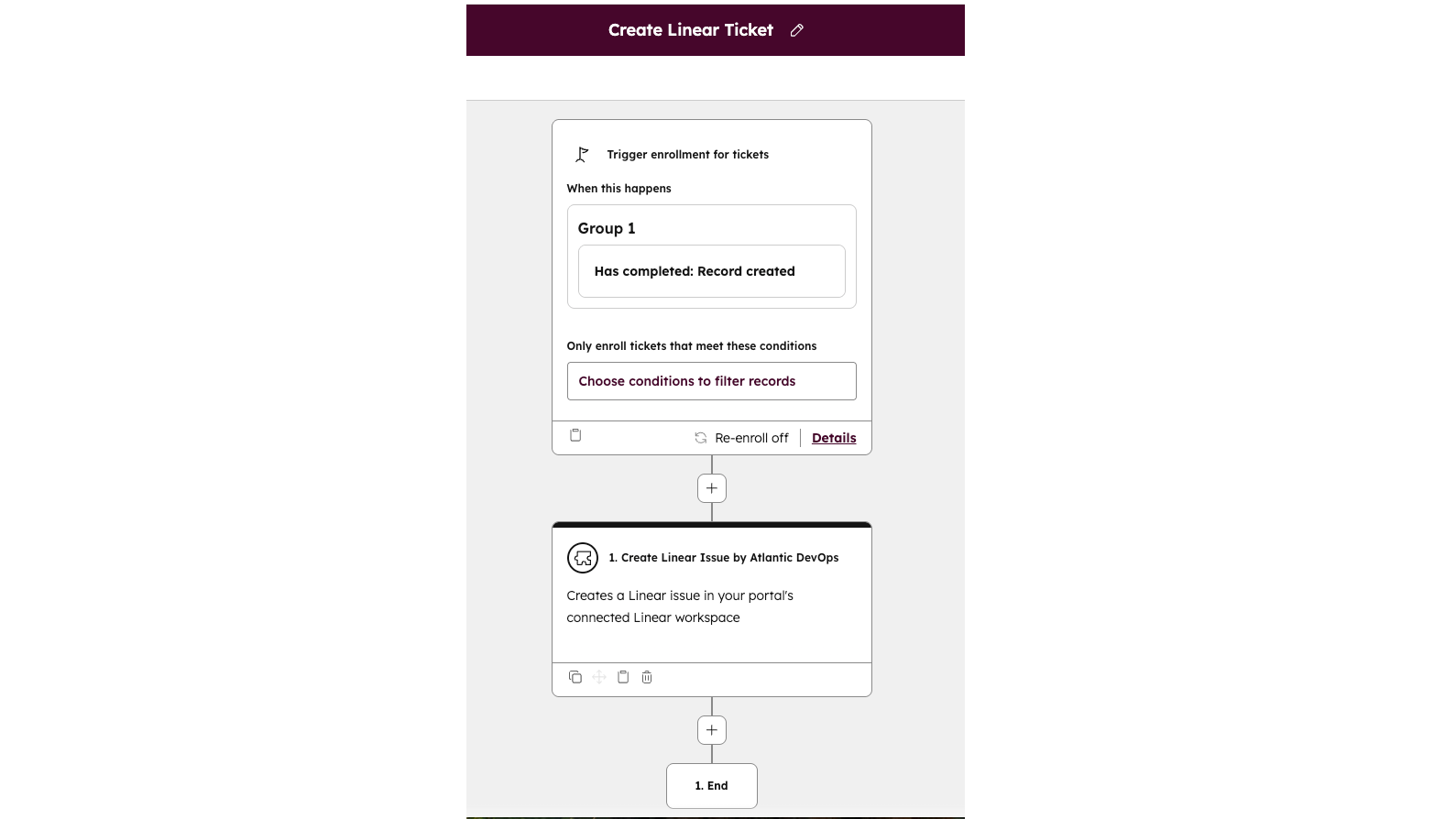
1/3 - Workflow set up
Integracja Linear ↔ HubSpot rozwiązuje problem braku komunikacji między zespołami obsługującymi klientów a działem rozwoju produktu. Zespoły ds. wsparcia i sukcesu klienta często rejestrują krytyczne zgłoszenia w systemie HubSpot, podczas gdy zespoły produktowe i inżynieryjne śledzą swoją pracę w Linear. Bez połączenia między tymi systemami informacje giną, są powielane lub opóźniane, co wydłuża czas reakcji i frustruje zarówno zespoły, jak i klientów.
Ta aplikacja eliminuje tę lukę, umożliwiając użytkownikom HubSpot tworzenie lub łączenie zgłoszeń w Linear bezpośrednio z ticketów, synchronizację statusów i przydziałów zadań w obu systemach oraz zapewnienie wglądu w postępy rozwiązywania zgłoszeń bez konieczności przełączania się między narzędziami. Dzięki ujednoliceniu procesów CRM i zarządzania projektami zapewnia szybsze rozwiązywanie problemów, jaśniejszą komunikację oraz płynniejsze przekazywanie spraw z działu obsługi klienta do działu rozwoju produktów.
Cechy
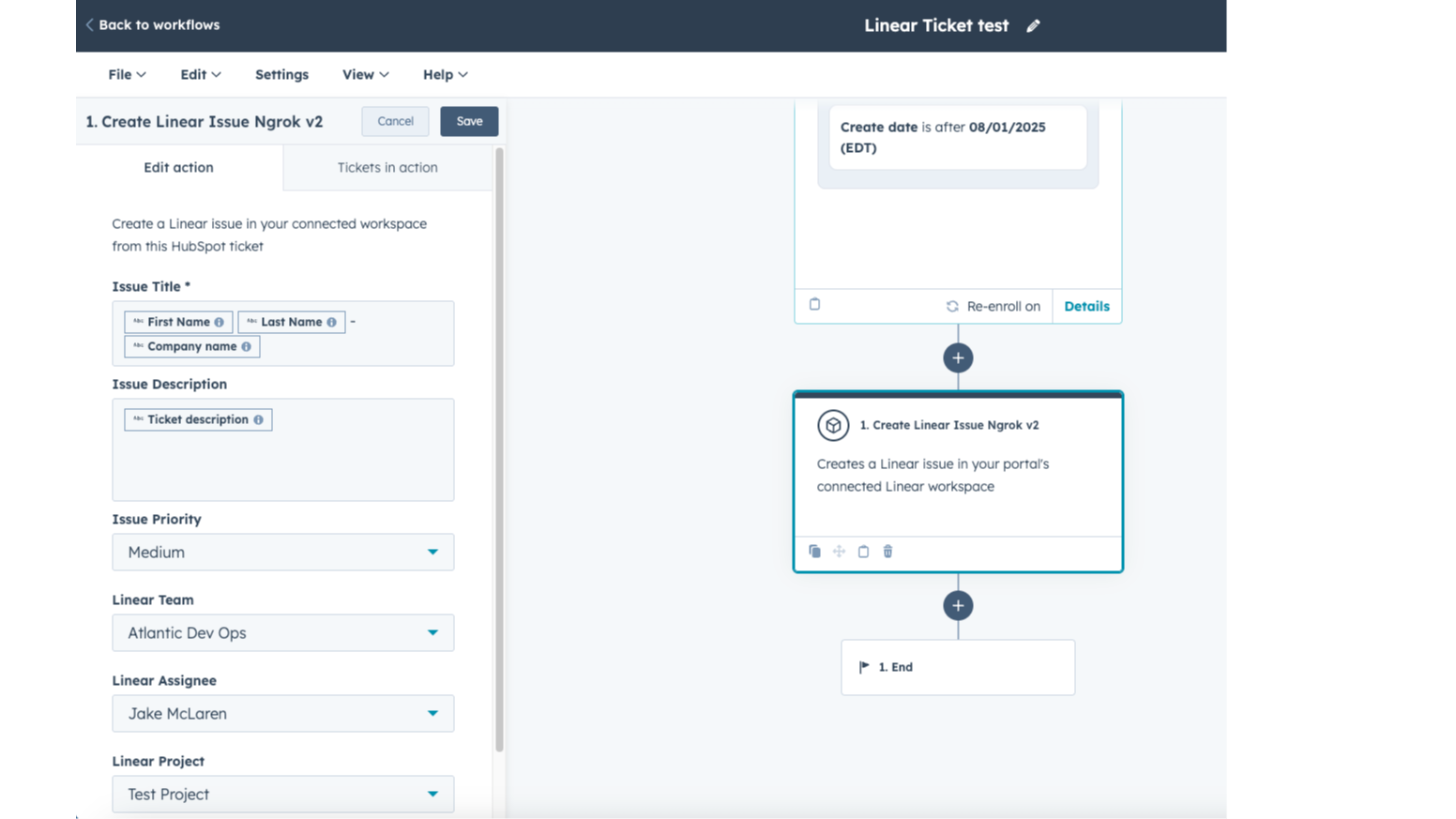
Aplikacje zintegrowane z procesami roboczymi
Połącz przepływy pracy HubSpot z Linear, aby zautomatyzować przekazywanie spraw między zespołami obsługi klienta a zespołami produktowymi. Automatycznie twórz lub łącz zgłoszenia, uruchamiaj powiadomienia w przypadku zmiany statusu oraz na bieżąco informuj osoby odpowiedzialne za zgłoszenia — ograniczając w ten sposób ręczne czynności i zapewniając szybsze oraz lepiej skoordynowane rozwiązania dla klientów.
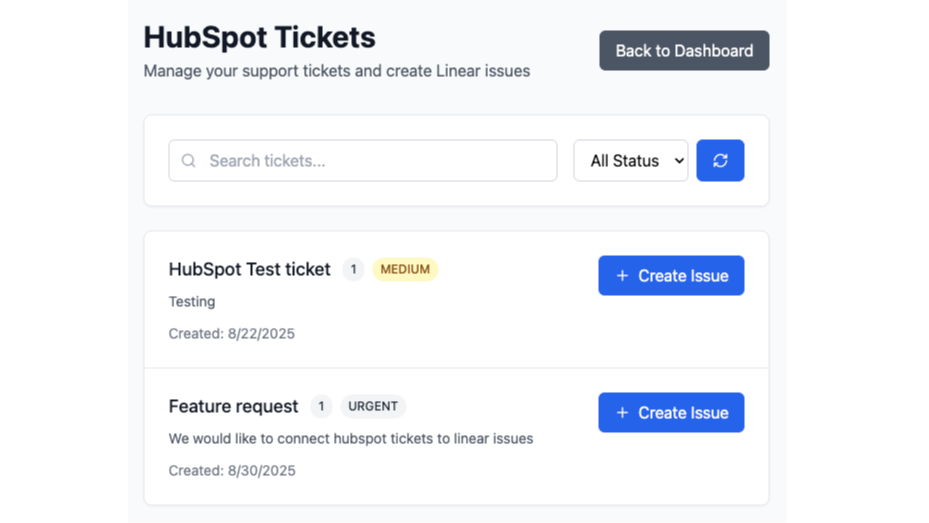
Szybkie tworzenie spraw liniowych na podstawie zgłoszeń
Szybkie i łatwe tworzenie zgłoszeń w systemie Linear z poziomu pulpitu nawigacyjnego aplikacji. Wyszukaj zgłoszenia w HubSpot, które chcesz przekształcić w zgłoszenia w systemie Linear. Ta funkcja działa bez dostępu do przepływu pracy, umożliwiając ręczne przetwarzanie.
Funkcjonalność aplikacji
Udostępnione dane
Issues | ||
Owners | ||
Notes | ||
Contacts | ||
Customers |
Ta integracja łączy zgłoszenia w HubSpot z zgłoszeniami w Linear, usprawniając współpracę między zespołami obsługującymi klientów a zespołami produktowymi. Po zainstalowaniu aplikacja może uzyskać dostęp do następujących danych i je synchronizować:
Dane z systemu CRM HubSpot – szczegóły zgłoszeń, właściwości oraz powiązane informacje o kontaktach/firmach niezbędne do tworzenia lub powiązania zgłoszeń.
Zgłoszenia – możliwość przeglądania, tworzenia, aktualizowania lub usuwania zgłoszeń HubSpot oraz powiązania ich z zgłoszeniami w Linear.
Przepływy pracy – korzystaj z przepływów pracy HubSpot, aby wyzwalać tworzenie lub powiązanie zgłoszeń w Linear albo podejmować działania w oparciu o zmiany statusu zgłoszeń.
Sekwencje (opcjonalnie) – ograniczony dostęp do danych dotyczących rejestracji i sekwencji, jeśli działania lub wyzwalacze przepływu pracy odwołują się do nich.
Informacje o koncie – podstawowe dane dotyczące konta HubSpot (domena główna, adresy e-mail użytkowników) wymagane do uwierzytelniania i konfiguracji.
Dane Linear – Szczegóły zgłoszeń, takie jak tytuł, opis, status, osoba przypisana, projekt i komentarze, są synchronizowane z powrotem do HubSpot w celu zapewnienia widoczności.
Wszystkie tokeny OAuth i zsynchronizowane dane są bezpiecznie przechowywane z zastosowaniem szyfrowania i zasady minimalnych uprawnień, co zapewnia spójność obu systemów przy jednoczesnej ochronie danych.
Recenzje
Miesięcznie
24,92 USD
/mies.Wypróbuj za darmo przez maksymalnie 14 dni
Miesięcznie
24,92 USD
/mies.Wypróbuj za darmo przez maksymalnie 14 dni
* Powyższe ceny zostały podane wyłącznie w celach informacyjnych. Nie zawierają one podatków, premii, zniżek lub innych zmiennych cenowych. Skontaktuj się z partnerem w celu uzyskania najbardziej aktualnych i poprawnych informacji o cenach. HubSpot nie ponosi żadnej odpowiedzialności za informacje cenowe, które są dostarczane przez naszych partnerów. Ostatnia aktualizacja cen: 05.07.2026
Więcej informacji
Utworzone przez - Atlantic Ops
Instaluje - Ponad 100 instalacji
Kategorie Języki, w których dostępna jest ta aplikacja Angielski
Najbardziej popularne

Gmail
Bring HubSpot to your inbox with the HubSpot integration for Gmail.

Google Calendar
Book meetings quickly and easily with HubSpot and Google Calendar.
