
.png)
AdRoll Marketing & Advertising
Desarrollado por - AdRoll, Inc
Instalaciones - 2K instalaciones
Clasificación 3,8
(5)

Aumentando
Requisitos
Plan de HubSpot Permisos de cuenta de HubSpot - Ver los permisos de cuenta requeridos
Tipo de acceso Compartida Suscripción: AdRoll Marketing & Advertising - Suscripción: Integración gratuita con HubSpot
Vista general
1/3
Con nuestra integración con HubSpot, puedes sincronizar tus listas de correo electrónico estáticas de HubSpot directamente desde tu cuenta con AdRoll. Gracias a nuestro proceso de importación de datos de CRM, esta integración te ayuda a convertir fácilmente tus listas en un público objetivo para su uso en medios digitales de pago y campañas de publicidad basadas en cuentas.
Requisitos para esta integración
Debes disponer de una cuenta de pago de HubSpot Marketing Hub (Starter, Professional o Enterprise).
Debes tener al menos 100 direcciones de correo electrónico de usuarios únicos en cada una de tus listas para que las listas del CRM se rellenen correctamente.
Sincronizar audiencias de CRM
Para encontrar la herramienta de integración de HubSpot:
- Ve a la pestaña «Audiencias» en el menú de navegación de la izquierda.
- Haz clic en «Audiencias conectadas».
- Haz clic en «Conectar tus otras aplicaciones de marketing » en la sección «Aplicaciones».
- Haz clic en el icono de HubSpot y, a continuación, en «Conectar».
- Inicia sesión en tu cuenta de HubSpot.
- Vuelve a AdRoll y pega tu ID en el campo «Introduce tu ID de HubSpot ».
- Haz clic en «Autenticar con ID de HubSpot» > «Autorizar».
- Haz clic en «Seleccionar listas » para elegir las listas de tu audiencia de AdRoll.
Prácticas recomendadas
A continuación te ofrecemos algunos consejos para preparar tus listas para la importación de datos del CRM:
- Tus listas deben contener al menos 100 direcciones de correo electrónico.
- Utiliza direcciones de correo electrónico personales siempre que sea posible, ya que tienen una tasa de coincidencia más alta.
- Asegúrate de que tu base de datos de direcciones de correo electrónico esté actualizada; añadir un paso de validación de direcciones de correo electrónico durante los flujos de trabajo de registro puede resultar muy útil para garantizar que los usuarios proporcionen direcciones de correo electrónico activas.
- Considera la posibilidad de combinar las audiencias del CRM con otros tipos de audiencias para mejorar el rendimiento.
- Asegúrate de subir una lista estática desde HubSpot. Actualmente no se admiten las listas inteligentes.
Obtén más información sobre cómo gestionar tus listas en HubSpot.
Públicos importados
Es posible que tus audiencias de HubSpot CRM no aparezcan en AdRoll de forma inmediata. Iniciaremos el proceso de emparejamiento de las nuevas listas en un plazo de seis horas. Las direcciones de correo electrónico nuevas que se añadan una vez iniciado el proceso pueden tardar hasta dos semanas en emparejarse.
Los nombres de las audiencias importadas terminarán automáticamente en «HubSpot».
Una vez que aparezca tu lista de correo electrónico, comenzará la sincronización de cookies. Espera hasta siete días para que se active por completo en tus campañas.
Qué puedes esperar
- Recopilaremos nuevas direcciones de correo electrónico de HubSpot cada 24 horas.
- Para los anunciantes de EE. UU., el CRM se puede activar tanto en la web como en Facebook. Siempre que sea posible, recomendamos utilizar direcciones de correo electrónico con dominio de EE. UU.
- Fuera de EE. UU., las audiencias de CRM tienen una funcionalidad limitada en las campañas web. Recomendamos a los anunciantes no estadounidenses que utilicen el retargeting de CRM en Facebook en su lugar.
- No puedes editar una audiencia de CRM una vez creada.
- La sincronización de cookies en Facebook tarda menos de 24 horas.
- La sincronización de cookies en la web tarda hasta siete días, dependiendo del tamaño de tu lista de correo electrónico.
Correos electrónicos emparejados
Mostraremos el número de direcciones de correo electrónico cargadas originalmente a través de la integración con HubSpot.
Para ver cuántas direcciones de correo electrónico se han emparejado correctamente para la web o Facebook, haz clic en el nombre de tu audiencia de HubSpot en la pestaña «Audiencia».
Características
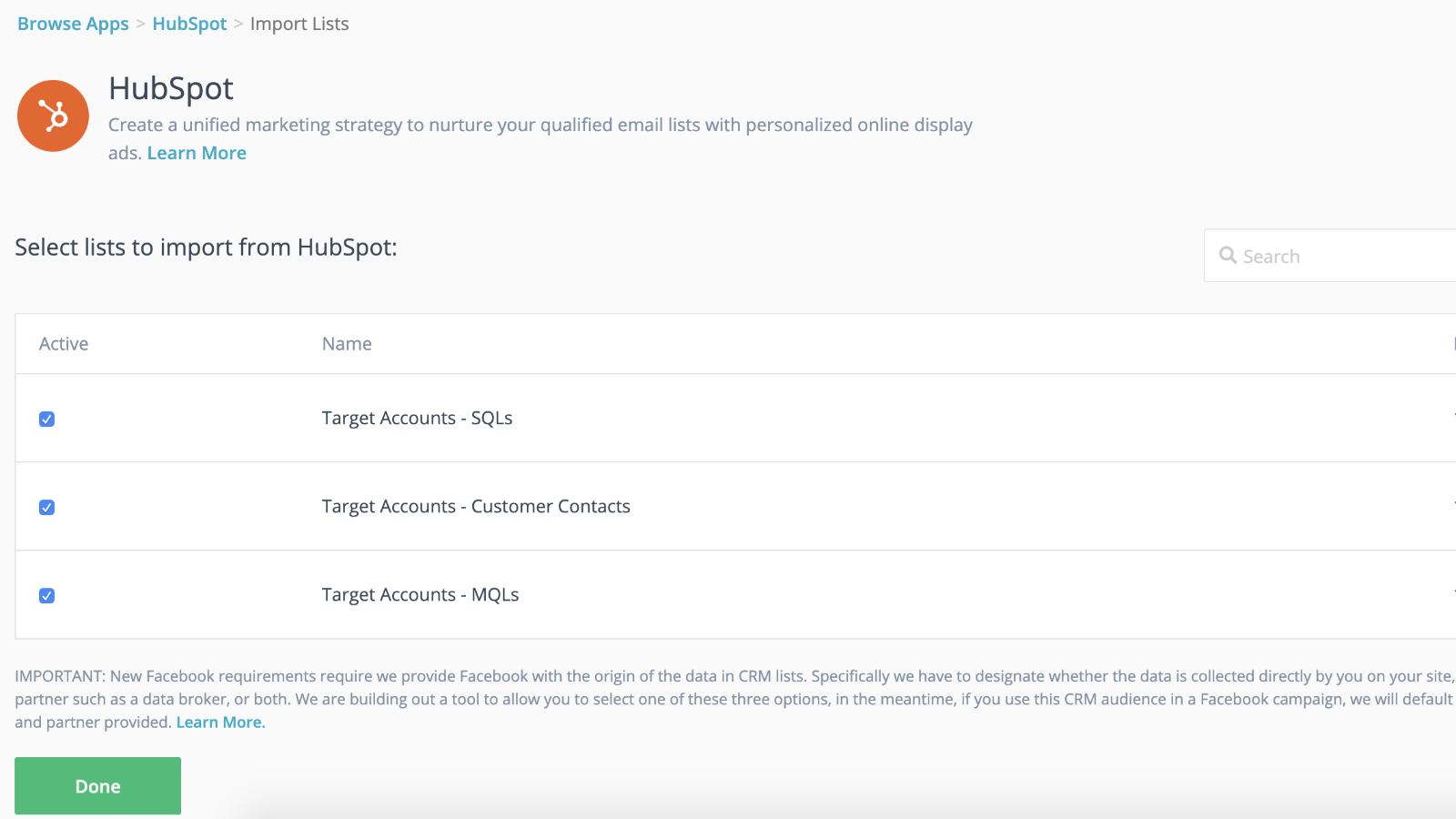
Integración perfecta con la sincronización dinámica de audiencias y lanzamientos más rápidos
Conecta tus listas de CRM a tus campañas de retargeting para tomar la delantera mientras tu campaña de retargeting se pone en marcha en segundo plano. Una vez que hayas importado tus listas a AdRoll, ya lo tienes todo listo. Nosotros nos encargaremos de sincronizar dinámicamente tus listas de contactos cada 24 horas.
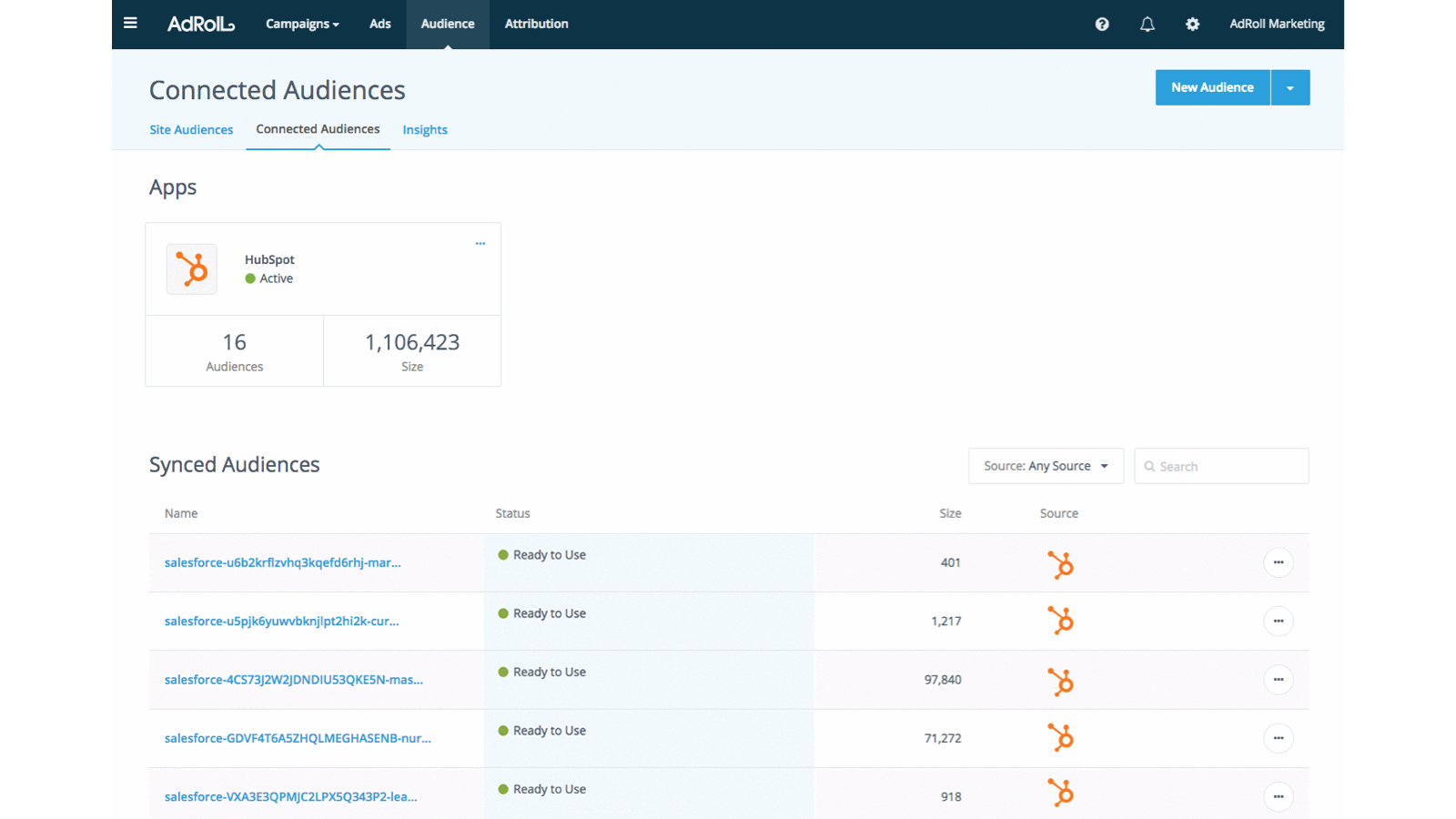
Personaliza la experiencia de los clientes potenciales
Utiliza los atributos de los clientes de tu CRM de HubSpot para crear experiencias de cliente personalizadas y de alto rendimiento.
Funcionalidad de la aplicación
Datos compartidos
AdRoll Audience |
Valoraciones
3,8
5
3,8
5
- 21 de nov. de 2024
Gumbayan, J.
- 20 de oct. de 2021
Retargeting with Adroll/HubSpot Integration
It works like a CHARM! It was easy to set up the HubSpot/AdRoll integration. Syncing our HubSpot lists with AdRoll was also seamless. The AdRoll platform is intuitive and allows you to set up different campaigns and "advertiser" profiles so you can segment the spend by department, making the expense reporting and ROI calculations easy.
We are using AdRoll for retargeting campaigns for our annual conference and select programs.
Syncing lists from HubSpot to AdRoll allows us to exclude customers/prospects from our retargeting efforts more easily that if we didn't have the integration.
The biggest drawback is that, unlike Google & Linkedin, the data sync is only one way...HubSpot TO AdRoll. If this were a two-way sync so that the metrics were included with our other Advertising Metrics on the HubSpot Ads section it would be even better! Also you can't manage the campaigns from within HubSpot...you have to set up and manage campaigns on the AdRoll platform
Grassley Clarke, M.
Sin fines de lucro - De 11 a 25 empleados
Integración gratuita con HubSpot
0 US$
Empieza hoy mismo a sincronizar las listas de HubSpot con AdRoll para tus campañas de segmentación publicitaria
Integración gratuita con HubSpot
0 US$
Empieza hoy mismo a sincronizar las listas de HubSpot con AdRoll para tus campañas de segmentación publicitaria
* El precio que aparece aquí es solo para fines de visualización. Los precios no incluyen impuestos, incentivos, descuentos u otras variables. Debes comunicarte con nuestro partner para obtener la información de precios más actualizada y correcta. HubSpot no se hace responsable de los precios que proporcionan nuestros partners. Precios actualizados por última vez: 29/07/2026
Más información
Desarrollado por - AdRoll, Inc
Instalaciones - 2K instalaciones
Categorías Idiomas en los que está disponible esta aplicación Inglés