
.png)
AdRoll Marketing & Advertising
Rakentanut - AdRoll, Inc
Asennukset - 2 t. asennusta
Arvostelu 3,8
(5)

Rising
Vaatimukset
HubSpot-tilaus HubSpot-tilin käyttöoikeudet - Tarkastele vaadittuja tilin käyttöoikeuksia
Pääsytyyppi Jaettu AdRoll Marketing & Advertising-tilaus - Ilmainen integrointi HubSpot-palveluun paketti
Yhteenveto
1/3
HubSpot-integraatiomme avulla voit synkronoida staattiset HubSpot-sähköpostilistasi suoraan tililtäsi AdRolliin. Tämä integraatio, joka perustuu CRM-tietojen siirtoprosessiimme, auttaa sinua muuntamaan listasi helposti kohdennettavaksi kohderyhmäksi, jota voit hyödyntää maksullisissa digitaalisissa mediakampanjoissa ja asiakkuuspohjaisissa mainoskampanjoissa.
Tämän integraation vaatimukset
Sinulla on oltava maksullinen HubSpot Marketing Hub -tili (Starter, Professional tai Enterprise).
Jokaisessa luettelossasi on oltava vähintään 100 yksilöllistä käyttäjän sähköpostiosoitetta, jotta CRM-luettelot voidaan täyttää onnistuneesti.
CRM-kohderyhmien synkronointi
HubSpot-integraatiotyökalun löytäminen:
- Siirry vasemmalla olevasta navigointivalikosta Kohderyhmät -välilehdelle.
- Napsauta Yhdistetyt kohderyhmät.
- Napsauta Sovellukset-kohdassa kohtaa Yhdistä muut markkinointisovelluksesi.
- Napsauta HubSpot-kuvaketta ja sitten Yhdistä.
- Kirjaudu HubSpot-tiliisi.
- Palaa AdRolliin ja liitä tunnuksesi kenttään Enter your HubSpot ID.
- Napsauta Vahvista HubSpot-tunnuksella > Valtuuta.
- Napsauta Valitse luettelot valitaksesi luettelot AdRoll-kohderyhmällesi.
Parhaat käytännöt
Seuraavassa on vinkkejä luetteloiden valmistelemiseen CRM-tietojen tuontia varten:
- Luetteloissasi tulisi olla vähintään 100 sähköpostiosoitetta.
- Käytä mahdollisuuksien mukaan henkilökohtaisia sähköpostiosoitteita, sillä niiden vastaavuusaste on korkeampi.
- Varmista, että sähköpostitietokantasi on ajan tasalla – sähköpostiosoitteiden vahvistusvaiheen lisääminen rekisteröitymisprosessiin voi olla erittäin hyödyllistä, jotta käyttäjät antavat voimassa olevia sähköpostiosoitteita.
- Harkitse CRM-kohderyhmien yhdistämistä muihin kohderyhmätyyppeihin suorituskyvyn parantamiseksi.
- Varmista, että lataat HubSpotista staattisen luettelon. Älyluetteloita ei tällä hetkellä tueta.
Lue lisää luetteloiden hallinnasta HubSpotissa.
Tuodut kohderyhmät
HubSpot CRM -kohderyhmäsi eivät välttämättä näy AdRollissa heti. Aloitamme uusien luetteloiden täsmäytysprosessin kuuden tunnin kuluessa. Prosessin alkamisen jälkeen lisättyjen uusien sähköpostiosoitteiden täsmäyttäminen voi kestää jopa kaksi viikkoa.
Tuotujen kohderyhmien nimet päättyvät automaattisesti sanaan HubSpot.
Kun sähköpostilistasi näkyy, evästeiden täsmäytys alkaa. Kestää jopa seitsemän päivää, ennen kuin täsmäytys aktivoituu täysin kampanjoissasi.
Mitä odottaa
- Haemme uusia sähköpostiosoitteita HubSpotista 24 tunnin välein.
- Yhdysvalloissa toimiville mainostajille CRM-kohderyhmät voidaan ottaa käyttöön sekä verkossa että Facebookissa. Suosittelemme käyttämään mahdollisuuksien mukaan yhdysvaltalaisia sähköpostiosoitteita.
- Yhdysvaltojen ulkopuolella CRM-kohderyhmien toiminnallisuus on rajoitettu verkkokampanjoissa. Suosittelemme, että Yhdysvaltojen ulkopuolella toimivat mainostajat ottavat sen sijaan käyttöön CRM-uudelleenkohdistuksen Facebookissa.
- CRM-kohderyhmää ei voi muokata sen luomisen jälkeen.
- Evästeiden täsmäyttäminen Facebookissa kestää alle 24 tuntia.
- Evästeiden täsmäyttäminen verkossa kestää jopa seitsemän päivää, riippuen sähköpostilistasi koosta.
Yhdistetyt sähköpostiosoitteet
Näytämme HubSpot-integraation kautta alun perin ladattujen sähköpostiosoitteiden määrän.
Voit tarkistaa, kuinka monta sähköpostiosoitetta on onnistuneesti täsmäytetty verkossa tai Facebookissa, napsauttamalla HubSpot-kohderyhmän nimeä Kohderyhmä-välilehdessä.
Ominaisuudet
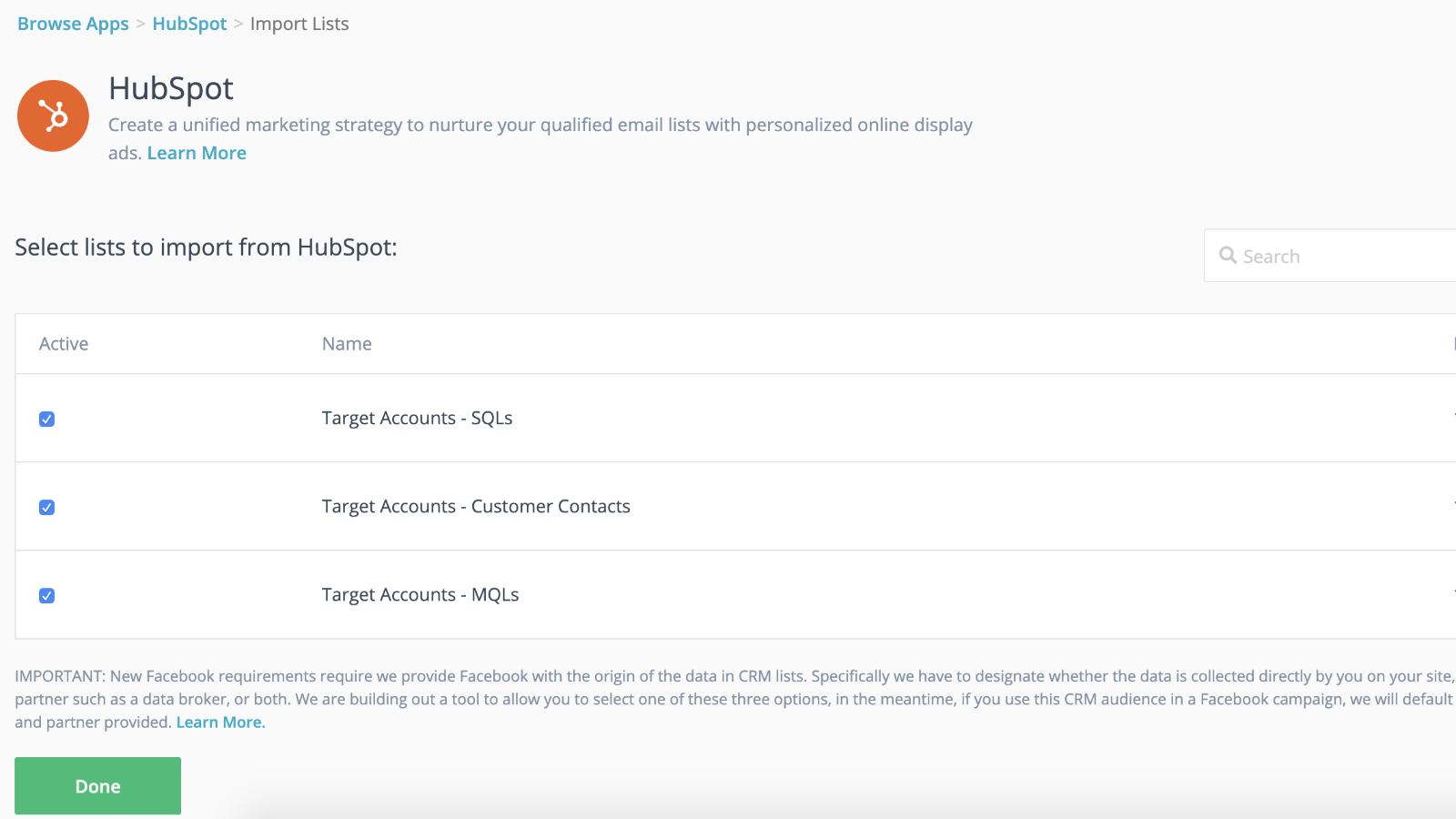
Saumaton integrointi dynaamisen kohderyhmän synkronoinnin kanssa ja nopeammat julkaisut
Yhdistä CRM-luettelosi uudelleen kohdistettuihin kampanjoihisi, jotta saat etumatkaa, kun kampanjasi käynnistyy taustalla. Kun olet tuonut luettelosi AdRolliin, olet valmis. Me huolehdimme yhteystietoluetteloidesi dynaamisesta synkronoinnista 24 tunnin välein.
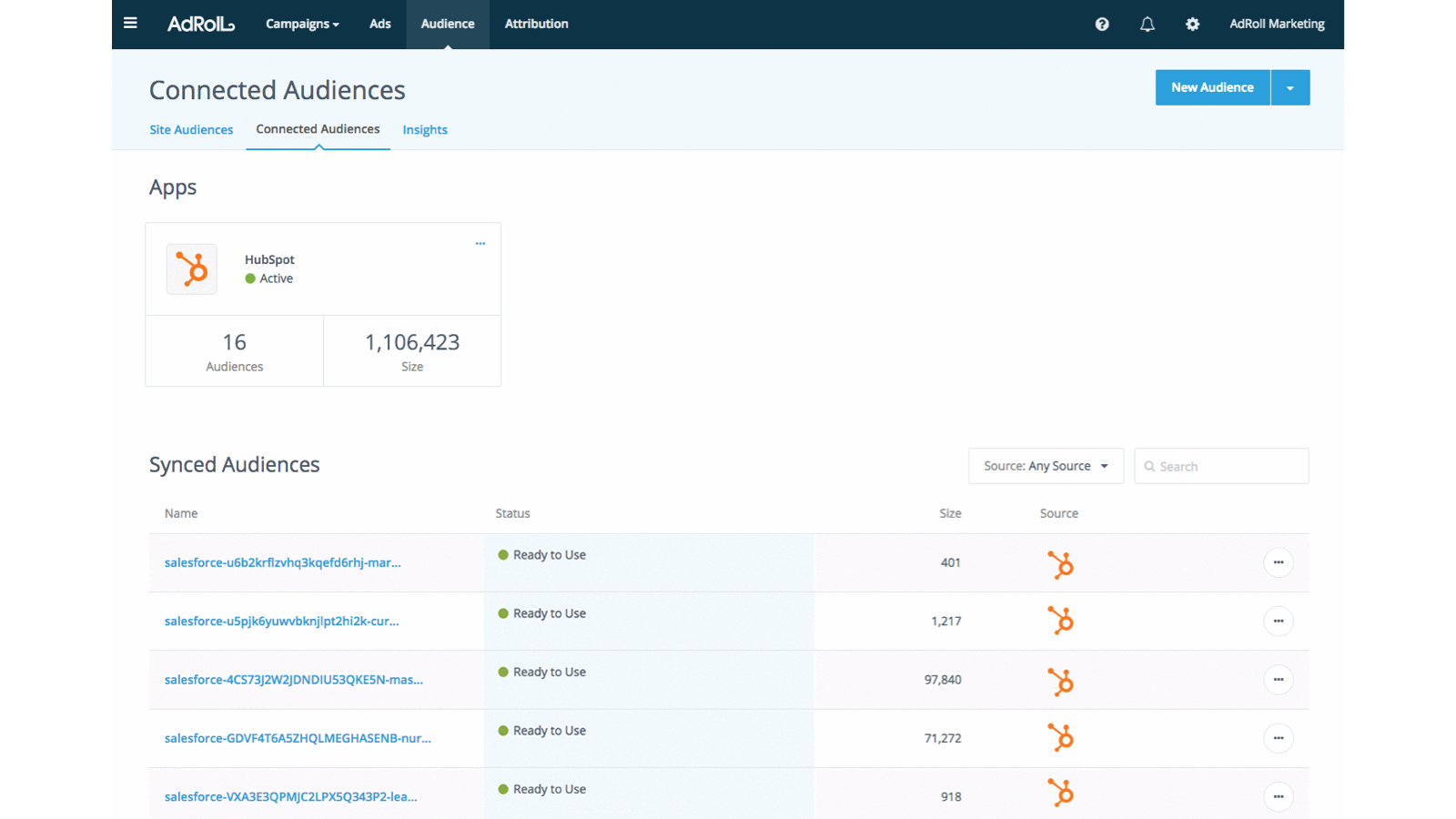
Räätälöi kokemus potentiaalisille asiakkaille
Hyödynnä HubSpot CRM:n asiakasattribuutteja luodaksesi kohdennettuja ja tehokkaita asiakaskokemuksia.
Sovelluksen toiminnallisuus
Jaetut tiedot
AdRoll Audience |
Arvostelut
3,8
5
3,8
5
- 21. marras 2024
Gumbayan, J.
- 20. loka 2021
Retargeting with Adroll/HubSpot Integration
It works like a CHARM! It was easy to set up the HubSpot/AdRoll integration. Syncing our HubSpot lists with AdRoll was also seamless. The AdRoll platform is intuitive and allows you to set up different campaigns and "advertiser" profiles so you can segment the spend by department, making the expense reporting and ROI calculations easy.
We are using AdRoll for retargeting campaigns for our annual conference and select programs.
Syncing lists from HubSpot to AdRoll allows us to exclude customers/prospects from our retargeting efforts more easily that if we didn't have the integration.
The biggest drawback is that, unlike Google & Linkedin, the data sync is only one way...HubSpot TO AdRoll. If this were a two-way sync so that the metrics were included with our other Advertising Metrics on the HubSpot Ads section it would be even better! Also you can't manage the campaigns from within HubSpot...you have to set up and manage campaigns on the AdRoll platform
Grassley Clarke, M.
Voittoa tavoittelematon - 11–25 työntekijää
Hinnoittelu
Ilmainen integrointi HubSpot-palveluun
0 $
Aloita jo tänään synkronoimalla HubSpot-luettelot AdRolliin mainosten kohdentamiskampanjoita varten
Ilmainen integrointi HubSpot-palveluun
0 $
Aloita jo tänään synkronoimalla HubSpot-luettelot AdRolliin mainosten kohdentamiskampanjoita varten
*Hinnoittelu tässä on vain esittelytarkoituksessa. Kaikki hinnat eivät sisällä veroja, kannustimia, alennuksia tai muita hinnoittelumuuttujia. Pyydä kumppanilta ajantasaiset ja oikeat hintatiedot. HubSpot ei ota vastuuta näistä kumppaneidemme tarjoamista hintatiedoista. Hinnoittelu päivitetty viimeksi: 29.07.2026
Lisätietoja
Rakentanut - AdRoll, Inc
Asennukset - 2 t. asennusta
Kategoriat Kielet, joilla tämä sovellus on saatavilla Englanti