.png)
AdRoll Marketing & Advertising
Creazione di - AdRoll, Inc
Installazioni - 2.100 installazioni
Valutazione 3,8
(5)

In aumento
Requisiti
Piano HubSpot Autorizzazioni dell'account HubSpot - Visualizza le autorizzazioni dell'account richieste
Tipo di accesso Condiviso Abbonamento AdRoll Marketing & Advertising - Piano Integrazione gratuita con HubSpot
Panoramica
1/3
Grazie alla nostra integrazione con HubSpot, puoi sincronizzare le tue liste di email statiche di HubSpot direttamente dal tuo account ad AdRoll. Grazie all’abbinamento effettuato tramite il nostro processo di importazione dei dati CRM, questa integrazione ti aiuta a convertire facilmente le tue liste in un pubblico targetizzabile da utilizzare nelle campagne pubblicitarie sui media digitali a pagamento e nelle campagne di account-based marketing.
Requisiti per questa integrazione
Devi disporre di un account a pagamento di HubSpot Marketing Hub (Starter, Professional o Enterprise).
È necessario disporre di almeno 100 indirizzi e-mail di utenti unici in ciascuna delle tue liste affinché le liste CRM vengano popolate correttamente.
Sincronizza i segmenti di pubblico del CRM
Per trovare lo strumento di integrazione HubSpot:
- Accedere alla scheda " Pubblico " nel menu di navigazione a sinistra.
- Fai clic su "Pubblici collegati".
- Fai clic su " Collega le tue altre app di marketing " nella sezione "App".
- Fai clic sull’icona di HubSpot, quindi su " Connetti".
- Accedi al tuo account HubSpot.
- Torna su AdRoll e incolla il tuo ID nel campo " Inserisci il tuo ID HubSpot ".
- Fai clic su "Autentica con ID HubSpot" > "Autorizza".
- Fai clic su " Seleziona liste " per scegliere le liste per il tuo pubblico AdRoll.
Migliori pratiche
Ecco alcuni suggerimenti per preparare le tue liste all'integrazione dei dati CRM:
- Le tue liste dovrebbero contenere almeno 100 indirizzi e-mail.
- Utilizza indirizzi e-mail personali quando possibile, poiché garantiscono una percentuale di corrispondenza più elevata.
- Assicurati che il tuo database di indirizzi e-mail sia aggiornato: l'aggiunta di una fase di convalida degli indirizzi e-mail durante i flussi di registrazione può essere molto utile per garantire che gli utenti forniscano indirizzi e-mail attivi.
- Valuta la possibilità di combinare i segmenti di pubblico del CRM con altri tipi di segmenti per migliorare le prestazioni.
- Assicurati di caricare un elenco statico da HubSpot. Gli elenchi intelligenti non sono attualmente supportati.
Scopri di più sulla gestione delle tue liste all’interno di HubSpot.
Segmenti importati
I tuoi segmenti di pubblico del CRM di HubSpot potrebbero non apparire immediatamente in AdRoll. Inizieremo il processo di abbinamento per i nuovi elenchi entro sei ore. Per gli indirizzi e-mail aggiunti dopo l’avvio del processo, l’abbinamento potrebbe richiedere fino a due settimane.
I nomi dei segmenti importati termineranno automaticamente con " HubSpot".
Una volta visualizzata la tua lista di indirizzi e-mail, avrà inizio l’abbinamento dei cookie. Occorreranno fino a sette giorni affinché l’abbinamento sia completamente attivo nelle tue campagne.
Cosa aspettarsi
- Estrarremo i nuovi indirizzi e-mail da HubSpot ogni 24 ore.
- Per gli inserzionisti statunitensi, il CRM può essere attivato sia sul web che su Facebook. Ove possibile, consigliamo di utilizzare indirizzi email con dominio statunitense.
- Al di fuori degli Stati Uniti, i segmenti CRM hanno funzionalità limitate nelle campagne web. Consigliamo agli inserzionisti non statunitensi di adottare invece il retargeting CRM su Facebook.
- Non è possibile modificare un pubblico CRM una volta creato.
- L'abbinamento dei cookie su Facebook richiede meno di 24 ore.
- L'abbinamento dei cookie sul web richiede fino a sette giorni, a seconda delle dimensioni della lista e-mail.
Indirizzi e-mail abbinati
Mostreremo il numero di indirizzi e-mail originariamente caricati tramite l'integrazione con HubSpot.
Per vedere quanti indirizzi email sono stati abbinati con successo per il web o Facebook, clicca sul nome del tuo pubblico HubSpot nella scheda "Pubblico".
Funzionalità
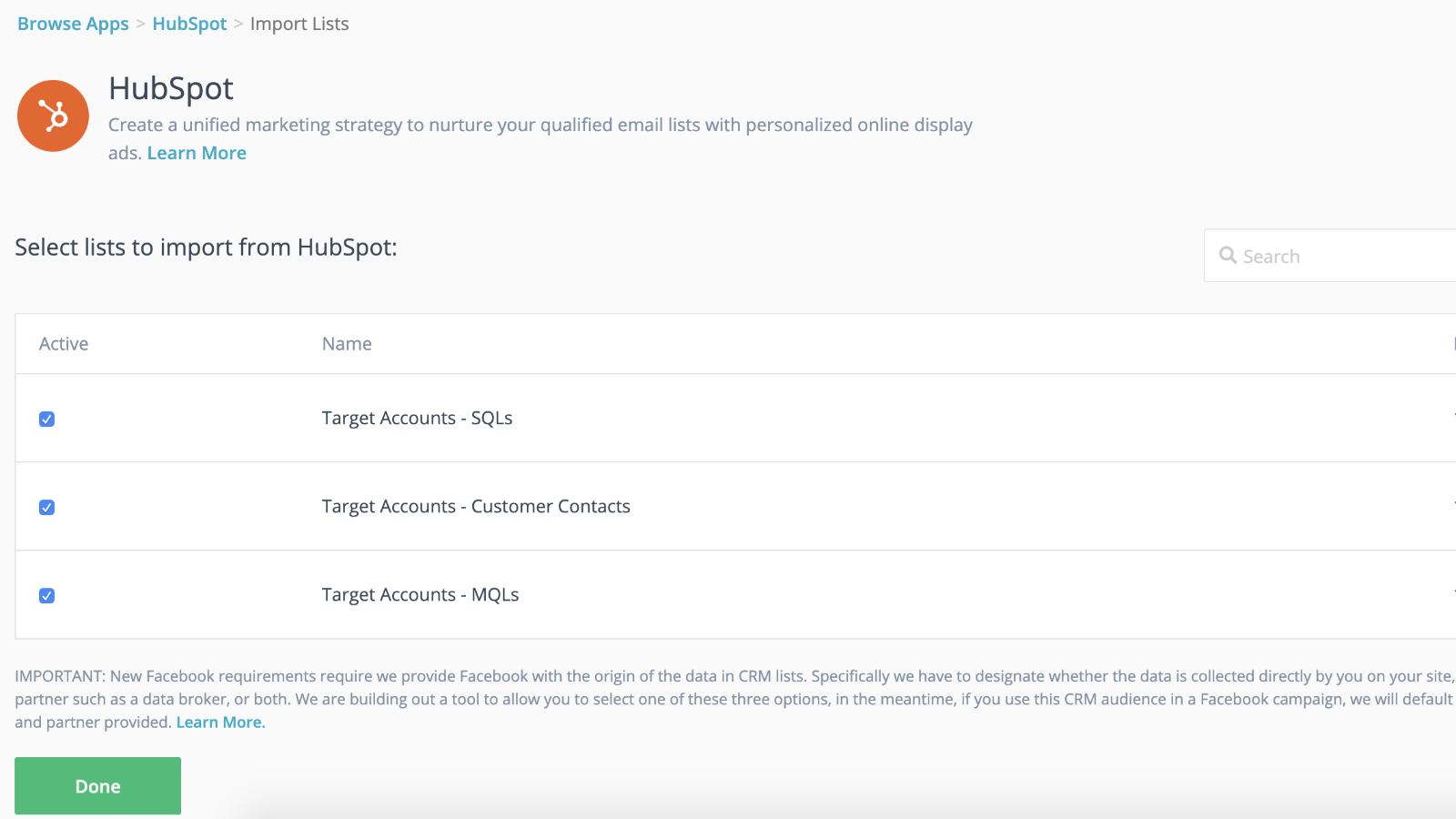
Integrazione perfetta con la sincronizzazione dinamica del pubblico e lanci più rapidi
Collega le tue liste CRM alle tue campagne di retargeting per partire con il piede giusto mentre la campagna di retargeting prende piede in background. Una volta importate le liste su AdRoll, sei a posto. Ci occuperemo noi di sincronizzare dinamicamente le tue liste di contatti ogni 24 ore.
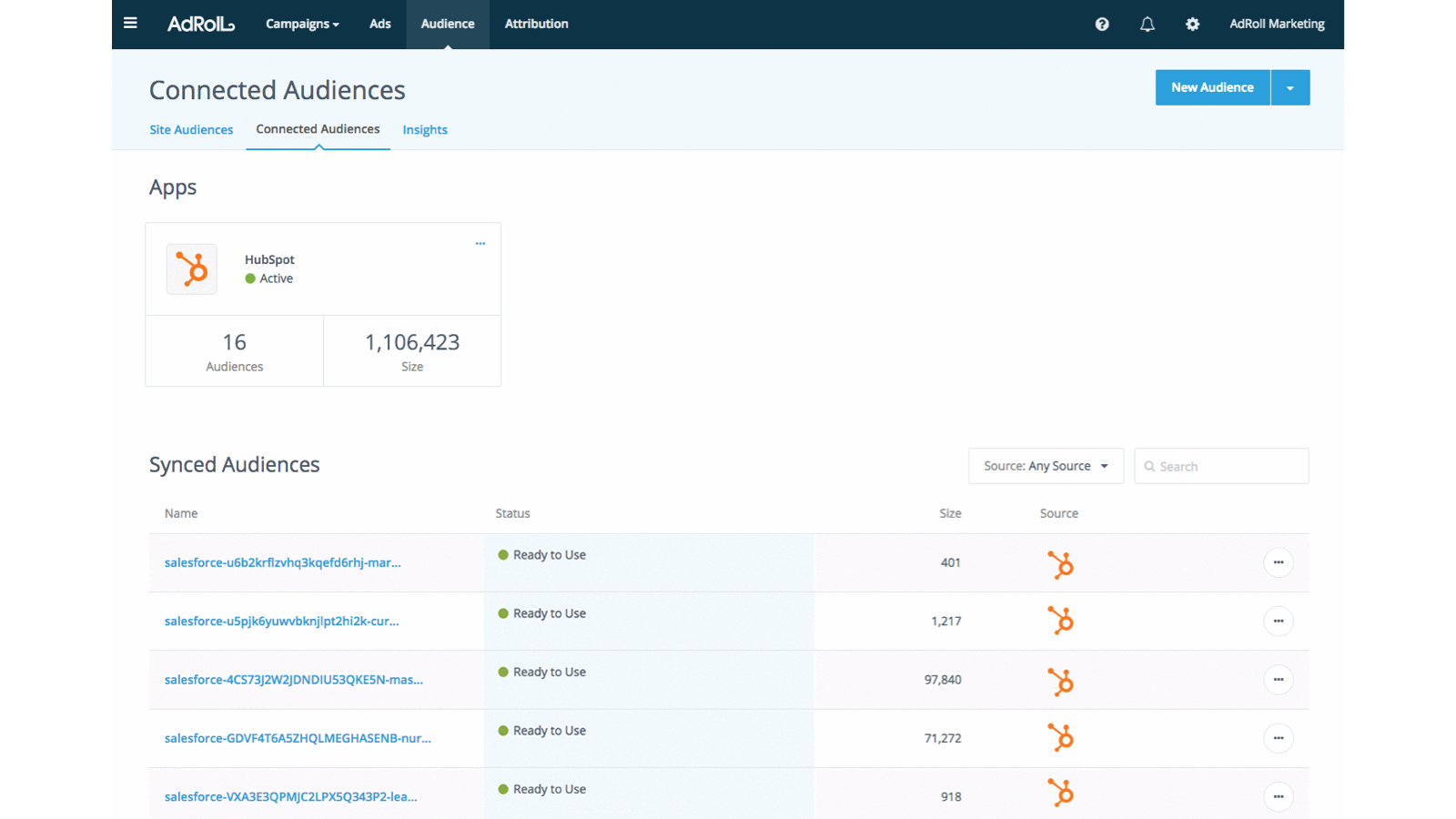
Personalizza l'esperienza dei potenziali clienti
Sfrutta gli attributi dei clienti presenti nel tuo CRM HubSpot per creare esperienze cliente mirate e altamente efficaci.
Funzionalità dell'app
Dati condivisi
AdRoll Audience |
Recensioni
3,8
5
3,8
5
- 21 nov 2024
Gumbayan, J.
- 20 ott 2021
Retargeting with Adroll/HubSpot Integration
It works like a CHARM! It was easy to set up the HubSpot/AdRoll integration. Syncing our HubSpot lists with AdRoll was also seamless. The AdRoll platform is intuitive and allows you to set up different campaigns and "advertiser" profiles so you can segment the spend by department, making the expense reporting and ROI calculations easy.
We are using AdRoll for retargeting campaigns for our annual conference and select programs.
Syncing lists from HubSpot to AdRoll allows us to exclude customers/prospects from our retargeting efforts more easily that if we didn't have the integration.
The biggest drawback is that, unlike Google & Linkedin, the data sync is only one way...HubSpot TO AdRoll. If this were a two-way sync so that the metrics were included with our other Advertising Metrics on the HubSpot Ads section it would be even better! Also you can't manage the campaigns from within HubSpot...you have to set up and manage campaigns on the AdRoll platform
Grassley Clarke, M.
No-profit - 11 - 25 dipendenti
Integrazione gratuita con HubSpot
0 USD
Inizia oggi stesso a sincronizzare le liste di HubSpot con AdRoll per le campagne pubblicitarie mirate
Integrazione gratuita con HubSpot
0 USD
Inizia oggi stesso a sincronizzare le liste di HubSpot con AdRoll per le campagne pubblicitarie mirate
* I prezzi riportati sono a scopo informativo. I prezzi non includono tasse, incentivi, sconti o altre variabili. Contatta il partner per ricevere il tariffario aggiornato. HubSpot declina qualsiasi responsabilità circa le informazioni di prezzo fornite dai propri partner. Ultimo aggiornamento tariffario: 29/07/2026
Maggiori informazioni
Creazione di - AdRoll, Inc
Installazioni - 2.100 installazioni
Categorie Lingue in cui è disponibile questa app Inglese