
.png)
AdRoll Marketing & Advertising
Bygget av - AdRoll, Inc
Installeringer - 2K innstalleringer
Rangering 3,8
(5)

Stigende
Krav
HubSpot-abonnement HubSpot-kontotillatelser - Vis nødvendige kontotillatelser
Tilgangstype Delt AdRoll Marketing & Advertising-abonnement - Gratis integrasjon med HubSpot-abonnement
Oversikt
1/3
Med vår HubSpot-integrasjon kan du synkronisere dine statiske HubSpot-e-postlister direkte fra kontoen din til AdRoll. Integrasjonen, som samordnes gjennom vår innlastingsprosess for CRM-data, hjelper deg med å enkelt omdanne listene dine til en målbar målgruppe for bruk i betalte digitale medier og kontobaserte reklamekampanjer.
Krav til denne integrasjonen
Du må ha en betalt HubSpot Marketing Hub-konto (Starter, Professional eller Enterprise).
Du må ha minst 100 unike bruker-e-postadresser i hver av listene dine for at CRM-listene skal fylles ut riktig.
Synkroniser CRM-målgrupper
Slik finner du HubSpot-integrasjonsverktøyet:
- Gå til fanen «Audiences» i navigasjonsmenyen til venstre.
- Klikk på «Tilkoblede målgrupper».
- Klikk på «Koble til andre markedsføringsapper » under «Apper».
- Klikk på HubSpot-ikonet, og deretter på «Koble til».
- Logg inn på HubSpot-kontoen din.
- Gå tilbake til AdRoll og lim inn ID-en din i feltet «Angi HubSpot-ID ».
- Klikk på «Autentiser med HubSpot-ID» > «Godkjenn».
- Klikk på «Velg lister » for å velge lister for AdRoll-målgruppen din.
Anbefalte fremgangsmåter
Her er noen tips for å forberede listene dine for innlasting av CRM-data:
- Listene dine bør inneholde minst 100 e-postadresser.
- Bruk personlige e-postadresser når det er mulig, da disse gir høyere samsvar.
- Sørg for at e-postdatabasen din er oppdatert – det kan være svært nyttig å legge til et trinn for e-postvalidering i registreringsprosessen for å sikre at brukerne oppgir aktive e-postadresser.
- Vurder å kombinere CRM-målgrupper med andre målgruppetyper for å øke ytelsen.
- Sørg for at du laster opp en statisk liste fra HubSpot. Smartlister støttes foreløpig ikke.
Les mer om hvordan du administrerer listene dine i HubSpot.
Importerte målgrupper
HubSpot CRM-målgruppene dine vises kanskje ikke i AdRoll umiddelbart. Vi starter samsvarsprosessen for nye lister innen seks timer. Det kan ta opptil to uker før nye e-postadresser som legges til etter at prosessen har startet, blir matchet.
Navnene på importerte målgrupper vil automatisk ende med «HubSpot».
Når e-postlisten din vises, starter samsvaringsprosessen for informasjonskapsler. Det kan ta opptil syv dager før dette er fullt aktivert i kampanjene dine.
Hva du kan forvente
- Vi henter nye e-postadresser fra HubSpot hver 24. time.
- For annonsører i USA kan CRM lanseres både på nettet og på Facebook. Der det er mulig, anbefaler vi å bruke e-postadresser basert i USA.
- Utenfor USA har CRM-målgrupper begrenset funksjonalitet i nettkampanjer. Vi anbefaler at annonsører utenfor USA bruker CRM-retargeting på Facebook i stedet.
- Du kan ikke redigere en CRM-målgruppe etter at den er opprettet.
- Cookie-matching på Facebook tar mindre enn 24 timer.
- Cookie-matching på nettet tar opptil syv dager, avhengig av størrelsen på e-postlisten din.
Matchede e-postadresser
Vi viser antall e-postadresser som opprinnelig ble lastet opp via HubSpot-integrasjonen.
For å se hvor mange e-postadresser som ble matchet for nettet eller Facebook, klikker du på navnet på HubSpot-målgruppen din i fanen «Målgruppe».
Funksjoner
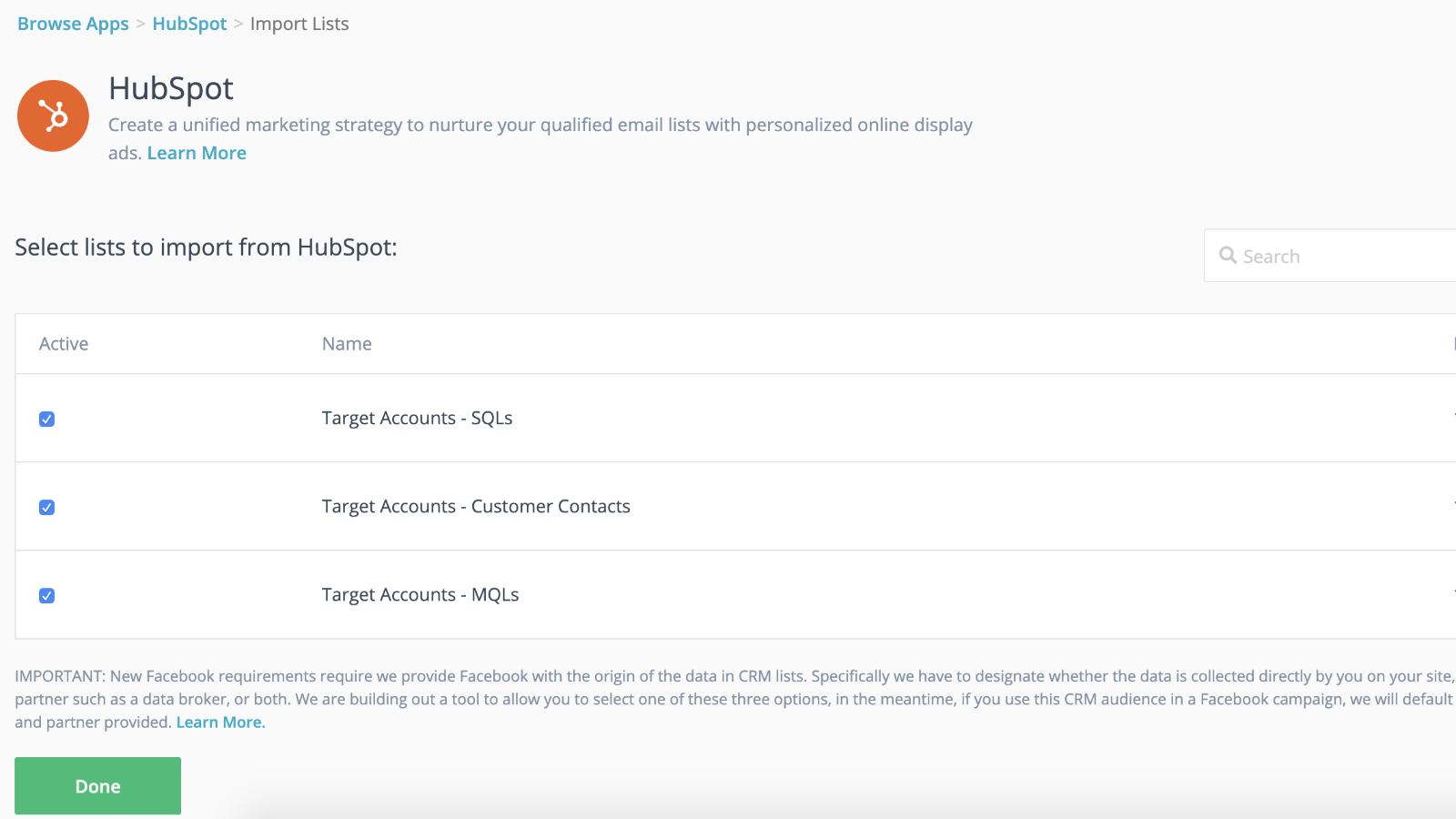
Sømløs integrasjon med dynamisk målgruppesynkronisering og raskere lanseringer
Koble CRM-listene dine til retargeting-kampanjene dine for å få et forsprang mens retargeting-kampanjen din kommer i gang i bakgrunnen. Så snart du har importert listene dine til AdRoll, er du klar. Vi sørger for å synkronisere kontaktlistene dine dynamisk hver 24. time.
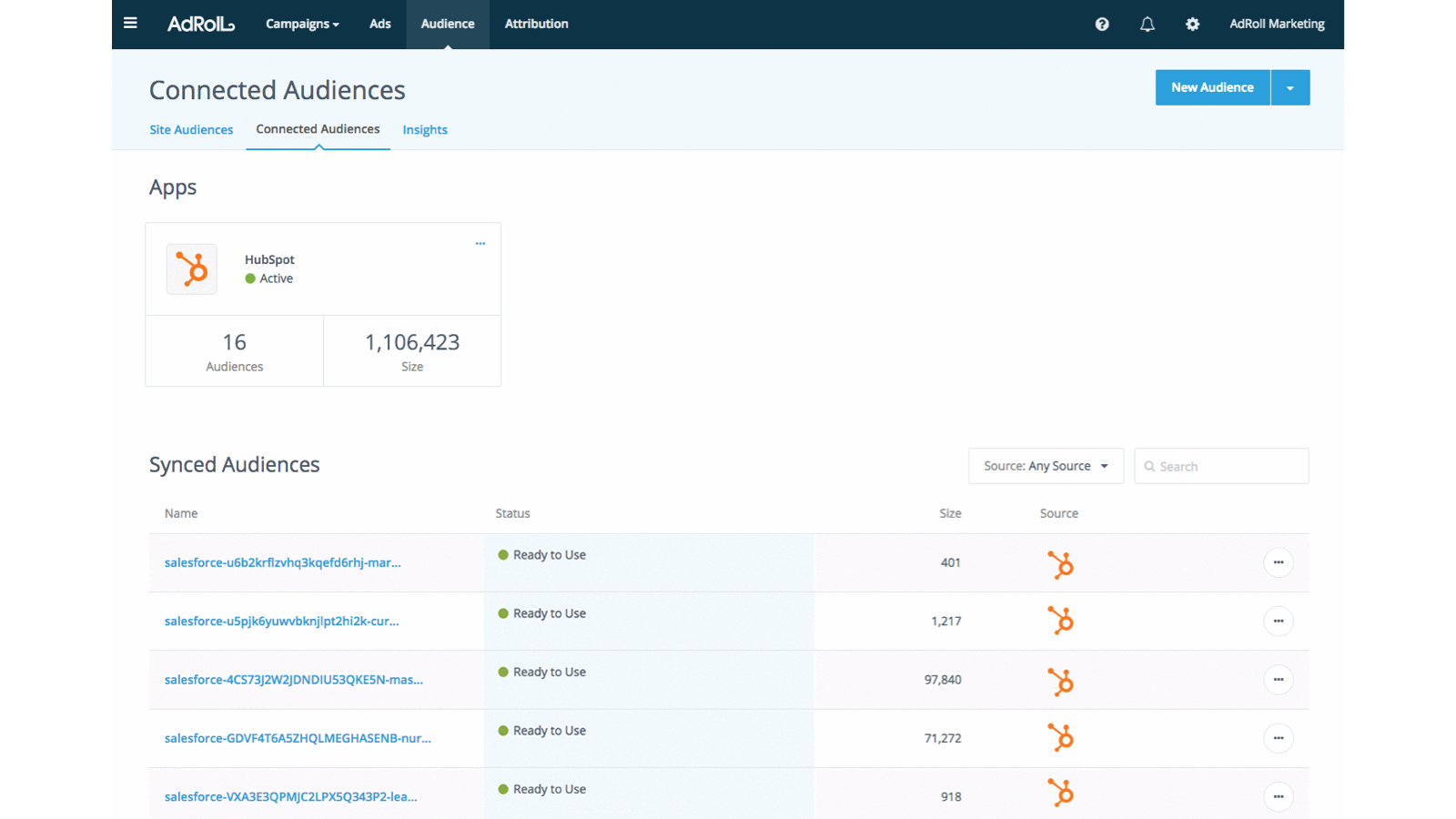
Tilpass opplevelsen for potensielle kunder
Bruk kundeattributtene i HubSpot CRM til å skape målrettede og effektive kundeopplevelser.
Appfunksjonalitet
Delt data
AdRoll Audience |
Gjennomganger
3,8
5
3,8
5
- 21. nov. 2024
Gumbayan, J.
- 20. okt. 2021
Retargeting with Adroll/HubSpot Integration
It works like a CHARM! It was easy to set up the HubSpot/AdRoll integration. Syncing our HubSpot lists with AdRoll was also seamless. The AdRoll platform is intuitive and allows you to set up different campaigns and "advertiser" profiles so you can segment the spend by department, making the expense reporting and ROI calculations easy.
We are using AdRoll for retargeting campaigns for our annual conference and select programs.
Syncing lists from HubSpot to AdRoll allows us to exclude customers/prospects from our retargeting efforts more easily that if we didn't have the integration.
The biggest drawback is that, unlike Google & Linkedin, the data sync is only one way...HubSpot TO AdRoll. If this were a two-way sync so that the metrics were included with our other Advertising Metrics on the HubSpot Ads section it would be even better! Also you can't manage the campaigns from within HubSpot...you have to set up and manage campaigns on the AdRoll platform
Grassley Clarke, M.
Nonprofit - 11 til 25 ansatte
Gratis integrasjon med HubSpot
USD 0
Kom i gang allerede i dag med å synkronisere HubSpot-lister til AdRoll for målrettede annonsekampanjer
Gratis integrasjon med HubSpot
USD 0
Kom i gang allerede i dag med å synkronisere HubSpot-lister til AdRoll for målrettede annonsekampanjer
* Prissettingen her er kun for illustrasjonsformål. Prisene inkluderer ikke avgifter, insentiver, rabatter eller andre prissettingsvariabler. Kontakt partneren for å få oppdatert og riktig prissettingsinformasjon. HubSpot tar ikke ansvar for denne prissettingsinformasjonen, som gis av våre partnere. Prissetting sist oppdatert: 29.07.2026
Mer info
Bygget av - AdRoll, Inc
Installeringer - 2K innstalleringer
Kategorier Språkene appen er tilgjengelig på Engelsk