
.png)
AdRoll Marketing & Advertising
Utworzone przez - AdRoll, Inc
Instaluje - Instalacje (2 tys.)
Ocena 3,8
(5)

Powstanie
Wymagania
Plan HubSpot Uprawnienia konta HubSpot - Wyświetl wymagane uprawnienia konta
Typ dostępu Udostępniono Subskrypcja AdRoll Marketing & Advertising - Bezpłatna integracja z HubSpot plan
Przegląd
1/3
Dzięki naszej integracji z HubSpot możesz zsynchronizować swoje statyczne listy mailingowe z HubSpot bezpośrednio ze swojego konta do AdRoll. Integracja ta, oparta na naszym procesie wdrażania danych z systemów CRM, pozwala w prosty sposób przekształcić listy w grupę docelową, którą można wykorzystać w płatnych kampaniach w mediach cyfrowych oraz w kampaniach reklamowych opartych na kontach.
Wymagania dotyczące tej integracji
Musisz posiadać płatne konto HubSpot Marketing Hub (Starter, Professional lub Enterprise).
Aby listy CRM mogły zostać pomyślnie zapełnione, każda z list musi zawierać co najmniej 100 unikalnych adresów e-mail użytkowników.
Synchronizacja grup docelowych CRM
Aby znaleźć narzędzie do integracji z HubSpot:
- Przejdź do zakładki „Grupy odbiorców ” w lewym menu nawigacyjnym.
- Kliknij opcję „Połączone grupy odbiorców”.
- W sekcji „Aplikacje” kliknij opcję „Połącz inne aplikacje marketingowe ”.
- Kliknij ikonę HubSpot, a następnie „Połącz”.
- Zaloguj się na swoje konto HubSpot.
- Wróć do serwisu AdRoll i wklej swój identyfikator w polu „Wprowadź swój identyfikator HubSpot ”.
- Kliknij „Uwierzytelnij za pomocą identyfikatora HubSpot” > „Autoryzuj”.
- Kliknij „Wybierz listy ”, aby wybrać listy dla odbiorców w AdRoll.
Najlepsze praktyki
Oto wskazówki dotyczące przygotowania list do importu danych z CRM:
- Listy powinny zawierać co najmniej 100 adresów e-mail.
- W miarę możliwości używaj adresów e-mail osobistych, ponieważ zapewniają one wyższy wskaźnik dopasowania.
- Upewnij się, że Twoja baza adresów e-mail jest aktualna — dodanie etapu weryfikacji adresu e-mail podczas procesu rejestracji może być bardzo pomocne w zapewnieniu, że użytkownicy podają aktywne adresy e-mail.
- Rozważ połączenie grup docelowych CRM z innymi typami grup docelowych, aby zwiększyć skuteczność.
- Upewnij się, że przesyłasz listę statyczną z HubSpot. Listy inteligentne nie są obecnie obsługiwane.
Dowiedz się więcej o zarządzaniu listami w HubSpot.
Zaimportowane grupy odbiorców
Twoje grupy docelowe z HubSpot CRM mogą nie pojawić się w AdRoll od razu. Proces dopasowywania nowych list rozpoczniemy w ciągu sześciu godzin. Dopasowanie nowych adresów e-mail dodanych po rozpoczęciu procesu może potrwać do dwóch tygodni.
Nazwy zaimportowanych grup docelowych będą automatycznie kończyć się na „HubSpot”.
Po pojawieniu się listy adresów e-mail rozpocznie się dopasowywanie plików cookie. Pełna aktywacja w kampaniach może potrwać do siedmiu dni.
Czego można się spodziewać
- Co 24 godziny pobieramy nowe adresy e-mail z HubSpot.
- W przypadku reklamodawców z USA funkcję CRM można uruchomić zarówno w sieci, jak i na Facebooku. Tam, gdzie to możliwe, zalecamy korzystanie z adresów e-mail z USA.
- Poza Stanami Zjednoczonymi grupy odbiorców CRM mają ograniczoną funkcjonalność w kampaniach internetowych. Reklamodawcom spoza Stanów Zjednoczonych zalecamy zamiast tego stosowanie retargetingu CRM na Facebooku.
- Po utworzeniu grupy docelowej CRM nie można jej edytować.
- Dopasowanie plików cookie na Facebooku trwa mniej niż 24 godziny.
- Dopasowanie plików cookie w sieci trwa do siedmiu dni, w zależności od wielkości listy adresów e-mail.
Dopasowane adresy e-mail
Wyświetlimy liczbę adresów e-mail pierwotnie przesłanych za pośrednictwem integracji z HubSpot.
Aby sprawdzić, ile adresów e-mail zostało pomyślnie dopasowanych w sieci lub na Facebooku, kliknij nazwę swojej grupy docelowej HubSpot w zakładce „Grupy docelowe”.
Cechy
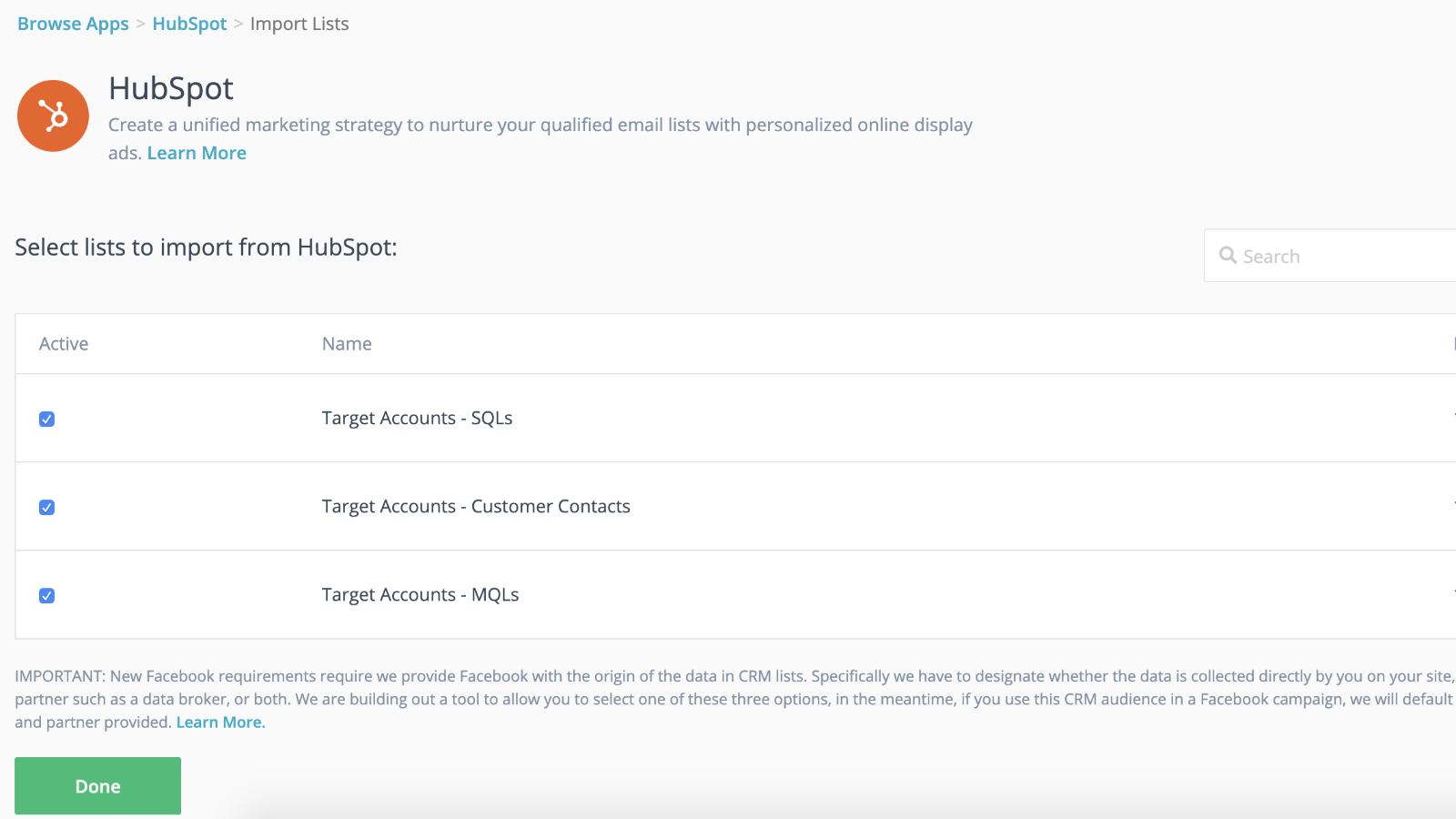
Płynna integracja z funkcją dynamicznej synchronizacji odbiorców oraz szybsze uruchamianie kampanii
Połącz swoje listy z systemu CRM z kampaniami retargetingowymi, aby zyskać przewagę, podczas gdy kampania retargetingowa będzie stopniowo nabierać tempa w tle. Po zaimportowaniu list do AdRoll wszystko jest gotowe. My zajmiemy się dynamiczną synchronizacją Twoich list kontaktów co 24 godziny.
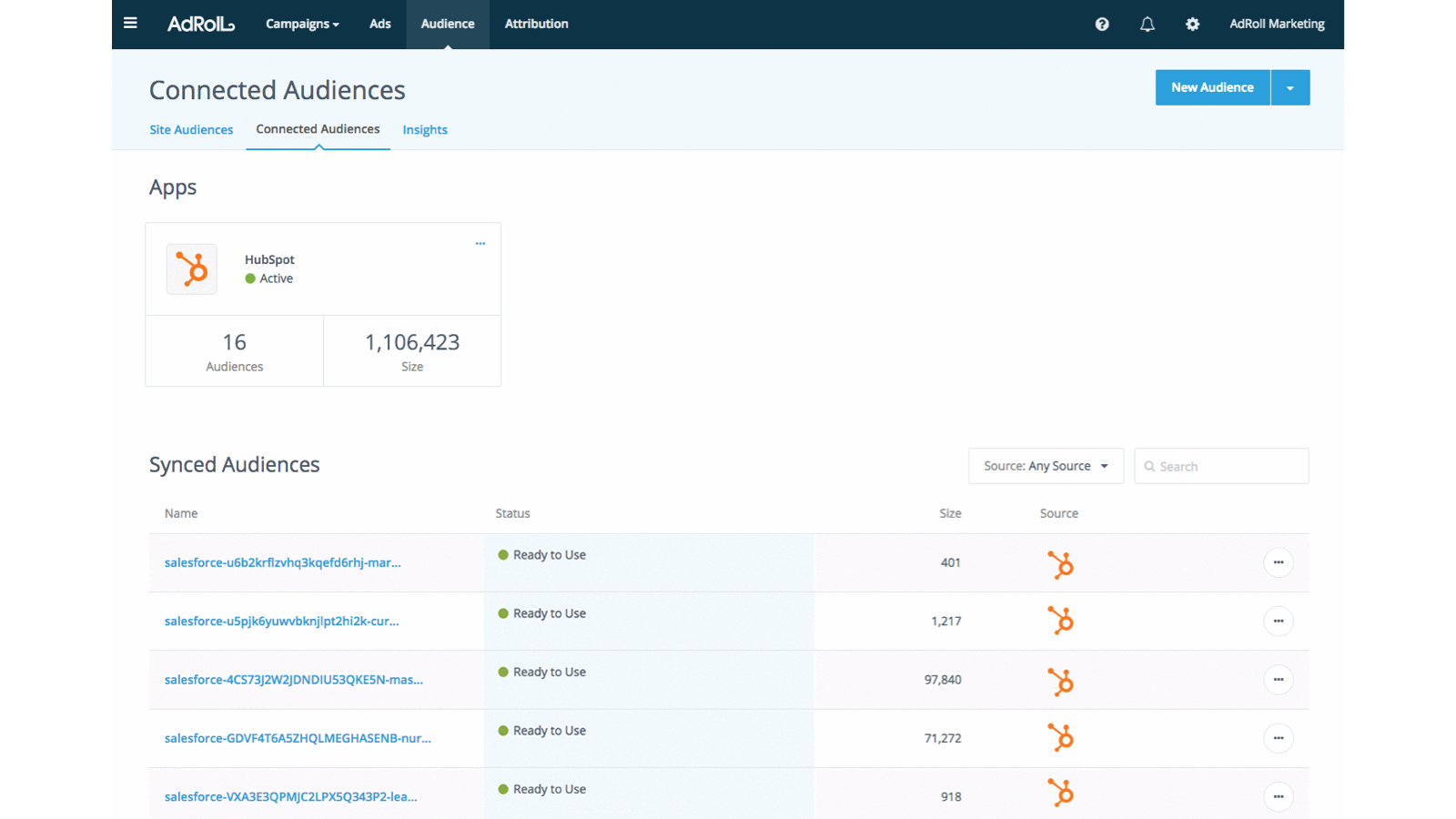
Dostosuj doświadczenia potencjalnych klientów
Wykorzystaj atrybuty klientów dostępne w systemie CRM HubSpot, aby tworzyć ukierunkowane i wysoce skuteczne doświadczenia klientów.
Funkcjonalność aplikacji
Udostępnione dane
AdRoll Audience |
Recenzje
3,8
5
3,8
5
- 21 lis 2024
Gumbayan, J.
- 20 paź 2021
Retargeting with Adroll/HubSpot Integration
It works like a CHARM! It was easy to set up the HubSpot/AdRoll integration. Syncing our HubSpot lists with AdRoll was also seamless. The AdRoll platform is intuitive and allows you to set up different campaigns and "advertiser" profiles so you can segment the spend by department, making the expense reporting and ROI calculations easy.
We are using AdRoll for retargeting campaigns for our annual conference and select programs.
Syncing lists from HubSpot to AdRoll allows us to exclude customers/prospects from our retargeting efforts more easily that if we didn't have the integration.
The biggest drawback is that, unlike Google & Linkedin, the data sync is only one way...HubSpot TO AdRoll. If this were a two-way sync so that the metrics were included with our other Advertising Metrics on the HubSpot Ads section it would be even better! Also you can't manage the campaigns from within HubSpot...you have to set up and manage campaigns on the AdRoll platform
Grassley Clarke, M.
Organizacje non-profit - Od 11 do 25 pracowników
Bezpłatna integracja z HubSpot
0 USD
Zacznij już dziś synchronizować listy HubSpot z AdRoll w celu prowadzenia kampanii reklamowych z ukierunkowaniem na odbiorców
Bezpłatna integracja z HubSpot
0 USD
Zacznij już dziś synchronizować listy HubSpot z AdRoll w celu prowadzenia kampanii reklamowych z ukierunkowaniem na odbiorców
* Powyższe ceny zostały podane wyłącznie w celach informacyjnych. Nie zawierają one podatków, premii, zniżek lub innych zmiennych cenowych. Skontaktuj się z partnerem w celu uzyskania najbardziej aktualnych i poprawnych informacji o cenach. HubSpot nie ponosi żadnej odpowiedzialności za informacje cenowe, które są dostarczane przez naszych partnerów. Ostatnia aktualizacja cen: 29.07.2026
Więcej informacji
Utworzone przez - AdRoll, Inc
Instaluje - Instalacje (2 tys.)
Kategorie Języki, w których dostępna jest ta aplikacja Angielski