.png)
AdRoll Marketing & Advertising
Créé par - AdRoll, Inc
Installation - 2 k installations
Évaluation 3,8
(5)

En hausse
Exigences
Abonnement HubSpot Autorisations de compte HubSpot - Afficher les autorisations de compte requises
Type d'accès Partagé Abonnement à AdRoll Marketing & Advertising - Abonnement : Intégration gratuite à HubSpot
Vue d'ensemble
1/3
Grâce à notre intégration HubSpot, vous pouvez synchroniser vos listes d'e-mails HubSpot statiques directement depuis votre compte vers AdRoll. Grâce à notre processus d'intégration des données CRM, cette intégration vous permet de convertir facilement vos listes en une audience ciblable, à utiliser dans le cadre de campagnes publicitaires sur les médias numériques payants et de campagnes publicitaires basées sur les comptes.
Conditions requises pour cette intégration
Vous devez disposer d'un compte HubSpot Marketing Hub payant (Starter, Professional ou Enterprise).
Chacune de vos listes doit comporter au moins 100 adresses e-mail d'utilisateurs uniques pour que les listes CRM puissent être correctement renseignées.
Synchroniser les audiences CRM
Pour accéder à l’outil d’intégration HubSpot :
- Accédez à l'onglet « Audiences » dans le menu de navigation de gauche.
- Cliquez sur « Audiences connectées ».
- Cliquez sur « Connecter vos autres applications marketing » sous « Applications ».
- Cliquez sur l’icône HubSpot, puis sur « Connecter ».
- Connectez-vous à votre compte HubSpot.
- Revenez sur AdRoll et collez votre identifiant dans le champ « Saisissez votre identifiant HubSpot ».
- Cliquez sur « S'authentifier avec l'identifiant HubSpot » > « Autoriser ».
- Cliquez sur « Sélectionner des listes » pour choisir les listes correspondant à votre audience AdRoll.
Bonnes pratiques
Voici quelques conseils pour préparer vos listes en vue de l'intégration des données CRM :
- Vos listes doivent contenir au moins 100 adresses e-mail.
- Utilisez des adresses e-mail personnelles dans la mesure du possible, car elles présentent un taux de correspondance plus élevé.
- Assurez-vous que votre base de données d'adresses e-mail est à jour : l'ajout d'une étape de validation des adresses e-mail lors des processus d'inscription peut s'avérer très utile pour vous assurer que les utilisateurs fournissent des adresses e-mail actives.
- Envisagez de combiner les audiences CRM avec d’autres types d’audiences pour améliorer les performances.
- Veillez à importer une liste statique depuis HubSpot. Les listes intelligentes ne sont actuellement pas prises en charge.
En savoir plus sur la gestion de vos listes dans HubSpot.
Audiences importées
Il se peut que vos audiences HubSpot CRM n’apparaissent pas immédiatement dans AdRoll. Nous lancerons le processus de mise en correspondance des nouvelles listes dans un délai de six heures. Les nouvelles adresses e-mail ajoutées après le début du processus peuvent mettre jusqu’à deux semaines à être mises en correspondance.
Les noms des audiences importées se termineront automatiquement par « HubSpot ».
Une fois votre liste d’adresses e-mail apparue, la mise en correspondance des cookies commence. Comptez jusqu’à sept jours pour que cette fonctionnalité soit pleinement active sur vos campagnes.
À quoi s'attendre
- Nous récupérerons les nouvelles adresses e-mail depuis HubSpot toutes les 24 heures.
- Pour les annonceurs américains, le CRM peut être lancé à la fois sur le Web et sur Facebook. Dans la mesure du possible, nous vous recommandons d’utiliser des adresses e-mail basées aux États-Unis.
- En dehors des États-Unis, les audiences CRM ont des fonctionnalités limitées dans les campagnes Web. Nous recommandons aux annonceurs non américains d’adopter plutôt le reciblage CRM sur Facebook.
- Vous ne pouvez pas modifier une audience CRM une fois qu'elle a été créée.
- La mise en correspondance des cookies sur Facebook prend moins de 24 heures.
- La mise en correspondance des cookies sur le Web peut prendre jusqu’à sept jours, en fonction de la taille de votre liste d’adresses e-mail.
E-mails mis en correspondance
Nous afficherons le nombre d’adresses e-mail initialement importées via l’intégration HubSpot.
Pour connaître le nombre d’adresses e-mail qui ont été mises en correspondance avec succès pour le Web ou Facebook, cliquez sur le nom de votre audience HubSpot dans l’onglet « Audience ».
Fonctionnalités
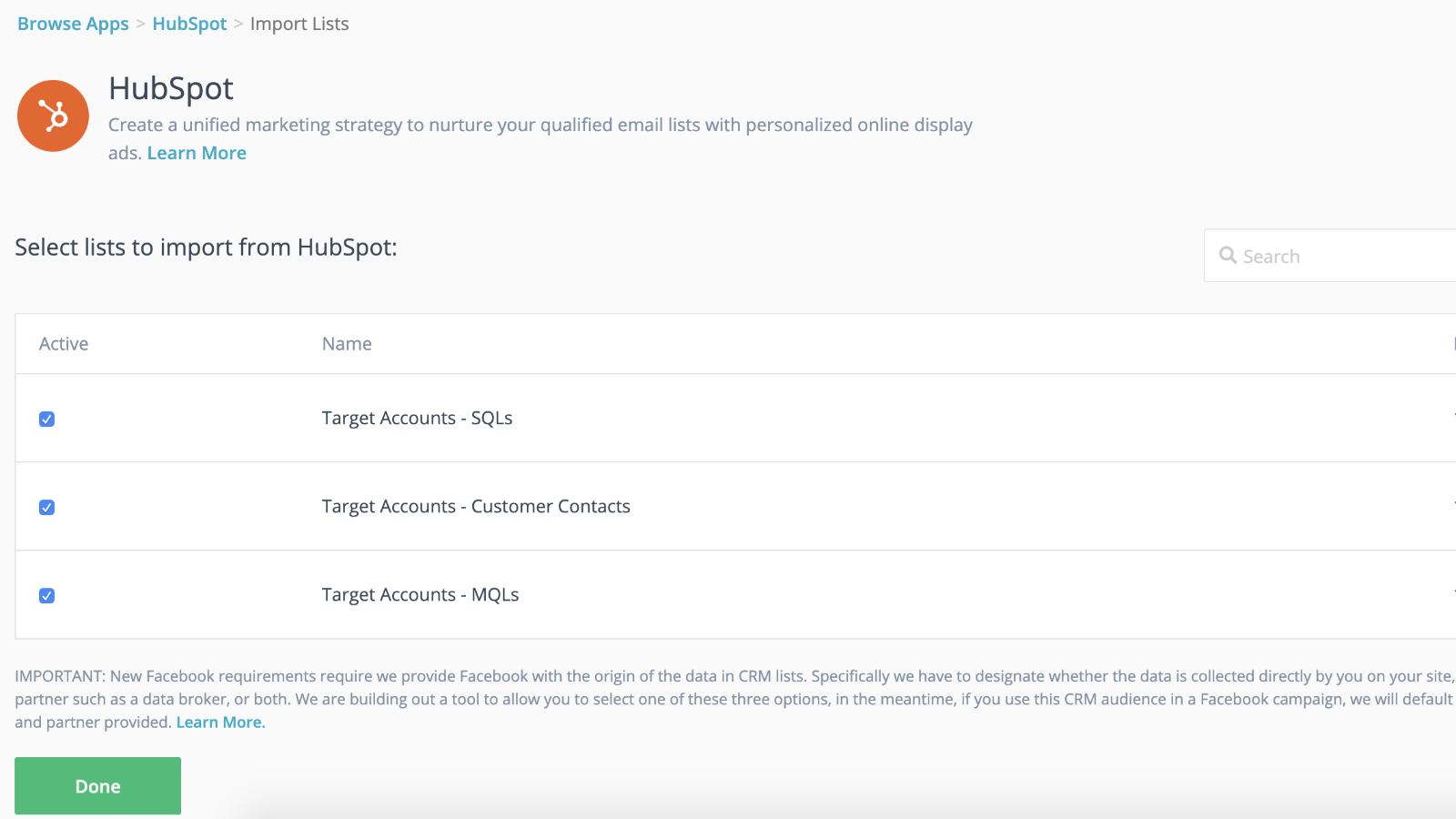
Intégration transparente avec synchronisation dynamique des audiences et lancements plus rapides
Connectez vos listes CRM à vos campagnes de reciblage pour prendre une longueur d'avance pendant que votre campagne de reciblage se met en place en arrière-plan. Une fois vos listes importées dans AdRoll, vous êtes prêt. Nous nous chargeons de synchroniser dynamiquement vos listes de contacts toutes les 24 heures.
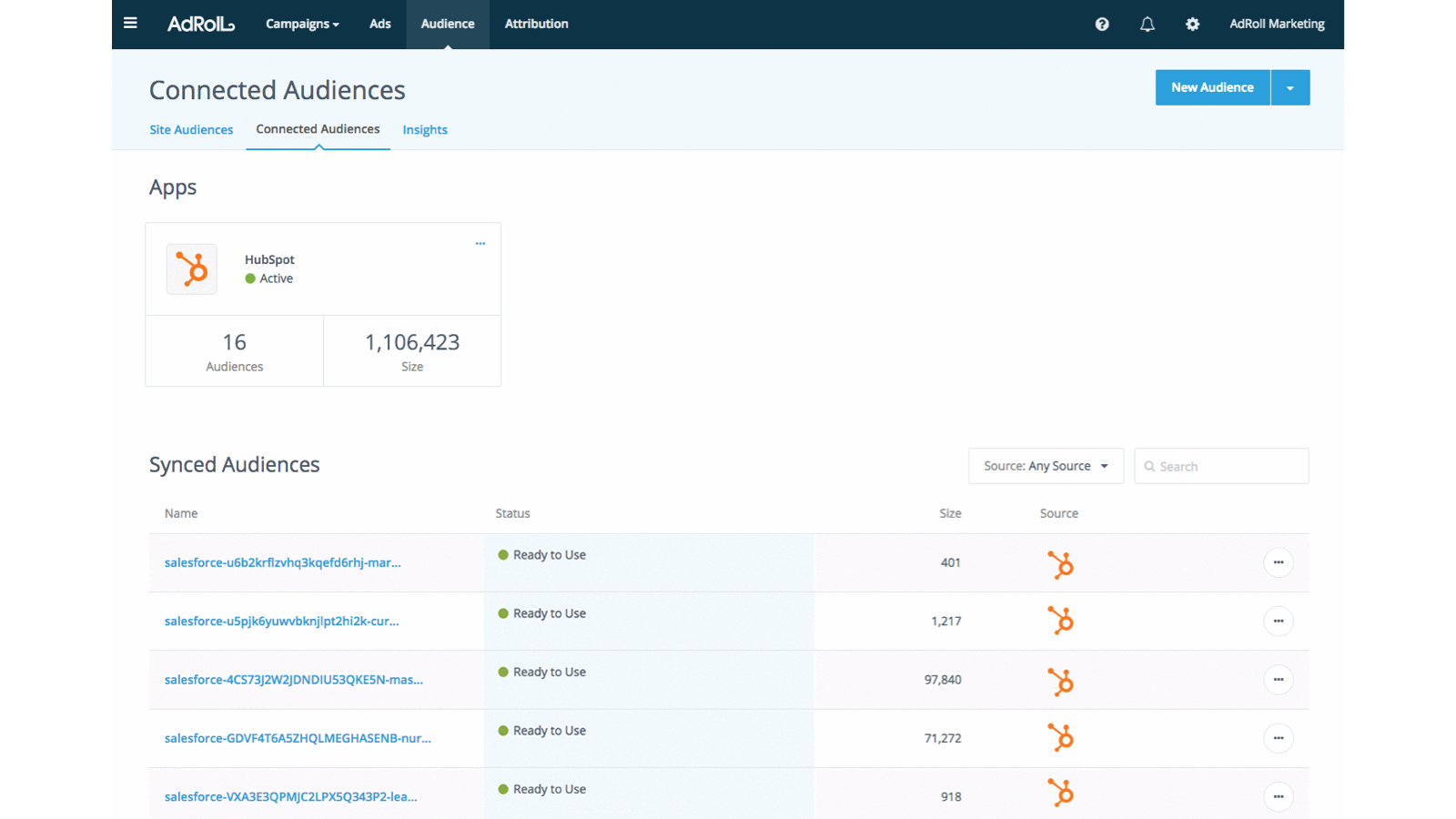
Personnaliser l'expérience des prospects
Exploitez les attributs clients de votre CRM HubSpot pour créer des expériences client ciblées et hautement performantes.
Fonctionnalité de l'application
Données partagées
AdRoll Audience |
3,8
5
3,8
5
- 21 nov. 2024
Gumbayan, J.
- 20 oct. 2021
Retargeting with Adroll/HubSpot Integration
It works like a CHARM! It was easy to set up the HubSpot/AdRoll integration. Syncing our HubSpot lists with AdRoll was also seamless. The AdRoll platform is intuitive and allows you to set up different campaigns and "advertiser" profiles so you can segment the spend by department, making the expense reporting and ROI calculations easy.
We are using AdRoll for retargeting campaigns for our annual conference and select programs.
Syncing lists from HubSpot to AdRoll allows us to exclude customers/prospects from our retargeting efforts more easily that if we didn't have the integration.
The biggest drawback is that, unlike Google & Linkedin, the data sync is only one way...HubSpot TO AdRoll. If this were a two-way sync so that the metrics were included with our other Advertising Metrics on the HubSpot Ads section it would be even better! Also you can't manage the campaigns from within HubSpot...you have to set up and manage campaigns on the AdRoll platform
Grassley Clarke, M.
À but non lucratif - 11 à 25 employés
Tarification
Intégration gratuite à HubSpot
0 $US
Commencez dès aujourd'hui à synchroniser vos listes HubSpot avec AdRoll pour vos campagnes publicitaires ciblées
Intégration gratuite à HubSpot
0 $US
Commencez dès aujourd'hui à synchroniser vos listes HubSpot avec AdRoll pour vos campagnes publicitaires ciblées
* Les prix mentionnés ici sont uniquement présentés à titre indicatif. Tous les prix n'incluent pas les taxes, les offres spéciales, les réductions ni les autres facteurs pouvant affecter les tarifs. Vous devez contacter le partenaire pour obtenir les tarifs les plus récents. HubSpot n'assume aucune responsabilité pour les informations de tarification fournies par ses partenaires. Dernière mise à jour des prix : 29/07/2026
Informations supplémentaires
Créé par - AdRoll, Inc
Installation - 2 k installations
Catégories Langues dans lesquelles cette application est disponible Anglais