.png)
AdRoll Marketing & Advertising
Criado por - AdRoll, Inc
Instalações - 2 mil instalações
Avaliação 3,8
(5)

Em ascensão
Requisitos
Plano da HubSpot Permissões da conta da HubSpot - Ver permissões de conta necessárias
Tipo de acesso Compartilhado Assinatura AdRoll Marketing & Advertising - Integração gratuita com o HubSpot plano
Visão geral
1/3
Com nossa integração com o HubSpot, você pode sincronizar suas listas estáticas de e-mail do HubSpot diretamente da sua conta para o AdRoll. Por meio do nosso processo de importação de dados de CRM, essa integração ajuda você a converter facilmente suas listas em um público-alvo segmentável para uso em mídias digitais pagas e campanhas de publicidade baseadas em contas.
Requisitos para esta integração
Você deve ter uma conta paga do HubSpot Marketing Hub (Starter, Professional ou Enterprise).
É necessário ter pelo menos 100 endereços de e-mail de usuários únicos em cada uma de suas listas para que as listas do CRM sejam preenchidas com sucesso.
Sincronizar públicos do CRM
Para encontrar a ferramenta de integração do HubSpot:
- Acesse a aba “Públicos” no menu de navegação à esquerda.
- Clique em “Públicos conectados”.
- Clique em “Conectar seus outros aplicativos de marketing ” na seção “Aplicativos”.
- Clique no ícone do HubSpot e, em seguida, em “Conectar”.
- Faça login na sua conta do HubSpot.
- Volte ao AdRoll e cole seu ID no campo “Insira seu ID do HubSpot ”.
- Clique em “Autenticar com ID do HubSpot” > “Autorizar”.
- Clique em “Selecionar listas” para escolher as listas para o seu público do AdRoll.
Práticas recomendadas
Aqui estão algumas dicas para preparar suas listas para a integração de dados do CRM:
- Suas listas devem conter pelo menos 100 e-mails.
- Use e-mails pessoais sempre que possível, pois eles apresentam uma taxa de correspondência mais alta.
- Certifique-se de que seu banco de dados de e-mails esteja atualizado — adicionar uma etapa de validação de e-mail durante os fluxos de trabalho de cadastro pode ser muito útil para garantir que os usuários forneçam endereços de e-mail ativos.
- Considere combinar públicos do CRM com outros tipos de público para melhorar o desempenho.
- Certifique-se de fazer o upload de uma lista estática do HubSpot. Atualmente, listas inteligentes não são compatíveis.
Saiba mais sobre como gerenciar suas listas no HubSpot.
Públicos importados
Seus públicos do HubSpot CRM podem não aparecer no AdRoll imediatamente. Iniciaremos o processo de correspondência para novas listas em até seis horas. Quaisquer novos e-mails adicionados após o início do processo podem levar até duas semanas para serem correspondidos.
Os nomes dos públicos importados terminarão automaticamente com “HubSpot”.
Depois que sua lista de e-mails aparecer, a correspondência de cookies será iniciada. Aguarde até sete dias para que ela seja totalmente ativada em suas campanhas.
O que esperar
- Vamos extrair novos e-mails do HubSpot a cada 24 horas.
- Para anunciantes dos EUA, o CRM pode ser ativado tanto na web quanto no Facebook. Sempre que possível, recomendamos o uso de endereços de e-mail dos EUA.
- Fora dos EUA, os públicos do CRM têm funcionalidade limitada em campanhas na web. Recomendamos que anunciantes fora dos EUA adotem o retargeting do CRM no Facebook.
- Não é possível editar um público do CRM depois que ele for criado.
- A correspondência de cookies no Facebook leva menos de 24 horas.
- A correspondência de cookies na web leva até sete dias, dependendo do tamanho da sua lista de e-mails.
E-mails correspondentes
Exibiremos o número de e-mails originalmente enviados por meio da integração com a HubSpot.
Para ver quantos e-mails foram correspondidos com sucesso para a web ou para o Facebook, clique no nome do seu público-alvo do HubSpot na aba “Público-alvo”.
Recursos
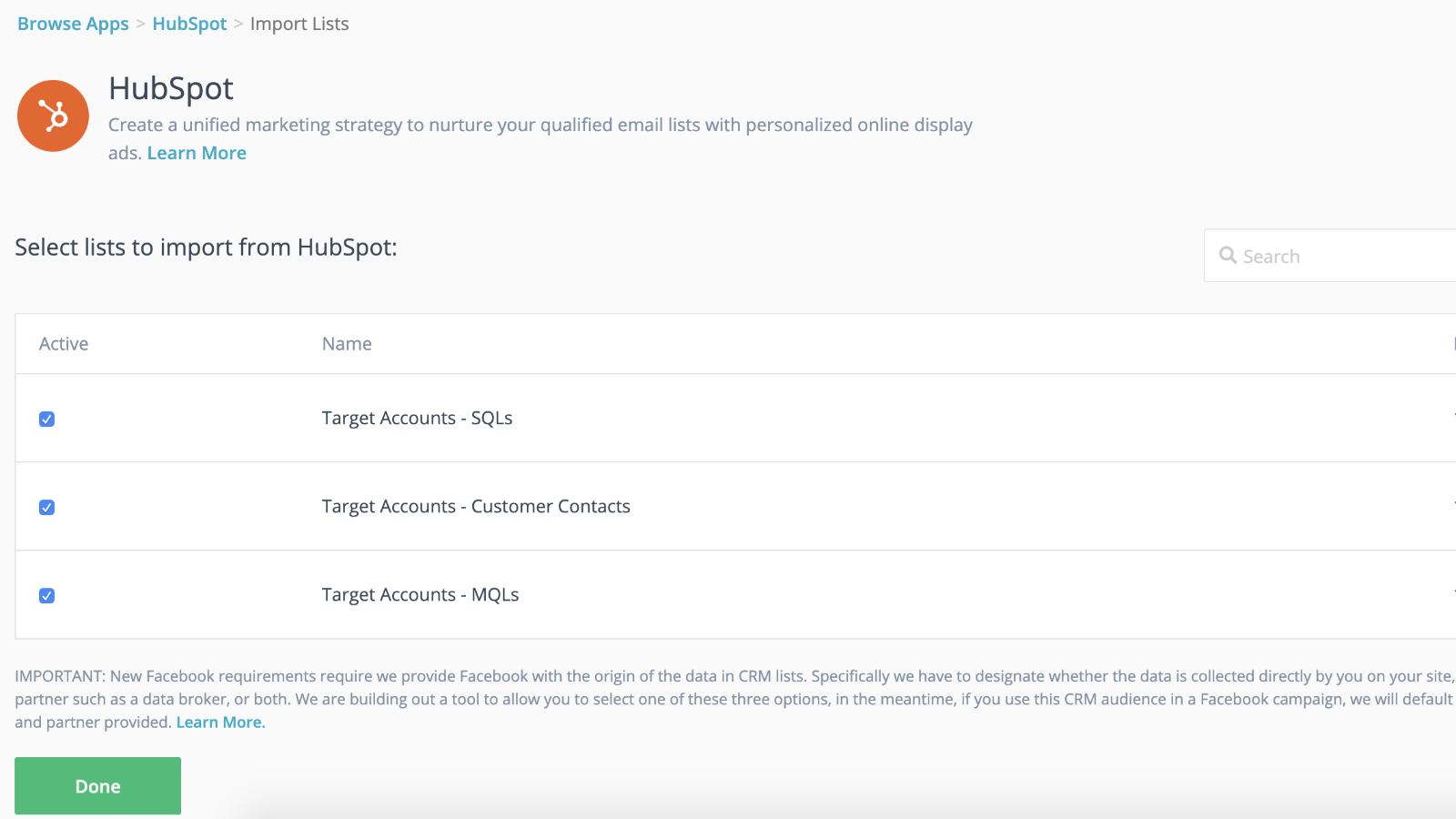
Integração perfeita com sincronização dinâmica de público e lançamentos mais rápidos
Conecte suas listas do CRM às suas campanhas de retargeting para ganhar vantagem inicial enquanto sua campanha de retargeting ganha força em segundo plano. Depois de importar suas listas para o AdRoll, está tudo pronto. Nós nos encarregaremos de sincronizar dinamicamente suas listas de contatos a cada 24 horas.
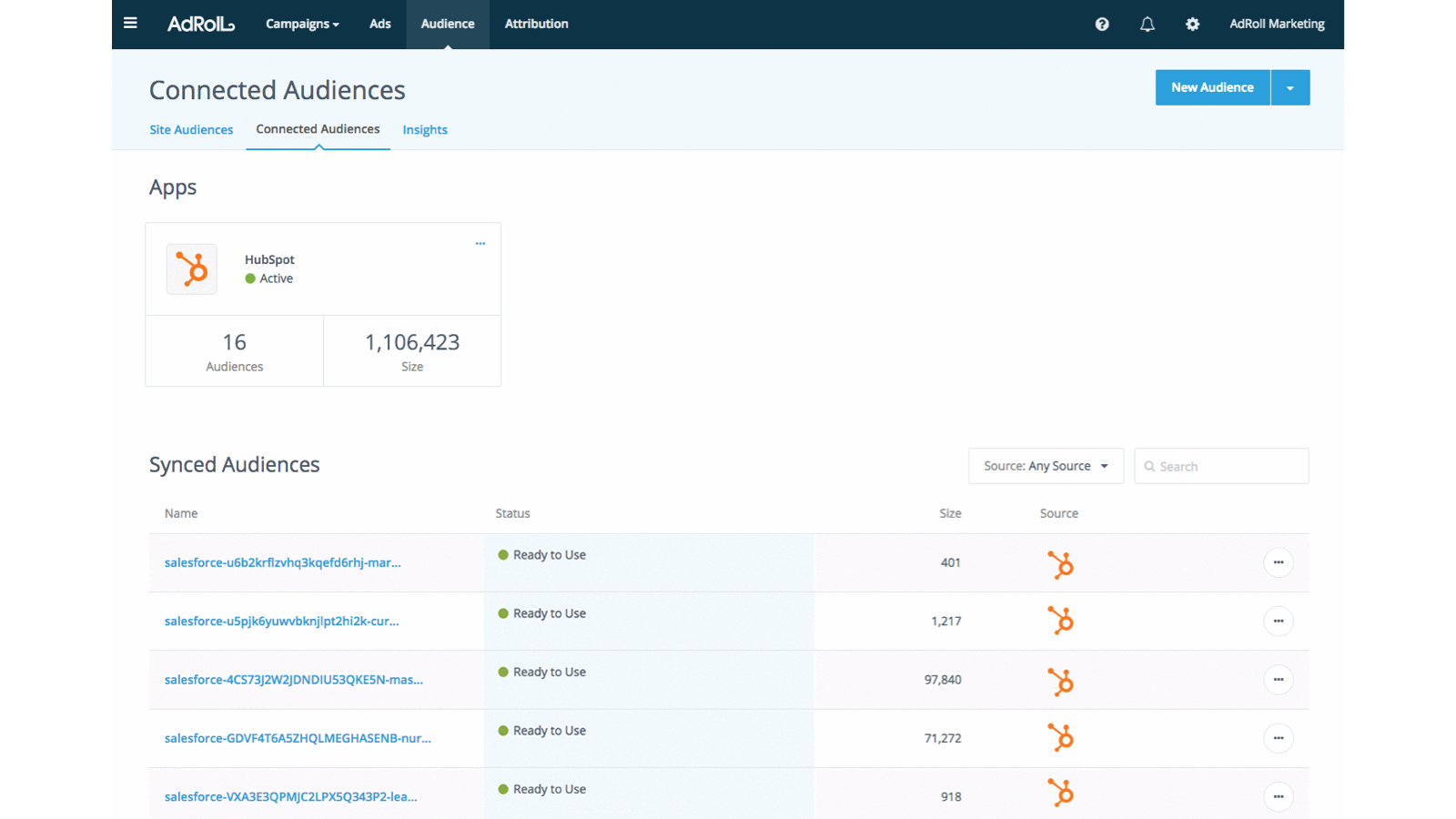
Personalize a experiência dos clientes em potencial
Utilize os atributos dos clientes no seu HubSpot CRM para criar experiências personalizadas e de alto desempenho para os clientes.
Funcionalidade do aplicativo
Dados compartilhados
AdRoll Audience |
Avaliações
3,8
5
3,8
5
- 21 de Nov de 2024
Gumbayan, J.
- 20 de Out de 2021
Retargeting with Adroll/HubSpot Integration
It works like a CHARM! It was easy to set up the HubSpot/AdRoll integration. Syncing our HubSpot lists with AdRoll was also seamless. The AdRoll platform is intuitive and allows you to set up different campaigns and "advertiser" profiles so you can segment the spend by department, making the expense reporting and ROI calculations easy.
We are using AdRoll for retargeting campaigns for our annual conference and select programs.
Syncing lists from HubSpot to AdRoll allows us to exclude customers/prospects from our retargeting efforts more easily that if we didn't have the integration.
The biggest drawback is that, unlike Google & Linkedin, the data sync is only one way...HubSpot TO AdRoll. If this were a two-way sync so that the metrics were included with our other Advertising Metrics on the HubSpot Ads section it would be even better! Also you can't manage the campaigns from within HubSpot...you have to set up and manage campaigns on the AdRoll platform
Grassley Clarke, M.
Sem fins lucrativos - 11 a 25 funcionários
Integração gratuita com o HubSpot
US$ 0
Comece hoje mesmo a sincronizar as listas do HubSpot com o AdRoll para campanhas de segmentação de anúncios
Integração gratuita com o HubSpot
US$ 0
Comece hoje mesmo a sincronizar as listas do HubSpot com o AdRoll para campanhas de segmentação de anúncios
* O preço aqui é apenas para fins de exibição. Todos os preços não incluem impostos, incentivos, descontos ou outras variáveis de preços. Você deve entrar em contato com o parceiro para obter informações mais atualizadas e precisas. A HubSpot não se responsabiliza por essas informações de preços, que são fornecidas pelos nossos parceiros. Preços atualizados pela última vez: 29/07/2026
Mais informações
Criado por - AdRoll, Inc
Instalações - 2 mil instalações
Categorias Idiomas nos quais este aplicativo está disponível Inglês