

Task Assistant
Rakentanut - Growth Operations
Asennukset - Yli 200 asennusta
Arvostelu 5
(3)

Johtava
Vaatimukset
HubSpot-tilaus HubSpot-tilin käyttöoikeudet - Tarkastele vaadittuja tilin käyttöoikeuksia
Pääsytyyppi Jaettu Task Assistant-tilaus - Vapaa, Käynnistin, Ammattilainen, Yritys tai Enterprise+ paketit
Yhteenveto
1/4
Vihdoinkin voit LOPETTAA epäolennaisten tehtävien hoitamisen.
Task Assistantin avulla voit helposti automatisoida tehtävien päivitykset minkä tahansa HubSpot-työnkulun avulla.
Kolme yleistä käyttötapausta:
- Kun tiketti sulkeutuu, merkitse avoimet tehtävät valmiiksi.
- Jos tietueen omistaja vaihtuu, päivitä tehtävän omistaja.
- Kun kauppa on voitettu, poista jäljellä olevat myyntitehtävät.
Keskeiset ominaisuudet:
- Yhdellä sovelluksen asennuksella saat käyttöön kolme uutta työnkulun toimintoa.
- Task Assistant -toiminnot ovat käytettävissä MISSÄ tahansa työnkulussa.
- Lisäominaisuuksien avulla voit suodattaa päivitettäviä tehtäviä.
Aloita tehtävien siivoaminen jo tänään ILMAISEKSI.
Ominaisuudet
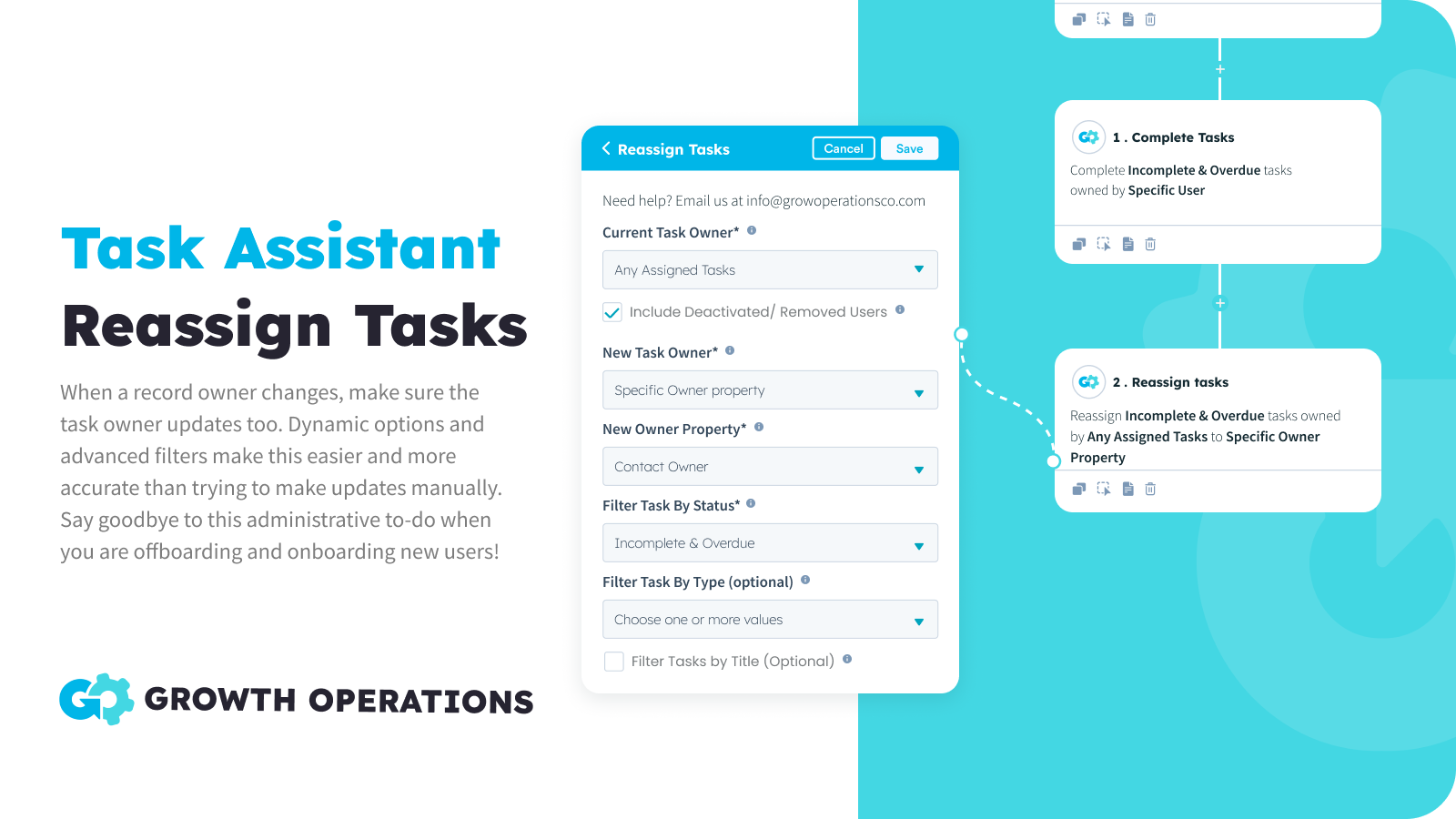
Tehtävien uudelleenmäärittäminen irtotavarana
Kun tietueen omistaja vaihtuu, varmista, että myös tehtävän omistaja päivittyy. Tämä on helppo automatisoida dynaamisten vaihtoehtojen avulla, ja kehittyneiden suodattimien ansiosta tämä on tarkempaa kuin päivitysten tekeminen manuaalisesti. Sano hyvästit tälle hallinnolliselle työtehtävälle, kun otat uusia käyttäjiä käyttöön ja poistat heidät käytöstä!
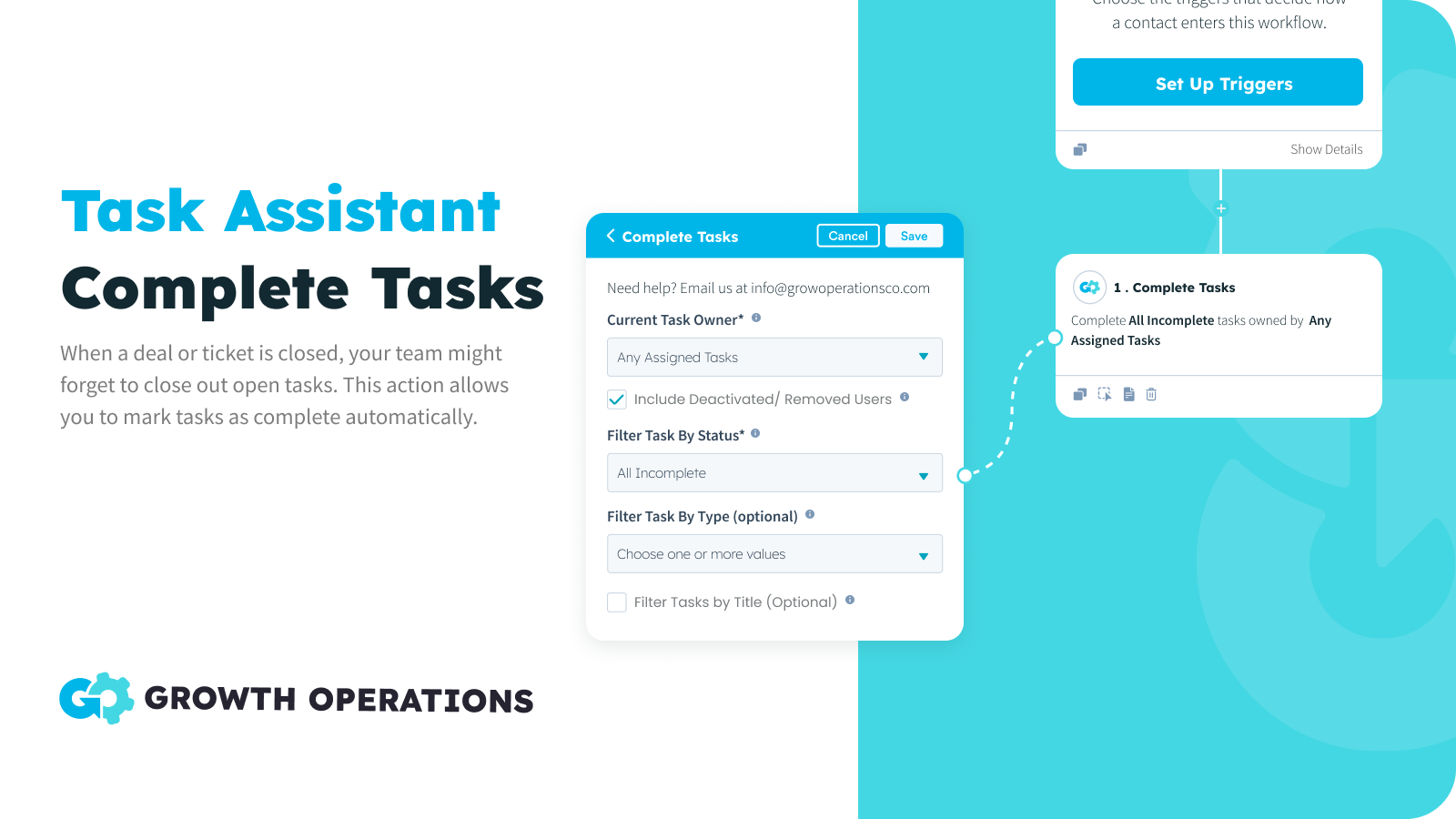
Bulk Complete Tehtävät
Kun sopimus tai tiketti suljetaan, tiimisi saattaa unohtaa sulkea avoimet tehtävät. Tämän toiminnon avulla voit merkitä tehtävät automaattisesti loppuun suoritetuiksi ja varmistaa, että tiimisi keskittyy olennaisiin tehtäviin.
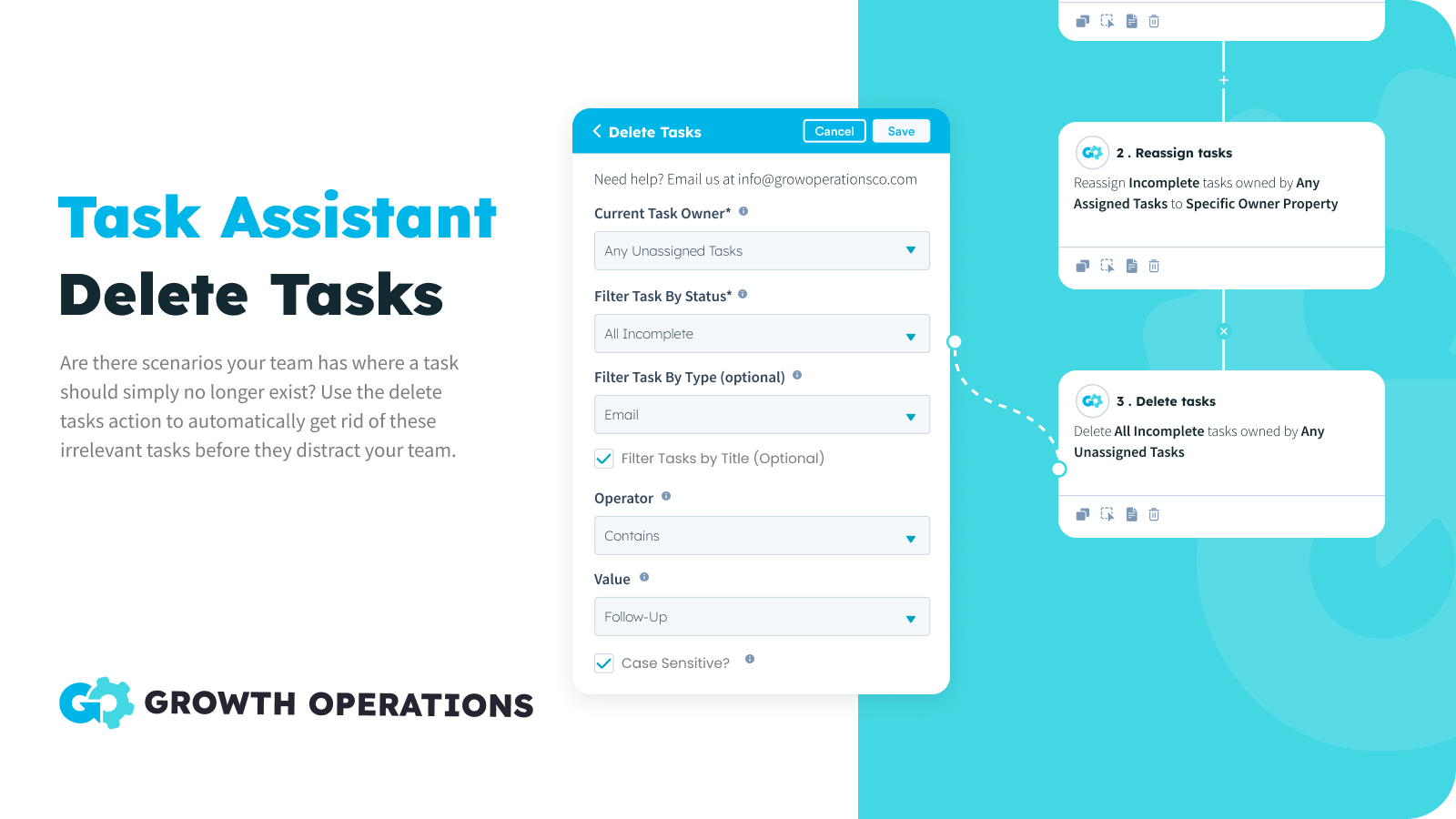
Tehtävien joukkopoisto
Joskus on tehtäviä, joita et yksinkertaisesti enää tarvitse. Et halua merkitä tehtävää suoritetuksi, koska mitään toimenpiteitä ei ole tehty. Et vain halua sitä, piste. Nyt voit laittaa tällaiset skenaariot automaattiohjaukseen ja varmistaa, että tiimisi tehtävät ovat tarkkoja.
Sovelluksen toiminnallisuus
Tehtävät | ||
Yhteystiedot | ||
Yritykset | ||
Tarjoukset | ||
Liput |
Arvostelut
- 16. syys 2024
Great for reassigning contacts during annual leave
I was looking for a solution to making sure MQLs weren't slipping through the net while a team member was on a two-week holiday, but I didn't want to change contact owner. Task Assistant was great for this. Andrew was super helpful too, supporting me in getting my "OOO" task reassignment set up, saving me a big headache. We: 1) Created a list of records that target the tasks (incomplete / newly created tasks for the 2-week period). 2) Used Task Assistant to reassign specific tasks on those records to a specific user (the person covering for my person on hols.)
Rose, K.
Vähittäiskauppa - 11–25 työntekijää
- 7. tammi 2024
Pitää putkiston puhtaana!
Tälle on paljon käyttötarkoituksia, ja työnkulun aloittelijan on helppo käyttää sitä. Olemme integroineet tehtäväavustajan käyttämisen tehtävien sulkemiseen, kun vaihe on valmis, ja HS-tehtävien avaamiseen seuraavaan vaiheeseen. Tämä tarkoittaa, että kaikilla avattavilla sopimuksilla on tehtäviä ja vuotojen muutokset on minimoitu. Se on myös hienoa, jos haluat poistaa tarpeettoman tehtävän tai kohdentaa tehtäviä uudelleen, kun kaupan omistaja vaihtuu Käytämme tätä myös korjauksena toiseen HubSpotin ongelmaan tai rajoitukseen, jossa markkinointi ei näy kaupantekotoiminnassa, vaan näkyy vain Contact-aktiviteetissa..... Koska myyntitiimimme käyttää pääasiassa deal-näkymää, on tuskallista mennä jatkuvasti Contactiin nähdäkseen kaikki merkintäsähköpostit, tekstiviestit jne. Kun markkinointisähköposti lähetetään, meidän on HS:n luotava välitön tehtävä, jossa lukee "Marking Email Sent - <template name>", ja laitettava sitten linkki sähköpostin esikatseluun tehtävän muistiinpanoihin. Sama pätee tekstiviesteihin tai mihin tahansa muuhun toimintoon, jonka haluat leimata. Task Assistant voi sitten sulkea kyseisen tehtävän välittömästi, ja sinulla on nyt markkinointitiedot kaupasta.
Tälle on paljon käyttötarkoituksia 1) Tehtävien uudelleen kohdentaminen, kun sopimuksen omistaja vaihtuu 2) Tehtävien sulkeminen tai poistaminen Työnkulkujen avulla olemme integroineet tehtäväavustajan käyttämisen tehtävien sulkemiseen, kun vaihe on valmis, ja HS-tehtävien avaamiseen seuraavaan vaiheeseen. Tämä tarkoittaa, että kaikki avatut kaupat ovat taksit niitä ja muutokset vuoto on minimoitu Korjaa myös toisen ongelman tai rajoituksen HubSpotissa, jossa markkinointisähköposteja ei ole aikaleimattu kauppoihin, vaan ne näkyvät vain yhteystoiminnassa - Koska myyntitiimimme käyttää pääasiassa
Zentner, D.
Pankki-/Finanssipalvelut - 26–50 työntekijää
Hinnoittelu
Vapaa
0 $
50x kuukaudessa ILMAISEKSI
Kaikki tehtävätoiminnot
Kaikki työnkulun tyypit
50 toimintoa kuukaudessa
Vapaa
0 $
50x kuukaudessa ILMAISEKSI
Kaikki tehtävätoiminnot
Kaikki työnkulun tyypit
50 toimintoa kuukaudessa
*Hinnoittelu tässä on vain esittelytarkoituksessa. Kaikki hinnat eivät sisällä veroja, kannustimia, alennuksia tai muita hinnoittelumuuttujia. Pyydä kumppanilta ajantasaiset ja oikeat hintatiedot. HubSpot ei ota vastuuta näistä kumppaneidemme tarjoamista hintatiedoista. Hinnoittelu päivitetty viimeksi: 26.05.2026
Lisätietoja
Rakentanut - Growth Operations
Asennukset - Yli 200 asennusta
Kategoriat Kielet, joilla tämä sovellus on saatavilla Englanti