

QuickBooks Online Advanced Automation
All HubSpot Objects ↔ All QuickBooks transactions, everything…
Créé par - HelloCODER LLP
Installation - 500+ installations
Évaluation - 4,2(20)
Exigences
Abonnement HubSpot Autorisations de compte HubSpot - Afficher les autorisations de compte requises
Abonnement à QuickBooks Online Advanced Automation - Abonnements : Professional, Business Max, Corporate ou Professional Annual
Vue d'ensemble
1/7
Seamlessly Sync All QuickBooks Transactions with HubSpot
Two-Way Accounting Sync — from Customers & Projects to Payments, with AI Insights. Covers both Accounts Receivable & Accounts Payable.
Record and Manage Income with Ease
SyncQ allows you to create, send, and view Estimates, Invoices, Payments, and Sales Receipts directly from HubSpot records. With Business Max and Corporate plans, unlock advanced sync capabilities for HubSpot Custom Objects, including
QuickBooks Project as HubSpot Deal,
QuickBooks Job/sub-customer as HubSpot Deal and attach related invoices as Deal Invoices,
Bi-directional QuickBooks Invoice with HubSpot Invoice/Deal,
Deposits, Vendor Credits, Chart of Accounts, and more.
Enjoy FREE Mapping Assistance and Zero Onboarding Cost.
AI-Powered Insights, 100% Customizable Sync
SyncQ is an advanced, AI-powered business insights, ask any queries related to your business and get instant insights. (complimentary limited trial on every plan, + paid edtions).
100% customizable mappings that let you to map HubSpot Objects including custom objects and fields to most QuickBooks transactions including Invoice and Estimate custom fields, plus taxes and classes, to fit your 360-degree business needs.
With intelligent automation, you can choose to sync automatically or manually with a single click—without logging into QuickBooks. It also automatically syncs QuickBooks Online records to HubSpot, including received payments and pending balances.
Empower Sales with Instant Access to Financial Data
SyncQ automatically displays QuickBooks Estimates, Invoices, and Payment details inside HubSpot Companies/Contacts note sections, giving your sales team instant access to critical financial insights—without needing to contact accounting or log into QuickBooks Online.
Enterprise-Grade Security & Intuit Certification
SyncQ is Intuit Approved and meets industry-standard security requirements. It is regularly evaluated by Intuit as per NIST security standards (The National Institute of Standards and Technology, U.S. Department of Commerce). Find SyncQ inside your QuickBooks account or on the Intuit App Store.
Key Features
✔ Intuit Approved – Meets industry standards for financial security
✔ Automated & manual bi-directional and mono-directional sync
✔ Automatically sync QuickBooks transactions to HubSpot records
✔ AI-Powered Insights – Know more about your business and customers
✔ Sync HubSpot Companies/Contacts with QuickBooks Customers/Vendors
✔ Sync HubSpot Deals/Tickets with QuickBooks Estimates, Invoices, Purchase Orders, Bills & more
✔ View QuickBooks transaction history in HubSpot notes, including QuickBooks Invoice PDF links (license required to view)
✔ Sync QuickBooks Products with HubSpot Products
✔ Email Estimates & Invoices directly from HubSpot
✔ Track sales trends & receivables inside HubSpot
✔ Fully customizable field mappings for unique business needs
✔ Sync HubSpot custom fields & QuickBooks custom fields
✔ Connect multiple QuickBooks Companies
SyncQ – The #1 QuickBooks Automation with AI Insights
SyncQ is the leading QuickBooks automation solution for multiple CRMs, including Salesforce and Pipedrive. Trusted by hundreds of businesses, SyncQ ensures seamless AI-powered automation, transaction sync, and financial insights.
All our integrations are Intuit approved.
Fonctionnalités
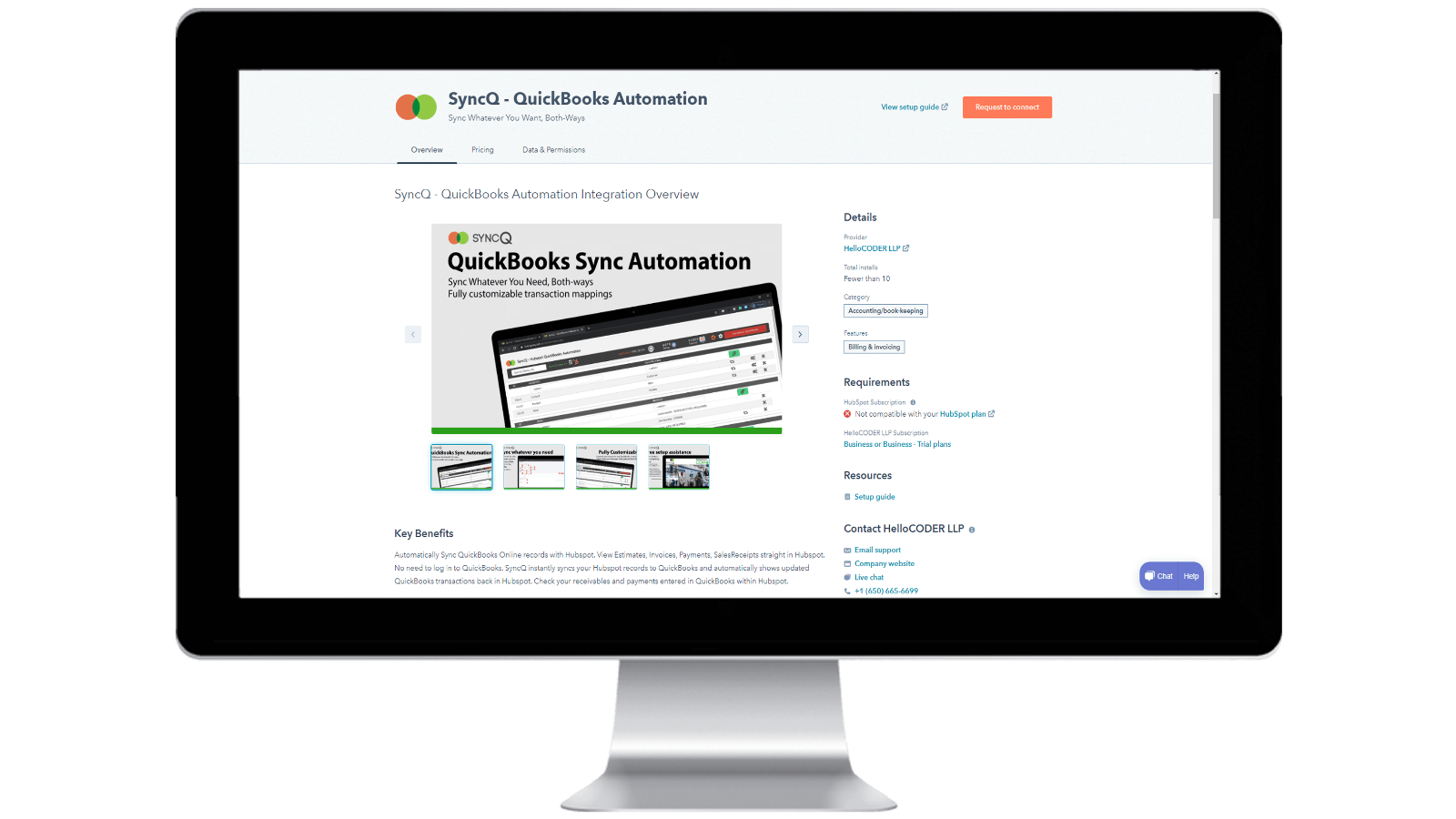
Installing SyncQ into your HubSpot account & Unsubscribing SyncQ
Install SyncQ from Intuit or HubSpot AppStore. For InstaView, contact SyncQ support. To unsubscribe to SyncQ, click on the Unsubscribe button within the SyncQ app or cancel your Paypal recurring payment or contact SyncQ support. Merely disconnecting SyncQ app from HubSpot does not unsubscribe SyncQ
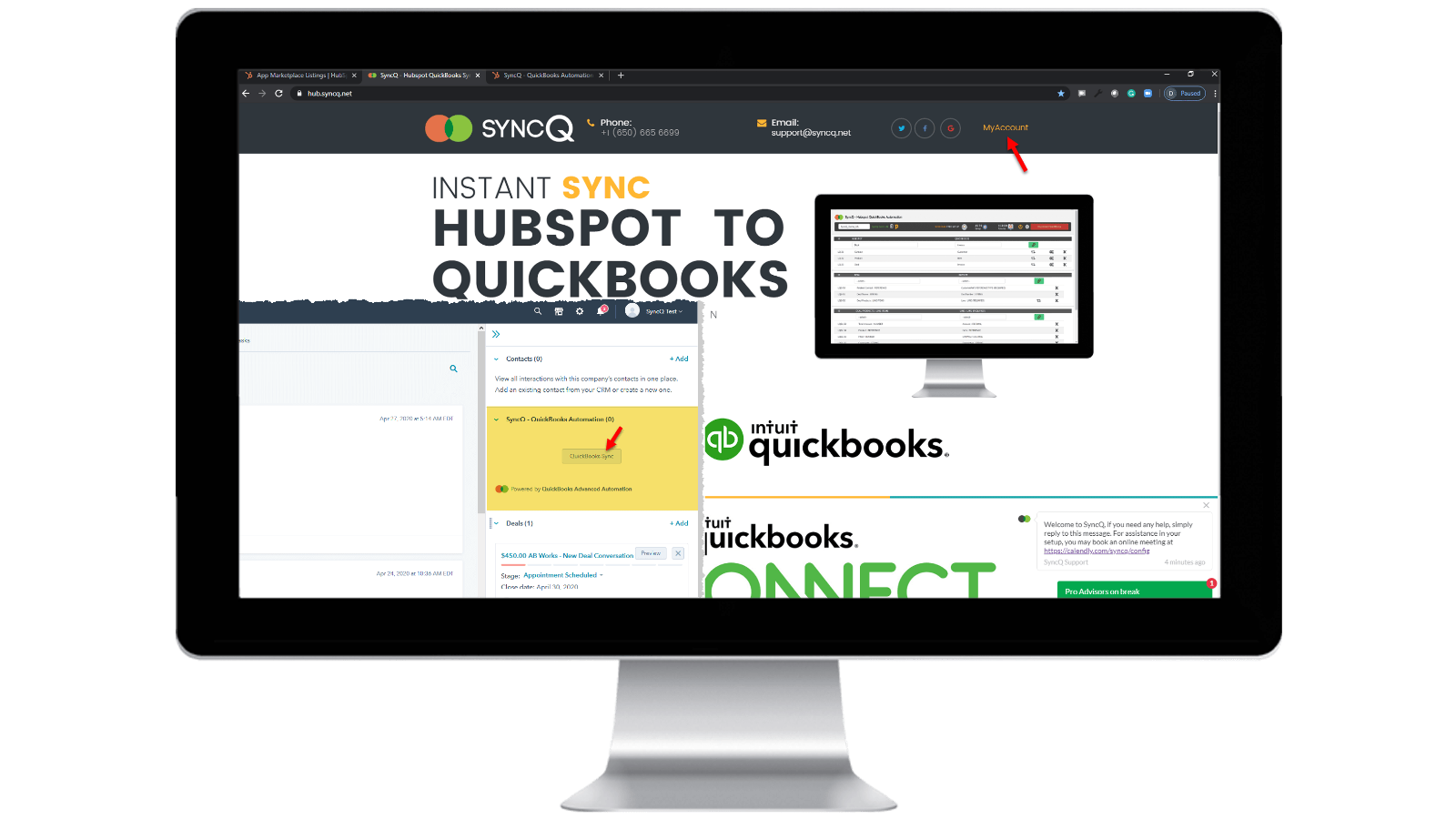
Log into your SyncQ account
Browse to https://hb.syncq.net and click on My Account. The easy way: goto any record in HubSpot, find SyncQ card tab on the right tabs, and then click on QuickBooks Sync. Then enter your HubSpot user email id. You will receive a verification code to verify your account.
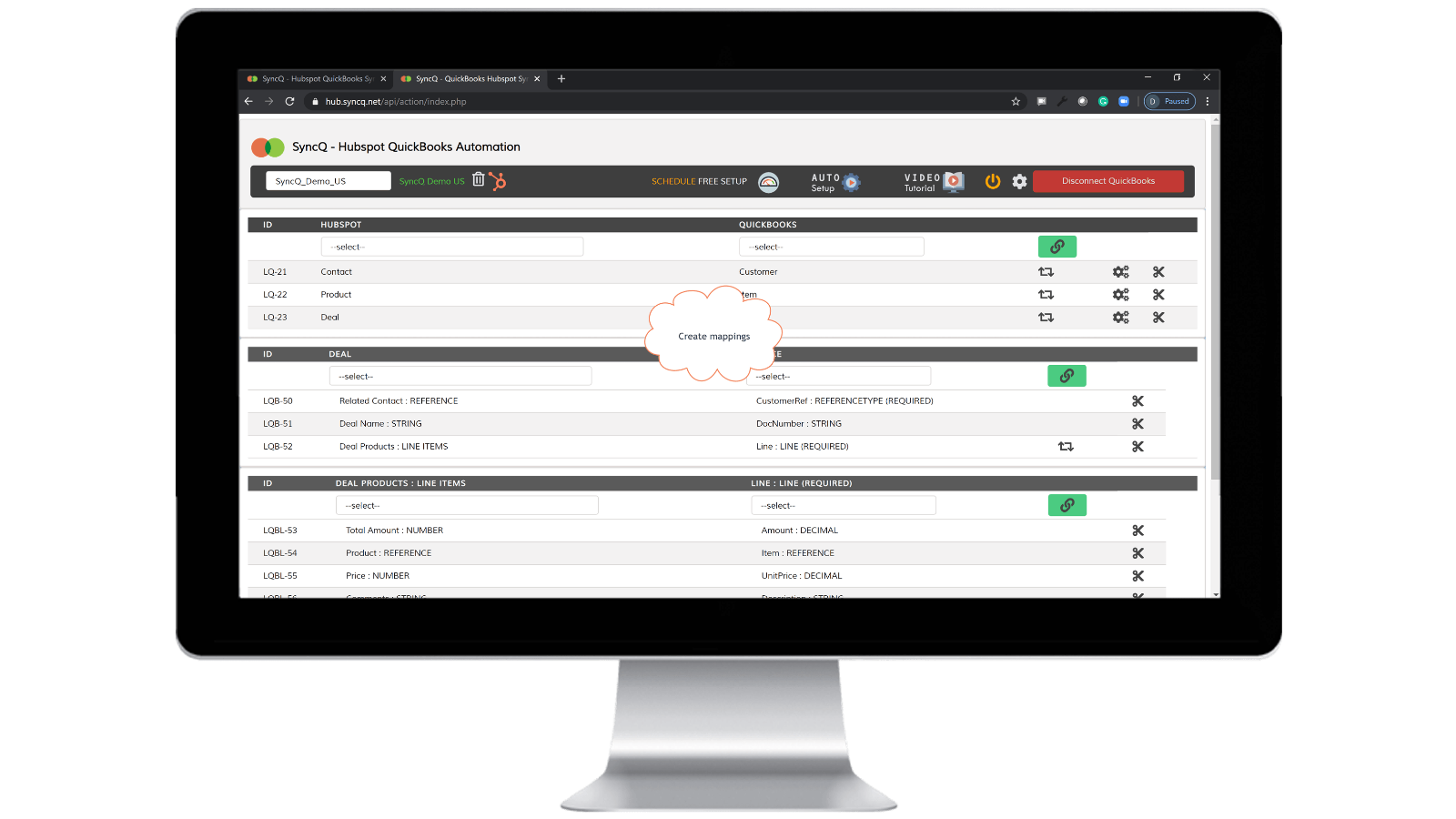
Connect QuickBooks Company, create mappings and enable auto sync.
Click on Connect to QuickBooks, your QuickBooks company will automatically show up. Click on the setup wheel button to create your mappings or click on Auto Setup. Enable auto-sync against individual mappings. You can also do manual sync by clicking on the SyncQ card button from HubSpot record.

Manual and instant record sync, both-ways
Goto to the HubSpot record that you want to sync. Find the SyncQ card on right and then click on QuickBooks Sync. You will get options to sync the related HubSpot record. Click on the Sync button. HubSpot record will instantly sync to QuickBooks. A summary of QuickBook's record will show up.
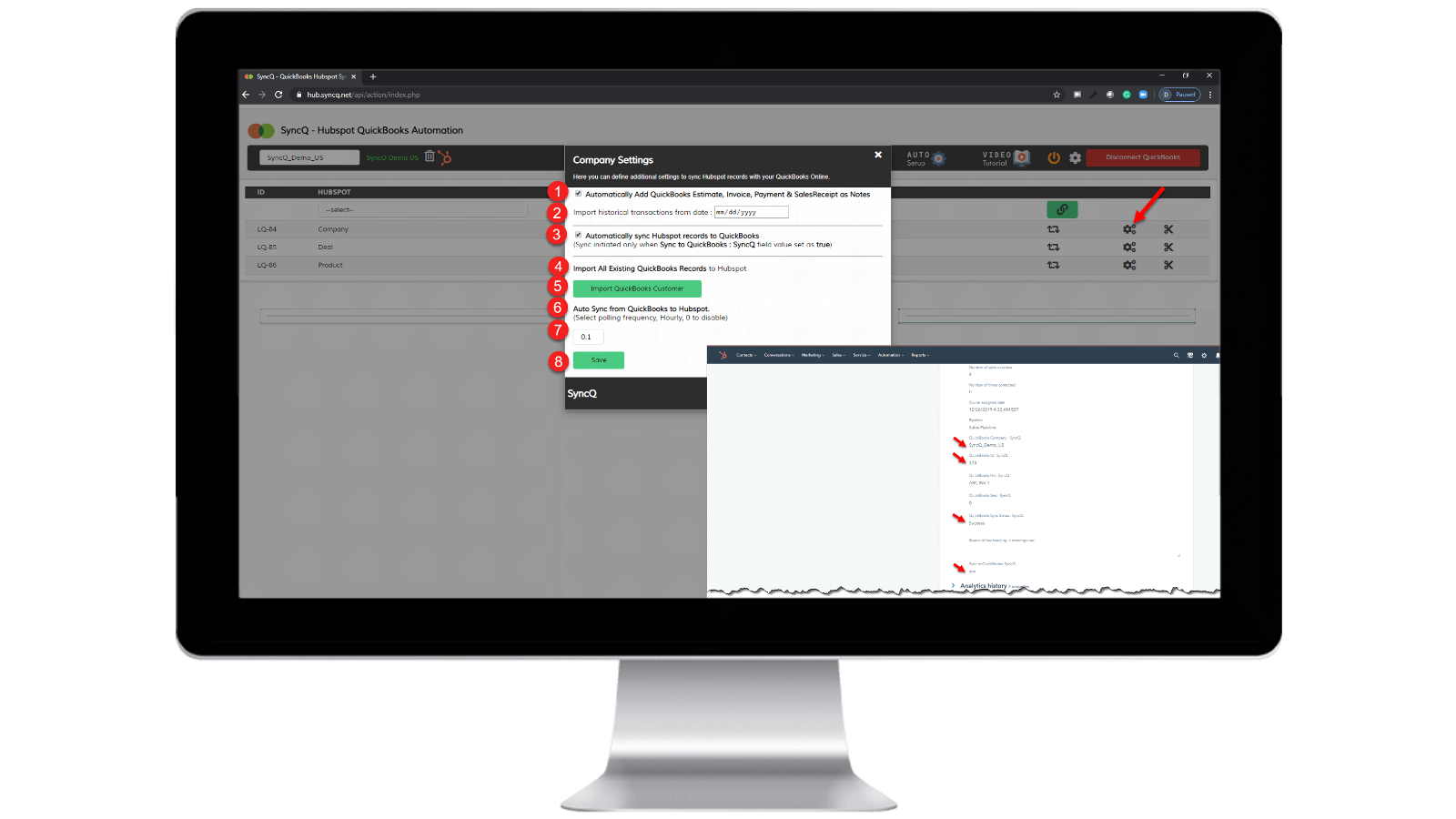
Enable auto-sync.
From QuickBooks to HubSpot: 1) Check "Automatically sync HubSpot records to QuickBooks" From HubSpot to QuickBooks: 1) Specify the hourly frequency of "Auto Sync from QuickBooks to HubSpot." 2) On the specific HubSpot record that you want to sync, set "SyncQ to QuickBooks: SyncQ" as "yes".
Fonctionnalité de l'application
Données partagées
1. Customers / Vendors | ||
1. Estimates/Invoice/Bill/PurchaseOrder | ||
2. Customers / Vendors | ||
2. Estimate/Invoice/Deposit/Bill/VendorCredit & More | ||
Inovoice | ||
Items | ||
Job / Sub Customer / Project |
Avis
4,2
20
4,2
20
- 22 sept. 2025
Bonne fonctionnalité de synchronisation, mais mauvaise interface utilisateur et équipe d'assistance peu serviable
Bonne intégration dans l'ensemble avec quelques problèmes mineurs, nécessité d'améliorer l'assistance
La synchronisation est bonne, rapide et les options de cartographie sont variées.
Quelques erreurs mineures surviennent encore lors de la synchronisation, comme un contact qui n'est pas synchronisé correctement, l'écrasement d'informations. De plus, l'interface utilisateur n'est pas très intuitive et doit être améliorée. La prochaine équipe d'assistance doit être plus utile et plus rapide pour les problèmes de synchronisation et les questions auxquelles nous sommes confrontés.
Tasnimul, M.
- 3 juil. 2025
ÉVITER CETTE APP
J'ai lu les commentaires avant de télécharger et je regrette de ne pas avoir suivi le conseil des autres - évitez cette application. Inutile
L'application saisit immédiatement vos informations de paiement QB (c'est génial pour eux, mais c'est nul pour moi car je dois les contacter (au Royaume-Uni) pour annuler).
l'application n'a pas fonctionné - elle n'a rien fait
McDermott, J.
Tarification
Professional
49 $US
/moisINCLUDES 2 LICENSES
Sync HubSpot Contacts or Companies, Products, and Deals with QuickBooks.
Manual and Automated Sync.
Unlimited Sync.
Customer AI insights. Full features with additional plans.
Bi-directional Sync of QuickBooks Customers and Vendors with HubSpot.
Auto-import Estimates, Invoices, and Sales Receipts to Deals.
Automatically import Estimates, Invoices, Payments, and Sales Receipts to Organizations or People.
Professional
49 $US
/moisINCLUDES 2 LICENSES
Sync HubSpot Contacts or Companies, Products, and Deals with QuickBooks.
Manual and Automated Sync.
Unlimited Sync.
Customer AI insights. Full features with additional plans.
Bi-directional Sync of QuickBooks Customers and Vendors with HubSpot.
Auto-import Estimates, Invoices, and Sales Receipts to Deals.
Automatically import Estimates, Invoices, Payments, and Sales Receipts to Organizations or People.
* Les prix mentionnés ici sont uniquement présentés à titre indicatif. Tous les prix n'incluent pas les taxes, les offres spéciales, les réductions ni les autres facteurs pouvant affecter les tarifs. Vous devez contacter le partenaire pour obtenir les tarifs les plus récents. HubSpot n'assume aucune responsabilité pour les informations de tarification fournies par ses partenaires. Dernière mise à jour des prix : 02/03/2025
Informations supplémentaires
Créé par - HelloCODER LLP
Installation - 500+ installations
Catégories Langues dans lesquelles cette application est disponible Anglais
Nouveautés

NoteLinker
Stop losing context in siloed docs. NoteLinker automatically syncs…

Dialer Sync (dialer.io)
Easily sync Dialer.io calls to HubSpot!
