
Box
Built by - SparkGrid Software
Installs - 100+ installs
Rating 5
(10)
Requirements
HubSpot Plan HubSpot Account permissions - View the required account permissions
Access Type Shared Box Subscription - Core, Growth, Enterprise, or Onboarding & enablement package plans
Overview
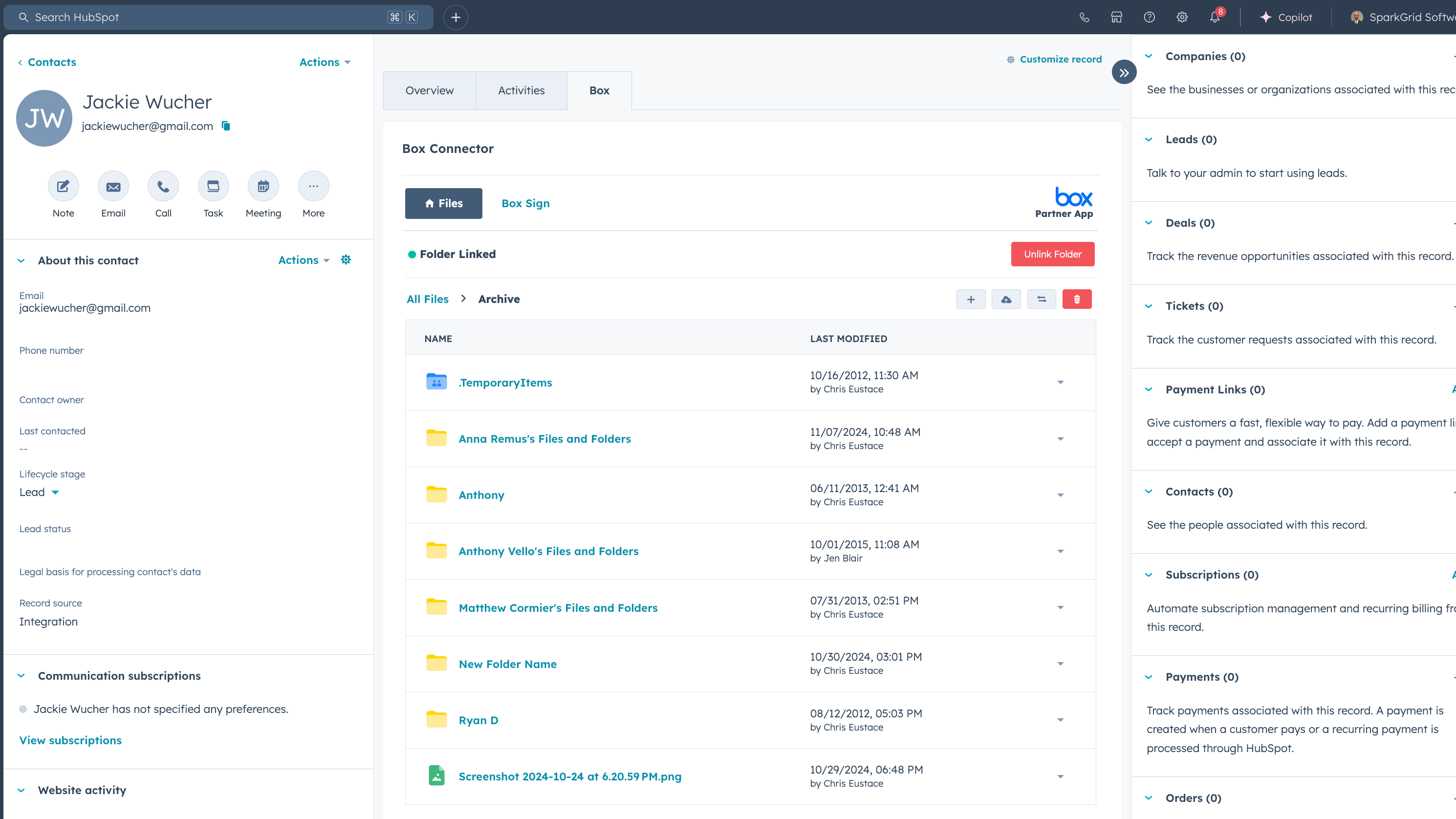
1/5 - View and manage your box folders and files in HubSpot
Box document workflows on every HubSpot record.
SparkGrid's Box app puts Box inside HubSpot contacts, companies, deals, tickets and custom objects. Your team can browse, preview, upload and share the Box files for each record, send Box Sign requests pre-filled with HubSpot data, and automate folders and files with 42 no-code workflow actions in HubSpot's workflow builder.
Manage Box files on the record
Browse, search, preview, upload and organize the Box files tied to each record
Pin Box files and folders to contacts, companies, deals, tickets and custom objects
Box permissions apply for every user
Automate folders and files with 42 no-code workflow actions (Growth and above)
Create and pin folders when a record is created or a deal reaches a stage
Copy, move and share files, add collaborators and send Box file requests
Apply Box metadata, security classifications and retention policies (Enterprise)
Use each action's results in later workflow steps
Send Box Sign requests from HubSpot
Send and track Box Sign requests from the record or from a workflow
Map HubSpot properties to Box Sign templates to pre-fill agreements
Box Sign status updates post to the record timeline and can trigger HubSpot workflows
Generate documents with Box Doc Gen (Enterprise)
Create quotes, proposals and similar documents from Box Doc Gen templates using HubSpot data, including deal line items
Extract data with Box AI (Enterprise)
Pull values out of documents in Box and use them in HubSpot workflows
Built for document workflows
Use this app when your team runs document processes on HubSpot records: organizing folders and files, collecting documents, sending signatures and generating documents automatically.
Security
Files stay in Box. SparkGrid has completed a SOC 2 Type 2 audit, and a BAA is available.
Natural-language search and instant document summaries
Intelligent file renaming for clean, compliant documentation
Save thousands per year vs standalone eSign tools
Auto-send onboarding documents to new clients via a secure Box portal
Auto-archive files on schedule
Keep documents synced between Box and HubSpot when HubSpot properties or deal stages change
FAQs
Can Box integrate with HubSpot?
Yes. SparkGrid's Box Connector connects Box files and document activity to HubSpot records and workflows. Teams can use the integration to manage files, automate folders, support document collection, and connect document processes to CRM activity.
How can companies manage Box files inside HubSpot?
Box Connector allows teams to access and manage Box content in the context of HubSpot contacts, companies, deals, tickets, and workflows.
Can HubSpot automatically create folders in Box?
Yes. Box Connector can work with HubSpot workflows to create Box folders based on selected records, stages, triggers, or processes.
What document workflows can be automated between Box and HubSpot?
Teams can automate folder creation, file organization, document requests, routing, approvals, signatures, and other repeatable document actions.
Can Box Sign be used with HubSpot?
Box Connector supports workflows that connect Box Sign requests and signature activity to HubSpot processes.
How does Box Connector support secure document workflows?
Box Connector connects Box-powered content, permissions, security, and governance with HubSpot workflows, helping organizations manage document processes more consistently. Files stay in Box. SparkGrid has completed a SOC 2 Type 2 audit, and a BAA is available.
Who is Box Connector best for?
Box Connector is best suited for organizations already using Box and HubSpot that need a more structured way to manage files, folders, signatures, permissions, or document-heavy processes. It can be especially valuable for teams in financial services, healthcare, legal, and other regulated or document-intensive industries.
How long does implementation take?
Implementation depends on the organization's systems, permissions, workflow complexity, and intended use cases. The Box Connector team helps teams plan and configure the appropriate implementation process.
Features
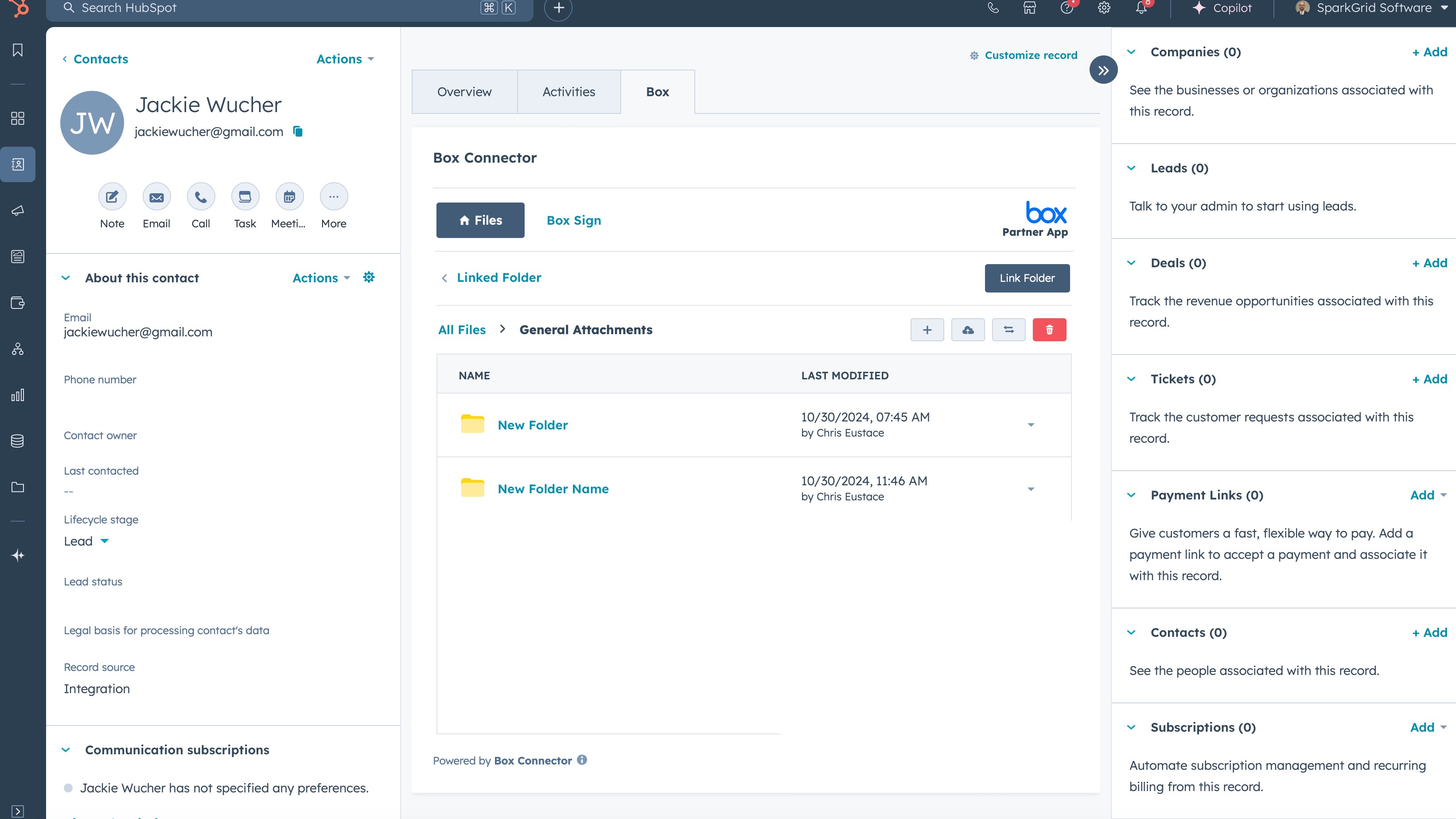
View and Manage Box Files in HubSpot
Access every client folder and file in HubSpot so your team can find, preview, and share files instantly. - See Box files instantly on Contact, Company, Deal, Ticket, & Custom Object records - Work without switching tools by managing Box documents directly inside HubSpot - Keep access secure with Box permissions automatically applied for every user

Automate repeatable file tasks
Use 42 no-code Box workflow actions in HubSpot Workflows to eliminate manual file management
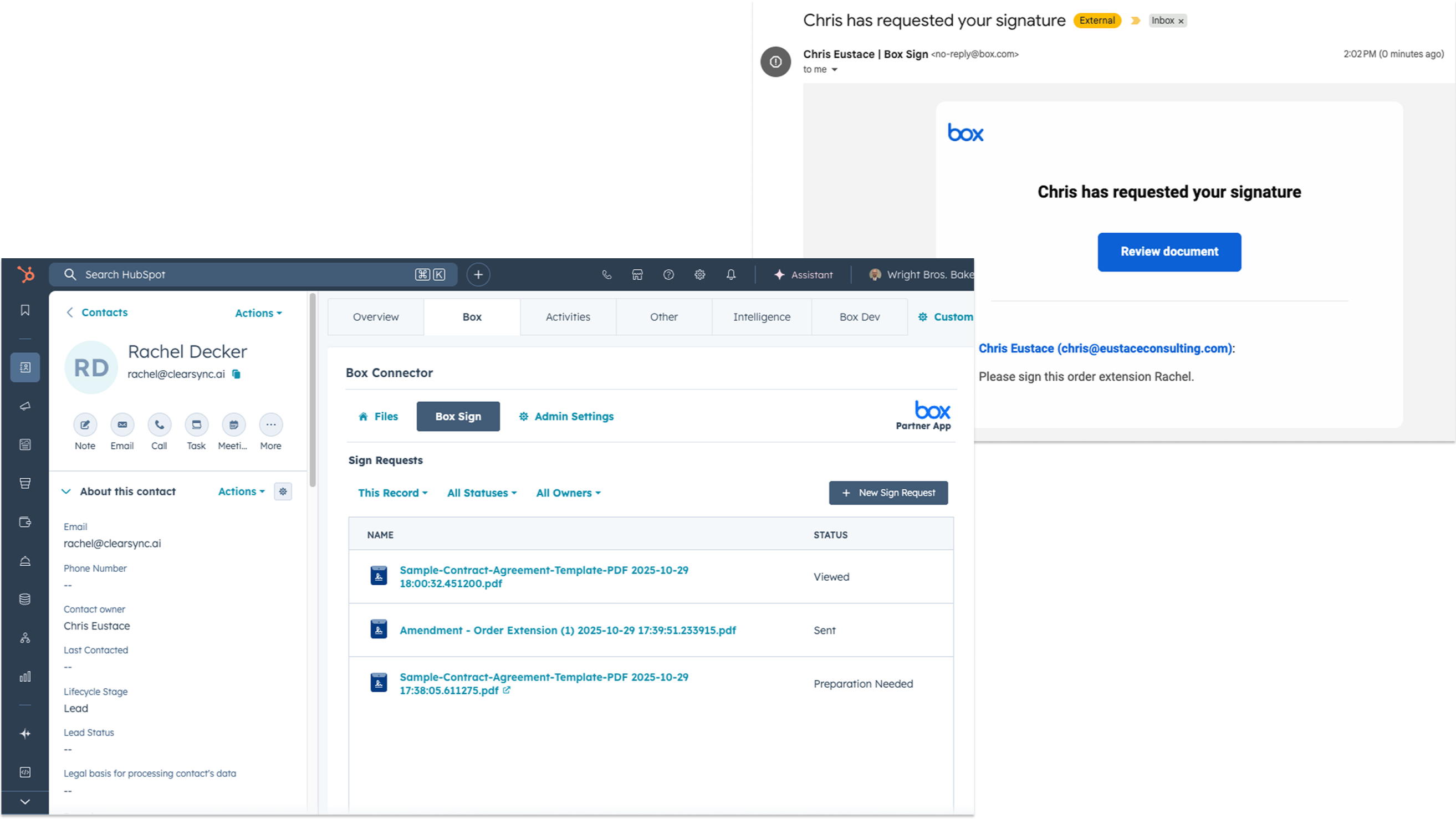
Sign and share documents effortlessly
Send, track, and sync signatures without leaving HubSpot. - Monitor every signature in real time by initiating, viewing, and tracking Box Sign requests directly from HubSpot - Personalize every document automatically by mapping HubSpot properties to Box Sign templates - Send unlimited e-signatures for free with your Box Business plan or above
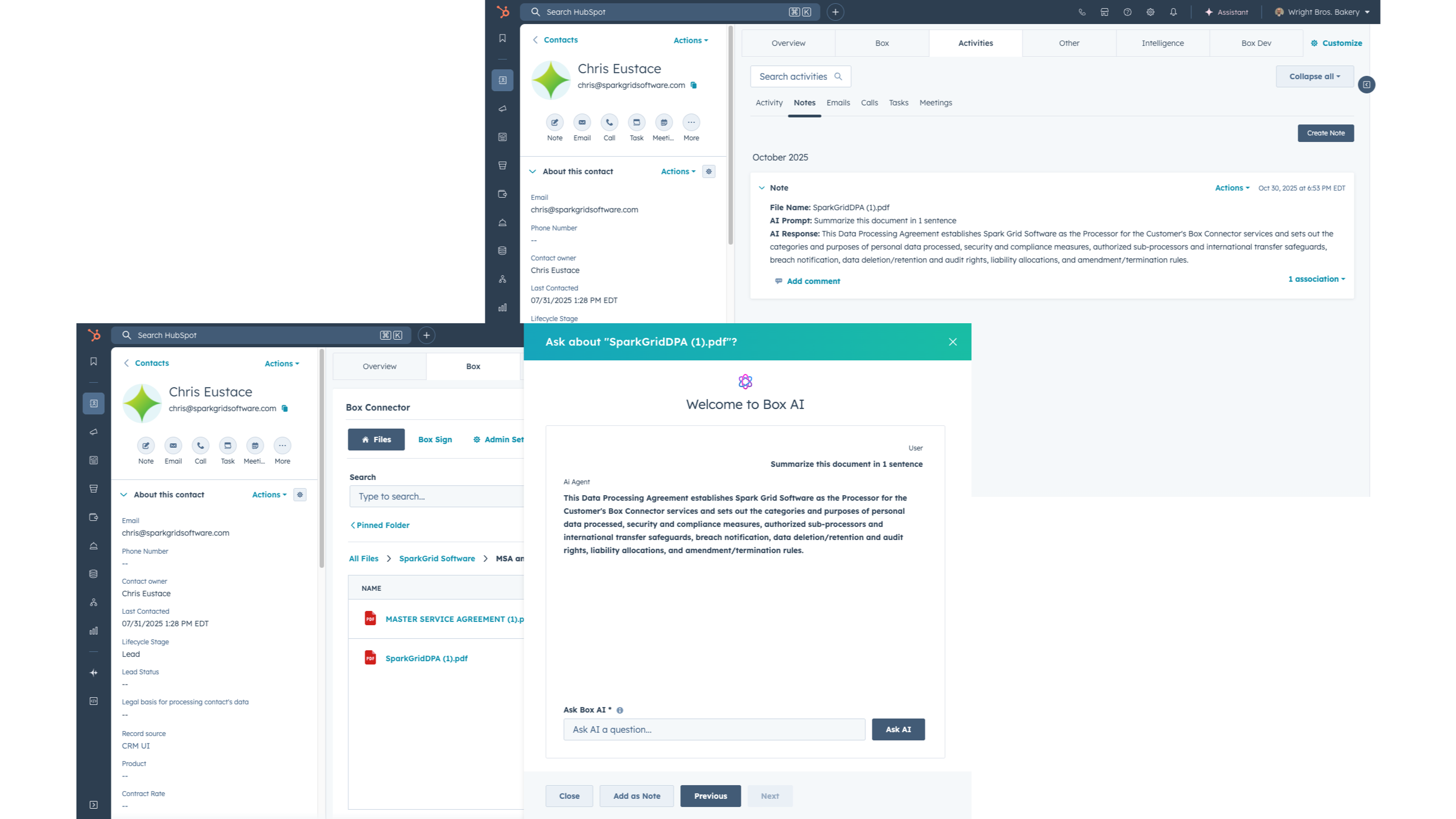
Turn chaos into clarity with Box AI
Box AI automatically names, sorts, files, and summarizes your documents. - Find & summarize any document instantly by asking questions in natural language - Files organize themselves into the correct Box folders & link to HubSpot records - From “IMG_2487.pdf” to “Jane S's Driver’s License”, Box AI renames files automatically for instant clarity

Security your compliance team can check
Your files stay in Box, protected by Box's security and permissions. - SparkGrid has completed a SOC 2 Type 2 audit, and a BAA is available - Box and HubSpot both support HIPAA; SparkGrid itself is not HIPAA compliant
App Functionality
Tickets | ||
Companies | ||
Contacts | ||
Deals |
Reviews
5.0
10
5.0
10
- Aug 18, 2026
Seamless HubSpot & Box Integration with Outstanding Support
We recently completed the implementation of Box Connector to integrate HubSpot with Box, and the experience exceeded our expectations. The integration has streamlined our document management process by allowing our sales team to initiate Box Sign requests directly from HubSpot while automatically storing executed agreements in the correct Box folder structure. This has eliminated manual file management, improved consistency, and ensured client documentation is organized and accessible across the organization. A special thank you to Jackie for his outstanding support throughout the implementation. He was knowledgeable, responsive, and always willing to help work through questions and configuration challenges. His guidance made the deployment smooth and ensured we were able to implement the solution successfully. The product delivers real operational value, and the level of customer support provided by the SparkGrid team was excellent.
Mahmood, W.
- Jul 15, 2026
The 400 Hour Per Month Time Saver
The Box Connector integration for HubSpot has absolutely transformed the way we do business, process documentation, and service our clients. As a financial services company, it's imperative that we are able to accurately accept, digest, and reference documentation. The Box Connector allows us to do just that, while opening up our HubSpot portal to the full functionality and capability of the Box AI model and Box metadata. If you want your team to experience 400 Hours of time savings like we have, get this product.
Customer Support, Customer Success, Integration, Metadata Extraction, Box AI functionality
N/A
Smith, D.
Core
$200
/monthIntegrate Your Box Files to HubSpot
Securely Share Folders and Files
File Search
File Collaboration
Dynamic Folder Creation
Pin Folders to HubSpot Records
File Previews
Seamless integration of Box within HubSpot CRM
Core
$200
/monthIntegrate Your Box Files to HubSpot
Securely Share Folders and Files
File Search
File Collaboration
Dynamic Folder Creation
Pin Folders to HubSpot Records
File Previews
Seamless integration of Box within HubSpot CRM
* The pricing here is for display purposes only. All prices do not include taxes, incentives, discounts, or other pricing variables. You should contact the partner for the most up to date and correct pricing information. HubSpot does not take any responsibility for this pricing information, which is provided by our partners. Pricing last updated: 11/11/2026
More info
Built by - SparkGrid Software
Installs - 100+ installs
Categories Languages this app is available in English
New arrivals

Mesh
We run the back end. You run the business.

AT&T Office@Hand
Streamline workflows with AT&T Office@Hand's integration for HubSpot.
