

CloudFiles - Document Management, Sharing & Generation
Erstellt von - CloudFiles
Installationen - 2 Tsd. Installationen
Bewertung 4,8
(36)

Führend
Anforderungen
HubSpot-Produktversion HubSpot-Account-Berechtigungen - Erforderliche Account-Berechtigungen anzeigen
Zugriffstyp Geteilt CloudFiles - Document Management, Sharing & Generation-Abonnement - Produktversionen: Dokumentenverwaltung, Dokumente teilen oder Dokumentgenerierung
Übersicht
1/9 - CloudFiles x HubSpot | Demo-Video zu Dokumentenmanagement und Automatisierung
CloudFiles ist die All-in-One-Dokumentenplattform für HubSpot, die entwickelt wurde, um Dokumente zu erstellen, externe Speicher zu verwalten, Dateien mit Kunden zu teilen und Daten aus Uploads zu extrahieren, ohne HubSpot verlassen zu müssen. Sie vereint vier Tools, die alle in HubSpot-Datensätze und -Workflows integriert sind.
Links zum Schnellstart
CloudFiles bietet eine 14-tägige kostenlose Testversion. Um loszulegen, installieren Sie das Tool mithilfe der 🔗 Installationsanleitung und besuchen Sie anschließend einen dieser Schnellstart-Leitfäden:
🔗 Schnellstart „Dokumentenverwaltung“ – Verbinden Sie externe Speicherorte mit HubSpot-Datensätzen und automatisieren Sie die Verwaltung von Dateien und Ordnern
🔗 Schnellstart „Dokumentenfreigabe“ – Teilen Sie Dateien mit Kunden, erfassen Sie Analysedaten und erstellen Sie Datenräume zum Sammeln von Dateien
🔗 Schnellstart „Dokumenterstellung“ – Erstellen Sie markengerechte Dokumente mithilfe von Vorlagen auf Microsoft- oder Google-Basis
🔗 Schnellstart „Marketing & CMS“ – Best Practices zur Erstellung von Dateianalysen und deren Nutzung in HubSpot-Berichten
🔗 Schnellstart für Vertrieb und Service – Best Practices zur Automatisierung der Verwaltung externer Dateien und Ordner in HubSpot
Kurze Produktübersichten
CloudFiles vereint vier Dokumententools in HubSpot. In den oben genannten Produkt-Schnellstarts finden Sie kurze Anleitungen, wie Sie die Funktionen in Ihrer eigenen HubSpot-Instanz in Aktion erleben können.
Dokumentenmanagement – Verbinden Sie Cloud-Speicher (Google Drive, SharePoint und mehr) und verwalten Sie Dateien und Ordner direkt aus HubSpot heraus. Automatisieren Sie die Ordnererstellung, organisieren Sie Uploads und optimieren Sie Dokumenten-Workflows.
Dokumentenfreigabe – Geben Sie Dateien und Ordner aus HubSpot über sichere, mit Ihrem Branding versehene und nachverfolgbare Links frei. Steuern Sie den Zugriff, sammeln Sie Dokumente und lösen Sie Workflows basierend auf der Interaktion mit den Dateien aus – alles direkt aus der Datensatzansicht heraus.
Dokumenterstellung – Erstellen Sie Vorlagen mit HubSpot-Daten und veröffentlichen Sie diese direkt in HubSpot. Generieren Sie aus jedem Datensatz sofort einsatzbereite Angebote, Vereinbarungen oder Verträge im DOCX- oder PDF-Format.
(In Kürze verfügbar) Dokumenten-KI – Mithilfe fortschrittlicher OCR-Technologie und Dokumentenintelligenz können Sie wichtige Informationen aus jedem Dokument extrahieren, Inhalte zusammenfassen und analysieren, Dateien aufteilen und Workflows auslösen – alles, ohne den HubSpot-Datensatz zu verlassen.
Entwickelt für HubSpot-Teams
CloudFiles hilft Marketing-, Vertriebs- und Serviceteams, bessere Leistungen zu erzielen, indem es Dokumente zugänglicher und aussagekräftiger macht. Sehen Sie sich die oben aufgeführten Schnellstarts für Teams an, um verschiedene Strategien unserer Top-Kunden kennenzulernen.
Analysen für Marketingfachleute – Veröffentlichen Sie Marketingmaterialien auf Ihrer Website, in sozialen Medien oder in Anzeigen, oder versenden Sie diese per Massen- oder Vertriebs-E-Mails. Sammeln Sie E-Mail-Adressen und Analysedaten in HubSpot, segmentieren und bewerten Sie diese mithilfe von Automatisierungen und erstellen Sie Berichte und Dashboards, um Erkenntnisse zu gewinnen.
Automatisierung für Vertriebs- und Serviceverantwortliche – Erstellen Sie markengerechte Dokumente, verwalten Sie externe Speicherorte direkt aus HubSpot-Datensätzen heraus, automatisieren Sie Ordner- und Dateivorgänge und geben Sie Dateien an Ihre Kunden weiter bzw. sammeln Sie diese von ihnen ein.
Hier sind noch einige weitere nützliche Links – **Alle Schnellstarts, Anwendungsfälle entdecken, Videoplaylist, Termin mit Experten vereinbaren**
„CloudFiles hat die Dateifreigabe in HubSpot nahtlos gestaltet – mit automatisierten Ordnern, Nachverfolgung und einem reibungslosen Onboarding.“ ⭐⭐⭐⭐⭐ – Lauren Goldman, Senior Manager, PwC Australia
Funktionen
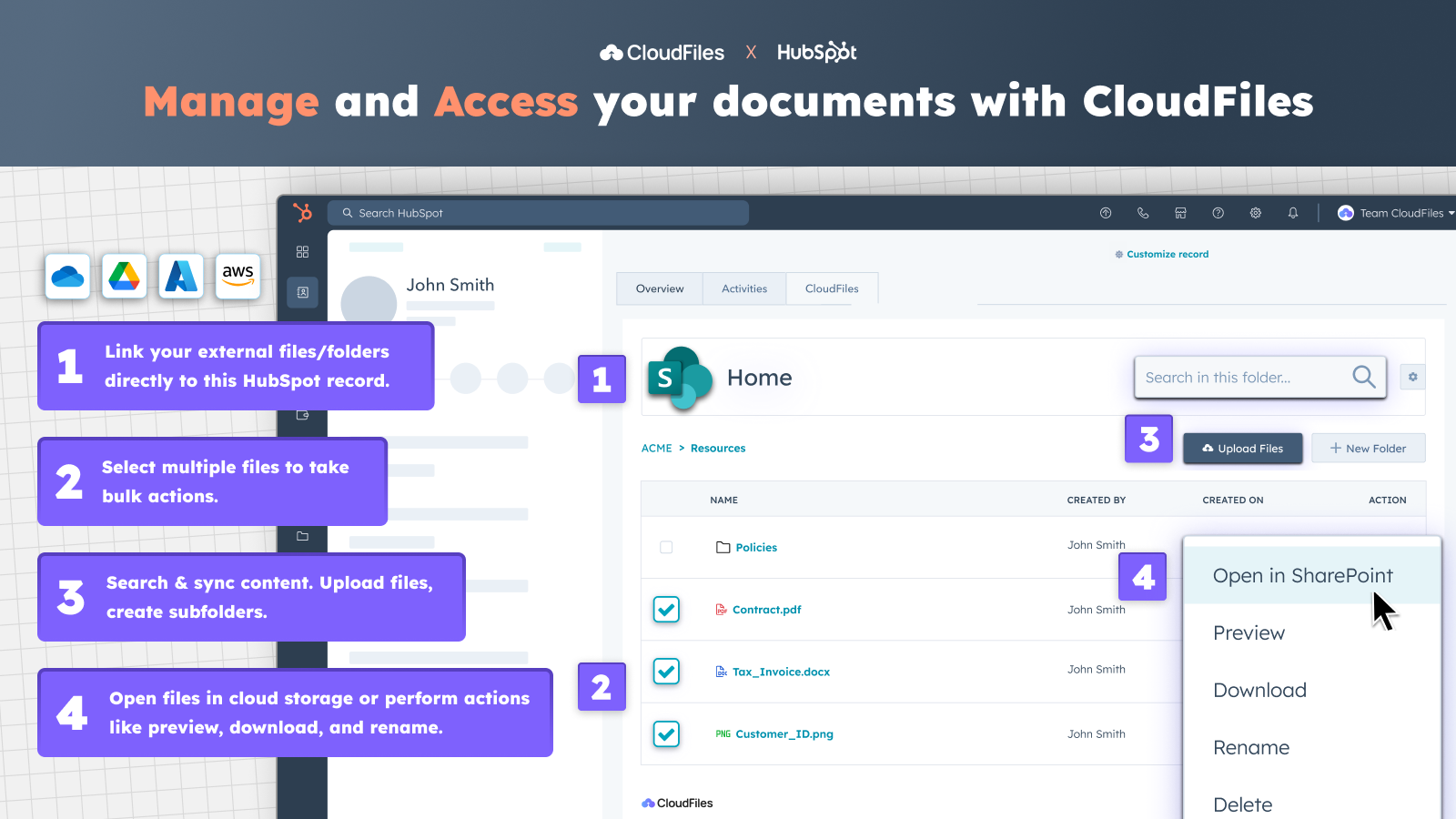
Auf externe Dateien und Ordner über HubSpot zugreifen
✅ Rufen Sie das CloudFiles-Widget aus Kontakt-, Unternehmens-, Geschäfts- oder Ticket-Datensätzen auf. ✅ Synchronisieren Sie vorhandene Bibliotheken von Google Drive, OneDrive, SharePoint, Box oder Dropbox. ✅ Verknüpfen Sie Dokumente und Ordner mit beliebigen Datensätzen. ✅ Zeigen Sie eine Vorschau an, benennen Sie Dateien um, laden Sie sie herunter, öffnen Sie sie in Ihrer Cloud und vieles mehr – ganz ohne zwischen Registerkarten hin- und herzuwechseln.
-1.png)
Dokumente über markenspezifische Portale sicher freigeben und sammeln
✅ Wenden Sie erweiterte Sicherheitsmaßnahmen wie das Ablaufen von Links, E-Mail-Verifizierung oder die Deaktivierung von Downloads auf Ihre Dokumente an. ✅ Erstellen Sie sichere, an Ihr Unternehmen angepasste Portale, um Inhalte oder Ordner aus Google Drive oder SharePoint über einen einzigen Link freizugeben. ✅ Gruppieren Sie Inhalte und fügen Sie Blöcke für Dateianfragen hinzu, um Dokumente direkt von Kunden zu sammeln.
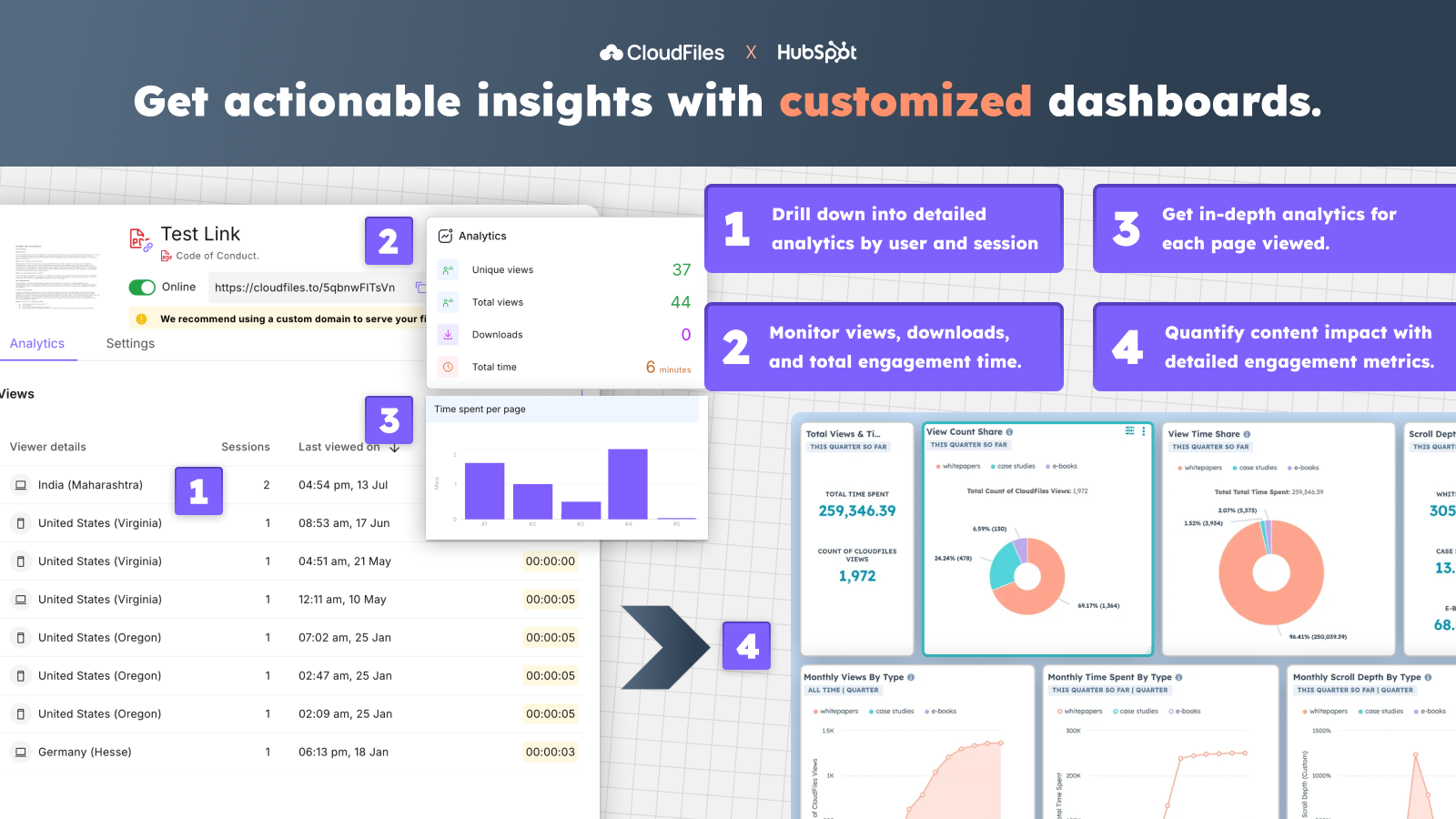
Dateianalysen verfolgen und benutzerdefinierte Dashboards erstellen
✅ Verfolgen Sie Aufrufe, Verweildauer und Interaktionen für Dateien aus Google Drive oder anderen Speichern. ✅ Erhalten Sie detaillierte Analysen nach Nutzer, Sitzung und Aktivitäten auf Seitenebene. ✅ Verfolgen Sie die Leistung von Dokumenten und die Interaktionen mit benutzerdefinierten Dashboards in HubSpot.
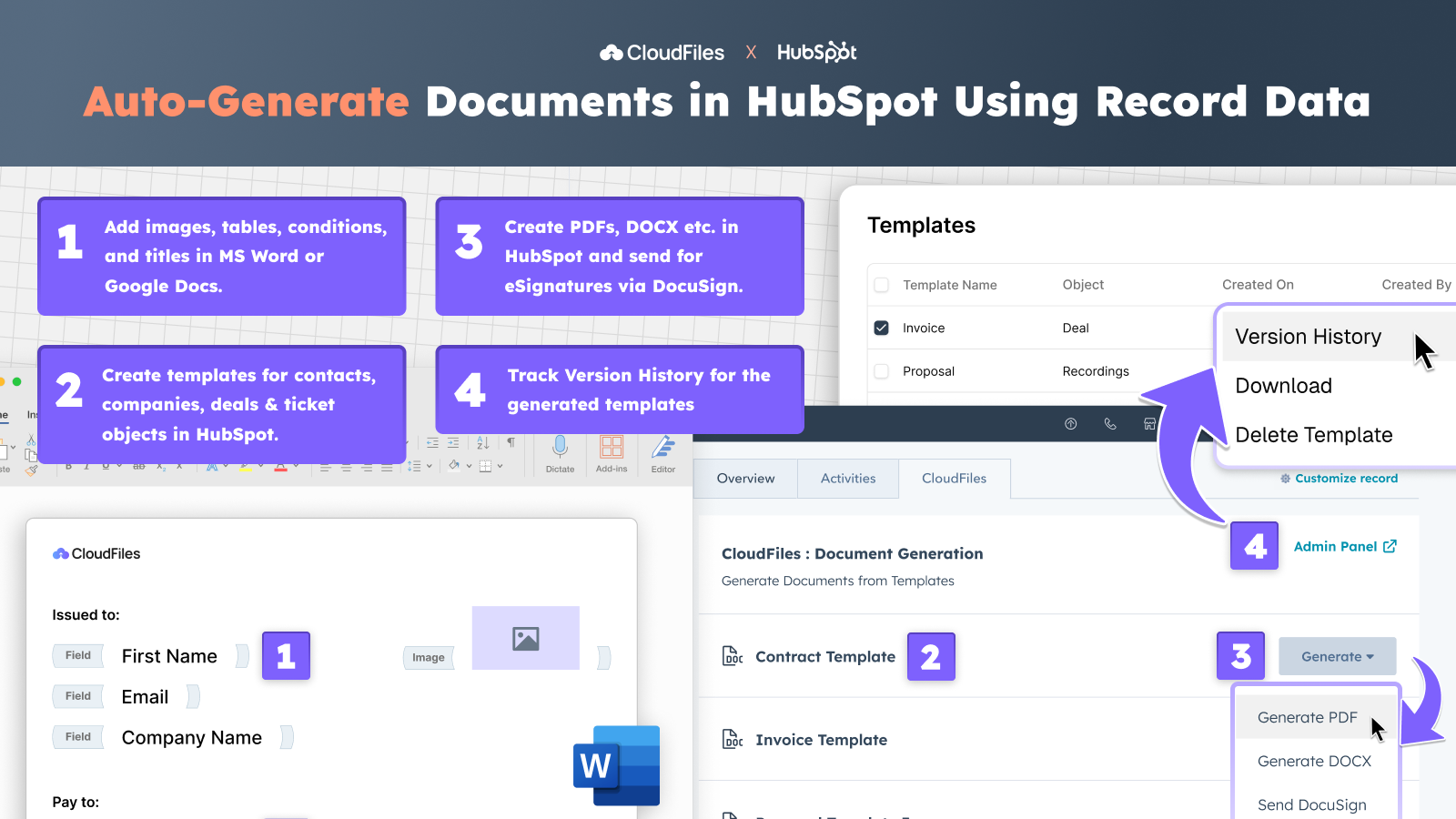
Erstellen Sie personalisierte Dokumente direkt in HubSpot
✅ Erstellen Sie dynamische Vorlagen für jedes HubSpot-Objekt unter Verwendung von CRM-Daten. ✅ Fügen Sie Felder, Bedingungen, Bilder und Tabellen hinzu, um personalisierte Angebote, Rechnungen usw. zu erstellen. ✅ Bearbeiten und verwalten Sie Vorlagen in Google Docs oder MS Word mit vollständigem Versionsverlauf. ✅ Erstellen Sie automatisch PDF-, DOCX-, PPTX-Dateien usw. direkt aus HubSpot heraus oder senden Sie sie über DocuSign zur elektronischen Unterzeichnung.
App-Funktionalität
File | ||
File View Events | ||
Files View Event | ||
File View Event |
Rezensionen
4,8
36
4,8
36
- 27. Juli 2026
Unterstützung für benutzerdefinierte Objekte
CloudFiles ist ein großartiges System, und wir können uns sehr glücklich schätzen, auch einen so hervorragenden und reaktionsschnellen Support durch das Team zu erhalten. Wyma hat einen sehr komplexen Anwendungsfall, und das CloudFiles-Team versteht unsere Anliegen schnell, hilft uns bei der Fehlerbehebung und arbeitet so lange mit uns zusammen, bis das Problem gelöst ist.
Erfüllt genau unsere Anforderungen – verbindet unsere HubSpot-Kontakte sicher mit SharePoint-Ressourcen. Lässt sich sehr gut mit HubSpot kombinieren. Der Support ist hervorragend.
Mir fällt nichts ein.
Coker, M.
- 30. Juni 2026
Die perfekte Lösung für SharePoint und Dokumentenmanagement in HubSpot
Wir sind äußerst zufrieden mit CloudFiles und dem Mehrwert, den es für unser Team geschaffen hat. Die App eignet sich perfekt für die Verwaltung der Anbindung an SharePoint. Wir nutzen HubSpot-Workflows, um automatisch Ordner anzulegen und Berechtigungen zuzuweisen, was unsere Prozesse wesentlich effizienter und zuverlässiger gemacht hat. Ein weiterer großer Vorteil ist die Dokumentenautomatisierung. Wir verfügen über Word- und Excel-Vorlagen, die direkt aus HubSpot mit Informationen gefüllt werden können, sodass wir Dokumente für Angebote, Verträge, Projekte und vieles mehr direkt aus dem Datensatz generieren können. Besonders hervorzuheben ist auch die Qualität des Supports. Das Team hat proaktiv auf unsere Vorschläge für Erweiterungen oder Verbesserungen reagiert und schnell mit Anpassungen und Weiterentwicklungen geantwortet. Auch während der gesamten Implementierungsphase haben sie uns sehr unterstützt, uns bei der Einrichtung geholfen und unsere Fragen beantwortet. CloudFiles hat uns dabei geholfen, sowohl das Dokumentenmanagement als auch die Zusammenarbeit zu optimieren, und ist zu einem wichtigen Bestandteil unserer Arbeitsweise in HubSpot geworden. Ich kann die App und das dahinter stehende Team wärmstens empfehlen.
Einfache Einrichtung und proaktiver Support
Keine
Bakke, K.
Dokumentenverwaltung
4,17 $
/MonatVerknüpfen Sie externe Dateien und Ordner mit HubSpot-Datensätzen und verkürzen Sie so die Bearbeitungszeit
Die Preise gelten pro CloudFiles-Lizenz
Anbindung für Google Drive, SharePoint, AWS S3 und mehr…
Karte und Widget für Kontakte, Unternehmen, Geschäfte und Tickets
Dateien hochladen, Ordner erstellen und weitere Funktionen
Funktioniert mit HubSpot-Standardobjekten und benutzerdefinierten Objekten
Bidirektionale Synchronisierung mit allen externen Speichermedien
Selbsthilfe, E-Mail- und Chat-Support verfügbar
Mit Unternehmenslizenzen verfügbare Automatisierungen
Alle Preisoptionen für Enterprise- und Add-on-Pakete anzeigen
Dokumentenverwaltung
4,17 $
/MonatVerknüpfen Sie externe Dateien und Ordner mit HubSpot-Datensätzen und verkürzen Sie so die Bearbeitungszeit
Die Preise gelten pro CloudFiles-Lizenz
Anbindung für Google Drive, SharePoint, AWS S3 und mehr…
Karte und Widget für Kontakte, Unternehmen, Geschäfte und Tickets
Dateien hochladen, Ordner erstellen und weitere Funktionen
Funktioniert mit HubSpot-Standardobjekten und benutzerdefinierten Objekten
Bidirektionale Synchronisierung mit allen externen Speichermedien
Selbsthilfe, E-Mail- und Chat-Support verfügbar
Mit Unternehmenslizenzen verfügbare Automatisierungen
Alle Preisoptionen für Enterprise- und Add-on-Pakete anzeigen
* Die hier angegebenen Preise dienen nur zu Illustrationszwecken. Alle Preise enthalten keine Steuern, Sonderangebote, Rabatte oder sonstigen Preisvarianten. Bitte wenden Sie sich direkt an den Partner, um aktuelle und korrekte Preisinformationen zu erhalten. HubSpot übernimmt keine Verantwortung für Preisinformationen, die von unseren Partnern bereitgestellt werden. Letzte Aktualisierung der Preisinformationen: 16.06.2026
Weitere Infos
Erstellt von - CloudFiles
Installationen - 2 Tsd. Installationen
Kategorien Sprachen, in denen diese App verfügbar ist Deutsch ,Englisch ,Französisch undSpanisch