
CloudFiles - Document Management, Sharing & Generation
Bygget av - CloudFiles
Installeringer - 2K innstalleringer
Rangering 4,8
(34)

Ledende
Krav
HubSpot-abonnement HubSpot-kontotillatelser - Vis nødvendige kontotillatelser
Tilgangstype Delt CloudFiles - Document Management, Sharing & Generation-abonnement - Dokumenthåndtering, Deling av dokumenter eller Generering av dokumenter-abonnementer
Oversikt
1/9 - CloudFiles x HubSpot | Document Management and Automation Demo Video
CloudFiles er en alt-i-ett-dokumentplattform for HubSpot, utviklet for å hjelpe deg med å opprette dokumenter, administrere eksterne lagringsplasser, dele filer med kunder og hente ut data fra opplastede filer uten å forlate HubSpot. Den samler fire verktøy, som alle er integrert med HubSpot-poster og -arbeidsflyter.
Lenker til hurtigstart
CloudFiles kommer med en 14-dagers gratis prøveperiode. For å komme i gang, installer den ved å følge 🔗 installasjonsveiledningen, og gå deretter til en av disse hurtigstartguidene –
🔗 Hurtigstart for dokumenthåndtering – Koble eksterne lagringsplasser til HubSpot-poster og automatiser fil- og mappehåndtering
🔗 Hurtigstart for fildeling – Del filer med kunder, samle inn analyser og opprett datarom for å samle filer
🔗 Hurtigstart for dokumentgenerering – Lag merkevarekonsistente dokumenter ved hjelp av Microsoft- og Google-baserte maler
🔗 Hurtigstart for markedsføring og CMS – beste praksis for å generere filanalyser og bruke dem i HubSpot-rapporter
🔗 Hurtigstart for salg og service – beste praksis for å automatisere håndtering av eksterne filer og mapper i HubSpot
Kort produktoversikt
CloudFiles samler fire dokumentverktøy i HubSpot. Besøk hurtigstartguidene ovenfor for å få en rask innføring i hvordan du kan se det i praksis i din egen HubSpot-instans.
Dokumenthåndtering – Koble til skylagring (Google Drive, SharePoint og mer) og administrer filer og mapper direkte fra HubSpot. Automatiser oppretting av mapper, organiser opplastinger og effektiviser dokumentarbeidsflyter.
Dokumentdeling – Del filer og mapper fra HubSpot ved hjelp av sikre, merkevarebaserte og sporbare lenker. Kontroller tilgang, samle inn dokumenter og utløs arbeidsflyter basert på filengasjement – alt fra rekordvisningen.
Dokumentgenerering – Lag maler med HubSpot-data og publiser dem i HubSpot. Fra hvilken som helst post kan du umiddelbart generere bruksklare tilbud, avtaler eller kontrakter i DOCX- eller PDF-format.
(Kommer snart) Dokument-AI – Ved hjelp av avansert OCR og dokumentintelligens kan du hente ut nøkkelinformasjon fra ethvert dokument, oppsummere og analysere innhold, dele opp filer og utløse arbeidsflyter – alt uten å forlate HubSpot-posten.
Laget for HubSpot-team
CloudFiles hjelper markedsførings-, salgs- og serviceteam med å prestere bedre ved å gjøre dokumenter mer tilgjengelige og innsiktsfulle. Besøk hurtigstartguidene for teamene ovenfor for å se ulike strategier som brukes av våre største kunder.
Analytikk for markedsførere – Del markedsføringsmateriale på nettstedet, i sosiale medier og i annonser, eller send det via masse- eller salgs-e-poster. Samle e-postadresser og analytikk i HubSpot, segmenter og vurder ved hjelp av automatiseringer, og lag rapporter og dashbord for å generere innsikt.
Automatisering for salgs- og serviceledere – Lag merkevaretilpassede dokumenter, administrer eksterne lagringsplasser fra HubSpot-poster, automatiser mappe- og filoperasjoner, og del samt samle inn filer fra kundene dine.
Her er noen flere nyttige lenker – **Alle hurtigstarter, utforsk bruksscenarier, videospilleliste, bestill en samtale med eksperter**
«CloudFiles gjorde fildeling sømløs i HubSpot – med automatiserte mapper, sporing og en smidig oppstartsopplevelse.» ⭐⭐⭐⭐⭐ – Lauren Goldman, Senior Manager, PwC Australia
Funksjoner
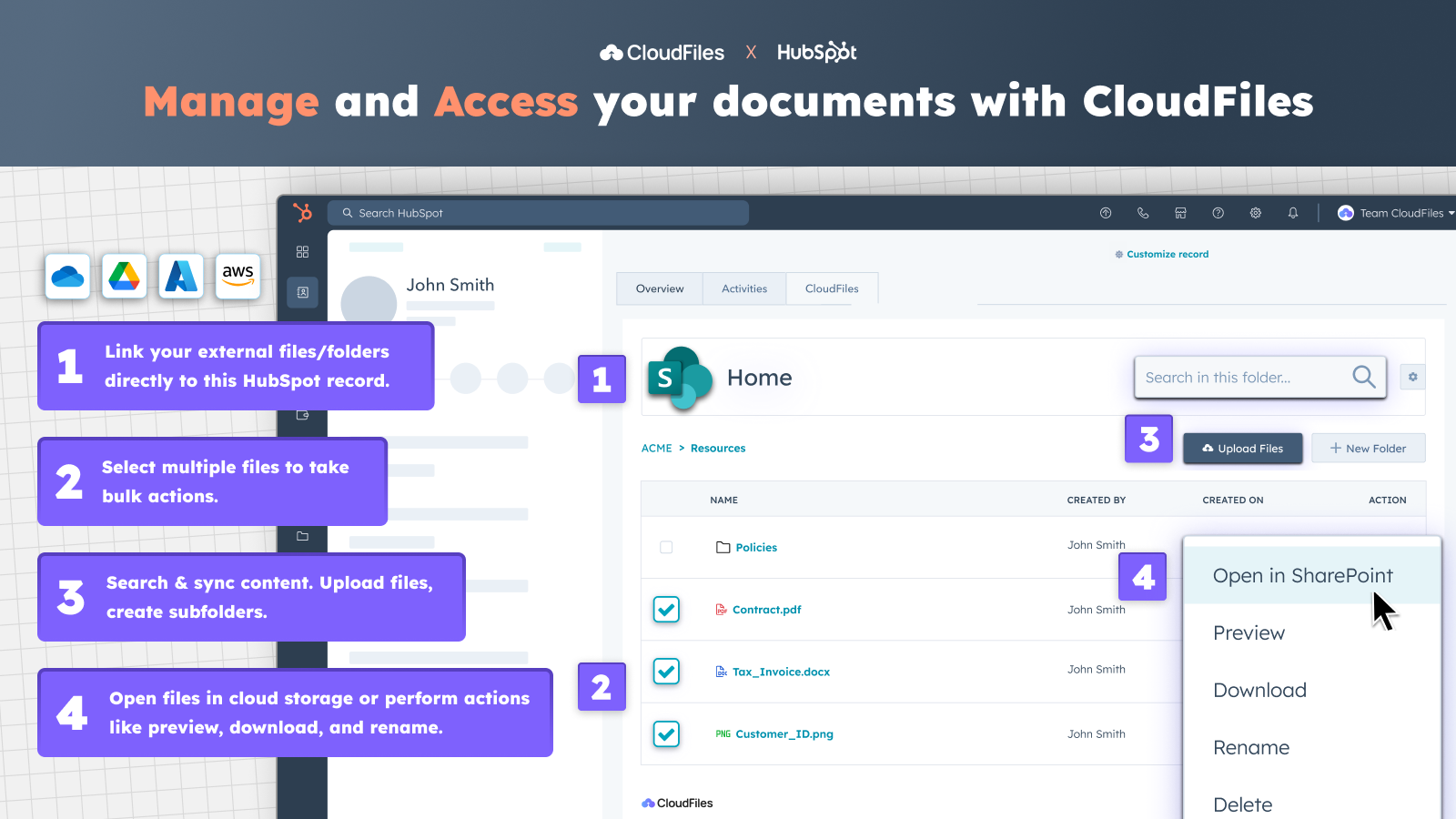
Få tilgang til eksterne filer og mapper fra HubSpot
✅ Få tilgang til CloudFiles-widgeten fra kontakt-, bedrifts-, avtale- eller saksoppføringer. ✅ Synkroniser eksisterende biblioteker i Google Drive, OneDrive, SharePoint, Box eller Dropbox. ✅ Koble dokumenter og mapper til hvilken som helst post ✅ Forhåndsvis, gi nytt navn, last ned, åpne filer i skyen og mer uten å måtte bytte mellom faner.
-1.png)
Del og samle inn dokumenter på en sikker måte via portaler med bedriftens profil
✅ Bruk avanserte sikkerhetsfunksjoner som utløpstid for lenker, e-postbekreftelse eller deaktivering av nedlastinger for dokumentene dine. ✅ Opprett sikre portaler med bedriftens profil for å dele innhold eller mapper fra Google Drive eller SharePoint med én enkelt lenke. ✅ Gruppér innhold og legg til blokker for filforespørsler for å samle inn dokumenter direkte fra kunder.
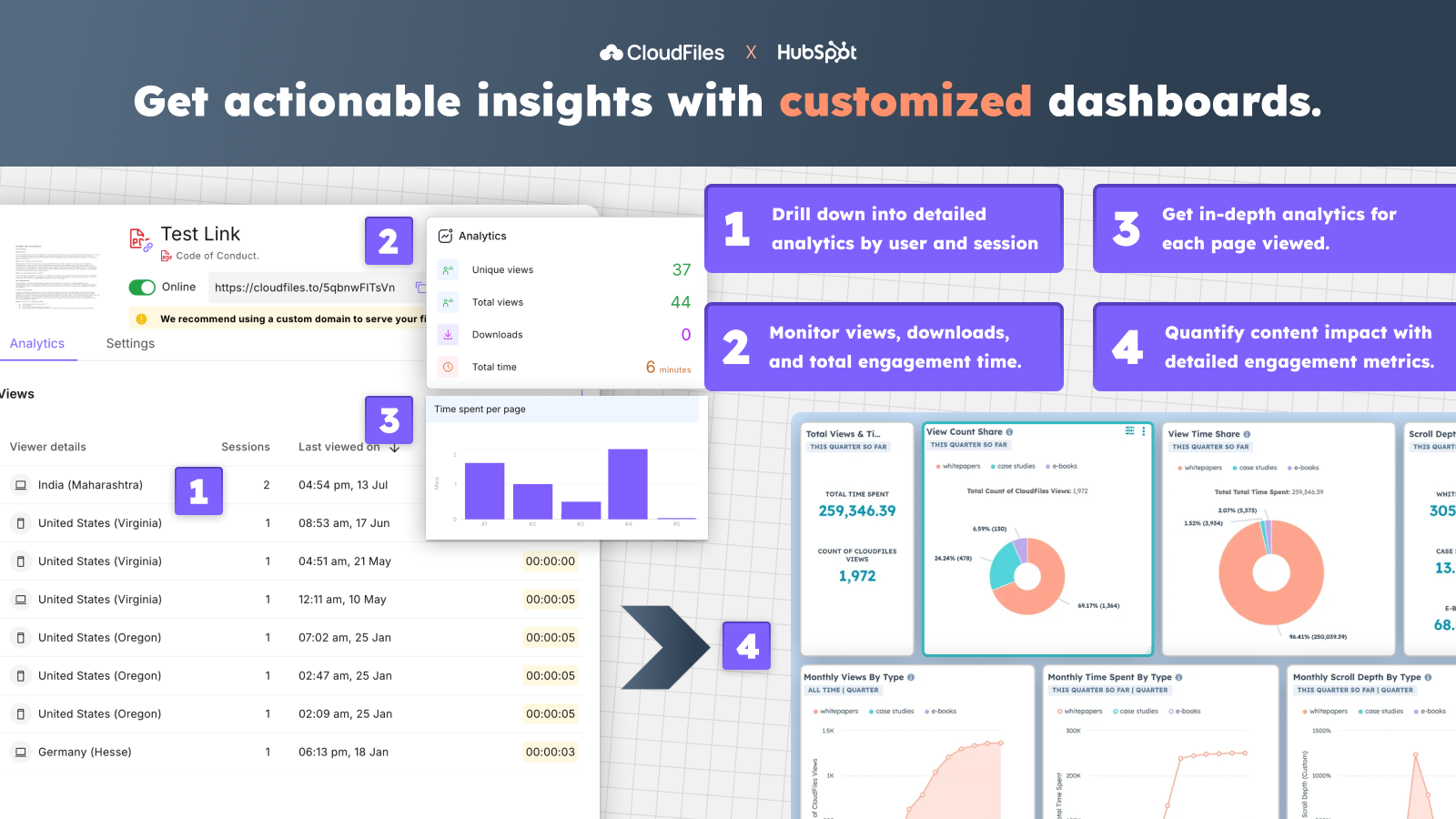
Spor filanalyser og lag tilpassede oversiktssider
✅ Spor visninger, tilgangstid og engasjement for filer fra Google Drive eller andre lagringssteder. ✅ Få detaljerte analyser etter bruker, økt og aktivitet på sidenivå. ✅ Spor dokumenters ytelse og engasjement med tilpassede dashbord i HubSpot.
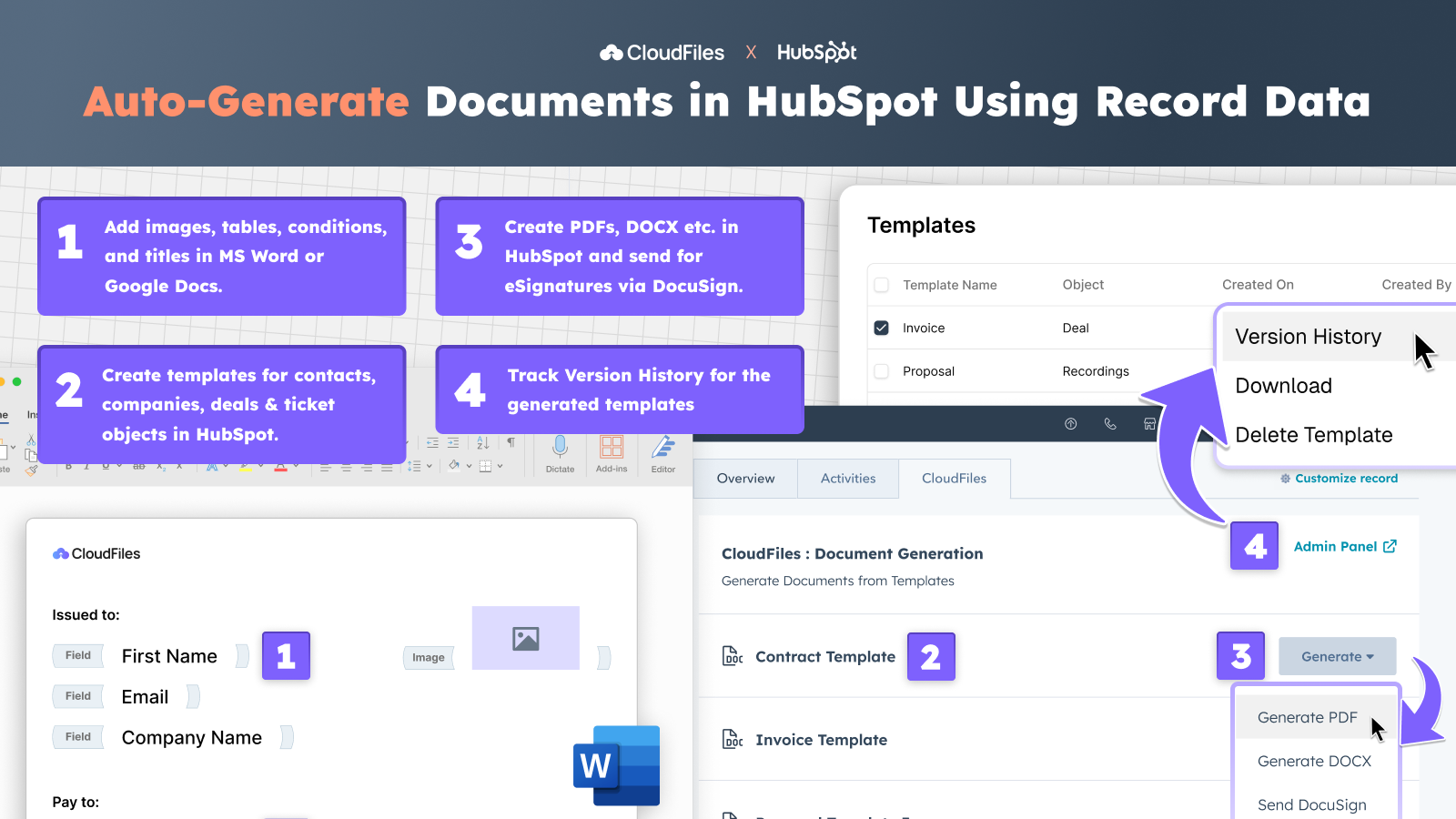
Lag tilpassede dokumenter direkte i HubSpot
✅ Lag dynamiske maler for alle HubSpot-objekter ved hjelp av CRM-data. ✅ Legg til felt, betingelser, bilder og tabeller for å lage tilpassede tilbud, fakturaer osv. ✅ Rediger og administrer maler i Google Docs eller MS Word, med fullstendig versjonshistorikk. ✅ Generer automatisk PDF-filer, DOCX, PPTX osv. direkte fra HubSpot, eller send dem til elektronisk signering via DocuSign.
Appfunksjonalitet
Delt data
File | ||
File View Events | ||
Files View Event | ||
File View Event |
Gjennomganger
4,8
34
4,8
34
- 26. mai 2026
Document Storage Simplified
CloudFiles makes it easy to connect HubSpot and a file storage system like Dropbox.
Love the built in workflow actions, ease of accessing files, and prompt helpful support.
Haven't identified any. Thoroughly impressed with the amount of functionality and ease of use.
Polliard, W.
- 22. mai 2026
I love the fast help that CloudFiles has :-)
I am starting to use CloudFiles and it feels like it will make our document setup much more easy
Lillesø, T.S.
Dokumenthåndtering
USD 4,17
/månedKnytt eksterne filer og mapper til HubSpot-poster og reduser behandlingstiden
Prisen gjelder per CloudFiles-lisens
Kobling til Google Drive, SharePoint, AWS S3 og mer…
Kort og widget for kontakter, selskaper, avtaler og saker
Last opp filer, opprett mapper og utfør flere handlinger
Fungerer med HubSpot Standard og tilpassede objekter
Toveis synkronisering med alle eksterne lagringsenheter
Selvbetjening, e-post- og chat-support tilgjengelig
Automatiseringer som er tilgjengelige med bedriftslisenser
Se alle prisalternativer for Enterprise og tilleggspakker
Dokumenthåndtering
USD 4,17
/månedKnytt eksterne filer og mapper til HubSpot-poster og reduser behandlingstiden
Prisen gjelder per CloudFiles-lisens
Kobling til Google Drive, SharePoint, AWS S3 og mer…
Kort og widget for kontakter, selskaper, avtaler og saker
Last opp filer, opprett mapper og utfør flere handlinger
Fungerer med HubSpot Standard og tilpassede objekter
Toveis synkronisering med alle eksterne lagringsenheter
Selvbetjening, e-post- og chat-support tilgjengelig
Automatiseringer som er tilgjengelige med bedriftslisenser
Se alle prisalternativer for Enterprise og tilleggspakker
* Prissettingen her er kun for illustrasjonsformål. Prisene inkluderer ikke avgifter, insentiver, rabatter eller andre prissettingsvariabler. Kontakt partneren for å få oppdatert og riktig prissettingsinformasjon. HubSpot tar ikke ansvar for denne prissettingsinformasjonen, som gis av våre partnere. Prissetting sist oppdatert: 16.06.2026
Mer info
Bygget av - CloudFiles
Installeringer - 2K innstalleringer
Kategorier Språkene appen er tilgjengelig på Engelsk ,Fransk ,Spansk ogTysk