
CloudFiles - Document Management, Sharing & Generation
Créé par - CloudFiles
Installation - 2 k installations
Évaluation 4,8
(34)

Diriger
Exigences
Abonnement HubSpot Autorisations de compte HubSpot - Afficher les autorisations de compte requises
Type d'accès Partagé Abonnement à CloudFiles - Document Management, Sharing & Generation - Abonnements : Gestion des documents, Partage de documents ou Génération de documents
Vue d'ensemble
1/9 - CloudFiles x HubSpot | Document Management and Automation Demo Video
CloudFiles est la plateforme de gestion de documents tout-en-un pour HubSpot, conçue pour vous aider à créer des documents, gérer des espaces de stockage externes, partager des fichiers avec vos clients et extraire des données à partir des fichiers téléchargés, le tout sans quitter HubSpot. Elle regroupe 4 outils, tous intégrés aux fiches et aux workflows HubSpot.
Liens de démarrage rapide
CloudFiles propose un essai gratuit de 14 jours. Pour commencer, installez-le à l’aide du 🔗 guide d’installation, puis consultez l’un de ces guides de démarrage rapide :
🔗 Guide de démarrage rapide « Gestion des documents » : connectez des espaces de stockage externes aux fiches HubSpot et automatisez la gestion des fichiers et des dossiers
🔗 Guide de démarrage rapide « Partage de documents » : partagez des fichiers avec vos clients, collectez des données analytiques et créez des salles de données pour rassembler des fichiers
🔗 Guide de démarrage rapide « Génération de documents » : créez des documents conformes à l’identité de marque à l’aide de modèles Microsoft ou Google
🔗 Guide de démarrage rapide « Marketing et CMS » : les meilleures pratiques pour générer des analyses de fichiers et les exploiter à l’aide des rapports HubSpot
🔗 Guide de démarrage rapide « Ventes et service client » : bonnes pratiques pour automatiser la gestion des fichiers et dossiers externes dans HubSpot
Brèves présentations du produit
CloudFiles regroupe 4 outils de gestion de documents dans HubSpot. Consultez les guides de démarrage rapide ci-dessus pour découvrir en quelques étapes comment les utiliser dans votre propre instance HubSpot.
Gestion des documents — Connectez votre espace de stockage cloud (Google Drive, SharePoint et bien d’autres) et gérez vos fichiers et dossiers directement depuis HubSpot. Automatisez la création de dossiers, organisez les téléchargements et rationalisez les workflows documentaires.
Partage de documents : partagez des fichiers et des dossiers depuis HubSpot à l’aide de liens sécurisés, personnalisés à l’image de votre marque et traçables. Contrôlez les accès, collectez des documents et déclenchez des workflows en fonction de l’activité sur les fichiers, le tout depuis la vue de l’enregistrement.
Génération de documents — Créez des modèles à partir des données HubSpot et publiez-les au sein de HubSpot. À partir de n’importe quelle fiche, générez instantanément des propositions, des accords ou des contrats prêts à l’emploi au format DOCX ou PDF.
(Bientôt disponible) IA documentaire : grâce à une technologie OCR avancée et à l’intelligence documentaire, vous pouvez extraire des informations clés de n’importe quel document, résumer et analyser le contenu, diviser des fichiers et déclencher des workflows, le tout sans quitter l’enregistrement HubSpot.
Conçu pour les équipes HubSpot
CloudFiles aide les équipes marketing, commerciales et de service client à améliorer leurs performances en rendant les documents plus accessibles et plus pertinents. Consultez les guides de démarrage rapide par équipe ci-dessus pour découvrir les différentes stratégies mises en œuvre par nos principaux clients.
Analyses pour les responsables marketing: partagez des supports marketing sur votre site web, sur les réseaux sociaux ou dans des publicités, ou envoyez-les via des e-mails groupés ou commerciaux. Collectez les adresses e-mail et les données d’analyse dans HubSpot, segmentez et attribuez des scores à l’aide d’automatisations, puis créez des rapports et des tableaux de bord pour générer des informations exploitables.
Automatisation pour les responsables des ventes et du service client: générez des documents conformes à l’image de marque, gérez des espaces de stockage externes à partir des fiches HubSpot, automatisez les opérations sur les dossiers et les fichiers, et partagez ou récupérez des fichiers auprès de vos clients.
Voici quelques liens utiles supplémentaires : **Tous les guides de démarrage rapide, découvrir les cas d’utilisation, liste de lecture vidéo, prendre rendez-vous avec des experts**
«CloudFiles a rendu le partage de fichiers transparent dans HubSpot, grâce à des dossiers automatisés, un suivi et une expérience d’intégration fluide. » ⭐⭐⭐⭐⭐ – Lauren Goldman, responsable senior, PwC Australie
Fonctionnalités
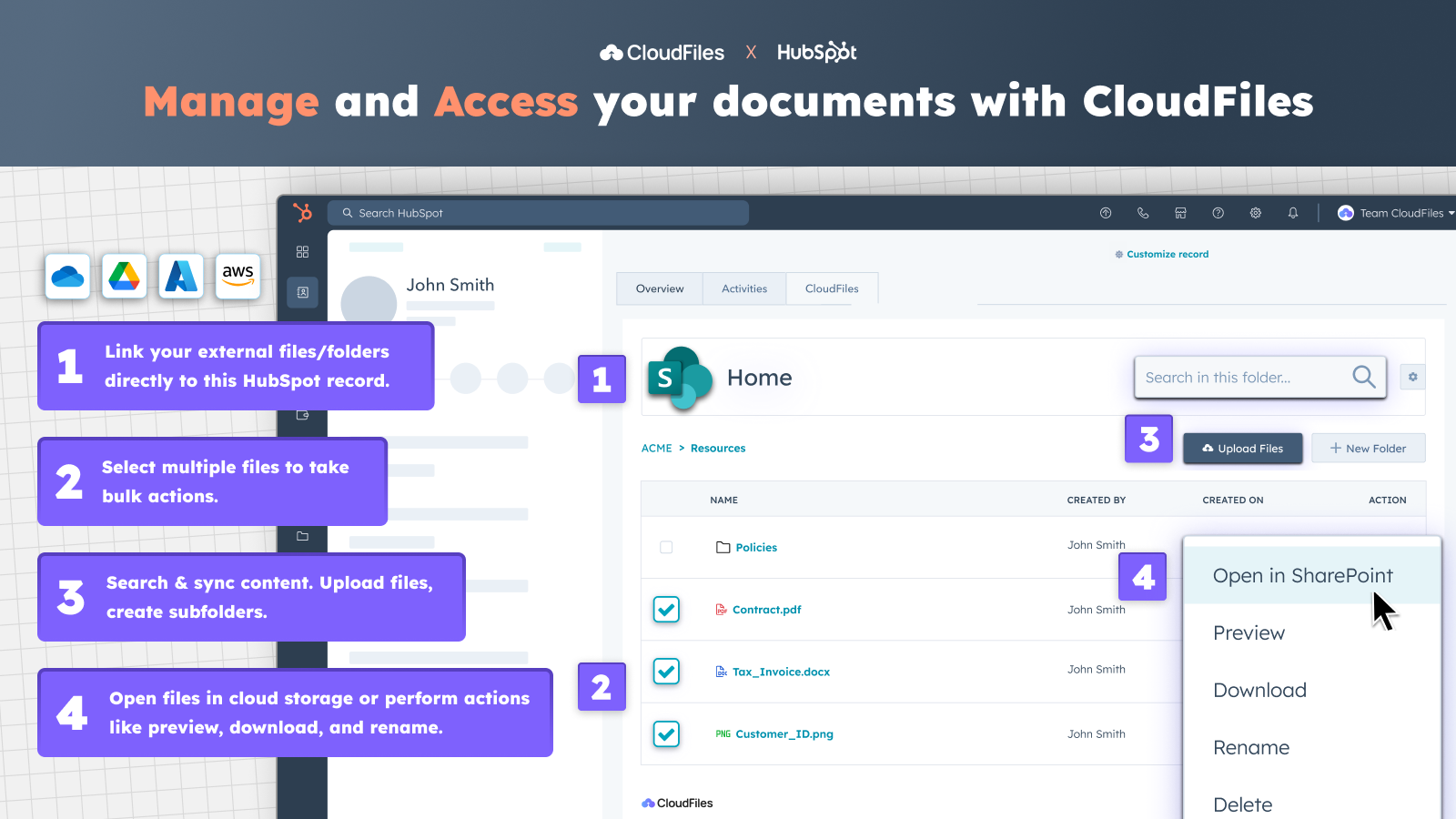
Accéder à des fichiers et dossiers externes depuis HubSpot
✅ Accédez au widget CloudFiles depuis les fiches de contact, d'entreprise, d'opportunité ou de ticket. ✅ Synchronisez vos bibliothèques Google Drive, OneDrive, SharePoint, Box ou Dropbox existantes. ✅ Associez des documents et des dossiers à n'importe quelle fiche ✅ Prévisualisez, renommez, téléchargez et ouvrez des fichiers dans votre cloud, et bien plus encore, sans avoir à changer d'onglet.
-1.png)
Partagez et collectez des documents en toute sécurité via des portails personnalisés
✅ Appliquez des mesures de sécurité avancées à vos documents, telles que l'expiration des liens, la vérification par e-mail ou la désactivation des téléchargements. ✅ Créez des portails sécurisés et personnalisés à l'image de votre marque pour partager du contenu ou des dossiers Google Drive ou SharePoint à l'aide d'un simple lien. ✅ Regroupez du contenu et ajoutez des formulaires de demande de fichiers pour collecter des documents directement auprès de vos clients.
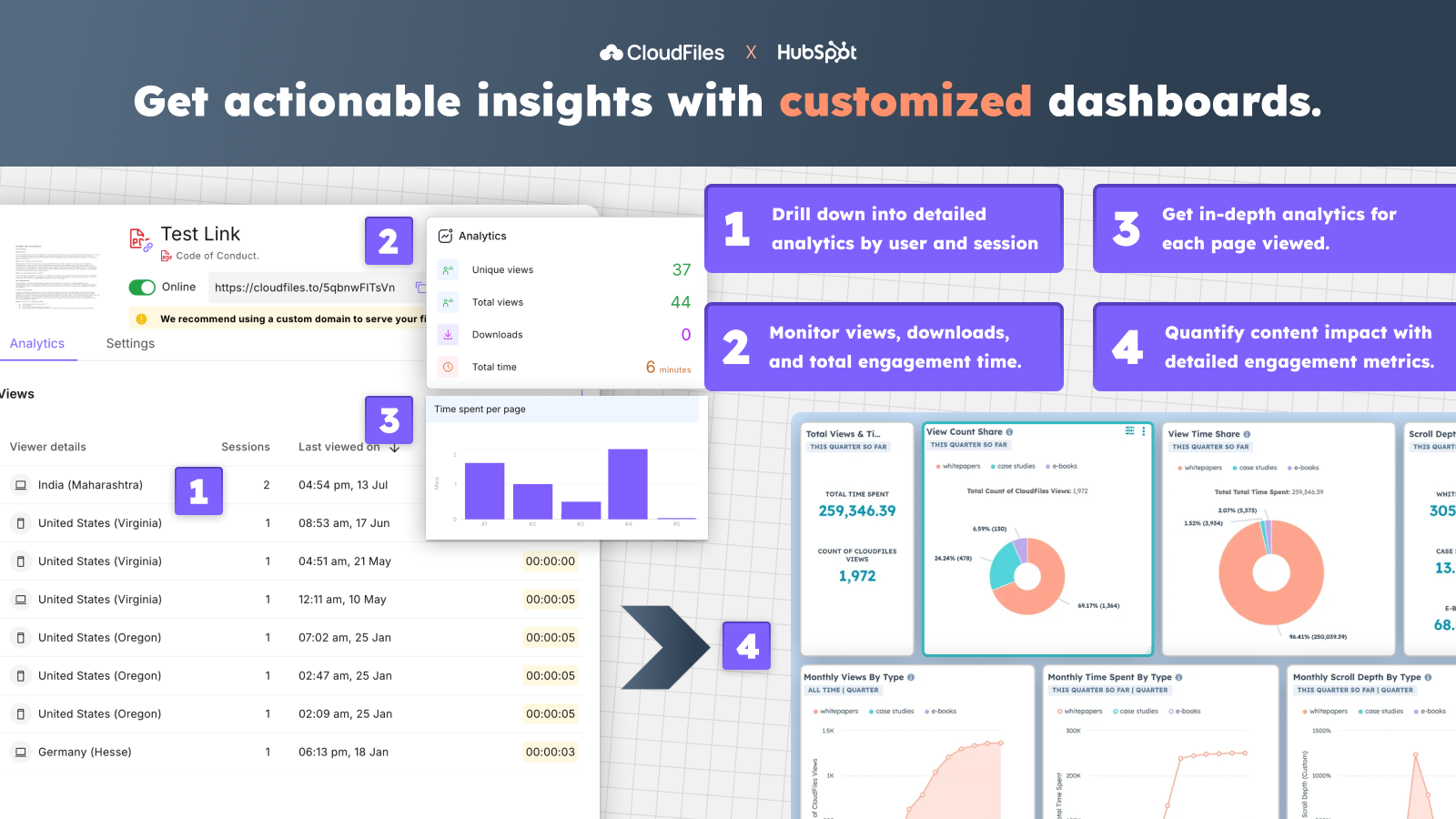
Suivre les statistiques des fichiers et créer des tableaux de bord personnalisés
✅ Suivez le nombre de consultations, la durée de consultation et l'engagement pour les fichiers provenant de Google Drive ou d'autres espaces de stockage. ✅ Obtenez des analyses détaillées par utilisateur, par session et par activité au niveau des pages. ✅ Suivez les performances des documents et l'engagement grâce à des tableaux de bord personnalisés dans HubSpot.
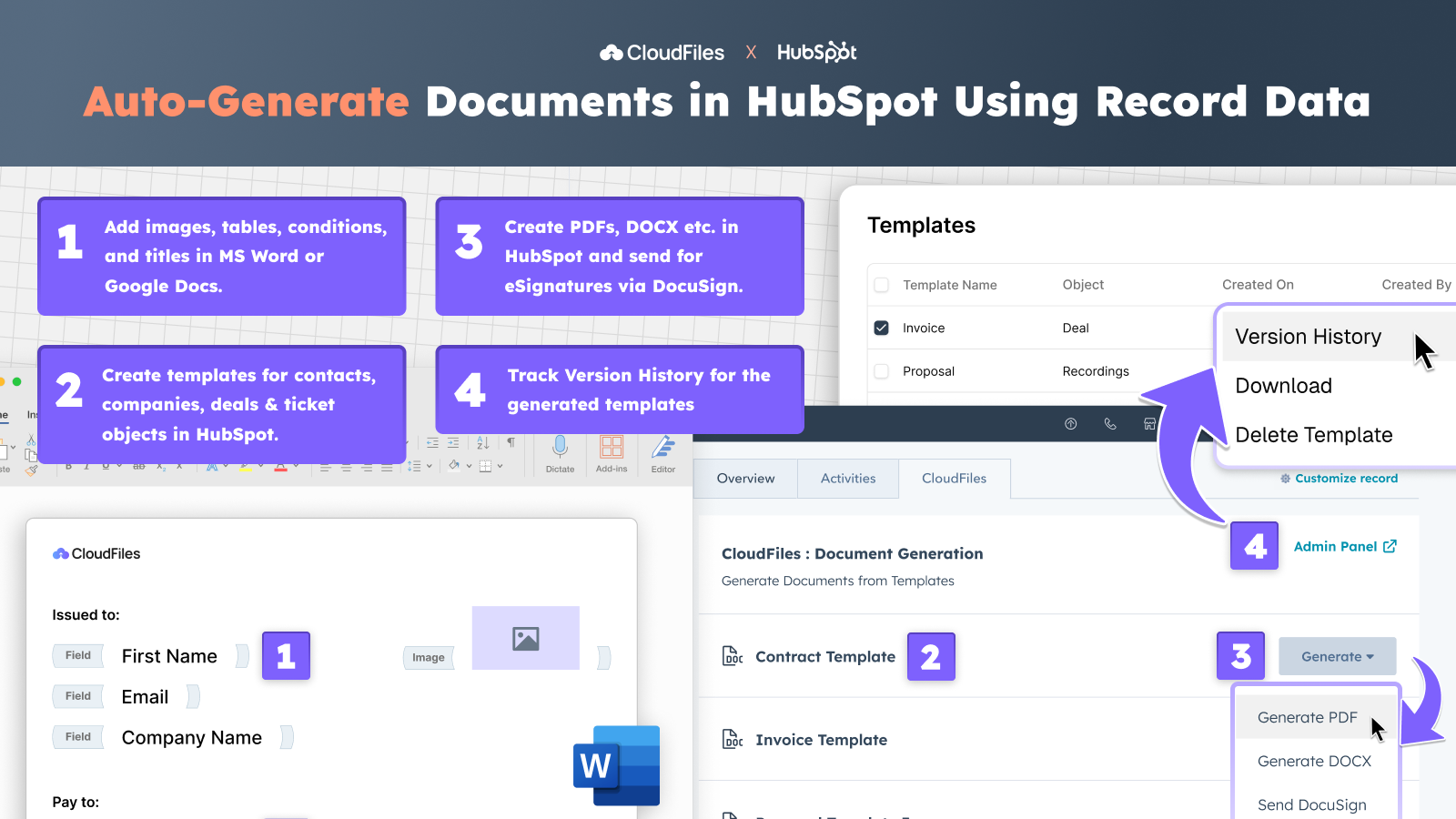
Créez des documents personnalisés directement depuis HubSpot
✅ Créez des modèles dynamiques pour n'importe quel objet HubSpot à partir des données du CRM. ✅ Ajoutez des champs, des conditions, des images et des tableaux pour créer des devis, des factures, etc. personnalisés. ✅ Modifiez et gérez vos modèles dans Google Docs ou MS Word, avec un historique complet des versions. ✅ Générez automatiquement des fichiers PDF, DOCX, PPTX, etc. directement depuis HubSpot, ou envoyez-les pour signature électronique via DocuSign.
Fonctionnalité de l'application
Données partagées
File | ||
File View Events | ||
Files View Event | ||
File View Event |
4,8
34
4,8
34
- 26 mai 2026
Stockage de documents simplifié
CloudFiles facilite la connexion entre HubSpot et un système de stockage de fichiers comme Dropbox.
J'adore les actions intégrées au flux de travail, la facilité d'accès aux fichiers et l'assistance rapide et utile.
Je n'en ai pas identifié. Je suis très impressionné par la quantité de fonctionnalités et la facilité d'utilisation.
Polliard, W.
- 22 mai 2026
J'aime l'aide rapide de CloudFiles :-)
Je commence à utiliser CloudFiles et j'ai l'impression qu'il facilitera grandement la mise en place de nos documents.
Lillesø, T.S.
Tarification
Gestion des documents
4,17 $US
/moisAssociez des fichiers et des dossiers externes aux enregistrements HubSpot et réduisez les délais d'exécution
Le prix s'entend par licence CloudFiles
Connecteur pour Google Drive, SharePoint, AWS S3 et bien d'autres encore…
Fiche et widget pour les contacts, les entreprises, les opportunités et les tickets
Télécharger des fichiers, créer des dossiers et effectuer d'autres opérations
Compatible avec les objets standard et personnalisés de HubSpot
Synchronisation bidirectionnelle avec tous les supports de stockage externes
Assistance en libre-service, par e-mail et par chat disponible
Automatisations disponibles avec les licences d'entreprise
Découvrez toutes les options tarifaires pour les formules « Enterprise » et les packs complémentaires
Gestion des documents
4,17 $US
/moisAssociez des fichiers et des dossiers externes aux enregistrements HubSpot et réduisez les délais d'exécution
Le prix s'entend par licence CloudFiles
Connecteur pour Google Drive, SharePoint, AWS S3 et bien d'autres encore…
Fiche et widget pour les contacts, les entreprises, les opportunités et les tickets
Télécharger des fichiers, créer des dossiers et effectuer d'autres opérations
Compatible avec les objets standard et personnalisés de HubSpot
Synchronisation bidirectionnelle avec tous les supports de stockage externes
Assistance en libre-service, par e-mail et par chat disponible
Automatisations disponibles avec les licences d'entreprise
Découvrez toutes les options tarifaires pour les formules « Enterprise » et les packs complémentaires
* Les prix mentionnés ici sont uniquement présentés à titre indicatif. Tous les prix n'incluent pas les taxes, les offres spéciales, les réductions ni les autres facteurs pouvant affecter les tarifs. Vous devez contacter le partenaire pour obtenir les tarifs les plus récents. HubSpot n'assume aucune responsabilité pour les informations de tarification fournies par ses partenaires. Dernière mise à jour des prix : 16/06/2026
Informations supplémentaires
Créé par - CloudFiles
Installation - 2 k installations
Catégories Langues dans lesquelles cette application est disponible Allemand ,Anglais ,Espagnol etFrançais