

Data Bridge - Bring Any (Sync) Data into CRM Objects

Führend
Anforderungen
HubSpot-Produktversion HubSpot-Account-Berechtigungen - Erforderliche Account-Berechtigungen anzeigen
Zugriffstyp Geteilt Data Bridge - Bring Any (Sync) Data into CRM Objects-Abonnement - Produktversionen: Grundlegend oder Professionell 🔥
Übersicht
-1.png)
1/6 - Fügen Sie Google Workspace, Videos, Text und iframed-Links hinzu und zeigen Sie sie basierend auf Bedingungen oder benutzerdefinierten Regeln in HubSpot an.
Erweitern Sie Ihre HubSpot-Datensätze mit Data Bridge! Synchronisieren Sie externe Inhalte - Websites, Bilder, Videos, Google Sheets, Docs und vieles mehr - die direkt dort angezeigt werden, wo Ihr Team arbeitet. Sync Data Bridge App - hilft Ihnen, relevante Inhalte dort hinzuzufügen, wo es am wichtigsten ist, und macht Ihr CRM einfacher zu bedienen und informativer. Integrieren Sie HubSpot mit nur 1 Klick in Ihre bevorzugten Anwendungen.
Kostenloses Live-Onboarding - Kontaktieren Sie uns, um einen Termin zu vereinbaren
Jeder Data Bridge-Benutzer erhält eine kostenlose Live-Onboarding-Sitzung mit unserem Produkt-/Supportteam. So sind Sie vom ersten Tag an bestens gerüstet und können genau das entwickeln, was Ihr Unternehmen braucht! Zeigen Sie externe Daten in HubSpot-Datensätzen an! Google Sheets einbetten! Suchen Sie nach einer einfachen Möglichkeit, Datenintegration und -synchronisation in HubSpot zu handhaben? Mit Data Bridge können Sie externe Daten verbinden, Dashboards einbetten und sogar benutzerdefinierte Objekte direkt in Ihren HubSpot-Datensätzen verwalten. Ob Datenmigration, ein benutzerdefinierter Connector oder die Möglichkeit, Daten aus Google Sheets, Excel oder Datenbanken zu importieren/exportieren - Data Bridge macht Automatisierung, Berichtsintegration und ETL für HubSpot mühelos. Erstellen Sie anpassbare Raster, betten Sie die benötigten Daten ein/zeigen Sie sie an, und verwandeln Sie Ihre HubSpot-Datensätze in eine echte Kommandozentrale.
Hauptmerkmale von Data Bridge
Bilder mit Links direkt in HubSpot-Datensätze einbetten
Fügen Sie Produktfotos, Marketingmaterialien oder andere visuelle Assets direkt in Kontakte, Unternehmen, Deals, Tickets oder benutzerdefinierte Objekte ein. Sorgen Sie dafür, dass Ihr Team direkt an seinem Arbeitsplatz mit visuellen Elementen arbeiten kann.
Live-Integration von Google Sheets und Docs
Betten Sie Google Sheets in HubSpot-Datensätze ein, um Echtzeitberichte, Tracker oder Dashboards anzuzeigen. Ideal für die Fortschrittsverfolgung, KPIs oder gemeinsame Kundendaten.
YouTube-Video-Einbettungen
Bringen Sie Tutorials, Produktdemos oder Kunden-Updates direkt in HubSpot-Datensätze. Teams erhalten sofortigen Zugriff auf die richtigen Videoinhalte, ohne das CRM zu verlassen.
Benutzerdefinierter Grid Builder
Gestalten Sie vollständig anpassbare Raster in HubSpot-Datensätzen. Fügen Sie Tags, Text, Statusanzeigen, Links, Bilder, Symbole, E-Mails oder Warnungen hinzu. Verwenden Sie farbcodierte Varianten (Erfolg, Warnung, Fehler, Info) und zusätzliche Notizen, um komplexe Daten einfach zu interpretieren und zu verarbeiten.
Bedingte Anzeigeregeln
Zeigen Sie Module auf der Grundlage von Geschäftsphasen, Eigenschaftswerten oder benutzerdefinierten Bedingungen an oder blenden Sie sie aus - so sieht jedes Teammitglied nur das, was zum richtigen Zeitpunkt relevant ist.
Nahtlose HubSpot-Integration
Funktioniert nativ mit allen HubSpot-Standardobjekten (Kontakte, Unternehmen, Deals, Tickets) und benutzerdefinierten Objekten - keine Codierung oder zusätzliche Anmeldung erforderlich.
Unterstützung von Dateien und Medien
Laden Sie Bilder, PDFs oder Mediendateien hoch und zeigen Sie sie innerhalb von Datensätzen an, um die Zusammenarbeit zu beschleunigen und den Kontext zu zentralisieren.
Wo Sie Inhalte platzieren können
Alle Datensätze - zeigen Sie Inhalte in Ihrem gesamten CRM an.
Spezifischer Datensatz - Fügen Sie Inhalte zu einem einzelnen Datensatz hinzu, den Sie gerade betrachten.
Gefilterte Datensätze - suchen Sie nach Datensätzen, die den von Ihnen gewählten Kriterien entsprechen.
Filter funktionieren für jeden Inhaltstyp, so dass die richtigen Informationen an der richtigen Stelle angezeigt werden.
Warum es nützlich ist - Der richtige Inhalt, am richtigen Ort.
Halten Sie externe Inhalte zugänglich, ohne HubSpot zu verlassen.
Verringern Sie das Wechseln zwischen den Registerkarten und verstreute Daten.
Können Sie Ihrem Team aktuelle visuelle Darstellungen und Informationen im Kontext zur Verfügung stellen?
Verbessern Sie Datensätze mit umsetzbaren Inhalten, auf die Ihr Team sofort zugreifen kann.
Die 5 wichtigsten praktischen Anwendungsfälle, bei denen HubSpot glänzt:
1. Onboarding Hub für Kunden (Saas / Tech)
Integrieren Sie Onboarding-Checklisten, Playbooks und Aufzeichnungen von Kickoff-Gesprächen direkt in den Geschäfts- oder Unternehmensdatensatz.
Zeigen Sie je nach Onboarding-Stadium unterschiedliche Anweisungen an (z. B. "Setup Pending" vs. "Live").
CSMs aktualisieren den Fortschritt direkt in HubSpot, ohne das Tool zu wechseln.
2. Account Health & Success Tracking (Kundenerfolg)
Fügen Sie ein Live Google Sheet oder Dashboard mit KPIs, Verlängerungsdaten und NPS-Ergebnissen hinzu.
Zeigen Sie Warnungen an, wenn die Nutzung sinkt, die Vertragsverlängerung bevorsteht oder bestimmte Eigenschaften ein Risiko darstellen.
Halten Sie CSMs mit schnellen Links (Mail an den Kontoinhaber, Vorlagen für Verlängerungsangebote) auf dem Laufenden.
3. Sales Playbooks & Anleitungen (Sales Teams)
Zeigen Sie dynamische Anweisungen je nach Geschäftsphase an ("Discovery" = Qualifizierungsfragen anzeigen, "Proposal Sent" = Vertragscheckliste anzeigen).
Fügen Sie Verknüpfungen wie Mailto-Links für die Genehmigung durch die Rechtsabteilung oder die Finanzabteilung hinzu.
Verkürzen Sie die Einarbeitungszeit von Vertriebsmitarbeitern, indem Sie die richtigen Informationen nur dann anzeigen, wenn sie benötigt werden.
4. Außendienst & Installationen (Fertigung / Dienstleistungen)
Integrieren Sie eine Installations-Checkliste in ein Ticket.
Techniker laden Vorher/Nachher-Fotos, Videos oder unterzeichnete Dokumente hoch.
Zeigen Sie Sicherheitsanweisungen oder Hinweise zur Einhaltung von Vorschriften nur an, wenn ein bestimmter Produkttyp ausgewählt wurde.
5. Kreativ-/Marketing-Asset-Reviews (Agenturen oder In-House-Teams)
Speichern Sie kreative Briefs, laden Sie Designentwürfe hoch und zeigen Sie Videos in der Vorschau an - alles in einem Datensatz.
Zeigen Sie den Hinweis "Review Pending" an, bis der Kunde die Freigabe erteilt hat.
Kundenbetreuer können Dateien hochladen, während Direktoren die Struktur und Vorlagen kontrollieren.
Kurz gesagt: Sync Data Bridge reduziert das Wechseln zwischen verschiedenen Tools und bringt den richtigen Inhalt zur richtigen Zeit direkt in die HubSpot-Datensätze. #HubSpot-Anschluss Nr. 1!
Funktionen
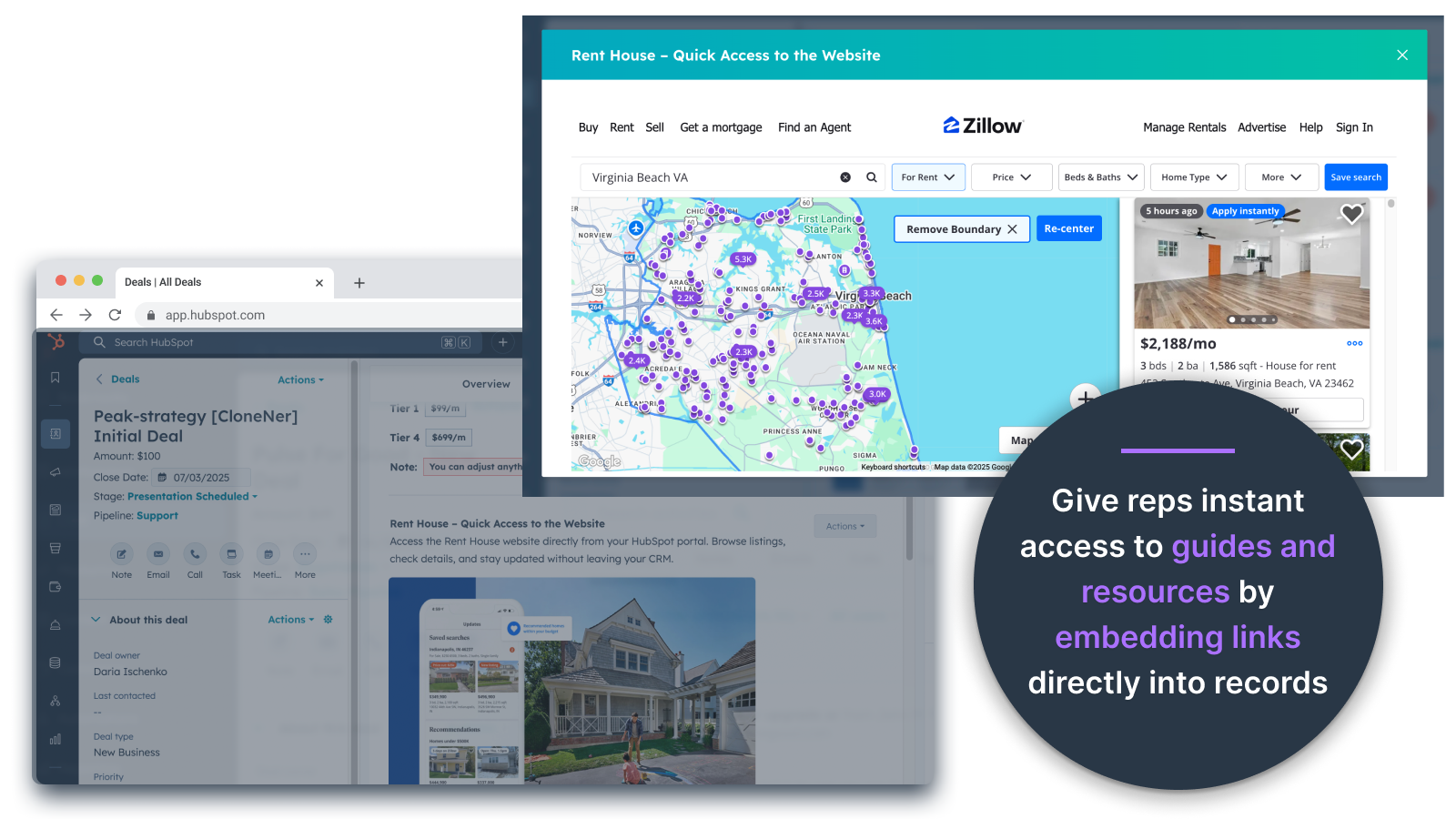
Bilder direkt in Angebote, Tickets und andere Datensatzansichten einbetten
Fügen Sie Produktfotos, Marketingmaterialien oder andere visuelle Elemente direkt in Kontakte, Unternehmen, Angebote, Tickets oder benutzerdefinierte Objekte ein. Sorgen Sie dafür, dass Ihr Team genau dort, wo es arbeitet, mit Bildmaterial versorgt wird.
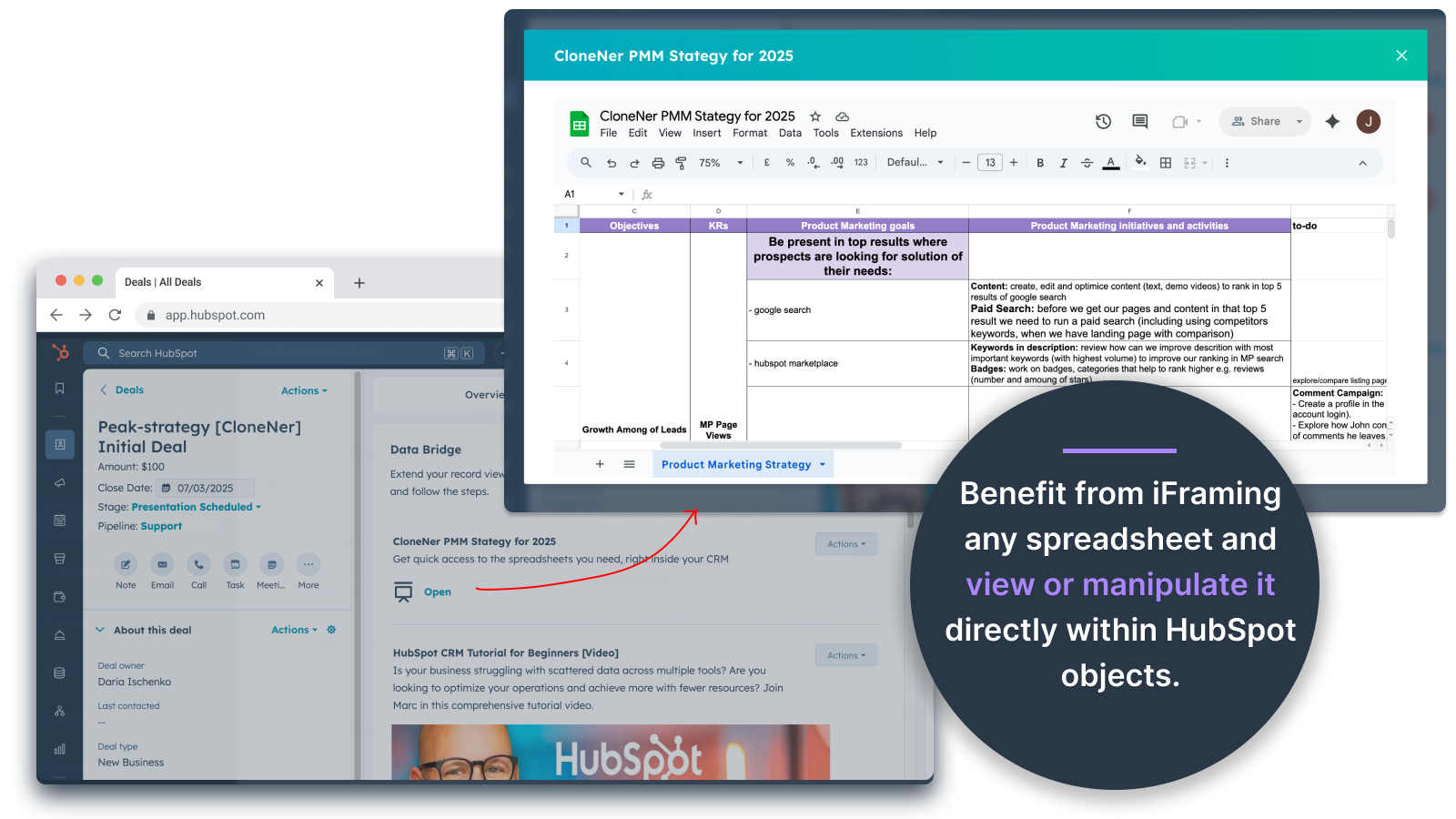
Google Sheets und Docs - Ansicht direkt in Deals, Tickets, etc.
Sie können Google Sheets in HubSpot-Datensätze einbetten und mit einem Iframe versehen, um Echtzeitberichte, Tracker oder Dashboards anzuzeigen. Perfekt für die Fortschrittsverfolgung, KPIs oder gemeinsame Kundendaten.
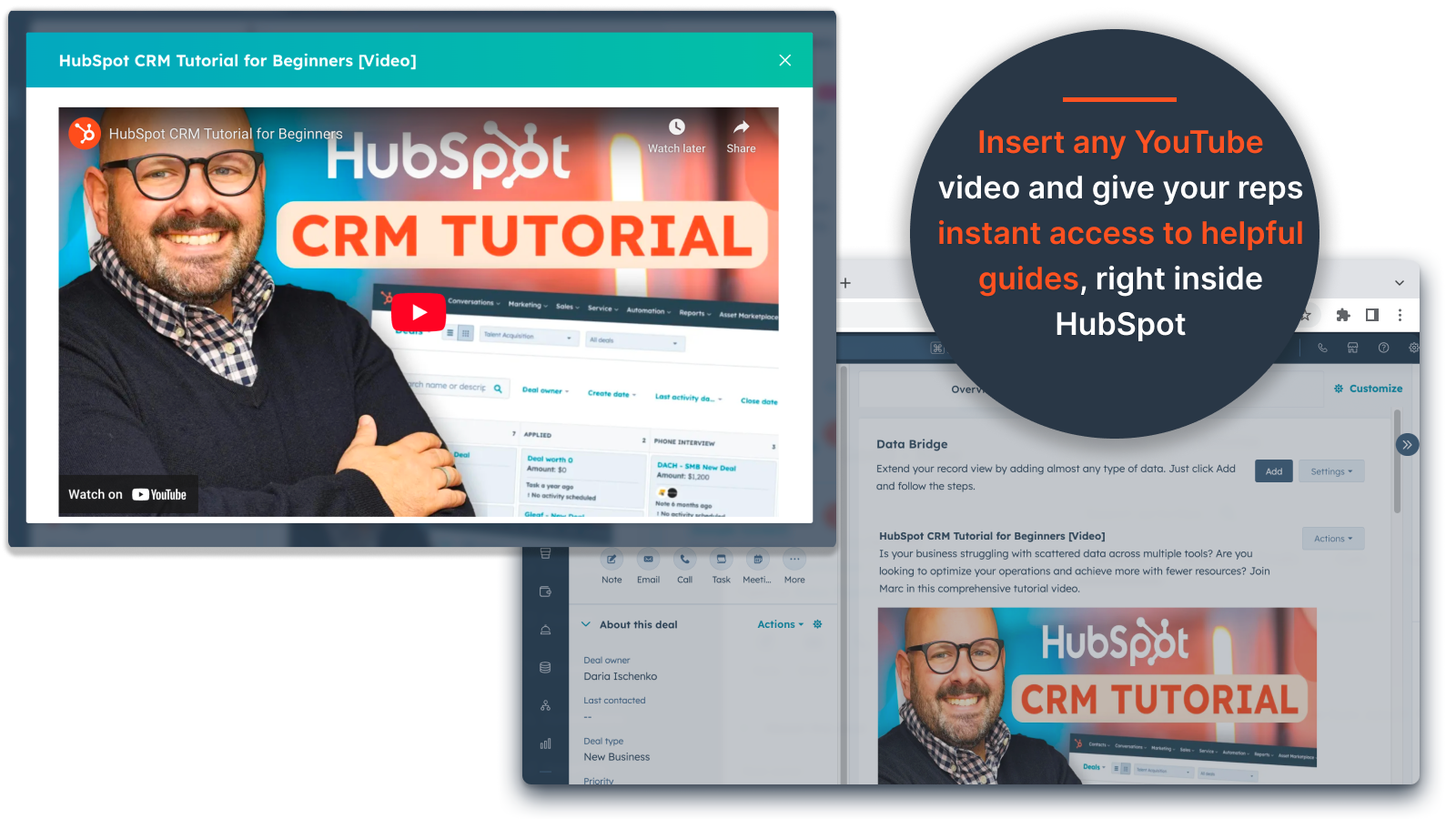
YouTube-Video-Einbettungen
Bringen Sie Tutorials, Produktdemos oder Kunden-Updates direkt in HubSpot-Datensätze. Teams erhalten sofortigen Zugriff auf die richtigen Videoinhalte, ohne das CRM zu verlassen.
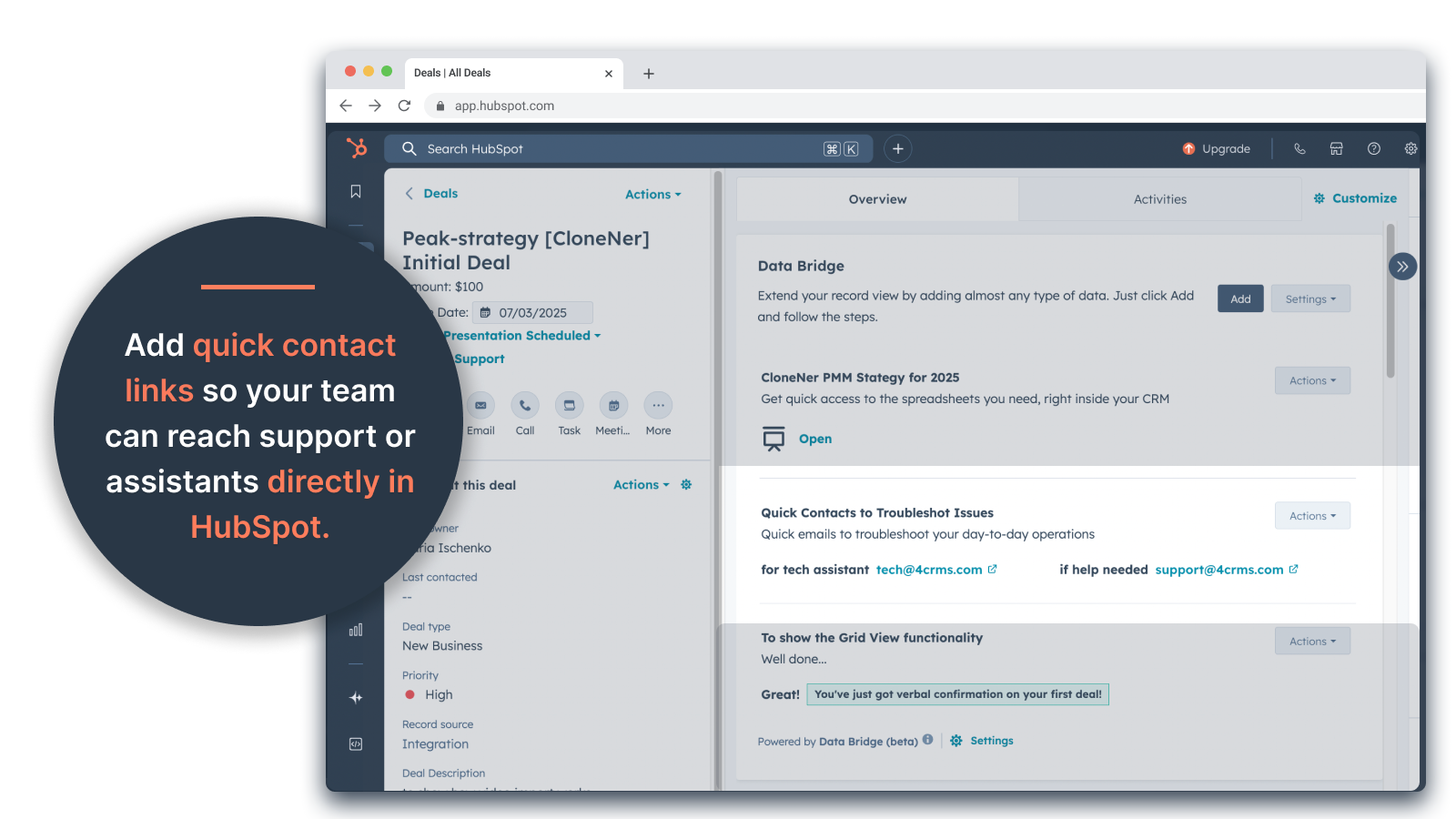
Custom Grid Builder
Entwerfen Sie vollständig anpassbare Raster innerhalb von HubSpot-Datensätzen. Fügen Sie Tags, Text, Statusanzeigen, Links, Bilder, Symbole, E-Mails oder Warnungen hinzu. Verwenden Sie farbcodierte Varianten (Erfolg, Warnung, Fehler, Info) und zusätzliche Notizen, um komplexe Daten einfach zu interpretieren und zu verarbeiten.
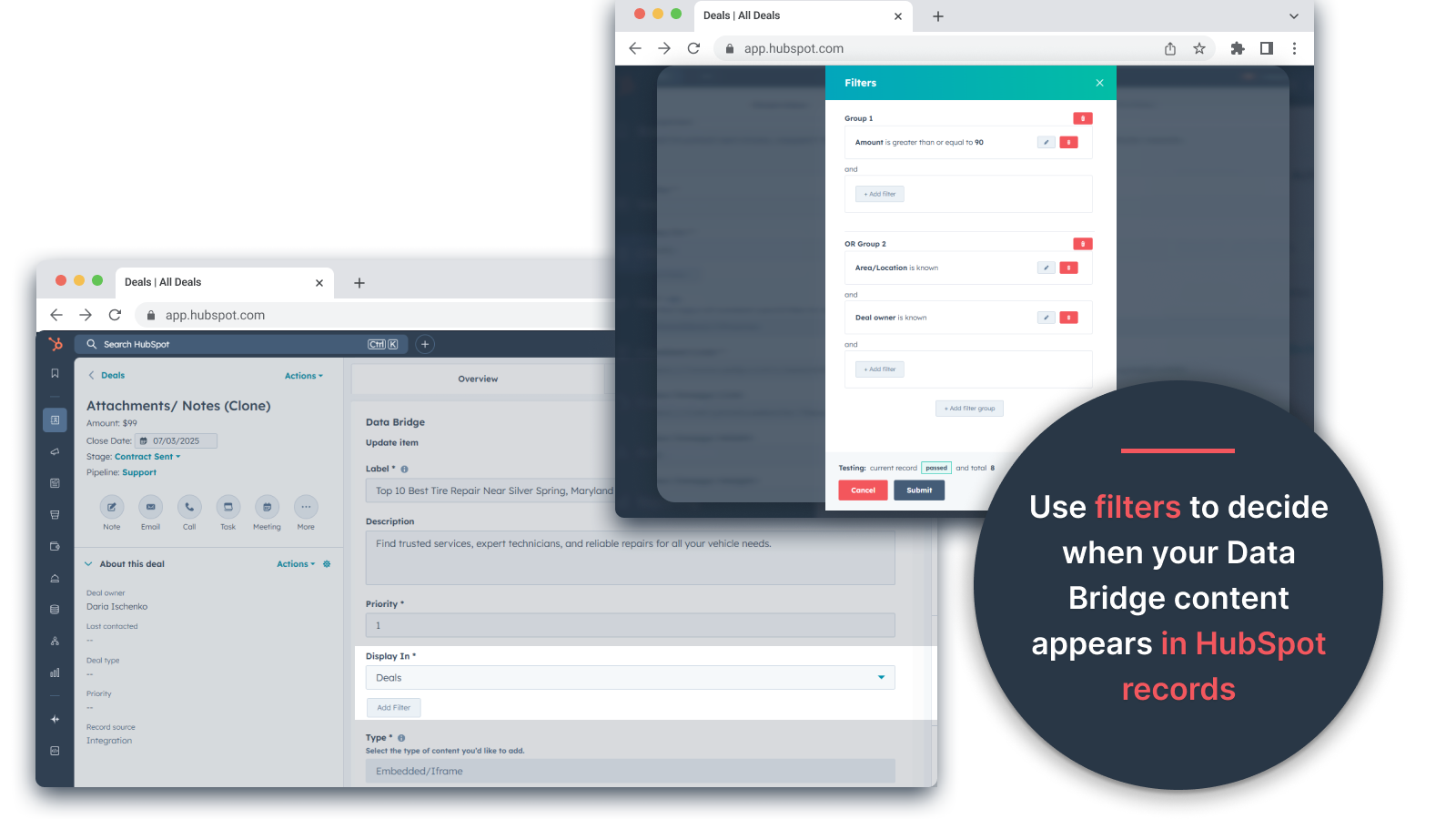
Bedingte Anzeigeregeln
Zeigen oder verbergen Sie Module auf der Grundlage von Geschäftsphasen, Immobilienwerten oder benutzerdefinierten Bedingungen, damit jedes Teammitglied nur das sieht, was zum richtigen Zeitpunkt relevant ist.
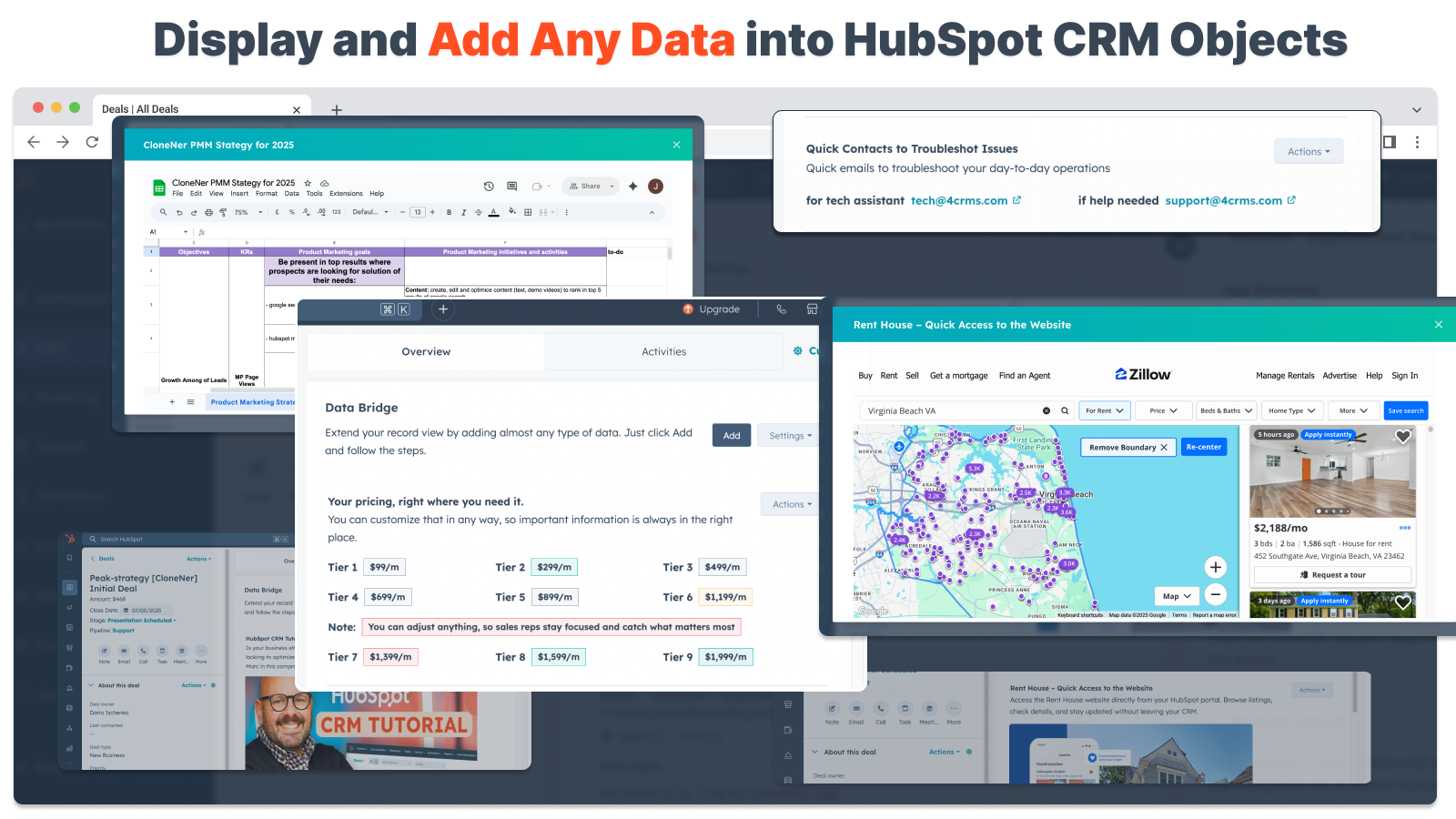
Nahtlose HubSpot-Integration
Funktioniert nativ mit allen HubSpot-Standardobjekten (Kontakte, Unternehmen, Deals, Tickets) und benutzerdefinierten Objekten - keine Kodierung oder zusätzliche Logins erforderlich.
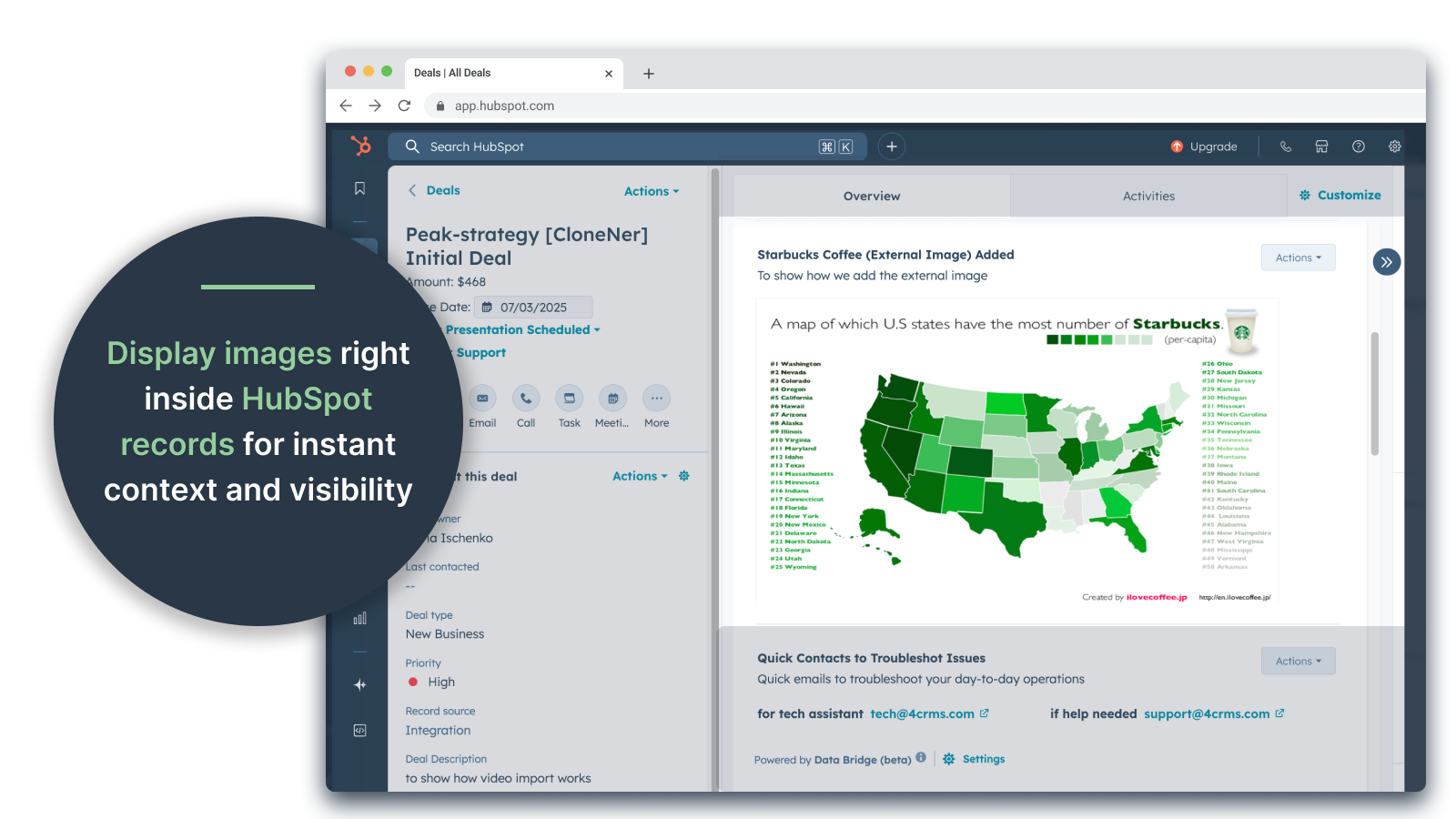
Unterstützung für Dateien und Medien
Laden Sie Bilder, PDFs oder Mediendateien hoch und zeigen Sie sie innerhalb von Datensätzen an, um die Zusammenarbeit zu beschleunigen und den Kontext zu zentralisieren.
App-Funktionalität
Datenaustausch
Contacts | ||
Custom Objects | ||
Company | ||
Deal | ||
Ticket | ||
Owners | ||
Deal Pipelines |
Rezensionen
- 25. Sep. 2025
Eine große Zeitersparnis, die das mühsame Verwalten verstreuter Dateien überflüssig macht und alles direkt dorthin bringt, wo Sie es brauchen!
Datenbrücke für den Sieg! Wir brauchten eine einfache Möglichkeit, Spesenabrechnungen, die in Excel gespeichert sind, in HubSpot einzubinden, und dies löste dieses Problem, ohne tonnenweise Google Drive-Ordner verwalten zu müssen. Jetzt können die Mitarbeiter Spesenabrechnungen ganz einfach klonen, sie direkt in die zugehörigen Deals einbetten und einfach darauf zugreifen, ohne in Google Drive wühlen zu müssen. Eine große Zeit- und Stressersparnis!!
Einfache Einrichtung, bringt externe Ressourcen direkt in HubSpot für einfachen Zugriff
noch keine gefunden!
Estey, Z.
- 19. Sep. 2025
Verwandelt HubSpot in eine Kommandozentrale
Unser Team arbeitet seit kurzem mit Data Bridge! von 4CRM und es hat unsere Arbeitsabläufe bereits auf beeindruckende Weise rationalisiert. Die Möglichkeit, Google Sheets, Docs, Videos und andere externe Ressourcen direkt in HubSpot-Datensätze einzubetten, hat uns eine Menge Hin- und Hergerede erspart und unser CRM viel handlungsfähiger gemacht. Es ist intuitiv, flexibel und bringt die richtigen Daten zur richtigen Zeit an den richtigen Ort.
- Super einfach einzurichten und zu verwenden - Bettet wichtige Vertriebsinhalte (wie Live-Sheets, Referenzmaterialien, Onboarding-Dokumente) direkt in HubSpot ein - Anpassbare Raster erleichtern die Organisation und Anzeige der wichtigsten Daten - Hervorragend geeignet, um Datensätze wie eine echte "Kommandozentrale" zu gestalten - Erhöhte Effizienz und weniger Tab-Hopping
- Einige eingebettete Inhalte (z. B. bestimmte Videoplayer) können je nach Browsereinstellungen Probleme bei der Anzeige verursachen.
Stern, D.
Preise
Grundlegend
19 $
/Monat👉 45 Tage kostenlos testen - 🔓 alle Funktionen freischalten. Machen Sie HubSpot-Datensätze intelligenter mit UI-Elementen genau dort, wo Sie arbeiten. Bringen Sie Daten zu Kontakten, Unternehmen und Geschäften.
3 UI-Elemente: Jedes hinzugefügte Element zählt als 1 Element (z. B. ein Bild oder ein Video usw.).
Kontakte: Data Bridge UI-Elemente innerhalb von Kontaktdatensätzen anzeigen
Unternehmen: Anzeige von Data Bridge UI-Elementen innerhalb von Unternehmensdatensätzen.
Geschäfte: Anzeige von Data Bridge UI-Elementen innerhalb von Geschäftsdatensätzen.
Betten Sie Bilder, YouTube, Google Docs, Slides & Sheets mit iFrames ein - alle werden direkt in HubSpot-Datensätzen angezeigt.
Filter: ⚠️ Nicht verfügbar (nur pro Objekt oder für alle Objekte)
Custom Grid Builder: ⚠️ Nicht verfügbar. Kann keine Raster mit Tags, Links, Bildern und Notizen erstellen.
Grundlegend
19 $
/Monat👉 45 Tage kostenlos testen - 🔓 alle Funktionen freischalten. Machen Sie HubSpot-Datensätze intelligenter mit UI-Elementen genau dort, wo Sie arbeiten. Bringen Sie Daten zu Kontakten, Unternehmen und Geschäften.
3 UI-Elemente: Jedes hinzugefügte Element zählt als 1 Element (z. B. ein Bild oder ein Video usw.).
Kontakte: Data Bridge UI-Elemente innerhalb von Kontaktdatensätzen anzeigen
Unternehmen: Anzeige von Data Bridge UI-Elementen innerhalb von Unternehmensdatensätzen.
Geschäfte: Anzeige von Data Bridge UI-Elementen innerhalb von Geschäftsdatensätzen.
Betten Sie Bilder, YouTube, Google Docs, Slides & Sheets mit iFrames ein - alle werden direkt in HubSpot-Datensätzen angezeigt.
Filter: ⚠️ Nicht verfügbar (nur pro Objekt oder für alle Objekte)
Custom Grid Builder: ⚠️ Nicht verfügbar. Kann keine Raster mit Tags, Links, Bildern und Notizen erstellen.
* Die hier angegebenen Preise dienen nur zu Illustrationszwecken. Alle Preise enthalten keine Steuern, Sonderangebote, Rabatte oder sonstigen Preisvarianten. Bitte wenden Sie sich direkt an den Partner, um aktuelle und korrekte Preisinformationen zu erhalten. HubSpot übernimmt keine Verantwortung für Preisinformationen, die von unseren Partnern bereitgestellt werden. Letzte Aktualisierung der Preisinformationen: 05.05.2026