

Data Bridge - Bring Any (Sync) Data into CRM Objects

Wiodący
Wymagania
Plan HubSpot Uprawnienia konta HubSpot - Wyświetl wymagane uprawnienia konta
Typ dostępu Udostępniono Subskrypcja Data Bridge - Bring Any (Sync) Data into CRM Objects - Podstawowy lub Profesjonalny 🔥 planu
Przegląd
-1.png)
1/6 - Dodaj Google Workspace, filmy, tekst, linki iframed - i wyświetlaj je na podstawie warunków lub niestandardowych reguł - wewnątrz HubSpot.
Doładuj swoje rekordy HubSpot dzięki Data Bridge! Synchronizuj treści zewnętrzne - strony internetowe, obrazy, filmy, Arkusze Google, Dokumenty i inne - wszystkie wyświetlane bezpośrednio tam, gdzie pracuje Twój zespół. Synchronizuj aplikację Data Bridge - pomaga dodawać odpowiednie treści tam, gdzie mają one największe znaczenie, dzięki czemu CRM jest łatwiejszy w użyciu i zawiera więcej informacji. Zintegruj HubSpot ze swoimi ulubionymi aplikacjami jednym kliknięciem.
Bezpłatne wdrożenie na żywo - skontaktuj się z nami, aby ustalić termin
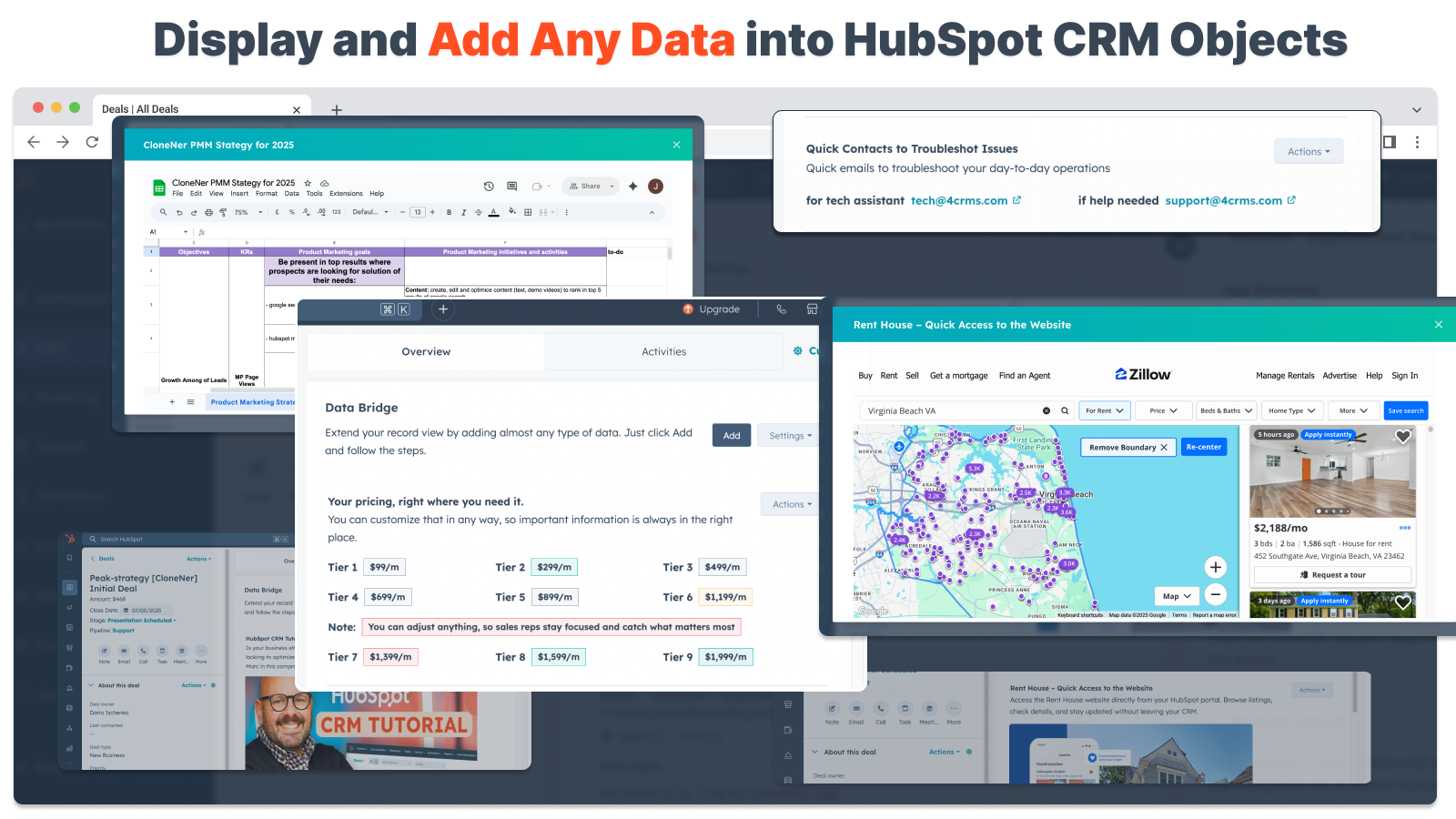
Każdy użytkownik Data Bridge otrzymuje bezpłatną sesję wdroż eniową na żywo z naszym zespołem ds. produktów i pomocy technicznej. Będziesz w pełni wyposażony od pierwszego dnia - mając pewność, że zbudujesz dokładnie to, czego potrzebuje Twoja firma! Wyświetlanie zewnętrznych danych w rekordach HubSpot! Osadzanie Arkuszy Google! Szukasz prostego sposobu na integrację i synchronizację danych w HubSpot? Data Bridge pozwala łączyć dane zewnętrzne, osadzać pulpity nawigacyjne, a nawet zarządzać niestandardowymi obiektami bezpośrednio w rekordach HubSpot. Niezależnie od tego, czy chodzi o migrację danych, niestandardowy łącznik, czy też możliwość importowania/eksportowania danych z Arkuszy Google, Excela lub baz danych, Data Bridge sprawia, że automatyzacja, integracja raportowania i ETL dla HubSpot nie wymagają wysiłku. Twórz konfigurowalne siatki, osadzaj/pokazuj potrzebne dane i zamień swoje rekordy HubSpot w prawdziwe centrum dowodzenia.
Kluczowe cechy Data Bridge
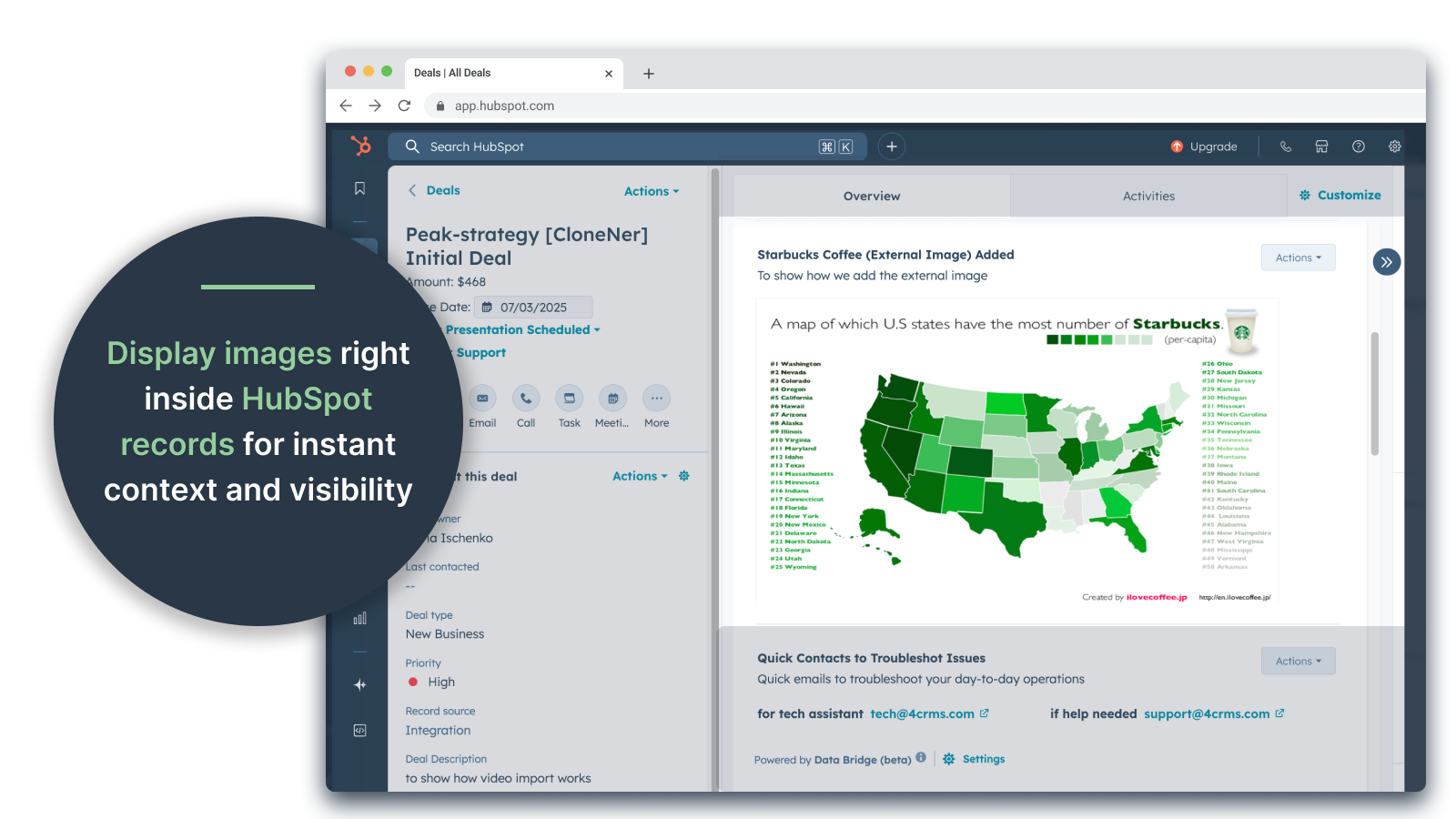
Osadzanie obrazów z linkami bezpośrednio w rekordach HubSpot
Dodawaj zdjęcia produktów, materiały marketingowe lub dowolne zasoby wizualne bezpośrednio do kontaktów, firm, transakcji, biletów lub obiektów niestandardowych. Zapewnij swojemu zespołowi dostęp do wizualizacji bezpośrednio tam, gdzie pracują.
Integracja z Arkuszami i Dokumentami Google na żywo
Osadzaj Arkusze Google w rekordach HubSpot, aby wyświetlać raporty, narzędzia do śledzenia lub pulpity nawigacyjne w czasie rzeczywistym. Idealne do śledzenia postępów, wskaźników KPI lub udostępniania danych klientów.
Osadzanie filmów z YouTube
Umieszczaj samouczki, prezentacje produktów lub aktualizacje dla klientów bezpośrednio w rekordach HubSpot. Zespoły uzyskują natychmiastowy dostęp do odpowiednich treści wideo bez opuszczania CRM.
Custom Grid Builder
Projektuj w pełni konfigurowalne siatki w rekordach HubSpot. Dodawaj tagi, tekst, wskaźniki statusu, linki, obrazy, ikony, wiadomości e-mail lub alerty. Używaj wariantów oznaczonych kolorami (Sukces, Ostrzeżenie, Błąd, Informacja) i dodatkowych notatek, aby złożone dane były łatwe do interpretacji i działania.
Warunkowe reguły wyświetlania
Pokazuj lub ukrywaj moduły na podstawie etapu transakcji, wartości właściwości lub niestandardowych warunków - aby każdy członek zespołu widział tylko to, co jest istotne we właściwym czasie.
Bezproblemowa integracja z HubSpot
Działa natywnie ze wszystkimi standardowymi obiektami HubSpot (kontakty, firmy, transakcje, bilety) i obiektami niestandardowymi - nie wymaga kodowania ani dodatkowych loginów.
Obsługa plików i multimediów
Przesyłaj i wyświetlaj obrazy, pliki PDF lub pliki multimedialne wewnątrz rekordów, aby przyspieszyć współpracę i scentralizować kontekst.
Gdzie można umieszczać treści
Wszystkie rekordy - wyświetlaj zawartość w całym CRM.
Konkretny rekord - dodawanie treści do pojedynczego wyświetlanego rekordu.
Przefiltrowane rekordy - rekordy docelowe spełniające wybrane kryteria.
Filtry działają dla każdego typu treści, więc właściwe informacje pojawiają się we właściwym miejscu.
Dlaczego jest to przydatne - właściwa treść we właściwym miejscu.
Dostęp do treści zewnętrznych bez opuszczania HubSpot.
Ograniczenie przełączania kart i rozproszenia danych.
Czy możesz zapewnić swojemu zespołowi aktualne wizualizacje i informacje w kontekście?
Wzbogać rekordy o przydatne treści, do których zespół może się natychmiast odwołać.
Top 5 praktycznych przypadków użycia w biznesie, w których błyszczy:
1. Centrum wdrażania klientów (Saas / Tech)
Osadzaj listy kontrolne onboardingu, playbooki i nagrania rozmów kickoff bezpośrednio w rekordach transakcji lub firmy.
Wyświetlanie różnych instrukcji w zależności od etapu wdrażania (np. "Oczekiwanie na konfigurację" vs. "Na żywo").
CSM aktualizują postępy bezpośrednio w HubSpot bez konieczności przełączania narzędzi.
2. Stan konta i śledzenie sukcesu (Customer Success)
Dodaj aktywny Arkusz Google lub pulpit nawigacyjny ze wskaźnikami KPI, datami odnowienia i wynikami NPS.
Wyświetlaj ostrzeżenia, gdy spada użycie, zbliża się odnowienie umowy lub niektóre właściwości sygnalizują ryzyko.
Utrzymuj CSM w zgodzie z szybkimi linkami (mail do właściciela konta, szablony ofert odnowienia).
3. Podręczniki sprzedaży i wskazówki (zespoły sprzedaży)
Wyświetlanie dynamicznych instrukcji na podstawie etapu transakcji ("Odkrycie" = wyświetlanie pytań kwalifikacyjnych, "Wysłana propozycja" = wyświetlanie listy kontrolnej umowy).
Dodawanie skrótów, takich jak linki mailto do zatwierdzenia prawnego lub finansowego.
Skrócenie czasu wdrożenia przedstawiciela poprzez wyświetlanie właściwych informacji tylko wtedy, gdy są potrzebne.
4. Serwis terenowy i instalacje (produkcja / usługi)
Osadzenie listy kontrolnej instalacji wewnątrz zgłoszenia.
Technicy mogą przesyłać zdjęcia, filmy lub podpisane dokumenty.
Wyświetlanie instrukcji bezpieczeństwa lub uwag dotyczących zgodności tylko w przypadku wybrania określonego typu produktu.
5. Przeglądy zasobów kreatywnych / marketingowych (agencje lub zespoły wewnętrzne)
Przechowuj briefy kreatywne, przesyłaj wersje robocze projektów i wyświetlaj podgląd filmów w jednym rekordzie.
Wyświetlaj powiadomienie "Recenzja oczekuje", dopóki klient nie zaznaczy zatwierdzenia.
Menedżerowie kont mogą przesyłać pliki, podczas gdy dyrektorzy kontrolują strukturę i szablony.
W skrócie: Sync Data Bridge redukuje przełączanie narzędzi i przenosi właściwą zawartość, we właściwym czasie, bezpośrednio do rekordów HubSpot. #1 HubSpot connector!
Cechy
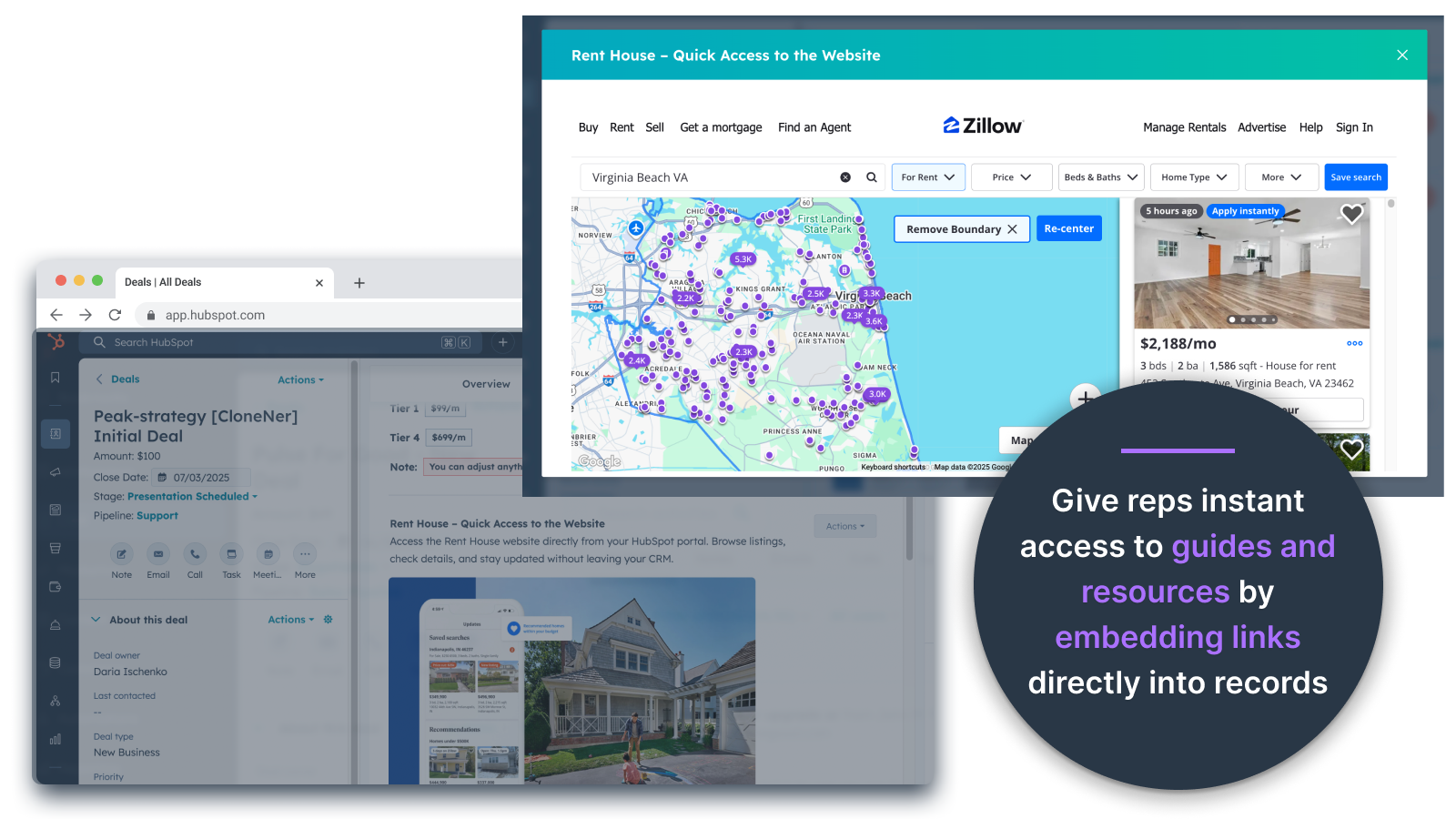
Osadzanie obrazów bezpośrednio w ofertach, biletach i innych widokach rekordów
Dodawaj zdjęcia produktów, materiały marketingowe lub dowolne zasoby wizualne bezpośrednio do Kontaktów, Firm, Umów, Biletów lub Obiektów niestandardowych. Zapewnij swojemu zespołowi dostęp do materiałów wizualnych bezpośrednio tam, gdzie pracują.
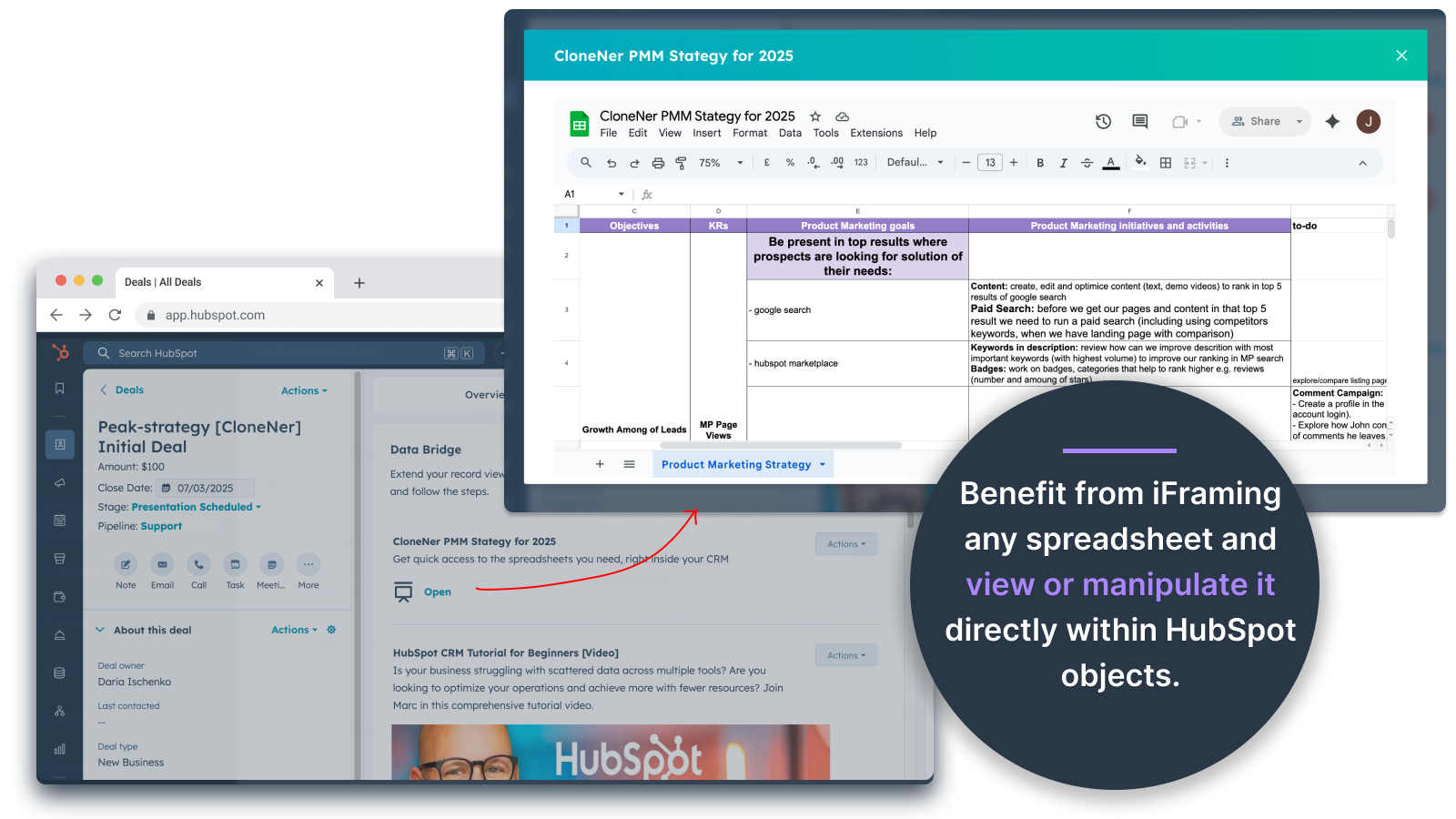
Arkusze i Dokumenty Google - wyświetlanie bezpośrednio w umowach, biletach itp.
Osadzaj Arkusze Google w rekordach HubSpot, aby wyświetlać raporty w czasie rzeczywistym, narzędzia do śledzenia lub pulpity nawigacyjne. Idealne do śledzenia postępów, wskaźników KPI lub udostępniania danych klientów.
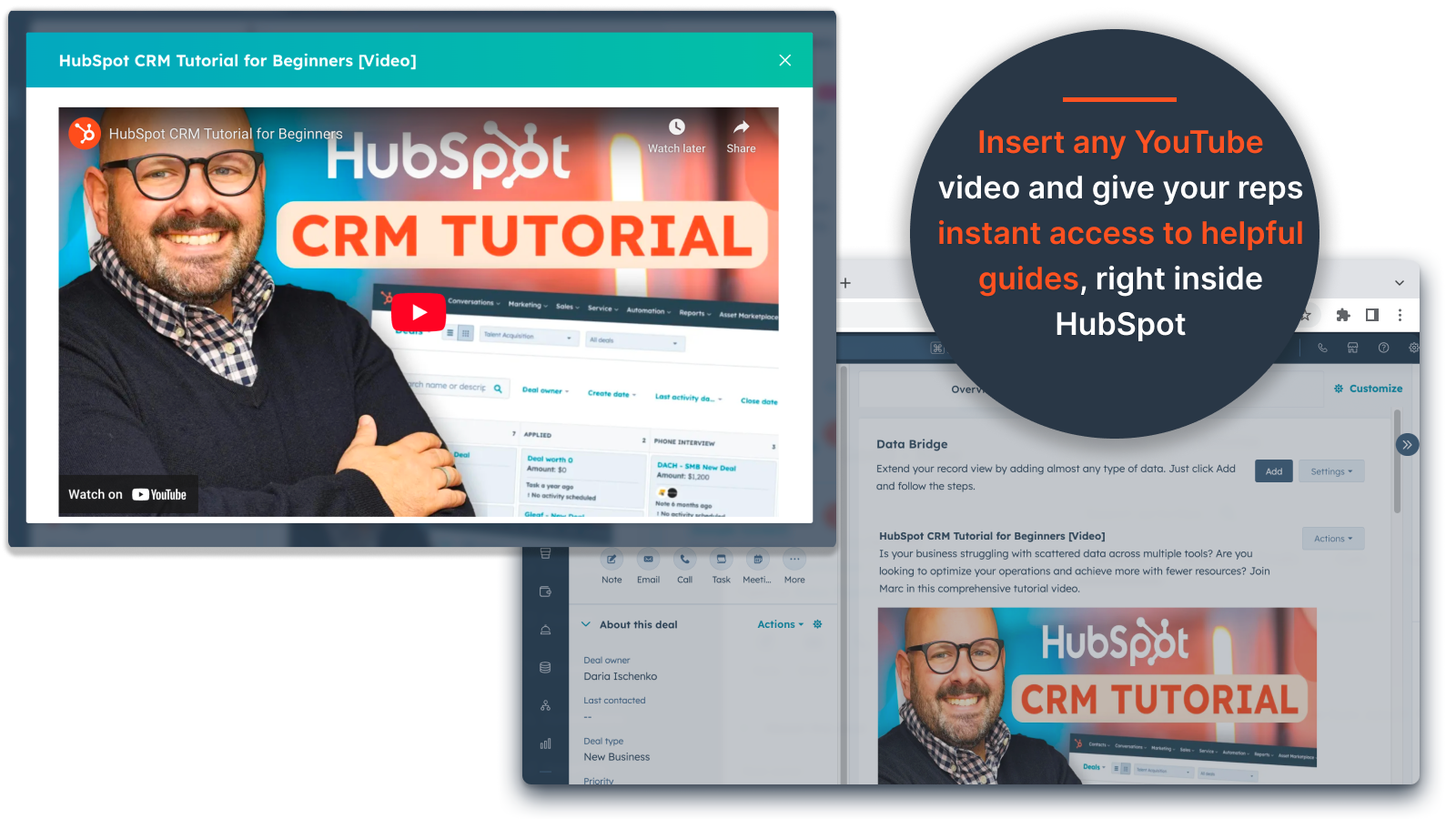
Osadzanie filmów YouTube
Przesyłaj samouczki, prezentacje produktów lub aktualizacje dla klientów bezpośrednio do rekordów HubSpot. Zespoły uzyskują natychmiastowy dostęp do odpowiednich treści wideo bez opuszczania CRM.
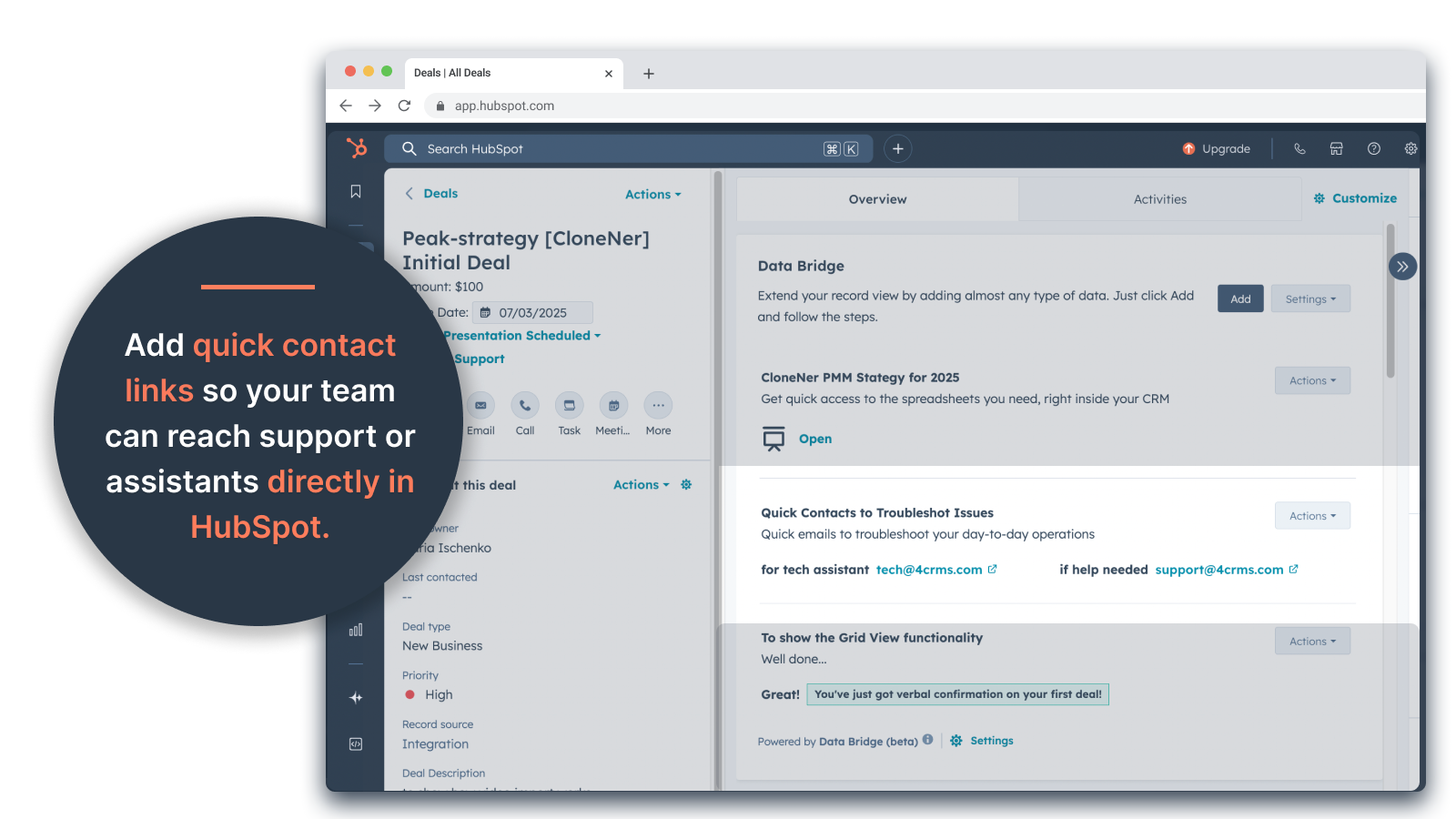
Niestandardowy kreator siatki
Projektuj w pełni konfigurowalne siatki wewnątrz rekordów HubSpot. Dodawaj tagi, tekst, wskaźniki stanu, linki, obrazy, ikony, wiadomości e-mail lub alerty. Używaj wariantów oznaczonych kolorami (Sukces, Ostrzeżenie, Błąd, Informacja) i dodatkowych notatek, aby złożone dane były łatwe do interpretacji i działania.
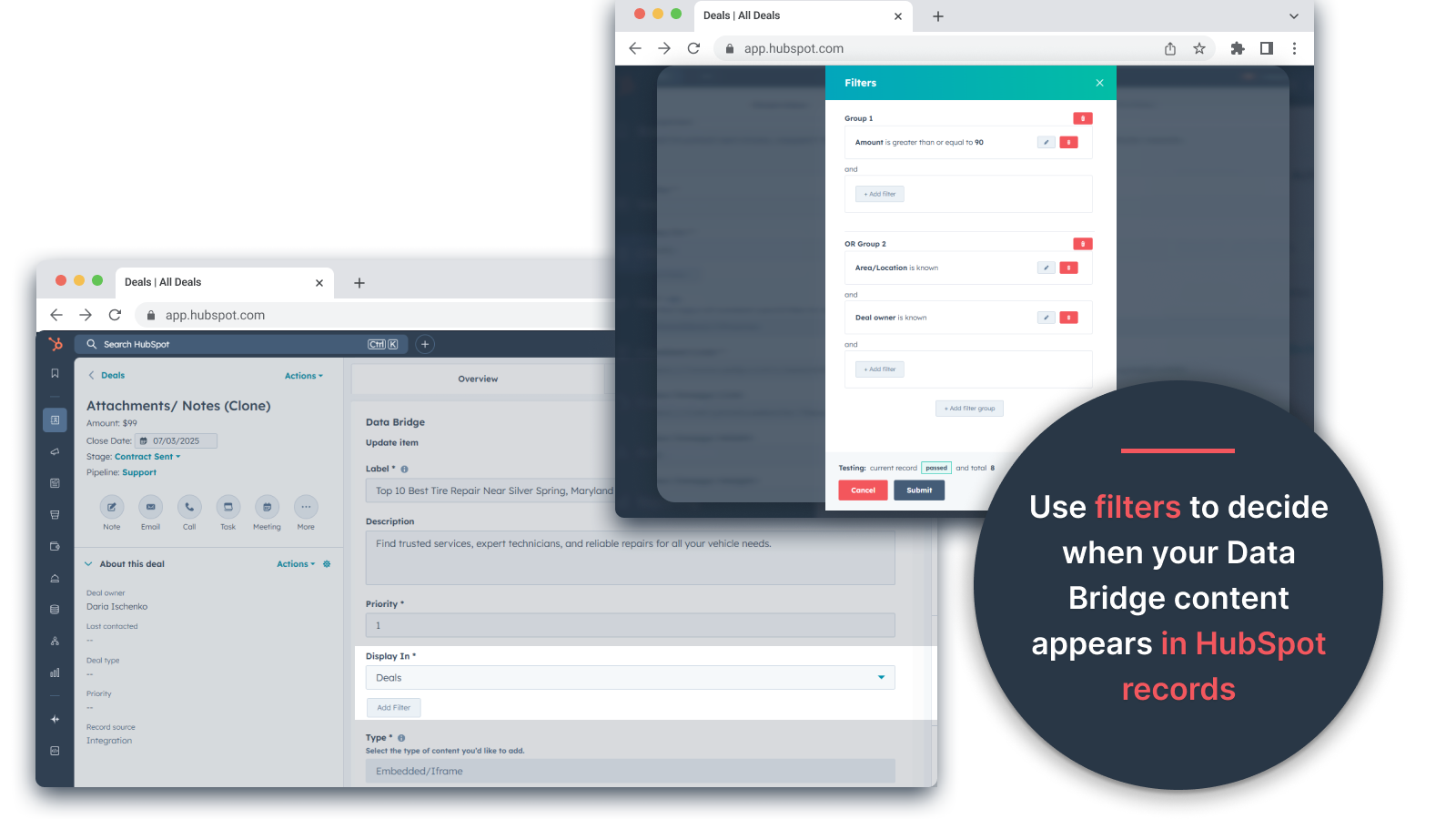
Reguły wyświetlania warunkowego
Pokaż lub ukryj moduły na podstawie etapu transakcji, wartości nieruchomości lub niestandardowych warunków - aby każdy członek zespołu widział tylko to, co jest istotne we właściwym czasie.
Bezproblemowa integracja z HubSpot
Działa natywnie ze wszystkimi standardowymi obiektami HubSpot (kontakty, firmy, transakcje, bilety) i obiektami niestandardowymi - nie wymaga kodowania ani dodatkowych loginów.
Obsługa plików i multimediów
Przesyłaj i wyświetlaj obrazy, pliki PDF lub pliki multimedialne wewnątrz rekordów, aby przyspieszyć współpracę i scentralizować kontekst.
Funkcjonalność aplikacji
Udostępnione dane
Contacts | ||
Custom Objects | ||
Company | ||
Deal | ||
Ticket | ||
Owners | ||
Deal Pipelines |
Recenzje
- 25 wrz 2025
Duża oszczędność czasu, która eliminuje kłopoty z zarządzaniem rozproszonymi plikami i przenosi wszystko bezpośrednio tam, gdzie jest to potrzebne!
Most danych na zwycięstwo! Potrzebowaliśmy łatwego sposobu na pobieranie raportów wydatków przechowywanych w Excelu do HubSpot i to rozwiązało ten problem bez konieczności zarządzania mnóstwem folderów Google Drive. Teraz przedstawiciele mogą łatwo klonować raporty wydatków, osadzać je bezpośrednio w powiązanych transakcjach i łatwo uzyskiwać do nich dostęp bez konieczności grzebania w Google Drive. Duża oszczędność czasu i stresu!
Łatwa konfiguracja, przenosi zasoby zewnętrzne bezpośrednio do HubSpot dla łatwego dostępu.
Jeszcze nie znaleziono!
Estey, Z.
- 19 wrz 2025
Przekształca HubSpot w centrum dowodzenia
Nasz zespół zaczął niedawno korzystać z Data Bridge! by 4CRM i już usprawnił nasz przepływ pracy na wiele sposobów. Możliwość osadzania Arkuszy Google, Dokumentów, filmów i innych zewnętrznych zasobów bezpośrednio w rekordach HubSpot wyeliminowała mnóstwo pracy w obie strony i sprawiła, że nasz CRM stał się o wiele bardziej praktyczny. Jest intuicyjny, elastyczny i dostarcza właściwe dane we właściwe miejsce we właściwym czasie.
- Bardzo łatwa konfiguracja i rozpoczęcie korzystania - Osadza krytyczne treści sprzedażowe (takie jak arkusze na żywo, materiały referencyjne, dokumenty wdrożeniowe) bezpośrednio w HubSpot - Konfigurowalne siatki ułatwiają organizowanie i wyświetlanie najistotniejszych danych - Świetne, aby rekordy były prawdziwym "centrum dowodzenia" - Zwiększona wydajność i ograniczenie przeskakiwania między kartami
- Chętnie zobaczyłbym jeszcze więcej natywnych integracji dodanych z czasem - Niektóre osadzone treści (np. niektóre odtwarzacze wideo) mogą mieć dziwactwa wyświetlania w zależności od ustawień przeglądarki
Stern, D.
Ceny
Podstawowy
19 USD
/mies.Uzyskaj 45 dni za darmo - 🔓 odblokuj wszystkie funkcje. Uczyń HubSpot Records inteligentniejszym dzięki elementom interfejsu użytkownika w miejscu pracy. Przenieś dane do kontaktów, firm i transakcji.
3 elementy interfejsu użytkownika: Każdy dodany element liczy się jako 1 element (np. obraz lub wideo itp.).
Kontakty: Wyświetlanie elementów interfejsu użytkownika Data Bridge wewnątrz rekordów kontaktów
Firmy: Wyświetlanie elementów interfejsu użytkownika Data Bridge wewnątrz rekordów firmy.
Transakcje: Wyświetlanie elementów interfejsu użytkownika Data Bridge wewnątrz rekordów transakcji.
Osadzaj obrazy, YouTube, Dokumenty Google, Slajdy i Arkusze za pomocą ramek iFrame - wszystkie wyświetlane bezpośrednio w rekordach HubSpot.
Filtry: ⚠️ Niedostępne (tylko dla obiektu lub dla wszystkich obiektów)
Custom Grid Builder: ⚠️ Niedostępne. Nie można tworzyć siatek z tagami, linkami, obrazami i notatkami.
Podstawowy
19 USD
/mies.Uzyskaj 45 dni za darmo - 🔓 odblokuj wszystkie funkcje. Uczyń HubSpot Records inteligentniejszym dzięki elementom interfejsu użytkownika w miejscu pracy. Przenieś dane do kontaktów, firm i transakcji.
3 elementy interfejsu użytkownika: Każdy dodany element liczy się jako 1 element (np. obraz lub wideo itp.).
Kontakty: Wyświetlanie elementów interfejsu użytkownika Data Bridge wewnątrz rekordów kontaktów
Firmy: Wyświetlanie elementów interfejsu użytkownika Data Bridge wewnątrz rekordów firmy.
Transakcje: Wyświetlanie elementów interfejsu użytkownika Data Bridge wewnątrz rekordów transakcji.
Osadzaj obrazy, YouTube, Dokumenty Google, Slajdy i Arkusze za pomocą ramek iFrame - wszystkie wyświetlane bezpośrednio w rekordach HubSpot.
Filtry: ⚠️ Niedostępne (tylko dla obiektu lub dla wszystkich obiektów)
Custom Grid Builder: ⚠️ Niedostępne. Nie można tworzyć siatek z tagami, linkami, obrazami i notatkami.
* Powyższe ceny zostały podane wyłącznie w celach informacyjnych. Nie zawierają one podatków, premii, zniżek lub innych zmiennych cenowych. Skontaktuj się z partnerem w celu uzyskania najbardziej aktualnych i poprawnych informacji o cenach. HubSpot nie ponosi żadnej odpowiedzialności za informacje cenowe, które są dostarczane przez naszych partnerów. Ostatnia aktualizacja cen: 05.05.2026
Więcej informacji
Utworzone przez - 4CRMs
Instaluje - Ponad 60 instalacji
Kategorie Języki, w których dostępna jest ta aplikacja Angielski