

Data Bridge - Bring Any (Sync) Data into CRM Objects

요구 사항
HubSpot 요금제 HubSpot 계정 권한 - 필수 계정 권한 보기
액세스 유형 공유됨 Data Bridge - Bring Any (Sync) Data into CRM Objects 구독 - 기본 또는 전문가 🔥 플랜
개요
-1.png)
1/6 - 조건 또는 사용자 지정 규칙에 따라 Google 작업 영역, 동영상, 텍스트, 아이프레임 링크를 HubSpot에 추가하고 표시할 수 있습니다.
Data Bridge로 HubSpot 기록을 강화하세요! 웹사이트, 이미지, 동영상, Google 스프레드시트, 문서 등 외부 콘텐츠를 동기화하여 팀이 작업하는 곳에서 바로 표시하세요. 데이터 브리지 앱 동기화 - 가장 중요한 곳에 관련 콘텐츠를 추가하여 CRM을 더 쉽게 사용하고 더 많은 정보를 얻을 수 있도록 도와줍니다. 단 한 번의 클릭으로 즐겨 사용하는 앱과 HubSpot을 통합하세요.
무료 라이브 온보딩 받기 - 문의하여 예약하기
모든 Data Bridge 사용자는 제품/지원팀과 함께하는 무료 라이브 온보딩 세션을 받을 수 있습니다. 첫날부터 비즈니스에 필요한 것을 정확하게 구축할 수 있는 모든 준비를 갖추게 됩니다. HubSpot 기록에 외부 데이터를 표시하세요! Google 스프레드시트 임베드! HubSpot에서 데이터 통합 및 데이터 동기화를 처리하는 간단한 방법을 찾고 계신가요? Data Bridge를 사용하면 외부 데이터를 연결하고, 대시보드를 임베드하고, HubSpot 레코드 내에서 바로 사용자 지정 개체를 관리할 수 있습니다. 데이터 마이그레이션, 사용자 지정 커넥터, Google 스프레드시트, Excel 또는 데이터베이스에서 데이터 가져오기/내보내기 기능 등 Data Bridge를 사용하면 자동화, 보고 통합 및 HubSpot용 ETL을 손쉽게 수행할 수 있습니다. 사용자 지정 가능한 그리드를 만들고, 필요한 데이터를 포함/표시하고, HubSpot 레코드를 진정한 명령 센터로 전환하세요.
Data Bridge의 주요 기능
링크가 포함된 이미지를 HubSpot 레코드에 직접 임베드하세요.
제품 사진, 마케팅 자료 또는 모든 시각적 자산을 연락처, 회사, 거래, 티켓 또는 사용자 지정 개체에 바로 추가하세요. 팀이 작업하는 곳에서 바로 시각적 자료로 일관성을 유지하세요.
라이브 Google 스프레드시트, 문서 통합
실시간 보고서, 트래커 또는 대시보드를 표시하기 위해 HubSpot 기록 내에 Google 스프레드시트를 임베드하고 iframe하세요. 진행 상황 추적, KPI 또는 공유 고객 데이터에 적합합니다.
YouTube 동영상 임베드
튜토리얼, 제품 데모 또는 고객 업데이트를 HubSpot 레코드로 바로 가져올 수 있습니다. 팀은 CRM을 벗어나지 않고도 적합한 동영상 콘텐츠에 즉시 액세스할 수 있습니다.
사용자 지정 그리드 빌더
HubSpot 레코드 내에서 완전히 사용자 지정 가능한 그리드를 디자인하세요. 태그, 텍스트, 상태 표시기, 링크, 이미지, 아이콘, 이메일 또는 경고를 추가하세요. 색상으로 구분된 변형(성공, 경고, 오류, 정보) 및 추가 메모를 사용하여 복잡한 데이터를 쉽게 해석하고 조치할 수 있도록 하세요.
조건부 표시 규칙
거래 단계, 속성 값 또는 사용자 지정 조건에 따라 모듈을 표시하거나 숨겨 각 팀원이 적시에 관련성 있는 정보만 볼 수 있도록 하세요.
원활한 HubSpot 통합
코딩이나 추가 로그인 없이 모든 HubSpot 표준 개체(연락처, 회사, 거래, 티켓) 및 사용자 지정 개체와 기본적으로 작동합니다.
파일 및 미디어 지원
이미지, PDF 또는 미디어 파일을 레코드 안에 업로드하고 표시하여 더욱 빠른 협업과 중앙 집중식 컨텍스트를 확보하세요.
콘텐츠를 배치할 수 있는 위치
모든 레코드 - CRM 전체에 콘텐츠를 표시합니다.
특정 레코드 - 보고 있는 단일 레코드에 콘텐츠를 추가합니다.
필터링된 레 코드 - 선택한 기준과 일치하는 레코드를 대상으로 합니다.
필터는 모든 콘텐츠 유형에 대해 작동하므로 올바른 정보가 올바른 위치에 표시됩니다.
유용한 이유 - 올바른 콘텐츠를 올바른 위치에 제공합니다.
HubSpot을 벗어나지 않고도 외부 콘텐츠에 액세스할 수 있습니다.
탭 전환 및 흩어져 있는 데이터를 줄이세요.
팀에게 최신 시각 자료와 정보를 맥락에 맞게 제공할 수 있나요?
팀이 즉시 참조할 수 있는 실행 가능한 콘텐츠로 기록을 개선하세요.
이 기능이 빛을 발하는 5가지 실제 비즈니스 사용 사례를 소개합니다:
1. 고객 온보딩 허브(SaaS/기술)
온보딩 체크리스트, 플레이북, 킥오프 통화 녹음을 거래 또는 회사 기록에 바로 삽입하세요.
온보딩 단계에 따라 다른 지침을 표시하세요(예: "설정 보류 중" 대 "라이브").
CSM은 도구를 전환할 필요 없이 HubSpot 내에서 직접 진행 상황을 업데이트합니다.
2. 계정 상태 및 성공 추적(고객 성공)
KPI, 갱신 날짜 및 NPS 결과가 포함된 실시간 Google 스프레드시트 또는 대시보드를 추가하세요.
사용량이 감소하거나 계약 갱신이 임박하거나 특정 자산에 위험이 표시되면 경고를 표시하세요.
빠른 링크(계정 소유자에게 메일 보내기, 갱신 제안 템플릿)로 CSM을 정렬하세요.
3. 영업 플레이북 및 안내(영업팀)
거래 단계에 따라 동적 지침을 표시합니다('발견' = 적격 질문 표시, '제안서 전송' = 계약 체크리스트 표시).
법률 또는 재무 승인을 위한 메일 투 링크와 같은 바로가기를 추가하세요.
필요할 때만 올바른 정보가 표시되도록 설정하여 담당자의 램프업 시간을 단축하세요.
4. 현장 서비스 및 설치(제조/서비스)
티켓에 설치 체크리스트를 포함하세요.
기술자가 설치 전후 사진, 동영상 또는 서명된 문서를 업로드합니다.
특정 제품 유형을 선택한 경우에만 안전 지침 또는 준수 사항을 표시하세요.
5. 크리에이티브/마케팅 자산 리뷰(에이전시 또는 사내 팀)
크리에이티브 브리핑, 디자인 초안 업로드, 동영상 미리 보기를 모두 하나의 기록에 저장하세요.
고객이 승인을 표시할 때까지 '검토 보류 중'이라는 알림을 표시합니다.
계정 관리자는 파일을 업로드하고 디렉터는 구조와 템플릿을 제어할 수 있습니다.
간단히 말해, 동기화 데이터 브리지는 도구 전환을 줄이고 적절한 콘텐츠를 적시에 HubSpot 레코드에 바로 가져올 수 있습니다. #최고의 HubSpot 커넥터!
기능
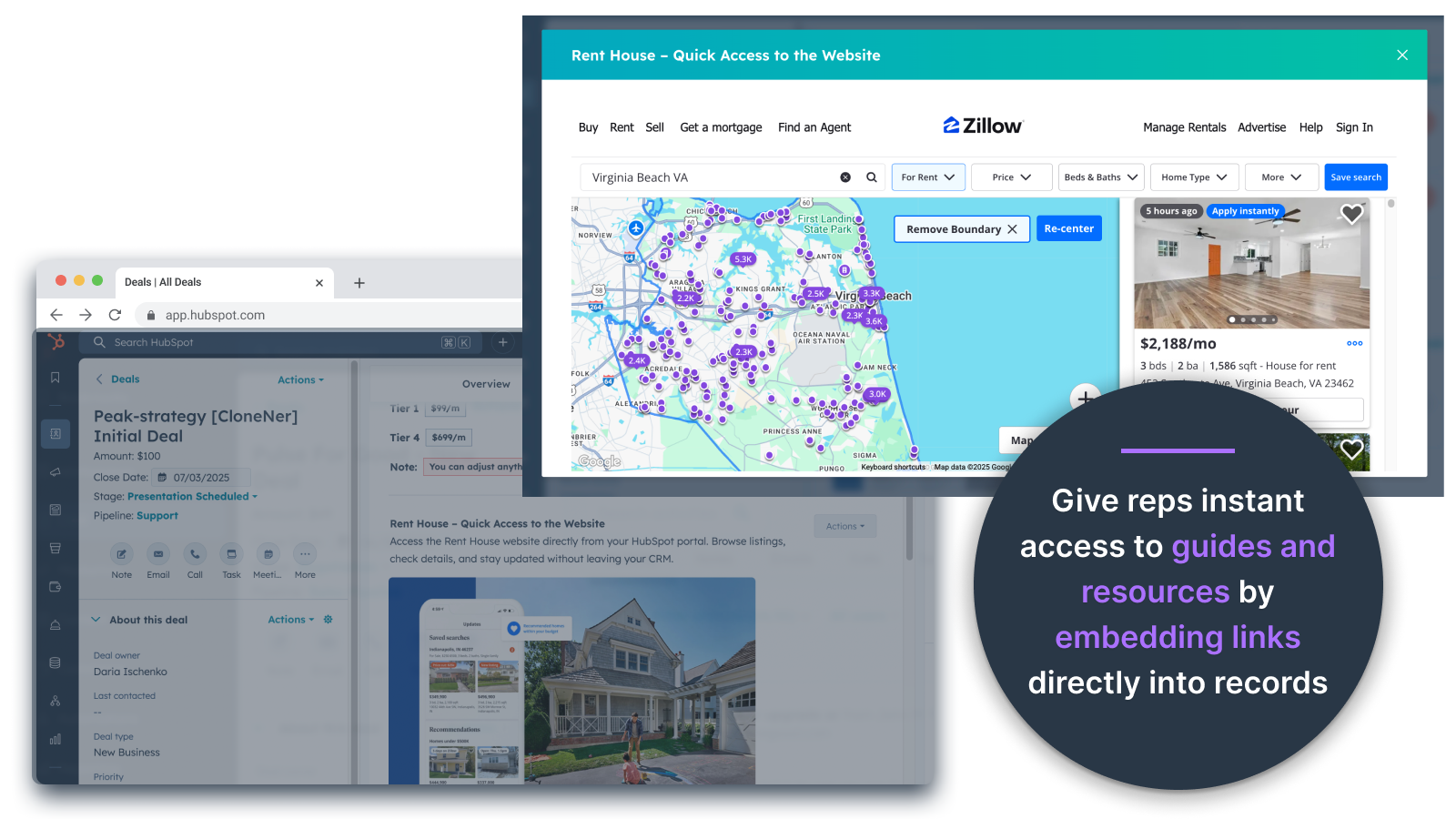
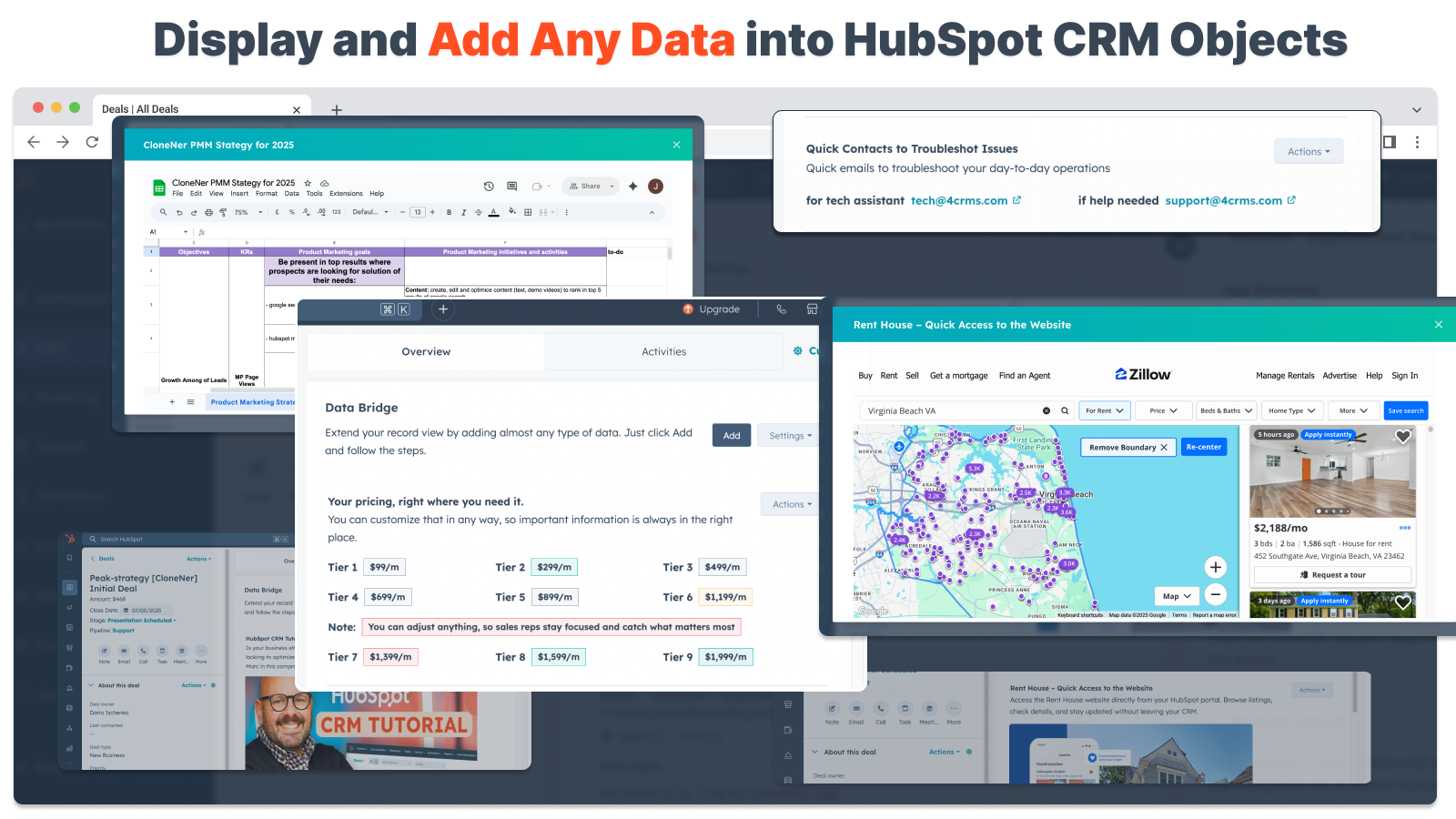
거래, 티켓 및 기타 레코드 보기에 직접 이미지 삽입하기
제품 사진, 마케팅 자료 또는 모든 시각적 자산을 연락처, 회사, 거래, 티켓 또는 사용자 지정 개체에 바로 추가하세요. 팀원들이 일하는 곳에서 바로 시각적 자료를 사용할 수 있도록 하세요.
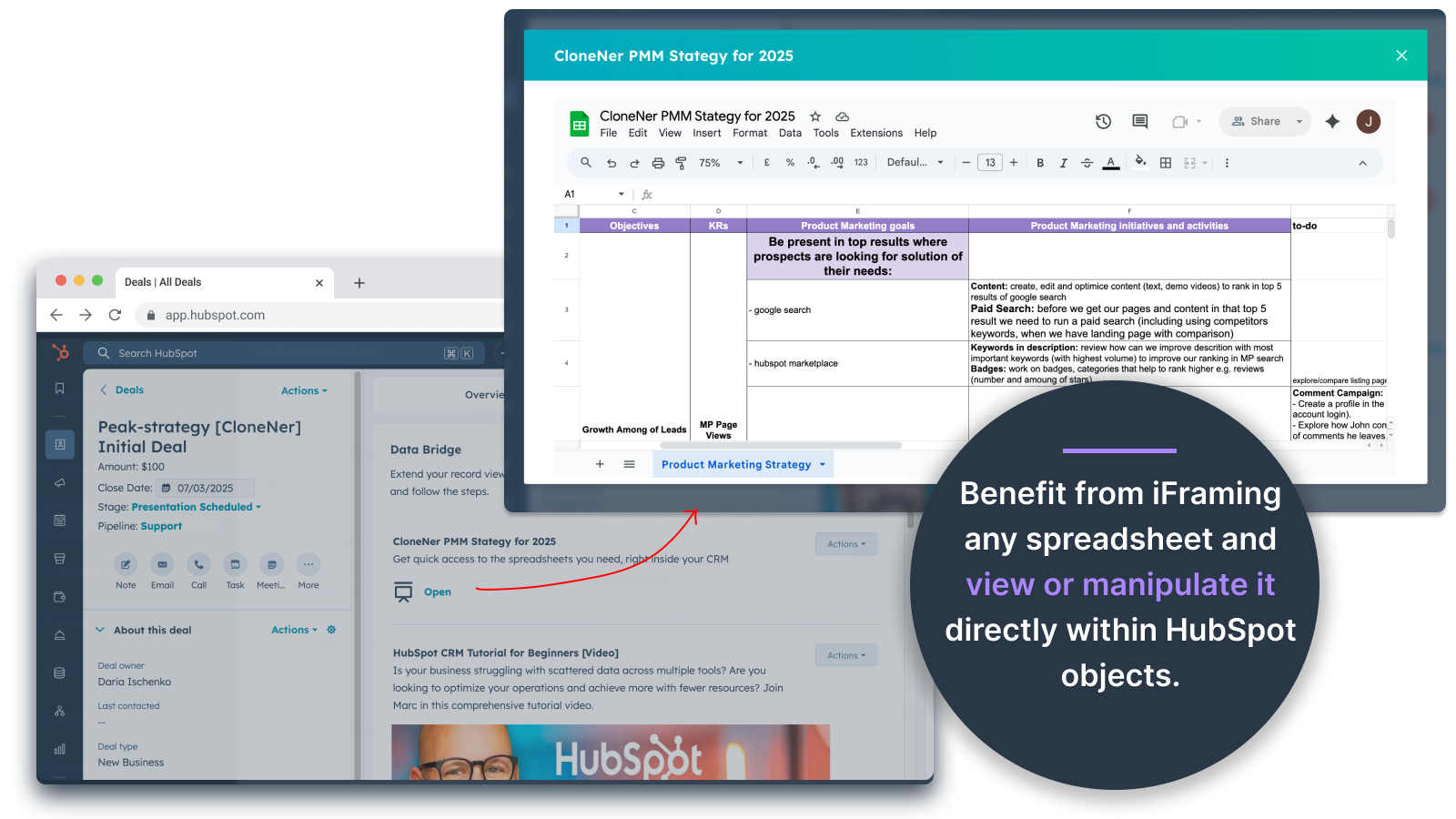
Google 스프레드시트 및 문서도구 - 거래, 티켓 등 내부에서 바로 보기
실시간 보고서, 트래커 또는 대시보드를 표시하기 위해 HubSpot 레코드에 Google 스프레드시트를 삽입하고 iframe하세요. 진행 상황 추적, KPI 또는 공유 고객 데이터에 적합합니다.

YouTube 동영상 퍼가기
튜토리얼, 제품 데모 또는 클라이언트 업데이트를 HubSpot 기록으로 바로 가져올 수 있습니다. 팀은 CRM을 벗어나지 않고도 적합한 비디오 콘텐츠에 즉시 액세스할 수 있습니다.
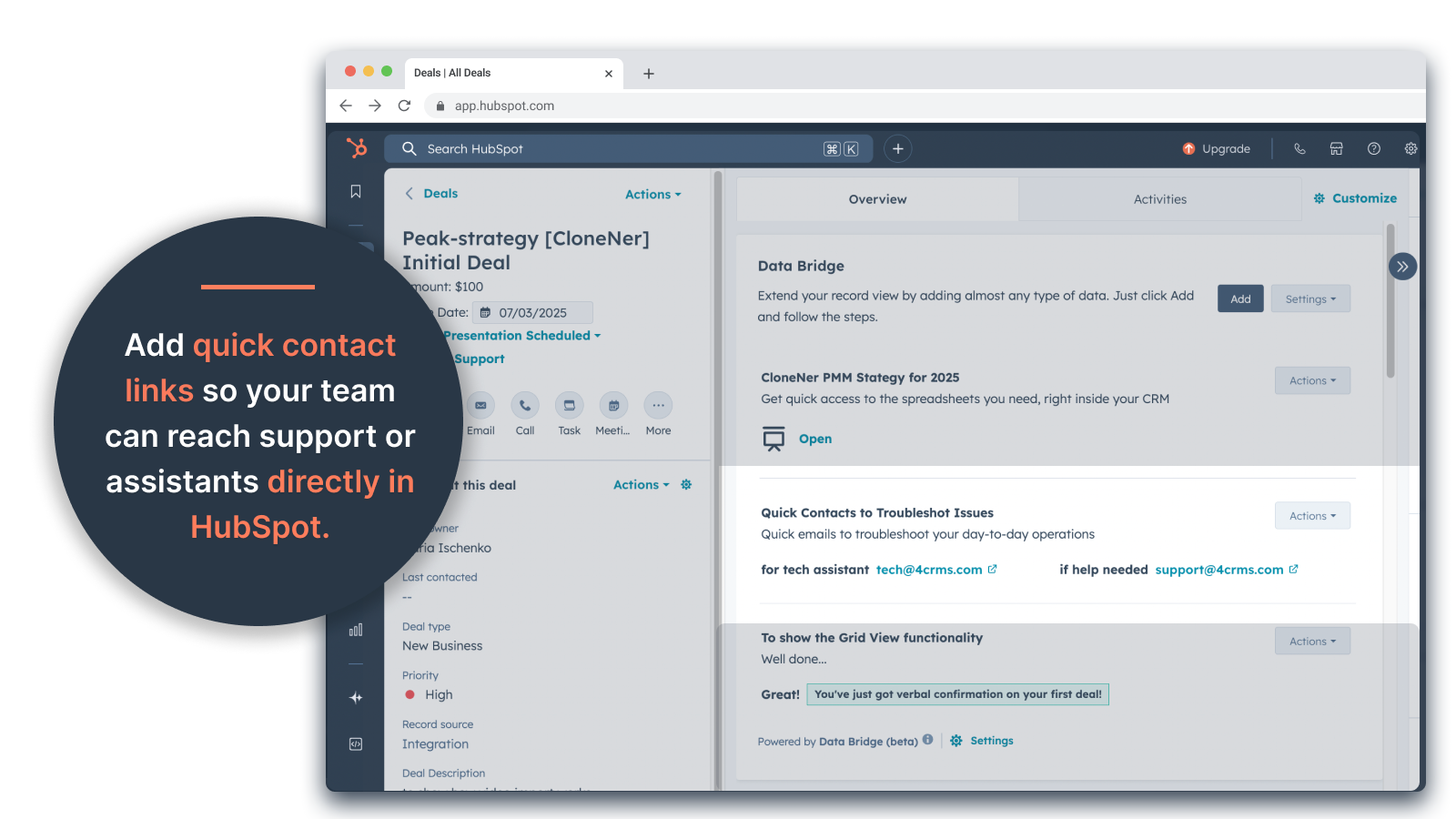
사용자 지정 그리드 빌더
HubSpot 레코드 내에서 완전히 사용자 지정 가능한 그리드를 디자인하세요. 태그, 텍스트, 상태 표시기, 링크, 이미지, 아이콘, 이메일 또는 경고를 추가하세요. 색상으로 구분된 변형(성공, 경고, 오류, 정보) 및 추가 메모를 사용하여 복잡한 데이터를 쉽게 해석하고 조치할 수 있도록 하세요.
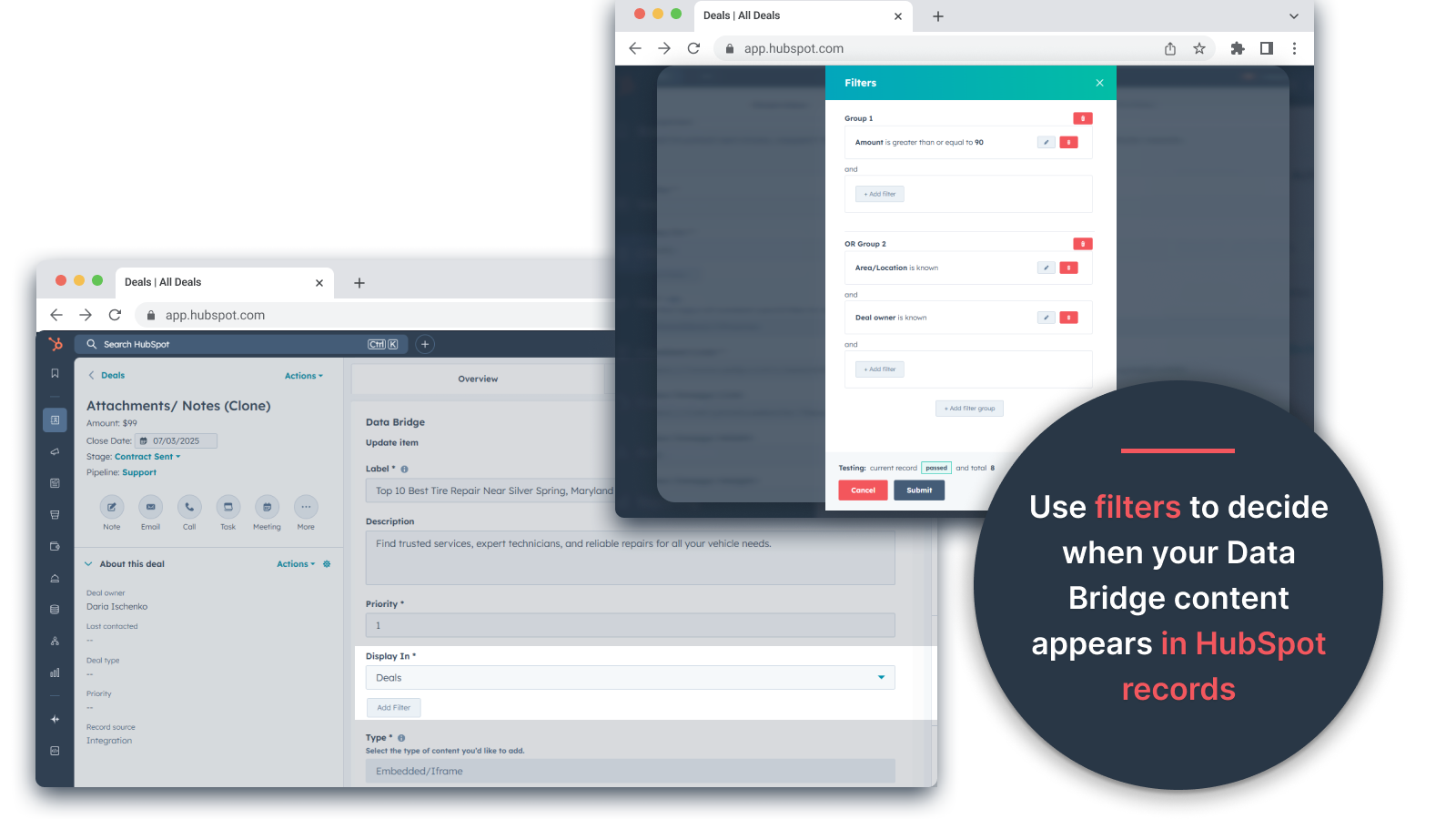
조건부 표시 규칙
거래 단계, 속성 값 또는 사용자 지정 조건에 따라 모듈을 표시하거나 숨길 수 있으므로 각 팀원은 적시에 관련성 있는 내용만 볼 수 있습니다.
원활한 HubSpot 통합
코딩이나 추가 로그인이 필요 없이 모든 HubSpot 표준 개체(연락처, 회사, 거래, 티켓) 및 사용자 지정 개체와 기본적으로 작동합니다.
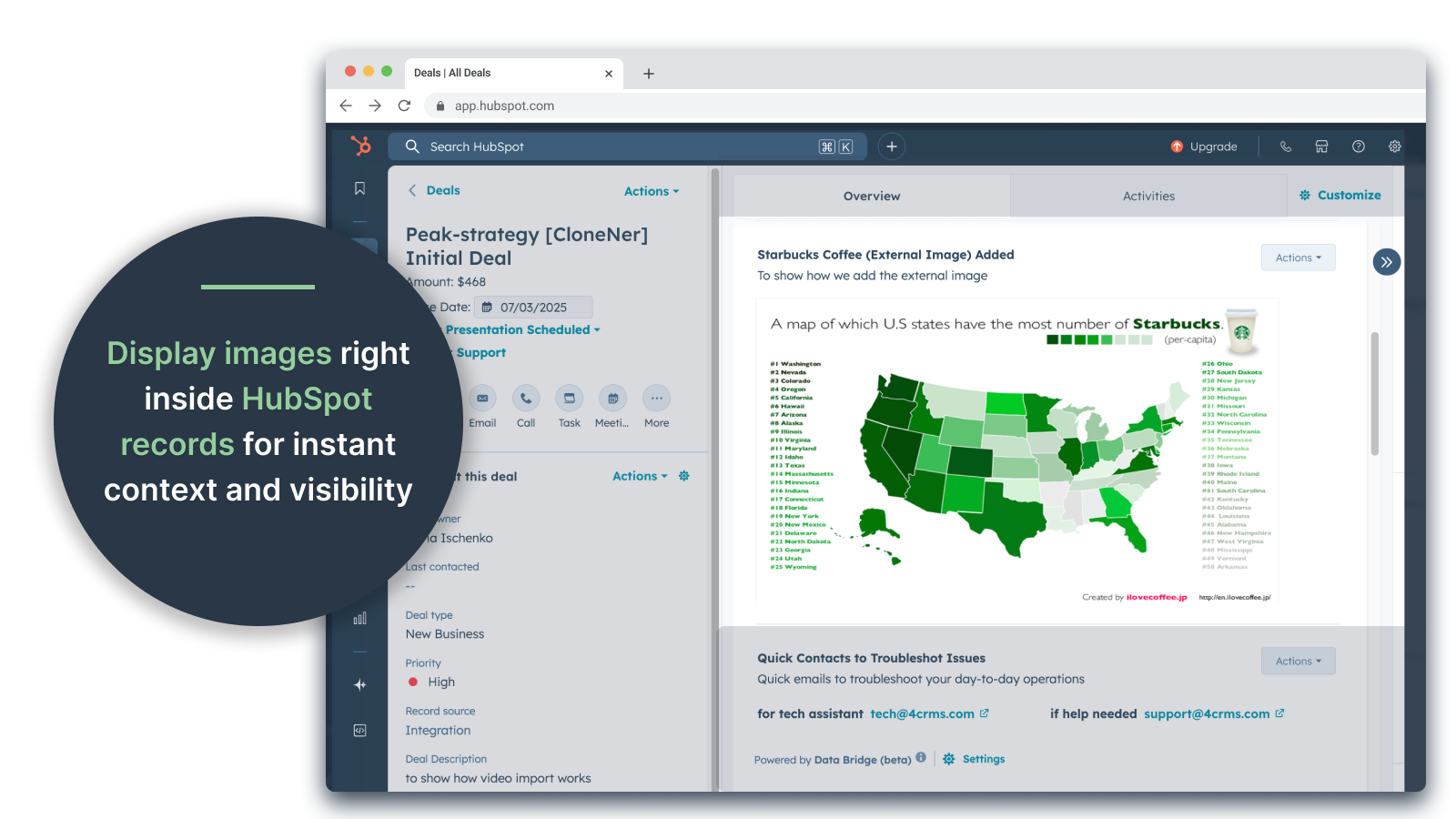
파일 및 미디어 지원
레코드 안에 이미지, PDF 또는 미디어 파일을 업로드하고 표시하여 더욱 빠른 협업과 중앙 집중식 컨텍스트를 확보하세요.
앱 기능
공유 데이터
Contacts | ||
Custom Objects | ||
Company | ||
Deal | ||
Ticket | ||
Owners | ||
Deal Pipelines |
리뷰
- 2025년 9월 25일
흩어져 있는 파일을 관리하는 번거로움을 없애고 필요한 곳에 모든 파일을 바로 가져올 수 있어 시간을 크게 절약할 수 있습니다!
데이터 브릿지를 통한 성공! Excel에 있는 경비 보고서를 HubSpot으로 쉽게 가져올 수 있는 방법이 필요했는데, 수많은 Google 드라이브 폴더를 관리할 필요 없이 이 문제를 해결했습니다. 이제 담당자는 경비 보고서를 쉽게 복제하여 관련 거래에 바로 삽입하고 Google 드라이브를 파헤칠 필요 없이 쉽게 액세스할 수 있습니다. 시간과 스트레스를 크게 절약할 수 있습니다!
간편한 설정, 외부 리소스를 HubSpot으로 직접 가져와 쉽게 액세스 가능
아직 발견되지 않았습니다!
Estey, Z.
- 2025년 9월 19일
HubSpot을 명령 센터로 전환하기
우리 팀은 최근 4CRM의 Data Bridge! 를 사용하기 시작했고, 이미 강력한 방식으로 워크플로우를 간소화했습니다. Google 스프레드시트, 문서, 동영상 및 기타 외부 리소스를 HubSpot 기록에 직접 삽입할 수 있는 기능 덕분에 수많은 번거로움이 사라지고 CRM의 실행 가능성이 훨씬 더 높아졌습니다. 직관적이고 유연하며 적시에 적절한 데이터를 적재적소에 제공할 수 있습니다.
- 매우 간편한 설정 및 사용 시작 - 중요한 영업 콘텐츠(예: 라이브 시트, 참고 자료, 온보딩 문서)를 HubSpot에 직접 포함 - 사용자 지정 가능한 그리드를 통해 가장 관련성 높은 데이터를 쉽게 구성하고 표시 - 기록을 진정한 '명령 센터'처럼 만드는 데 탁월 - 효율성 향상 및 탭 이동 감소
- 시간이 지남에 따라 더 많은 기본 통합 기능이 추가되기를 기대합니다 - 일부 임베디드 콘텐츠(예: 특정 동영상 플레이어)는 브라우저 설정에 따라 표시상의 문제가 있을 수 있습니다.
Stern, D.
가격 책정
기본
US$19
/월45일 무료 이용 - 🔓모든 기능 잠금 해제. 작업하는 곳에서 바로 UI 요소로 HubSpot 기록을 더 스마트하게 만드세요. 연락처, 회사 및 거래에 데이터를 가져오세요.
3개의 UI 요소: 추가된 각 항목은 1개의 요소로 계산됩니다(예: 이미지 또는 동영상 등).
연락처: 연락처 레코드 내에 데이터 브리지 UI 요소 표시
회사: 회사 레코드 내에 Data Bridge UI 요소를 표시합니다.
거래: 거래 레코드 내에 데이터 브리지 UI 요소를 표시합니다.
이미지, YouTube, Google 문서, 슬라이드 및 스프레드시트를 iFrame으로 삽입하면 모두 HubSpot 기록에 바로 표시됩니다.
필터: ⚠️ 사용 불가(개체별로만 적용되거나 모든 개체에 적용됨)
사용자 지정 그리드 빌더: ⚠️ 사용할 수 없습니다. 태그, 링크, 이미지, 메모가 포함된 그리드는 만들 수 없습니다.
기본
US$19
/월45일 무료 이용 - 🔓모든 기능 잠금 해제. 작업하는 곳에서 바로 UI 요소로 HubSpot 기록을 더 스마트하게 만드세요. 연락처, 회사 및 거래에 데이터를 가져오세요.
3개의 UI 요소: 추가된 각 항목은 1개의 요소로 계산됩니다(예: 이미지 또는 동영상 등).
연락처: 연락처 레코드 내에 데이터 브리지 UI 요소 표시
회사: 회사 레코드 내에 Data Bridge UI 요소를 표시합니다.
거래: 거래 레코드 내에 데이터 브리지 UI 요소를 표시합니다.
이미지, YouTube, Google 문서, 슬라이드 및 스프레드시트를 iFrame으로 삽입하면 모두 HubSpot 기록에 바로 표시됩니다.
필터: ⚠️ 사용 불가(개체별로만 적용되거나 모든 개체에 적용됨)
사용자 지정 그리드 빌더: ⚠️ 사용할 수 없습니다. 태그, 링크, 이미지, 메모가 포함된 그리드는 만들 수 없습니다.
* 여기에 표시된 가격은 표시 목적으로만 사용됩니다. 모든 가격에는 세금, 인센티브, 할인 또는 기타 가격 변수가 포함되어 있지 않습니다. 가장 최신의 정확한 가격 정보를 알고 싶다면 파트너에게 연락해야 합니다. HubSpot은 파트너가 제공하는 이 가격 정보에 대해 어떠한 책임도 지지 않습니다. 마지막 가격 업데이트 날짜: 2026.05.05.