

Oneflow
Erstellt von - Oneflow AB
Installationen - 1 Tsd. Installationen
Bewertung 4,6
(29)

Führend
Anforderungen
HubSpot-Produktversion HubSpot-Account-Berechtigungen - Erforderliche Account-Berechtigungen anzeigen
Zugriffstyp Geteilt Oneflow-Abonnement - Produktversionen: Business oder Unternehmen
Übersicht
1/8 - Erfahren Sie, wie die Oneflow x HubSpot-Integration Ihren Vertriebs- und Vertragsmanagementprozess rationalisiert.
Optimieren Sie Ihren Vertriebsprozess mit Contract Intelligence
Erstellen Sie nahtlose, datenreiche Verträge, die eine Zusammenarbeit in Echtzeit über den gesamten Vertragslebenszyklus hinweg ermöglichen, direkt aus Geschäften, Unternehmen und Kontakten. Nutzen Sie KI und Vertragsmetadaten, um Risiken und Engpässe in Ihren Angeboten zu erkennen, und unterschreiben Sie sofort mit rechtsverbindlichen elektronischen Signaturen.
Beseitigen Sie manuelle Arbeit mit Vertragsautomatisierung
Befreien Sie sich von sich wiederholenden Aufgaben, indem Sie automatisch Verträge erstellen und versenden, sobald ein Geschäft ein qualifiziertes Stadium erreicht oder ein Lead ein Formular abschickt. Synchronisieren Sie automatisch Daten, einschließlich Einzelposten, zwischen Oneflow und HubSpot, in beide Richtungen, um Zeit zu sparen und die Konsistenz Ihrer Verträge und Ihres CRM zu erhöhen.
Beschleunigen Sie den Abschluss durch reibungslose Vertragsabwicklung
Optimieren Sie die Verhandlung durch Live-Zusammenarbeit und Bearbeitung innerhalb des Angebots, um Reibungsverluste im Unterzeichnungsprozess zu vermeiden. Verfolgen Sie das Engagement Ihres potenziellen Kunden auf der Aktivitätszeitachse und synchronisieren Sie Vertragsaktualisierungen mit HubSpot, ohne dass Sie manuell eingreifen müssen. Auf diese Weise können Sie die Vertriebsdynamik aufrechterhalten und sich auf den Abschluss des Geschäfts konzentrieren.
Funktionen
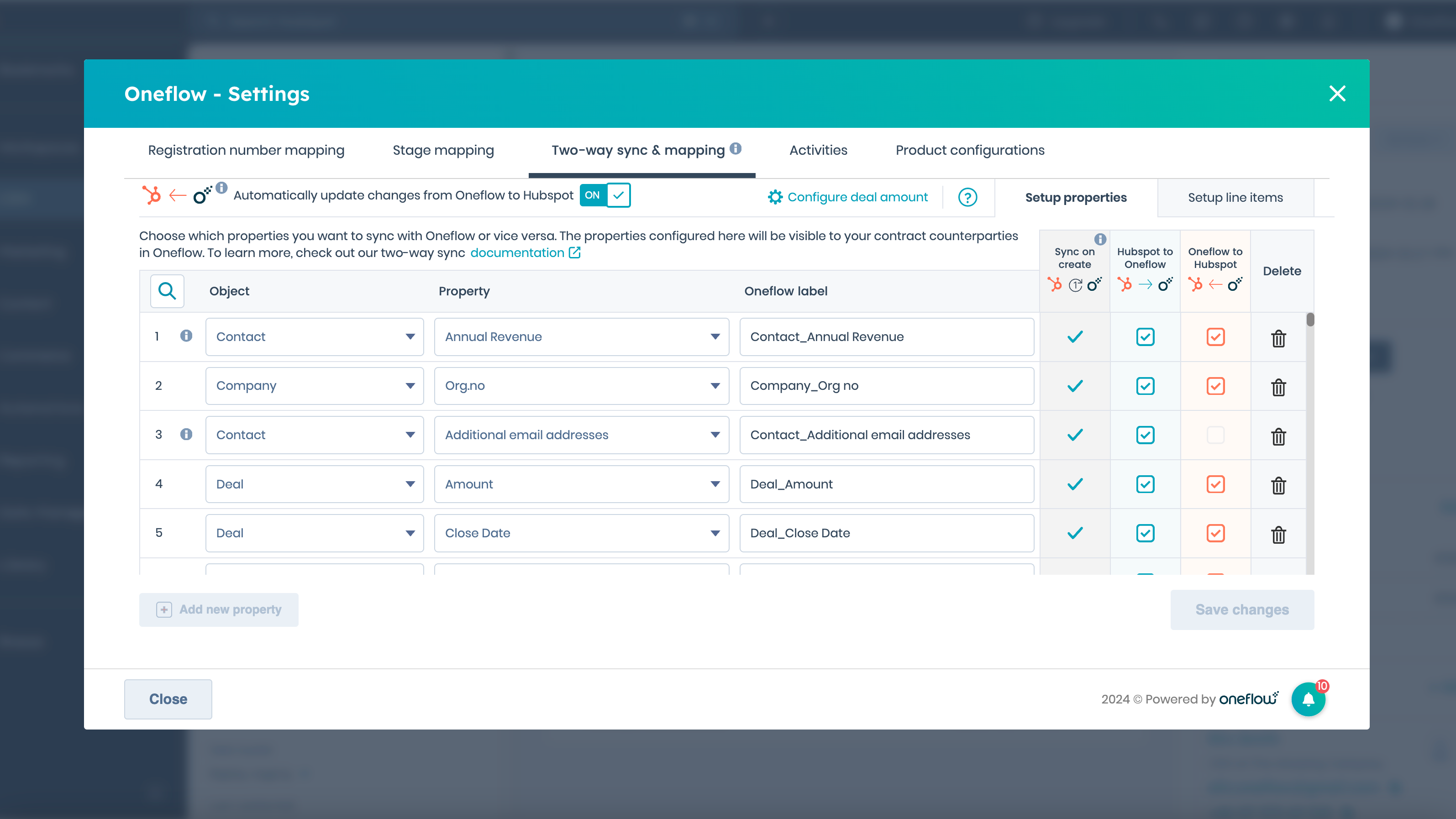
Datenfelder und Zwei-Wege-Synchronisierung einrichten
Synchronisieren Sie HubSpot-Eigenschaften mit Datenfeldern in einem Oneflow-Dokument. Immer wenn Sie einen Vertrag erstellen, werden die von Ihnen synchronisierten Daten automatisch in das Oneflow-Dokument übertragen. Wenn Informationen innerhalb des Dokuments geändert werden, wird das HubSpot-Feld automatisch aktualisiert, wenn Sie unsere Zwei-Wege-Synchronisierung aktiviert haben.
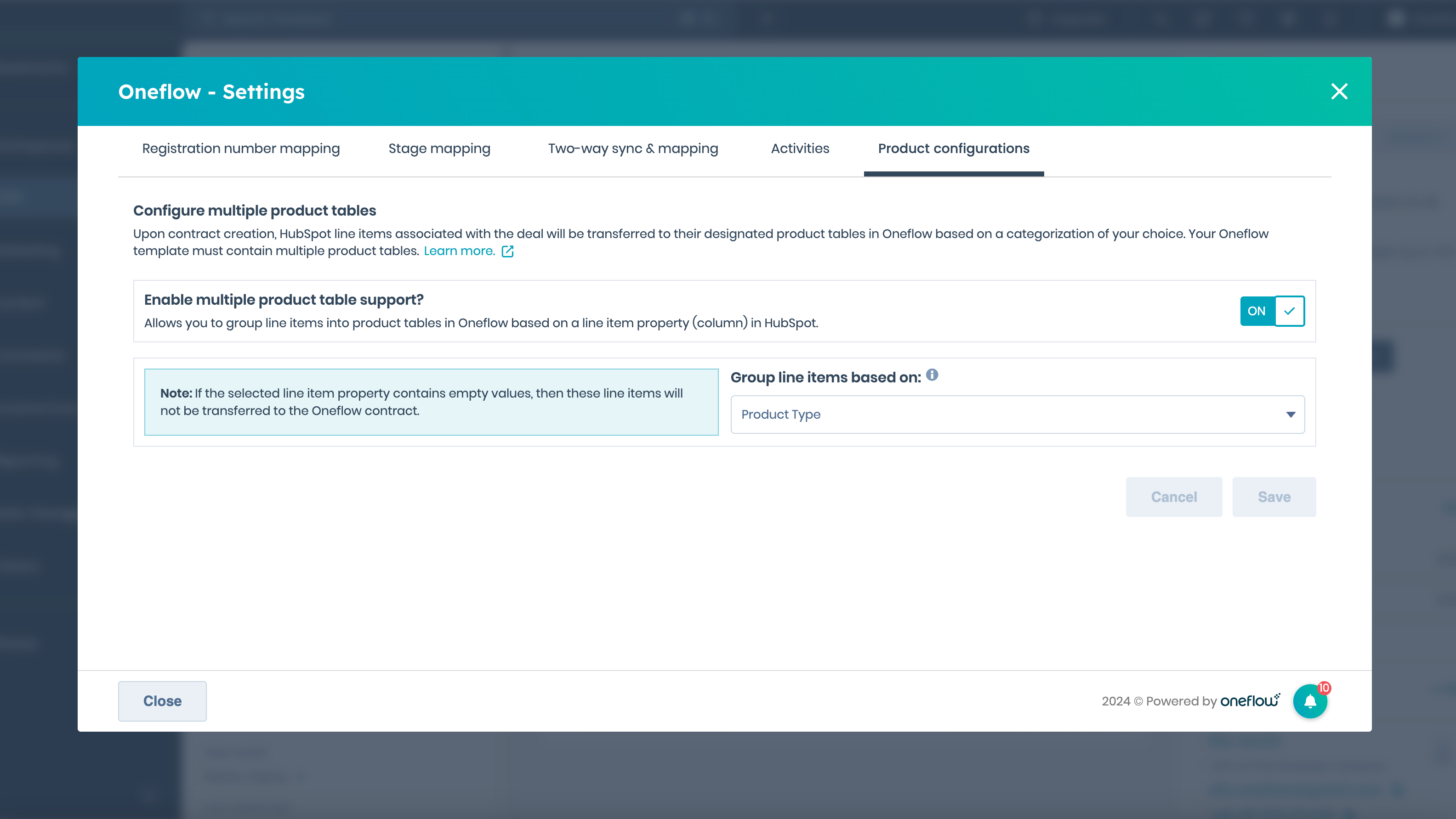
Erstellen einer Vertragsvorlage mit HubSpot-Produkten
Erstellen Sie eine Oneflow-Vorlage, die Produkttabellen enthält, um HubSpot-Positionen, einschließlich Beschreibung, Mengen, Preise und Rabatte, automatisch mit einem neuen Vertrag zu synchronisieren. Sie können auch Positionen in mehrere Produkttabellen innerhalb des Oneflow-Dokuments kategorisieren, basierend auf den Eigenschaften der Positionen.
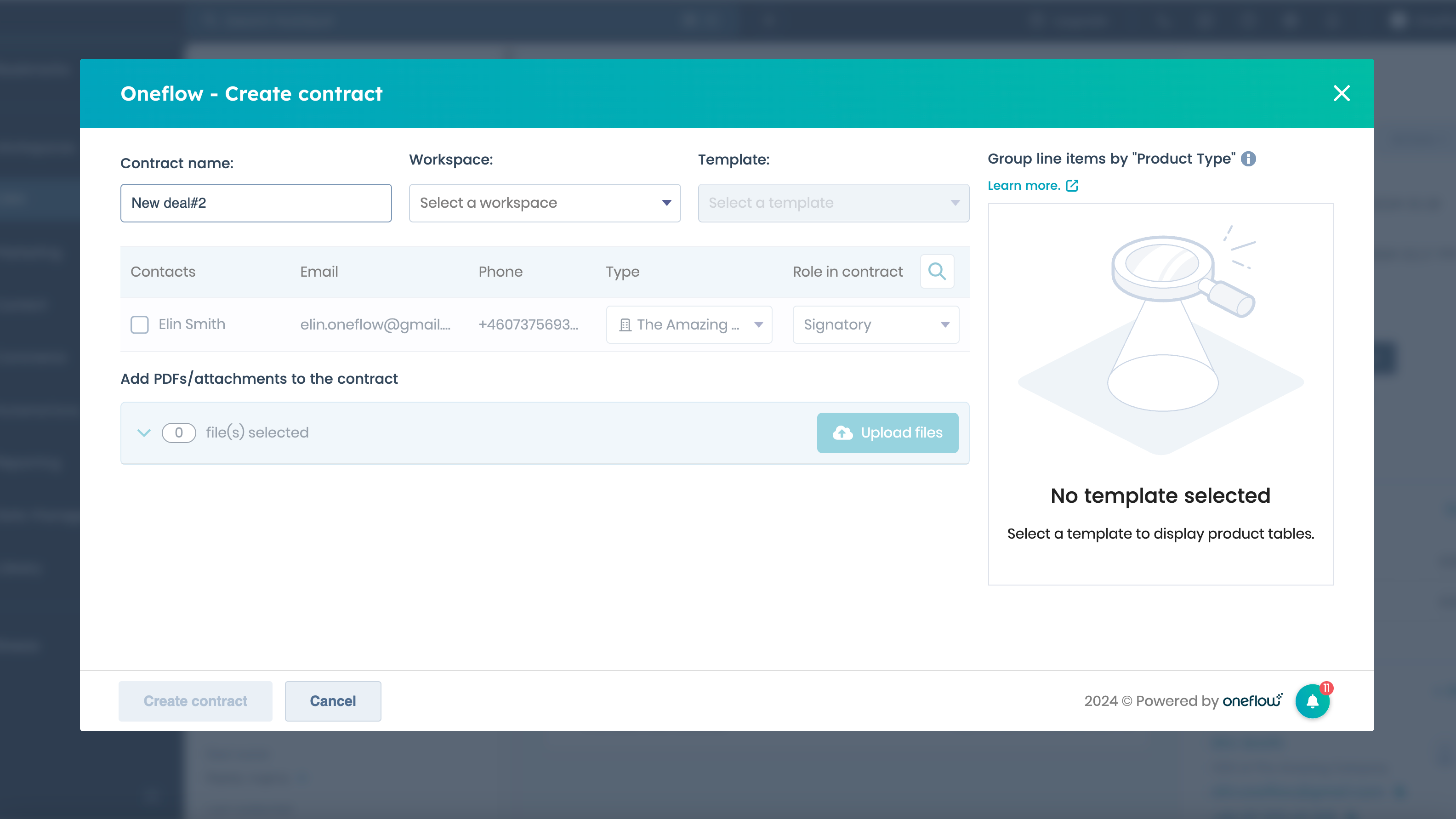
Erstellen und Senden eines Oneflow-Dokuments (Vertrag)
Erstellen Sie einen Oneflow-Vertrag direkt aus einem neuen oder bestehenden Geschäft, einem Kontakt oder einem Unternehmen, indem Sie das Oneflow-Vertragskarten-Widget verwenden. Wählen Sie, welche Arbeitsbereiche, Vorlagen und Kontakte in das Dokument aufgenommen werden sollen, und fügen Sie nahtlos Anhänge hinzu.
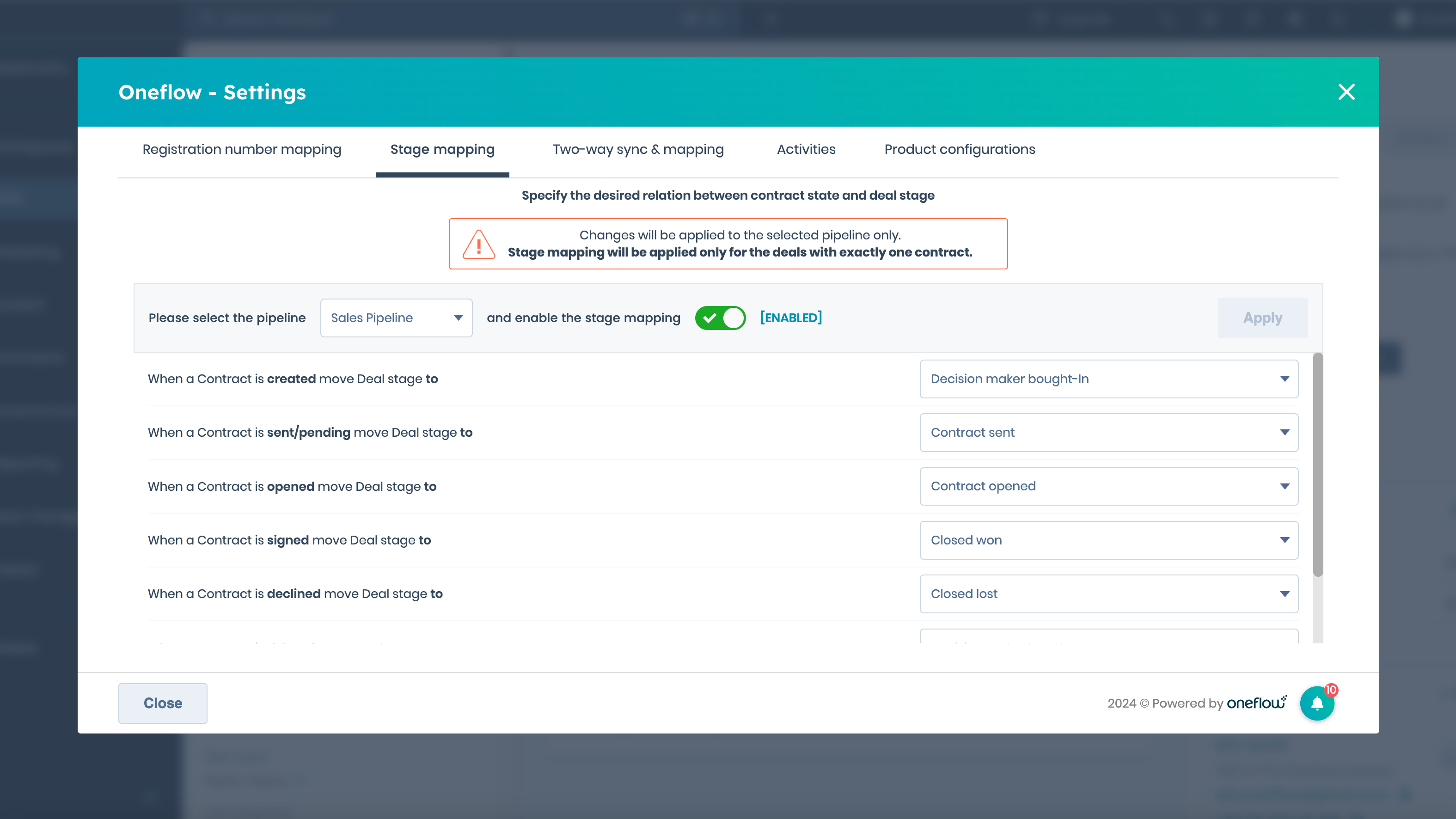
Synchronisieren Sie Ihre Vertriebspipeline mit dem Vertragsstadium (für Admins)
Verwalten Sie automatisch die Geschäftsphasen in Ihren Pipelines, indem Sie sie dem Status Ihres Vertrags zuordnen. Sobald Sie einen Vertrag erstellen, senden oder unterzeichnen, wird das Geschäft automatisch in die neue Phase in Ihrer Pipeline verschoben.
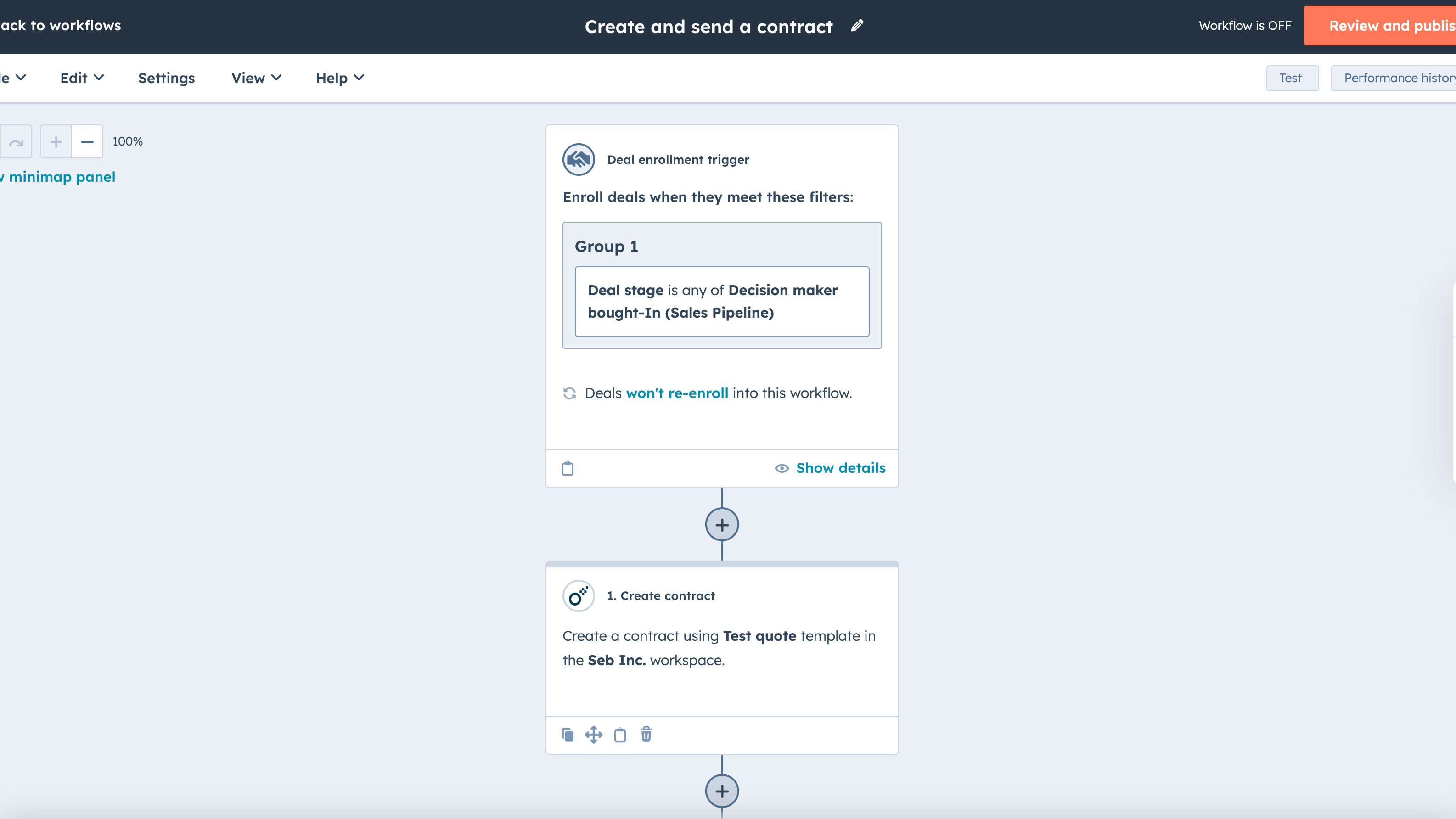
Arbeitsabläufe: Erstellen und Senden eines Vertrags, wenn eine Auslösebedingung erfüllt ist
Fügen Sie die Oneflow-Aktionen Vertrag erstellen und Vertrag senden zu einem Workflow-Auslöser Ihrer Wahl hinzu, um die Vertragserstellung und den Versand zu automatisieren. Der Workflow wird immer dann ausgeführt, wenn eine bestimmte Auslösebedingung in HubSpot erfüllt ist, z. B. wenn ein Geschäft von einer Phase der Pipeline in eine andere übergeht.
App-Funktionalität
Data Fields | ||
Data Fields | ||
Product Table | ||
Document Status | ||
Participant |
Rezensionen
4,6
29
4,6
29
- 20. März 2026
Große Enttäuschungen - funktioniert trotz Kompatibilitätsversprechen überhaupt nicht mit HubSpot
Funktioniert nicht in HubSpot, muss separat ausgeführt werden. Nicht das, was ich erwarte.
nichts
Nicht kompatibel.
Andersson, A.
- 18. März 2026
Oneflow ist eine große Zeitersparnis
Früher verbrachte der Vertrieb mehr als 20 Minuten mit der Erstellung von Angeboten, die zudem in Bezug auf Bedingungen, Preise und Design ziemlich uneinheitlich waren. Jetzt sind es nur noch 2 Minuten zum Anklicken und Überprüfen. Außerdem wird der Einführungsprozess erheblich beschleunigt, da wir direkt die Kontonummer für den Lastschrifteinzug erhalten und nach der Genehmigung einen eindeutigen Weiterleitungslink für den Kunden verwenden.
- Synchronisieren Sie Daten wie Positionen von HubSpot zu Oneflow und verwenden Sie HubSpot-Eigenschaften, um die Bedingungen zu ändern - Zeigen Sie die Angebotsverpflichtung auf dem HubSpot-Geschäft an - Synchronisieren Sie Daten zurück zu HubSpot, wie z. B. Rechnungs-E-Mails - Das Support-Team ist sehr hilfreich
- Sie können nicht mehrere Oneflow-Portale mit derselben E-Mail verwalten oder darin arbeiten.
Swinkels (oud), M.
Business
50 €
/MonatSchalten Sie die Daten in Ihren Verträgen frei und nutzen Sie sie.
Oneflow für HubSpot
Vertragserstellung & e-Signierung
Datenfelder
Zwei-Wege-Synchronisation
Arbeitsabläufe
Arbeitsbereiche
Einblick in den Vertrag
Business
50 €
/MonatSchalten Sie die Daten in Ihren Verträgen frei und nutzen Sie sie.
Oneflow für HubSpot
Vertragserstellung & e-Signierung
Datenfelder
Zwei-Wege-Synchronisation
Arbeitsabläufe
Arbeitsbereiche
Einblick in den Vertrag
* Die hier angegebenen Preise dienen nur zu Illustrationszwecken. Alle Preise enthalten keine Steuern, Sonderangebote, Rabatte oder sonstigen Preisvarianten. Bitte wenden Sie sich direkt an den Partner, um aktuelle und korrekte Preisinformationen zu erhalten. HubSpot übernimmt keine Verantwortung für Preisinformationen, die von unseren Partnern bereitgestellt werden. Letzte Aktualisierung der Preisinformationen: 26.05.2026
Weitere Infos
Erstellt von - Oneflow AB
Installationen - 1 Tsd. Installationen
Kategorien Sprachen, in denen diese App verfügbar ist Englisch ,Finnisch ,Französisch ,Niederländisch ,Norwegisch undSchwedisch