

Dialpad
Erstellt von - Dialpad, Inc.
Installationen - 5 Tsd. Installationen
Bewertung 3,6
(222)

Führend
Anforderungen
HubSpot-Produktversion HubSpot-Account-Berechtigungen - Erforderliche Account-Berechtigungen anzeigen
Zugriffstyp Geteilt Dialpad-Abonnement - Produktversionen: Pro oder Unternehmen
Übersicht
1/6 - Video mit einer Übersicht über die native HubSpot-CRM-Integration von Dialpad, in dem KI-gestützte Anrufe und Nachrichtenübermittlung vorgestellt werden
Dialpad integriert leistungsstarke KI- und SMS-Funktionen direkt in Ihre HubSpot-Workflows und ermöglicht Ihnen so eine größere Reichweite bei Ihren HubSpot-Interaktionen.
Vereinheitlichen Sie Ihre Kommunikation
Leiten Sie Ihre gesamte Kommunikation von Dialpad in das HubSpot-CRM und zurück, um einen einheitlichen und umsetzbaren Überblick über Ihre Kunden zu erhalten.
Automatisieren Sie Workflows für mehr Effizienz
Konfigurieren Sie die automatische Ticketerstellung in HubSpot basierend auf Aktivitäten wie eingehenden und ausgehenden Anrufen, SMS und verpassten Anrufen.
Vollständiger Verlauf der Kundeninteraktionen
Erstellen Sie neue HubSpot-Kontakte aus Dialpad, ordnen Sie bestehende HubSpot-Kontakte den Dialpad-Kontakten zu und zeigen Sie das Kontaktprofil sowie vergangene und offene Aktivitäten an.
Funktionen
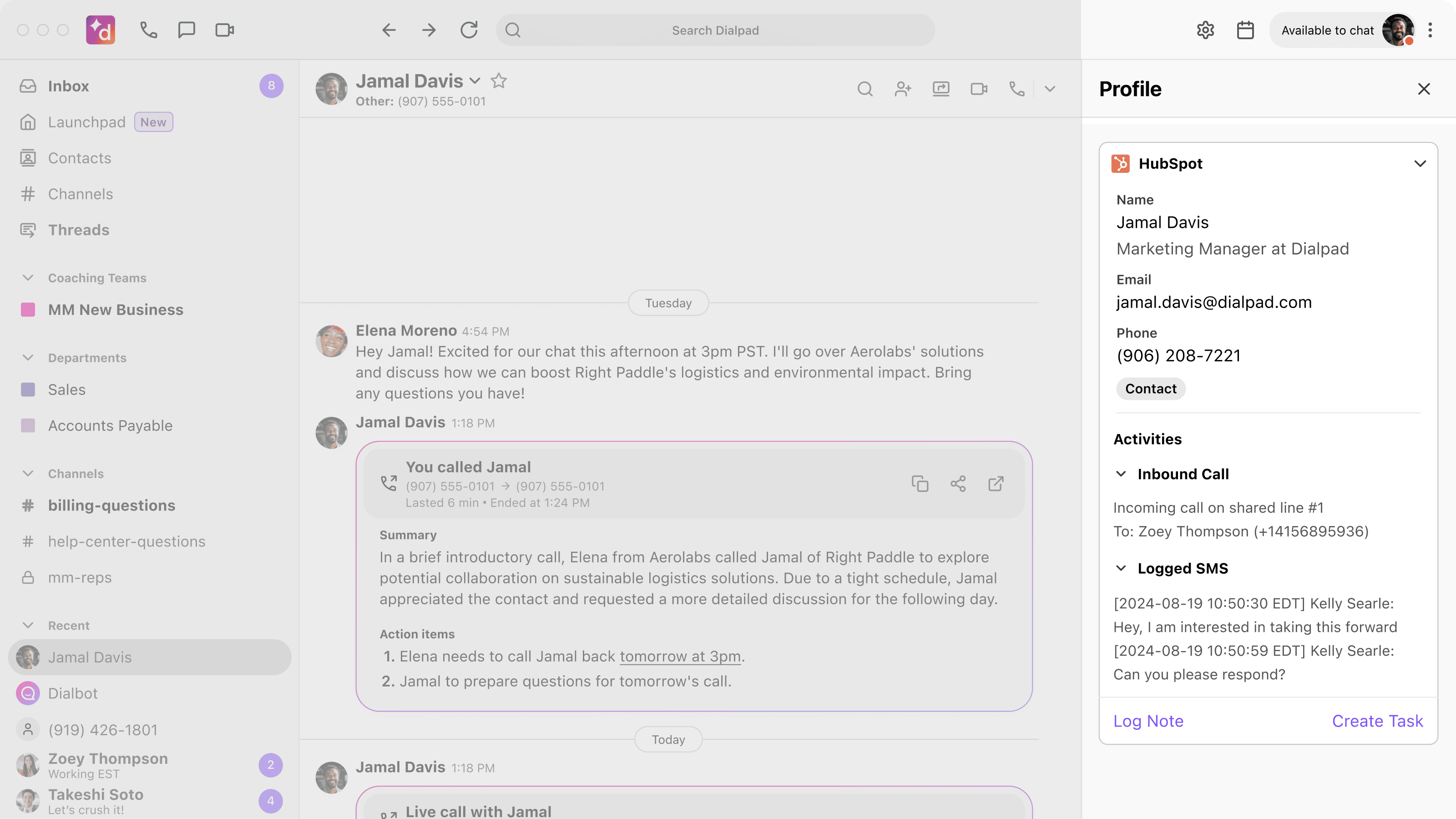
Vollständige Kontaktansicht
Verschaffen Sie sich einen umfassenden, einheitlichen Überblick über die Aktivitäten Ihrer Kontakte. Wichtige HubSpot-Kontaktdaten werden in Dialpad angezeigt, wenn Sie Anrufe tätigen oder empfangen oder SMS-Nachrichten versenden bzw. erhalten, sodass Sie einen hervorragenden ersten Eindruck hinterlassen können. Alle Anrufe werden in HubSpot protokolliert und automatisch mit bestehenden Kontakten abgeglichen, wodurch Sie Zugriff auf eine umfassende, aktuelle Historie erhalten.
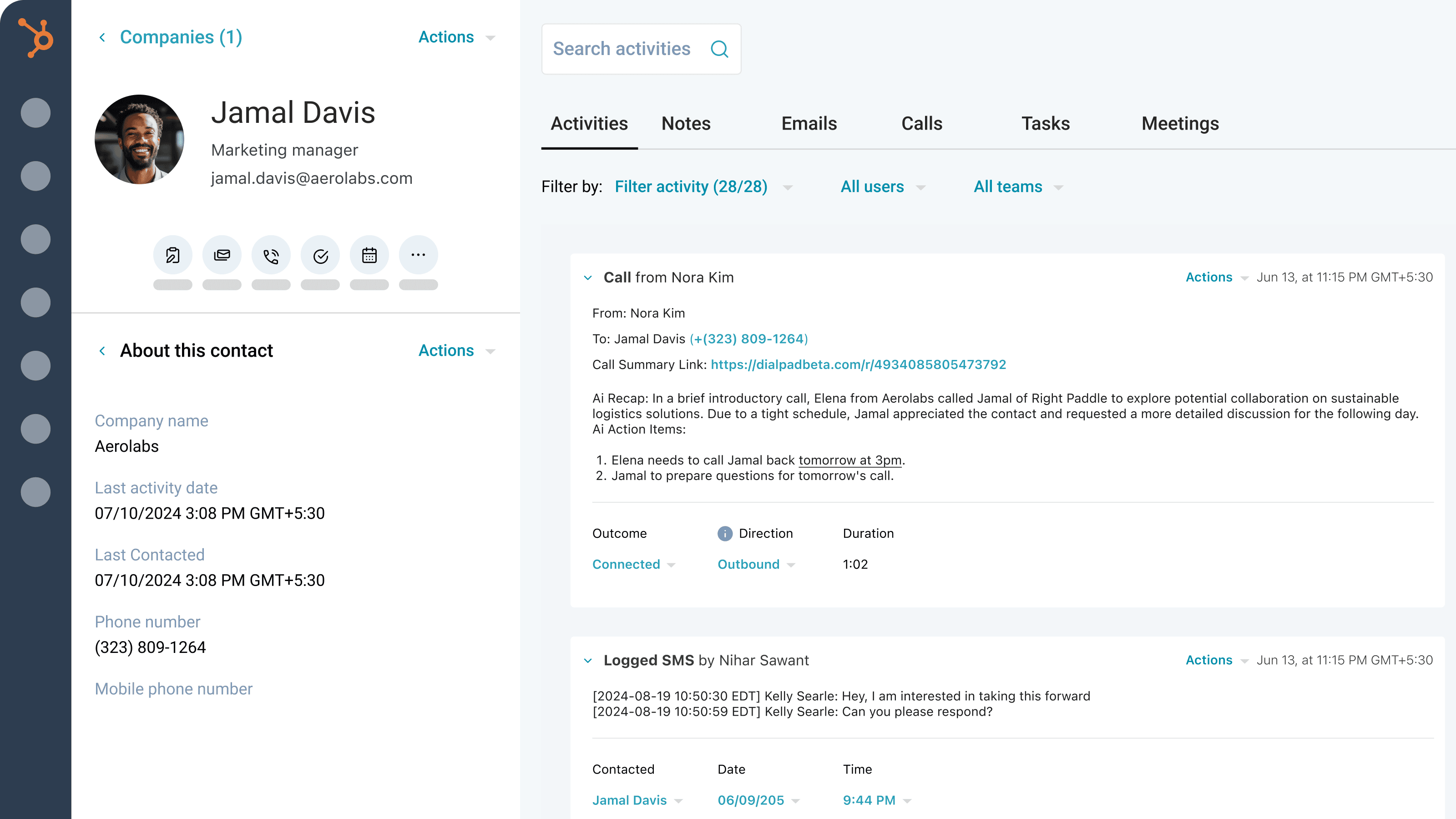
KI-gestützte Protokollierung von Anrufen und SMS
Verschaffen Sie sich einen umfassenden Überblick über jede Interaktion. Dialpad Ai generiert und protokolliert automatisch detaillierte Anrufinformationen wie Aktionspunkte, Zusammenfassungen, CSAT-Werte, Zweck und Ergebnis. Außerdem protokollieren wir alle Ihre SMS-Nachrichten. Ergänzen Sie diese Protokolle direkt in HubSpot um Ergebnisse, zugehörige Geschäfte und Anrufaufzeichnungen.
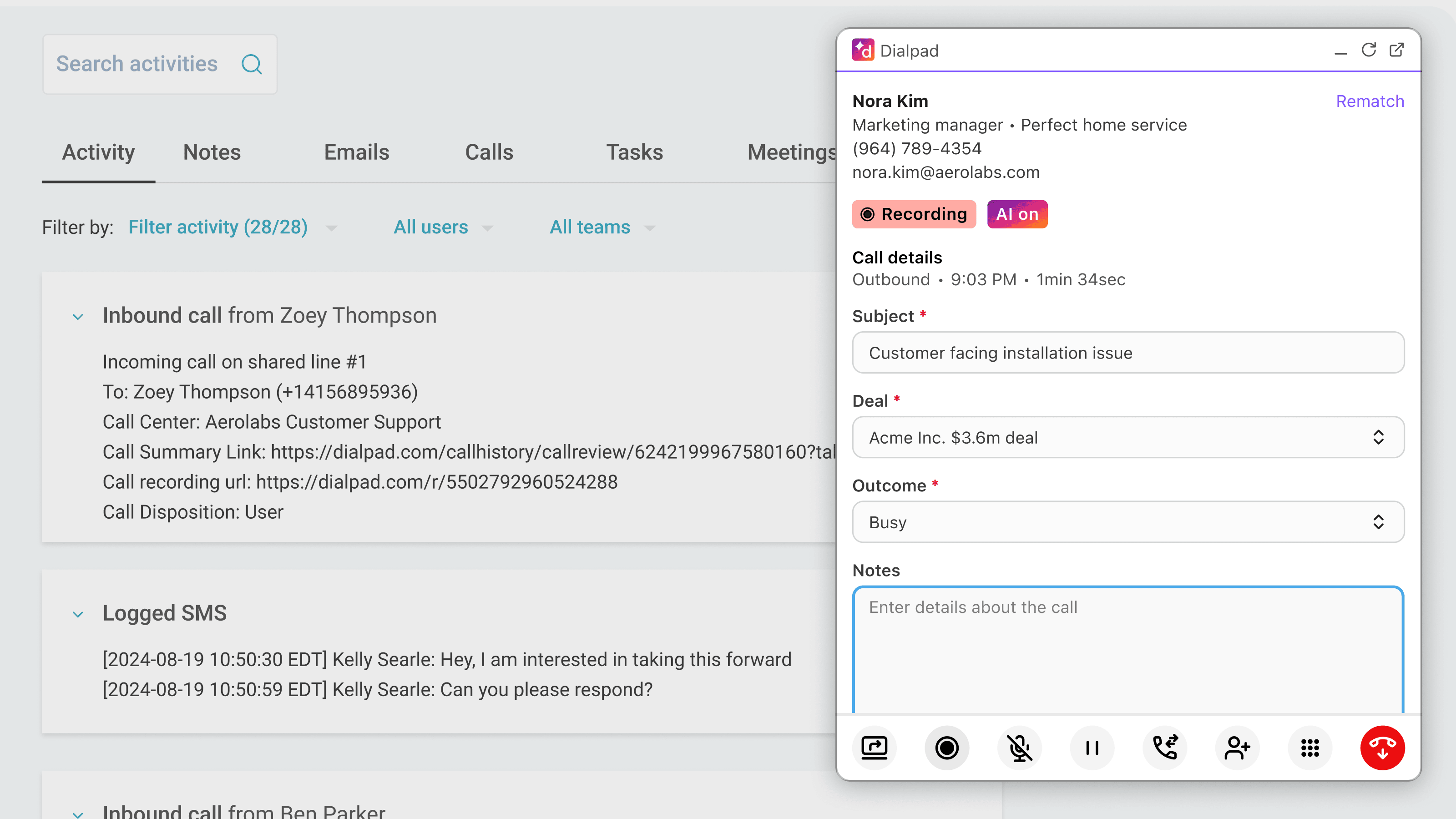
Optimierte Kommunikation
Verwalten Sie Ihre gesamte Kommunikation, ohne zwischen verschiedenen Apps hin- und herwechseln zu müssen. Mit Dialpad können Sie Anrufe direkt in HubSpot tätigen und entgegennehmen, sodass kein Wechsel zwischen verschiedenen Bildschirmen erforderlich ist.
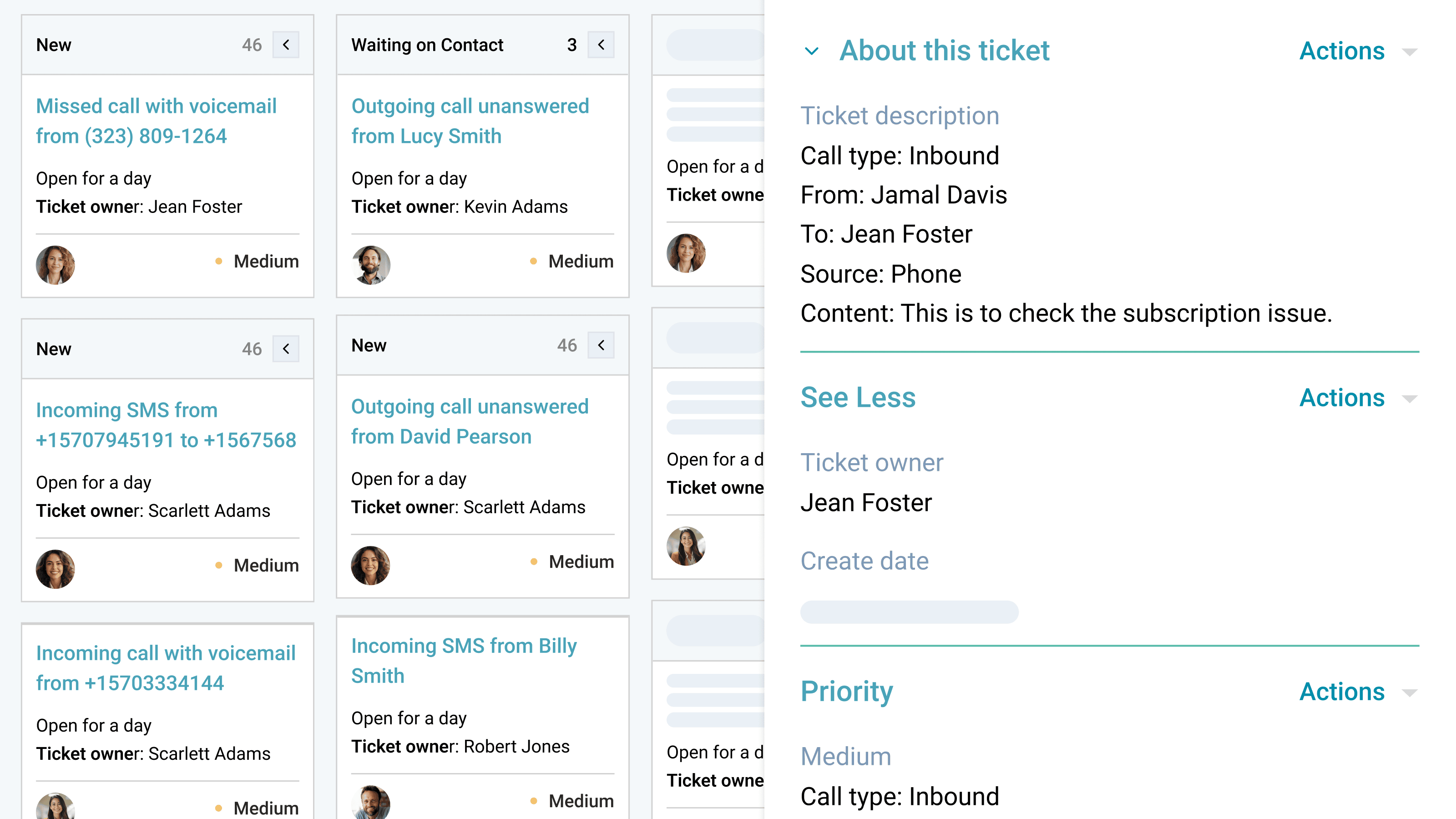
Automatisierte Nachverfolgung und Ticketverwaltung
Verpassen Sie keinen Anruf und keine Nachfassgelegenheit. Die Dialpad-Integration erstellt automatisch Tickets für verpasste Anrufe oder Nachrichten auf gemeinsam genutzten Leitungen oder privaten Nummern. So kann Ihr Team sofort nachfassen, zeitnah reagieren und den Kundenservice ohne manuellen Aufwand verbessern.
App-Funktionalität
Sidebar and calling widget | ||
Calls | ||
Calls | ||
SMS | ||
Sidebar and calling widget | ||
Sidebar and calling widget | ||
Calls | ||
SMS | ||
SMS | ||
Sidebar and calling widget |
Rezensionen
3,6
222
3,6
222
- 27. Juli 2026
Unterstützung benötigt
Das HubSpot-Konto des Vertriebsmitarbeiters ist nicht verbunden, sodass er keine Anrufe über Dialpad tätigen kann.
Das HubSpot-Konto des Vertriebsmitarbeiters ist nicht verbunden, sodass er keine Anrufe über Dialpad tätigen kann.
Kuzyshyn, Y.
- 22. Juli 2026
Parikh, S.
Pro
25 $
/MonatSteigern Sie Ihre Produktivität durch fortschrittliche Integrationen, Support rund um die Uhr und die Verwaltung mehrerer Standorte – ideal für wachsende Unternehmen, die mehr Flexibilität benötigen.
Unbegrenzte HD-Sprachverbindungen
Geschäftstelefonnummern
Anrufbeantworter
Gebührenfreie Rufnummern
25 Abteilungen und 10 Büros
Warteschlangen anhalten
Individuelle Anrufweiterleitung und -umleitung
Nummernportierung und Weiterleitung
Anrufaufzeichnung
Automatische Spam-Erkennung
Synchronisierung von Kontakten
SMS, MMS und Team-Nachrichten
Internationale SMS
Dateifreigabe
Transkriptionen von Anrufen und Voicemails in Echtzeit
Echtzeit-Analysen und Berichterstellung
Pro
25 $
/MonatSteigern Sie Ihre Produktivität durch fortschrittliche Integrationen, Support rund um die Uhr und die Verwaltung mehrerer Standorte – ideal für wachsende Unternehmen, die mehr Flexibilität benötigen.
Unbegrenzte HD-Sprachverbindungen
Geschäftstelefonnummern
Anrufbeantworter
Gebührenfreie Rufnummern
25 Abteilungen und 10 Büros
Warteschlangen anhalten
Individuelle Anrufweiterleitung und -umleitung
Nummernportierung und Weiterleitung
Anrufaufzeichnung
Automatische Spam-Erkennung
Synchronisierung von Kontakten
SMS, MMS und Team-Nachrichten
Internationale SMS
Dateifreigabe
Transkriptionen von Anrufen und Voicemails in Echtzeit
Echtzeit-Analysen und Berichterstellung
* Die hier angegebenen Preise dienen nur zu Illustrationszwecken. Alle Preise enthalten keine Steuern, Sonderangebote, Rabatte oder sonstigen Preisvarianten. Bitte wenden Sie sich direkt an den Partner, um aktuelle und korrekte Preisinformationen zu erhalten. HubSpot übernimmt keine Verantwortung für Preisinformationen, die von unseren Partnern bereitgestellt werden. Letzte Aktualisierung der Preisinformationen: 14.08.2026
Weitere Infos
Erstellt von - Dialpad, Inc.
Installationen - 5 Tsd. Installationen
Kategorien Sprachen, in denen diese App verfügbar ist Englisch undJapanisch