

Dialpad
Bygget av - Dialpad, Inc.
Installeringer - 5K innstalleringer
Rangering 3,6
(222)

Ledende
Krav
HubSpot-abonnement HubSpot-kontotillatelser - Vis nødvendige kontotillatelser
Tilgangstype Delt Dialpad-abonnement - Pro eller Bedrift-abonnementer
Oversikt
1/6 - Video som gir en oversikt over Dialpads innebygde HubSpot CRM-integrasjon, og viser AI-drevet samtale- og meldingsfunksjonalitet
Dialpad integrerer kraftige AI- og SMS-funksjoner direkte i HubSpot-arbeidsflytene dine, slik at du får større rekkevidde i HubSpot-interaksjonene dine.
Samle all kommunikasjonen din
Før all kommunikasjonen din fra Dialpad inn i HubSpot CRM og tilbake igjen, for å skape en samlet og handlingsrettet oversikt over kundene dine.
Automatiser arbeidsflyter for større effektivitet
Konfigurer automatisk oppretting av saker i HubSpot basert på aktiviteter, som innkommende og utgående samtaler, SMS og tapte anrop.
Fullstendig historikk over kundeinteraksjoner
Opprett nye HubSpot-kontakter fra Dialpad, koble eksisterende HubSpot-kontakter til Dialpad-kontakter, og vis kontaktprofilen samt tidligere og åpne aktiviteter.
Funksjoner
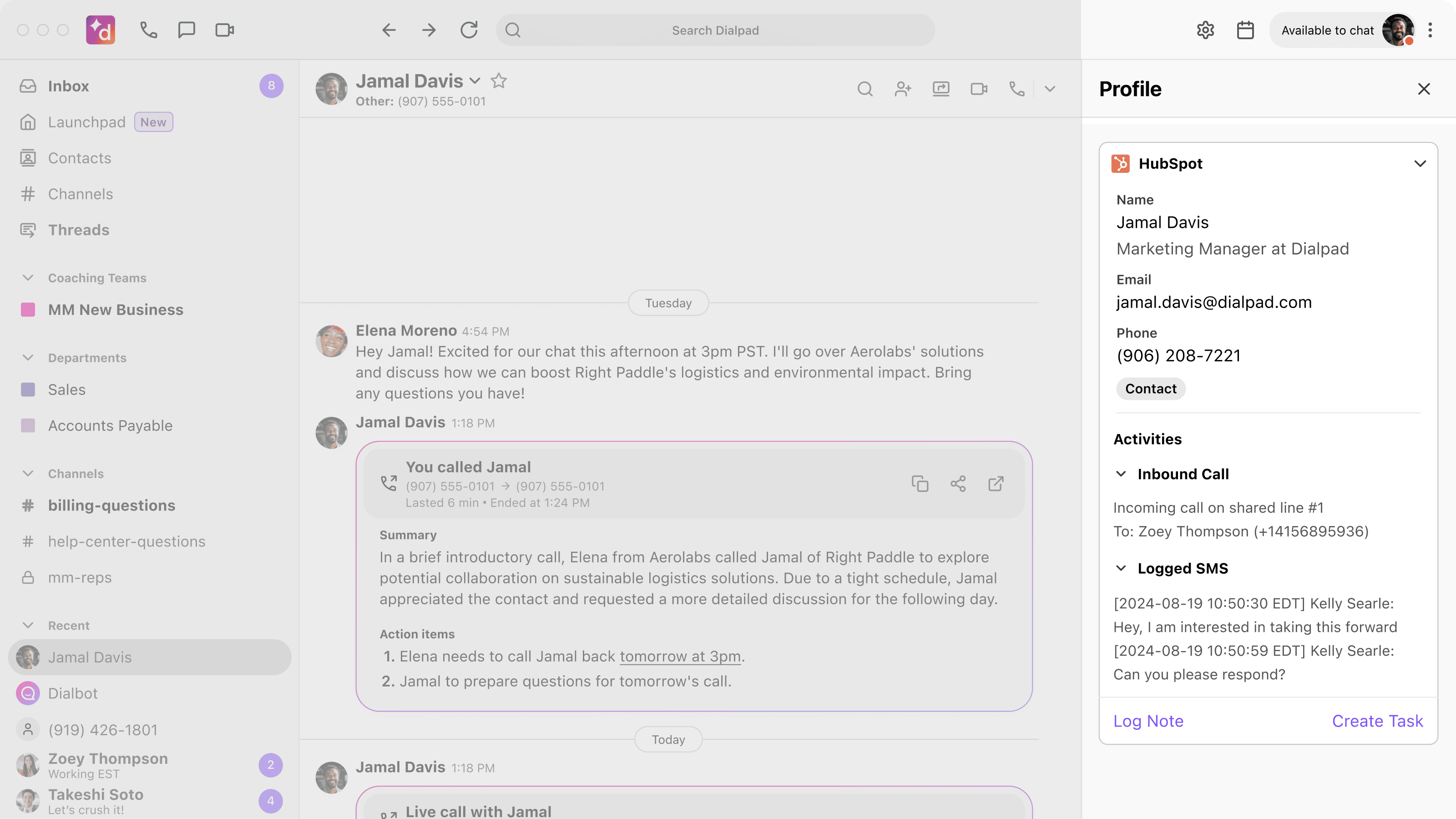
Fullstendig kontaktvisning
Få et fullstendig og samlet overblikk over kontaktenes aktiviteter. Viktige kontaktopplysninger fra HubSpot vises i Dialpad når du ringer eller mottar samtaler eller SMS-meldinger, slik at du kan gi et godt førsteinntrykk. Alle samtaler loggføres i HubSpot og kobles automatisk til eksisterende kontakter, noe som gir deg en omfattende og oppdatert historikk.
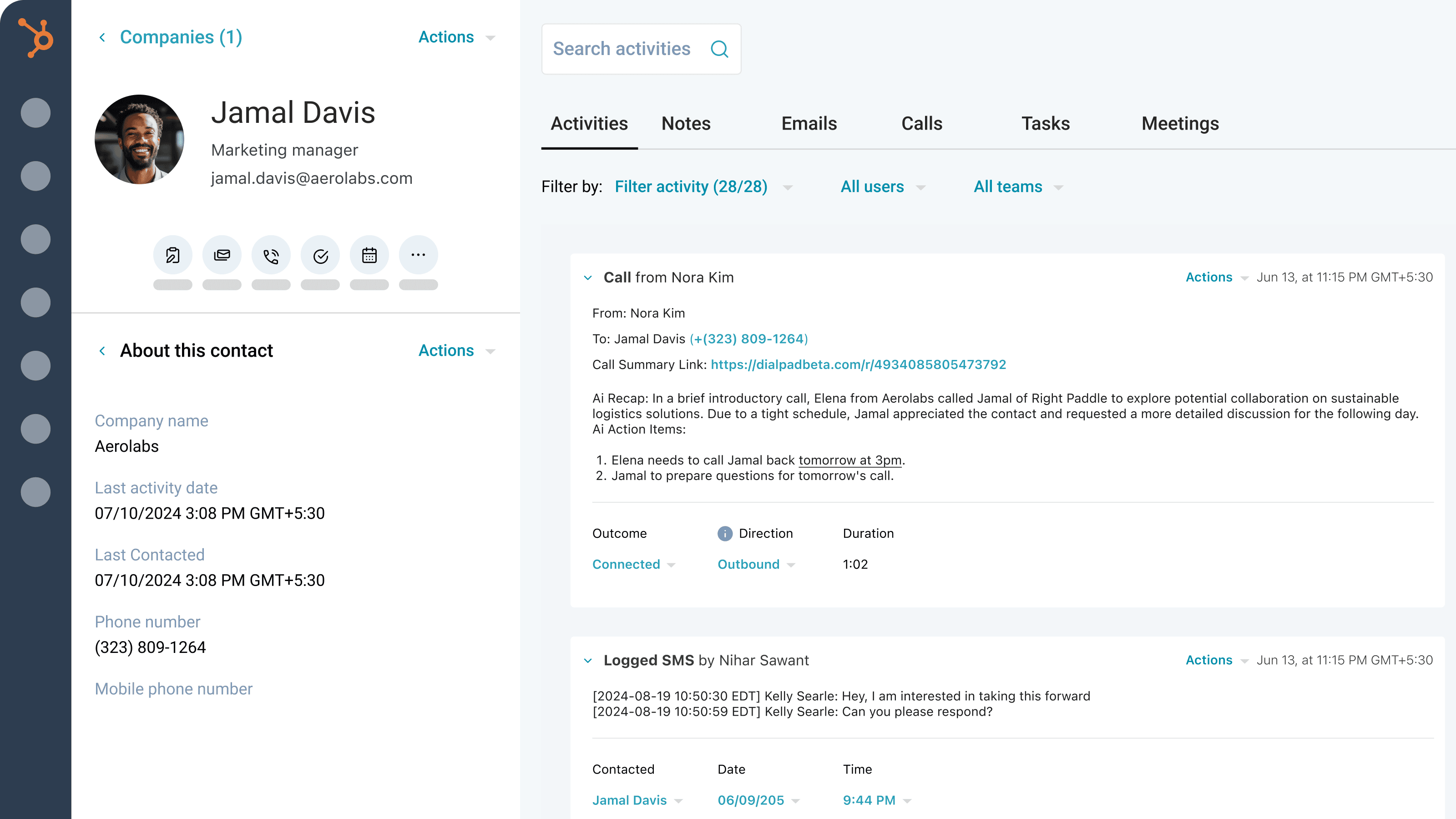
AI-drevet loggføring av samtaler og SMS-meldinger
Få et fullstendig bilde av hver eneste interaksjon. Dialpad Ai genererer og loggfører automatisk detaljerte opplysninger om samtalene, som oppgaver, sammendrag, CSAT-score, formål og utfall. Vi loggfører også alle SMS-meldingene dine. Utvid disse loggene med utfall, tilknyttede avtaler og samtaleopptak direkte i HubSpot.
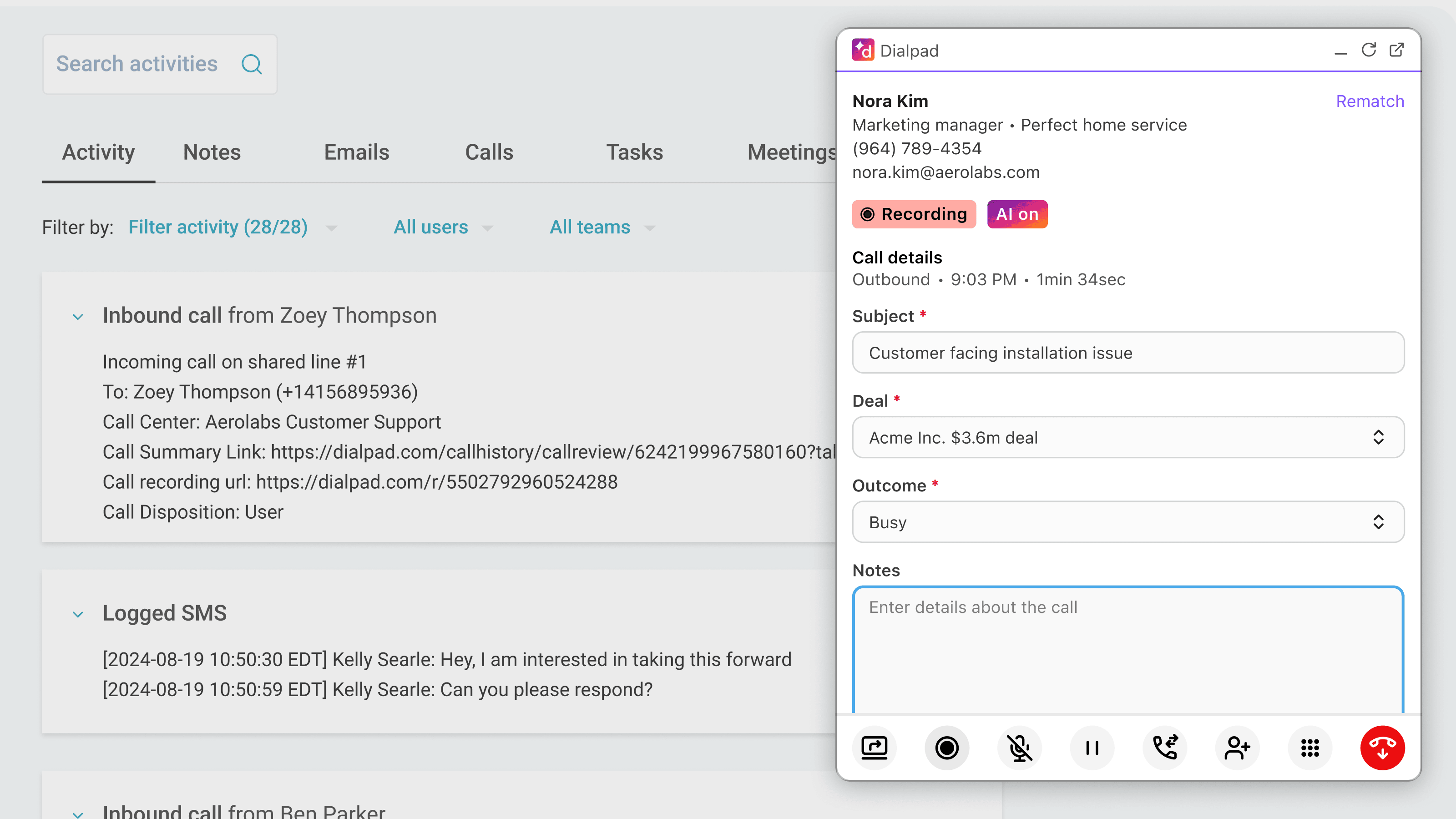
Effektivisert kommunikasjon
Administrer all kommunikasjonen din uten å måtte hoppe mellom ulike apper. Ring og ta imot samtaler direkte i HubSpot ved hjelp av Dialpad, slik at du slipper å bytte skjerm.
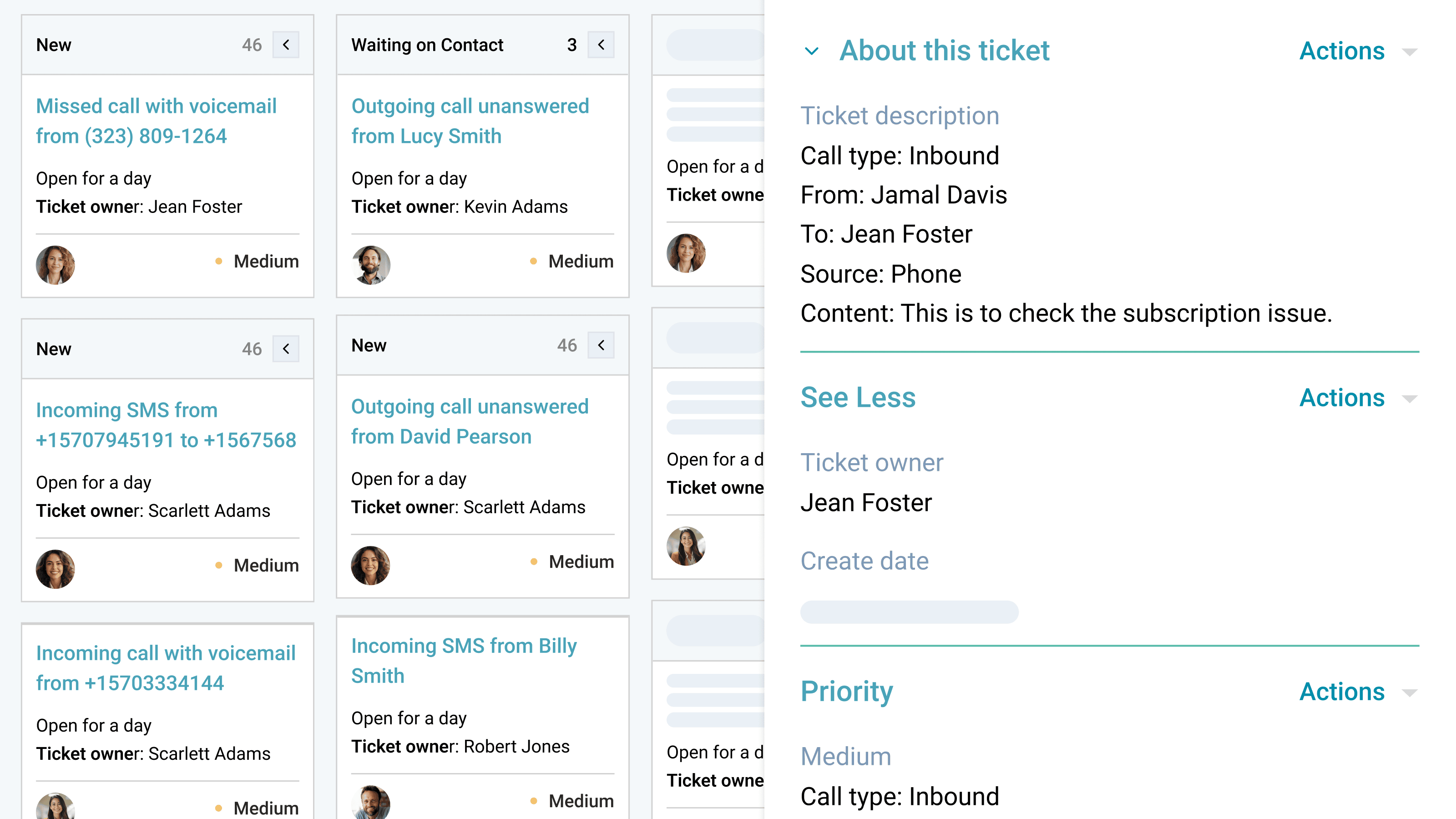
Automatisert oppfølging og saksbehandling
Gå aldri glipp av noe viktig eller en mulighet til oppfølging. Dialpad-integrasjonen oppretter automatisk saker for ubesvarte anrop eller meldinger på delte linjer eller personlige numre. Dette sikrer at teamet ditt kan følge opp umiddelbart, gi raske svar og forbedre kundeservicen uten manuell innsats.
Appfunksjonalitet
Sidebar and calling widget | ||
Calls | ||
Calls | ||
SMS | ||
Sidebar and calling widget | ||
Sidebar and calling widget | ||
Calls | ||
SMS | ||
SMS | ||
Sidebar and calling widget |
Gjennomganger
3,6
222
3,6
222
- 27. juli 2026
Support needed
The sales representative’s HubSpot account is not connected, so they are unable to make calls through Dialpad.
The sales representative’s HubSpot account is not connected, so they are unable to make calls through Dialpad.
Kuzyshyn, Y.
- 22. juli 2026
Parikh, S.
Pro
USD 25
/månedØk produktiviteten med avanserte integrasjoner, support døgnet rundt og administrasjon av flere kontorer – ideelt for bedrifter i vekst som trenger større fleksibilitet.
Ubegrenset HD-telefoni
Telefonnumre til bedrifter
Talepost
Gratisnummer
25 avdelinger og 10 kontorer
Ventekøer
Tilpasset viderekobling og omdirigering av anrop
Nummerportering og viderekobling
Samtaleopptak
Automatisk spam-deteksjon
Synkronisering av kontakter
SMS, MMS og gruppemeldinger
Internasjonale SMS-meldinger
Fildeling
Transkripsjoner av samtaler og talemeldinger i sanntid
Analyser og rapportering i sanntid
Pro
USD 25
/månedØk produktiviteten med avanserte integrasjoner, support døgnet rundt og administrasjon av flere kontorer – ideelt for bedrifter i vekst som trenger større fleksibilitet.
Ubegrenset HD-telefoni
Telefonnumre til bedrifter
Talepost
Gratisnummer
25 avdelinger og 10 kontorer
Ventekøer
Tilpasset viderekobling og omdirigering av anrop
Nummerportering og viderekobling
Samtaleopptak
Automatisk spam-deteksjon
Synkronisering av kontakter
SMS, MMS og gruppemeldinger
Internasjonale SMS-meldinger
Fildeling
Transkripsjoner av samtaler og talemeldinger i sanntid
Analyser og rapportering i sanntid
* Prissettingen her er kun for illustrasjonsformål. Prisene inkluderer ikke avgifter, insentiver, rabatter eller andre prissettingsvariabler. Kontakt partneren for å få oppdatert og riktig prissettingsinformasjon. HubSpot tar ikke ansvar for denne prissettingsinformasjonen, som gis av våre partnere. Prissetting sist oppdatert: 14.08.2026