

Aloware Cloud Contact Center
Créé par - Aloware, Inc.
Installation - 900+ installations
Évaluation 4,4
(22)

Diriger
Exigences
Abonnement HubSpot Autorisations de compte HubSpot - Afficher les autorisations de compte requises
Type d'accès Partagé Abonnement à Aloware Cloud Contact Center - Abonnements : iPro + IA ✨, uPro + IA ✨ ou xPro + IA ✨
Vue d'ensemble

1/4 - N° 1 des outils d'appel commercial intégrés à HubSpot Appelez facilement vos contacts d'un simple clic
L'intégration poussée d'Aloware avec HubSpot regroupe tous vos appels et SMS dans le CRM, ce qui vous permet de gérer vos communications en toute fluidité. Voici ce à quoi vous pouvez vous attendre :
Appels et SMS natifs dans HubSpot : passez et recevez des appels, envoyez des SMS et gérez toutes vos communications directement depuis HubSpot. Chaque interaction est automatiquement enregistrée, offrant ainsi une visibilité complète et le contexte nécessaire pour les interactions avec les clients.
Routage basé sur l’IA : exploitez les données de HubSpot pour un routage intelligent des appels et des SMS. L’IA d’Aloware garantit que les clients sont mis en relation avec les agents les plus pertinents, ce qui améliore les temps de réponse et la personnalisation.
Prise en charge de tous les objets HubSpot : lancez des appels et envoyez des SMS à partir de n’importe quel enregistrement HubSpot — contacts, entreprises, opportunités et tickets. Synchronisez les résultats, les types et la direction des appels natifs entre Aloware et HubSpot, ce qui réduit les doublons et rationalise les workflows.
Composition dynamique et relances automatisées : créez des listes de numéros dans HubSpot et importez-les en un clic dans le composeur avancé d’Aloware. Automatisez les relances et déclenchez des communications en fonction des workflows HubSpot, pour optimiser vos efforts de prospection.
Conformité intégrée : Aloware gère les réglementations anti-spam et l’enregistrement A2P 10DLC, garantissant ainsi que vos messages sont délivrés de manière fiable et que vos appels sont moins susceptibles d’être signalés comme spam.
Rapports et analyses améliorés : accédez à des analyses vocales basées sur l’IA, à des résumés d’appels et à des données de routage intelligentes pour optimiser les performances des agents et garantir l’efficacité de vos stratégies de communication.
Avec Aloware et HubSpot, vous bénéficiez d’une solution puissante, conforme et efficace pour améliorer vos interactions avec les clients, le tout au sein du CRM que vous utilisez déjà.
Fonctionnalités
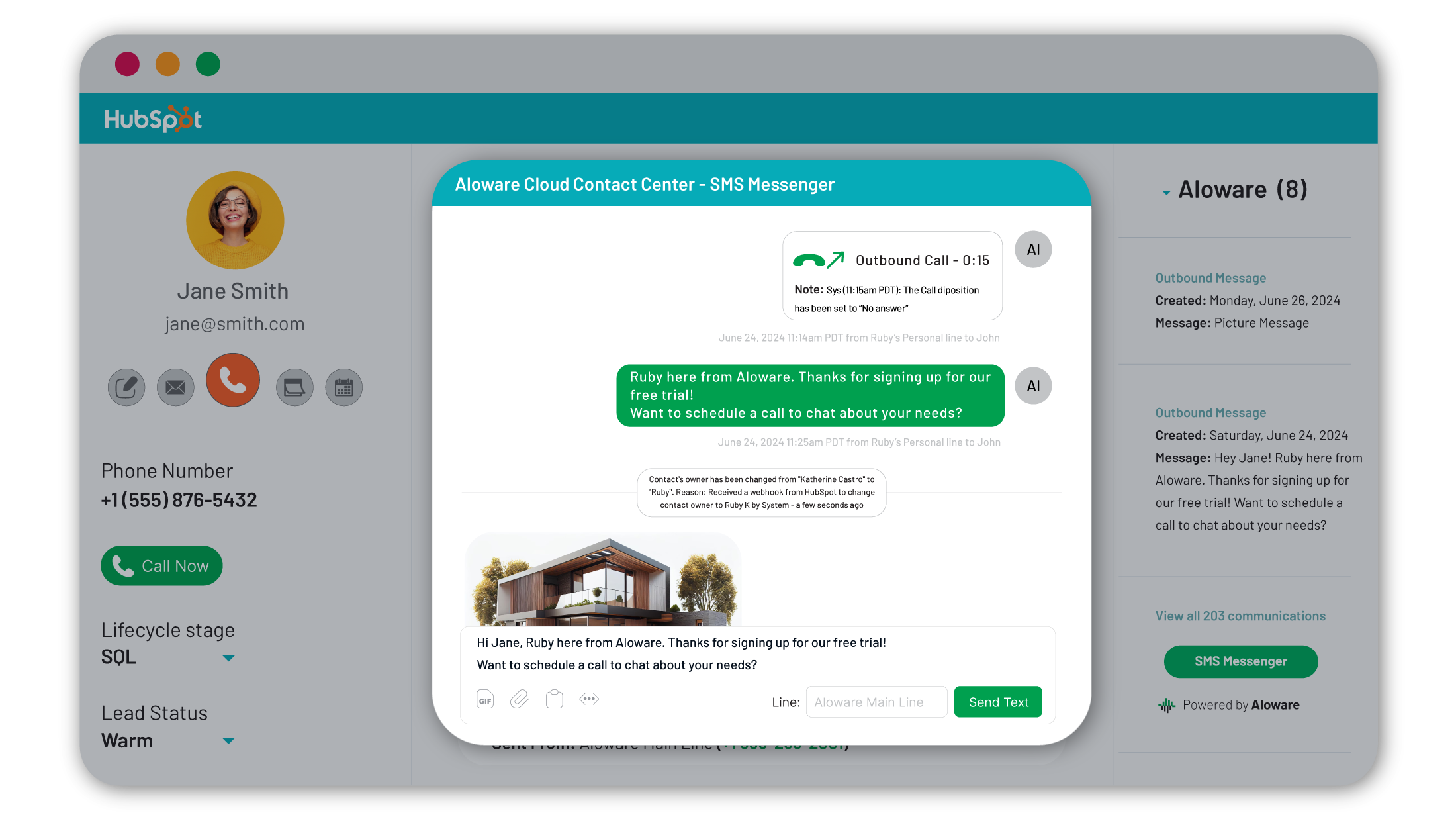
Appels et SMS dans HubSpot
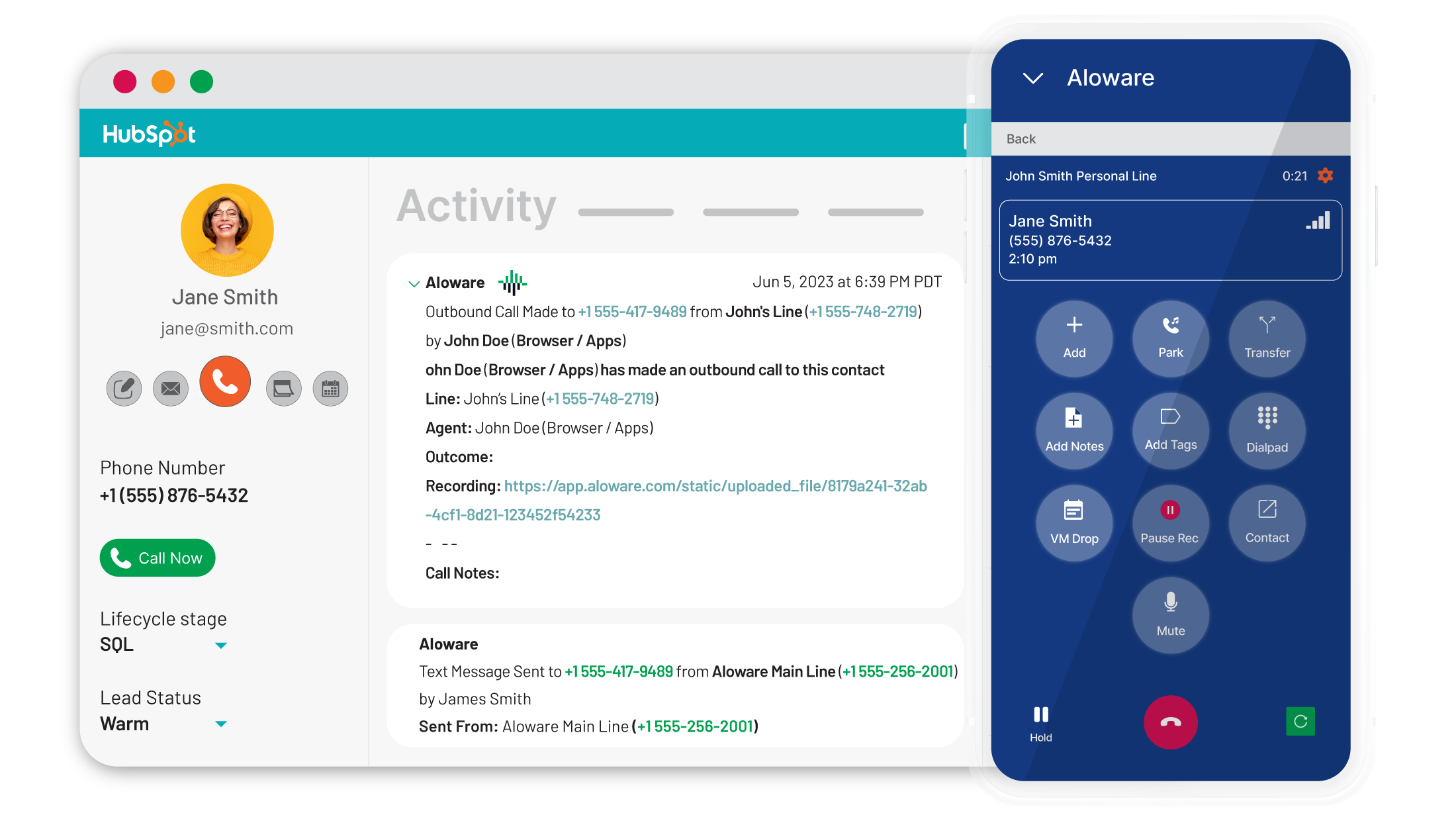
Passez et recevez des appels, et envoyez et recevez des SMS directement depuis HubSpot : plus besoin de changer d'onglet. Consultez les noms des contacts, leurs responsables et leur statut lors des appels entrants. Aidez les agents grâce à des fenêtres contextuelles affichant les opportunités et les tickets. Vos agents ne travaillent pas sur HubSpot ? Aloware vous propose une application mobile, une intégration « clic pour appeler » et une application de bureau pour une communication fluide.
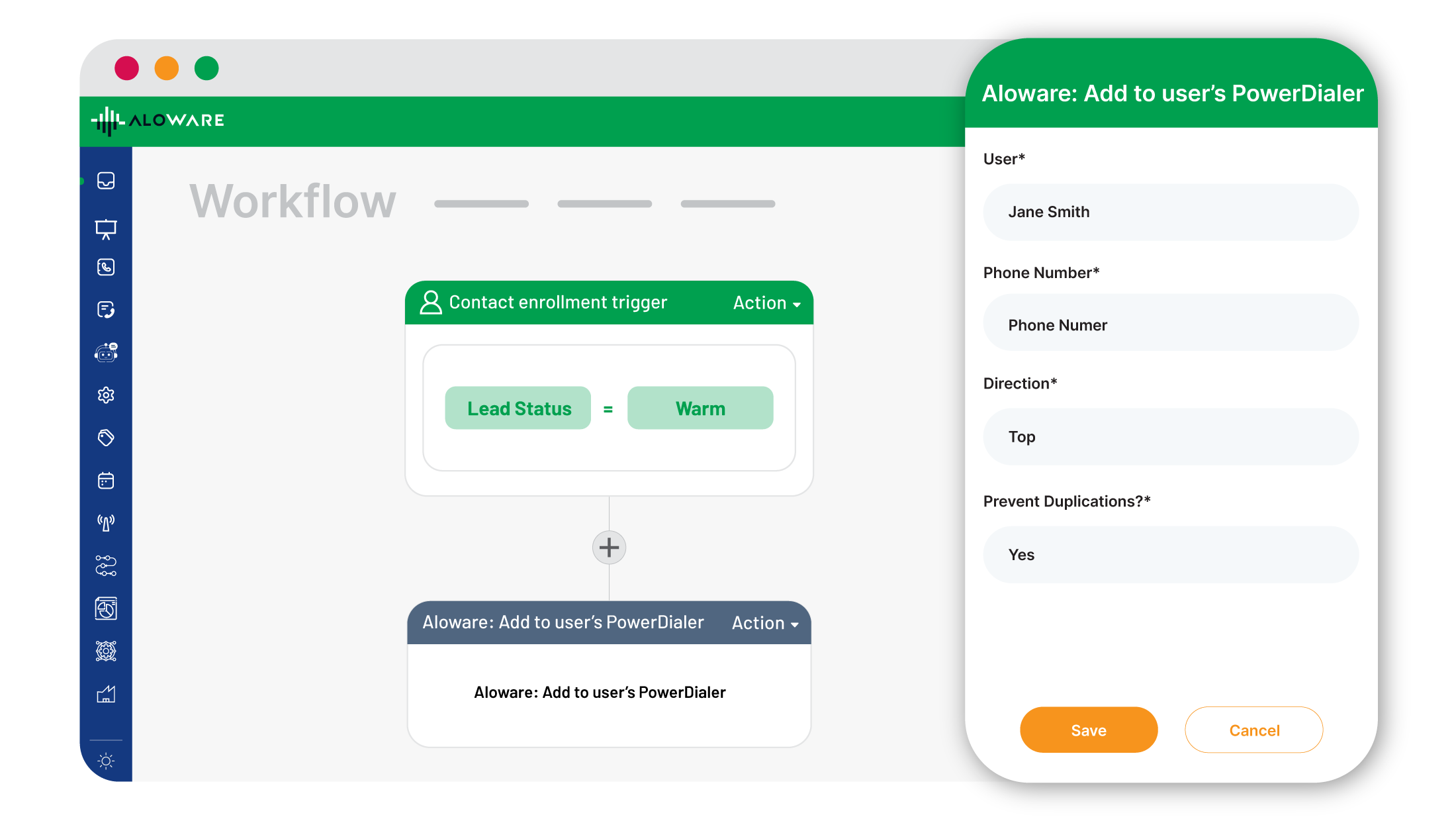
Compositeur automatique
Passez à plus de 500 appels par jour en créant des listes dans HubSpot et en les important en un clic dans le composeur automatique d'Aloware. Utilisez les workflows et les données sur les prospects pour créer des listes d'appel dynamiques. Acheminez instantanément les prospects les plus prometteurs grâce à la logique de sélection du meilleur agent. Accédez aux coordonnées en temps réel grâce à la vue CRM et à une fenêtre contextuelle pour une gestion des appels plus rapide et plus efficace.
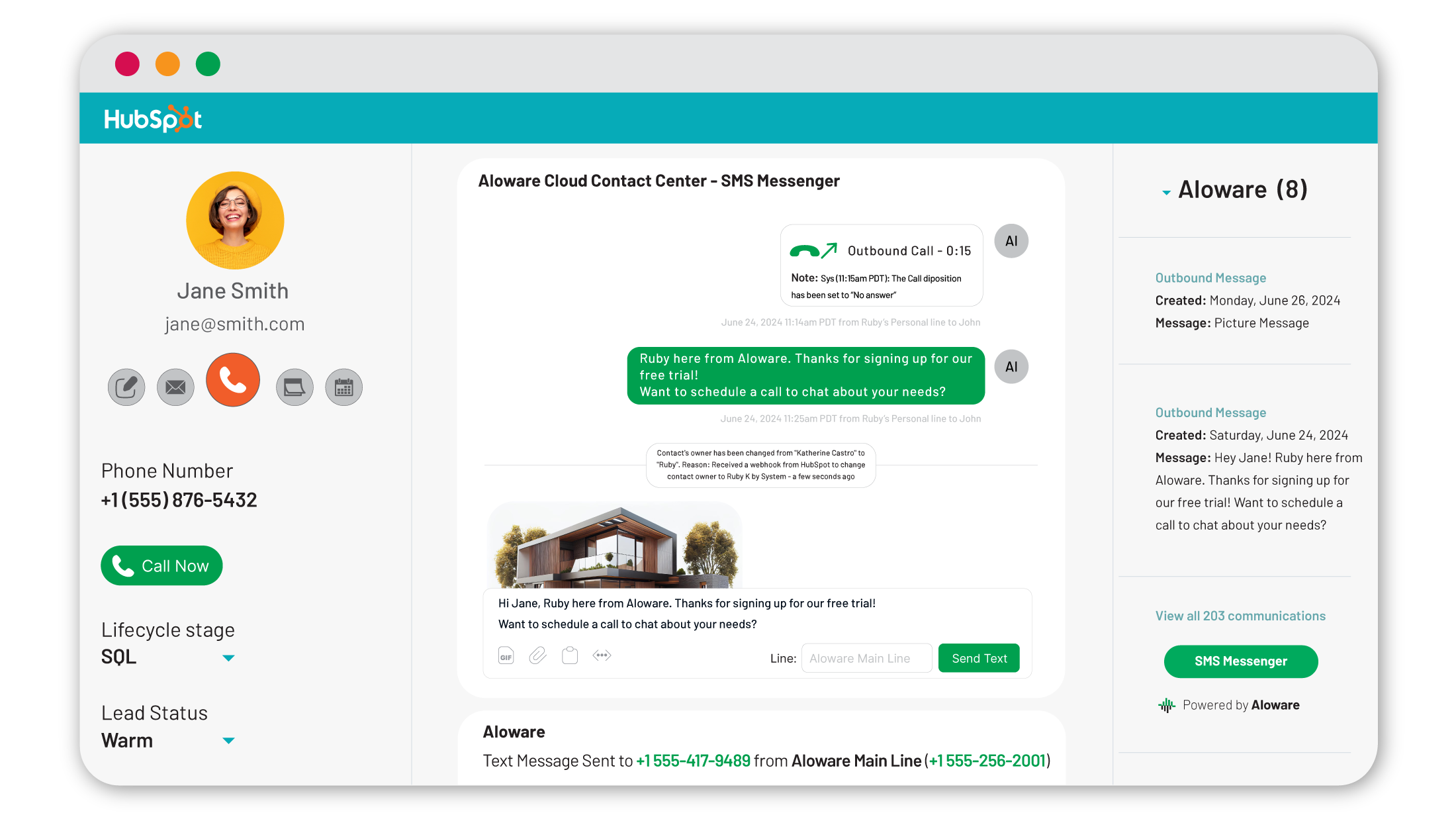
Intégration multi-hubs
Consultez et enregistrez les appels relatifs aux contacts, aux entreprises, aux opportunités et aux tickets dans HubSpot. Passez des appels, envoyez des SMS et synchronisez les informations de responsabilité, le statut des prospects et les étapes du cycle de vie avec Aloware. Réimportez dans HubSpot des données telles que l'heure du dernier appel et les interactions. Identifiez et gérez les doublons liés aux numéros de téléphone partagés pour bénéficier d'une visibilité totale sur les communications.
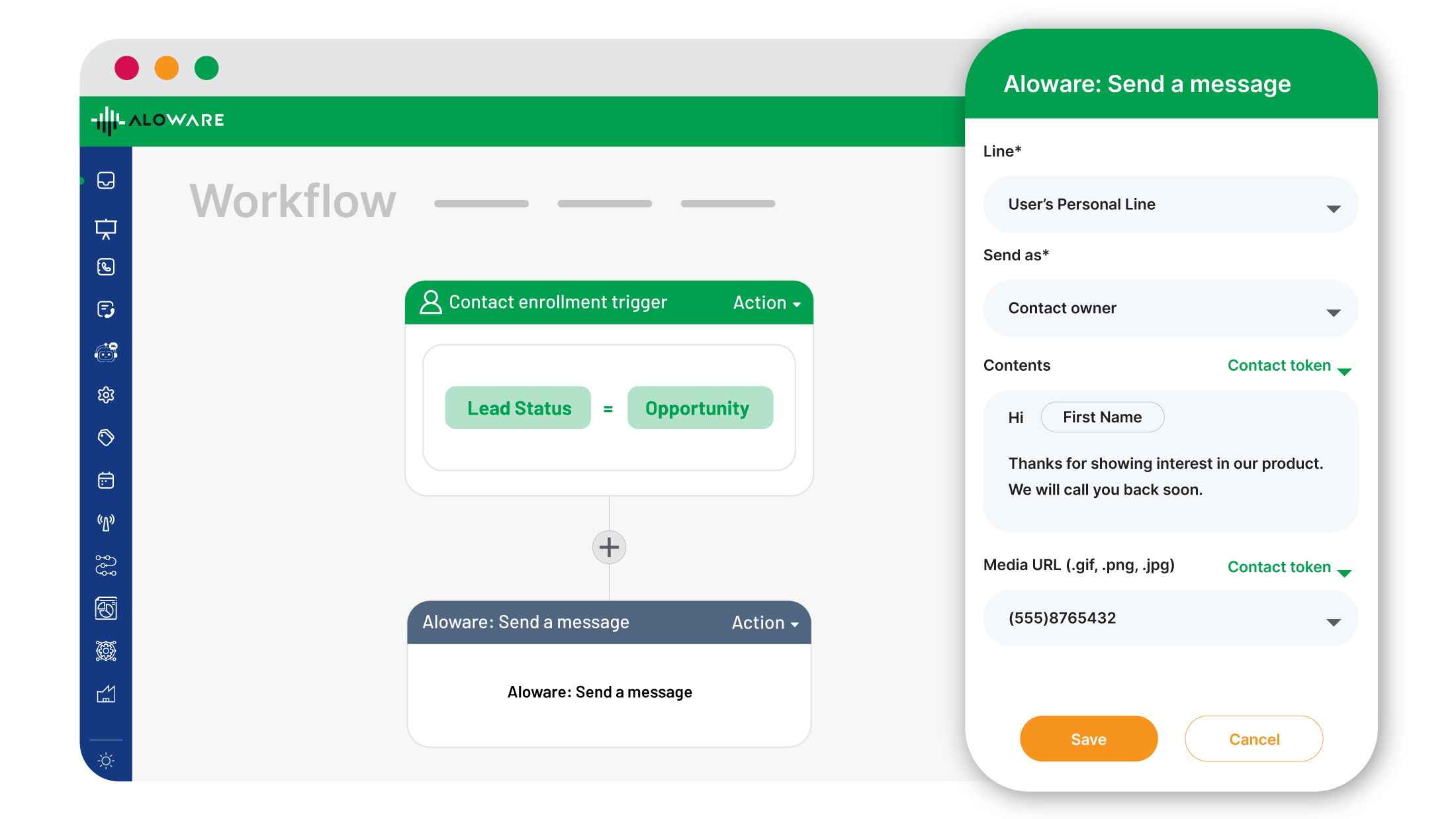
Automatisations des flux de travail
Déclenchez automatiquement des appels ou des SMS entre votre équipe et vos prospects en fonction des actions et des workflows HubSpot. Envoyez des campagnes SMS ponctuelles ou progressives via des numéros conformes ou des codes courts. Accélérez la conversion des prospects en leur envoyant un SMS lorsqu’ils remplissent un formulaire ou prennent rendez-vous. Cette fonctionnalité est compatible avec les workflows basés sur les contacts, les opportunités, les tickets et les entreprises.
Acheminement des appels basé sur le CRM
Configurez le routage des appels entrants en fonction du responsable du contact ou de la dernière interaction dans HubSpot. Les appels entrants sont automatiquement mis en correspondance avec les fiches HubSpot associées au numéro de l’appelant, ce qui permet à vos agents de voir instantanément le nom de l’appelant, ses tickets et ses opportunités. Si un agent n’est pas disponible, le routage par IA redirige l’appel vers le meilleur agent disponible, en toute transparence.
Fonctionnalité de l'application
Contacts | ||
Communications | ||
Call list | ||
Phone call | ||
Phone number | ||
Contact lists | ||
SMS | ||
Power Dialer lists | ||
Contact Owners | ||
Contacts | ||
Multi-entity Contact | ||
Deal Pipeline inside the contact | ||
Call Trigger | ||
Call and SMS event | ||
Contact properties | ||
Conversations | ||
Contact | ||
Contact Properties | ||
CMS Files |
4,4
22
4,4
22
- 18 mai 2026
Guidry, R.
- 8 juin 2025
Bon
Il dispose d'une tonne d'options de fonctionnalités différentes, mais toutes les fonctionnalités ne fonctionnent pas comme prévu. Je pense qu'ils doivent renforcer un peu plus leur équipe d'assistance technique pour résoudre les bogues et les pépins du système.
Nombreux réglages et configurations de routage
Tous les paramètres ne fonctionnent pas comme prévu.
Dittmer, J.
iPro + IA ✨
30 $US
/moisAppels entrants et sortants illimités
Fonctionnalités de base pour les appels et les SMS
Intégrations natives : HubSpot, Pipedrive, Zoho
1 000 minutes d'analyse vocale AloAi
Systèmes de réponse vocale interactive (IVR), enregistrement des appels, tableau de bord en temps réel
Extension Chrome, applications pour ordinateur et mobile
Envoi groupé de SMS/MMS
Balises et dispositions obligatoires
Messages de messagerie vocale et modèles de SMS
Intégrations Zapier : plus de 100
API Lead et webhooks
Composer un numéro dans le CRM
Synchronisation des appels et des transcriptions avec le CRM
Numéros propres et dédiés
Présence locale (module complémentaire)
AloAI Text Bot (module complémentaire)
iPro + IA ✨
30 $US
/moisAppels entrants et sortants illimités
Fonctionnalités de base pour les appels et les SMS
Intégrations natives : HubSpot, Pipedrive, Zoho
1 000 minutes d'analyse vocale AloAi
Systèmes de réponse vocale interactive (IVR), enregistrement des appels, tableau de bord en temps réel
Extension Chrome, applications pour ordinateur et mobile
Envoi groupé de SMS/MMS
Balises et dispositions obligatoires
Messages de messagerie vocale et modèles de SMS
Intégrations Zapier : plus de 100
API Lead et webhooks
Composer un numéro dans le CRM
Synchronisation des appels et des transcriptions avec le CRM
Numéros propres et dédiés
Présence locale (module complémentaire)
AloAI Text Bot (module complémentaire)
* Les prix mentionnés ici sont uniquement présentés à titre indicatif. Tous les prix n'incluent pas les taxes, les offres spéciales, les réductions ni les autres facteurs pouvant affecter les tarifs. Vous devez contacter le partenaire pour obtenir les tarifs les plus récents. HubSpot n'assume aucune responsabilité pour les informations de tarification fournies par ses partenaires. Dernière mise à jour des prix : 18/08/2026
Informations supplémentaires
Créé par - Aloware, Inc.
Installation - 900+ installations
Catégories Langues dans lesquelles cette application est disponible Anglais