

CloudFiles - Document Management, Sharing & Generation
Built by - CloudFiles
Installs - 2K installs
Rating 4.8
(34)

Leading
Requirements
HubSpot Plan HubSpot Account permissions - View the required account permissions
Access Type Shared CloudFiles - Document Management, Sharing & Generation Subscription - Doc Management, Doc Sharing, or Doc Generation plans
Overview
1/9 - CloudFiles x HubSpot | Document Management and Automation Demo Video
CloudFiles is the all-in-one document platform for HubSpot, built to help generate docs, manage external storages, share files with clients, & extract data from uploads without leaving HubSpot. It brings together 4 tools, all integrated with HubSpot records & workflows.
Quick Start Links
CloudFiles comes with 14-days free trial. To get started, install it using the 🔗 installation guide, then visit any of these quick starts -
🔗 Doc Management Quick Start - Connect external storages to HubSpot records and automate files & folder management
🔗 Doc Sharing Quick Start - Share files with clients, collect analytics and create datarooms to collect files
🔗 Doc Generation Quick Start - Create on-brand documents using Microsoft / Google based templates
🔗 Marketing & CMS Quick Start - Best practices to generate file analytics & consume using HubSpot reports
🔗 Sales & Service Quick Start - Best practices to automate external file & folder management in HubSpot
Brief Product Overviews
CloudFiles brings together 4 document tools in HubSpot. Visit the product quick starts above for quick steps on how to see it in action in your own HubSpot instance.
Document Management - Connect cloud storage (Google Drive, SharePoint & more) and manage files/folders directly from HubSpot. Automate folder creation, organize uploads, and streamline document workflows.
Document Sharing - Share files and folders from HubSpot using secure, branded, and trackable links. Control access, collect documents, and trigger workflows based on file engagement — all from the record view.
Document Generation - Create templates with HubSpot data and publish them inside HubSpot. From any record, instantly generate ready-to-use proposals, agreements, or contracts in DOCX or PDF.
(Coming Soon) Document AI - Using advanced OCR and document intelligence, you can extract key information from any document, summarize and analyze content, split files, and trigger workflows — all without leaving the HubSpot record.
Built for HubSpot Teams
CloudFiles helps marketing, sales & service teams perform better by making documents more accessible & insightful. Visit the team quick starts above for various strategies used by our top customers.
Analytics for Marketers - Share collateral on website, social media, ads or send it using bulk / sales emails. Collect emails & analytics in HubSpot, segment & score using automations and create reports & dashboards to generate insights.
Automation for Sales & Service executives - Generate on-brand docs, manage external storages from HubSpot records, automate folder & file operations and share as well as collect files from your customers.
Here are a few more useful links - **All Quick Starts, Explore Use-Cases, Video Playlist, Book a call with Experts**
“CloudFiles made file sharing seamless in HubSpot — with automated folders, tracking, and a smooth onboarding experience.” ⭐⭐⭐⭐⭐ – Lauren Goldman, Senior Manager, PwC Australia
Features
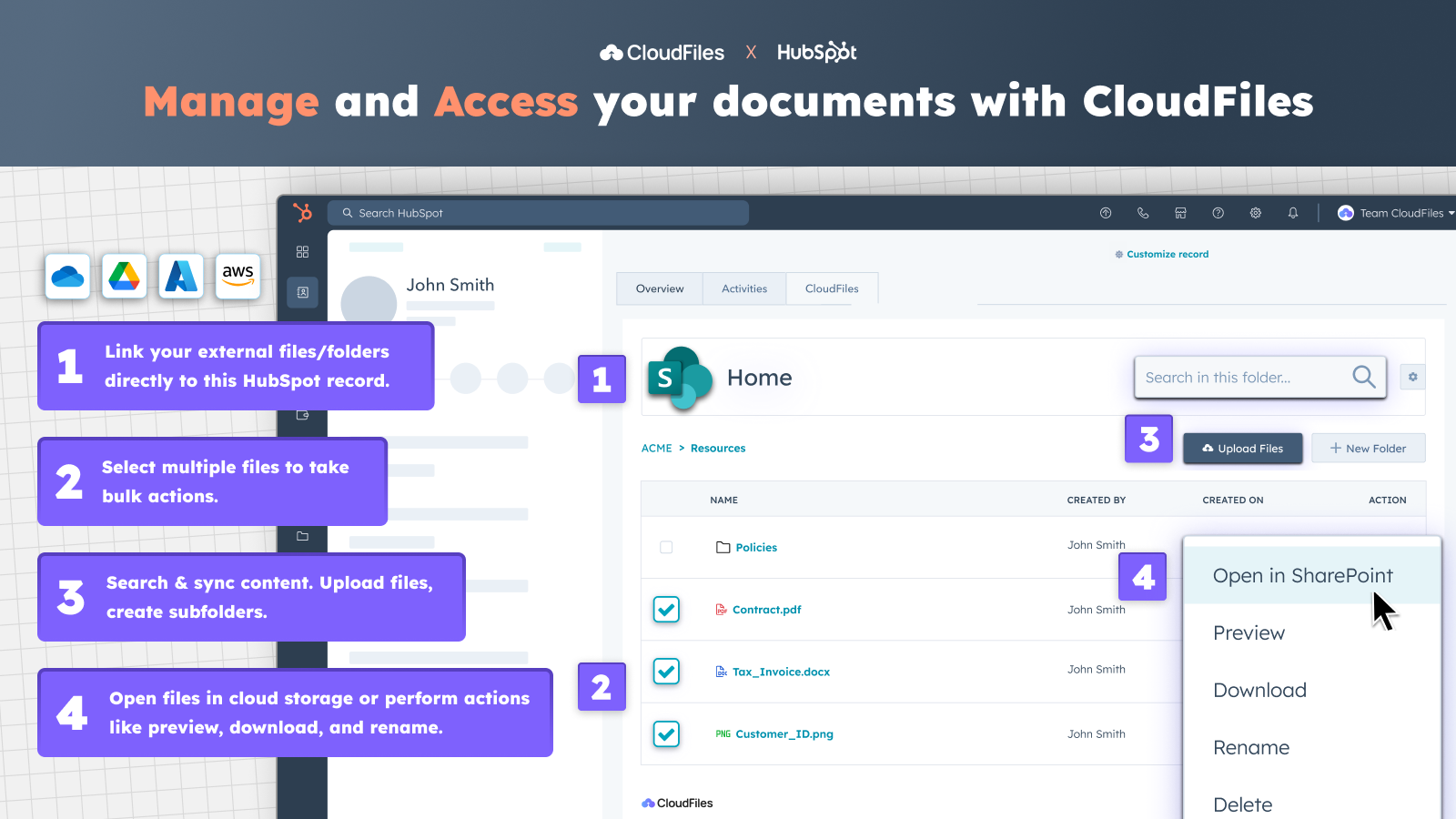
Access external files & folders from HubSpot
✅ Access the CloudFiles widget from contact, company, deal, or ticket records. ✅ Sync existing Google Drive, OneDrive, SharePoint, Box, or Dropbox libraries. ✅ Link documents and folders to any record ✅ Preview, rename, download, open files in your cloud & more with no tabs switching.
-1.png)
Securely share & collect documents through branded portals
✅ Apply advanced security like link expiry, email verification, or disabling downloads to your documents. ✅ Build secure, branded portals to share Google Drive or SharePoint content or folders with one link. ✅ Group content and add file request blocks to collect documents directly from clients.
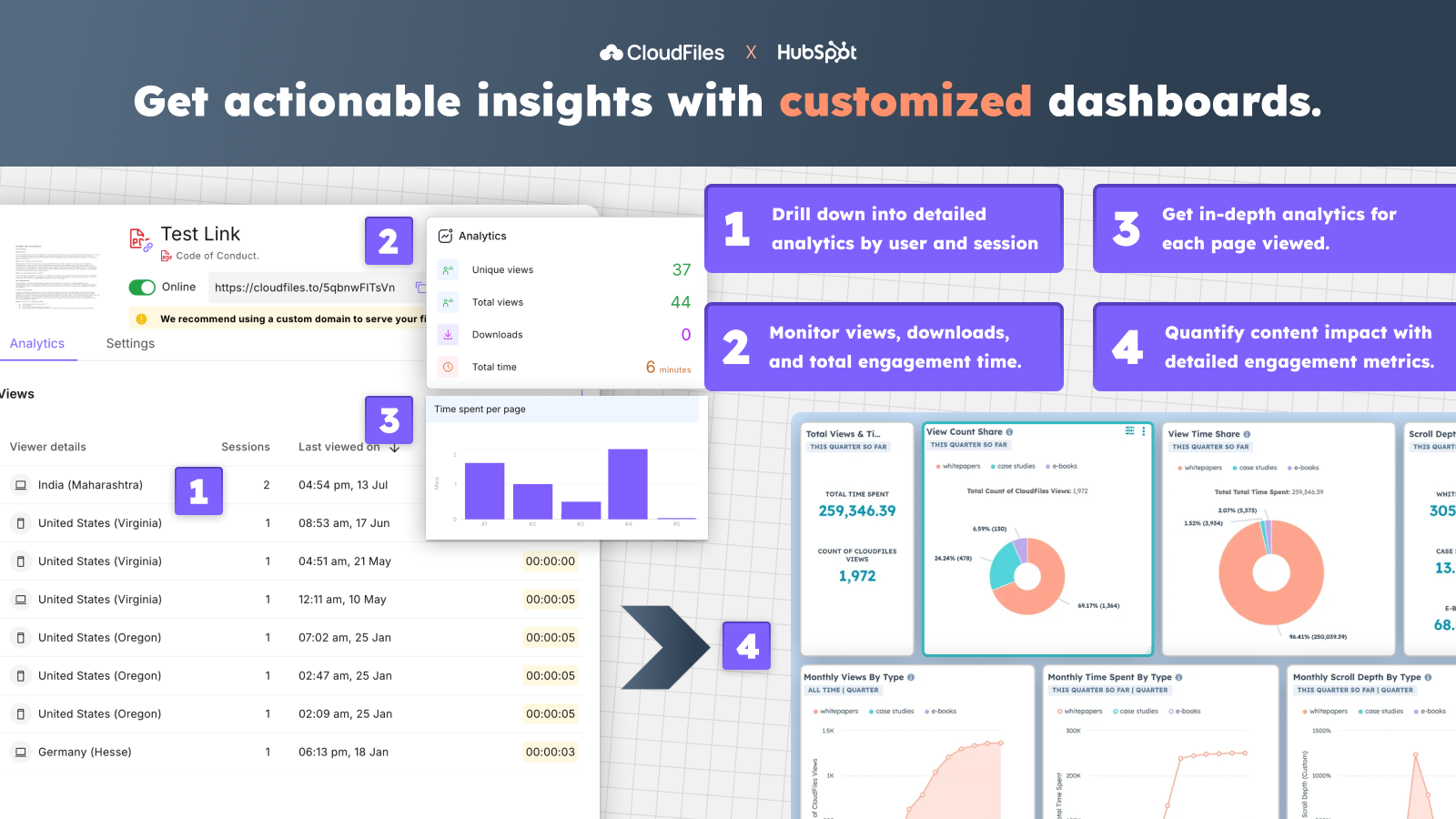
Track file analytics and build custom dashboards
✅ Track views, access time, and engagement for files from Google Drive or other storages. ✅ Get detailed analytics by user, session, and page-level activity. ✅ Track document performance and engagement with custom dashboards inside HubSpot.
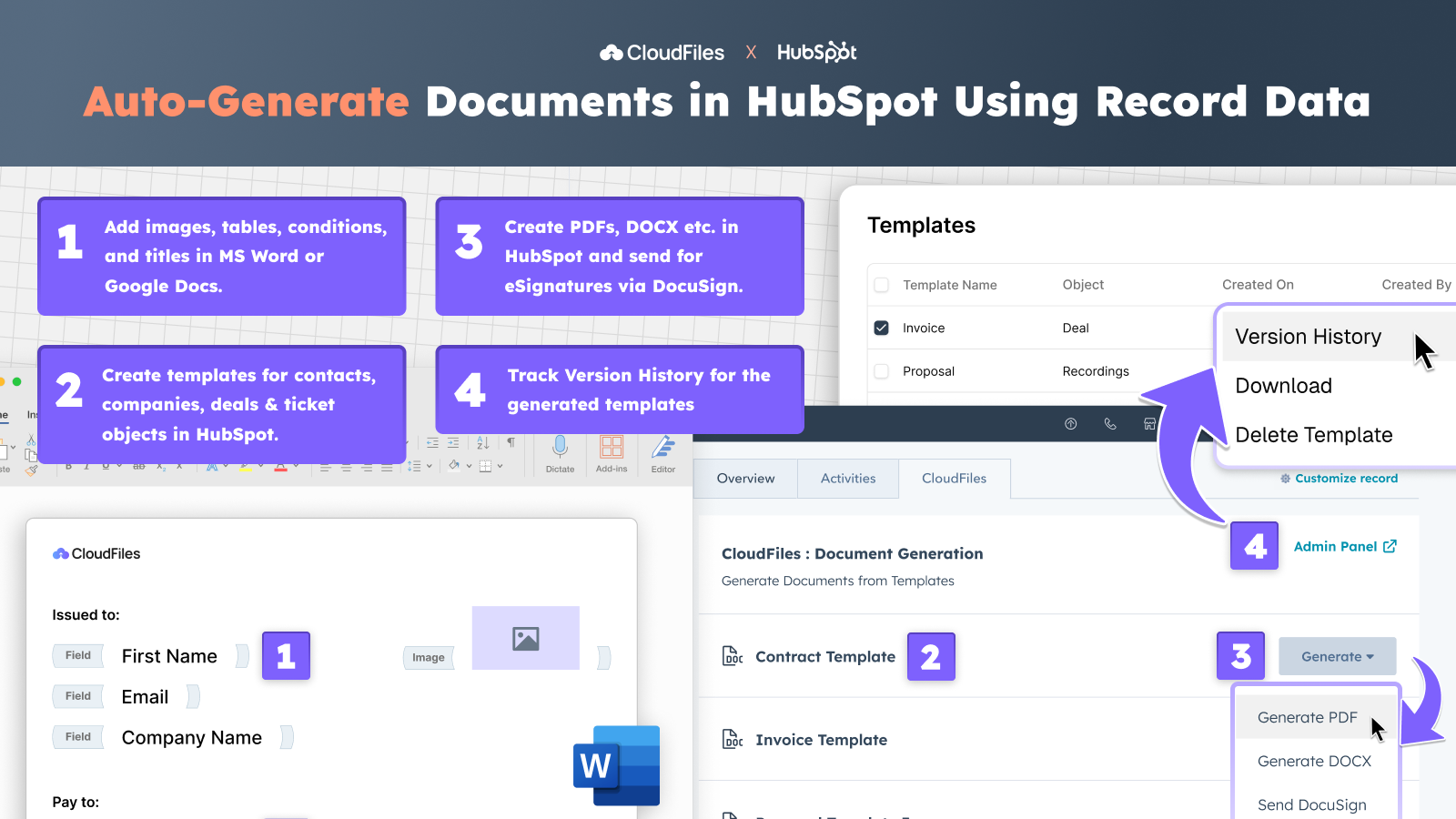
Generate personalized documents directly inside HubSpot
✅ Build dynamic templates for any HubSpot object using CRM data. ✅ Add fields, conditions, images, & tables to create personalized proposals, invoices etc. ✅ Edit & manage templates in Google Docs or MS Word, with complete version history. ✅ Automatically generate PDFs, DOCX, PPTX etc. directly from HubSpot, or send for eSignatures via DocuSign.
App Functionality
Shared Data
File | ||
File View Events | ||
Files View Event | ||
File View Event |
Reviews
4.8
34
4.8
34
- May 26, 2026
Document Storage Simplified
CloudFiles makes it easy to connect HubSpot and a file storage system like Dropbox.
Love the built in workflow actions, ease of accessing files, and prompt helpful support.
Haven't identified any. Thoroughly impressed with the amount of functionality and ease of use.
Polliard, W.
- May 22, 2026
I love the fast help that CloudFiles has :-)
I am starting to use CloudFiles and it feels like it will make our document setup much more easy
Lillesø, T.S.
Pricing
Doc Management
$4.17
/monthConnect external files & folders to HubSpot records and reduce turnaround time
Pricing is per CloudFiles License
Connector for Google Drive, SharePoint, AWS S3 & more…
Card & widget on contacts, companies, deals & tickets
Upload files, create folders & more operations
Works with HubSpot Standard and Custom Objects
Two-way sync with all external storages
Self-serve, Email & chat support available
Automations available with enterprise licenses
See all pricing options for Enterprise & add-on packs
Doc Management
$4.17
/monthConnect external files & folders to HubSpot records and reduce turnaround time
Pricing is per CloudFiles License
Connector for Google Drive, SharePoint, AWS S3 & more…
Card & widget on contacts, companies, deals & tickets
Upload files, create folders & more operations
Works with HubSpot Standard and Custom Objects
Two-way sync with all external storages
Self-serve, Email & chat support available
Automations available with enterprise licenses
See all pricing options for Enterprise & add-on packs
* The pricing here is for display purposes only. All prices do not include taxes, incentives, discounts, or other pricing variables. You should contact the partner for the most up to date and correct pricing information. HubSpot does not take any responsibility for this pricing information, which is provided by our partners. Pricing last updated: 06/11/2026
More info
Built by - CloudFiles
Installs - 2K installs
Categories Languages this app is available in English ,French ,German , andSpanish