

Oneflow
Built by - Oneflow AB
Installs - 1K installs
Rating 4.6
(29)

Leading
Requirements
HubSpot Plan HubSpot Account permissions - View the required account permissions
Access Type Shared Oneflow Subscription - Business or Enterprise plans
Overview
1/8 - Learn how the Oneflow x HubSpot integration streamlines your sales and contract management process.
Streamline your sales process with contract intelligence
Create seamless, data-rich contracts that enable real-time collaboration across the contract lifecycle directly from deals, companies, and contacts. Leverage AI and contract metadata to identify risk and bottlenecks in your proposals, and sign instantly with legally binding e-signatures.
Remove manual busywork with contract automation
Get rid of repetitive tasks by automatically generating and sending contracts as soon as a deal reaches a qualified stage or a lead submits a form. Automatically sync data including line items between Oneflow and HubSpot, in both directions, to save time and increase consistency across your contracts and CRM.
Speed up closing with frictionless contract experience
Streamline negotiation with live collaboration and editing inside the proposal, removing friction in the signing process. Track your prospect’s engagement on the activity timeline and sync contract updates to HubSpot without manual hassle. This way, you can keep sales momentum and focus on closing the deal.
Features
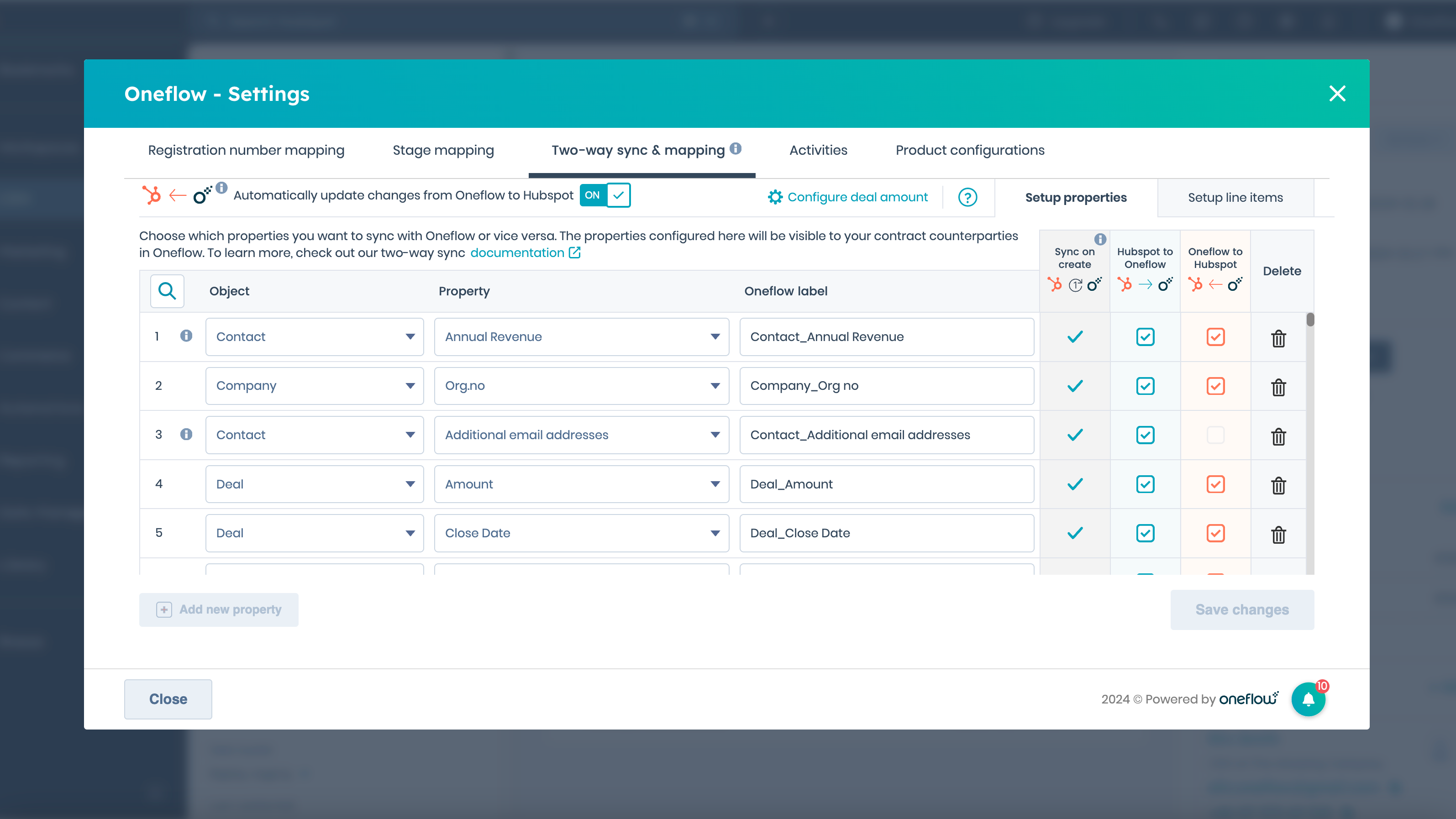
Set up data fields and two-way syncing
Sync HubSpot properties to data fields inside a Oneflow document. Whenever you create a contract, the data you have synced will be automatically transferred to the Oneflow document. If any information is changed within the document, the HubSpot field will be automatically updated if you have enabled our two-way sync.
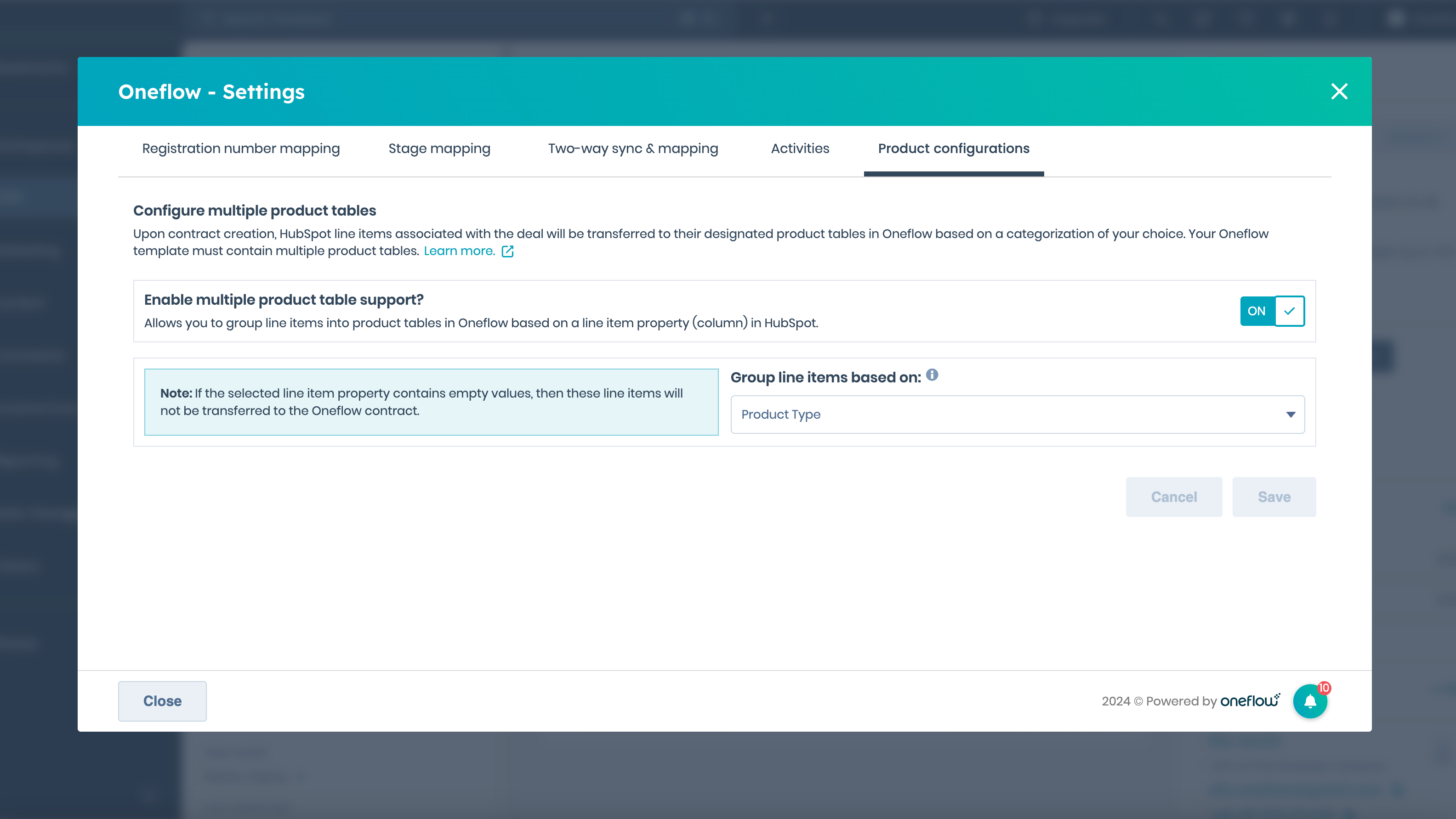
Create a contract template with HubSpot products
Create a Oneflow template that includes product tables in order to automatically sync HubSpot line items, including description, quantities, pricing, and discounts, into a new contract. You can also categorize line items into multiple product tables inside the Oneflow document based on line item properties.
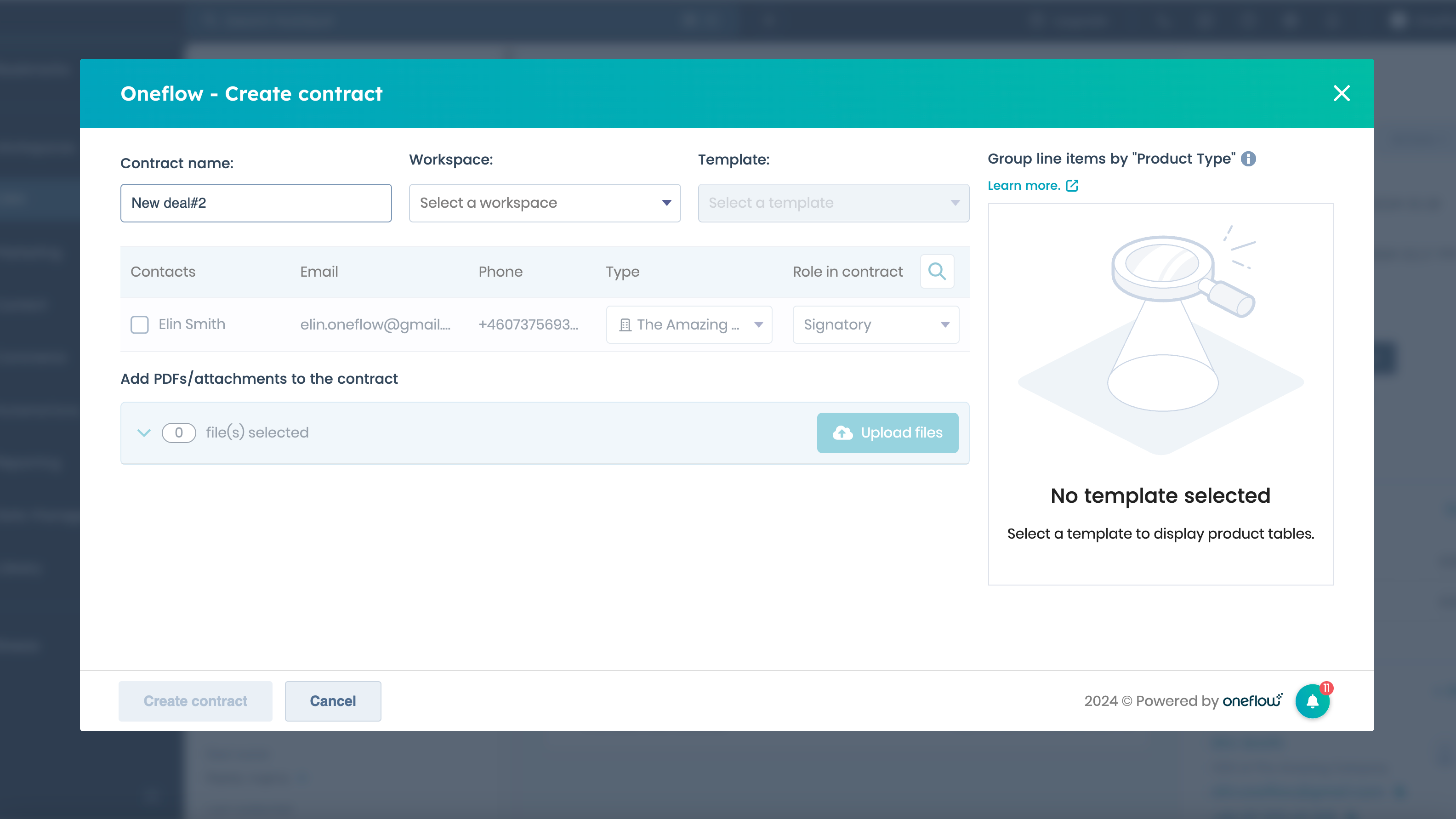
Create and send a Oneflow document (contract)
Create a Oneflow contract directly from a new or existing deal, a contact, or a company by using the Oneflow contract card widget. Choose which workspace, templates, and contacts you want to be included in the document and seamlessly add attachments.
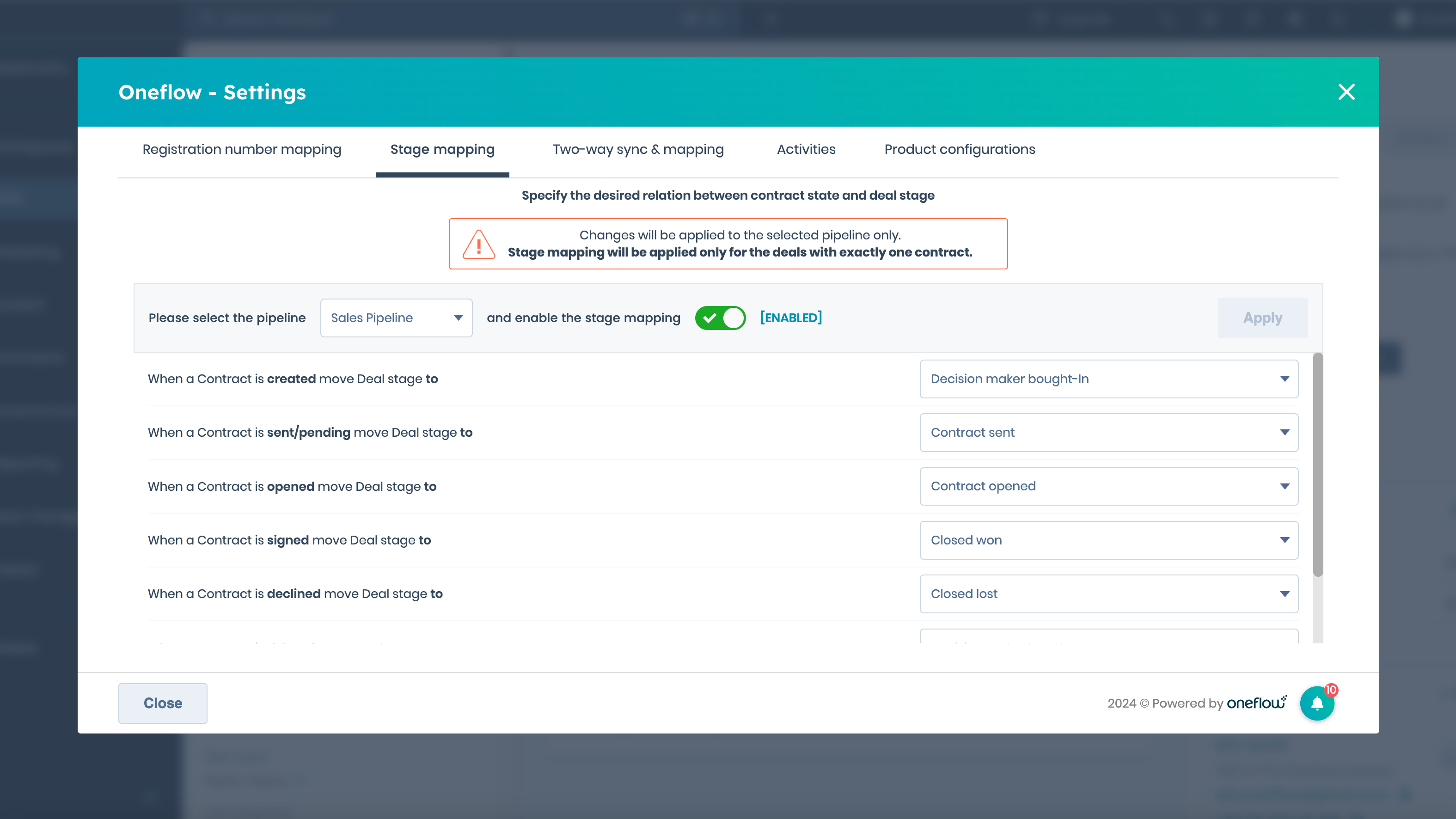
Sync your sales pipeline to contract stage (for Admins)
Automatically manage deal stages in your pipelines by mapping it to the status of your contract. As soon as you create, send, or sign a contract the deal will automatically move to the new stage in your pipeline.
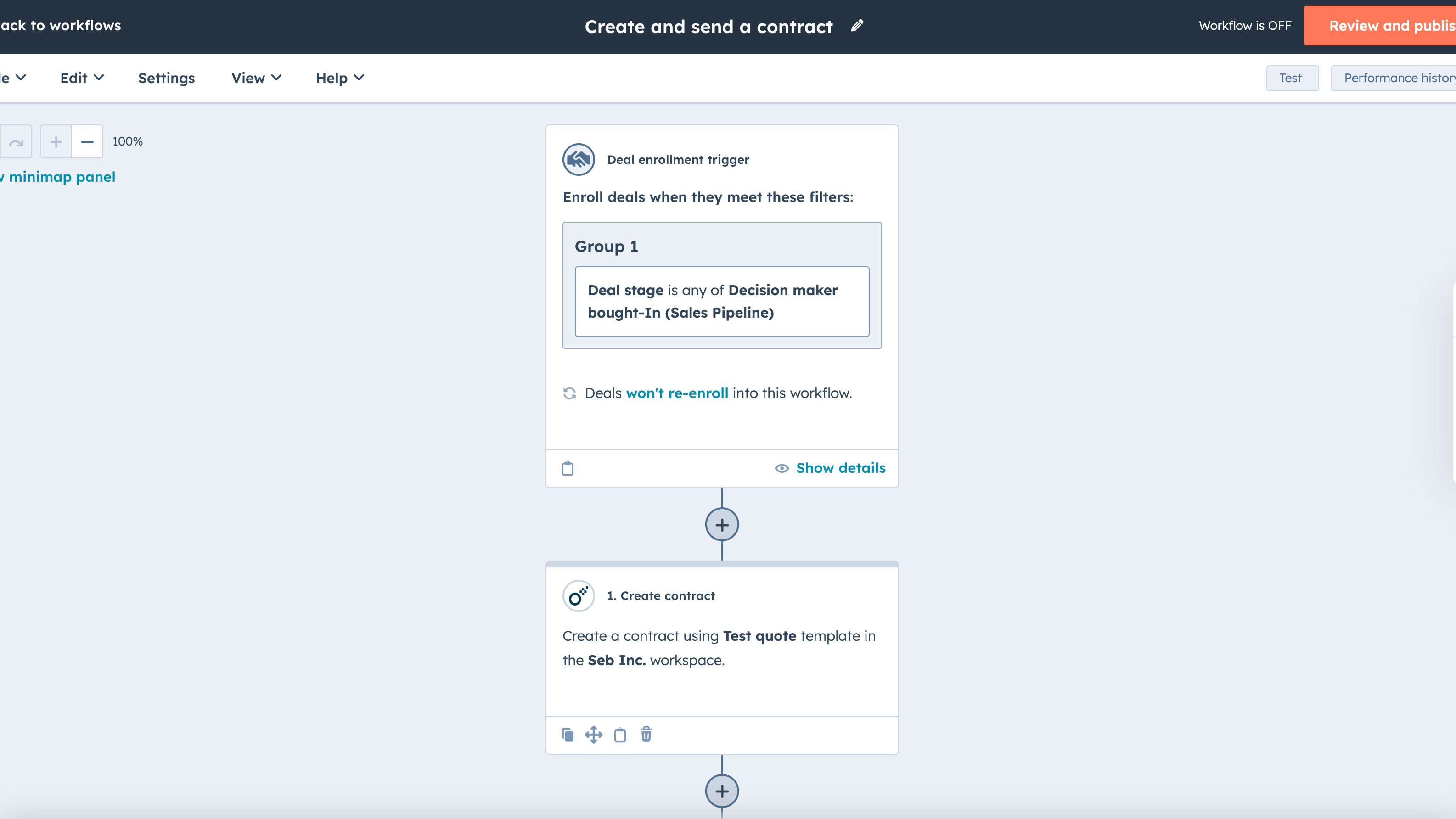
Workflows: Create and send a contract when a trigger condition is met
Add Oneflow’s Create contract and Send contract actions to a workflow trigger of your choice to automate contract creation and sending. The workflow will run whenever a specific trigger condition is met in HubSpot, for instance, when a deal moves from one stage of the pipeline to another.
App Functionality
Data Fields | ||
Data Fields | ||
Product Table | ||
Document Status | ||
Participant |
Reviews
4.6
29
4.6
29
- Mar 20, 2026
Big disappointments - not working at all with HubSpot despite promises of compatibility
Doesn't work in HubSpot, have to run it separately. Not what I expect.
nothing
Not compatible.
Andersson, A.
- Mar 18, 2026
Oneflow is a big time saver
Sales used to spend 20+ minutes on creating quotes, which were also pretty inconsistent regarding terms, pricing and design. Now that's 2 minutes of just clicking and checking. In addition, it greatly accelerates the onboarding process because we directly get the bank account number for direct debit and use a customer unique redirect link after approval.
- Sync data like line items from HubSpot to Oneflow and use HubSpot properties to change terms. - Show quote engagement on the HubSpot deal - Sync data back to HubSpot like billing email - Support team is very helpful
- You cannot manage or work in multiple Oneflow portals with the same email
Swinkels (oud), M.
Pricing
Business
€50
/monthUnlock and use the data inside your contracts.
Oneflow for HubSpot
Contract creation & e-signing
Data fields
Two-way synching
Workflows
Workspaces
Contract insight
Business
€50
/monthUnlock and use the data inside your contracts.
Oneflow for HubSpot
Contract creation & e-signing
Data fields
Two-way synching
Workflows
Workspaces
Contract insight
* The pricing here is for display purposes only. All prices do not include taxes, incentives, discounts, or other pricing variables. You should contact the partner for the most up to date and correct pricing information. HubSpot does not take any responsibility for this pricing information, which is provided by our partners. Pricing last updated: 05/26/2026
More info
Built by - Oneflow AB
Installs - 1K installs
Categories Languages this app is available in Dutch ,English ,Finnish ,French ,Norwegian , andSwedish
Getting attention today

Microsoft Teams
Use Microsoft Teams and HubSpot for meetings, conversations, and more!

Slack
Manage CRM records, get AI-powered assistance from Breeze, send real-time notifications, and collaborate with your team — without leaving Slack.
